








Winter ’27 has been rolling out to production orgs in waves since September, with the final release weekends landing in early October. If your team has been heads-down on projects, there’s a good chance nobody has had time to dig into the release notes yet: that’s where you come in.
Agentforce grabbed plenty of the headlines again, but there is a lot here for admins, developers, and architects beyond AI. Flow Builder in particular has had one of its biggest updates in years, so we’ve rounded up the 12 Winter ’27 features worth sending to your team right now, starting with Flow.
1. Test Flows Properly With the New Test Mode (Beta)
Debug mode has served flow builders well, but it was never really a testing tool. Winter ’27 introduces Test Mode for Flow Builder (beta), which brings debugging and repeatable testing together in a single interface.
You can choose a test record, run the flow, and save the setup as a scenario so you can rerun it after every change. Scenarios can include assertions that check for expected values, and you can toggle “Use Mock Output” to simulate callout responses without hitting a live endpoint. That last part is a big deal for anyone building flows that call external systems.
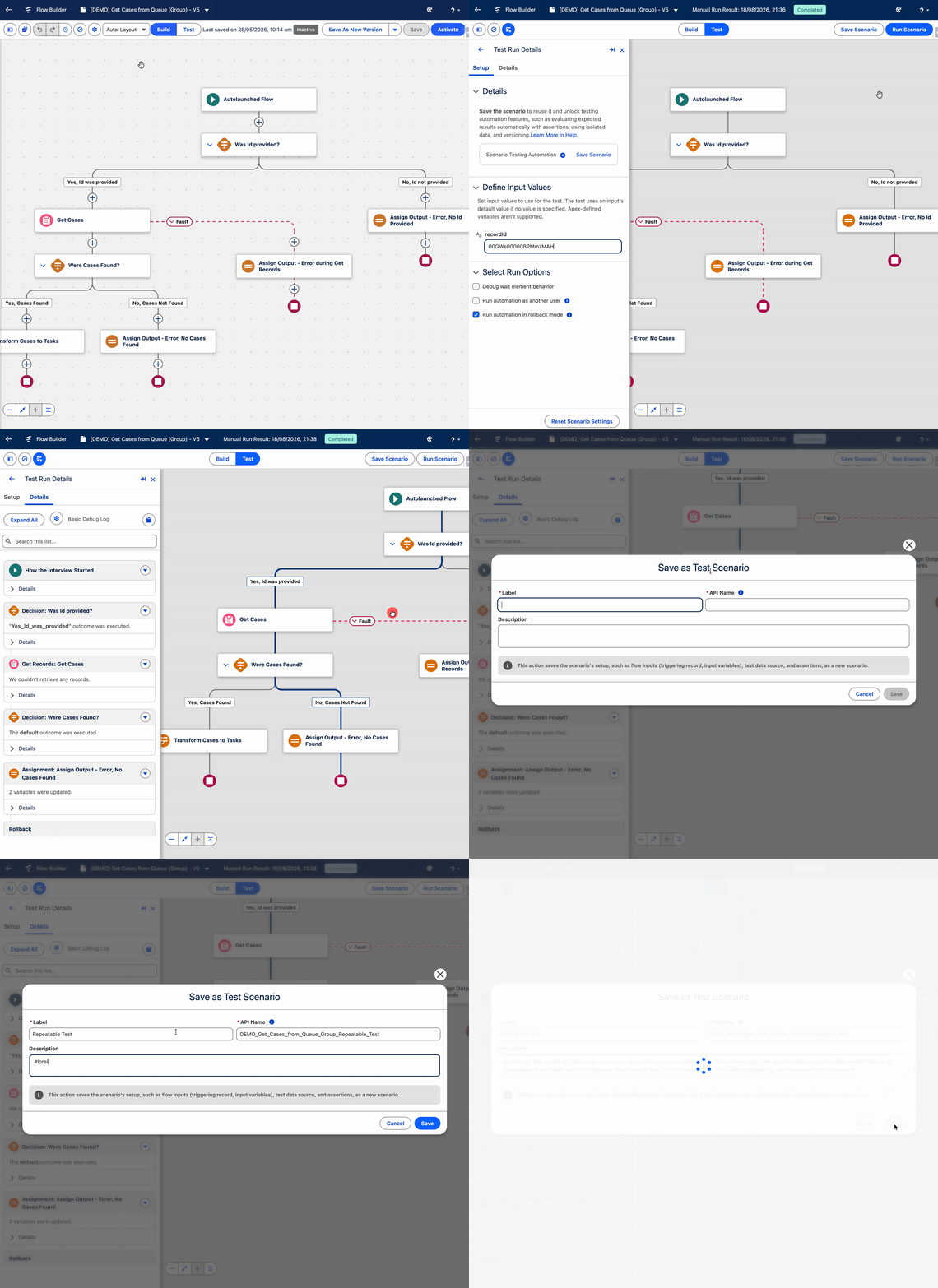
Test Mode is enabled from Process Automation Settings. As it’s in beta, it’s best to trial it in a sandbox first.
Share with: admins, flow builders, and developers who review flows.
2. Run Screen Flows on Multiple Records From List Views and Related Lists
This one has been on wish lists for a long time. Screen flows launched from a Quick Action on a list view or related list can now receive every selected record at once.
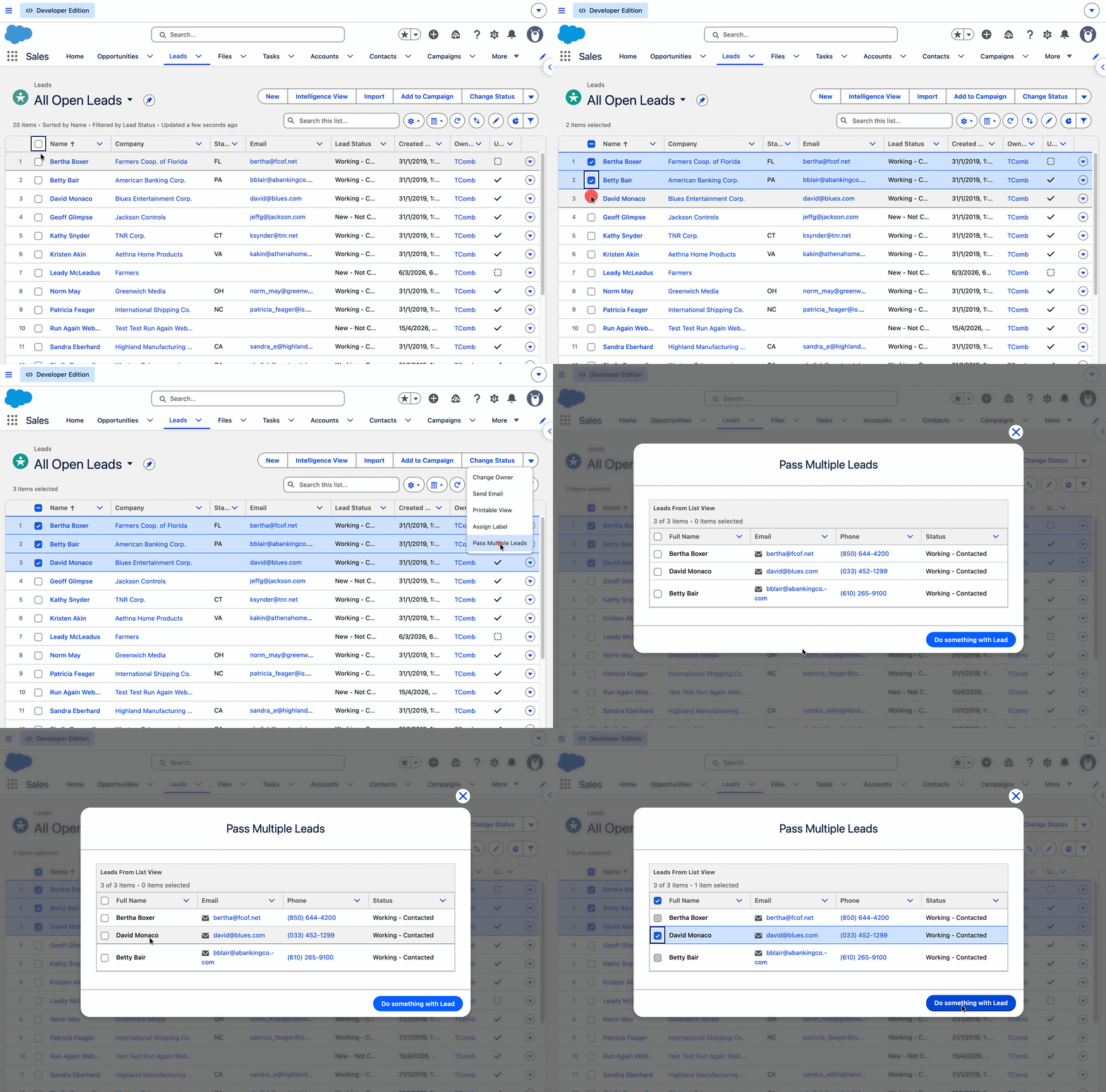
To make it work, create a text collection variable named ids (lowercase), available for input. Salesforce passes the selected record Ids into it, and you can loop through them to update, reassign, or close records in bulk. No more custom LWC or Visualforce workarounds just to process a handful of selected records.
Share with: admins and flow builders.
3. Use Reactive Formulas in Conditional Visibility
Conditional visibility rules in screen flows can now correctly evaluate formulas that reference components on the same screen. In practice, this means fields can show, hide, or change based on what a user has just entered – without needing an extra screen in between.
As Tim Combridge put it in his rundown of the 17 new Flow features in Winter ’27, this will “have a genuinely big impact on the way you build screen flows”.
Share with: anyone who builds screen flows.
4. Catch Missing Required Fields and Field Length Errors at Save Time
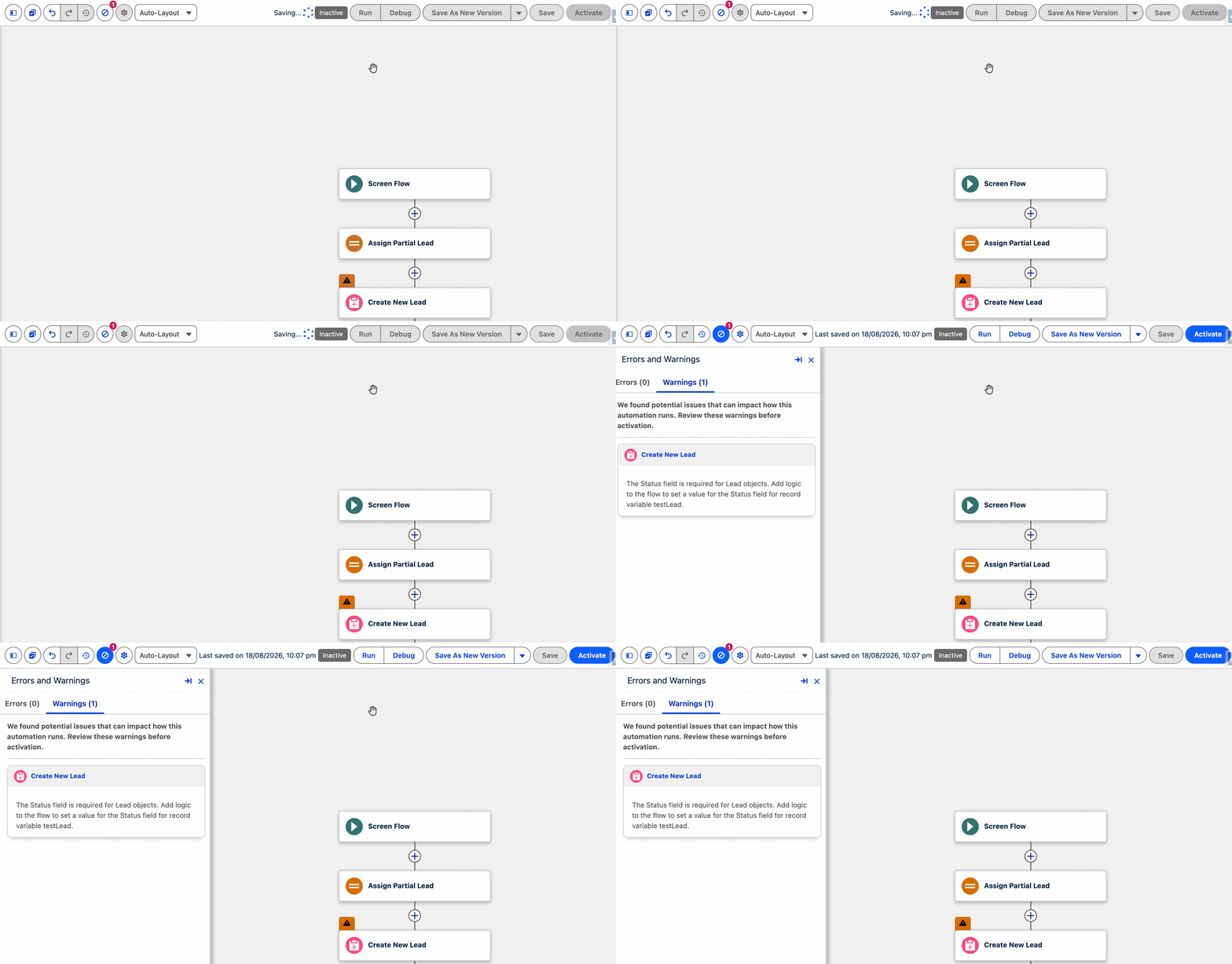
Two new checks in Flow Builder should save your team from some frustrating production errors. When you save a flow, you’ll now be warned if:
- A Create Records element is missing an assignment for a required field.
- A value could exceed the character limit of the field it’s being written to.
Both issues used to surface only at runtime, often intermittently. One caveat: existing flows aren’t flagged if a field is later made required, so these checks don’t replace regression testing.
Share with: admins and flow builders.
5. Branch Your Logic With Split by Field Value and Split by Date
Winter ’27 adds two new logic elements to Flow Builder:
- Split by Field Value: Creates a branch for each specific value of a field or variable, plus an automatic default path. With picklists, Flow Builder names the branches for you.
- Split by Date: Branches based on whether the flow is running on, before, after, or between specified dates.
They won’t replace the Decision element entirely. You can’t combine multiple values in one branch, and Split by Date only compares against the current date, not dates on a record. There’s also no official word that they perform any better than a Decision element. Read more in our deep dive on the new logic split elements.
Share with: flow builders.
6. Clean Up and Navigate Large Flows More Easily
If your team has inherited a flow with years of history, Winter ’27 brings several quality-of-life updates:
- Unused resources filter: Highlights elements and resources that are no longer used, plus anything missing a description.
- Element grouping: Lets you highlight and label sections of a flow, then collapse or expand them to focus on the part you’re working on.
- Edit History panel: Shows a timeline of saves, detailed element changes, and the option to restore a previous version.
- Keyboard shortcuts: These let you move around the canvas and copy and paste elements without reaching for the mouse.
Note that element grouping and Edit History are rolling out gradually, so they may not be in every org yet. Our hands-on look at the new Flow features walks through the cleanup filter and Test Mode in practice.
Share with: admins, flow builders, and architects responsible for org health.
7. Enforce User Permissions in Flows
Screen flows and autolaunched flows have a new run context option: “User Context – Enforces User Permissions”. When selected, the flow runs with the running user’s permissions, so it can only access data and perform actions that the user is allowed to.
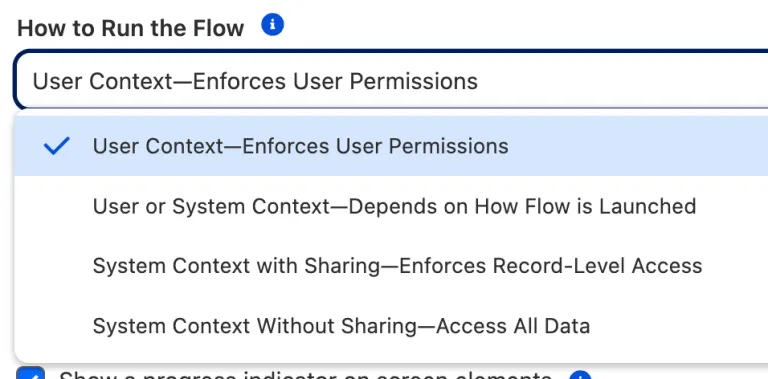
For architects and security-minded admins, this is a simple way to prevent flows from accidentally escalating privileges. It’s worth agreeing as a team when this should become your default.
Share with: architects and admins.
8. Keep Manual Shares When Transferring Records
Until now, changing a record’s owner wiped out its manual shares – leaving admins to recreate them or field “I’ve lost access” tickets. A new setting lets you keep manual shares when ownership changes.
It’s off by default to preserve existing behavior, and it applies org-wide rather than per record. That makes it a good one to discuss with your architect before switching it on.
Share with: admins and architects.
9. Track Field History on the User Object
Field history tracking is now generally available for the User object, so you can track changes to up to 20 user fields. That closes a long-standing gap for audit and compliance teams who need to know when someone’s role, manager, or other key details changed.
You’ll need to enable it in Setup, and don’t be surprised if the UI still shows a beta label.
Share with: admins and anyone responsible for compliance.
10. Inline Edit More Fields in List Views
Two new options in User Interface Settings make inline editing in list views more flexible. Users can now edit fields that aren’t on the page layout, and they can inline edit across records with different record types.
Both settings are off by default, so check your page layouts and validation rules before enabling them. For more admin highlights, see our top 12 Winter ’27 features for admins.
Share with: admins and power users.
11. Handle Bigger Data Volumes With Higher Apex Heap Limits
Apex heap limits have had a significant boost. Synchronous transactions now get 10MB (up from 6MB), and asynchronous transactions get 25MB (up from 12MB).
Heap limit errors tend to appear only in production, when real data volumes hit code that worked fine in a sandbox, so this gives your developers welcome headroom. There’s an “Enforce the Summer ’26 Apex heap limit” setting to help manage the transition, and developers can confirm the current limit with Limits.getLimitHeapSize().
Share with: developers and architects.
12. Stop Updating API Versions With “latest”
Integrations that call the REST API can now use latest in place of a version number, for example, /services/data/latest/sobjects/Account. That means no more chasing version numbers three times a year.
It’s worth a team conversation before switching everything over, though. Pinning a version still makes sense where you need predictable behavior, so architects may want to decide which integrations should always track the latest version.
If your developers want more, our top 10 Winter ’27 features for developers also covers complex template expressions in LWC and the new FORMULA() function in SOQL (beta).
Share with: developers and integration architects.
Final Thoughts
Winter ’27 is a big release for flow builders, with Test Mode, bulk record processing in screen flows, and reactive visibility all changing how your team will build and test automation. Admins, developers, and architects all have something here too.
Two things to flag before you hit send. First, if anyone on your team saw Flow Tags in their preview org, it didn’t make the final cut: Salesforce removed Flow Tags from Winter ’27 because it “isn’t quite ready yet”. Second, Enable Profile Filtering is now enforced, so users can only see their own profile name unless they have the View All Profiles permission. If any custom functionality relies on cross-profile visibility, test it now.
For the full picture, including release updates and features by cloud, read our guide to the Salesforce Winter ’27 release.
Which Winter ’27 feature is your team most excited about? Let us know in the comments.
Resources
- 17 New Salesforce Flow Features in Winter ’27
- Salesforce Winter ’27: Hands-On With New Flow Features
- Winter ’27 Release: New Logic Split Elements for Salesforce Flow
- Salesforce Removes Flow Tags from Winter ’27 Release
- Top 12 Salesforce Winter ’27 Features for Admins
- Top 10 Salesforce Winter ’27 Features for Developers
- Salesforce Winter ’27 Release: Everything You Need to Know Before Go-Live
- Salesforce Winter ’27 Release: What to Expect and How to Prepare





Comments: