

The Salesforce Winter ‘27 release is finally here! Can you believe it? This release window feels like it’s gone by in the blink of an eye, likely due to the sheer volume of new features in this release. There’s no doubt that the triennial Salesforce releases are full of fantastic features and exciting updates, but sometimes, there’s just too much good stuff to wrap your head around all at once.
The team at SF Ben is determined to help you understand the most impactful parts of the release in easily digestible, discipline-based chunks. But what if you’re interested in the most exciting, anticipated, and important parts of the release all in one spot? If that’s you, look no further!
Additionally, I have curated what I believe to be the three most important release updates for the majority of Salesforce customers to pay attention to. You’ll need to assess how they will impact your org before the Winter ‘27 release goes live to minimize disruption across your business.
Winter ‘27 Features: The Top 3 for Each Discipline
Top Admin Features
Christine has eagerly torn through the release notes to bring ten of the most impactful ones to admins.
1. Preview Records from Lightning Reports Without Losing Context (Beta)
There’s nothing worse than having to jump between tabs to look at the records that show up in reports. Winter ‘27 solves this by introducing the ability to preview records directly from within the report itself.
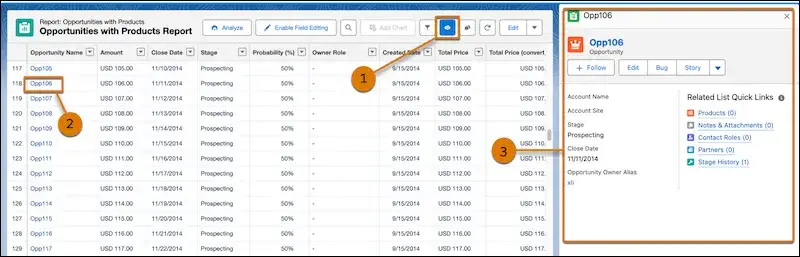
No more juggling tabs or losing context – just you, your data, and a wonderful, seamless experience.
2. Embed Lightning Reports in Your Lightning Web Runtime Experience Cloud Sites (Beta)
We love Lightning Web Runtime sites, and we love being able to embed reports in our sites. What we’ve not been able to do until now is embed our reports in our LWR sites! Winter ‘27 finally bridges this gap.
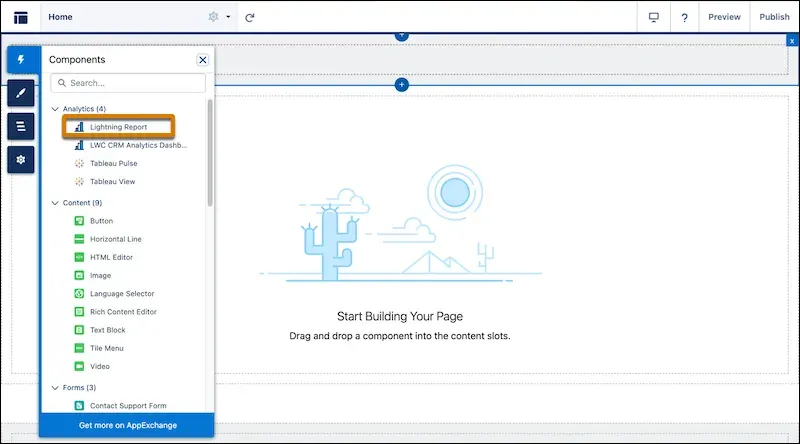
You can rest easy knowing that your customers and partners will have access to the reports they need to make informed decisions, while operating on the most performant Experience Cloud runtime.
3. Embed Lightning Dashboards in Your Lightning Web Runtime Experience Cloud Sites (Beta)
Following on from the last feature, your dashboards can also be embedded into your LWR Experience Cloud sites!
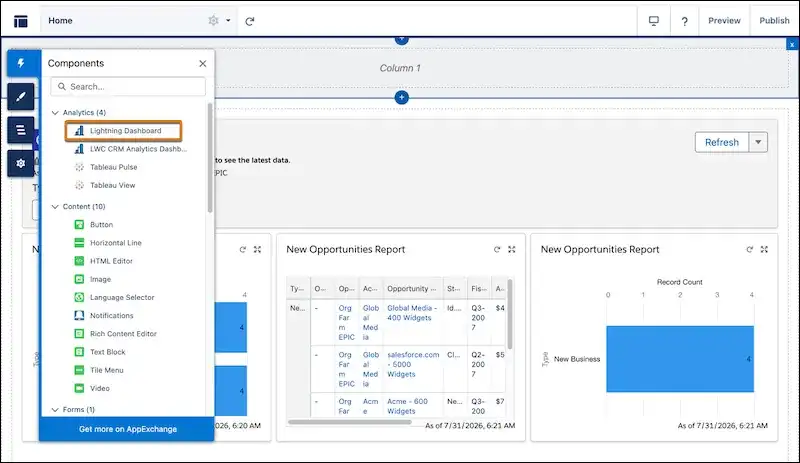
Visually rich dashboards alongside information-rich reports – what’s not to love?
Top Marketing Features
Marketing enthusiast Timo has compiled a list of top marketing updates that Winter ‘27 brings to you.
1. Agentforce Marketing Goals Agent
The new Marketing Goals Agent in Winter ‘27 is here to help marketers translate their business goals into practical strategies. Marketers will simply define their goals, budgets, and target audiences, and the agent will build a workable strategy.
2. Agentforce Marketing Content Agent
Another agent joins the team in Winter ‘27: the Agentforce Content Agent! This agent helps to create campaign content that fits your brand. Simply describe your campaign goals and the agent will generate content that aligns with them.
3. Marketing Completion Actions
Completion Actions from Pardot (Marketing Cloud Account Engagement) are making their way to Marketing Cloud Next in Winter ‘27. This is an extremely versatile tool that allows marketers to perform completion actions within Flow Builder, rather than having to configure the separate flow logic for each outcome.
Top Developer Features
Tim assembles the 10 most impactful enhancements that will have developers scrambling with excitement.
1. Handle Larger Datasets With Increased Apex Heap Limits
There’s an increased heap limit coming in Winter ‘27, finally! Synchronous transactions are up to 10MB from 6MB, and asynchronous transactions are up to 25MB from 12MB. These are 66% and 108% increases, respectively.
2. Test External Services and HTTP Callouts in Apex Integration Tests (Developer Preview)
Instead of relying exclusively on mock responses when testing external services, you can now leverage the new ApexIntegrationTests feature to get an actual response from the external service, ensuring that you’re working with the most up-to-date data format.
3. Build and Use Richer Development Tools With the Apex Symbol API (Beta)
Winter ‘27 brings the Apex Symbol API, which provides Salesforce Developers with comprehensive Apex type metadata. Prior to this release, there was no clean source of truth for this level of detail around Apex types.
This new API bridges the gap in the /completions endpoint and the SymbolTable Tooling API object.
Top Flow Features
Tim says run, don’t walk, to apply the following Flow features in your org in Winter ‘27.
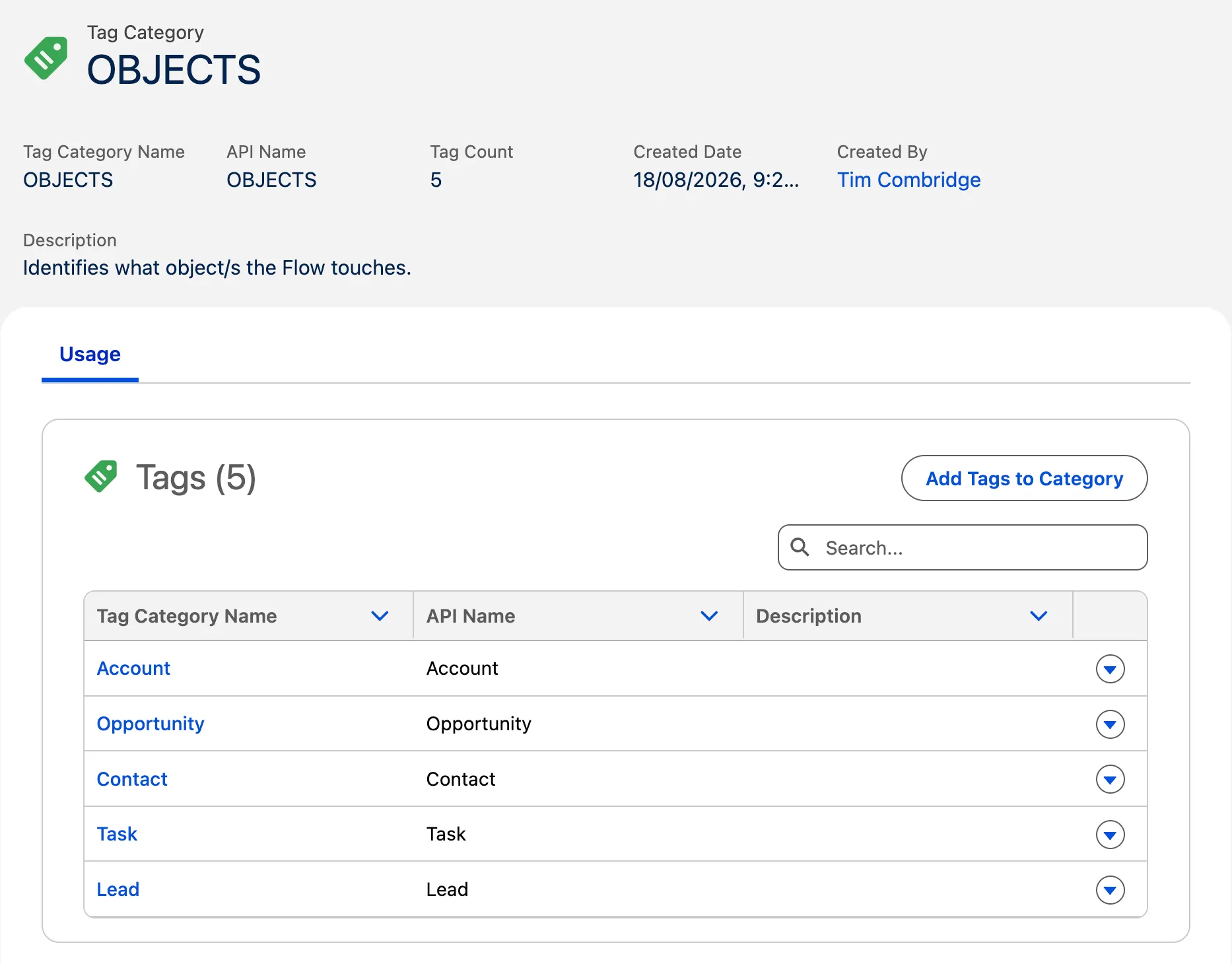
1. Classify and Discover Flows With Flow Tags
There’s nothing quite like a well-organized automation framework. While naming conventions and proper documentation can help, Winter ‘27 brings Flow Tags that are going to be a lot more beneficial. You can now create Flow Tags and group them into Tag Categories, and use these to organize your flows.
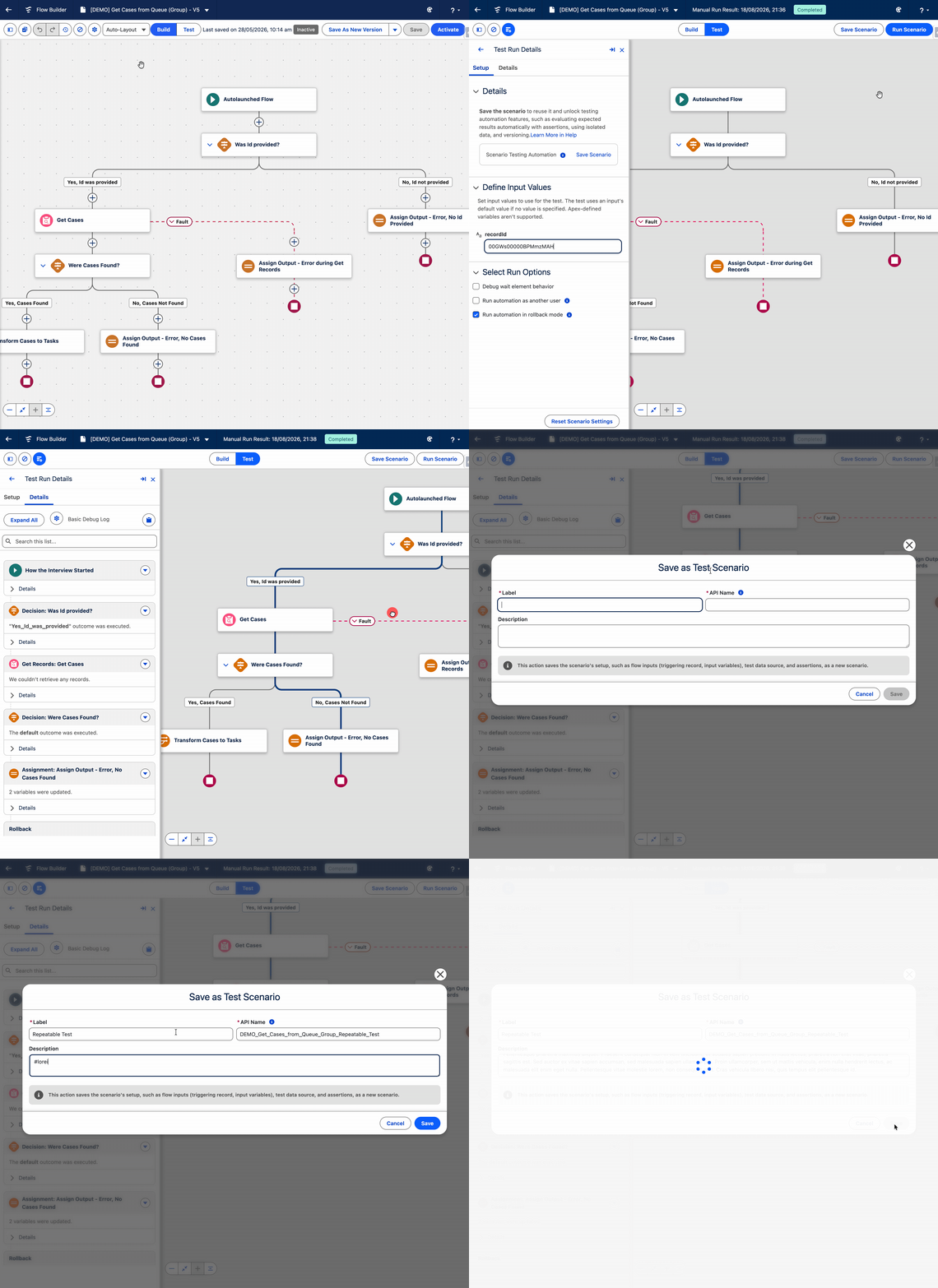
2. Test Flows in a Dedicated Test Mode (Beta)
There is a whole new way to test your automations in Flow Builder in Winter ‘27. The new Test Mode replaces traditional Debug Mode, and allows for far more structured ongoing testing of your automations.
3. Process Multiple Records With Screen Flows from List Views and Related Lists
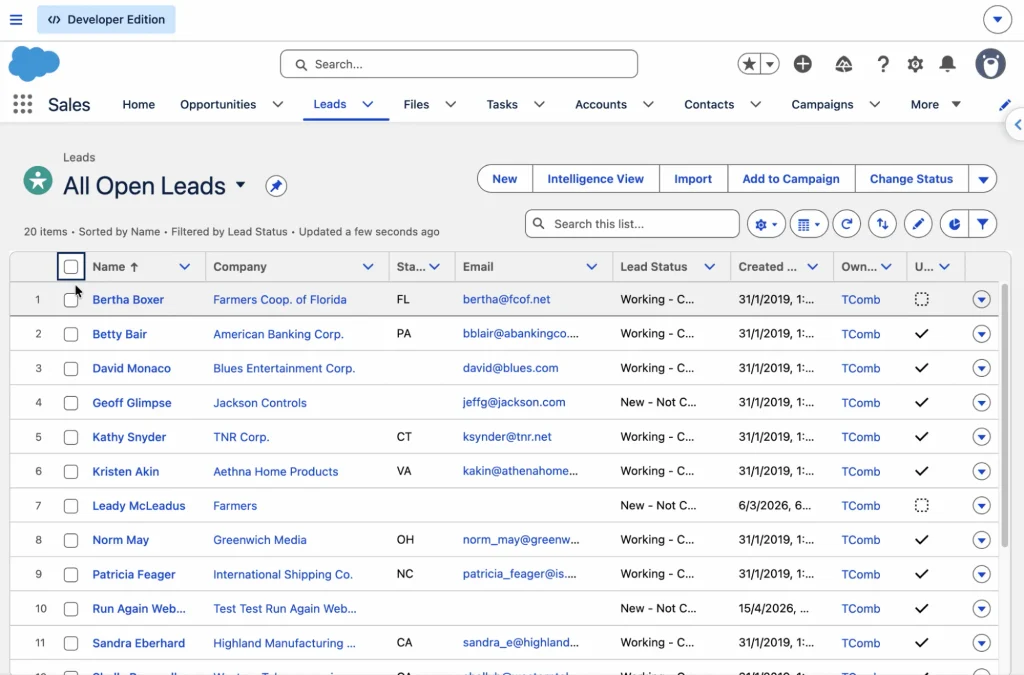
With Winter ‘27, you can now feed in multiple records from a List View or Related List into a Screen Flow. Simply ensure you’ve got a Text Collection variable in your flow called “ids” and you’re on your way!
Top Service Features
Mariel’s back for more Winter ‘27 goodness, this time compiling a list of the top features for Service users.
1. Delete Outdated Case Milestones
A frustrating gap in Case Milestone management has finally been patched in Winter ‘27. You can now clear outdated Case Milestones from the Case Timeline, which resolves an Idea that has been active for almost a decade!
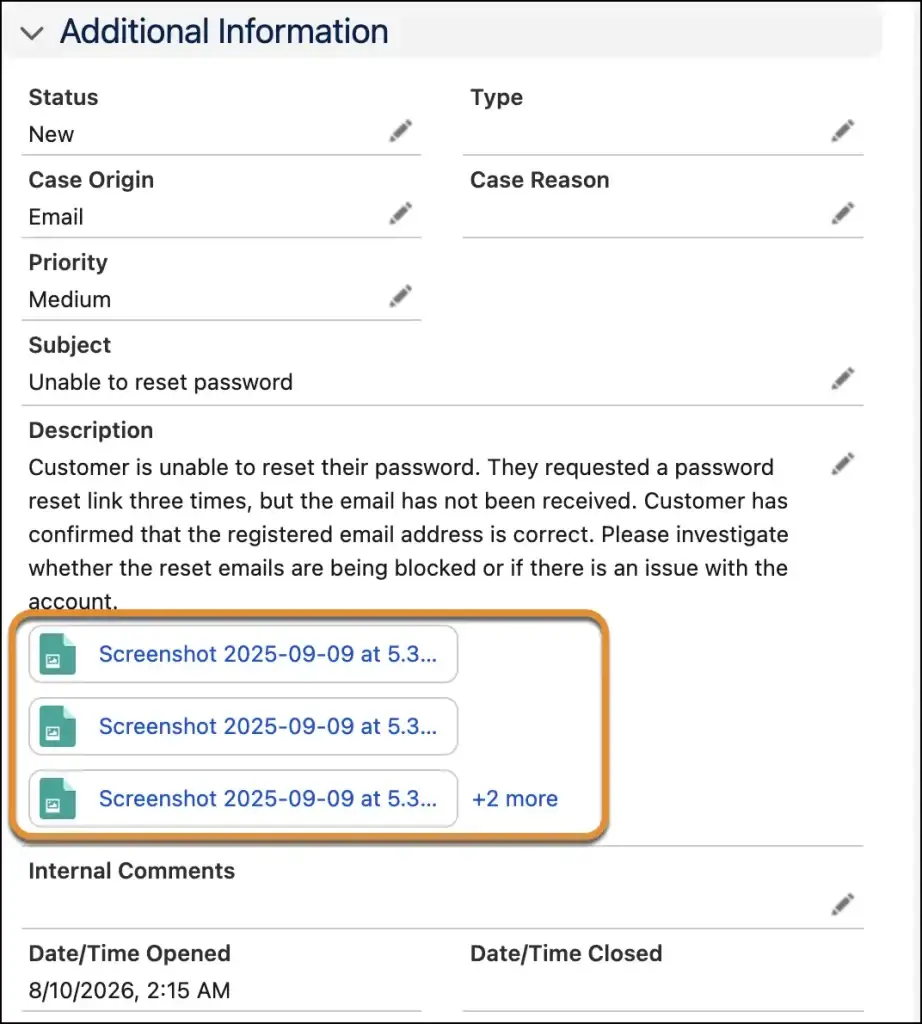
2. View Original Case Attachments Inline in Case Details
Rather than sieving through a list of Case Attachments to find the original attachments that were sent through when the Case was created, you can now view them inline in the Case Description. This is a massive time saver. Those tickets that go on for a while and have a lot of related files are now much easier to navigate.
3. Revamped Enhanced Case Merge UI (Beta)
Finally, Winter ‘27 cleans up the mess of Case Merge setup pages into a single, clean UI. Case Merge, Enhanced Case Merge (Beta), and Case Merge for Omni-Channel (Beta) can now be switched off and on from this page, and it also behaves as a place to configure merge settings.
Top Sales Features
Last but not least, Christine has assembled a list of the top features that Winter ‘27 brings to Sales Cloud.
1. Accelerate Meeting Follow-Ups With AI-Suggested Actions
Winter ‘27 introduces new AI-generated suggested next steps following meetings for Einstein Conversation Insights customers. Once the transcript of a meeting is available, Einstein processes it and identifies any follow-up actions that may want to be taken.
2. Capture Post-Meeting Insights With Voice Notes
While you wait for your conversation transcript to be generated, you can capture Post-Meeting Voice Notes in the Salesforce mobile app. This provides a quick way to record any burning insights or questions from the conversation.
3. Review Deal Risks and Activity Trends in Pipeline Forecasting
Starting in Winter ‘27, sales reps and managers can see things like deal risks, methodology scores, contact insights, agent activity, and activity heatmaps in the new Pipeline Forecasting feature. This is a rebranded and updated version of Forecasts that we’ve known for years, but an appreciated update.
5 Release Updates You Need to Address
The release is upon us! As you read this, the first (or more) of the release weekends may have already passed, and if not, they’re quickly approaching. Release updates are changes that Salesforce applies to elements of the platform to help future-proof it. They’re designed to ensure Salesforce remains secure, performs well, and continues to be a valuable tool well into the future.
These changes are enforced by Salesforce when the major release is deployed, but there are 5 important steps you need to take and testing you need to complete prior to (or as soon as possible after) the release to ensure that disruption is minimized or, preferably, avoided completely.
1. Assign Use Any API Auth Permission for SOAP Login()
Starting in Winter ‘27, any users that don’t have the Use Any API Auth user permission can no longer authenticate with SOAP API login(). This is in pursuit of a bolstered security posture for Salesforce.
2. Enable Accessibility Enhancements for Cards, Docked Containers, Menu Lists, and Panels (Release Update)
To be able to handle higher magnification levels (as dictated by WCAG 2.2), Salesforce is adapting the behavior of cards, docked containers, menu lists, and panels. This will allow users to zoom into greater than 200% magnification, without impacting the user experience.
3. Enable Accessibility Enhancements for Date Pickers, Popovers, Bottom Utility Bars, Record Headers
Similar to the prior release update, Salesforce is adapting the behavior of date pickers, popovers, bottom utility bars, and record headers in Winter ‘27. This is once again to ensure that these elements can be viewed at over 200% magnification without impacting the user experience.
4. Enable Accessibility Enhancements for Page Headers and Modal Windows When Zoom Is Greater Than 200%
Similar to the prior two release updates, Salesforce is adapting the behavior of page headers and modal windows so that their content can be viewed at over 200% magnification without impacting the user experience.
5. Enable Profile Filtering
Profile Filtering will be enabled by default in Winter ‘27. This prevents users from viewing names of profiles other than their own. Users who do need access to see all profile names can be assigned the View All Profiles permission.
Final Thoughts
Winter ‘27 is a significant release for Salesforce, with a multitude of new goodies that Salesforce professionals can take advantage of. Our team has worked tirelessly to help you make sense of this release, and we hope you’ve found value in our efforts. This is a truly massive release, and we’re excited to see how this new version of Salesforce will be used by the global Salesforce community.
Thank you for joining the SF Ben team as we navigate yet another major Salesforce release! Don’t forget to sign up for our newsletter so you can stay ahead of the curve when Salesforce drops new features and tooling. We’ll see you in the Spring ‘27 release!