

It’s been said that 2026 is the year of the Salesforce Developer, and the Winter ‘27 release is proving that this may just be the case! There are a multitude of big new tools and features that developers will be able to take advantage of, and I’m excited to show you some of them now!
Before I continue, there are many features that are either in beta (meaning you shouldn’t or can’t use them in production) or are GA (meaning you can use them in production now, but they’re unchanged from prior releases). Remember to ensure you’re staying abreast of the latest changes on these features from Salesforce before you implement them somewhere important.
With that out of the way, let’s dive in.
1. Handle Larger Datasets With Increased Apex Heap Limits
For years, Salesforce Developers have had to deal with a smaller heap limit, which often leads to issues that could be difficult to solve properly as they tend to surface in production orgs, as they have larger data volumes than development environments. With Winter ‘27, those days are behind us! At least, for now.
Salesforce is increasing the heap limit for synchronous transactions to 10MB (up from 6MB), and asynchronous transactions up to 25 (from 12MB). That’s a 66% increase for synchronous transactions, and a whopping 108% increase for asynchronous transactions!
Salesforce also introduced the “Enforce the Summer ‘26 Apex heap limit” setting to ensure that developers could continue working on their code in a Winter ‘27 sandbox, but deploy to Production without running into conflicts with the new heap limits.
Daniel Ballinger, Product Manager Director for Apex at Salesforce, said in relation to the setting: “This gives developers a mechanism to keep working in their sandbox orgs etc. with the confidence that the deployment to production will still work with the limits that the production org currently has… The setting was only introduced in Winter ‘27 to help developers smoothly transition to the new higher limit in a controlled manner. It is fully in the control of the developer if they wish to utilize this setting or not.”
The change will be enforced globally, regardless of the setting status in your org. You can also confirm your org’s current Apex heap limits using the Limits.getLimitHeapSize() method.
2. Test External Services and HTTP Callouts in Apex Integration Tests (Developer Preview)
While using a mock callout will confirm that your code functions properly when it receives a response that is formatted a certain way, it doesn’t guarantee that it will work with the response that a service actually returns. If you’re going to test that your code works, you may as well test it by calling a real service – this ensures that it’s pulling the latest response format, and will highlight issues before being pushed to production.
From your scratch org, you’ll need to enable the ApexIntegrationTests feature in your scratch org’s definition file. Then, when writing an integration test class, you’ll need to add @IntegrationTest on the class and each relevant test method to ensure that the test is actually run. There is some sample code in the official release notes that you can use as a starting point.
You’ll need to use @BeforeClass and @TearDown annotations when working with real HTTP callouts. This is because integration tests trade away automatic rollback in exchange for the ability to use real HTTP callouts.
For the pleasure of being able to test proper endpoints, you’ll need to own your own test data lifecycle, which is a fair trade-off. Use the @BeforeClass annotation to set up the test data that will be shared across all methods, and then use a @TearDown method to clean up the data that was committed while executing your test. To see this in action, check out the sample code in the official release notes.
Notably, you can only run a single concurrent integration test, and it must run asynchronously as this feature doesn’t support synchronous tests.
3. Build and Use Richer Development Tools With the Apex Symbol API (Beta)
I’m starting to see a pattern with this release in particular… there’s a lot more focus on metadata reasoning. This makes sense, though, given we’re well and truly living in the era of agentic AI.
Winter ‘27 has introduced the Apex Symbol API, which is a Tooling API REST resource that returns details about Apex types. Salesforce explains that this is beneficial for powering code completion in IDEs, providing context for AI agents that work with Apex code, or grounding setup agents that answer questions about Apex code.
Prior to this release, there was no good source of truth for this level of detail around Apex types. This new API bridges the gap in the /completions endpoint and the SymbolTable Tooling API object.
Now, instead of building your type information from different sources with an Apex grammar parser bolted on, you can leverage the Apex Symbol API for everything you could possibly need. The best part: it stays up to date with the latest Apex version as it evolves.
Once again, there is sample code in the release notes that you can use as a point of reference. This is compiler-grade type metadata exposed over REST, and Salesforce calls out AI grounding as a primary use case. Super valuable to ensure your tools build executable code rather than a hallucinated mess.
4. Use Complex Template Expressions in Your Lightning Web Components (Generally Available)
As of Winter ‘27, the ability to use complex JavaScript expressions within an HTML template file is now generally available. We first saw this introduced in Spring ‘26 in beta.
Salesforce highlights that one of the main benefits of LWCs is the templating system, which uses a virtual DOM to render components intelligently and efficiently. Complex template expressions take this a step further by allowing you to include a broad subset of JavaScript expressions within the template. This allows for more dynamic templates while maintaining all the benefits of LWCs, namely the performance and security characteristics.
In practice, this means using fewer getters that exist purely to format data or build a CSS class string. It also means a common workaround when working with iterations isn’t required anymore. Given that a getter has no way of knowing which item in a loop it’s being called for, developers historically had to map over their data in JS first and attach the output display values to each record. With this being GA in Winter ‘27, you can bind the raw data and let the work occur directly in the template. Simple!
Notably, this is only supported as part of version 66.0 or later – you can set this in the .js-meta.xml file. This makes it essentially opt-in on a per-component basis, rather than applied globally automatically. Salesforce has also made it clear that there have not been any changes since the last release, except for the fact that it is now GA.
5. Use Third-Party Web Components in LWC (Generally Available)
Another feature that is now GA is the ability to use third-party web components in LWC without needing to rewrite them. Simply apply lwc:external to an element within your LWC template, and watch the magic happen!
Historically, if you wanted to display some sort of advanced, third-party component in LWC, you’d not have much choice but to use an iframe (which often broke styling or had other negative side effects), or load libraries in as static resources that you then had to maintain. In worst-case scenarios, you had to rebuild a majority of it from scratch in LWC.
The reality is that the LWC ecosystem is still relatively small compared to the wider web. LWC is built on web standards, which is what makes all of this possible. However, up until Winter ‘27, this didn’t include the ability to render external components within your templates.
With the ability to leverage external web components in your LWC, you can save a significant amount of time, testing, and code maintenance. Salesforce also mentions that there have been no changes here in how it works, just that it is GA now.
6. Salesforce Development Claude Code Plugin
If I’m being honest, this is the feature that I’m most excited about. I have enjoyed using tools like Claude to accelerate my learning for Salesforce development, but a problem that I keep running into is that often it’s both Claude and I that are learning, primarily from Claude’s mistakes. It won’t be a surprise to anyone to learn that off-the-shelf AI coding assistants are great, but unreliable when it comes to specific tools like Salesforce.
This plugin detects the Salesforce DX project and provides org context through hosted MCP servers. This provides the grounding that Claude Code needs to be more effective, and ideally much more accurate the first time around.
This is also great for anyone who isn’t a Salesforce developer, but wants to ask some simple questions about the code running in their org. If it helps handle some of those simpler questions, and allows Salesforce Developers to focus on the more complex issues, that’s a win in my book!
7. Compare Values Between Fields in SOQL (Beta)
You can now construct simple formulas within SOQL WHERE clauses using the FORMULA() function. This is a massive time saver, as historically you’d have to build all sorts of heavy, unnecessary workarounds just to get the right records ready to actually do something with them.
Gone are the days of creating a formula field just to use in the SOQL query. So, too, are the days of collecting too much data and filtering it in Apex instead. Now, you can construct a FORMULA() directly and save copious amounts of time and resources.
Let’s say you wanted to only get all the Opportunities where the Amount Paid is less than Amount To Pay. Now, it’s that simple!
SELECT Id, Name FROM Opportunity WHERE FORMULA('Amount_To_Pay__c - Amount_Paid__c') > 0
I need to mention here that this is only in beta as of Winter ’27, will only function in API version 68.0 and above, and is currently unavailable in production environments.
8. Simplify REST API Version Management
Don’t you love having to update your integrations three times a year to ensure that you’re using the latest version of the REST API? <sarcasm> Me too! </sarcasm>.
Don’t worry, Winter ‘27 has solved this painful problem with a painfully simple solution: You can now use latest instead of specifying a version number in your REST API URI.
This means that when you next update your REST API URI or create a new one, you can just replace the version number with latest. Salesforce provided the following example in the release notes:
https://<MyDomainName>.my.salesforce.com/services/data/latest/sobjects/Account
Historically, this would look like the below, and require updating to be kept up to date:
https://<MyDomainName>.my.salesforce.com/services/data/v66.0/sobjects/Account
I genuinely love those small changes where we can all breathe a collective sigh of relief, knowing our problems are solved with a single, tiny change!
9. Resolve Field Name Conflicts in Managed Package SOQL Queries
Time for some love for the ISVs! You know how you have to be careful how you name your field API names to avoid issues with dynamic SOQL queries, in case a subscriber has a custom field with the same name?
Well, starting in Winter ‘27, you no longer have to worry about that as Salesforce is allowing you to set the explicitNamespace property on a Database.QueryOptions object to ensure that only your field is being captured, and avoid that irritating issue where they’re seen as the same field name.
Once again, Salesforce has some sample code on their release notes page to give you an idea of how this works. Clean, simple, and coming to an org near you in Winter ‘27!
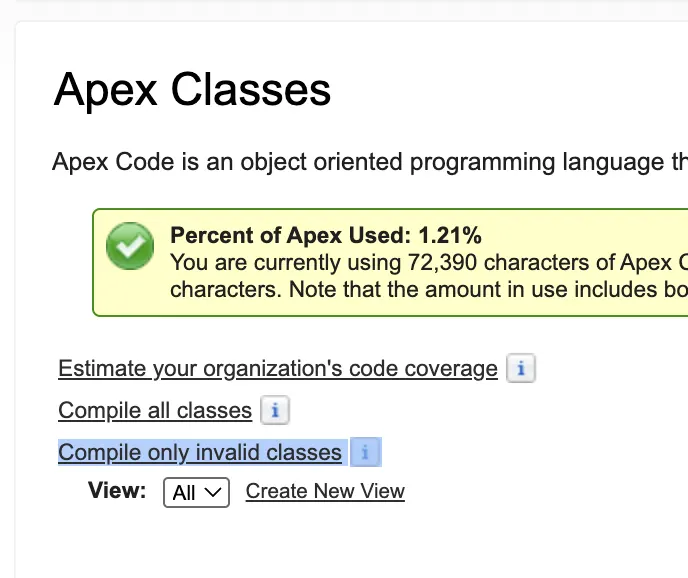
10. Reduce Overhead by Recompiling Only Invalid Apex Classes and Triggers
Recompiling all of your Apex classes, whether they’re still valid or not, isn’t ideal – particularly in larger orgs with a lot of Apex code. Starting in Winter ‘27, Salesforce is making it so that you can choose to only compile invalid Apex classes.
Compiling all classes is often seen as so painful that it is avoided altogether unless absolutely necessary. Now, with this game-changing new ability, you can safely focus on just the invalid Apex classes in your org, and leave the rest be.
BONUS. Find Duplicate Code and Scan from Your IDE With ApexGuru
Winter’ 27 is HUGE, so we’re blowing past just the top 10 features and touching on one more! ApexGuru now identifies duplicate and near-duplicate Apex code to help reduce redundancy in your org, and reduce the amount of maintenance work you need to do.
This solves an issue that occurs because a developer needs some logic that they either don’t know exists, or they can’t find, so they rewrite it from scratch. The problem with this is that you’ve now got multiple copies of either the exact same thing, or similar code. If a change is made in one place, it won’t exist in another.
This creates a lot of problems in terms of maintenance and expected functionality due to the fact that something works in one place, but not in another.
You can also use the ApexGuru code scanner from your agentic IDEs like Cursor, VS Code, and Agentforce Vibes. Salesforce has noted that these updates apply to production and Full Copy Sandboxes where ApexGuru has been enabled.
They’ve also mentioned in the release notes that ApexGuru is GA at no extra cost for Unlimited Edition, Signature Success Plan, and Scale Test customers… However, the ApexGuru FAQ says it’s also available for Enterprise, Professional, and Signature Editions. Whether this is a mistake in the release notes, or there are some changes coming to ApexGuru pricing, I’m not quite sure.
Summary
There’s more where that came from! As I said, this is a big release for everyone, especially developers. I’m excited to see what the global Salesforce community will do with these new tools. Don’t forget to read the release notes for all the details, and to see other features that I’ve not mentioned here.
Let me know if you think there’s another feature that I should have included in this top 10 list! I’m also keen to hear what you’re planning to do with these new tools – let me know in the comments and on LinkedIn!
Read More
- 10 Winter ’27 Updates Salesforce Marketers Need to Know
- 17 New Salesforce Flow Features in Winter ‘27
- Top 12 Salesforce Winter ’27 Features for Admins
- Sales Cloud: Top 7 Salesforce Winter ’27 Features
- Service Cloud: Top 8 Salesforce Winter ’27 Features