





Salesforce’s Spring ‘27 release arrives in January 2027, and with it another batch of enforced release updates. Release updates change how existing features behave, so it’s worth testing them before they’re enforced rather than finding out afterwards once issues occur.
With 16 updates due to be enforced before, as part of or following Spring ‘27, this guide is split into two parts. Be sure to read both parts to ensure you are prepared ahead of time.
Preparation
When preparing for these updates, you can take one of two approaches: clicks-not-code (no-code), or pro-code.
If you have a more developer-focused skill set, tools like SFDX (Salesforce Developer Experience) can give you a strong head start. By creating a local copy of your Salesforce metadata, you can more easily search for and identify impacted references.
You can also use third-party tools such as Workbench or Salesforce Inspector Reloaded to run queries and uncover dependencies within your org.
Finally, keep in mind that Salesforce may adjust release updates over time. They sometimes delay enforcement, change scope or impact, or cancel updates altogether. To stay up to date, always refer to the latest release notes.
Salesforce Spring ‘27 Release
With the Spring ’27 Release, Salesforce will enforce Release Updates both before and during the Release Window. This is unusual, but makes sense given updates enforced before the release relate to security.
Salesforce flags Release Updates via release Notes ahead of time. The latest source of truth for what’s coming in Spring ’27 is therefore the release notes from Winter ’27.
This guide gives one-size-fits-all steps for preparing, explained in non-technical terms. It’s designed as a general guide, so if you’ve customized the impacted features, you may need additional steps to prepare your org.
If you use Installed Packages, check with the provider that these solutions are ready for the Spring ’27 Release. This is particularly important for Managed Packages, where you can’t check the configuration as a subscriber.
As best practice, try out and prepare for Release Updates in a Sandbox first, then deploy the changes to your Production org.
When it’s time to make changes live in Production, consider scheduling these outside working hours. It also helps to have a communication plan, so users know where to flag issues afterwards, and a rollback plan in case things don’t go smoothly.
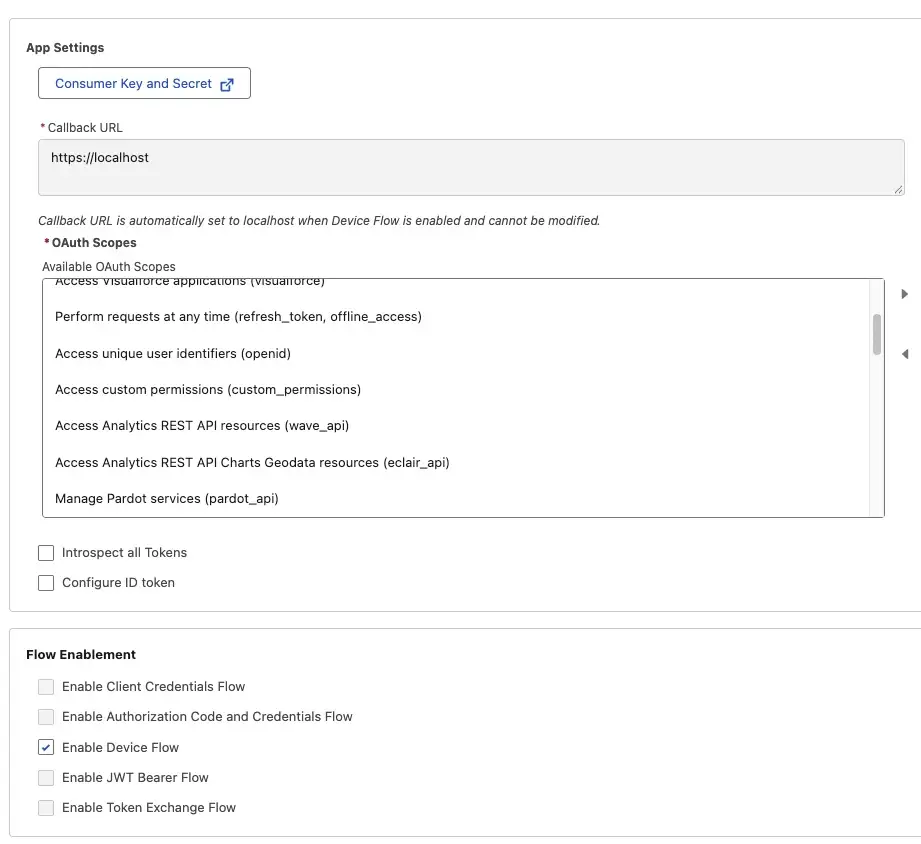
Restrict the OAuth 2.0 Device Flow to Local External Client Apps
This update is enforced prior to the Spring ‘27 Release on November 30, 2026.
If an External System is using the OAuth 2.0 Device Flow to login to Salesforce, then this could be impacted by this Release Update. Salesforce is removing the OAuth 2.0 Device Flow from;
- Connected Apps
- Packaged External Client Apps
- Local External Client Apps without a Callback URL
The exact steps you have to take depend on what option(s) from the above list you are using. To find out what is impacted, you can follow the steps below (for both No Code and Pro Code):
- Review Login History for any login with sub-type as OAuthDevice. You can either download the Login History or create a Custom List View that is filtered.
- Compare ‘Application’ to the name of your Connected Apps or External Client Apps to match things up.
- Note: Login History is held for six months. So if integrations haven’t been used recently, they will not show up here.
Preparing in a Sandbox
If your investigations turn up any Connected Apps, then these must be migrated to External Client Apps to continue using the Device Flow.
If you find any Packaged Connected Apps or External Client Apps using the Device Flow, contact the app developer. If this is the case, you may need to upgrade packages to use a different authentication method.
If you find any Local External Client Apps using the Device Flow, make sure these include a Callback URL to continue to authenticate that way.
Once you have made the necessary changes, enable the Test Run of this update and test each impacted connection to make sure this continues to work as expected.
Preparing in Production
Deploy these changes to your Production org once testing changes in your sandboxes have been successfully completed.
Make sure to complete some testing afterwards so that any connection that is adjusted continues to work as expected.
Resources
Assign Use Any API Auth Permission for SOAP Login()
Prior to the retirement of SOAP Login, Salesforce is gating this feature behind a User Permission.
If users do not have access to the Use Any API Auth User Permission, then from December 1, 2026, they will be unable to log in this way.
- For No Code:
- Navigate to Salesforce Setup → Login History and press Download Now.
- Review items that reference the SOAP API.
- For Pro Code:
- Run the following query:
SELECT id, LoginType from LoginHistory where LoginSubType like '%SOAP%'
- Run the following query:
- Note: Salesforce only retains Login History for six months and so only logins outside of this time window will not be shown.
Preparing in a Sandbox
Check Login History (using the No Code or Pro Code steps) to find who has used the SOAP API in the last six months. Salesforce hasn’t said whether this change affects every SOAP API subtype, so these steps return all SOAP logins.
Give the affected users and integrations a Permission Set with the Use Any API Auth user permission.
Turn on the Test Run for this Release Update, then re-test to confirm those users can still log in with the SOAP API.

Preparing in Production
Deploy any new Permission Set(s) from your Sandbox(es) to Production and assign these to users who need to continue to use the SOAP Login.
Enable the Test Run and double-check these users can still log in this way.
Resources
Maintain Your Email Verification Exception
If Salesforce Support has turned off user email verification for your org in the past, that option is being retired.
Once enforced, existing Email Domain Allowlists will stop working, so you need to move to Authorized Email Domains instead. If you don’t do this in time, users may not be able to send emails from Salesforce.
For both No Code and Pro Code, the step you should take is:
- Check Release Updates: If this update does not appear, then you are not impacted by this change. It will be enforced on December 1, 2026.
Preparing in a Sandbox and Production
If this Release Update appears in your org, test the changes in a sandbox before Production, in every environment that sends emails.
If you have “Verify the ownership of email sending domains by DKIM keys” turned on, Salesforce recommends switching to an Authorized Email Domain and turning this setting off. With the DKIM option, users still need to verify their address whenever they change it.
In each sandbox and Production org, follow Salesforce’s guide to Set up an Authorized Email Domain. To save time on future sandbox refreshes, follow the steps to Copy Authorized Email Domains into a Sandbox.
Resources
Accessibility Enhancements for To Do Lists and Lightning Dual Listboxes
This update is similar to recent accessibility enhancements for when zoom is > 200% and is due to be enforced from January 2027.
This time around, the behavior is enhanced for To Do Lists and Lightning Dual Listboxes.
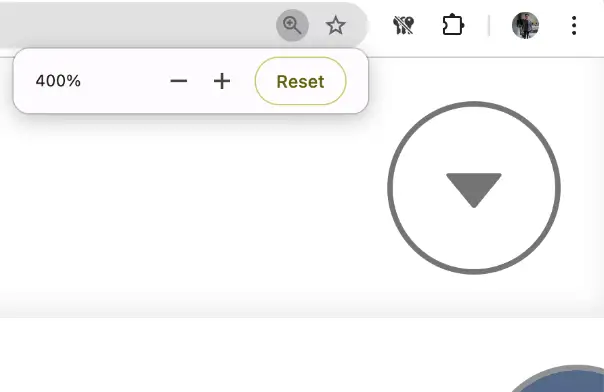
If any of your users access Salesforce at this level of zoom, you may notice changes to the styling of pages. Users operating below this threshold will not be impacted.
As this is a browser-level setting, it’s typically controlled using standard keyboard shortcuts.
| Windows | Mac | |
|---|---|---|
| Zoom In | Ctrl + + | Cmd + + |
| Zoom Out | Ctrl + – | Cmd + – |
| Reset to 100% | Ctrl + 0 | Cmd + 0 |
To assess potential impact, consider checking in with your users via a Chatter poll, Slack post, or in-app guidance message to understand who may be using higher magnification settings.
Preparing in a Sandbox
Within a sandbox, enable the Test Run of this update. Once this update is enabled for testing, review custom pages and Visualforce pages. During testing, verify that there are no issues when pages are viewed at >200% zoom.
If you have custom components that are impacted, work with a Salesforce Developer to fix any regressions you may see.
Preparing in Production
Deploy any changes made in your sandboxes to your Production org. Plan these changes outside of normal working hours so that you have time to enable the test run and perform some post-deployment smoke testing. This way, in case of any issues, you will be able to roll back changes with little to no user impact.
Resources
Remove Non-Public Fields from Custom Object Data in Aura Action Responses
In order to improve security, Salesforce is taking steps to block custom Lightning Component components from returning internal system fields from January 2027.
If you are using Aura Components that currently reference these fields, those references will need to be updated and removed in order for that functionality to continue to work as expected.
The scope of this update includes any Aura Component that references a System Field that is not publicly documented.
If you use components from a Managed Package, check with the provider if functionality is impacted by this Release Update.
- For No Code:
- Review Lightning Components and their associated Apex Classes to determine which returns Custom Object Data.
- For Pro Code:
- Review LWC components for references to Apex classes:
@salesforce/apex - Review Aura components for references to Apex classes:
controller=""in the .cmp file, pluscomponent.get("c.methodName")and$A.enqueueActionin the JS. - Review custom object data returned by the Apex classes within LWC and Aura components:
- Custom object (My_Object__c).
- Custom object collection (List, Set, or Map of custom objects).
- Wrapper class containing custom objects.
- Generic SObject or List<SObject>.
- Check how each component uses the returned records:
- Field references by API name (
record.Amount__c, record.Name) are fine, if the field is documented. - Code that loops over every field (Object.keys, for…in) needs testing.
- Any references to fields that are not documented need to be reworked.
- Field references by API name (
- Review LWC components for references to Apex classes:
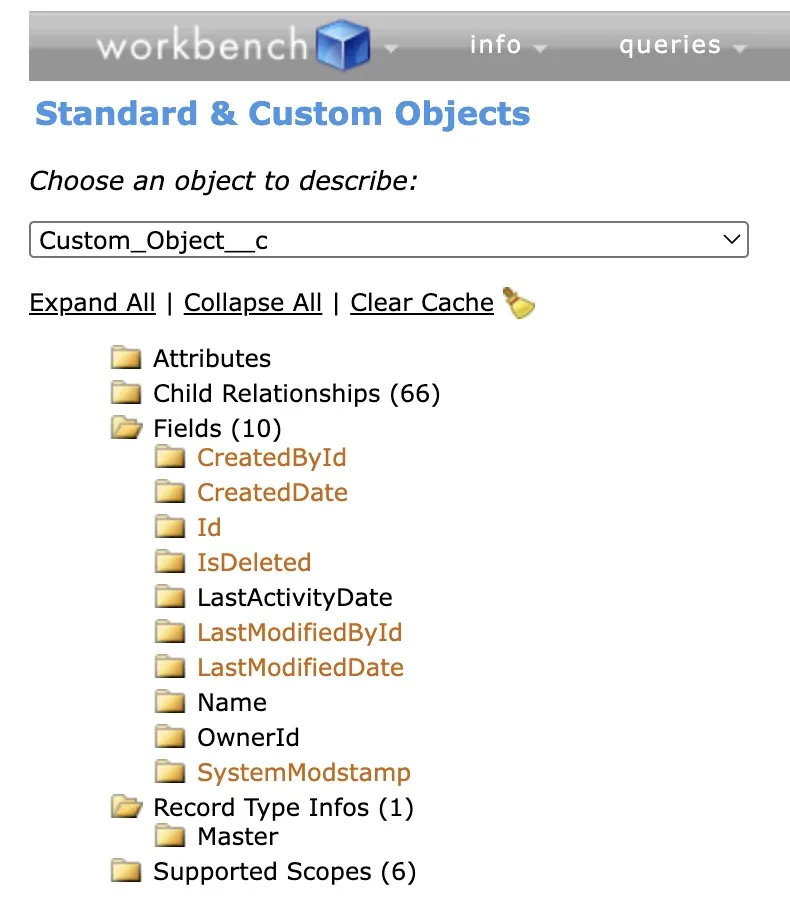
- Use Salesforce Workbench to see the documented fields for each object via this click path: Workbench → Info → Standard & Custom Objects → [Object Name] → Fields.
When I tested this Release Update myself, non-public fields were no longer returned for Standard Objects too. So if you are risk-averse, include these in your testing too.
Preparing in a Sandbox
Follow the ‘No Code’ or ‘Pro Code’ Steps to assess the impact of this update and choose whether or not to include Standard Objects too.
Enable the Test Run of this update and make sure identified components still return the expected data from related object(s) successfully – if they do not, then those components will need to be adjusted.
Preparing in Production
Deploy any metadata changes from your sandbox environments to Production, outside of core business hours.
Enable the Test Run for this update and ensure that impacted components still work as expected and return the correct data.
Resources
Salesforce Connect Cross-Org Adapter Legacy Authentication Is Being Retired
If you are using Salesforce Connect, which uses an add-on licence, support for the OAuth 2.0 Authentication and Password Methods is being removed from January 2027.
If you use this type of connection, migrate to Named Credentials to avoid any disruption.
- For No Code:
- Navigate to Setup → External Data Sources.
- Search the list for an External Data Source with Type = “Salesforce Connect: Cross-Org”.
- For Pro Code, run the following queries:
SELECT fields (all) from ExternalDataSource where type = 'SfdcOrg' and Protocol = 'Password' limit 200SELECT fields (all) from ExternalDataSource where type = 'SfdcOrg' and Protocol = 'Oauth' limit 200

Preparing in a Sandbox
If the No Code or Pro Code Steps have returned results, then you need to migrate those External Data Sources to use Named Credentials. If you do not make the switch in time, these connections will break.
In a sandbox environment, create a Named Credential for each impacted connection, re-authenticate, and make sure the connection continues to work as before.
Preparing in Production
Deploy any new or updated Named Credentials or External Data Sources to your Production org outside of core working hours.
Re-authenticate in your Production org and ensure that ‘External Objects’ under each External Data Source are configured as expected.
Test the flow of data for each impacted connection. If things don’t work as expected, be prepared to roll back the changes to avoid any user impact.
Resources
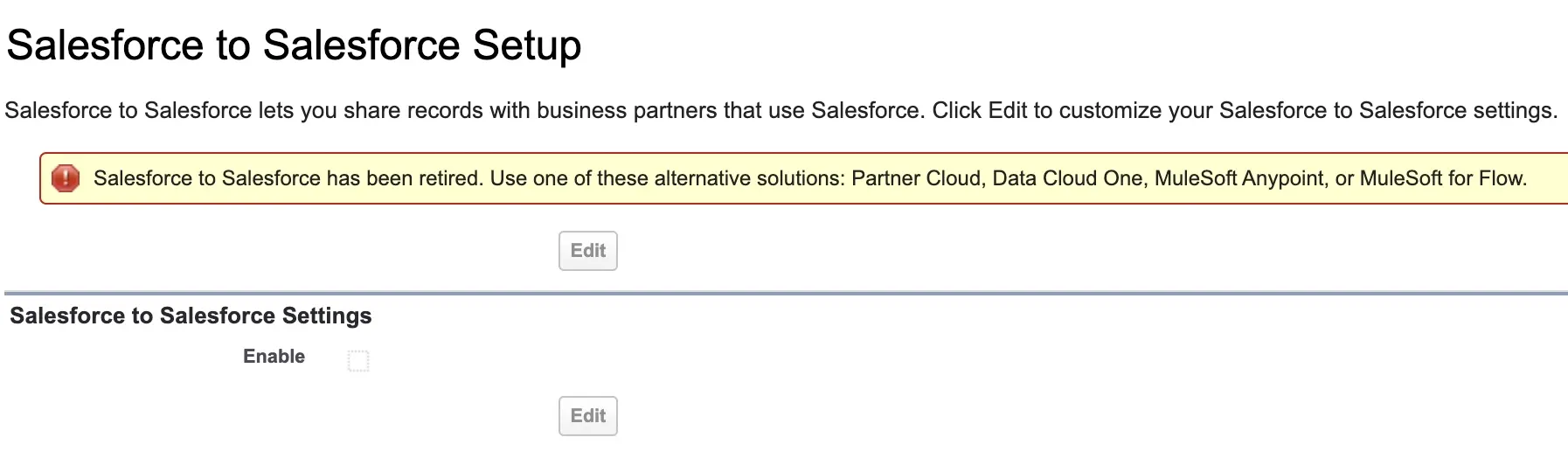
Salesforce to Salesforce Is Being Retired
The product commonly known as Salesforce to Salesforce is being retired from January 2027.
Prior to enforcement of this update, be sure to migrate to a different mechanism to connect multiple Salesforce orgs such as Partner Cloud, Data Cloud One, MuleSoft Anypoint, or MuleSoft for Flow.
If you are unsure whether you use Salesforce to Salesforce, follow the steps below:
- For No Code:
- Switch to Salesforce Classic.
- Navigate to Salesforce Setup.
- Review Salesforce to Salesforce Setup. If ‘Enable’ is checked, then Salesforce to Salesforce is turned on.
- For Pro Code, run the following query:
- SELECT Id, ConnectionName, ConnectionStatus, ConnectionType FROM PartnerNetworkConnection
- If the results are returned, Salesforce to Salesforce is enabled. If you get an error that the feature is not available.
- Optionally, export records from
PartnerNetworkRecordConnectionandPartnerNetworkSyncLogif you are using this feature as a backup mechanism.
Preparing in a Sandbox
If Salesforce to Salesforce is enabled, you need to consider an alternative mechanism to sync between multiple Salesforce orgs.
The best alternative depends on your specific requirements but could be either;
- Partner Cloud
- Data Cloud One
- MuleSoft Anypoint
- MuleSoft for Flow
- A Third-Party Integration Tool
As part of the migration, be sure to test in a sandbox once you have turned off Salesforce to Salesforce in that environment.
Preparing in Production
You should arrange to switch over from Salesforce to Salesforce to an alternative outside of core business hours to avoid disruption to users.
Once you have made the switch in Production, be sure to test thoroughly to identify any issues and have a rollback plan should things not go to plan.
Resources
Release Update Changes
Salesforce has made some adjustments to Release Updates which were covered previously, namely:
- Retirement of OAuth 2.0 Username-Password Flow for Connected Apps, covered in this article. This is now due to be enforced on February 20, 2027.
- Update Instanced URLs in API Traffic, covered in this article. This is now due to be enforced in Spring ‘27.
Summary
That wraps up the first part of our Salesforce Spring ‘27 Release guide.
Head over to the second part for the updates not covered here, so you’re fully prepared before the Release Updates land.