





If you’ve spent any time as a Salesforce Admin, you’ve probably faced this question: should you create a Record Type, a Profile, or a Permission Set? It’s surprisingly easy to choose the wrong tool.
A request to give a team access to a field turns into a new Profile, while a slightly different sales process results in another Record Type. Before long, your org has dozens of Profiles, Record Types that nobody quite understands, and Permission Sets that seem to do the same thing.
The good news is that each tool has a clear purpose, and choosing the right one doesn’t have to be complicated. Salesforce continues to recommend a permission-set-led approach to access management, even though its previously announced retirement of Profile-based permissions was cancelled in June 2026.
This is a good opportunity to revisit legacy configuration habits, understand what each tool is designed to do, and build a more scalable org. Let’s look at a practical decision framework, some common scenarios, and the mistakes to avoid.
Understand What Each Tool Is For
Before getting into specific scenarios, it helps to establish the fundamental difference between Record Types, Profiles, and Permission Sets. Although they can work together to deliver the right experience and access for your users, they solve different problems, and understanding those differences will help you avoid unnecessary configuration.
Record Types: Define Different Business Processes
Record Types allow you to support different business processes for the same Salesforce object. They can control which picklist values are available and, alongside page layouts, help tailor the experience to different types of records.
For example, imagine your company sells both hardware and software. Both are represented by Opportunity records, but the sales teams follow slightly different processes. Hardware opportunities might need stages and other picklist values that reflect installation and delivery, while software opportunities need options for licensing and subscription renewals.
There is an important technical distinction here: Record Types don’t define Opportunity Stage values directly. Instead, a Sales Process determines the available Opportunity Stage values, and that Sales Process is assigned to a Record Type.
The same principle applies to Cases, where Support Processes determine available Case Status values, and Leads, where Lead Processes determine available Lead Status values. Record Types are useful when the difference relates to the type of record being created or the business process that record follows, rather than simply the person creating it.
Record Types aren’t a security mechanism, either. Assigning a Record Type doesn’t determine which individual records a user can view or edit, and restricting the available Record Types doesn’t prevent users from accessing existing records that use other Record Types. If your requirement is to stop a user from seeing sensitive customer information, a Record Type isn’t the answer.
Profiles: Define the Baseline
Every Salesforce user has exactly one Profile. Historically, admins have often used Profiles to manage everything from object permissions and field-level security to tab visibility, apps, and Record Type defaults.
Profiles still have an important role, but Salesforce recommends using them primarily for baseline settings while managing access through Permission Sets and Permission Set Groups. These baseline settings can include login hours, login IP ranges, password policies, session settings, and default apps, Record Types, and page layouts.
Think of a Profile as the starting point for a user’s Salesforce experience. For example, your organization might have a standard internal-user Profile that provides a common baseline for employees, with sales representatives, service agents, and marketing users receiving additional permissions according to their responsibilities. The key principle is to avoid creating a new Profile every time a user needs a slightly different combination of permissions. Doing so makes configuration harder to maintain and increases the risk of inconsistencies between user groups.
For more context, Salesforce’s guidance on the cancellation of Profile permission retirement explains the position on Profile-based permissions and the continued recommendation to use Permission Sets for access management.
Permission Sets: Grant Additional Access
Permission Sets allow you to grant users additional permissions without changing their Profile. A user can have multiple Permission Sets, making them much more flexible when different people need different combinations of access.
For example, a group of sales representatives might share the same Profile, but only some need access to a particular custom object, an additional application, or a specific feature. Instead of creating a new Profile for those users, you can create a Permission Set containing the required permissions and assign it to the relevant people.
Permission Sets can grant object permissions, field-level access, user permissions, Apex class access, and other supported permissions. They can also grant access to custom Record Types.
Where several Permission Sets are commonly assigned together, Permission Set Groups allow you to bundle them into a reusable collection. This is the principle behind a permission-set-led approach: grant users the permissions they need through modular, reusable components, rather than maintaining a separate Profile for every possible combination. SF Ben’s guide to distributing permissions in a scalable way explores how admins can put this into practice.
One important distinction is that Permission Sets generally grant access rather than remove it. If a user’s Profile or another assigned Permission Set grants a permission, assigning a Permission Set that doesn’t include that permission won’t revoke it.
There is an exception worth knowing about: a muting Permission Set, used within a Permission Set Group, can suppress selected permissions granted by other Permission Sets in that same group. However, it doesn’t remove permissions granted by the user’s Profile or by Permission Sets outside that group, so if you need to remove access, you must understand exactly where that access is coming from.
The Decision Framework: Which Tool Should You Use?
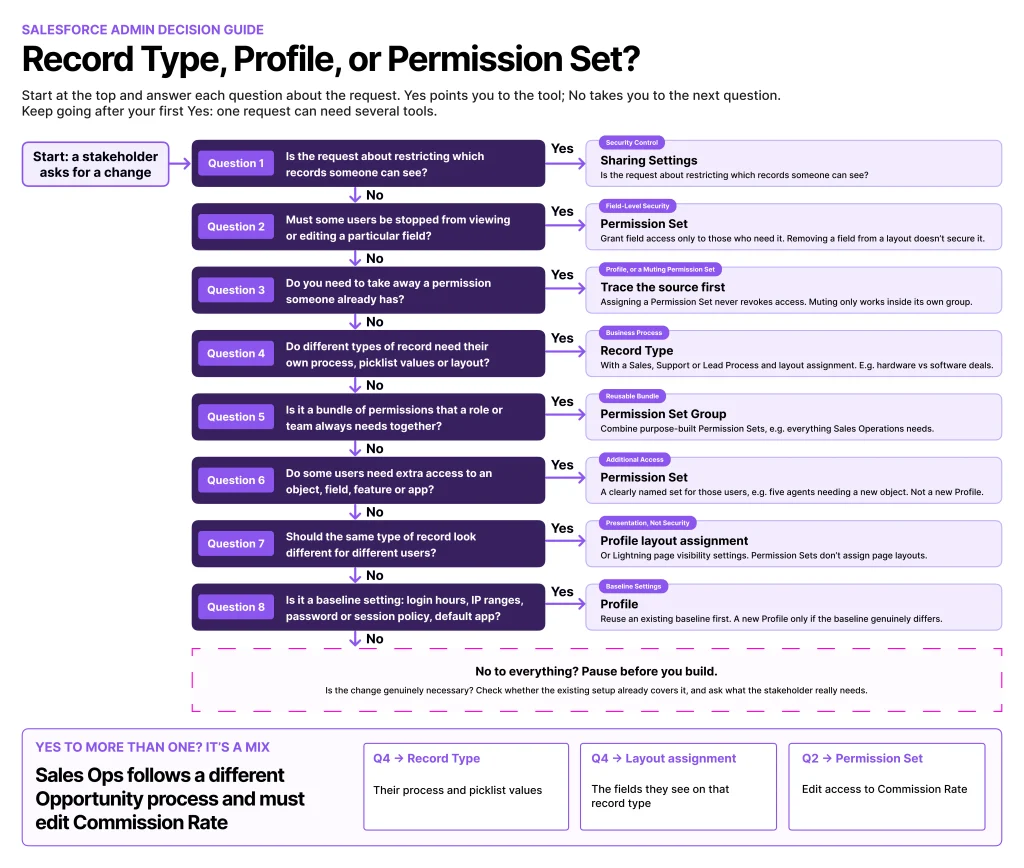
When a new requirement comes in, start by identifying what the business is actually asking for. The following framework should help you narrow down the options, although remember that more than one tool may be needed to deliver the complete solution.
| Business Requirement | Best Starting Point | Example |
|---|---|---|
| Different business processes or picklist values for the same object | Record Type, with the relevant process configuration | Separate hardware and software sales processes |
| Different baseline user settings | Profile | Establishing default settings for internal employees |
| Additional access to an object, field, feature, or application | Permission Set | Giving selected users access to a custom object |
| A common bundle of permissions for a particular role or responsibility | Permission Set Group | Combining permissions needed by a sales operations team |
| Different page layouts for different types of records | Record Type and page layout assignment | Showing different fields and related lists for hardware and software opportunities |
| Restricting access to particular records | Sharing and security configuration | Limiting which customer records a team can access |
There is one important caveat: these tools aren’t always mutually exclusive, and a single requirement can involve more than one of them. For example, a sales representative might need a particular Opportunity Record Type, a different page layout for that record type, and additional permissions to edit a custom field. That could involve a Record Type, a page layout assignment, and a Permission Set, with each element doing a different job.
The goal isn’t to force every requirement into one category, but to avoid using a tool for something it wasn’t designed to do.
An Example of Getting It Wrong
Imagine a company where sales reps and sales operations both work with Opportunities, but the sales operations team needs to edit a Commission Rate field that sales reps should not be able to change. An admin might create a new Opportunity Record Type called Sales Operations and assign it to those users, expecting this to give them access to the additional field.
It might seem like a sensible solution, particularly if the two teams also have slightly different processes, but a Record Type does not control field-level security.
The better approach is to use a Permission Set to grant the Sales Operations team edit access to the Commission Rate field, assuming they already have the necessary object permissions and record access.
If the teams also need different page layouts or picklist values, a Record Type may still be useful, but it should not be doing the job of a security control. Hiding a field on a page layout is not enough to secure it either, as users may still be able to access the field through other parts of Salesforce if their permissions allow it.
The lesson: If the requirement is about who can view or edit a field, start with permissions. If it is about supporting a different business process, consider a Record Type. The two can work together, but they solve different problems.
Real-World Scenarios for Salesforce Admins
Let’s put the framework into practice with some of the requests you might receive from stakeholders. These examples also demonstrate why it’s worth understanding the underlying requirement before jumping straight into Setup.
“Can We Give the Sales Team a Different Set of Picklist Values?”
Your sales team has introduced a new sales process for enterprise customers. Enterprise opportunities need different values for Opportunity Stage or another process-specific picklist than those used by your existing sales team.
The recommended solution is to use Record Types, with the appropriate Sales Process configuration where needed. For Opportunity Stage values, create or update a Sales Process to define the available stages, then assign it to the relevant Record Type. Record Types can also control other picklist values and work alongside page layouts to provide the right experience for each process.
Before creating a new Record Type, check whether the existing process can accommodate the requirement. A new Record Type introduces another configuration element to maintain, so there should be a clear business reason for having one. If the only difference is which users can edit a field, a Record Type probably isn’t necessary, and a Permission Set may be a better fit.
“Can We Give These Five Users Access to a New Feature?”
A few members of your service team need access to a new feature or custom object, but the rest of the team doesn’t need it.
The recommended solution is a Permission Set. Create a Permission Set containing the required permissions and assign it to the five users. This is a classic example of why Permission Sets are so useful: you can grant access to the people who need it without changing the baseline configuration for everyone else or introducing another Profile.
If the feature becomes standard for a larger group, you can review how the Permission Set fits into your wider access model. You don’t need to predict every future requirement before making a sensible configuration decision today, but it’s worth giving the Permission Set a clear name and purpose so that other admins can understand why it exists.
“The Marketing Team Needs Different Access From the Sales Team”
This request is slightly more complicated because “different access” could mean several things. Marketing users might need access to marketing applications, specific objects, or particular fields, and they might also need a different default app or other baseline settings.
The recommended solution is to start with the baseline, then use Permission Sets for additional access. If your existing Profiles already provide suitable baseline settings, you may not need to change them at all. Grant the additional permissions the marketing team needs through Permission Sets, using Permission Set Groups if there are several common bundles of access.
If there are genuine differences in baseline settings that cannot sensibly be managed through Permission Sets, a separate Profile may still be appropriate. The important thing is not to create a Marketing Profile simply because the department has a different name. Build the configuration around the actual requirements, rather than assuming every department needs its own Profile.
“Can We Hide These Fields From Users Who Don’t Need Them?”
This is one of those requests where the wording matters. If users simply don’t need to see certain information while working on a record, a page layout or Lightning record page might help tailor the experience.
However, if the information is sensitive and users must not be able to access it, field-level security is the relevant security control. You can manage field-level security through Profiles and Permission Sets.
For a permission-set-led approach, use Permission Sets to grant the appropriate field access, while ensuring the baseline and any other assigned permissions don’t grant access that should be restricted.
Removing a field from a page layout doesn’t make the field secure. Users might still be able to access it through reports, APIs, or other Salesforce features if their permissions allow it. Page layouts control presentation, while field-level security controls whether users can read or edit a field. For practical tips, see our guide to reviewing field-level security using Permission Sets.
“We Need Different Page Layouts for Different Teams”
Your service team wants a layout with case-specific information, while another team needs a simpler view. Should you create another Profile? The recommended solution is to first determine whether the difference is based on the record or the user.
If the layout should differ according to the type of Case, Record Types and page layout assignments are a natural fit. If the same type of Case needs to look different for different users, you may need separate page layout assignments based on Profile, or you might achieve the desired experience through Lightning record pages and their supported activation and visibility settings.
This is where it’s worth checking the exact requirement before changing your configuration. Record Types and Profiles can both influence the page layout a user sees, so the right answer depends on whether the difference is driven by the record, the user, or both.
Remember that Permission Sets don’t assign page layouts. They can grant access to Record Types, but page layout assignments are configured through Profiles and Record Types.
Common Configuration Mistakes to Avoid
Knowing what each tool does is one thing. Keeping an org manageable over several years is another, particularly when multiple admins have made configuration decisions at different points in the org’s history. Here are five common anti-patterns to watch out for.
Creating a New Profile for Every Department
It’s tempting to create a Profile for every department or job title. It feels organized at first, but the number of Profiles can grow quickly as people request different combinations of permissions. The result is configuration that becomes increasingly difficult to compare, update, and troubleshoot, particularly when a change needs to be applied consistently across multiple Profiles.
Instead, establish sensible baseline Profiles and use Permission Sets to grant additional access. Where users need the same combination of permissions, consider grouping those Permission Sets together. There may still be legitimate reasons for having different Profiles, but “this person works in a different department” shouldn’t automatically be one of them.
Using Record Types to Control Security
Record Types aren’t designed to prevent users from accessing particular records or fields. A user who can’t select a particular Record Type when creating a record might still be able to view or edit records that use it, depending on their other permissions and record access.
If the requirement is about access, look at the appropriate security controls instead. Object permissions determine what users can do with an object, field-level security governs access to fields, and sharing settings help determine which individual records users can access.
Using Record Types as a workaround for security requirements can create a false sense of protection. It’s worth taking the time to identify the right security control at the start, rather than building a workaround that looks effective but doesn’t actually protect the information in question.
Creating Permission Sets That Duplicate Profiles
Permission Sets are useful, but creating them without a clear purpose can introduce a different kind of complexity. If every Permission Set contains the same permissions as an existing Profile, admins have more configuration to maintain without necessarily gaining any flexibility.
Instead, create Permission Sets around meaningful responsibilities or access requirements, such as “Export Customer Data”, “Manage Cases”, or “Access Sales Analytics”.
Each Permission Set should have a clear purpose that someone else can understand without needing to reverse-engineer its contents. If you’re simply copying Profile permissions into Permission Sets without a clear access-management strategy, it’s worth stepping back and reviewing the approach before creating more configuration.
Building Page Layout Strategies Around Profiles Alone
Profiles are important for page layout assignments, but Record Types can also determine which layout a user sees. If your org uses several Record Types, ignoring them when designing page layouts can lead to unnecessary duplication or layouts that don’t reflect the underlying business processes.
Start by identifying the differences between the records themselves, then decide which layouts are needed and how they should be assigned to users.
If the same record needs a different experience for different audiences, consider whether separate layout assignments or Lightning record pages would be more appropriate. The important thing is to avoid creating additional Profiles or Record Types just to solve a presentation problem when a more straightforward configuration could do the job.
Letting Permission Set Sprawl Take Over
Moving to a Permission Set-led model doesn’t mean creating a new Permission Set for every individual request. Without naming conventions, documentation, and regular reviews, you can end up with dozens of overlapping Permission Sets and very little understanding of why each one exists.
Establish naming conventions that describe the purpose of each Permission Set, document its intended audience, and review assignments periodically. Where several Permission Sets are consistently assigned together, consider a Permission Set Group.
It’s also worth checking for overlapping permissions and removing obsolete assignments as users change roles. Remember that a Permission Set Group’s muting configuration may suppress selected permissions within that group, but it won’t override access granted elsewhere. The aim is to make access easier to understand and maintain, not simply to move complexity from Profiles into Permission Sets.
Questions to Ask Before You Configure Anything
When a stakeholder asks for a change, it’s tempting to jump straight into Setup. Before you do, take a moment to establish exactly what they need. Asking a few straightforward questions at the beginning can help you choose the right tool, avoid unnecessary configuration, and explain your decision to the people requesting the change.
- Is the requirement about the data or business process? If different types of records need different picklist values or processes, consider a Record Type and the relevant process configuration.
- Is the requirement about access? If someone needs additional permissions, start with a Permission Set. If the request is to restrict access, identify the appropriate security control rather than assuming a Permission Set can remove permissions.
- Is the requirement about baseline settings? A Profile may be the right place for default settings that apply to a broad group of users.
- Is this difference genuinely necessary? Before introducing another configuration element, check whether the existing setup can meet the requirement.
- Will someone else understand this in six months? Consider whether the change will be easy to explain, troubleshoot, and maintain when the original request has long been forgotten.
That last question is particularly important. Salesforce configuration rarely exists in isolation, and a seemingly minor change can affect how users create records, what they can access, and how future admins need to maintain the org. A little planning now can save a surprising amount of time later, especially when you’re working in an org that has grown over several years.
Final Thoughts
Record Types, Profiles, and Permission Sets all have their place in a well-designed Salesforce org. The challenge is knowing when to use each one, rather than automatically reaching for whichever tool you’re most familiar with.
As a general rule, Record Types differentiate business processes, picklist values, and layouts by type of record; Profiles establish baseline user settings, including login restrictions, default apps, default Record Types, and page layout assignments; and Permission Sets grant additional access and permissions.
Permission Set Groups bundle related Permission Sets for easier assignment and management, while sharing and other security controls determine which records, fields, and capabilities users can actually access.
Salesforce’s recommendation to adopt a permission-set-led approach is a good opportunity to review legacy configuration, reduce unnecessary Profile variations, and make access management more flexible.
Although the previously announced retirement of Profile-based permissions was cancelled in June 2026, Salesforce continues to recommend using Profiles for baseline settings and Permission Sets for access control. You can read the official Salesforce guidance here. But don’t turn it into a rule that everything must be a Permission Set. The goal is to choose the right tool for the requirement, not to replace one set of bad habits with another.
When in doubt, ask yourself one simple question: Am I defining the data, the user’s baseline experience, or their access? Your answer will usually point you in the right direction.