

If your business is supporting service teams, this release gives you new ways to make case handling, agent productivity, and customer self-service more efficient. Winter ’26 brings some exciting new capabilities to Service Cloud: from smarter SLA management to richer messaging experiences and AI-powered Knowledge.
Here are the 10 standout updates you should know about.
1. Gain Better Insights into Case Team Member Contributions
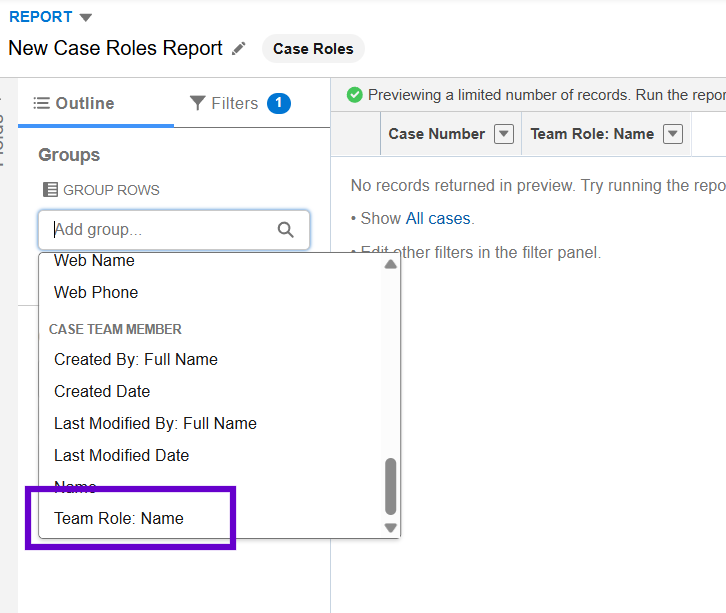
With Case teams made up of multiple people, tracking who did what and who gave the most effort to a Case hasn’t always been straightforward. With role-based reporting enabled, you can now get better visibility into each team member’s contributions. This helps with accountability, workload analysis, and making sure credit goes where it’s due.
As seen below, my custom report type on Cases and Case Team Members now has the Team Role: Name option.
2. Enhance Case Descriptions With Rich Text Formatting (Beta)
Case descriptions don’t have to be plain text anymore! With rich text formatting, agents can add lists, highlights, images, and media to make case details easier to scan and act on.
This is in beta, but it’s a big step toward more readable, detailed, and structured case notes. You can enable this from Setup > Support Settings.
3. New Inbound Email Limit for Email-to-Case
Previously, there was no cap. Now, Salesforce seems to be improving storage use and infrastructure by adding a limit: each case can now receive up to 250 inbound emails. Once the threshold is hit, new emails will fail with an exception notification email to the Automated Case User.
So for teams handling long-running threads, this change could impact workflows. It might be worth reviewing your automation and escalation processes.
4. Suggest Pre-Written Messages to Service Reps
Quick Text just got smarter. Now, Salesforce can suggest pre-written replies to reps during conversations, helping them respond faster and stay on brand.
This feature lightens the load on reps who deal with repetitive inquiries all day, now that they can see a list of recently used quick text snippets that match what they type in the conversation input field. No need to manually access the Quick Text action!
5. Play a Video in a Messaging Conversation
Messaging support isn’t just about text anymore. They’ve enhanced the support experience for reps this time because with Winter ’26, reps can now play videos sent by the customer directly inside a conversation.
No need to download the video anymore to view it! This is great for step-by-step troubleshooting or walkthroughs, giving customers faster responses when they send visual details of their issue.
6. HR Service (Previously Employee Service)
Employee Service has been rebranded as HR Service, reflecting its broader scope in supporting HR processes and employee experience. Along with the new name comes some useful updates, such as:
- Campaign Management for Employees: With the help of Data Cloud, HR teams can now run campaigns within HR Service to deliver targeted communications for specific employee groups, such as new hires. Whether it’s reminders about benefit enrollment, company policy updates, or employee engagement initiatives, sending targeted emails like this helps HR teams reach the right audience with the right message at the right time.
- New Components for the Employee Portal: There are 35 new components, and some of them are Case Comments Publisher, User Profile Summary, Global Search Box, and Language Selector. Bid the current static template goodbye, as these customizations help you design a more intuitive experience depending on business needs.
7. Collaborate on Complex Calls by Adding More Participants (Pilot)
Sometimes two voices on a call aren’t enough. With this pilot feature, Service Cloud Voice (with Amazon Connect) now supports multi-party calls, making it easier to handle complex issues that require specialists or managers.
It’s a win for collaboration and faster resolution times by getting the right people on the line without needing a separate call.
8. Smarter SLA Management with Milestone and Routing Enhancements
SLA tracking is more flexible than ever. Admins can now:
- Prioritize cases based on milestone time left: With “Time to Next Milestone” in the case list view, it’s easier to identify which cases need to be prioritized due to possible SLA violations. This can be enabled from Setup > Entitlement Settings > Show Time to Next Milestone.

- Pause individual milestones when needed. This helps highlight delays more clearly, allowing reps to pause an SLA milestone when they’re waiting on additional information from the customer or input from another team. Similar to above, can also be enabled from Setup > Entitlement Settings.
- Prioritize work by start target date with the new Accept By Date metric in Omni-channel.
9. Smarter Knowledge Articles
Knowledge management gets an AI boost for customers in this release. Articles can now:
- Provide AI-generated summaries: Customers don’t always want to wade through long articles to figure out if the content is relevant. With Winter ’26, Knowledge articles can now display AI-generated summaries that give readers a quick sense of whether the article will help them. A boost for self-service!
- Dynamic Q&A sections: Allow customers to see the most relevant questions and answers directly on a knowledge article page. This automatically shows the most common, related questions ranked by popularity, so it’s quicker to get the information you need without too much scrolling.
10. Improved Surveys for Better Customer Insights
Salesforce Surveys gets a trio of upgrades:
- Not every customer finishes a survey in one go, and that was solved with the recent ability to capture responses from partially-completed surveys. But with Winter ’26, you can now customize how long these partially completed responses are saved. Admins can set the window anywhere between 1 and 15 days.
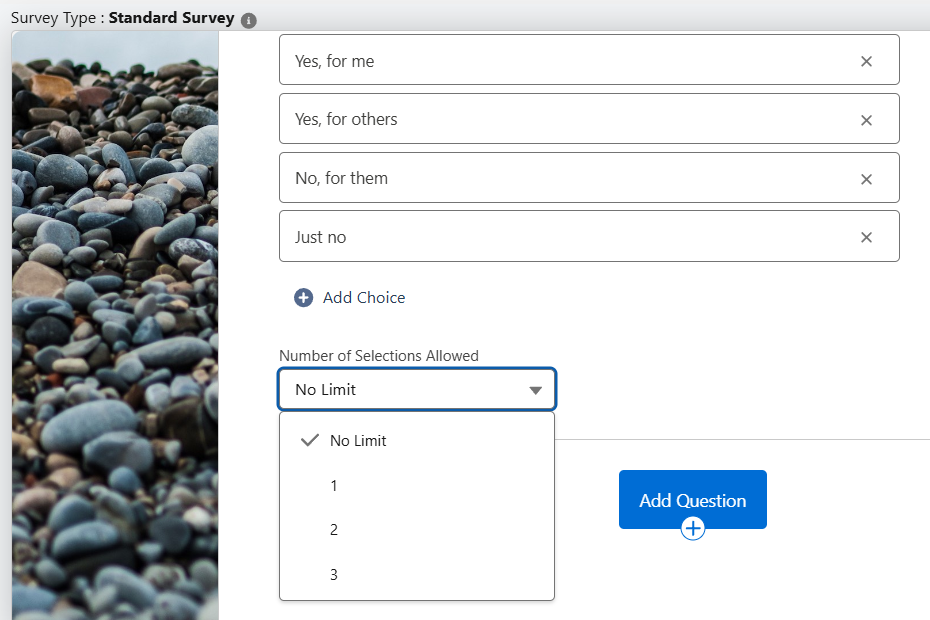
- Ability to limit selections on multi-choice questions. Survey responses can lose their value if participants select every option available. Admins can now set a maximum number of choices for multi-choice questions. This ensures feedback is more focused and easier to analyze.
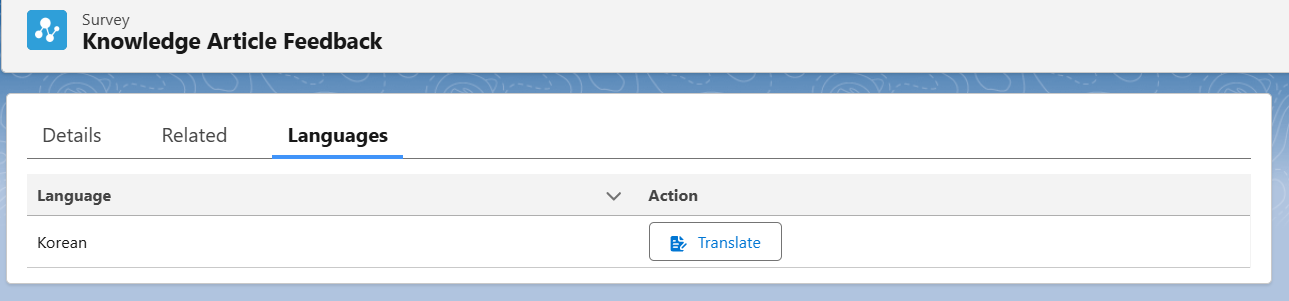
- Translations for Knowledge feedback forms, helping global teams collect insights more effectively.
Final Thoughts
Winter ’26 packs a lot into Service Cloud, like AI-powered knowledge and smarter SLA controls, or even better agent productivity tools.
The new 250 inbound email limit for cases is one to watch closely, while messaging and voice enhancements continue to evolve how agents connect with customers. If you’re supporting service teams, these updates are worth exploring in your sandbox so you can roll them out smoothly soon in production! To see how these features fit into the bigger picture, make sure you’re maximizing your use of Service Cloud.
What were your favorites from this season’s release? Leave your answers in the comments!
Read More:
- 10 New Salesforce Flow Features in Winter ‘26
- Top 10 Salesforce Winter ’26 Features for Admins
- Top 8 Salesforce Winter ’26 Features for Developers
- 12 Winter ’26 Updates Salesforce Marketers Need to Know
- Sales Cloud: Top Salesforce Winter ’26 Features