






Summer ‘26 is finally here! Can you believe it? This release window feels like it’s gone by in the blink of an eye. There’s no doubt that the triannual Salesforce releases are full of fantastic features and exciting updates, but sometimes, there’s just too much good stuff to wrap your head around all at once.
The team at SF Ben is determined to help you understand the most impactful parts of the release in easily digestible, discipline-based chunks. But what if you’re interested in the most exciting, anticipated, and important parts of the release all in one spot? If that’s you, look no further!
Additionally, I have curated what I believe to be the three most important release updates for the majority of Salesforce customers to pay attention to. You’ll need to assess how they will impact your org before the Summer ‘26 release goes live to minimize disruption across your business.
Summer ‘26 Features: The Top 3 for Each Discipline
Top Admin Features
Christine Marshall has eagerly torn through the release notes to bring ten of the most impactful ones to you.
Chatter Turned Off By Default in New Orgs
The writing is well and truly on the wall for Chatter – any new orgs that are spun up from Summer ‘26 onward will have Chatter disabled by default. You can still choose to enable it, and it’s not being turned off for existing customers, but the strategy is clear. Salesforce is beginning to phase out Chatter.
Track Permission Dependencies More Easily
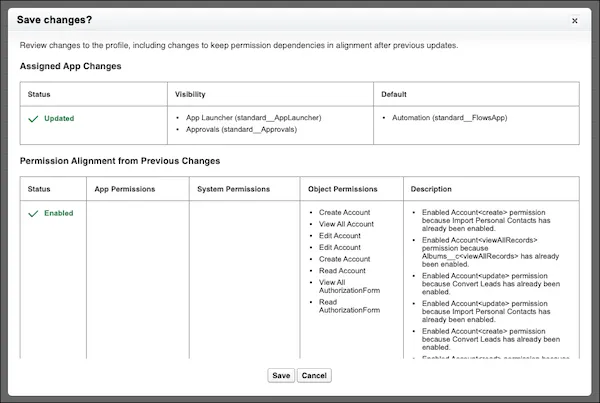
Oftentimes, when you change permissions in the enhanced profile view, there are some flow-on changes that aren’t so obvious. Summer ‘26 changes this by introducing a new view that highlights any indirect changes for the admin to approve before saving, making it far more visible and less accidental.
Changes to Queues Inheriting Hierarchical Access
Now, instead of queues granting users access to additional records by default, you’ve got the ability to enable or disable this on a one-by-one basis. This gives Salesforce Admins a lot more control over who has access to what, a welcome move.
Top Marketing Features
Marketing enthusiast Timo Kovala has compiled a list of top marketing updates that Summer ‘26 brings to you.
AMPscript Support in Marketing Cloud Next
This is a big deal for marketers – Salesforce’s AMPscript is finally coming to Marketing Cloud Next in Summer ‘26, bringing it into alignment with classic Marketing Cloud. Marketers can use AMPscript to retrieve, format, and display CRM data directly in email content using familiar marketing tools.
RCS Support in Marketing Cloud Next
Rich Communication Standard, or RCS, is rapidly becoming the standard for text-based messaging, and it is now natively supported within Marketing Cloud Next. While SMS was able to deliver simple, plain text messages, RCS empowers marketers to send branded, interactive experiences through native messaging apps.
MCP Support for Marketing Cloud Engagement
It may not be a shock to learn that Marketing Cloud Engagement is getting MCP (Model Context Protocol) support in Summer ‘26, but it is welcome. If you’re looking to orchestrate marketing campaigns, build content, and interact with subscriber data using your LLM of choice, you can do so now.
Top Developer Features
Paul Battisson assembles the eight most impactful enhancements that will have developers scrambling with excitement.
Preview Lightning Web Components While Building
The ability to preview a Lightning Web Component as you build it has gone GA in the summer release. No more having to reload the entire page just to see a single component update – now it’s much smoother to preview in Visual Studio Code or directly in your browser.
State Management for Lightning Web Components
Peter Chittum briefly talked about this on The Picklist Podcast, and Paul confirms that this is a big deal. State Manager is now GA in Summer ‘26, and allows developers to more flexibly handle the state of components. This gives a more intelligent interconnectedness between components on the same page, allowing data to flow smoother between them all.
Security Enhancements in Apex
By default, database operations will run in user mode. Historically, they would run in system mode. In addition, any class that doesn’t have any sharing declaration will default to with sharing instead of without sharing. These changes apply from version 67, coming in Summer ‘26.
Top Flow Features
Tim Combridge says run, don’t walk, to apply the following Flow features in your org in Summer ‘26.
Data Table Lookup Enhancements
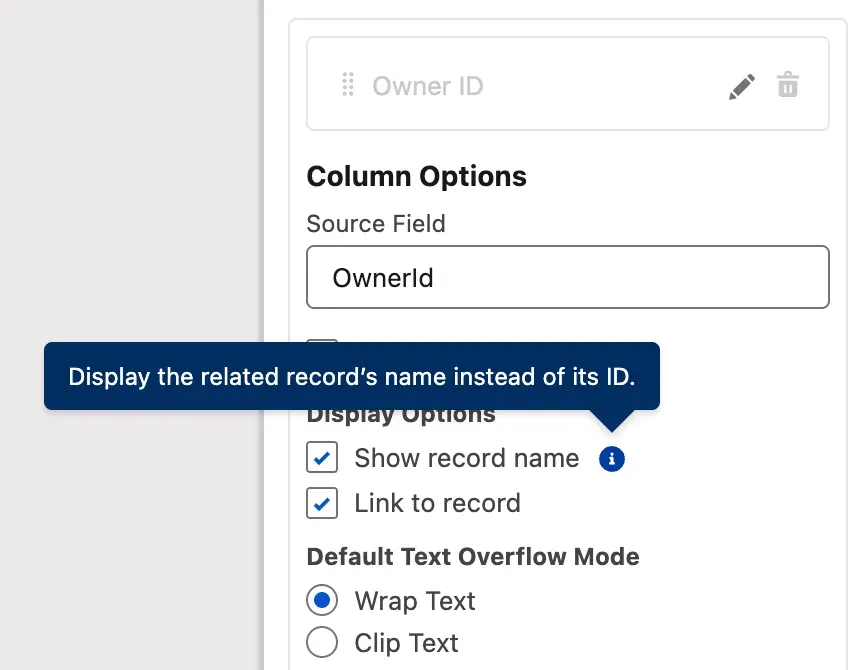
You’re now able to do more with lookups in the native Data Table component for Salesforce Flow. You can choose to display the name of the record instead of just the ID, and you can also enable hyperlink functionality with just a checkbox.
Radio Button Group Component
Instead of the ugly old way of displaying radio button options in Screen Flows, Summer ‘26 has given us a more visually appealing way of doing so. Now your users can click or tap on larger buttons as opposed to traditional radio buttons with the new Radio Button Group component.

Collapsible Fault Paths
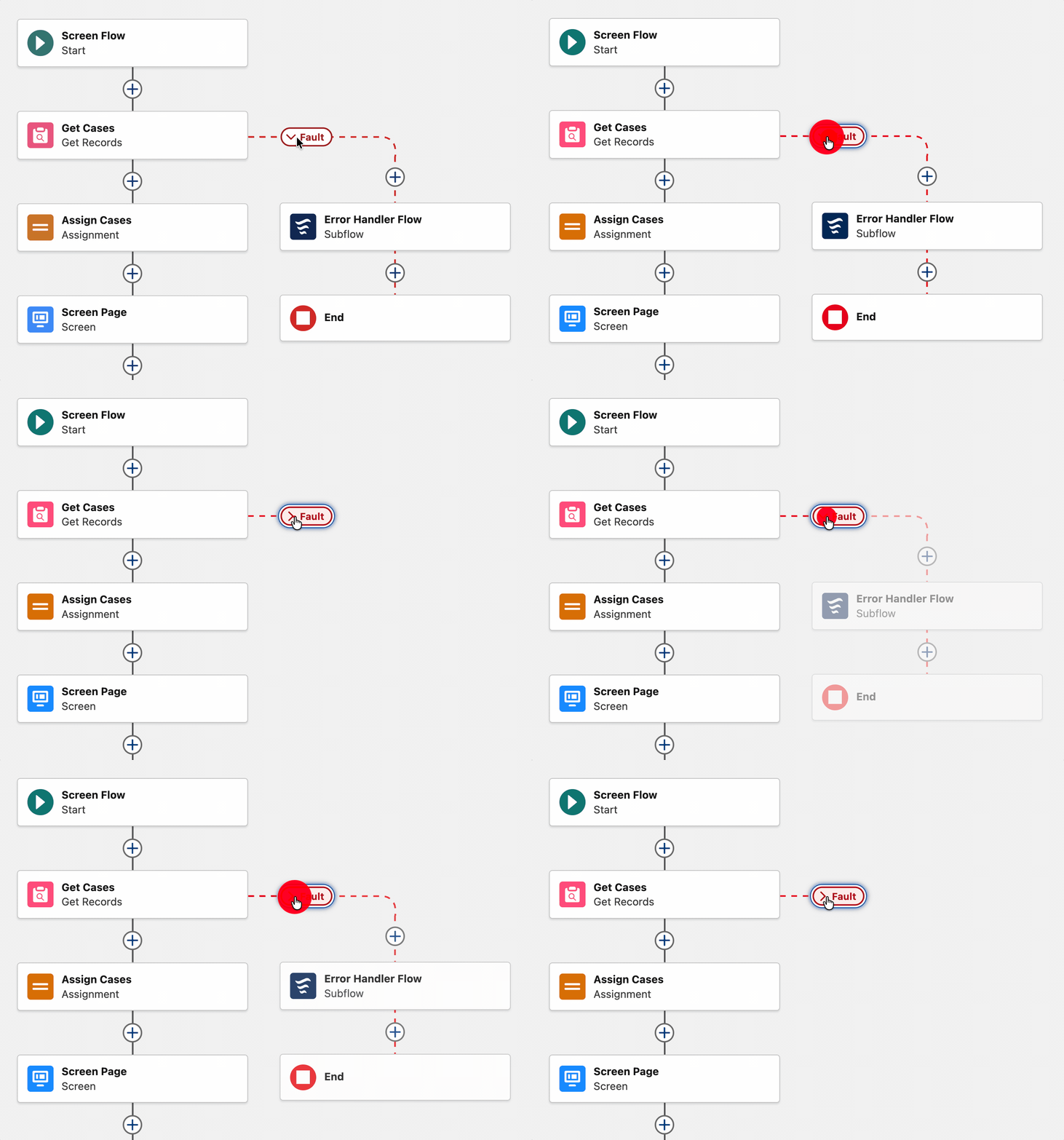
We all love a nice, clean Flow Builder canvas. Summer ‘26 delivers this by allowing you to collapse and shrink your fault paths, making getting a better birds-eye view of your flows much easier.
Top Service Features
Mariel Domingo’s back for more Summer ‘26 goodness, this time compiling a list of the top features for Service users.
Omni-Channel Routing and Scheduling Enhancements
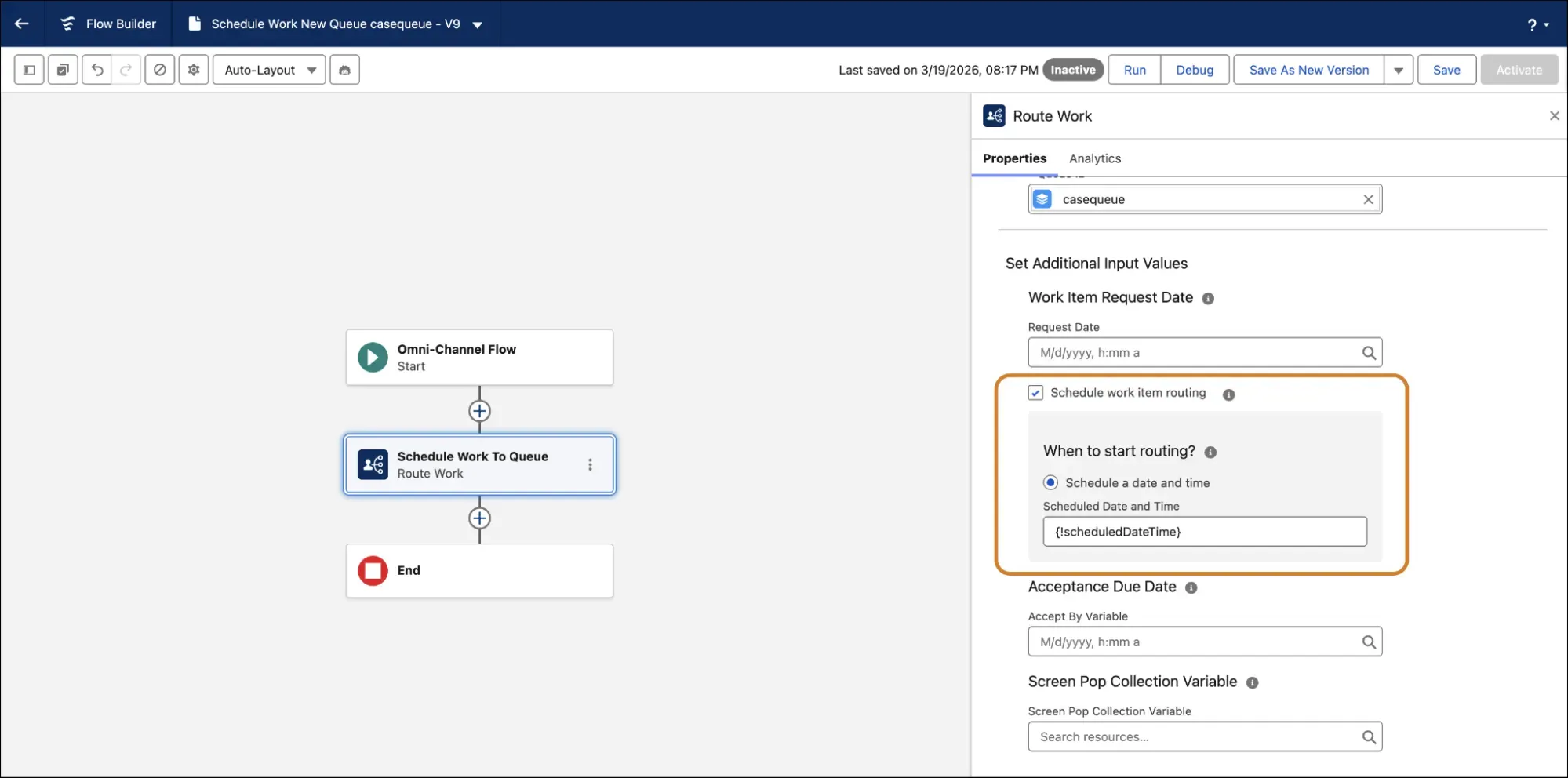
In Summer ‘26, you can now change the Omni-Channel routing to be based on the original request date. Previously, these would just be prioritized based on when the records entered the queue.
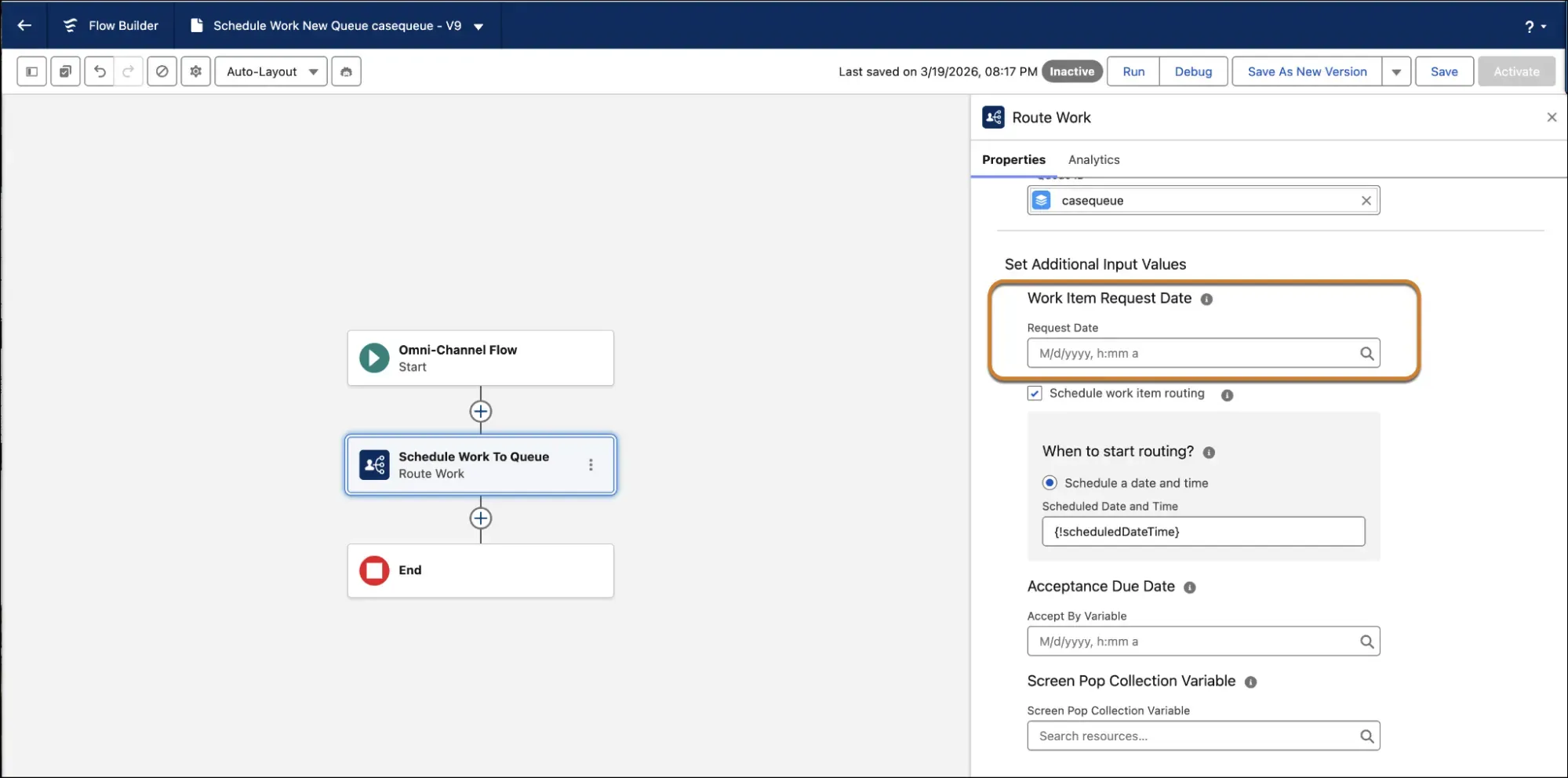
Additionally, you can schedule work items to be routed at a specific date and time rather than just adding them into the backlog immediately.
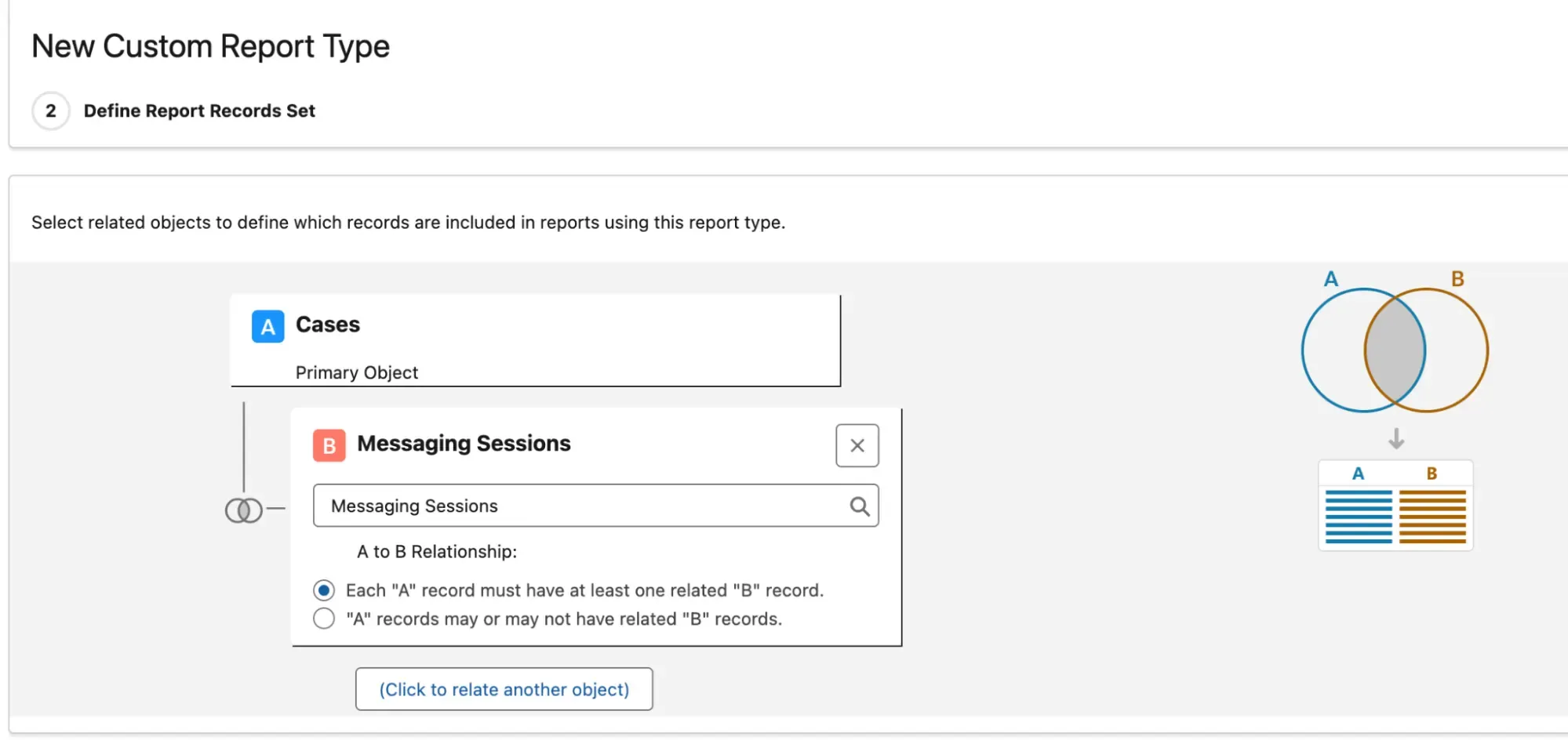
Report on Messaging Sessions
Messaging Sessions are officially supported as a related object on Cases when building out a new custom report type.
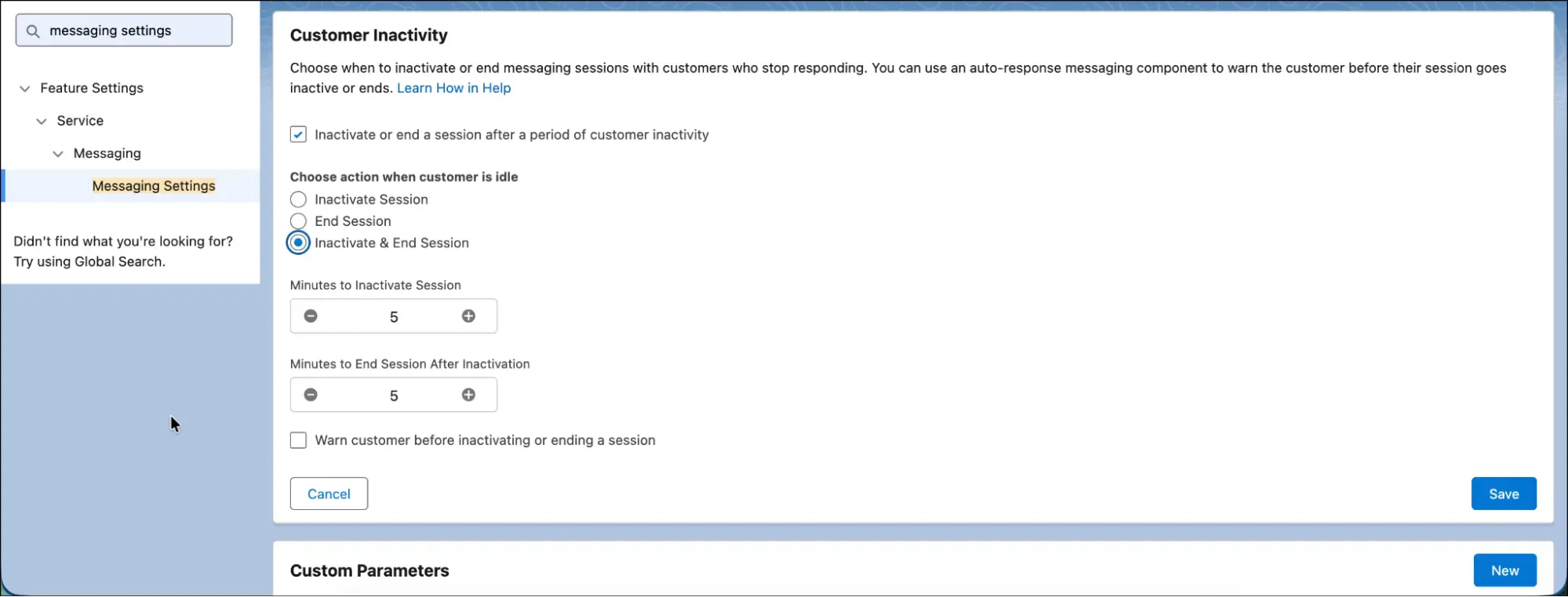
Automatically End Inactive Messaging Sessions
You can choose to automatically end messaging sessions after a period of inactivity with Summer ‘26. Historically, these would be marked as inactive but would require manual closing.
Top Sales Features
Last but not least, Christine has assembled a list of the top features that Summer ‘26 brings to Sales Cloud.
More Precise Planning With Currency and Quantity Targets
You can now define whether your goals are currency based or quantity based in Summer ‘26. This gives a lot more flexibility to sales teams who want to prioritize revenue growth or new acquisition counts.
Control Which Fields Get Autonomous Updates
You can now modify the Process Field Update Suggestions Flow to control which fields the Sales Management agent interacts with in your org. This means you can balance automation and control in all new ways in Summer ‘26.
Move from Lightning Sync to Einstein Activity Capture
Lightning Sync is going away in August 2026, so you will need to migrate to avoid issues. Salesforce’s Lightning Sync migration tool makes this an easy enough transition – not a simple flicking of the switch, but a structured path.
Release Updates You Need to Address
The release is upon us! As you read this, the first (or more) of the release weekends may have already passed, and if not, they’re quickly approaching. Release updates are changes that Salesforce applies to elements of the platform to help future-proof it. They’re designed to ensure Salesforce remains secure, performs well, and continues to be a valuable tool well into the future.
These changes are applied automatically by Salesforce when the major release is deployed, but there are some important steps you need to take and testing you need to complete prior to (or as soon as possible) the release to ensure that disruption is minimized or, preferably, avoided completely.
Enable Accessibility Enhancements for Date Pickers, Popovers, Bottom Utility Bars, Record Headers
This update ensures that users who use Salesforce via a browser at 200% magnification or greater are able to see date pickers, popovers, bottom utility bars, and record headers that display correctly.
Enable Accessibility Enhancements for Page Headers and Modal Windows When Zoom Is Greater Than 200%
Similar to the previous update, this ensures users are able to view page headers and modal windows when their zoom is closer to 300% or 400%.
Migrate to a Multiple-Configuration SAML Framework
Salesforce is removing the single-configuration SAML SSO framework that is currently in use, and as such, all customers will need to move to multi-configuration SAML. With this update, you’ll be able to integrate your org or Experience Cloud site with multiple external identity providers.
Salesforce-Managed X (Formerly Twitter) Authentication Provider Retirement
You’ll need to create a custom X app and update your SSO configurations to continue being integrated with X (formerly Twitter), as Salesforce is retiring the Salesforce-managed app for X.
Sort Apex Batch Action Results by Request Order
Action results will be shown in the order that they are received, starting in Summer ‘26. Historically, they have been prioritized to the top of the list if they are error-prone, and successful results were displayed at the bottom.
Use Visualforce PDF Rendering Service With Apex Blob.toPdf()
The Apex Blob.toPdf() methods for PDF rendering will use the same rendering service as Visualforce in Summer ‘26. This gives developers an expanded range of fonts to choose from, and the default font will be changed from sans-serif to serif.
Summary
This goes without saying: there are so many more features that Summer ‘26 brings to the table that you can take advantage of in your Salesforce org, but the team at SF Ben has tirelessly worked to bring some of the features we believe to be most impactful for a majority of users. Thank you for joining us as we unpacked these coming changes!
We’d love to hear how you’re planning to take advantage of some of these changes! If you’re working on some new functionality and planning on taking advantage of some of the Summer ‘26 changes, let us know in the comments below, or by responding to this post on social media or tagging us in a post.





Comments: