






The days are beginning to lengthen, the sun is driving away the clouds, and the trees are in full leaf – which can only mean one thing: the Summer ‘26 release is nearly upon us.
With preview orgs and release notes now available for everyone to start digging into, here are my picks for features that developers will want to play with from the Summer ‘26 release.
1. Preview a Single Lightning Web Component
Ok, I know as a starter this may not be an earth-shattering announcement, but the reason this is number one is that it is something that I and many others have been asking for since the Lightning Web Component framework was first released – the ability to preview a single component you are working on in your browser or in Visual Studio Code.
This feature became GA a couple of weeks ago and is just a huge time saver. No more having to reload the entire page to see a component update. I know, having used this whilst in preview, it has already saved me a ton of time and improved my development experience, so it’s definitely one you will want to try out.
2. State Management for LWC Is Here
Another feature that has been requested for a while is State Management, which is now fully GA in Summer ’26. But what is it, and why should you care?
Imagine a scenario where we have two components on an opportunity page: one for displaying a list of opportunity lines with the ability to add a new line item, and one displaying an overall summary of the opportunity, such as the total price. Currently, each of the components would send and receive data independently and communicate to each other via an event. So, if in the list component we added a new line item, an event would be dispatched to tell the summary component to retrieve the data again and update.
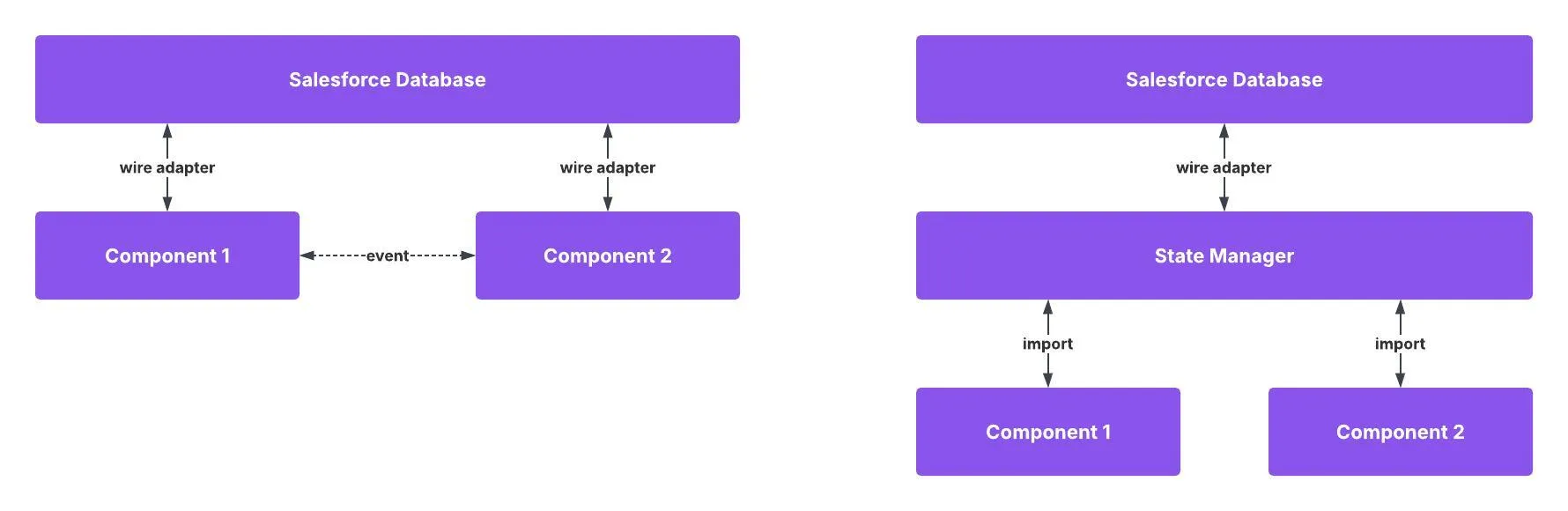
With state management, both components now work with an intermediary state manager that stores the details of the line items. The list component can add new lines and update the state manager, which will automatically update the summary component. Not only does this involve fewer round trips to the server, improving performance, but it also makes managing shared state data much easier, as it is all handled in a single place.
I can already think of a number of places where I can reduce complexity in my code using state managers, and I think this will be a huge improvement for developers.
3. Preview Features With Salesforce Release Manager (Beta)
Salesforce have announced the ability to opt in to Salesforce Release Manager, currently a beta opt-in, which allows you to preview and test upcoming features before they are released. Salesforce manages three channels:
- Standard: This is the stable, production release everyone is on.
- Accelerated: This is for production-ready features that have not yet been released in a major release.
- Dev: This is where new features are shared, often without full documentation and that are in active development. Items are promoted to the Accelerated channel prior to a major release when ready.
This is going to be extremely useful for developers to see what features are coming and also allows you to opt in to more developer previews. For example, in the Dev channel you can now access a developer preview of the new lightning-dynamic-list-container and lightning-dynamic-list-item components, which allow you to load large lists of data dynamically.
4. Updated Security in Apex
From Summer ‘26, any new Apex written using API version 67 will have some updated security behaviors designed to help make Apex and SOQL more secure by default.
The first of these is that database operations will run in user mode, rather than system mode, by default. This means that the query:
SELECT Id, Name, Can_I_Access_This__c FROM Account
will run in system mode in v66 and user mode in v67, potentially returning different results depending on the accessibility of the Can_I_Access_This__c field to the end user.
In addition, if the class using this query is API v67 and has no sharing declaration, it will now default to with sharing instead of without sharing. Salesforce has also confirmed that all Apex triggers, on any API version, will now run in system mode, as there were previously edge cases where sharing rules were enforced.
Finally, Salesforce is deprecating the WITH_SECURITY_ENFORCED SOQL clause to promote using user mode or system mode explicitly in your queries. Overall, these changes are a step in the right direction to further enhance security on the platform by default. Just make sure to test your code when moving up API versions for any unexpected sharing or permissions exceptions.
5. Multiline Strings and String Templates
Working with multiline text in Apex has never been easy, but Summer ‘26 brings both multiline strings and string templates to make working with text easier.
Firstly, you can now define a multiline string in Apex using a triple single quote:
String myPoem = '''
Multiline strings are here, hooray!
You can start using them today.
Triple quote, then start a new line,
For example this will work fine,
Poetry is not my forte!''';
We also now have Apex string templates using these new multiline strings, where we can pass in a map of values to populate defined variables. For example:
String message = '''
Hello ${firstName},
Your order was dispatched on {$dispatchDate}
'''.template( new Map {
'firstName' => 'Paul',
'dispatchDate' => Date.today()
});
6. Calculate Values in a SOQL WHERE Clause (Pilot)
This next feature is beta-only, but has the potential to be really powerful for developers: the ability to use a new FORMULA() function in the WHERE clause of a SOQL query so that you can compare values in real time to reduce post-query processing.
This is currently in pilot, so details are limited, and you need to reach out to your Account Executive or Customer Success Manager if you want to get on the pilot, but it looks to be a very exciting update I am keen to see in the wild.
7. Updated Apex Flow Action Input Options
There are a number of updates for those of us who build Apex actions for use in Flow, starting with the ability to add custom property editors to individual action inputs rather than the entire input, the ability to define picklists for action inputs, the option to add a custom header to the configuration page for the action in Flow Builder, and streamlining of how certain types of metadata are selected for Apex Action inputs.
Overall, this should allow developers to build far easier-to-configure and manage Flow actions. For managed package developers, this is also a real boost, as it makes it much simpler to provide a fully featured and guided user experience for your Flow actions that can help customers adopt the tools and build more.
8. Style Settings for Custom Flow Screen Components
The last item on the list is the ability to provide custom styling hooks for your custom Flow Screen Components written in LWC. You can provide hooks for color, radius, weight, and a host of other CSS attributes. The example code from the release notes below shows how you can allow users to customize the components styling by exposing the standard SLDS CSS hooks. Note, you can also group the hooks together to make them more intuitive to manage as well.
<targetConfig targets="lightning__FlowScreen">
       <stylingHook name="--slds-c-button-radius-border" label="Border Radius" type="dimension"/>
       <stylingHook name="--slds-c-button-sizing-border" label="Border Weight" type="dimension"/>
       <stylingHookGroup name="default" label="Default" displayInTab="true">
           <stylingHook name="--slds-c-button-neutral-color-background" label="Background Color" type="color"/>
           <stylingHook name="--slds-c-button-text-color" label="Text Color" type="color"/>
           <stylingHook name="--slds-c-button-neutral-color-border" label="Border Color" type="color"/>
       </stylingHookGroup>
   </targetConfig>
As we see Flow in more and more locations, having custom components that can be styled to match the intended look and feel of the deployment target is going to be helpful in maintaining a seamless brand setup and identity.
Summary
So that’s the top Summer ‘26 features and update areas that I think Salesforce Developers will find exciting. For me, I cannot wait to play with multiline strings and LWC state management. And, with the many hack announcements last year, it is good to see Salesforce also pushing security at the code level in this release as well.
Do you think I have missed something? Let us know what you are most excited about in this release!
Read More
- 10 New Salesforce Flow Features in Summer ‘26
- Top 11 Salesforce Summer ‘26 Features for Admins
- Service Cloud: Top Salesforce Summer ’26 Features
- Sales Cloud: Top Salesforce Summer ‘26 Features
- Top 9 Summer ‘26 Updates for Salesforce Marketers





Comments: