

This guide builds on the foundations laid out in a previous article. It is designed as a powerful tool that will empower Salesforce Architects, Admins, Developers, and security professionals to enhance their security measures.
This guide provides practical steps, checklists, and real-world insights to help you run effective Salesforce penetration tests and strengthen your overall security posture.
What’s Required for a Pen Test?
Conducting a successful Salesforce penetration test (pen test) calls for careful planning and is built on several key components.
Establishing a Clear and Compliant Scope
A successful Salesforce pen test starts with clear scoping. Organizations must define which areas to assess – configuration, Apex, LWCs, Visualforce, Experience Cloud, connected apps, and external APIs – and identify assets containing sensitive data and all possible entry points.
Since Salesforce requires approval for production testing and restricts destructive techniques, a precise scope is critical for compliance and safety. Good scoping keeps the test focused on real business risks rather than generic issues.
Work With Salesforce-Aware Testers
Not all penetration testers are equipped to assess a platform as specialized as Salesforce. Because Salesforce is metadata-driven, multi-tenant, and governed by a unique security framework, it requires penetration testers who understand its architecture – Apex, LWC, sharing models, OAuth, and Experience Cloud.
Specialists can identify subtle yet profound issues, such as overly broad permissions or exposed guest endpoints, that generalist testers often overlook.
Using the Right Mix of Automated and Manual Tools
No automated tool can fully capture Salesforce’s business logic, so a blended testing approach is essential. OWASP ZAP helps map endpoints and flag common web issues, Salesforce Inspector reveals object and field permissions, and the Salesforce CLI exposes raw metadata for static analysis.
Manual testing remains crucial for uncovering logic flaws in custom code and verifying that security controls work as intended.
Focus on the Custom Code and Business Logic
Most vulnerabilities in Salesforce originate from custom Apex and UI components. These must be reviewed for weak sharing, unsafe dynamic SOQL, unvalidated inputs, and exposed methods.
Since custom code can sidestep native controls, testers pay close attention to secure-development patterns like with sharing, Security.stripInaccessible(), Named Credentials, sanitization tools, and static code scanning.
Test with Different Profiles, Roles, and Permission Sets
Salesforce must be tested from the viewpoints of employees, partners, community users, integrations, and guest users. This exposes privilege escalation paths, permission creep, and unintended access caused by complex sharing.
Testing low-privilege personas is particularly important because attackers rarely begin with admin rights.
Prioritizing Remediation and Verifying Fixes
Pen test value comes from what happens after findings are identified. Teams must prioritize issues by severity and exposure, fix the most exploitable flaws first, and retest to confirm remediation.
Adding code scans and permission checks to CI/CD prevents the same weaknesses from reappearing.
Pro Tip: Don’t Forget Salesforce Trust Rules
A smart penetration test must operate within Salesforce’s Trust and Compliance Framework. Salesforce enforces specific approval requirements for production testing, and failing to follow them can lead to blocked tests or even tenant restrictions. Always review the latest Salesforce Trust documentation before scheduling any activity, especially if you plan to touch production systems.
When dealing with live data, consider masking or anonymizing sensitive fields to reduce risk during testing. It’s also wise to enable robust monitoring – such as login history, field audit trails, and Event Monitoring – so your security team can track unusual activity, validate tester actions, and ensure that any anomalies are quickly identified.
Salesforce Penetration Testing Checklist

Environment Preparation
Begin by identifying every Salesforce environment in use – Production, Sandboxes, Developer Editions, and any additional clouds such as Experience Cloud, Marketing Cloud, or Financial Services Cloud. Confirm what Salesforce allows you to test by reviewing its penetration testing policy, and request approval before testing production. Coordinate internally so security and operations teams understand when testing will occur, and avoid peak business hours or Salesforce release windows.
Authentication and Access Controls
Ensure MFA is enforced for all users, especially administrators, and remove shared or unused admin accounts. Guest user profiles must follow strict least-privilege principles, with no access to sensitive objects or fields. Session settings, login IP ranges, login hours, and OAuth scopes should all be configured to match organizational security standards.
User Permissions and Profile Review
Verify that profiles and permission sets grant only what each user needs. Limit high-risk permissions such as “API Enabled” and “Modify All Data.” Confirm that sensitive fields are properly hidden via Field-Level Security, and validate that record-level access via the role hierarchy and sharing rules aligns with business intentions.
Code and Customization Review
Review all custom Apex, LWCs, Aura components, and Visualforce pages for vulnerabilities such as injection, XSS, insecure endpoints, or improper use of without sharing. Ensure external callouts use Named Credentials and secure HTTPS connections, and remove any hardcoded secrets. Validate that custom code performs server-side authorization and input validation.
Network and Integration Testing
Assess outbound callouts, inbound APIs, and third-party integrations to ensure they use secure authentication (OAuth/JWT), strong TLS, rate limiting, and appropriate IP allowlisting. Review Connected Apps to confirm they request the minimum required OAuth scopes, and verify that embedded iframes and scripts follow CSP and sandboxing best practices.
Vulnerability and Exploit Testing
Act like an attacker by attempting horizontal and vertical privilege escalation, testing direct access to Visualforce or Aura pages, and performing input fuzzing on forms and APIs. Validate CSRF protections on all state-changing actions, and ensure metadata, debug logs, and system messages do not leak sensitive information.
The table below summarizes the assessment findings by group and ranks them by severity. The table provides an overview of the assessment findings and allows the Remediation team to focus efforts on the areas of highest severity.
| ID | Finding | Remediation Status | Severity |
|---|---|---|---|
| 1 | Weak Password Requirements | Not in Scope | Medium |
| 2 | Insufficient Cookie Protection | Remediated | Low |
| 3 | Using Components With Known Vulnerabilities | Remediated | Low |
| 4 | Subresource Integrity Not Implemented | Remediated | Low |
Logging, Monitoring, and Alerts
Enable and review Event Monitoring logs (or standard login history and setup audit trail if Shield is unavailable). Watch for suspicious login patterns, excessive API usage, configuration changes, or sudden data exports. Configure alerts for failed logins, high-risk events, and unusual authentication behavior to detect issues quickly.
Reporting and Remediation
Document findings clearly with severity, evidence, and recommended fixes. Prioritize remediation based on risk, addressing authentication flaws, exposed data, or admin-level weaknesses first.
Re-test after every fix to verify closure, and share a sanitized report with security leadership to track progress and support audits.
Example Findings Template:
| ID | Severity | Finding | Evidence | Recommendation | Owner | Status | Retest Date |
|---|---|---|---|---|---|---|---|
| 001 | Critical | Excessive admin users (12 active) | Screenshot of the Users report | Reduce to 3–5 admins, apply delegated admin for scoped tasks | Security Lead | Open | Pending |
| 002 | High | Guest profile has Read access to Contact | Guest User Access Report | Remove Contact object access; expose only needed objects | Salesforce Admin | In Progress | 2025-09-30 |
| 003 | Medium | Debug logs contain email addresses | Log file extract | Mask PII in logs; reduce debug levels in PROD | Dev Lead | Closed | 2025-09-20 |
Supporting Tools and Optional Resources
Use scanning tools such as Salesforce Code Analyzer, PMD, or Checkmarx to continuously evaluate custom code. For deeper assurance or compliance-driven programs, engage Salesforce-authorized penetration testing partners who are familiar with the platform’s architecture, limitations, and attack patterns.


In addition to internal assessments, agencies often use third-party providers – such as BitSight and RSM – as examples of external tools that complement Salesforce security work. BitSight offers continuous, external-attack-surface ratings, while RSM provides broader penetration testing across networks, APIs, integrations, and identity systems. These are just examples of partners that can help validate risks outside Salesforce.

Additional Steps for Experience Cloud
If you’re running Salesforce Experience Cloud (formerly Community Cloud), it’s not just about testing – it’s also about keeping your portal configuration clean, secure, and optimized. Here’s a checklist to support that effort:

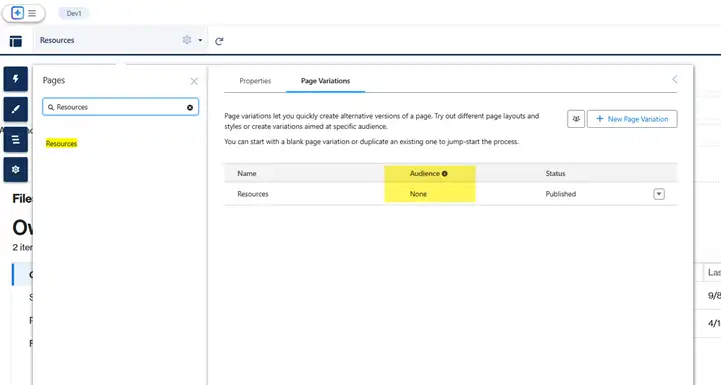
- Delete Unused Portal Pages: Regularly audit your portal and remove unused pages; if a page can’t be deleted due to dependencies, set its visibility to “None” to prevent access.
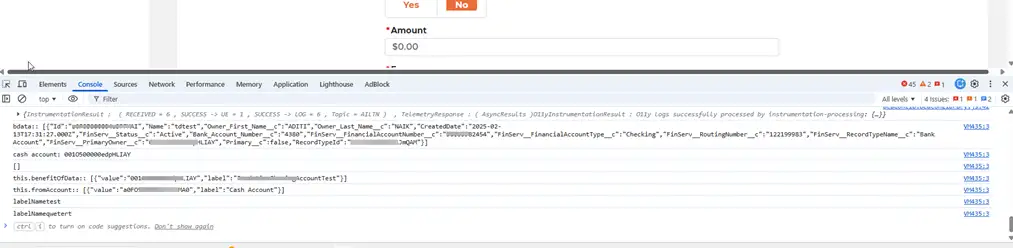
- Console Logs and Debugs: Remove all
console.log()statements from LWCs and Aura components and disable Apex debug logs before deploying to production.
- Portal User Access Review: Review profiles and permission sets for portal users twice a year and remove access to unnecessary objects and fields.
- Endpoint Security: Review all integrations, disable unused endpoints, and ensure active ones are protected with Named Credentials, authentication, and IP restrictions.
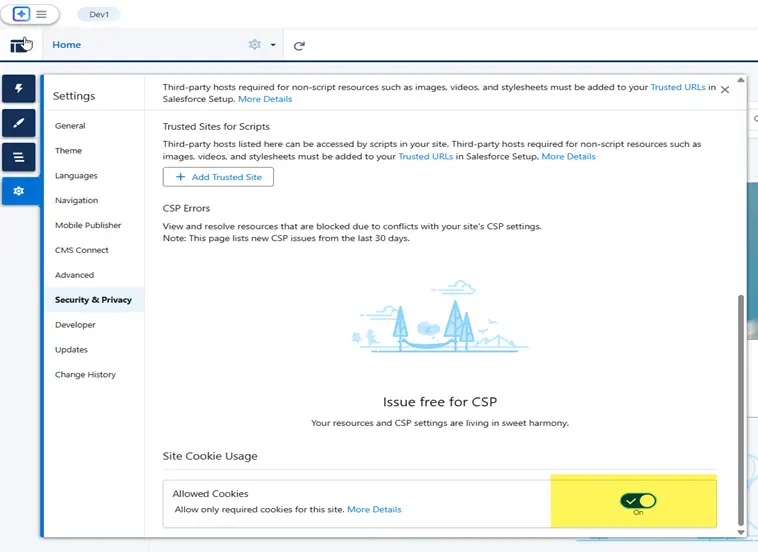
- Cookie and Session Security: Configure cookies with Secure and HttpOnly flags, set appropriate session timeouts, and renewal policies. Enable clickjack protection, require CSP Trusted Sites for external content, and implement session timeout warnings to minimize accidental session exposure.
- Guest User Profile Access: Limit the Guest User profile to only essential objects and fields, and document any enabled access.
- Password Standards: Enforce Salesforce’s password policies and encourage users to create unique, strong passwords or use SSO with MFA. Review login history for repeated failed attempts, ensure lockout thresholds are set correctly, and rotate admin credentials regularly.
- Apex Class Sharing Rules: Set Apex classes to ‘with sharing’ by default and use ‘without sharing’ only when absolutely necessary and documented. Also review batch classes, schedulables, and queueables to verify proper sharing behavior and ensure security-sensitive logic includes FLS and CRUD checks.
- Third-Party Library Management: Keep an inventory of all third-party libraries used in LWCs and update them when security patches or advisories are released. Avoid unverified CDN sources, pin specific versions to prevent unexpected automatic updates, and scan libraries for deprecated or risky functions.
- SSL Enforcement: Force HTTPS across the portal, block mixed content, and regularly test the health of certificates and SSL configuration.
Use Case: A Story from the Field
During a recent penetration test within a large government agency using various Salesforce Cloud products, the assessment revealed how a series of small misconfigurations, when chained together, could have led to a significant security incident. What appeared to be isolated issues across passwords, sessions, libraries, and permissions ultimately formed a realistic attack path that an adversary could have exploited end-to-end. In public-sector Salesforce environments, issues like these have an even larger impact because secure cloud CRM design is foundational to citizen trust and government cybersecurity expectations.
The test began by evaluating the authentication flow. Although the portal enforced password complexity requirements, testers discovered that weak yet common passwords – such as Password!234 and P@ssw0rd123 – were still allowed. Using automated credential-stuffing tools, the testers successfully compromised several low-privilege accounts. This provided the initial foothold needed to advance further into the system.
Once authenticated, the testers examined session controls. They found that session cookies lacked Secure, HttpOnly, and SameSite protections, making them susceptible to theft. With this weakness, the testers used a controlled XSS payload in a custom LWC to steal a session token and escalate privileges by impersonating a higher-level internal user.
Client-side analysis uncovered another critical issue: the portal was using outdated third-party libraries (including jQuery 1.11.3), known to contain exploitable CVEs. Because these libraries were loaded from external CDNs without Subresource Integrity (SRI), the testers demonstrated that a poisoned CDN or man-in-the-middle scenario could inject malicious JavaScript. This allowed them to keylog inputs, read sensitive fields, and maintain persistence in the user’s browser.
The test team then moved to API and metadata review. They found several endpoints where field-level and object-level security were not consistently enforced, exposing sensitive PII (personally identifiable information) such as driver’s license numbers and bank data. In addition, non-production environments contained unmasked PII, meaning any contractor, offshore tester, or compromised sandbox could gain access to real citizen data. By chaining weak FLS/OLS with their earlier session hijack, testers were able to extract regulated records in bulk.
The most severe finding, however, involved Experience Cloud guest-user misconfiguration in multiple sites. Guest users had access to 1,600+ fields and 90+ tabs, as well as standard Salesforce pages, significantly increasing exposure. Without authentication, the guest profile allowed API access to internal Knowledge Articles and particular custom objects. Using automated enumeration, testers retrieved a large portion of internal documentation and metadata – all without a single login. No rate limiting or guest-activity monitoring was in place, making the attack nearly invisible.
By the end of the penetration test, the testers had validated a complete attack chain:
- Weak passwords → foothold through credential stuffing.
- Unsecured cookies → session hijack via controlled XSS.
- Outdated libraries and missing SRI → persistent client-side compromise.
- Loose FLS/OLS → bulk exfiltration of sensitive PII.
- Exposed guest access → anonymous extraction of internal data.
This chain showed how security issues compound rather than exist in isolation. A single flaw might be manageable, but multiple small misconfigurations can create a high-impact breach scenario.
All issues were thoroughly documented with proofs of exploitation, affected components, and business-risk ratings. The engagement concluded with a prioritized remediation plan covering hardened password policies, MFA enforcement, cookie security updates, library upgrades with SRI/CSP, tighter FLS/OLS, sandbox masking, guest-user lockdowns, and improved monitoring.
The key lesson was that penetration testing reveals how real attackers exploit combinations of weaknesses. Even mature Salesforce environments can be compromised when misconfigurations align. The value of a pen test is not in isolated findings but in exposing how those findings work together to create a realistic, high-impact attack path.
Final Thoughts
Salesforce penetration testing is a proactive, essential practice for any organization that relies on the platform for CRM, portals, and business operations. As this guide demonstrates, Salesforce’s flexibility introduces unique security challenges that require platform-specific awareness – from Apex code validation and API security to guest user access controls and Experience Cloud configuration hygiene.
By combining static and dynamic testing methods, involving certified security testers, and using platform-native tools such as Security Health Check and Event Monitoring, organizations can systematically identify and address vulnerabilities. More importantly, regular testing helps teams meet compliance requirements, reduce business risks, and build lasting trust with customers and stakeholders.
Security isn’t a one-time event. It’s a continuous process. And in the cloud, it’s shared. Salesforce provides a secure infrastructure and robust security features, but that doesn’t mean customers are off the hook.
Salesforce handles the heavy lifting of platform and infrastructure security, while it’s up to us – the architects, admins, and developers – to configure, customize, and integrate the platform securely. That means applying the tools Salesforce gives us (MFA, Shield, Named Credentials, proper sharing models, secure coding practices) in line with best practices.
Regular penetration testing helps close that loop by validating that our implementation of Salesforce’s security model is working as intended.
Salesforce is powerful, but that makes it a target. A smart pen test helps you find and fix the weaknesses before attackers do – and the detailed steps in this guide show you exactly how.
Stay smart. Stay secure. Test often.
Further Resources
- Salesforce Security Guide
- Salesforce CRM Services Platform Security FAQs
- Cybersecurity For Digital Public Services
- NIST SP 800-115: Technical Guide to Information Security Testing and Assessment