

Salesforce has announced Agentforce Coworker, a new tool as part of its wider Agentforce product offering.
Coworker is designed to be “your new AI teammate […] inside every search bar”, meaning that Agentforce is now able to instantly tap into your CRM data at any time to take action. This feature is currently in Beta and available today for all Agentforce customers.
What Is Agentforce Coworker?
Salesforce CEO Marc Benioff took to X yesterday to announce the release of the new tool, calling it “your new AI teammate”.
Welcome Agentforce Coworker. 🤝
— Marc Benioff (@Benioff) May 21, 2026
Your new AI teammate is now inside every Salesforce search bar. It doesn’t just find things — it works with you. Agentforce now instantly taps into your CRM data, workflows, customer history, opportunities, and cases… then takes action in… pic.twitter.com/EQDogzKCDF
“It doesn’t just find things – it works with you,” he wrote. “Agentforce now instantly taps into your CRM data, workflows, customer history, opportunities, and cases… then takes action in real-time.”
“It works where you work,” is the messaging delivered in the tool’s new promotional video. This means users can utilize it across Salesforce, Slack, Teams, ChatGPT, or wherever else they work most day-to-day. By using simple search functionality, Coworker is able to connect to agents in all areas of your business – across platforms – and bring you the answers you need, all in one place.
Agentforce Coworker also grants users the ability to build custom agents that run natively in Slack, Teams, and mobile.
Benioff explained that with Coworker, there is no need for copying and pasting, tab hunting, or context switching, indicating that the release of the tool is part of the CRM giant’s wider mission to reinvent Salesforce’s UI and how accessible it is for growing orgs and growing tech stacks.
Does It Really Work?
As Salesforce has released more and more tools as part of its Agentforce suite, it has become difficult to discern which of them are actually worth the investment. However, with Coworker, it has already begun to receive the seal of approval from some professionals, including notable community voice Andrew Russo.
Andrew took to X himself after Benioff’s announcement to share his enthusiasm for the new tool and its functionality, writing: “There is no way this is real life right now.”
“Agentforce Coworker was able to pull together and navigate our complex sales and ERP data to answer questions that just yesterday would have been 45-60 mins of swivel chairing between screens and systems to even try to figure out,” he wrote. This subsequently ended up getting attention from the CEO.
“I’m freaking speechless at how good it works,” Andrew told SF Ben. “I expected to write some scathing post making fun of how much it sucked – turns out I’m still trying to break it.”
“It literally was the fastest setup I’ve ever had for a single Salesforce product. Agentforce could’ve never figured out the questions that I was asking – it literally would’ve just given up.”
Of course, the tool has not received approval from everyone, as can be garnered from the responses to Benioff’s X post and the ongoing discussion thread on r/Salesforce. A recurring critique is the request for clarification on whether this is a rename, rebrand, or a new tool entirely, which, with Salesforce’s renaming track record, is perhaps a valid ask.
SF Ben has reached out to Salesforce for comment.
How Do I Get Started?
Agentforce Coworker is available today for all Agentforce customers across Enterprise, Unlimited, and Agentforce 1 Editions. The setup of it is largely automated, but ensure you meet these requirements:
- A Data 360 Admin or Data 360 Architect to configure Agentforce Coworker.
- Access_Ai_Search Permission Set Group and AI Search Permission Set License to configure Agentforce Coworker.
- Access_Ai_Search Permission Set Group and AI Search Permission Set License to use Agentforce Coworker.
To turn it on in your org:
- From your org, select Setup and in the Quick Find box, enter Agentforce Coworker.
- Select Get Started with Agentforce Coworker.
- Click Turn On.
- When the Turn on Agentforce Coworker window appears, select Confirm.
- Salesforce completes the following steps on your screen automatically:
- Turn on Agentforce Studio – enables the Agentforce Platform.
- Connect to Salesforce CRM – links Agentforce Coworker to your CRM data.
- Set up search methods – configures the search infrastructure.
- Create Agentforce Coworker Agent – provisions the search agent.
- Set up Personalization Features – enables personalized search results.
- To make sure that you have the most updated features, enable the Beta Generative AI Models feature in Setup.
- In the Setup menu, enter Einstein Setup in the Quick Find box.
- Under Turn on Beta Generative AI Models, switch the toggle to On.
- When the automated steps are finished, a check mark appears next to each of the steps, and a green On label appears in the top right corner.
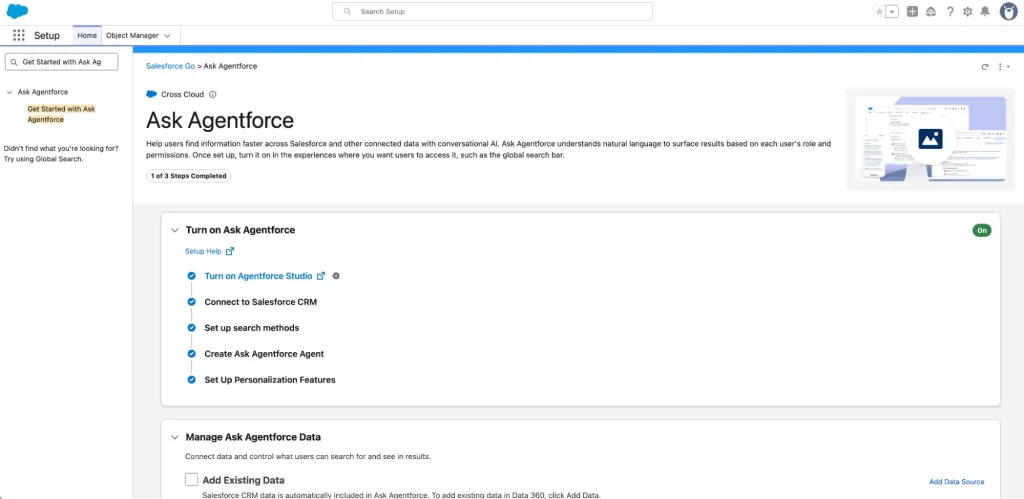
For more information on this, including which automatic actions are taken with this setup, we recommend consulting the official setup page.
Summary
Agentforce Coworker marks the next step of Salesforce’s goal to transform the way its users navigate its UI, following the launch of Slack CRM and Co-Founder Parker Harris’ comments on whether users ever need to log into Salesforce again.
This also feels like it plays into the next part of the Help Agent’s pipeline, as in March, we revealed that Salesforce had plans to announce the availability of its Help Agent in-app, meaning that the agent is able to answer questions and provide support to users directly from their orgs, building off of context and user-specific data. Is this what Coworker is? It is likely that this will become clearer as the tool is gradually adopted.