

Since its release, Lightning Web Components (LWC) has transformed Salesforce development through modern web standards and enhanced performance. However, the increased complexity of modern LWCs powering mission-critical applications necessitates robust testing frameworks that can scale with organizational growth and maintain quality standards across diverse development teams to ensure code quality and system reliability.
This article unveils a comprehensive GitHub Actions pipeline implementing automated LWC testing using the Jest framework and tailored to address enterprise-scale testing requirements. This pipeline demonstrates several key innovations, such as dynamic metadata synchronization with Salesforce organizations, automated test discovery and execution, comprehensive result analysis and reporting, and scalable architecture supporting varying project sizes.
Why Automate LWC Testing?
There is a broad consensus in the software development community that automated testing is a foundational best practice for ensuring code quality and long-term reliability.
Manual execution of test cases, where developers or testers run tests by hand rather than through scripted automation, can be error-prone, inconsistent, and difficult to scale, especially across large teams or frequent release cycles. When used in isolation, this approach falls short of meeting the demands of today’s fast-paced development environments and complex application architectures.
This challenge becomes even more critical in enterprise LWC applications, where components are often tightly interconnected. In such systems, even small changes can have wide-reaching effects, making comprehensive, repeatable test coverage more important than ever to ensure system stability and prevent unintended regressions.
That’s where Continuous Integration (CI) comes into play. CI is a development practice where code changes are regularly merged into a central repository and automatically built and tested. This enables early detection of integration issues and helps maintain a stable, deployable codebase at all times.
Integrating automated testing into Continuous Integration (CI) pipelines provides game-changing advantages:
- Fast Bug Detection: Identify defects and regressions before they reach production environments.
- Rock-Solid Consistency: Maintain standardized testing practices across all development teams.
- Scalable Quality Control: Sustain rigorous testing as the codebase expands significantly.
- Faster Feedback Cycles: Deliver prompt validation throughout development phases.
- Risk Mitigation: Prevent cascading effects from component changes.
Jest: The Testing Powerhouse
Jest is a widely adopted open-source testing framework that powers a comprehensive JavaScript testing ecosystem. It brings several game-changing capabilities:
- Zero Configuration Magic: Jest works out of the box with minimal setup, automatically discovering test files and providing intelligent defaults that align with Salesforce best practices.
- Snapshot Testing: Captures component outputs and compares them across test runs, ensuring UI consistency over time.
- Mocking Capabilities: Isolates components from external dependencies, enabling truly unit-focused tests.
- Code Coverage: Built-in coverage reporting helps you identify untested code paths, driving quality improvements across your LWC components.
Salesforce-Specific Testing with @salesforce/sfdx-lwc-jest
The plugin @salesforce/sfdx-lwc-jest is a customized wrapper for Jest specifically tailored for Lightning Web Components (LWC). This plugin extends Jest with Salesforce-specific configurations, mocks, and utilities.
Key Features:
- Lightning Platform Mocks: This framework includes built-in mocks for Lightning Platform services like Lightning Message Service, User Interface API, and Wire Adapters. These mocks allow components to be tested in isolation without requiring actual Salesforce org connectivity.
- Wire Service Mocking: Sophisticated simulation of different data states and error conditions.
- Component Lifecycle Simulation: Accurate simulation of LWC lifecycle events, including connectedCallback, disconnectedCallback, and reactive property updates.
- Lightning Design System Support: Testing components that utilize SLDS classes and styling.
- Shadow DOM interaction: Proper handling of Shadow DOM elements.
- Asynchronous operation handling: Robust support for async flows and promises.
Hands-On Tutorial
Roll up your sleeves and let’s build a pipeline. Before setting up the pipeline, ensure you have the essential building blocks:
1. Set Up A GitHub Repository: Sign in to GitHub and create a new private repository for your Salesforce project as illustrated below.

2. Retrieve Your Salesforce Org Authentication URL: Having Salesforce CLI installed on your terminal, connect to your Salesforce org and generate the authentication URL by running the following:
> sf force:auth:web:login --alias <OrgAlias> --instance-url <OrgURL> --set-default

A new browser tab will open, prompting you to log in to your Salesforce org. Enter your credentials, and once authenticated, close the tab.

3. Next, execute:
> sf org display --target-org <OrgAlias> --verbose
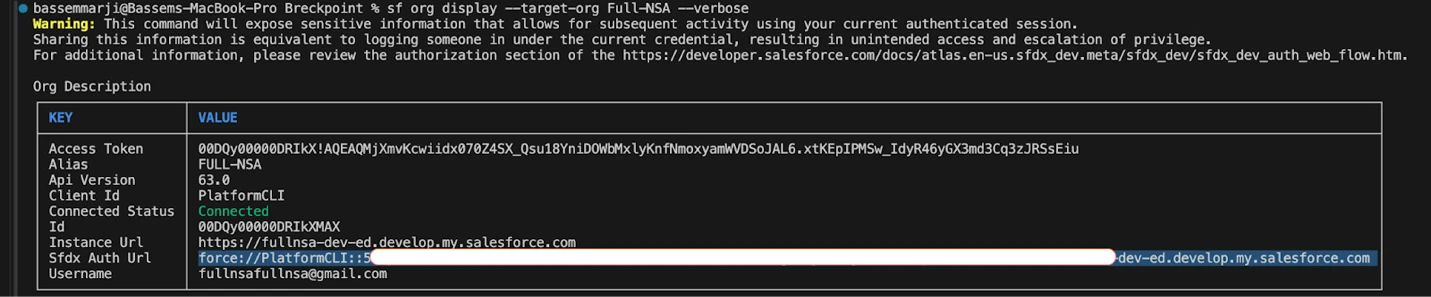
Save the value shown after Sfdx Auth Url for later use.
Note: Protect SFDX Auth URLs as highly sensitive credentials. If compromised, attackers gain authenticated Salesforce access matching the associated user’s permissions. Since most development orgs use Administrator profiles, unauthorized access can lead to complete compromise of the org.
When connecting to orgs containing sensitive data, always employ least-privilege service accounts.
4. Add Secret Variables to GitHub: Navigate to your repository’s Settings → Secrets and Variables → Actions. Click on New repository secret to add the following secret:
| Secret Name | Description |
|---|---|
| ORG_SFDX_URL | SFDX authentication URL for your Salesforce org |


5. Enable Workflow Permission: Ensure that permissions for actions and reusable workflows are granted by enabling the “Allow all actions and reusable workflows” setting:

6. This article assumes you’ve already created a Salesforce project and an LWC component named healthPlanManager, for examplee, using the Salesforce CLI as below:
> sf generate lightning component --name healthPlanManager --type lwc --output-dir force-app/main/default/lwc
Note that when generating this component using the CLI command or the VS Code Salesforce extensions, a test file healthPlanManager.test.js is automatically created in the component’s __tests__ directory as shown below:
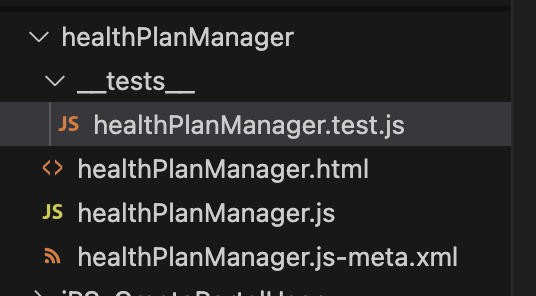
7. Create a directory structure for test discovery: In your repository, create a folder config including a manifest file named package.xml. This file defines which metadata components to retrieve from your Salesforce org. For this instance, we’ll include only the LWC files. A complete project would typically define additional metadata components as well:
<?xml version="1.0" encoding="UTF-8"?>
<Package xmlns="http://soap.sforce.com/2006/04/metadata">
  <version>55.0</version> <!-- Requires API 45.0+ for LWC -->
  <types>
    <!-- Retrieve ALL LWCs -->
    <members>*</members>
    <name>LightningComponentBundle</name>
  </types>
</Package>
On a related note, the pipeline implements a dynamic test discovery mechanism requiring strict adherence to a predefined directory structure.
To ensure tests are properly detected and executed, organize your test scripts as follows:
- In your repository, create a root directory called tests.
- Under tests, add folders for each component (e.g., healthPlanManager).
- Within every component folder, create a __tests__ subdirectory.
- For each component, place respective Jest test scripts (e.g., healthPlanManager.test.js) in their respective __tests__ folders.

For the sake of simplicity, we will create a minimal Jest test script for an LWC component called healthPlanManager that:
- Verifies that the component can be created without errors.
- Confirms that the component attaches to the DOM successfully.
import { createElement } from '@lwc/engine-dom';
import HealthPlanManager from 'c/healthPlanManager';
//Test Suite Definition
describe('c-health-plan-manager', () => {
    //DOM Cleanup
    afterEach(() => {
        while (document.body.firstChild) {
            document.body.removeChild(document.body.firstChild);
        }
    });

    it('TODO: test case generated by CLI command, please fill in test logic', () => {
        // Create the component instance
        const element = createElement('c-health-plan-manager', {
            is: HealthPlanManager
        });

        // Attach it to the DOM
        document.body.appendChild(element);
        // A placeholder assertion
        expect(1).toBe(1);
    });
});
Pipeline Architecture
“A well-architected pipeline is like a Swiss watch: precise, reliable, and beautiful in its simplicity.” Martin Kurczewski, DevOps and Infrastructure Automation Advocate
The “Run LWC Tests” pipeline orchestrates a complete testing lifecycle from environment preparation through result analysis, providing development teams with automated quality validation capabilities.
This workflow streamlines Lightning Web Component (LWC) unit testing by:
- Retrieving Salesforce metadata from a target org.
- Dynamically injecting Jest test files.
- Executing tests and reporting results.
Configure and Deploy the Pipeline:
- Create a file named run_lwc_test.yml in the /.github/workflows/ directory of your repository.
- Paste the provided code snippet into the new file and commit your changes.
name: Run LWC Tests

on:
  workflow_dispatch:
    inputs:
      ORG_ALIAS:
        type: string
        description: "Alias for the Salesforce org"
        required: true
        default: "orgAlias"

env:
  ORG_ALIAS: ${{ github.event.inputs.ORG_ALIAS }}

jobs:
  run_lwc_tests:
    runs-on: ubuntu-latest
    steps:
      - name: 'Checkout Repository'
        uses: actions/checkout@v4

      - name: 'Install Node.js'
        uses: actions/setup-node@v4
        with:
          node-version: 20

      - name: 'Install Salesforce CLI'
        run: npm install @salesforce/cli --global

      - name: Verify Salesforce CLI
        run: |
          npm update --global @salesforce/cli
          sf plugins:update
          sf --version

      - name: 'Install jest'
        run: echo "Y" | npm install --save-dev @salesforce/sfdx-lwc-jest jest

      - name: 'Install jq'
        run: echo "Y" | sudo apt-get update && sudo apt-get install -y jq

      - name: 'Authenticate to the Org'
        run: echo "${{ secrets.ORG_SFDX_URL }}" | sf org login sfdx-url --alias $ORG_ALIAS --set-default --sfdx-url-stdin

      - name: 'Validate Org Authentication'
        run: sf org list

      - name: 'Create project with manifest, Navigate to the project folder, Download metadata using SFDX'
        run: |
          # Generate project and manifest
          sf project generate --name "org-metadata" --manifest

          if test -f "./config/package.xml"; then
             echo "./config/package.xml file exists"
             cp ./config/package.xml ./org-metadata/manifest
          fi

          cd "./org-metadata"

          # Retrieve metadata (now including flows)
          sf project retrieve start --target-org $ORG_ALIAS --manifest manifest/package.xml

      - name: 'List And Copy LWC Test Files Dynamically'
        run: |
          # Go inside the retrieved project
          cd "$GITHUB_WORKSPACE/org-metadata"

          # Loop through all LWC components
          find "force-app/main/default/lwc" -mindepth 1 -maxdepth 1 -type d | while read dir; do
            componentName=$(basename "$dir")
            echo "🔍 Checking for test file for: $componentName"

            # Define source and destination paths
            sourceTestPath="$GITHUB_WORKSPACE/tests/$componentName/__tests__"
            destTestPath="force-app/main/default/lwc/$componentName/__tests__"

            # If test folder exists locally, copy it
            if [ -d "$sourceTestPath" ]; then
              echo "✅ Found test folder for $componentName"
              mkdir -p "$destTestPath"
              cp -r "$sourceTestPath"/* "$destTestPath/"
            else
              echo "🚫 No test file found for $componentName"
            fi
          done

      - name: 'Run LWC Unit Tests'
        id: run_tests
        run: |
          cd "$GITHUB_WORKSPACE/org-metadata"
          npx jest \
            --testPathPattern "$GITHUB_WORKSPACE/org-metadata/force-app/main/default/lwc/.*/__tests__/.*\\.test\\.js" \
            --passWithNoTests \
            --json \
            --outputFile="$GITHUB_WORKSPACE/org-metadata/jest-results.json"
          echo "TEST_EXIT_CODE=$?" >> $GITHUB_ENV

      - name: 'Set Status Based on Test Results'
        run: |
          if [ "$TEST_EXIT_CODE" -eq 0 ]; then
            echo "STATUS=SUCCESS" >> $GITHUB_ENV
          else
            echo "STATUS=FAILURE" >> $GITHUB_ENV
          fi

      - name: 'Display Test Results'
        if: always()
        run: |
          echo '### 🧪 LWC Unit Test Results' >> $GITHUB_STEP_SUMMARY
          cd "$GITHUB_WORKSPACE/org-metadata"

          if [ -f "jest-results.json" ]; then
              echo "Results file found ✅"

              TOTAL=$(jq '.numTotalTestSuites' jest-results.json)
              PASSED=$(jq '.numPassedTestSuites' jest-results.json)
              FAILED=$(jq '.numFailedTestSuites' jest-results.json)
              PENDING=$(jq '.numPendingTestSuites' jest-results.json)

              echo "Total: $TOTAL | Passed: $PASSED | Failed: $FAILED | Pending: $PENDING" >> $GITHUB_STEP_SUMMARY
              echo '' >> $GITHUB_STEP_SUMMARY

              jq -r '
                .testResults[] |
                "📁 Component: \(.name | gsub(".*lwc/"; "") | split("/")[0])\n" +
                "📄 Test File: \(.name | sub(".*/"; ""))\n" +
                "✅ Passed: \( [.assertionResults[] | select(.status == "passed")] | length ) | " +
                "❌ Failed: \( [.assertionResults[] | select(.status == "failed")] | length ) | " +
                "➖ Skipped: \( [.assertionResults[] | select(.status == "pending")] | length )\n"
               ' jest-results.json >> $GITHUB_STEP_SUMMARY

          else
              echo '🚫 No test results found.' >> $GITHUB_STEP_SUMMARY
          fi
Core Workflow Stages:
- Environment Preparation:
- Installs Node.js 20 and Salesforce CLI.
- Authenticates using SFDX URL from secrets.
- Verifies org connection.
- Metadata Synchronization: Creates an isolated project mirroring the target Salesforce org components.
- Test Injection: Dynamically pairs repository tests with their corresponding components.
- Validation & Reporting: Executes tests and generates component-level diagnostics.
Run and Monitor Your Workflow:
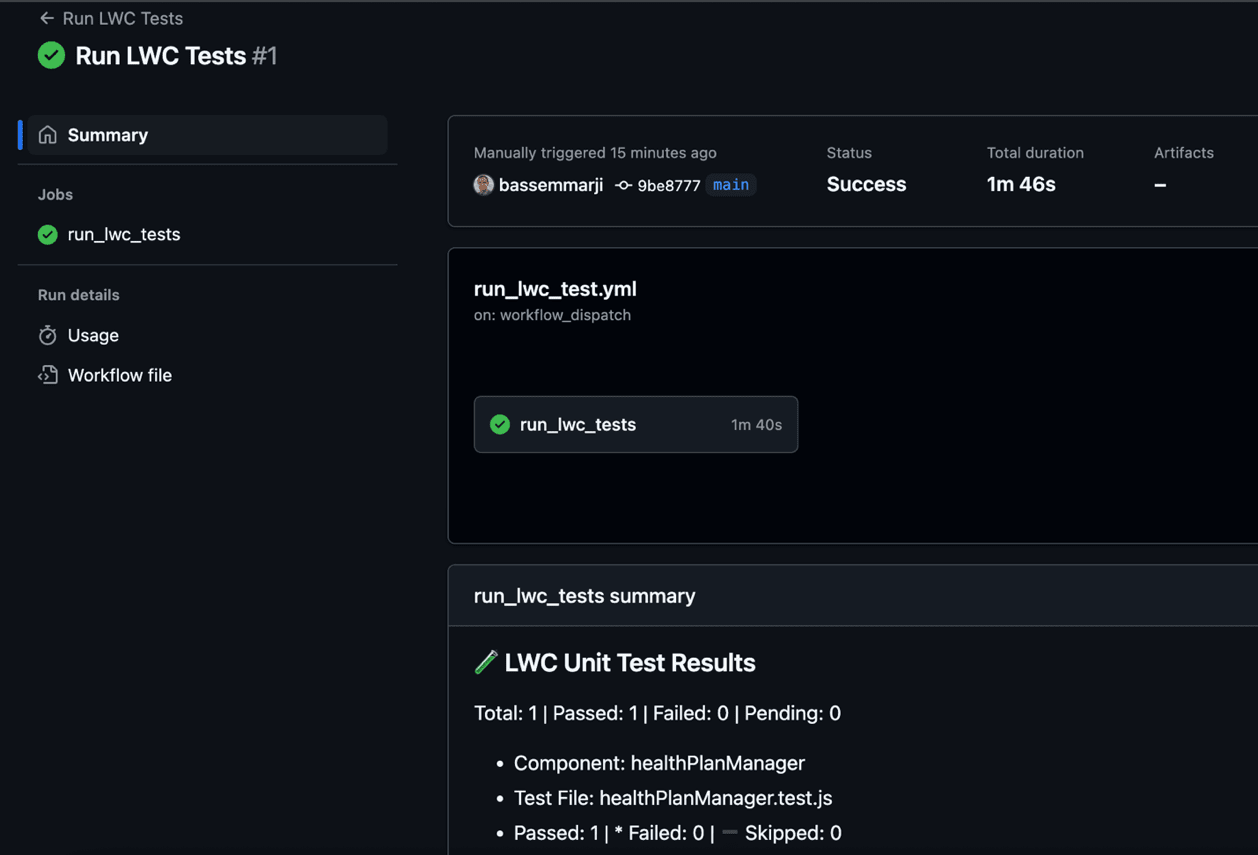
Click the Actions tab at the top of the GitHub repository page. From the left sidebar, select the workflow and click the Run workflow button. After triggering, you’ll be redirected to the workflow run page where you can monitor the execution in real time.
Once the run is complete, scroll through the logs to debug if anything went wrong.
Why This Workflow Stands Out
Designed for modern development teams, here’s what sets this pipeline apart:
- Flexible Test Organization: Features a decoupled test management where test files reside in a standalone folder parallel to the main codebase. This separation allows for better organization and makes it easier to manage test files independently of the component source code.
- Comprehensive Reporting: Leverages GitHub’s step summary to deliver detailed test results, including total test suite counts, pass/fail statistics, and individual test outcomes. Results are extracted from Jest’s JSON output using jq, transforming raw data into clear, human-readable summaries.
- Robust Error Handling: Implements robust error handling by capturing test exit codes and setting appropriate environment variables.
- Security Best Practices: Demonstrates proper secret management using GitHub’s encrypted secrets feature, preventing credential exposure while enabling automated authentication.
- Scalability and Performance: The dynamic component discovery approach scales automatically as new LWCs are added to the project. The workflow doesn’t require manual updates when components are added or removed.
- Cross-Environment Compatibility: Operates seamlessly across multiple Salesforce environments by changing an input parameter.
Summary
Great software is built on the foundation of great tests.
The beauty of this solution lies in its accessibility. Whether you’re a solo developer or part of a large enterprise team, this pipeline adapts to your needs while maintaining consistent, professional-grade testing standards.
In an era where customer expectations continue to rise, having this level of automated quality assurance is essential.