
When thinking about user authentication, the first option that probably comes to mind is the well-known username and password combination. While this mechanism has been used for a long time, modern threats are more sophisticated than ever, so what can you do to ensure your accounts remain yours?
In this article, we’ll cover passwords and account-security best practices that you should consider for both tools and applications in your technology stack at work, as well as those you use personally.
How Secure Are Your Passwords?
The mighty password is virtually a tale as old as time, and in the digital era, it is often still the only line of defense between our personal information, assets, and communications and unauthorized access.
Passwords should not be stored as plain text, as that’s ultimately an invitation for them to be breached, but rather as a “salted hash”. Hearing this for the first time may sound too technical, but it’s a process your passwords go through to become unreadable. Unlike encryption, which can be decrypted, hashing is an irreversible process that can give us more peace of mind even in case of a breach.
Hash functions are often used alongside salting, which acts as another layer of protection when storing passwords: every time a password is created (or changed, for that matter) a unique string is generated and combined with the password prior to hashing. This ensures that the resulting hashed passwords will be unique, even if they are the exact same passwords entered by two different users.
If passwords are hashed and salted, why do you even need a strong password to begin with? Similar to what you hear doctors say about your health, the same principle can be applied to passwords: prevention is better than a cure.
The National Institute of Standards and Technology (NIST) have recently updated their guidance on password security (which also includes passphrases and PINs), and the main focus is length rather than complexity and special characters. Here are a few key takeaways from the guide:
- Emphasize password length, with 8 characters being the absolute minimum. NIST recommends a range between 8 and 64 characters.
- While password complexity, including special characters such as “$%^&(“, was encouraged in the past, it’s no longer seen as a requirement if you’re using a longer password.
- NIST no longer recommends monthly password resets, as it has been concluded that passwords become weaker following mandatory changes.
Multi-Factor Authentication Everywhere
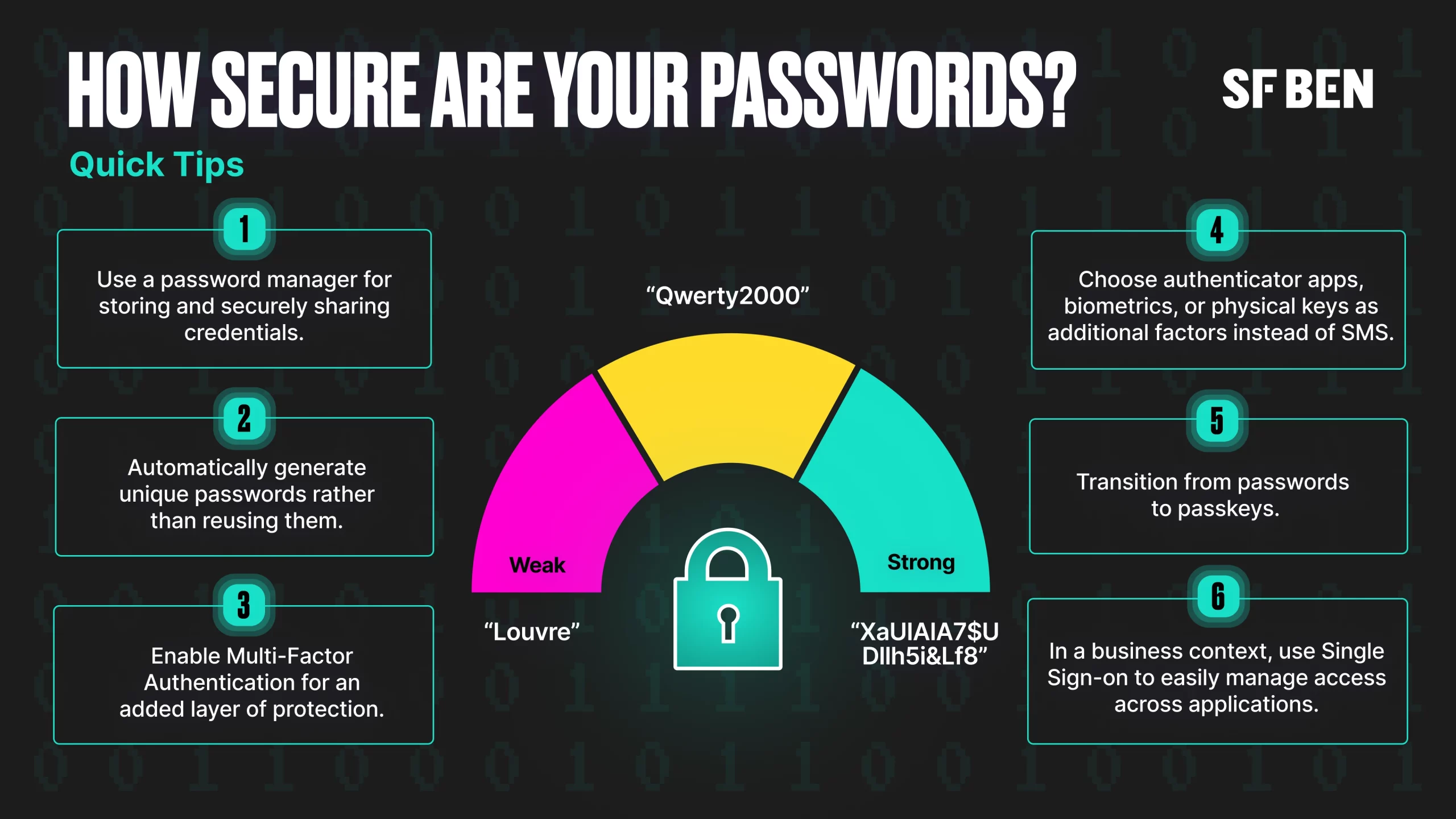
As mentioned above, passwords often act as the only barrier between our accounts and threats, including hackers and social engineers. This doesn’t have to be the case nowadays, with multi-factor authentication being an option – and even a requirement for many applications and websites. This method requires users to verify their identity in at least two ways to ensure that they are who they claim to be before gaining access to the system.
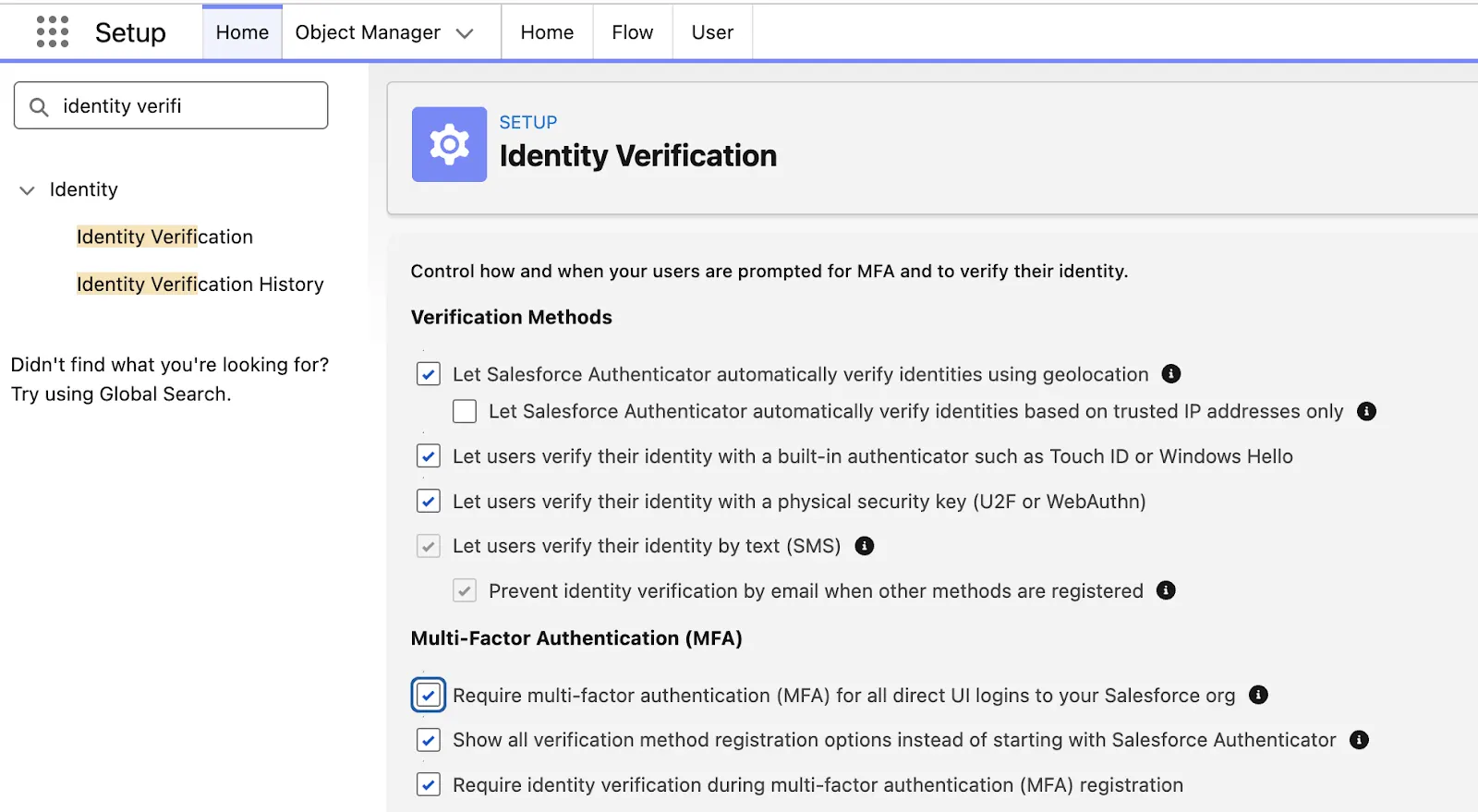
The available MFA mechanisms may differ from system to system, as not all existing options are supported for every application. Let’s use Salesforce as an example, given the MFA requirement, which shifted from the initially planned enforcement to periodic reminders for admins who haven’t yet complied in production orgs. If enabled, Salesforce users can verify their identity in a few ways:
- Salesforce Authenticator is the default option unless admins choose to display all other methods instead.
- Another authenticator app, such as Google Authenticator, Microsoft Authenticator, or another one.
- Built-in device biometric authenticators, such as Touch ID or Face ID.
- Physical security keys, such as Yubikeys.
In Salesforce specifically, SMS is turned on by default, as is the option to prevent identity verification by email when other methods are registered; however, this is by no means the strongest option. Additionally, SMS verification cannot be used as an MFA verification method for internal users.
In a business context, even if it may seem like a huge lift at the beginning, it is worth exploring the Single Sign-On (SSO) option so that access can be managed and controlled in one centralized place. This also means that the MFA requirement can be offloaded to the SSO provider, ensuring that a strong verification method is used. From a user perspective, it will facilitate the login process across the board and remove the friction that comes with having to set up MFA for each individual application or managing multiple credentials.
Don’t Make It Easy for Social Engineers
Following the recent Louvre heist, it was revealed that, unfortunately, the video surveillance system password at the time was simple “Louvre”. Would you have guessed it? We wouldn’t have even been in a position to try, but someone who wanted to break in could have thought about trying it. Sometimes it’s not even about the simplicity of the password, but what the password means to users, making it easier to remember.
Social engineering does also employ technology as part of attacks, but it mainly capitalizes on human nature to gain access through an authorized user’s credentials to critical systems, data, and so on. Perhaps the most well-known example of the impact social engineering attacks can have is the 2020 hijacking of Twitter (now 𝕏) accounts, which was carried out through company employees’ access.
In short, employees were contacted via phone calls and asked to enter their credentials into what seemed to be an internal tool, but was in fact a facade allowing attackers to obtain their passwords. Even if the accounts were protected by MFA, employees shared the code when prompted by attackers posing as colleagues, thereby gaining access to their accounts. If there are a few lessons to be learned from this example, they are:
- If you are contacted by colleagues, ensure it’s via one of the company-approved tools rather than just phone calls.
- Ensure that you only enter credentials on the actual platform, preferably by accessing it yourself.
- Never share passwords, PINs, or MFA codes received through your authenticator app.
Want to dive deeper into the topic of social engineering? Our very own Tim Combridge put together the ultimate guide to help you identify and prevent social engineering attacks, so make sure to check out the link below.
Password Managers Shouldn’t Be an Afterthought
If you’re still writing passwords on paper or constantly forgetting them, those are just a couple of the issues a password manager can immediately help with! Nowadays, password managers are plentiful and often include various additional features, such as password generators or even built-in email masking.
From a user perspective, password managers are convenient, as the only thing users need to remember is one master password – ideally paired with MFA for added account protection. Credentials such as passwords, credit cards, and even notes are securely stored in a digital vault that can be accessed on both desktop and mobile devices.
Even more so, if you or your users need to share credentials, password managers can make it easy. Especially in a business context, where passwords are often shared via Teams or Slack, such a tool can significantly improve the security of your applications. An added bonus with some password managers is that they can also be used as authenticators, so even if MFA is enabled on an account whose password you need to share, the password manager can handle it securely.
Implement Password Policies
Another key feature of password managers, more often in an organizational context than for personal use, is the ability to add and control password policies. This allows you to measure adoption and share guidelines with your team directly within the application, rather than having to communicate them repeatedly.
From a monitoring perspective, whether for a business or personal purpose, most password managers flag both weak and reused passwords. As password guidelines evolve over time, a password manager can help bring your business up to speed much more quickly.
Transitioning From Passwords to Passkeys
While everyone is familiar with passwords and at least some best practices, where do passkeys come in? Considering the sheer number of applications users have nowadays, chances are they won’t immediately remember the passwords to even half of them, which often leads to password reuse. Even with a password manager, passwords are prone to vulnerabilities, and without the addition of MFA (and in some cases, even with MFA) it can be a matter of time until a breach occurs.
Passkeys are the newest way for users – in both personal and business scenarios – to verify their identity online. They serve as a modern replacement for passwords and are secure by default, as they are based on public-key cryptography, which is fundamental to technologies you may be familiar with, such as HTTPS or digital certificates.
Creating a passkey involves generating a set of two keys: a private one, which remains on your device(s), and a public one, which is stored on the server you’re connecting to. When a user authenticates with a passkey, the server generates a challenge, after which the user must use either biometrics (e.g. Touch ID) or a PIN to sign the challenge to confirm their identity. If the public/private key pair is successfully verified, the user is granted access.
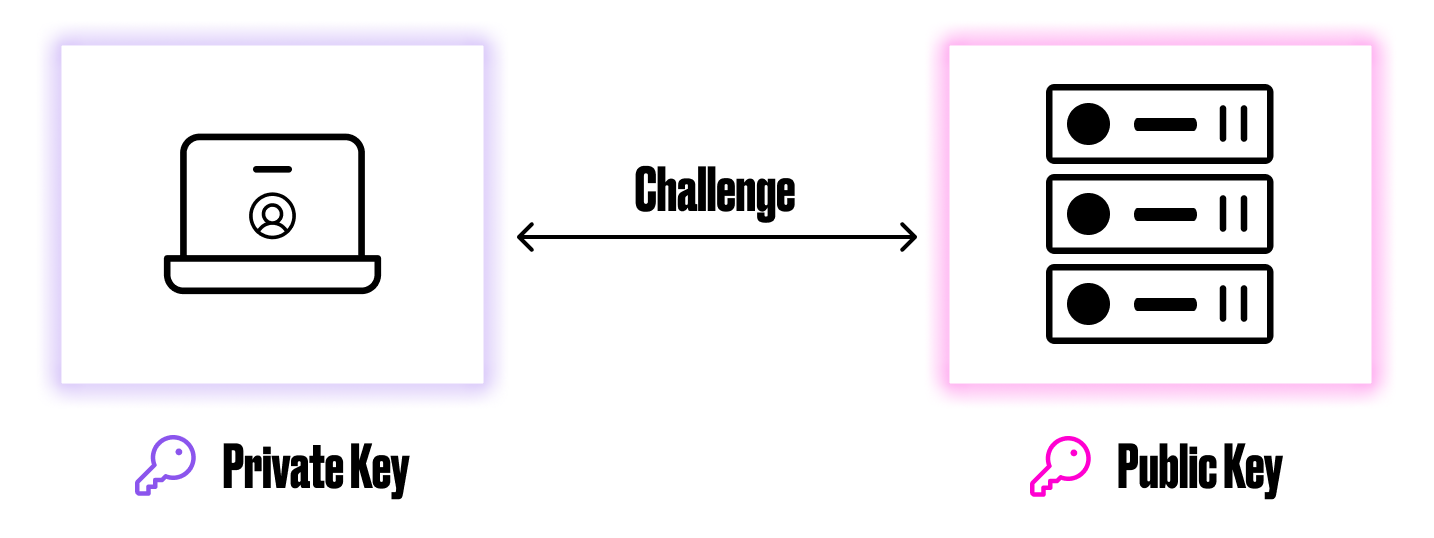
This new technology seems to strike the perfect balance between security and user experience. On one hand, even if the server is hacked and the public key is accessed, it is useless without the user’s private key. On the other hand, users can forget about having to think about having to remember or even set passwords, and logging into applications can be as easy as unlocking their laptop with Touch ID. Some password managers also support storing and sharing passkeys, so if you are already using one, everything can be managed in a single place.
While the transition is bound to be gradual, as not all websites and applications support passkeys, major ones already do, so it’s most likely a matter of time before this approach is widely adopted.
Final Thoughts
Your accounts and credentials will be as secure as you make them – there’s no shortage of technology or options to use, and it’s only a matter of making the switch if you haven’t already. Whether for business or personal credentials, this article should serve as a reminder to follow best practices: update your passwords to longer ones in line with current guidelines, make use of multi-factor authentication, and of course, use passkeys wherever possible.
How do you manage the security of your accounts? Let us know in the comments below!