






From June 2026, Salesforce will introduce a new wave of security controls designed to strengthen protection in response to the growing number of attacks targeting Salesforce environments and their customers. In the Salesforce Documentation, this is known as Security-Related Product Updates to the Salesforce Platform going forward.
Failure to prepare in advance could negatively impact your users. To minimize disruption and stay ahead, it’s important to take action early and ensure your organization is ready.
Disclaimer
This guide is intended to help Salesforce Administrators comply with the upcoming security requirements. As part of its preparation, certain assumptions have been made regarding how Salesforce will enforce these changes. The guide will be updated as further information becomes available.
All steps outlined assume standard use of the relevant features. If your organization has implemented customizations in these areas, additional preparation may be required.
MFA Enforcement for All Employee Users
What Does This Impact?
Salesforce will require Multi-Factor Authentication (MFA) across both Sandbox and Production environments. This applies to all internal users, including those with a Salesforce or Salesforce Platform licence.
For users logging in via Single Sign-On (SSO), if the SSO provider does not enforce a sufficiently strong authentication method (for example, biometric verification or a physical security key), additional MFA may be required.
The Waive Multi-Factor Authentication for Exempt Users is no longer applicable to users who log in via the Salesforce UI. If you have any custom integrations that use the Salesforce API Only System Integrations, these users should be unaffected.
Salesforce will start to enforce MFA in sandboxes from June 22, 2026, and in Production orgs from July 20, 2026.
This change will impact all internal users accessing both Sandbox and Production environments, so it is important to ensure MFA is fully implemented ahead of the deadline.
How Can I Prepare in a Sandbox?
In order to get ahead of this requirement, you can enable MFA in your Sandbox environments ahead of time. This will also give users time to enrol in methods ahead of the enforcement date and to deal with any teething issues.
To enable this, navigate to [MYDOMAIN]/lightning/setup/IdentityVerification/home (e.g. resourceful-otter-64nvnn-dev-ed.trailblaze.my.salesforce.com/lightning/setup/IdentityVerification/home).
From this page, enable “Require multi-factor authentication (MFA) for all direct UI logins to your Salesforce org” to ensure MFA for all human logins to that environment.
For the best user experience, also enable Show all verification method registration options instead of starting with built-in authenticators, so that users see a list of all available methods rather than the system defaulting to built-in authenticators.
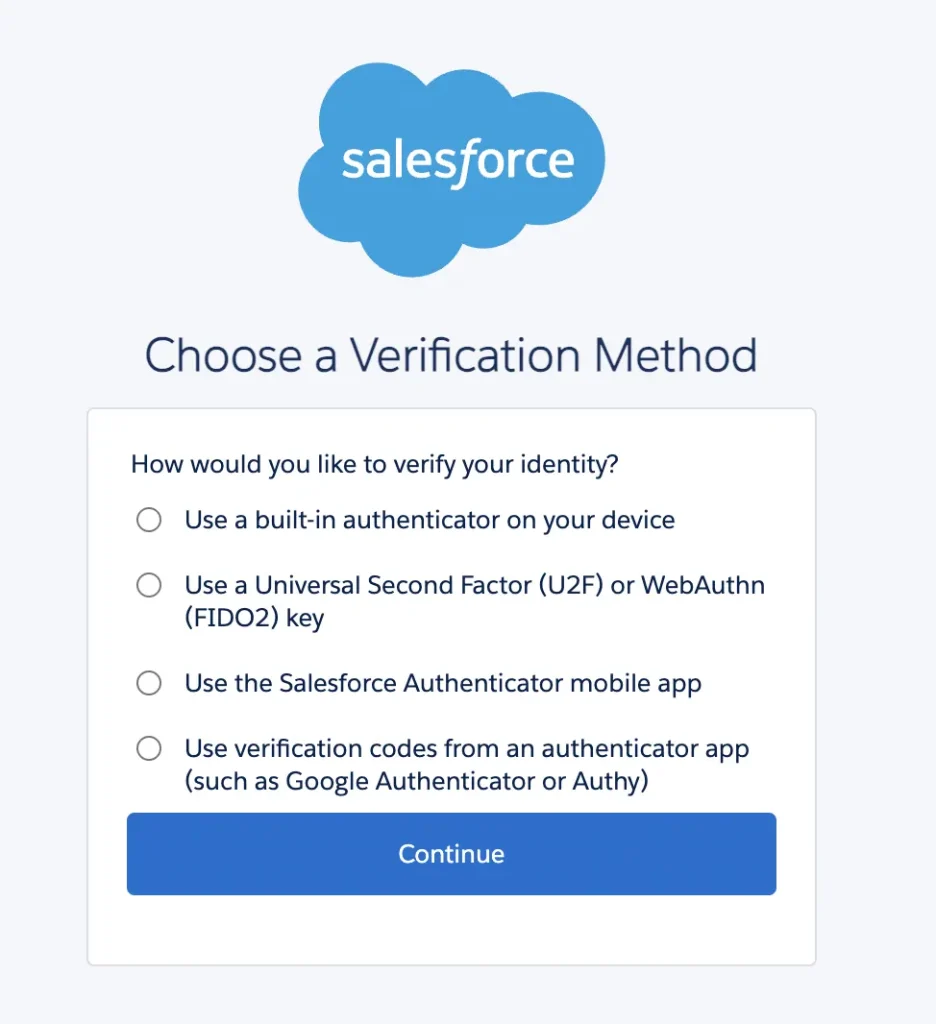
To monitor which users are enrolled for MFA, you can install the Multi-Factor Authentication Dashboard from Salesforce Labs for Admins Only via the URL below:
[MYDOMAIN]/packagingSetupUI/ipLanding.app?apvId=04to00000004DTQAA2 (e.g. resourceful-otter-64nvnn-dev-ed.trailblaze.my.salesforce.com/packagingSetupUI/ipLanding.app?apvId=04to00000004DTQAA2).
While this package provides a good baseline, you will likely need to customize these reports. These reports will show who is enabled for MFA, not who isn’t.
How Can I Prepare in Production?
MFA is likely already enforced in your Production environment. If not, you can follow the same steps to enforce this and work with your users to enrol a method.
Phishing-Resistant MFA Enforcement for Privileged Users, Including Admins
What Does This Impact?
System Administrators will be required to enrol in a phishing-resistant MFA method in order to comply with the new requirement.
Supported methods include:
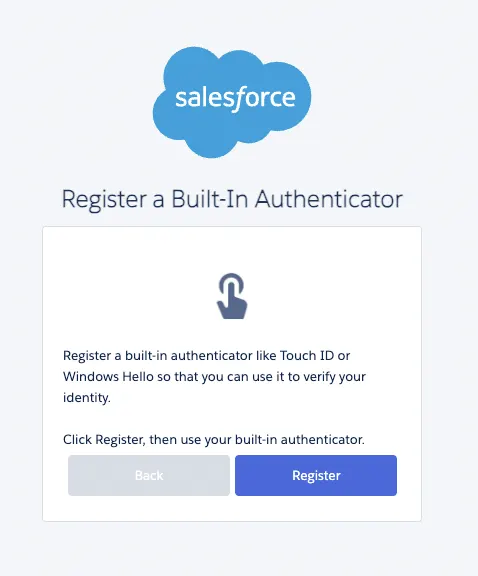
- Built-in authenticators (e.g. Windows Hello or Touch ID).
- Physical security keys (e.g. YubiKey).
If you are logging via SSO, Salesforce will check if the authentication method is ‘strong enough’. More information is provided within Prepare for Phishing-Resistant MFA Enforcement for Privileged Users including Admins on Salesforce Help.
Salesforce will enforce this from June 22, 2026, in Sandboxes and from July 1, 2026, in Production orgs.
Phishing-resistant Multi-Factor Authentication (MFA) will be required for those with the System Administrator profile, Modify All Data, View All Data, Customize Application, or Author Apex permissions.
Impacted users will need access to a device that supports one of these authentication methods, or organizations may need to procure physical security keys.
How Can I Prepare in a Sandbox?
Built-in authenticators and Physical Security Devices are not enabled by default as MFA methods.
In order to enable these methods ahead of time, navigate to [MYDOMAIN]/lightning/setup/IdentityVerification/home (e.g. resourceful-otter-64nvnn-dev-ed.trailblaze.my.salesforce.com/lightning/setup/IdentityVerification/home).
From this page, enable Let users verify their identity with a built-in authenticator such as Touch ID or Windows Hello, and Let users verify their identity with a physical security key (U2F or WebAuthn). From this page you can also enable Allow passwordless login with passkeys.
If you use SSO, test this to make sure that the method returned is sufficient to meet the requirement. More information is provided within Prepare for Phishing-Resistant MFA Enforcement for Privileged Users including Admins on Salesforce Help.
Enabling the feature doesn’t ensure compliance, as users still need to enrol in a supported method. You can monitor enforcement by using the Multi-Factor Authentication Dashboard from Salesforce Labs, which is mentioned above.
How Can I Prepare in Production?
To enable this in a Production environment, enable the same settings as in your Sandboxes. Enabling these methods is expected to have no user impact aside from allowing users to enrol in these methods going forward.
Restrict Login IP Addresses in Profiles
What Does This Impact?
This update will no longer be enforced, but it’s now considered best practice to enable Enforce login IP ranges on every request anyway.
Prepare for Transaction Security Policy Enhancements
What Does This Impact?
If you are using Salesforce Shield or Event Monitoring, this update applies to you. If not, this update is expected to have no impact.
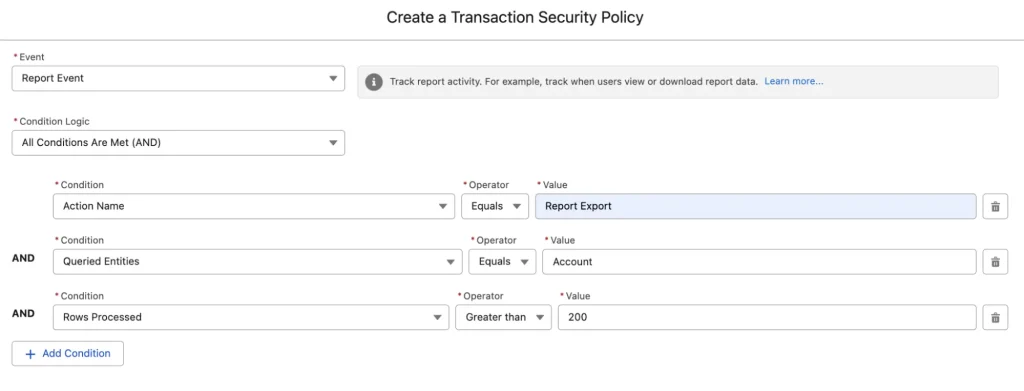
A Transaction Security Policy (TSP) will be introduced when a user exports a report if you do not have one set up already. This means Users will be prompted for their MFA method before they can export more than 10,000 records from reports going forward. Report Exports will also require step-up authentication.
Going forward, to create, update, delete, enable, or disable TSPs, both the Modify Transaction Security Policy and Customize Application permissions are required.
New Permissions and TSPs will appear in Sandboxes from June 1, 2026, and June 15, 2026. Changes will be enforced from June 22, 2026, in Sandboxes and July 13, 2026, in Production orgs.
How Can I Prepare in Sandbox and Production Environments?
You can either set up your own TSP if you do not have this already, or you can simply wait for Salesforce to auto-add this for you.
Be sure to also give users who need to manage TSPs both the Customize Application and Modify Transaction Security Policy permissions.
The current notice from Salesforce does not state whether this will be added to Sandboxes, Production orgs, or both.
Preventing Connections from Anonymizing VPNs, Proxies and High-Risk IP Addresses
What Does This Impact?
After April 24, 2026, users connecting via anonymizing VPNs, proxies, or high-risk IP addresses will be frozen and have their access blocked.
If this happens to one of your users as a System Admin, you will be notified along with the impacted user.
Salesforce will monitor and block these connections, although they do not state what exactly constitutes a high-risk IP address.
Step-Up Auth for Report Activities (Time Based Session Level Policy)
Salesforce is introducing another layer of security on reports due to increasing attacks that target these to export or scrape the data from the screen.
Going forward, all internal users who export a report will have to complete a step-up authentication challenge even if they are already logged in with MFA.
If users are unable to complete an MFA challenge (as they haven’t enrolled), then the system will fallback to a one-time password via Email or SMS. If all options are exhausted, then the operation is blocked.
This new feature will be rolled out on May 27, 2026, in Sandboxes and Production. This update will be enforced from June 17, 2026, for Sandboxes and from July 1, 2026, for Production Orgs.
By default, this authentication will be required every 120 minutes, but as an admin, you can configure this.
How Can I Prepare in a Sandbox and Production?
Make sure Internal Users have enrolled in an MFA method, and their Email Address and Mobile Number are up to date.
Be sure to get hands-on with this feature when it becomes available in your environment so you know how it works and how to support it.
Prepare for Step-up Authentication in Anomalous Report Export
Salesforce is applying machine learning to spot suspicious behaviour when it comes to report export, as this is considered a high-risk action.
If suspicious behavior is detected, then step-up authentication will be triggered for the impacted user, even if they are logged in with MFA and have recently completed step-up authentication.
This will be enforced for all users in both Production and Sandbox Orgs.
Refer to Prepare for the upcoming Step-up Authentication requirements on Report Actions for preparation steps.
Extended Login Anomaly Detections and Containment
Salesforce now uses AI to detect suspicious login attempts. These changes have already been enforced.
As this feature was previously part of Salesforce Shield, users may receive duplicate notifications if both features are enabled.
If a threat is detected, then a user will be frozen and any authentication tokens revoked. Impacted users will need to be unfrozen by a System Administrator and their passwords reset.
If this is triggered, an email will be sent to System Admins or Security Contacts.
If the request was genuine and via an anonymizing VPN, System Admins can request an exemption via Salesforce Support.
Summary
Against a threat landscape that is constantly evolving and an increase in successful attacks against Salesforce, I doubt this will be the last of fast-tracked security updates that Salesforce pushes out over the next few months.
As more information about these updates becomes available, we will publish updates so you can prepare ahead of the current June enforcement date from Salesforce.
Other Resources
- Security-Related Product Updates to the Salesforce Platform (Salesforce Help)
- Multi-Factor Authentication for Salesforce Orgs (Salesforce Help)
- Enable Built-In Authenticators for Identity Verification in Salesforce Orgs (Salesforce Help)
- Enable Security Keys for Identity Verification in Salesforce Orgs (Salesforce Help)
- ReportEvent Policies (Salesforce Help)





Comments: