






Overview
- AI has a bad reputation for making humans less intelligent over time. My goal in this article is to show that it’s about how you use it, rather than if you do.
- I built a Claude project that I began using to help me study for the Salesforce Certified JavaScript Developer Exam.
- Claude walked me through some concepts that would be on the exam. It created some targeted practice questions and scenarios to work through.
- I tested it on Salesforce-specific JavaScript restrictions to ensure it was teaching both general knowledge on JavaScript and some Salesforce specifics.
- Claude performed well in the targeted tests that I gave it. I will continue to use this project as my primary tool to study for the Salesforce Certified JavaScript Developer Exam.
There’s a commonly held belief that AI makes us less intelligent. Personally, this is not a belief that I subscribe to. I strongly believe that there are both positive and negative impacts to our cognitive abilities when working with AI. It’s about how you use it, not if you use it, that leads to cognitive decline.
In this article, I’m going to show you an example of how AI, specifically Anthropic’s Claude, can be used to learn, not to skip the work. Instead of becoming reliant on technology to do work for me, I use it to develop my own skills and knowledge.
The Plan
Personally, I’ve used AI to learn more concepts in record time than ever before. I’ve improved my Salesforce skills, learned to implement new tools, and designed more solid architecture. I’ve learned the basics of building my own Chrome extensions, and I’ve even published an iOS app to the App Store. All of this was driven by my ability to create dynamic learning environments with AI tooling.
I decided to take on a challenge. I was going to use various AI tools to help me brush up my JavaScript development skills to the point where I would be confident enough to at least attempt the Salesforce Certified JavaScript Developer Exam. If you know me, you’ll know that I’m not a developer by trade. If you know me super well, you’ll know I specifically struggle with JavaScript. Why? I have no idea. But I do, so this was going to be a real challenge.
The plan is simple. Using the official exam guide, I’m planning to get Claude to help me build up my skills and knowledge to the point at which I am comfortable with at least attempting the exam. Section by section, I’ll map out my current confidence and track it all the way to the point at which I believe I’m ready for that section of the exam.
I’m not doing this simply to add another number to my cert count; I’m doing it to level up my skills in a practical way, and prove that using AI to learn is a highly effective way of doing so.
The Execution
Part 1: New Claude Project
I decided to begin by creating a simple Claude Project that would encapsulate everything relating to this experiment.
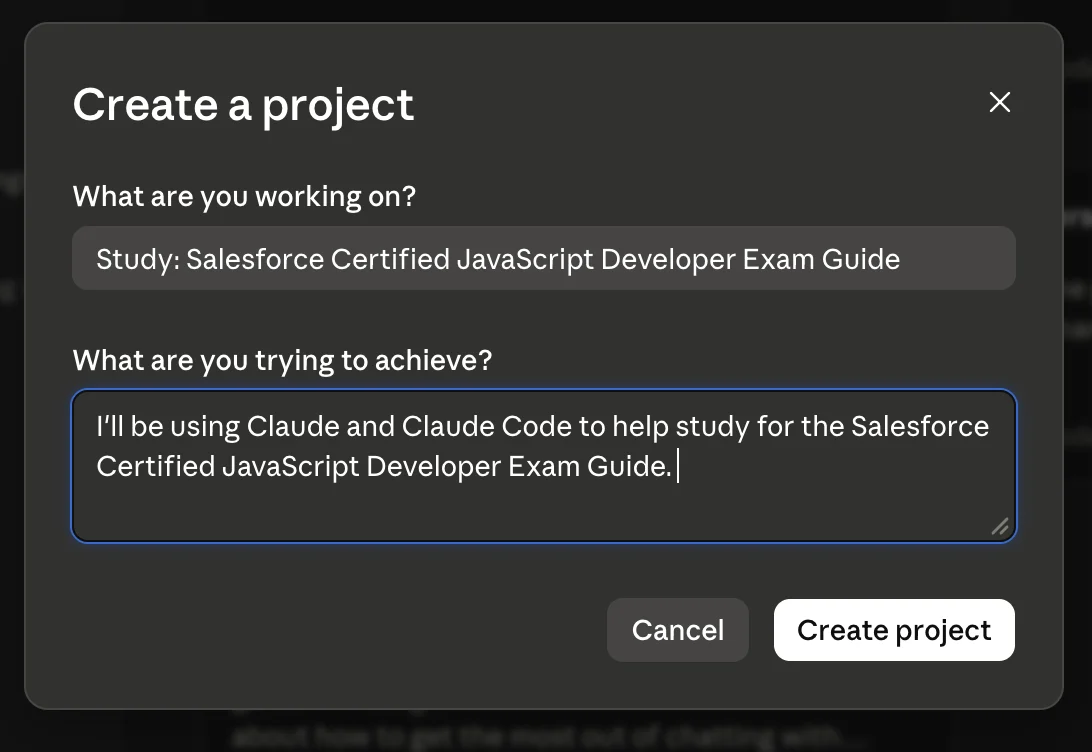
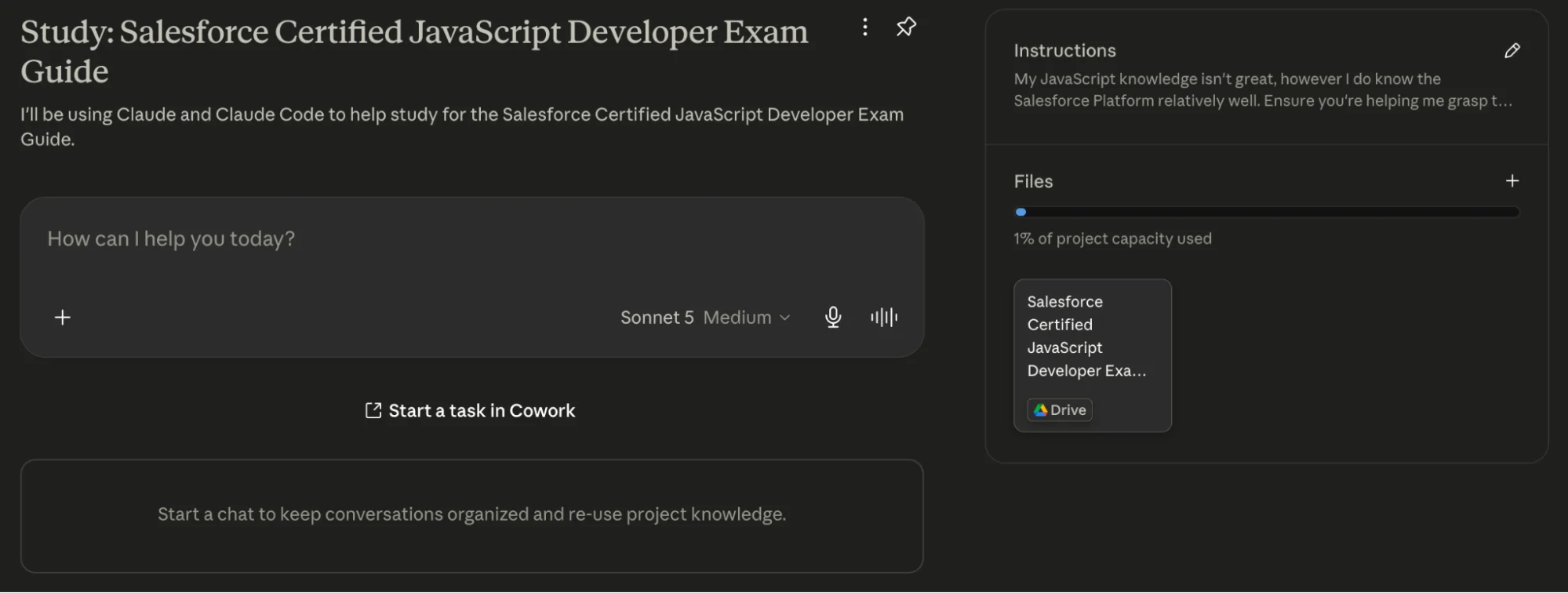
I also copied the official Exam Guide content into a Google Doc and added it to the project. I also specified in the project instructions that I needed to focus my learning on JavaScript, not the Salesforce Platform.
Claude prompt: My JavaScript knowledge isn’t great, however I do know the Salesforce Platform relatively well. Ensure you’re helping me grasp the JavaScript concepts in the exam guide, not trying to teach me the Salesforce Platform.
Part 2: The First Lesson (Creating and Initializing Variables in JavaScript)
I thought I’d start simple with a concept that I understood relatively well, to put Claude to the test. The first section is entitled Variables, Types, and Collections (23%), and the first bullet point in the exam outline states “Given a scenario, write code to create variables and initialize them correctly”.
Claude prompt: The first topic I want to study is Variables, Types, and Collections. Specifically, I want to focus on this bullet point: Given a scenario, write code to create variables and initialize them correctly. Can you help me understand how to write a variable and initialize it in JavaScript?
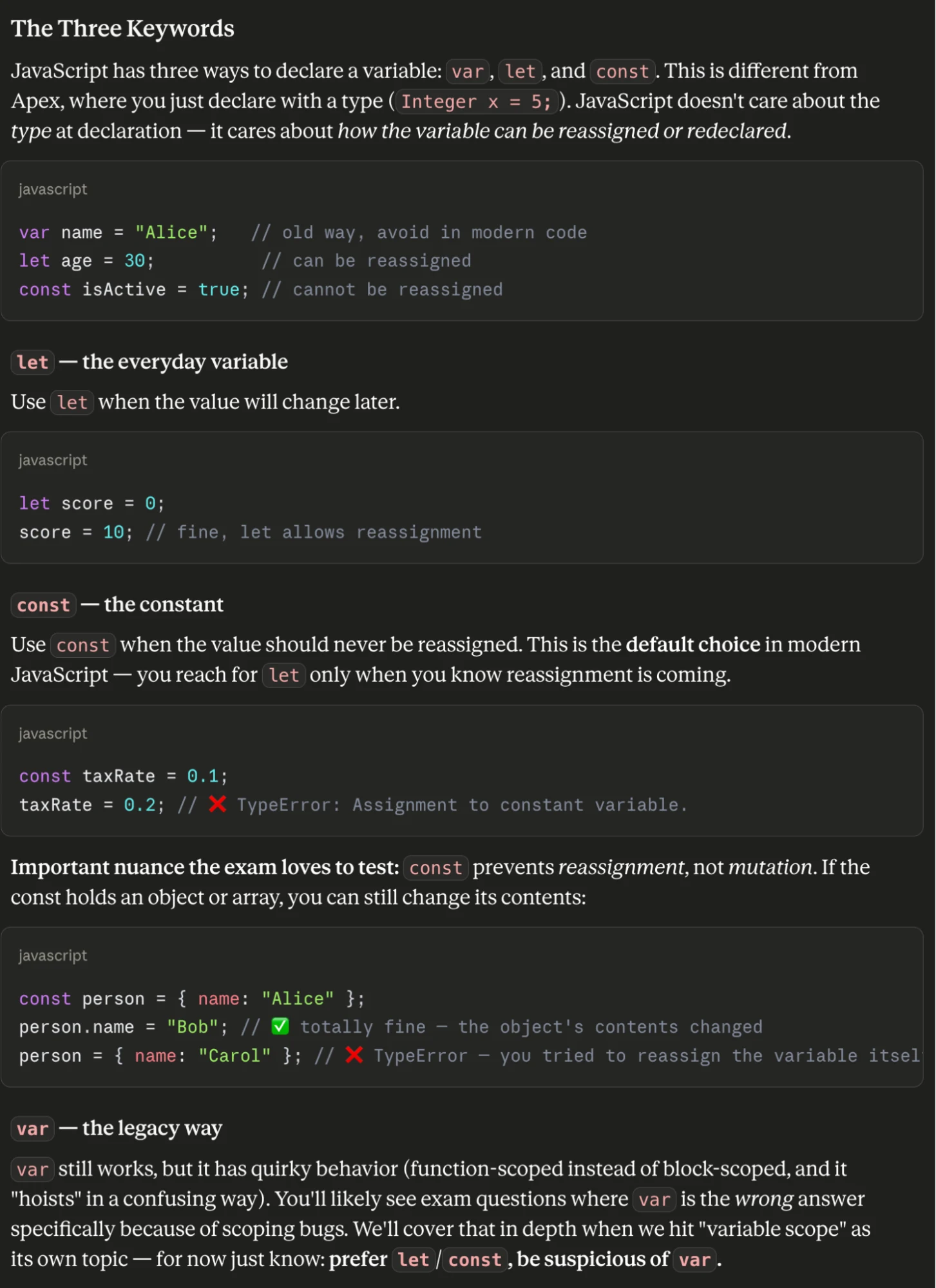
Claude’s first lesson explained to me that there are three ways to declare variables in JavaScript and compared it to Apex, which requires a type to be declared. The reason it brought this up is that I had already mentioned I was well-versed with the Salesforce Platform in the project instructions. Much appreciated, Claude!

It also clearly explained that var was the old way of doing things, let was the standard, and const wouldn’t let me change it later down the track. Clear, concise, and with examples.
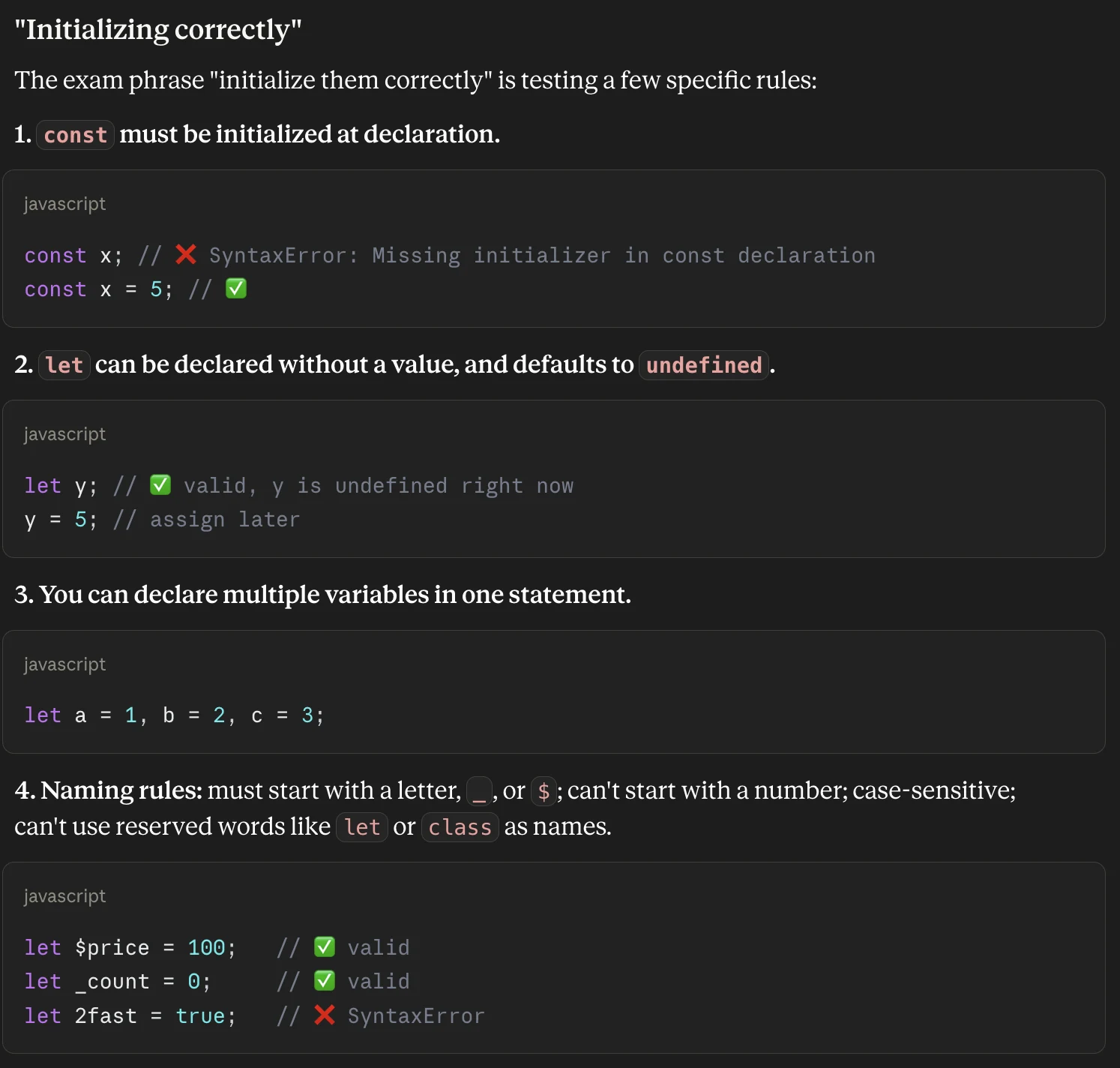
Then came the part that I was glad that it picked up on – the wording in the exam guide, “initialize them correctly”. Claude posited that the Salesforce exam would likely pick out a few rules when it came to initializing JavaScript, and proceeded to highlight 4 of them:
constmust be initialized at declaration.letcan be declared without a value, and defaults to undefined.- You can declare multiple variables in a single statement.
- Variable names must start with a letter, underscore, or dollar sign. They cannot start with a number. They are case-sensitive, and they cannot use reserved words like
letorclass.
All factually correct. Just a reminder: when using AI to learn, you should always verify what it says to ensure you’re learning real facts.
Finally, it gave me a comparison table that I could use to quickly confirm and validate my understanding, and asked if I wanted some practice scenarios.
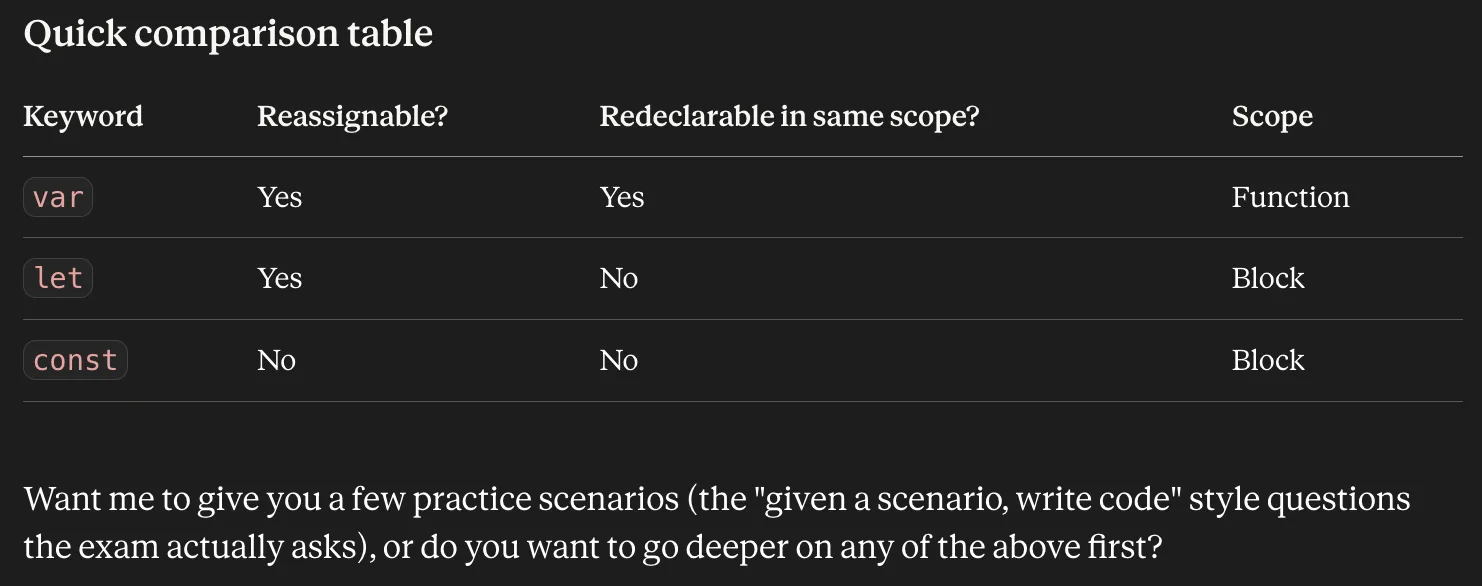
Part 3: Mock Exam Question – Stump Me!
I decided to take it up on that offer and asked for five practice questions, with multiple-choice answers (simulating the Salesforce exam).
Claude prompt: Please give me five practice scenarios. Phrase them as multiple-choice questions, with a minimum of 4 answers each. Try to stump me.
The very first question did indeed stump me at first; I thought we’d start very simple! Instead, it gave me an issue that I wasn’t taught in the lesson, or at least didn’t remember being taught. I could see that it was trying to log a variable that hadn’t been defined yet, and I knew that trying to declare a const would throw a syntax error if there was no value… but x wasn’t going to be a constant, it was going to be a standard var variable.
I decided to answer B, although I had a gut feeling that the answer was going to be C.
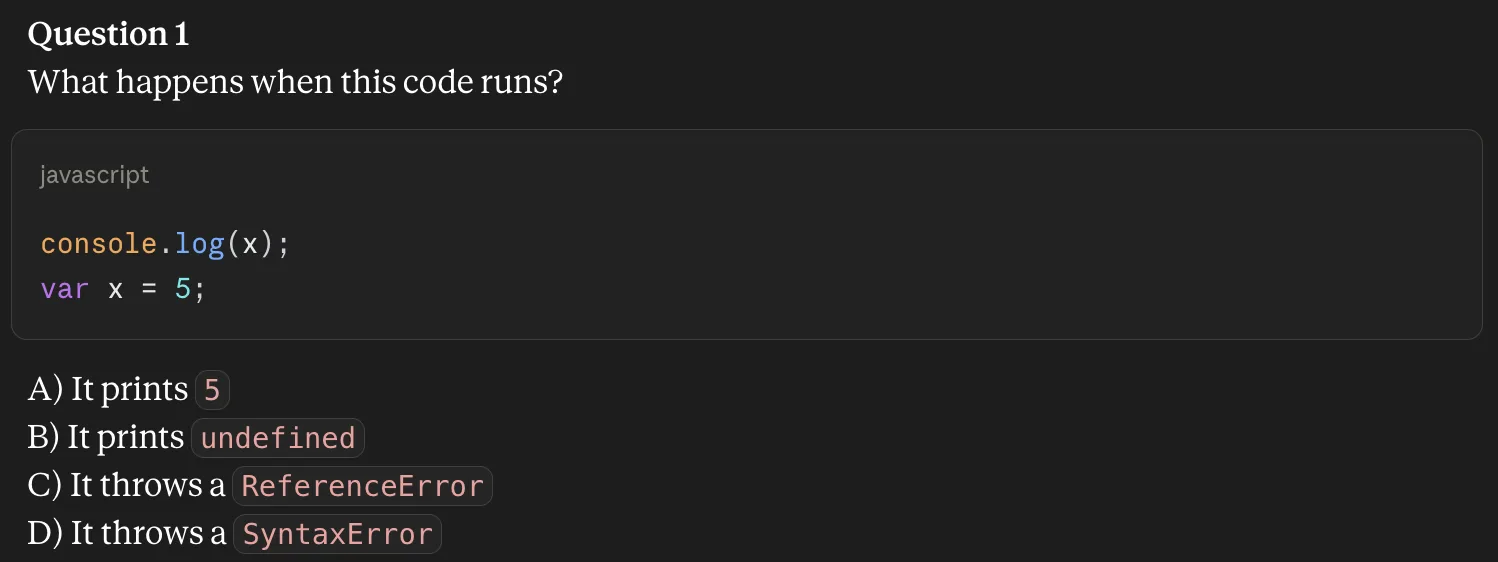
Luckily, I was correct! Claude patted me on the back and explained that the reason for this was due to a commonly tested JavaScript quirk, which was hoisting (a term I was totally unfamiliar with, up until now). It explained that for var declarations, JavaScript scans the entire scope and moves the declarations (i.e., it hoists them) to the top, but not the value that is assigned in that line.
In other words, var was declared to be five in the second line, but JavaScript executed the declaration of the variable itself (x) at the very beginning. It was declared, but no value was assigned until the second line. When the console.log ran, it spits out “undefined”.
I learned something new!
Part 4: Practical Test
I decided to take things to the next level and ask it instead to give me a question, to give me some unfinished code, and get me to fill in the blanks.
Claude prompt: Instead of going through questions 2-5, can you instead give me a scenario, some unfinished code with blanks in it, and ask me to complete it? I’ll copy the code, fill in the blanks, and submit it with my answers?
Claude came back with the following scenario and code:
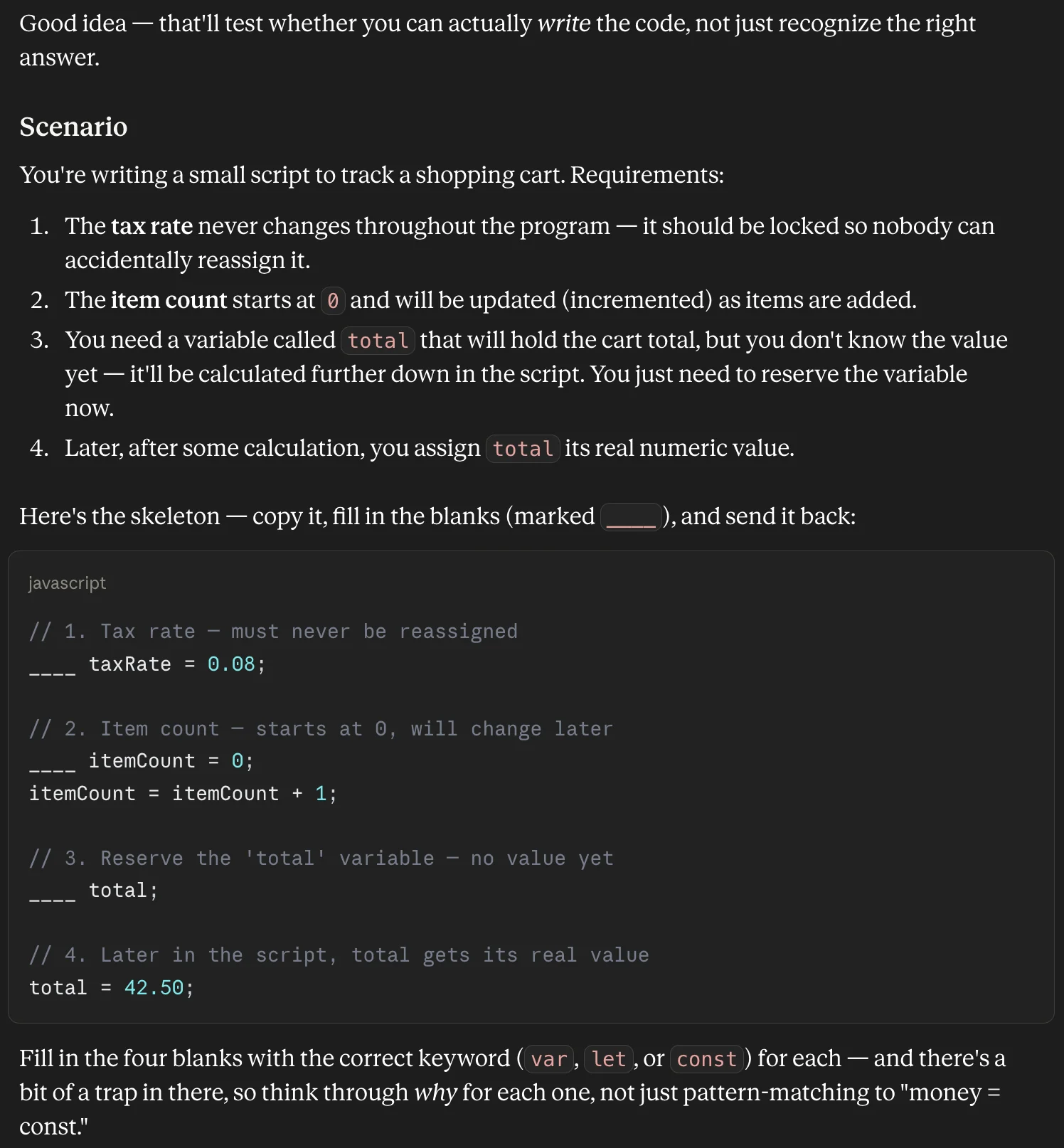
I gave it my best shot! Wondering if Claude was going to try and test me on all three (let, var, and const), I answered 1 as const, 2 as let, and 3 I assumed would be var, given I’d used let already. If you’re familiar with JavaScript, you’ll know that I passed only on a technicality.
Claude explained that while choosing var would run without an error, the exam guide was looking specifically for “initialize them correctly”, and so in an exam setting this would be wrong. This is why I love using AI for exam practice: because it is constantly checking the study guide, ensuring that what I am learning is fully aligned with what will likely be on the exam.
Claude showed its reasoning as to how I should have gotten to the correct answer. const was clearly out, as it needed to be reserved and set later (constants need to be declared with an unchanging value at initialization).
It then explained that, due to the hoisting baggage that I’d encountered earlier, let was preferred in this instance. While using let would hoist the variable to the top of the block, it would not initialize it. Using var did initialize it at the top.
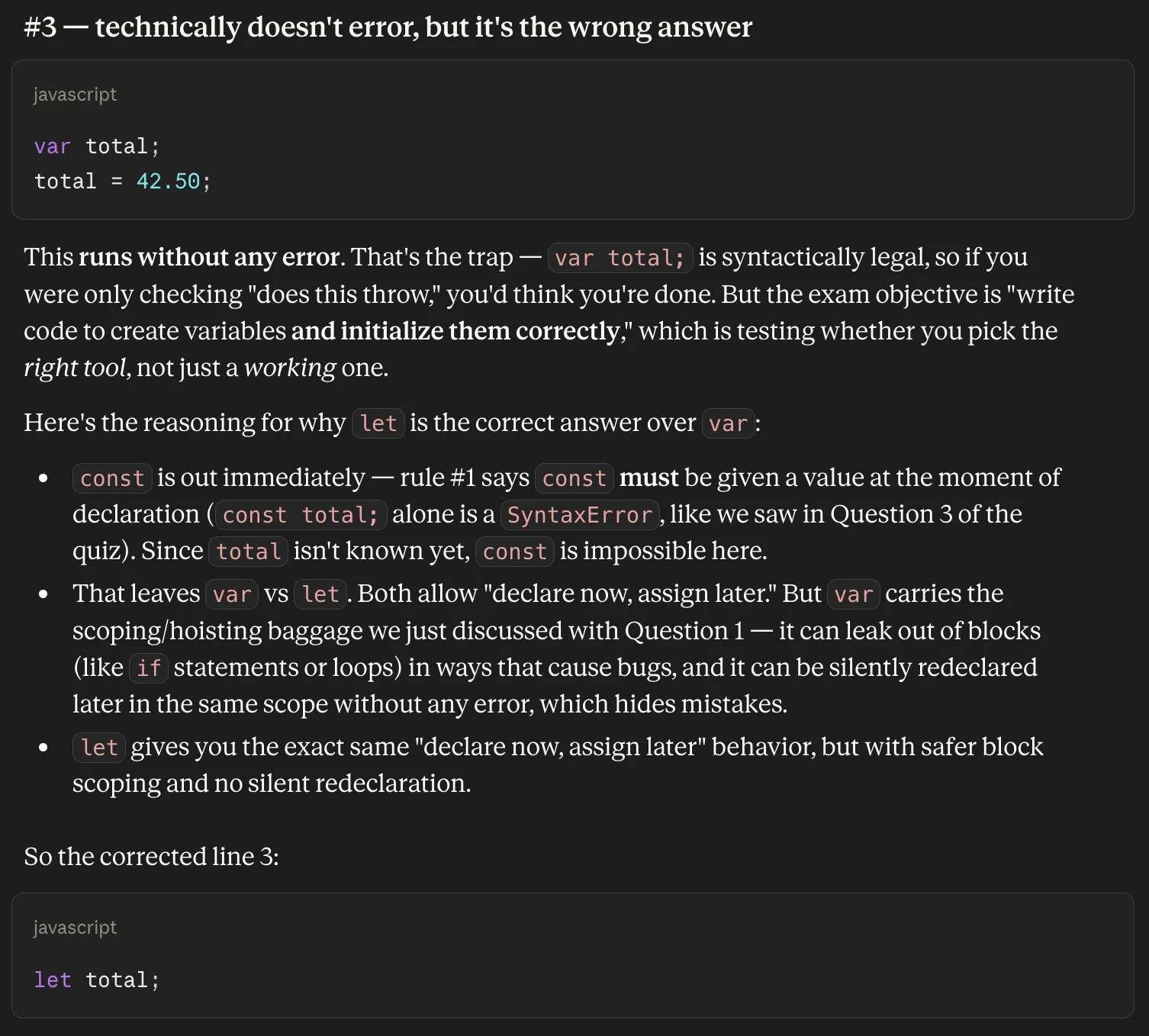
Then, to send me on my way to the next topic, it gave me a rule of thumb: default to const, but if the value needs to change or isn’t yet known, use let. Use var only for specific legacy reasons (which, for the exam, is basically never).
Part 5: Salesforce “Gotchas”
Claude had proven that it was able to explain a topic, work through some examples, create some questions, and give me a scenario to work through. However, this was all vanilla JavaScript, so I decided to ask it about something I knew was specific to Salesforce: including JavaScript.
I started a new conversation within the study project, and asked Claude the following question:
Claude prompt: Explain to me what I need to know about using script tags inside of components in Salesforce.
Claude correctly answered that while you could use script tags in regular HTML, this was not possible in Salesforce. It explained that JavaScript files lived totally separate from HTML files and needed to be imported where they needed to be used.
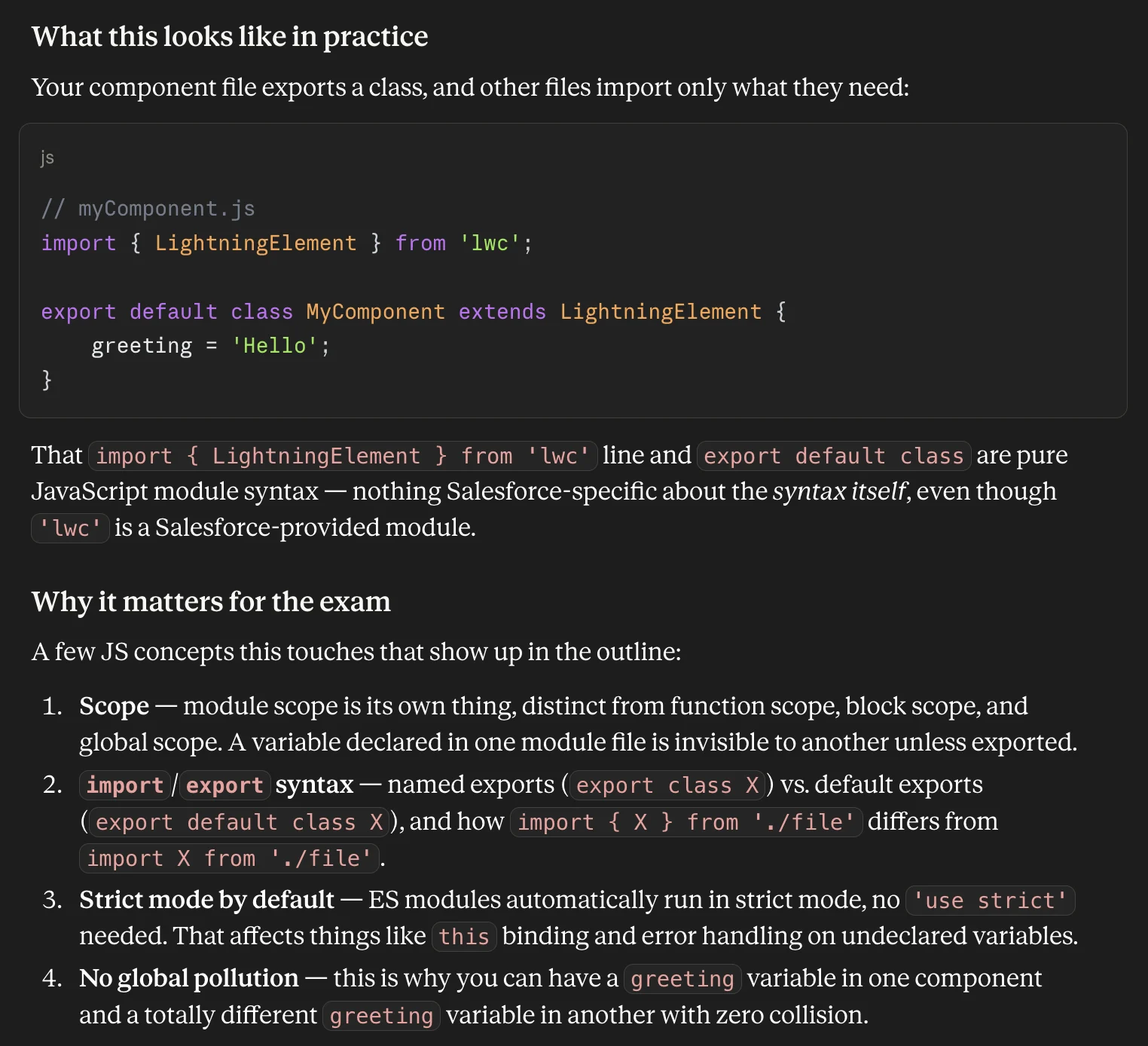
This is where things were, admittedly, a bit above my head. I knew in advance that the script tag was disallowed, but exactly what that looked like in practice was new to me.
I asked Claude to write me an example LWC that I could use to test and see this in action. It wrote one, and gave me guidance on how to test it, and what I could learn from each step.
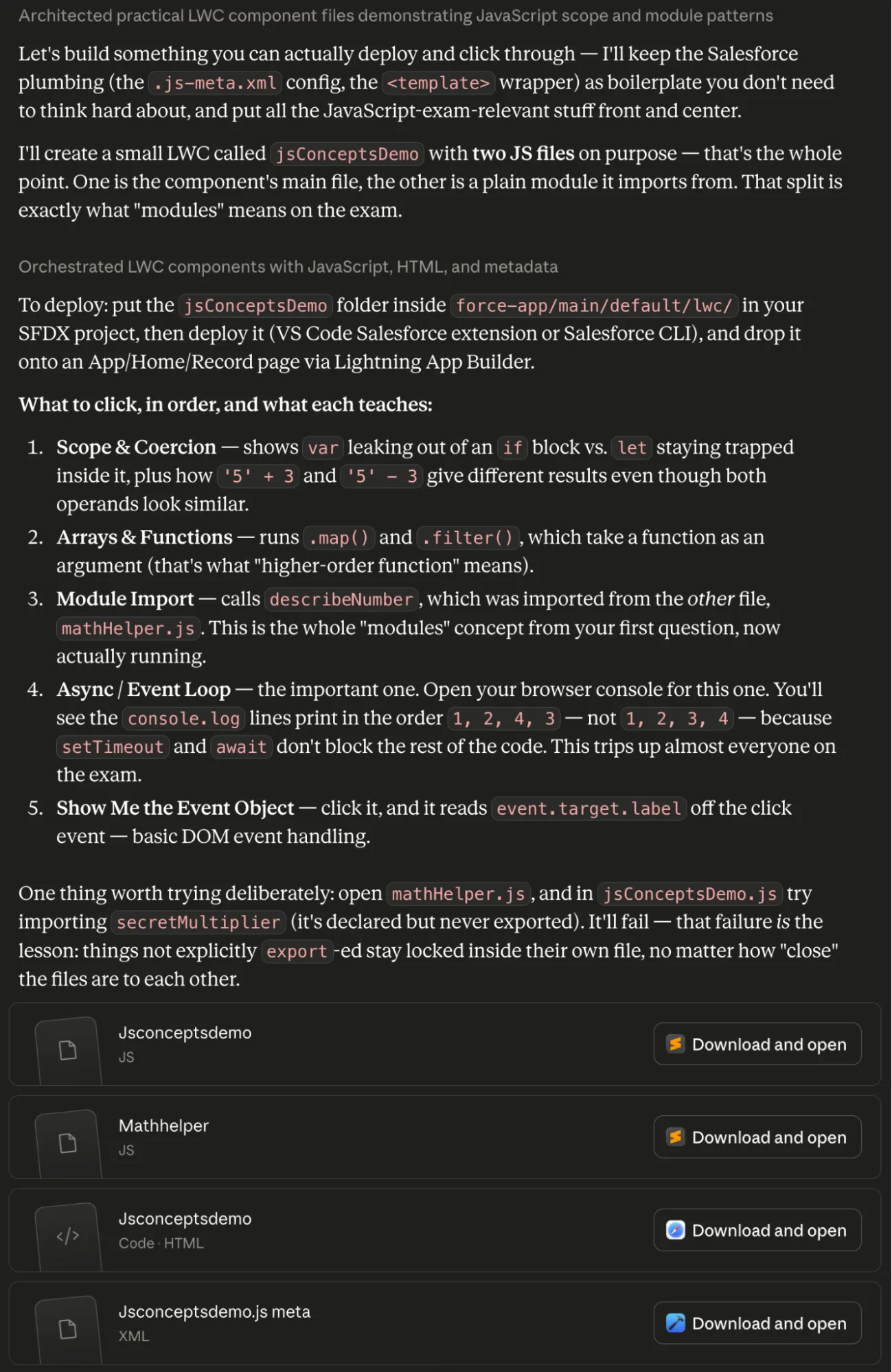
I followed its guidance, deployed the LWC to a developer org, and worked through the demo it had built. Admittedly, a lot of it still went over my head, but the very fact that it was able to deploy and run without any Salesforce errors showed that Claude wasn’t trying anything that Salesforce deemed to be “illegal”.
I have a lot of study to do on this before I can really put it to the test, it seems! However, I’m confident that Claude will help me to understand what I need to to have an attempt at the exam. I will continue to verify what it outputs, of course, but so far so good!
The Lessons
The first lesson I learned was that I had a LONG way to go before I am ready to take a shot at the Salesforce Certified JavaScript Developer Exam. The very next lesson I learned was that Claude would be beneficial in helping me to apply what I was learning in real time, and accelerate my education.
I learned that organizing my work into a project in Claude would allow me to start with a version of Claude that knew what was being tested in the exam. This would mean that I could start a new conversation, and it would have the context of what was in the exam each time.
I also learned that the project instructions would ensure that Claude’s focus was less broad and more focused. I could update it with what I was confident on as I went, and what I struggled with the most. This would act almost like a diary that informed my digital tutor as I progressed.
This would also be where I would later amend the instructions to include telling Claude to “make sure to check for any Salesforce-specific nuances relating to JavaScript”. That way, I could be sure Claude was warning me about any safeguards Salesforce had in place that restricted how JavaScript ran in its systems.
Final Thoughts
AI only turns your brain into slop if you don’t use it as a tool to grow. While tools like Anthropic’s Claude are extremely powerful and are able to do more and more of the tasks that we used to have to do ourselves, it also provides an unmatched opportunity to learn in a dynamic environment that grows as you do. It’s like having a tutor who is available 24/7, and for an extremely low cost.
Please note that I am NOT saying that LLMs like Claude are a replacement for real, structured education. Human experience will always be indispensable. My point here is that AI can be used to grow your brain rather than shrink it.
Have you had much experience studying for a certification exam using AI? Share your experiences; I’d LOVE to hear from you as to how it went and what your results were.





Comments: