

Another Salesforce release, another wave of updates to dig through! Winter ’27 has a good mix for Service Cloud (sorry, it’s Agentforce Service now) admins and reps to sink their teeth into. And with Dreamforce just around the corner, this is also a good moment to get ahead of things and know which specific ones to look forward to in demos.
This time around, we’ve still got AI capabilities and enhancements, but there’s also refinement and cleaning up long-standing pain points (hello, undeletable milestones!), and giving reps small but meaningful quality-of-life wins in their daily workflows.
That said, let’s get into the top features from the Winter ’27 release.
1. Delete Outdated Case Milestones
This sounds simple, but is very welcome for any org that’s been around a while! It actually reminded me of my days in Salesforce Support, where I would get cases with the main concern of not being able to delete milestones.
Informing users that they actually cannot be deleted felt like defeat. Milestone records just piled up on cases indefinitely, with no supported way to clear them out, which meant storage costs crept up for high-volume orgs even when those old milestones were no longer relevant (for example, when a high-severity case gets reclassified into a minor one).
This actually resolves an idea on the IdeaExchange from 2017. Now you can delete outdated milestones directly as with other objects via Data Loader, or programmatically through Apex. It’s great that admins now have an actual path to reclaim storage instead of just living with the bloat taken by outdated Milestones.
2. View Original Case Attachments Inline in Case Details
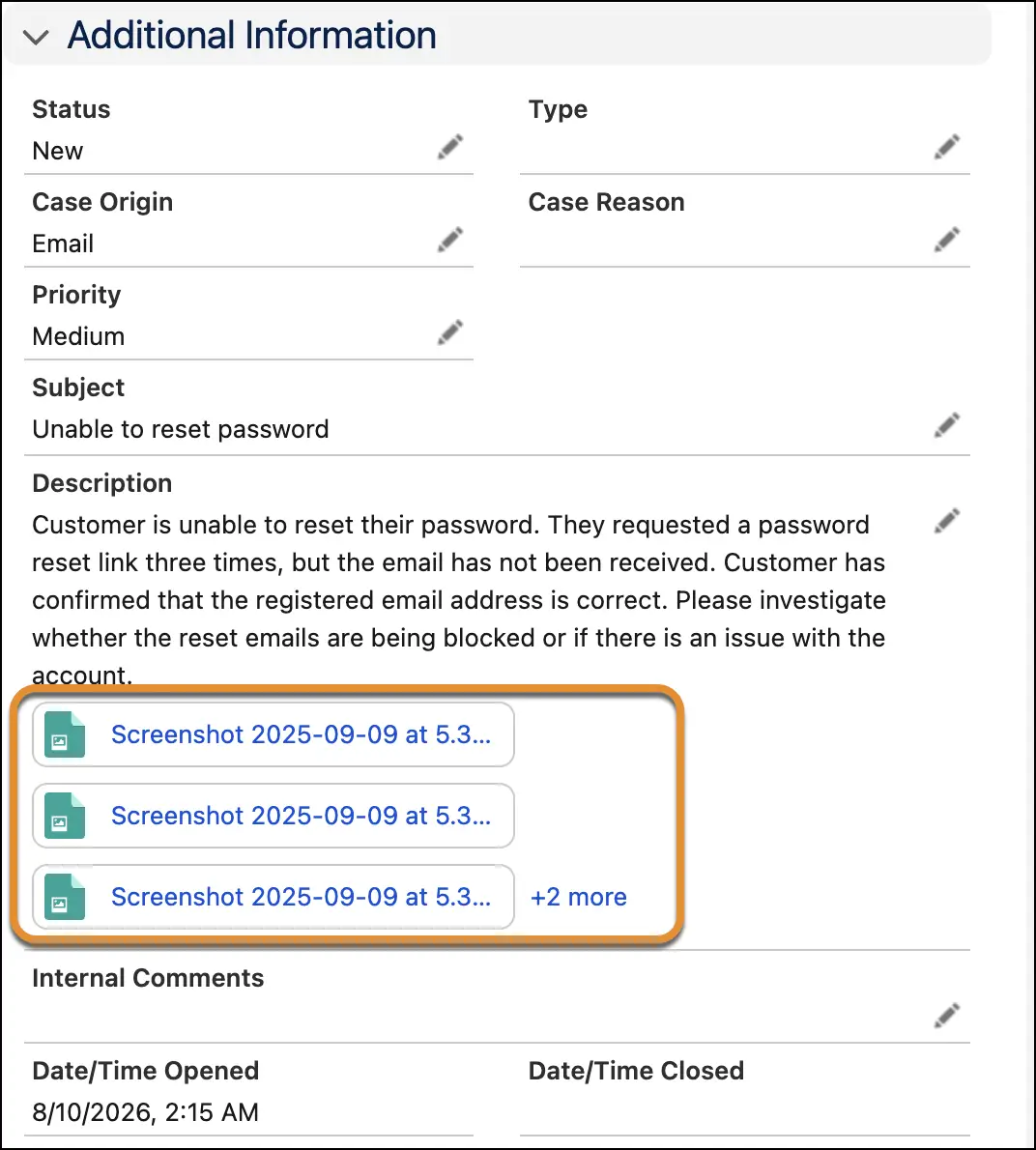
If you’ve ever had to look through the Files Related List just to see what a customer originally attached to their case, this one can help reduce all that scrolling. Original case attachments (specifically those files added at the time the case was created) now display directly inline under the Case Description field as visual tiles.
You will be able to see up to three attachment tiles, but if there are more than three, a link to see more opens a popover showing up to five at a time with a scrollbar for anything beyond that. If you wish to jump straight to the full Related List to see the complete file history, there’s a button for that as well.
This can be enabled by going to Setup → Support Settings → Show Original Case Attachments.
3. Revamped Enhanced Case Merge UI (Beta)
Managing settings related to case merging can be difficult as they’re scattered around Setup, and this update brings them together into one consolidated setup page covering Case Merge, Enhanced Case Merge (Beta), and Case Merge for Omni-Channel (Beta) all in one place.
From there, you can turn each of these on or off, decide whether duplicate cases get retained or deleted after a merge, set a default status (like Closed or Merged) for those duplicates, and jump straight into Duplicate Rules and Matching Rules to fine-tune detection logic.
4. AI-Powered Writing Tools for Case Comments
Reps can now polish, expand, or summarize case comment drafts right in the comment editor without their intended meaning getting lost in translation. The three mentioned are standard revise options, but reps can also give specific instructions for how they want a comment refined.
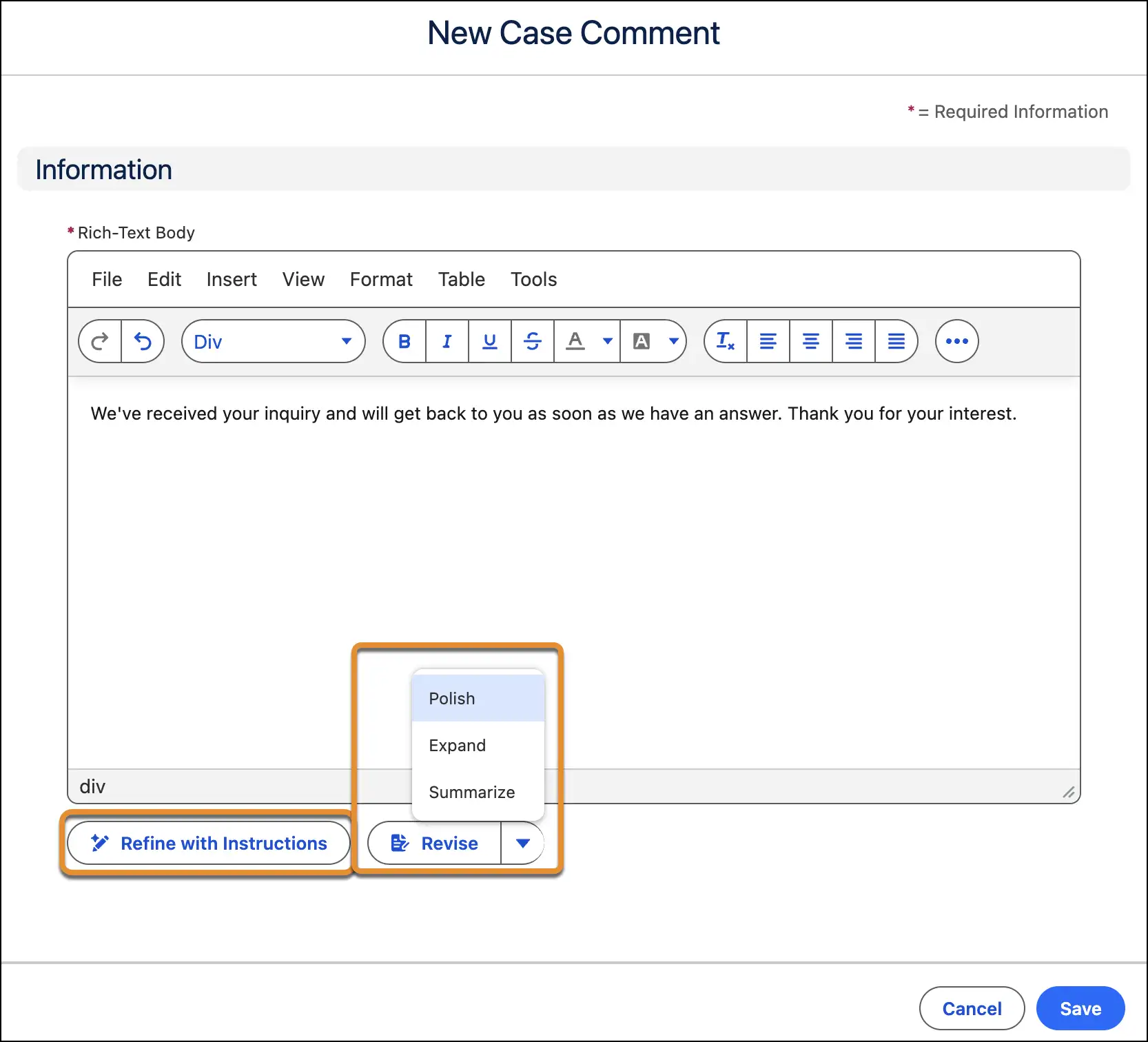
The “refine with instructions” action will be based on guidance admins configure in the Refine Case Comment prompt template, and the buttons’ visibility can be configured in Support Settings.
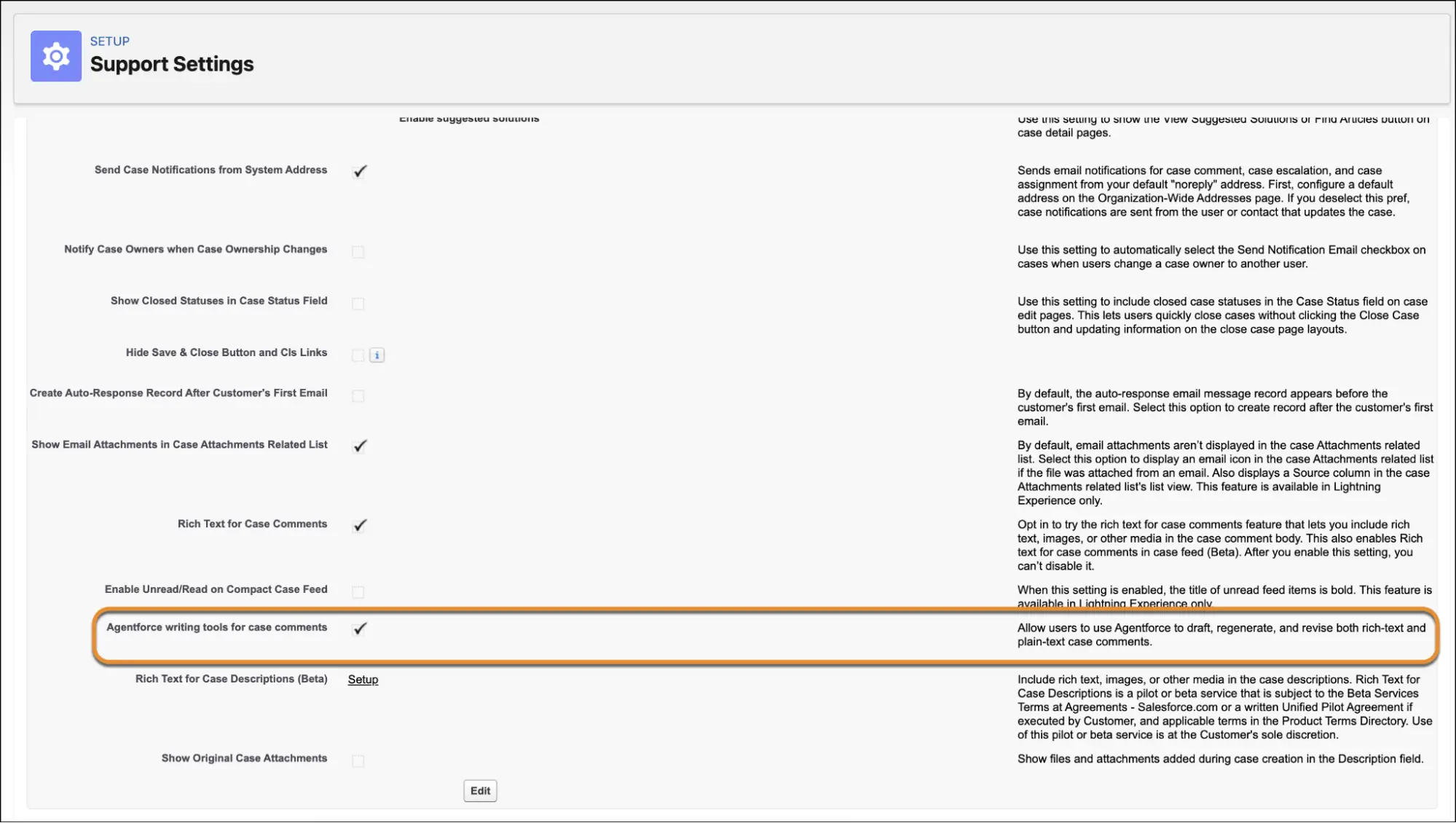
Your reps no longer have to spend time second-guessing how a comment’s tone reads! After all, most of their time is best spent actually moving the case forward. Note that this feature requires Agentforce for Service and Einstein for Service enabled in your org.
5. Salesforce Knowledge Gets a Trio of Upgrades
Knowledge management gets some real attention this release, with three updates aimed at keeping your knowledge base accurate, consistent, and easier to maintain.
You can now create articles from any record with custom prompt templates. If your reps have been putting off drafting Knowledge articles because of all the manual writing it entails, they can now draft accurate Knowledge articles straight from a case, incident, work order, or other record.
Now you can build multiple custom prompt templates in Prompt Builder using plain-language instructions and merge fields, so reps have a template tailored to whatever scenario they’re working in. They can create articles directly from a record, or conversationally through Agentforce from anywhere in the app.
Knowledge Similarity is another new feature that checks for existing articles that are similar to one that’s currently being drafted. It has the ability to give a percentage-based similarity score so authors can decide whether to update what’s already there instead of creating yet another near-duplicate.
These days, modular is the way to go, and this is made possible through Knowledge Blocks. These are reusable chunks of content that you create once and can insert into any article as a managed, read-only block. It can be useful for things like a legal disclaimer or a company address – so if either needs updating, you only need to do it once to have it updated on any article where it was used!
Note that all these features require you to have a Salesforce Knowledge add-on license.
6. Multi-Intent Article Recommendations
It’s common for a customer case to raise more than one problem at once. Agentforce Article Recommendations for Cases can now catch that, because instead of building a single search off the whole case (which tends to let the most prominent topic drown out and ignore the rest), it now identifies up to three distinct intents. It runs a targeted search for each, then merges the results into one ranked list of articles.
It’s a genuinely useful fix for anyone whose customers rarely stick to a single issue per case (so, most of us). Do note, though, that this requires Data Cloud provisioned, Agentforce Article Recommendations for Cases already enabled, and you may have to request Salesforce to activate it in your org before you even see the setting.
But once activated, it’s as easy as going into Setup → Einstein Article Recommendations for Cases, confirming you’re using the Get Recommendations on Cases flow (not Get Generative AI Recommendations for Cases, as this doesn’t support that flow), then turning on Enable Multi-Intent Detection.
7. Automatic Work Summaries for Enhanced Messaging and Voice Calls
How I wish these existed when I was still a support rep! It can get difficult to document what you’re working on while you’re communicating with a customer. Wrap-up gets easier with automatic work summaries, now available for both Enhanced Messaging sessions and Voice calls.
As soon as a messaging session or call ends, a summary generates automatically, and reps can either review and save it themselves, or admins can configure the summaries to save automatically without any review step from the rep at all.
Note that this requires the Agentforce for Service add-on or Agentforce 1 Edition. To enable it, go to the Einstein Work Summaries page in Setup where the Enhanced Messaging tab and Voice Calls tab each have their own “Automatically Generate Summaries” and “Automatically Save Summaries” toggles.
8. Inform Customers When Their Chat Is Rerouted to Another Service Rep
When chatting with a service rep, isn’t it frustrating when connectivity is lost, and you’re not sure what’s happening? Are you getting handed over to another rep, or was the conversation just dropped? When a rep loses connectivity mid-conversation and the chat gets rerouted to someone else, the customer now gets a customized auto-response explaining what’s happening.
To set this up, create an auto-response messaging component, then in Messaging Settings, add it to the Reroute Conversation field under Automated Responses. This applies to both Enhanced Messaging and Enhanced Chat, and is meaningful for customer trust, as nobody likes wondering if they’ve been ghosted mid-convo!
Summary
That’s a wrap on the Service Cloud features we’re most excited about for Winter ’27! I don’t really see a specific theme with this release, but if there is one prominent action or goal, it seems Salesforce is doubling down on making its existing AI tools actually useful in the flow of work while also finally addressing a few long-requested fixes (looking at you, Milestones).
As always, these are just eight of the many enhancements to Service Cloud this release that we think are worth your attention first. If you spot something we missed that deserves a mention, let us know in the comments…and if you’re heading to Dreamforce, do keep an eye out for how some of these features get expanded on stage!
Read More
- 10 Winter ’27 Updates Salesforce Marketers Need to Know
- 17 New Salesforce Flow Features in Winter ‘27
- Top 10 Salesforce Winter ’27 Features for Developers
- Top 12 Salesforce Winter ’27 Features for Admins
- Sales Cloud: Top 7 Salesforce Winter ’27 Features