

Salesforce Winter ’27 might still feel a little strange to be talking about while we’re enjoying the last few weeks of summer, but Salesforce releases wait for no season! This release brings plenty of updates for Sales Cloud, with AI and Agentforce continuing to take center stage alongside some useful improvements to everyday sales workflows.
From AI-generated follow-up actions and post-meeting voice notes to better pipeline insights, Relationship Maps, call coaching, and a whole host of Agentforce updates, there’s plenty for Salesforce Admins and sales teams to get their heads around. So, let’s take a look at some of the top Sales Cloud features coming in Winter ’27 (before we all start thinking about Christmas again).
1. Accelerate Meeting Follow-Ups With AI-Suggested Actions
For customers using Einstein Conversation Insights and the Salesforce mobile app, you can now receive AI-generated suggested next steps once a meeting transcript is available. The Salesforce mobile app displays a meeting summary, key decisions, and contextual next steps directly on the event record.
You can also review follow-up recommendations, such as sending requested materials, updating an opportunity, or scheduling another meeting, so you don’t have to work out what needs to happen next yourself.
2. Capture Post-Meeting Insights With Voice Notes
Capture important meeting details even when a conversation hasn’t been transcribed with Post-Meeting Voice Notes in the Salesforce mobile app. You can quickly record your thoughts straight after a meeting, helping you capture key details before they disappear into the post-meeting haze.
As the recording is only associated with you, there’s no need for verbal consent workflows. The Salesforce mobile app links the recording to the logged-in user, processes the transcription on-device, and sends the resulting text to Einstein Conversation Insights.
If you’re not already in the habit of talking to your phone, this might be your sign to get comfortable with voice notes.
3. Review Deal Risks and Activity Trends in Pipeline Forecasting
A reminder that Pipeline Forecasting is just regular Forecasting, renamed! Make forecasting a little less about guesswork with more deal intelligence right where you need it.
Sales reps and managers can now see things like deal risks, methodology scores, contact insights, agent activity, and activity heatmaps directly in the forecasting pipeline.
That means less clicking around to piece together what’s happening with a deal, and more time spotting which opportunities are healthy, which ones need some attention, and which might be heading for trouble.
4. Manage Stakeholder Details and Connections in Relationship Maps
Relationship Maps are getting a little more useful for sales reps, with more context about the people involved and more control over who appears on the map. Reps can now update details such as a contact’s opportunity role, department, and notes directly from the side panel, without having to leave the map.
They can also remove connections that are no longer relevant and bring them back later if needed. Basically, it’s easier to keep your Relationship Maps tidy, up-to-date, and focused on the people who actually matter to the deal.
This feature is available if you have Enterprise, Performance, and Unlimited editions with Sales, and Agentforce 1 Sales Edition.
5. Use Call Coaching on Video Calls to Drive Seller Success
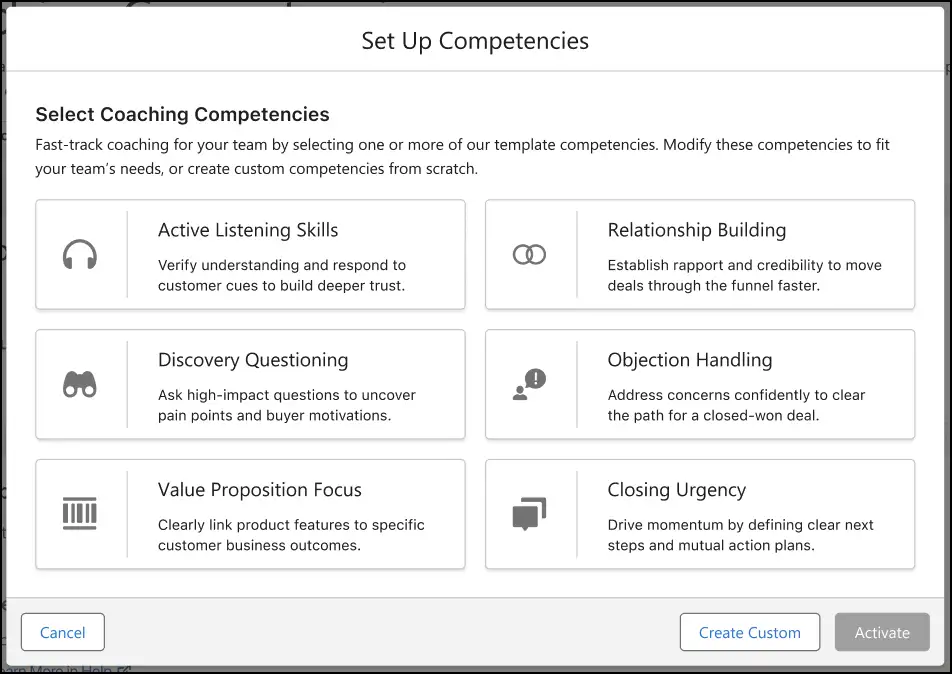
Give your sales teams a more consistent way to coach and improve their calls with Call Coaching. You can define the competencies that matter to your team and then see how reps are performing against them, with ratings and notes available directly from the Coaching tab on video call records.
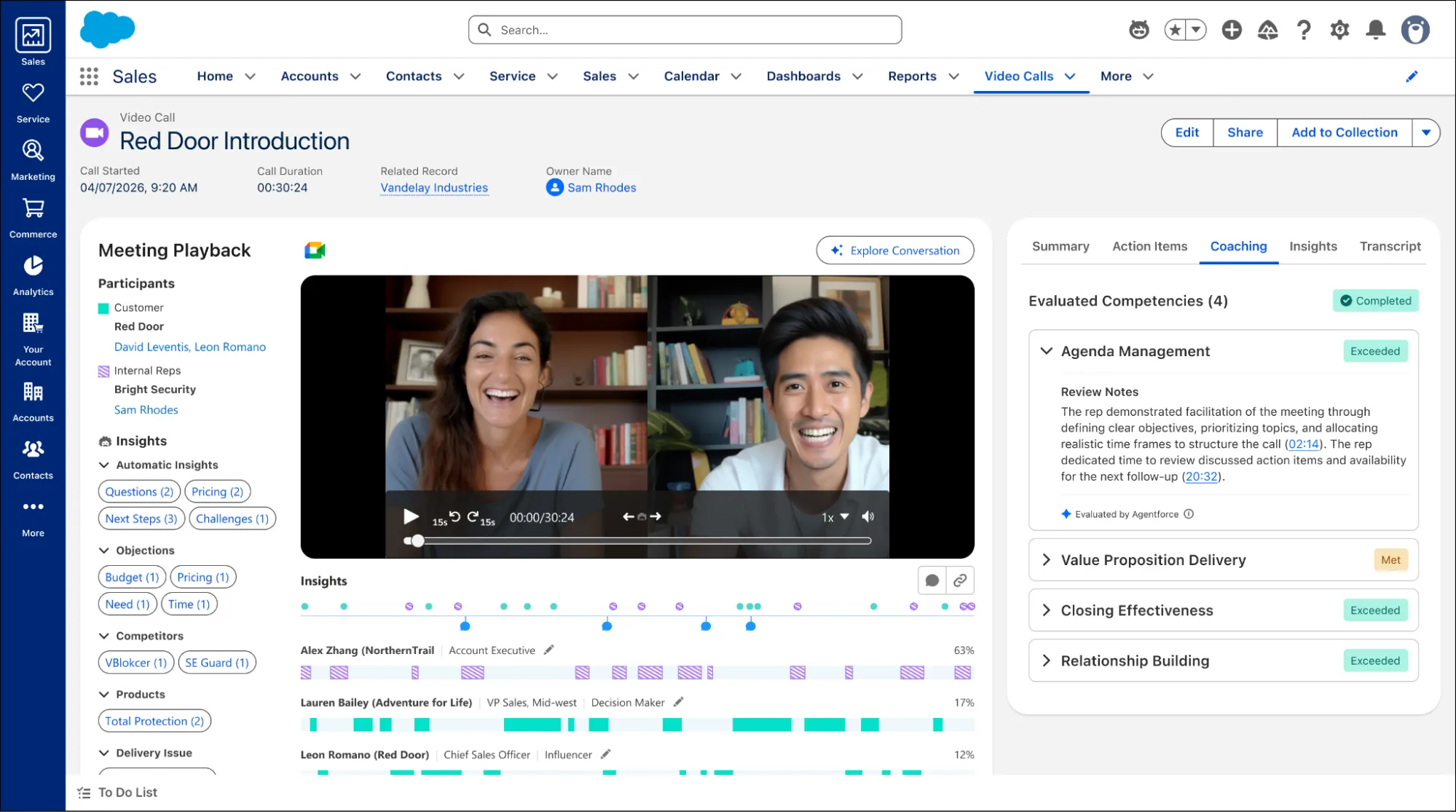
If you have Agentforce for Sales, an AI coaching agent can evaluate recorded calls automatically and provide feedback to reps. If you don’t, you can still rate calls manually using a simple three-point scale.
You can have up to eight active competencies, so there’s plenty of room to focus on the skills that actually matter rather than trying to coach everything at once.
6. Agentforce Engagement
There are three key changes to be aware of. First, Agentforce Lead Nurturing is now called Agentforce Engagement (it wouldn’t be a proper release without at least a few name changes!).
Second, there’s a new version of Agentforce Builder in town, and it’s bringing a bit more flexibility to how you configure your agents.
The new Agentforce Builder is based on Agent Script, making it easier to build in custom business rules and guardrails and have more control over how an agent behaves. You’ll find it in the Agentforce Studio app, while Salesforce Go remains the main place for creating and configuring Engagement agents.
Just be aware that there are now two flavours of Engagement agents: newer agents built with Agent Script use the new Builder, while legacy agents continue to use the older Builder in Setup. So, if you’re working with Engagement agents, it’s worth checking which type you’re using before you go looking for the right Builder.
Lastly, Sales teams now have more control over when their Lead Nurturing agent needs a human to step in before sending an email. You can choose to review every email, just the initial outreach, or use a custom flow to decide which emails need approval based on specific record criteria.
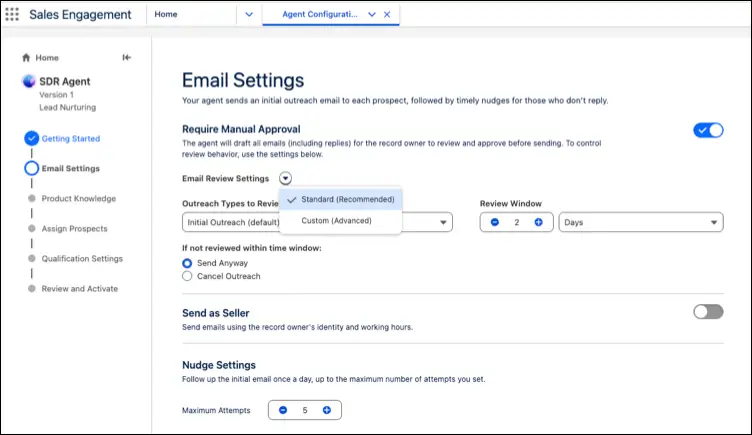
It’s a useful middle ground between letting the agent send everything automatically and having someone manually approve every single message. You get the automation while still keeping a human in the loop when the situation calls for it.
7. Agentforce Prospecting
I’ve also got a few updates, four to be precise, to share with you about Agentforce Prospecting, Salesforce’s outbound pipeline generation Agent. In good news – it hasn’t been renamed! Yet…
The first change is allowing your prospecting agent to do some of the legwork while everyone’s asleep. You can now schedule the agent to run automatically on the days and at the times that suit your team, with control over how frequently it runs and how many prospects are assigned to each rep.
That means your sales team can start the day with a fresh batch of prospects ready to work, rather than waiting for someone to remember to kick off an agent run. One less thing for the team to remember is always a win.
The next change is the ability to give your prospecting agent a better idea of who’s worth talking to first. You can now tell it to prioritize contacts who have already interacted with your business over the past 12 months, with the option to set the level of engagement you’re looking for. Those contacts are then surfaced in the prospect list, giving reps a head start on the people who have already shown some interest.
Your prospecting agent can now look beyond the accounts owned by your dedicated prospecting users. You can tell the agent to research accounts belonging to other users and then route any prospects it finds to the sales reps responsible for prospecting.
This is particularly useful if valuable accounts are sitting with users who aren’t actively prospecting, because the agent can still uncover opportunities without requiring you to shuffle account ownership around first.
Lastly, you can now see a lot more of what your prospecting agent is getting up to behind the scenes. From the Agent Activity tab on the Prospecting page, admins and sales reps can drill into individual agent sessions to see how many records were reviewed and why each one was either qualified or ruled out.
Previously, you could see the prospects the agent surfaced, but not much about the records it considered along the way. Now you can get a better idea of how the agent reached its conclusions, which is handy when you inevitably ask, “Why didn’t it pick up that one?”
Summary
There are plenty of useful updates for sales teams in Salesforce Winter ’27, with AI and Agentforce continuing to play a major role.
From smarter meeting follow-ups and post-meeting voice notes to improved pipeline insights, call coaching, Relationship Maps, and new Agentforce capabilities, there’s plenty for sales teams and admins to explore.
Read More
- 10 Winter ’27 Updates Salesforce Marketers Need to Know
- 17 New Salesforce Flow Features in Winter ‘27
- Top 10 Salesforce Winter ’27 Features for Developers
- Top 12 Salesforce Winter ’27 Features for Admins
- Service Cloud: Top 8 Salesforce Winter ’27 Features