






Highlights
- Salesforce has backtracked on its plans to retire profile-based permissions, but the underlying issues that caused the original retirement plan persist.
- Permission sets should be built as granularly as possible, but should not be distributed directly to users.
- Permission set groups are the best way to group permission sets together and assign them to users. This can be built according to a user’s role, or the tasks that users in your business will need to perform.
- The principle of least privilege should be adhered to as a standard across all Salesforce orgs.
Salesforce recently backtracked on its decision to retire permissions from within profiles. This was something that Salesforce customers had known was coming for years and had been preparing for. As a Consultant, I have worked with customers to deprioritize other projects to focus on the retirement first. Having it suddenly cancelled is causing a lot of confusion and frustration.
The worst part is that the underlying problem remains. Salesforce hasn’t suddenly found a way to make things better while continuing to distribute permissions via profiles. So, what is the best way to distribute permissions? That’s what we’re here to discuss today.
Why Profiles Aren’t It
Profiles have been the default for distributing permissions for years. When I started working with Salesforce, the approach was clear. We were to design profiles according to the teams within the business, clone them as needed for elevated access for team leaders, and build permission sets for “additional band-aid” permissions.
The problem is that Profiles are a mess. If you’ve ever had to try to deploy them through change sets, or even other more advanced tools, you’ll know that profiles are painful to deploy. Additionally, each user can only be assigned a single profile. They were originally built as a one-stop shop for all permissions distribution, but this means that there’s not a lot of flexibility.
Salesforce has had the solution to this problem staring them in the face for years: permission sets. These allow you to distribute permissions in a far more granular way. Users could be assigned multiple permission sets as required, which means you could build and assign permissions specifically. This is exactly what the principle of least privilege requires.
Where Profiles Are Still Required
You should begin by identifying what needs to remain in profiles. They’re not going away completely, but what you’re trying to do here is to move as much of the permissions distribution as possible into permission sets instead.
Profiles should continue to retain record type and app defaults, page layout assignments, and login hours/IP range information. Pretty much anything else should be moved into permission sets.
Distributing Permissions With Permission Sets
One thing I’ll say before I get started is that this is a great opportunity to begin using a vibe coding tool like Agentforce Vibes or Claude. What you’re about to build is extremely repetitive but not very technically complex. Doing this by hand is totally possible, but will take a long time. Leveraging an AI tool will save a lot of that time.
Identify a structure that you’d like to use for your permission sets across your entire org. Uniformity makes it far easier to maintain this in the long run, so pick something that will work. What I tend to do is create two permission sets minimum per object: a Read Only permission set, and a Full Access permission set. This gives you a great foundation to build up from. At this point, each permission set should also give field access, but not to sensitive/privileged fields.
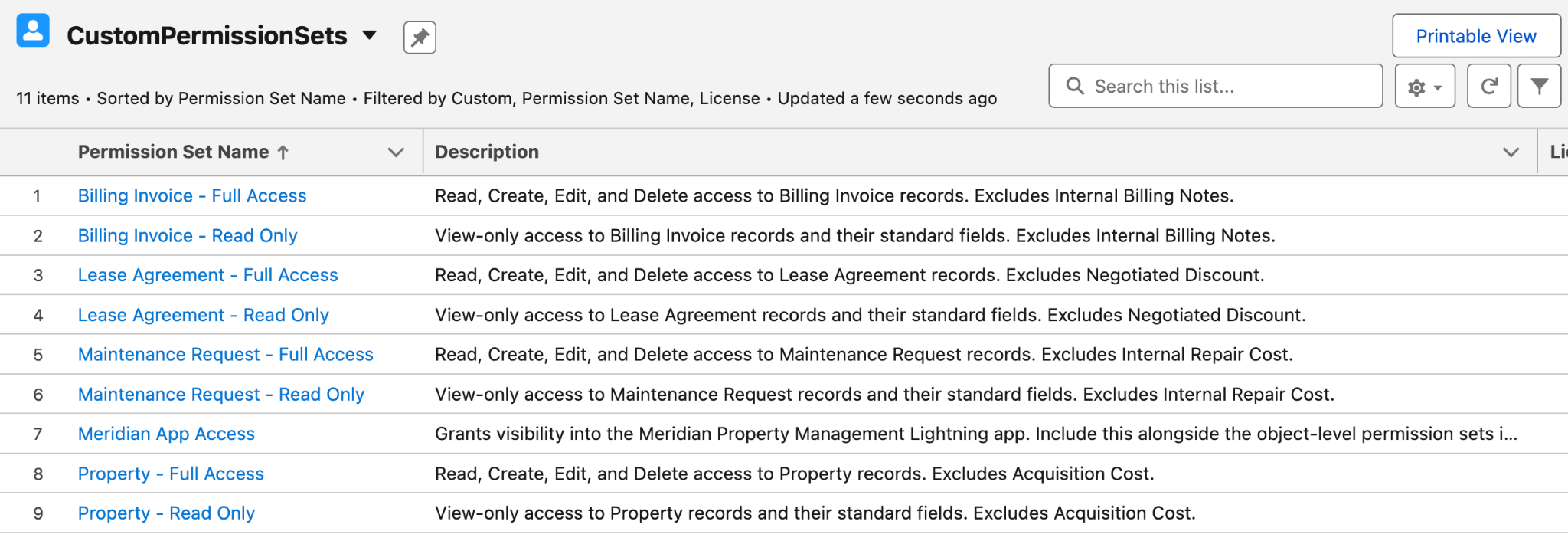
In the example above, you can see I’ve got a Read Only and Full Access permission set for a handful of custom objects. There’s also an extra one in there (Meridian App Access), which is a permission set that gives access to a Lightning App.
In the older world, you’d then have to go into each of these permission sets and manually assign them to the relevant users. Taking this approach isn’t sustainable in the long run, but once again Salesforce has come to the rescue by introducing permission set groups.
Grouping Into Permission Set Groups
Permission set groups allow you to group permission sets together, in a similar way that profiles do, to make assigning them to users easier. This is typically done by mapping out the type of user you’re working with, what permissions they need for the tasks they need to do, and adding the relevant permission sets to the group.
In the example below, you can see I’ve got a permission set group for each of the major roles in the org.
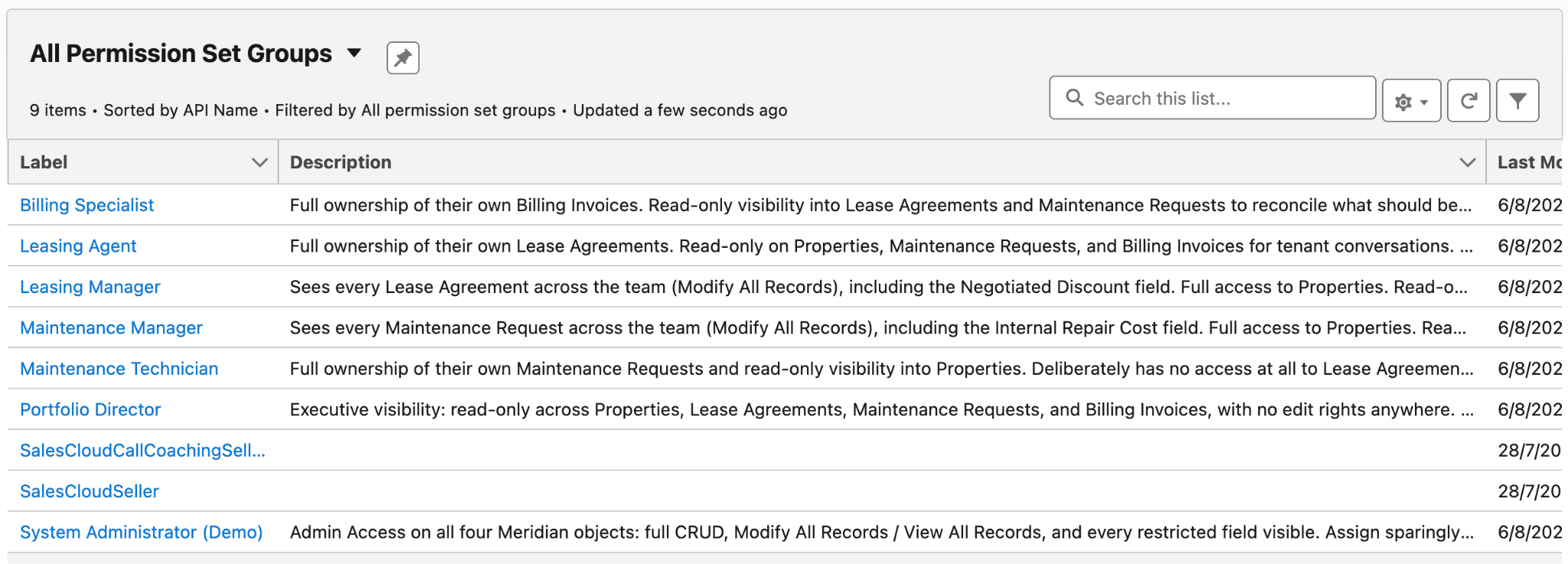
Each of these permission set groups contains only the permission sets that are relevant to the users that will be assigned to them. For example, in the Portfolio Director permission set group, you can see I’ve only added the Read Only permission sets that were created earlier. That, and the Meridian App Access permission set, which is required for access to the Meridian Lightning App.
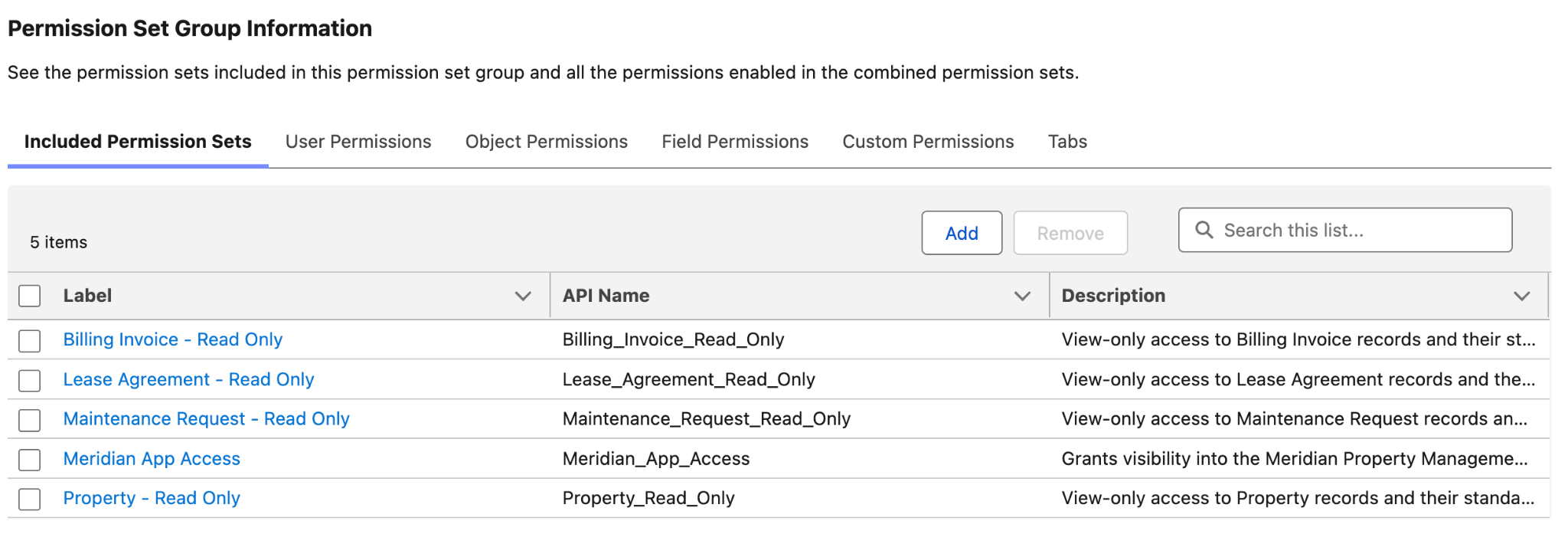
Keep in mind, this isn’t the only way to build out your permission set groups. If you have teams that might sit across multiple teams, then it may make more sense to create permission set groups for each task in your business that needs to be done. That way, you can assign the task-based permission set groups on a per-person basis.
You can also add multiple permission set groups to a single user, which you couldn’t do with profiles. This becomes almost critical if you’re working for an ISV and you want to make it easier for your customers to assign the right permissions to their users for your application.
Layering Additional Permission Sets
I mentioned sensitive fields earlier, or privileged data. This is where you can create permission sets that you don’t want to be added to permission set groups, but instead assign directly to a very small number of users.
This is more or less the same approach that you would’ve taken with profiles, so not a lot changes here. I just want to make a special mention of the fact that you shouldn’t be adding these high-risk permission sets to permission set groups.
One last thing, and this is less about distributing the permissions and more about when suppressing them is required. If you’re working in an org that has a messy permissions structure, you may find that you need to apply a blanket “no” to certain permissions in some situations. Oversimplifying it, this is where you’ll need to make use of Muting Permission Sets, which basically ensure that the permission flagged is NOT applied to that user.
Summary
Salesforce has cancelled the retirement of permissions on profiles, but the problems that caused them to plan the retirement in the first place still exist. As a responsible Salesforce professional, you need to ensure that your org is following the principle of least privilege when it comes to permissions distribution.
Keep in mind as well, the above was an example following just a single approach to POLP permissions distribution. There are many other ways to do it, but this is one I’ve found keeps things simple and sticks to the principle.
How are you handling permissions distribution in your org? Will that be changing after reading this article? Let me know on LinkedIn!





Comments: