

Security is boring until, all of a sudden, it isn’t, and it becomes very exciting. It’s a non-functional requirement that often has no one to champion it. In the ISV world, getting security tight enough to pass the Security Review is a prerequisite to selling your solution, but just passing the review isn’t the end of the story. Security is high-impact, tricky to get right, and under-discussed until things go wrong.
In this article, we will look at the strategies, tactics, and tools that will allow you to write secure code by default. You will learn about how poor security can be exploited, and how good security can be built and maintained as a fundamental part of your solution.
It All Starts With Permissions
The bedrock of security in Salesforce is the standard security model. Profiles, Permission Sets, and Sharing. These powerful tools are transparently enforced in all standard aspects of the platform.
If I’m not allowed to see a field, record, or object type, then I won’t see it on record pages, reports, list views, the API… Not anywhere.
Once those permissions are configured correctly, everything else can build on them to ensure your org stays safe. If those permissions are wrong, it may be only a matter of time until someone discovers how to do things that they shouldn’t be able to do.
If you don’t believe me, then fire up a tool like Salesforce Inspector Reloaded. It doesn’t exceed your permissions, but it sure can demonstrate all the things you can do with the permissions you have, even if normal UI options are hidden from you.
User Mode is Incredible
In the past, you could spot Apex code from ISVs or other security-minded people easily. Everything was littered with access checks to enforce field-level and object-level security. You might see something like this:
if (Schema.SObjectType.Account.isAccessible() &&
    Schema.SObjectType.Account.fields.Name.isAccessible() &&
    Schema.SObjectType.Account.fields.Industry.isAccessible() &&
    Schema.SObjectType.Account.fields.SecureField__c.isAccessible()) {
    return [
            SELECT Name, Industry, SecureField__c
            FROM Account
            WHERE Id = :accountId
    ];
} else {
    throw new AuraHandledException('User does not have access to required Account fields');
}
The access checks are longer than the functional code!
But in the Spring ’23 release, the Apex team at Salesforce introduced User Mode database operations. These bring the magic that you’re used to from the standard UI into Apex. If a user does not have access to a field or object, then the forbidden data is not readable or writable as their permissions dictate.
To make use of User Mode, all you need to do is specify it when you make queries or DML. Which vastly simplifies the code we had before:
return [
        SELECT Name, Industry, SecureField__c
        FROM Account
        WHERE Id = :accountId
        WITH USER_MODE
];
Now, since WITH USER_MODE is specified in the query, if the current user cannot access any of the queried fields, a QueryException is thrown with details of which fields are inaccessible.

User Mode is so straightforward that it makes alternative approaches redundant. In particular, Security.stripInaccessible() and WITH SECURITY_ENFORCED can be viewed as stepping stones in Apex’s journey to supporting User Mode and can be ignored today.
User mode is similarly simple when performing inline DML:
update as user new Account(
        Id = toUpdate.Id,
        Name = toUpdate.Name,
        Industry = toUpdate.Industry,
        SecureField__c = toUpdate.SecureField__c
);
When we include as user, then if the current user lacks write access to any of the fields, a DmlException is thrown.
Use Binds and Concrete Types to Avoid SOQL Injection
A classic vulnerability of database applications is query injection vulnerabilities. For example, if you naively build up a query like this:
String field = 'Name';
String name = 'ACME';
String query = 'SELECT ' + field + ' FROM Account WHERE Name = \'' + name + '\'';
This risks dangerous values going into the query:
String field = 'CaseNumber FROM Case WHERE Subject != \'';
String name = ' AND Id != \'';
String query = 'SELECT ' + field + ' FROM Account WHERE Name = \'' + name + '\'';
By careful selection of values, our Account query became a query on Case. To make it clear, the resulting query is:
SELECT CaseNumber FROM Case WHERE Subject != ' FROM Account WHERE Name = ' AND Id != ''
I.e. the field and name variables changed the target object, and then the Account part of the query is hidden inside a string constant.
This is an example of query injection, as made famous by Bobby Tables.
The standard solution to this in Apex is to use bind variables when building up a query as a string. To do this, we can rewrite the last part of our query as WHERE Name = :name. When you do this, Apex escapes the quotes that someone might use to perform query injection by putting backslashes in front of them. That prevents them from leaking out of the string constant that they are supposed to be in.
However, you cannot bind variables to the fields you select, or the SObjectType. For that, the safe thing to do is to go via a concrete type, validating that the string is the sort of thing you are expecting. For example, we can check the field:
String field = 'Name';
String name = 'ACME';

String checkedField = Account.SObjectType.getDescribe().fields.getMap().get(field).toString();
String query = 'SELECT ' + checkedField + ' FROM Account WHERE Name = :name';
Now, if field contained anything other than a field from Account, an error is thrown.
We can do similar things with enums and SObjectTypes to make sure that strings are what we expect them to be before using them in queries in locations where bind variables are not available.
Of course, in larger systems, we may want to centralize those checks into a single library class for database access.
Frontend Validations Are Only Suggestions
Any time you write an API, you need to be mindful that you cannot control the inputs. The API may receive invalid or unexpected values. The job of backend Apex code is to make sure that the input is validated and treated securely.
Importantly, any time you write an @AuraEnabled Apex method, you are creating an API. You cannot trust the input to that method.
Suppose you had a naive system-level Apex method to update an Account based on values from an LWC:
@AuraEnabled
public static void updateAccountYolo(Account toUpdate) {
    update toUpdate;
}
Note that this makes no attempt to check security, it runs in system mode and acts directly on the raw data it is given in the toUpdate parameter.
And then your LWC offers the user the chance to update Name and Industry. A field called SecureField__c exists in the org, but it is not visible to standard users. You have not included SecureField__c in your LWC:
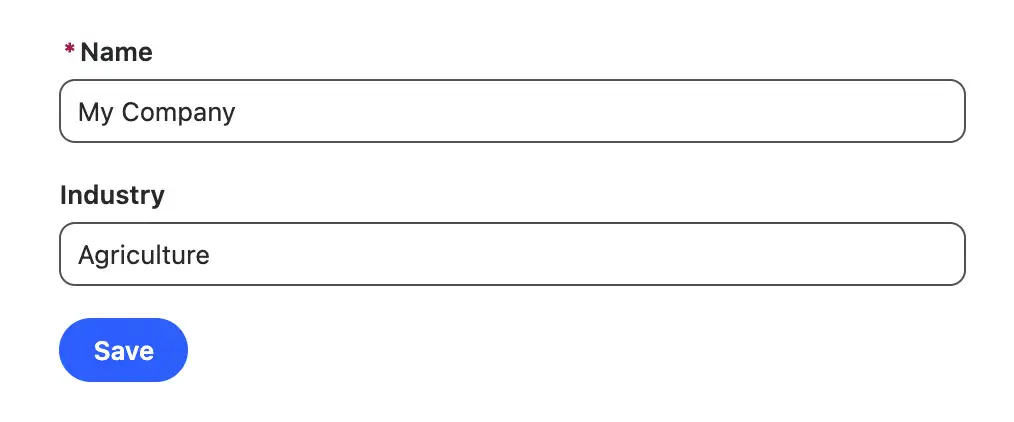
updateAccountYolo() methodA nefarious user can exploit your controller in various ways, including by using browser developer tools. The Network tab in developer tools records requests as they go to the server. So, a bad actor can enable network request recording and then press the Save button on the LWC. This gives them a request that they can copy:
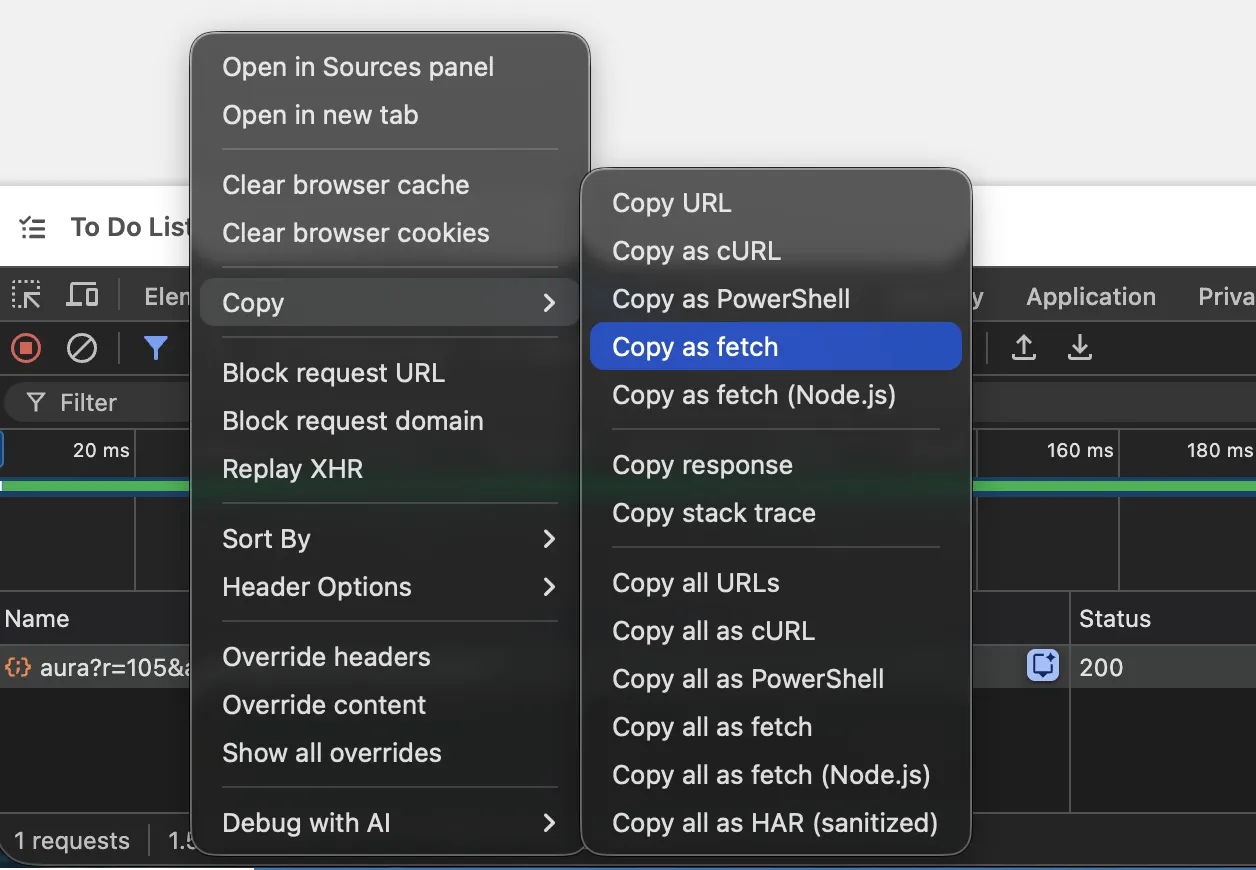
The request can then be run in the browser’s JavaScript console to repeat the action of the Save button. But the bad actor can trivially edit the request body, substituting the field values of the Account to write to Securefield__c using string replace():

SecureField__c based on an update to Industry.After the bad actor has sent that request as a Standard User, the updateAccountYolo() method simply updates the Account in system mode without checking field-level security. So, SecureField__c gets updated when it should not have been possible. As an administrator, we can view the Account, and see that they were able to update the secure field:
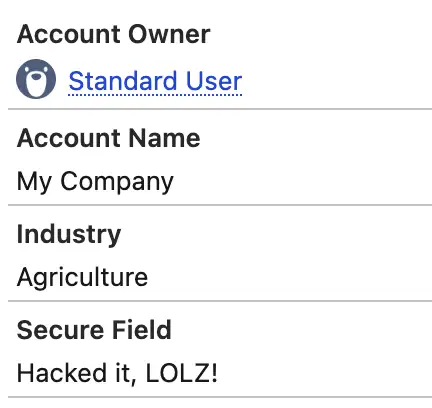
So, to properly secure our @AuraEnabled Apex, we must pick out just the fields that our controller is intended to update and perform DML in User Mode:
@AuraEnabled
public static void updateAccountUserMode(Account toUpdate) {
    update as user new Account(
            Id = toUpdate.Id,
            Name = toUpdate.Name,
            Industry = toUpdate.Industry
    );
}
Now, we’re ignoring any extras sent from the frontend. And, by making use of User Mode, we double-check that even the fields we have chosen are writable by the current user. If they are not, then an exception is thrown.
Inherited Sharing Is Suspect
Every time we declare a class in Apex, we can declare it as with sharing or without sharing. This affects whether or not the sharing rules of the current user are applied to queries and DML.
Like User Mode, the safest default position is to enforce the rules everywhere, i.e. with sharing. Only elevating to without sharing for the smallest possible section of code.
A corollary of having the smallest possible elevation is that we should not use inherited sharing. Inherited sharing seems like a great idea. It means that the current class adopts the sharing model of the class that called it. It seems to let you write utility classes that can be used in either mode. However, this makes it easy for one loose class to create a wide spread of code running without sharing.
So, the safest model is to make every class make database access with sharing. And, if it requires elevation to without sharing, do so in the smallest possible scope – potentially in an inner class.
On the subject of inner classes, note that inner classes do not inherit the sharing declaration of their parents. So inner classes must explicitly declare their sharing model if they access the database.
Security Is Like an Onion
You may have noticed that we have multiple layers of access checks. First, we choose which fields we think a user ought to be able to see in the UI and only show those. Then, we choose which fields they ought to be able to update in the Apex method, only passing a subset into the DML. And finally, we let User Mode DML have the final say on what gets written to the database.
This is a common pattern.
It’s nice for the user to have a UI that guides them away from doing things that are beyond their permissions – it avoids them hitting error messages. But it is only a convenience. It’s nice that the update method strips away fields we didn’t intend to update, but ultimately, permissions control what goes in and out of the database. User Mode tests those permissions and prevents any mistakes.
Passing Judgment from the Edges
We have thought a lot about how to make sure that Apex follows the permissions of the running user. There are also times when Apex needs to work in system mode, beyond the current user’s privileges.
For example, in triggers, from scheduled jobs that perform system-level maintenance, or to log actions to system-only records like logs.
In a well-architected system, there may be reusable Apex components that could be used in either system or user mode.
To handle this, we can take a cue from the syntax for User Mode in the System.Database class:
public static List<SObject> query(String queryString, System.AccessLevel accessLevel)

public static List<Database.SaveResult> update(List<SObject> recordsToUpdate, Boolean allOrNone, System.AccessLevel accessLevel)
In both of these methods, one of the parameters is an instance of the AccessLevel class. This indicates whether the operation should be in User or System mode.
An Apex developer can make use of this in their utility classes that touch the database. They can write one class that can be used in either mode. This class can require an AccessLevel object before use, forcing developers to be intentional about which mode they are operating in (or defaulting to the more secure User Mode).
public with sharing class MyUtil {
    private AccessLevel accessLevel;
    private List<SObject> records;

    public MyUtil() {
        accessLevel = System.AccessLevel.USER_MODE;
    }

    public MyUtil(AccessLevel accessLevel) {
        this.accessLevel = accessLevel;
    }

    // Some worthwhile methods...

    @SuppressWarnings
    public List<Database.SaveResult> updateRecords() {
        return Database.update(records, accessLevel);
    }
}
This class can then be created with User or System Mode, depending on the entry point where it is being used. You may find that you have to pass the AccessLevel through chains of objects, but the safety is worthwhile. You can take it even further by using factories and dependency injection to make things neat and object-oriented.
If you have centralized database access into Selector and Unit of Work classes, then these can be specialized into versions that work with specific sharing and FLS options that should be applied.
Building In Security
To make sure that your code is secure and will stay secure, you should use static analysis tools. Traditionally, that meant PMD. But today we can use the Salesforce Code Analyzer, which includes PMD and other scanners.
The default rules of Code Analyzer are a pretty good guide, but I would go further and add custom PMD rules to ensure that all database access (read and write) is in user mode. Then, developers can use @SuppressWarnings in any case where system mode is required.
Furthermore, I add CI checks requiring a comment justifying any suppressed warning.
Salesforce Code Analyzer can be run as an integration into VS Code and Illuminated Cloud, so developers can get immediate feedback on their compliance with security rules. Code Analyzer is even getting an MCP server to provide direct feedback to coding agents.
These facilities, plus pre-commit checks and CI actions, allow you to stay on top of all the security issues that you can check for with static analysis.
Final Thoughts
I think that the default posture of your average developer at an ISV is probably more secure than a non-ISV developer. In the past, this was understandable. Security checks in Salesforce were onerous and ugly. But with modern approaches, it’s much easier to write code that is secure, clean, and minimal.
I hope that the examples above opened your eyes to the potential risks and the straightforward approaches that we can take in securing Apex.
Whether you’re planning to submit a solution for security review or you just want to sleep better at night, getting security nailed down is important for all developers, admins, and architects.