

Mobile connectivity is no longer an optional feature for CRM – it is a core requirement. This article explores a metadata-driven architecture to bridge Salesforce with Firebase Cloud Messaging (FCM).
You will learn how to handle device registration, manage topic subscriptions, and execute real-time push notifications across Sales, Service, and Field Service clouds using Apex and Google OAuth 2.0.
Whether it’s a sales rep receiving a lead alert or a field service technician getting a dispatch change, instant notifications are the heartbeat of a responsive business. While Salesforce offers native tools, custom mobile apps require a “bridge.”
This guide walks you through a professional-grade integration using Custom Metadata (CMDT) to ensure your solution is scalable, secure, and deployment-friendly.
Architecture and Strategy
The core of this solution is a decoupled architecture that separates Device Management from Message Delivery. By leveraging FCM Topics, we offload the burden of managing individual tokens to Firebase, ensuring Salesforce remains a lean system of record.
The Four-Stage Lifecycle
- Handshake: Mobile app captures an FCM Token upon user login and stores it in Salesforce.
- Subscription: Salesforce calls the Firebase batchAdd API to link the token to a specific Topic (e.g., “Field_Service_Alerts”).
- Metadata Engine: All API keys and endpoints are stored in CMDT for environment agility.
- Delivery: A business event triggers a synchronous Apex callout to the FCM API.
Choosing the right architecture is essential for security and performance. We use Firebase Cloud Messaging (FCM) because it acts as a single gateway to reach both Android and iOS devices simultaneously.
This project specifically uses the modern FCM HTTP v1 API, which is much more secure than legacy versions because it uses short-lived access tokens. To connect Salesforce to Google safely, an Azure Function acts as a “secure middleman”.
This middleware stores sensitive private keys so they are never exposed inside the Salesforce org. Using Azure also handles complex data processing, which protects your Salesforce governor limits from being exhausted.
Additionally, by using FCM Topics, Salesforce only has to send one message to a group instead of thousands of individual alerts. This decoupled approach keeps your Salesforce environment fast and responsive.
Ultimately, this strategy provides an enterprise-grade security perimeter that is easy to maintain.
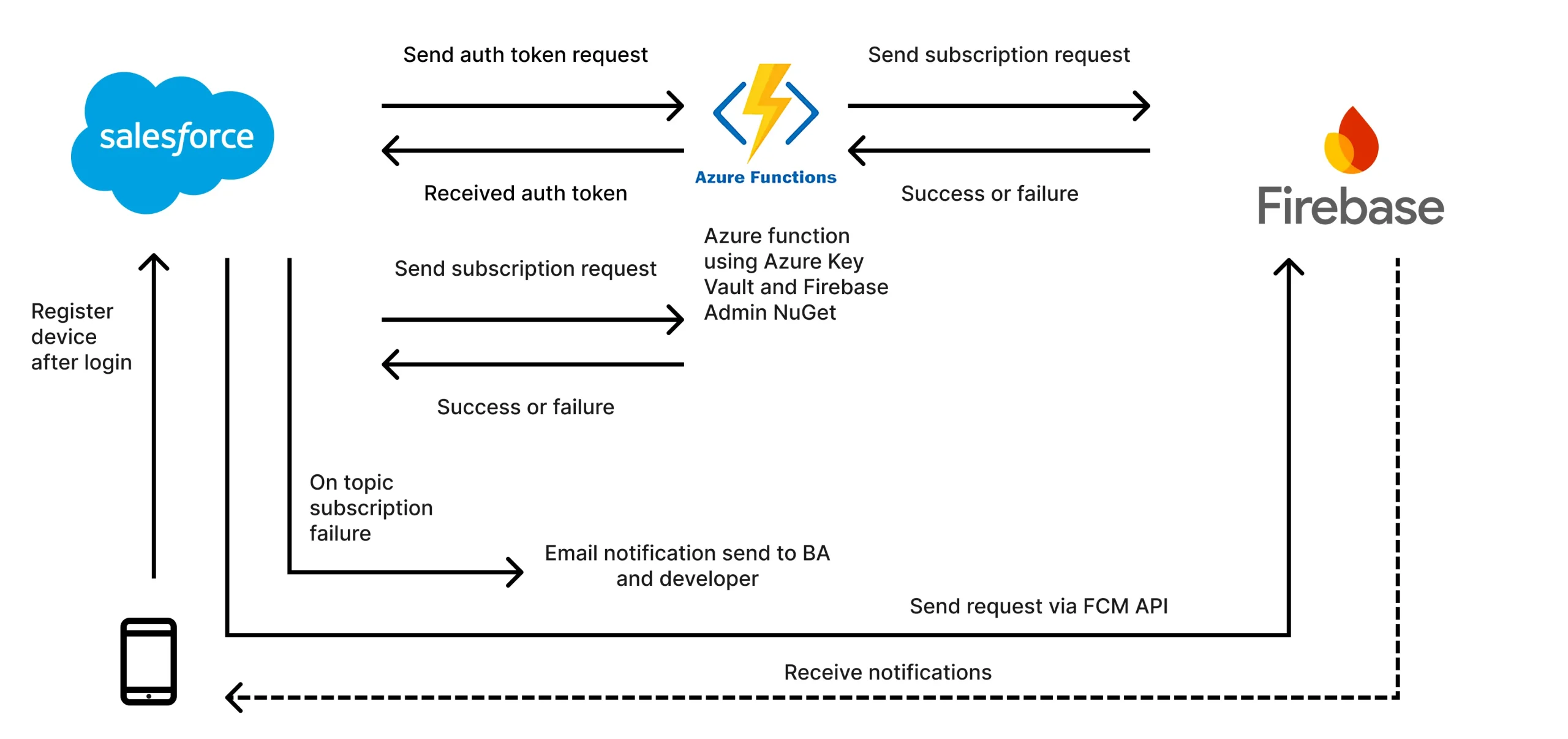
Integration Flow: A Detailed Walkthrough
While the architecture diagram visualizes the high-level connections, the process follows a specific sequence to ensure security and reliability:
- Device Registration: Upon login, the mobile phone captures its unique FCM token and registers it with Salesforce.
- Authentication Handshake: Salesforce initiates the process by sending an auth token request to the Azure Function. The function validates the request and sends the auth token back to Salesforce.
- Topic Subscription: Salesforce then sends a subscription request to the Azure Function. The Azure Function, acting as the secure middleman, uses the Firebase Admin NuGet and Azure Key Vault to securely communicate with Firebase.
- Confirmation and Error Handling: Firebase sends a Success or Failure status back to the Azure Function, which relays it to Salesforce. If the subscription fails, Salesforce is configured to automatically trigger an email notification to the business analyst (BA) and developer for immediate troubleshooting.
- Push Delivery: Once the handshake is complete, Salesforce sends notification requests via the FCM API directly to Firebase. Firebase then pushes the notifications to the target mobile devices.
Firebase and Azure Function Setup
Before implementing the Apex code, you must configure your environment in both Google Cloud and Azure. The high-level steps are as follows.
- First, create a project in the Firebase Console and ensure the Firebase Cloud Messaging API (V1) is enabled under Project Settings > Cloud Messaging.
- You will then need to generate a Service Account JSON key (found under the Service Accounts tab), which provides the private_key and client_email required for authentication.
- Next, set up an Azure Function to act as your secure middleware. In the Azure Portal, create a Function App and store your Firebase credentials within the Environment Variables (Application Settings) for maximum security. Ensure you have your Function URL and Function Key ready for the Salesforce callout.
For those new to these platforms, the Official Firebase Setup Guide and Azure Functions Quickstart provide excellent step-by-step instructions.
Solution: Configuration and Implementation
1. The Configuration Layer
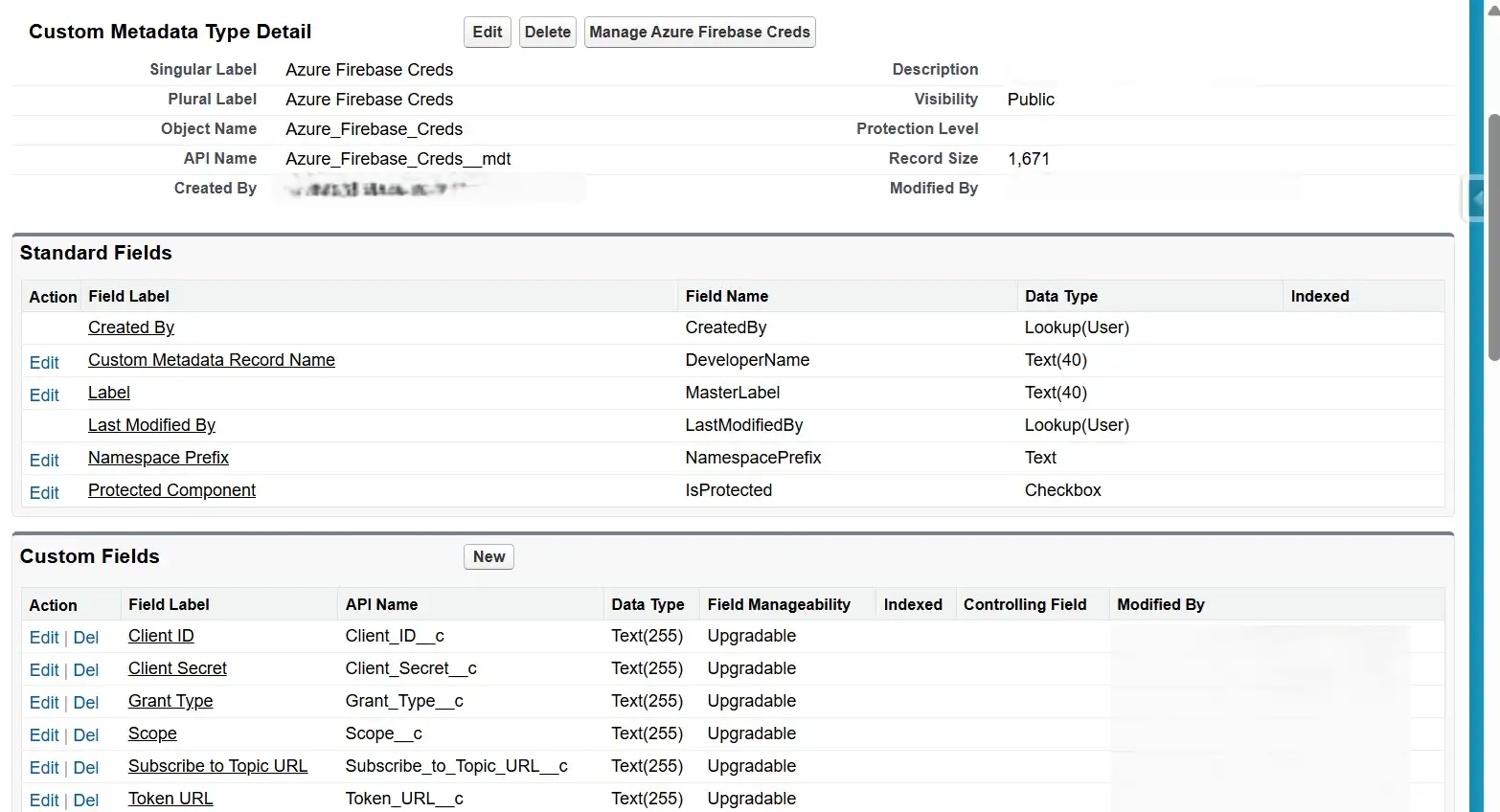
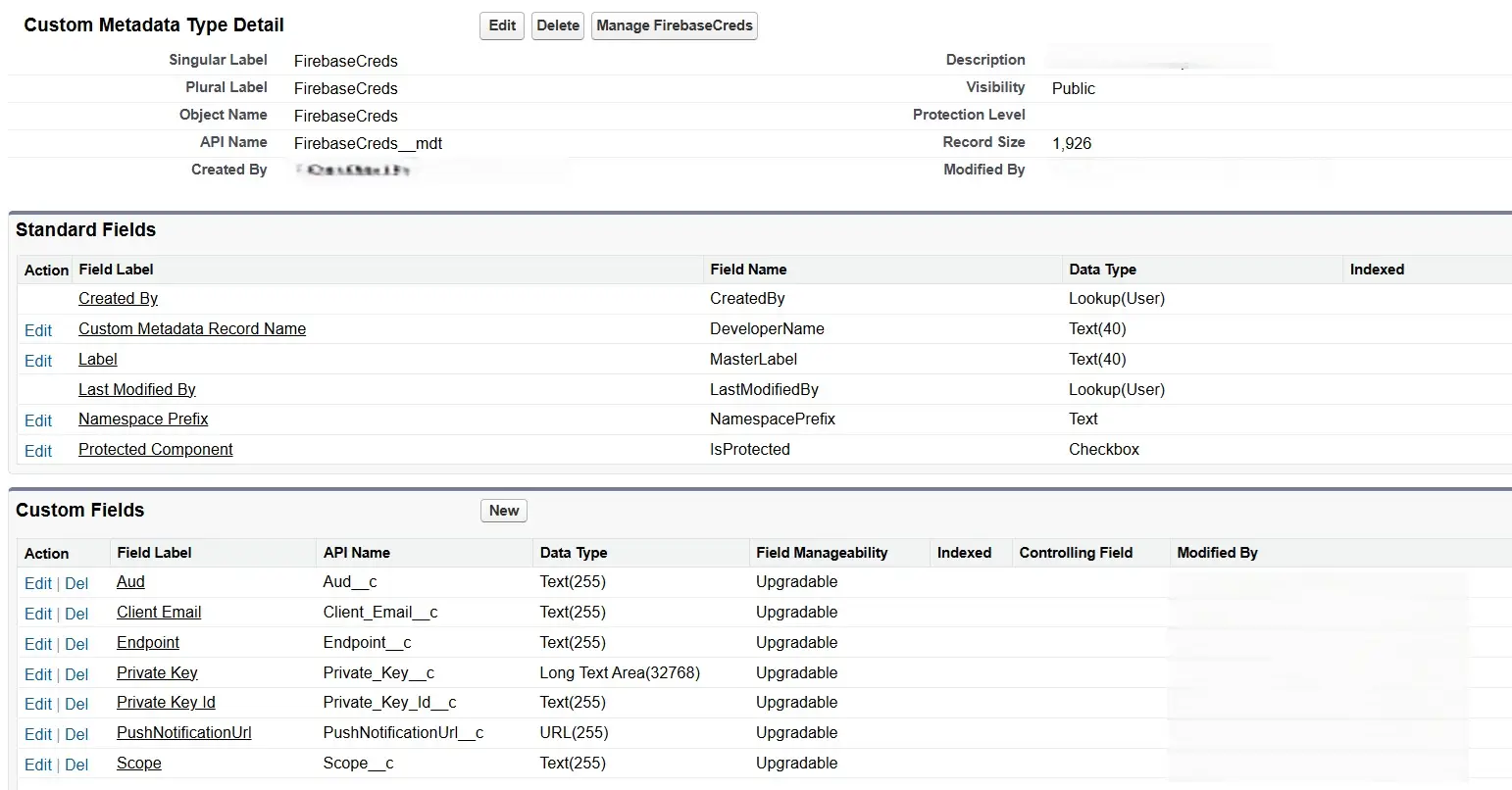
We use two separate Metadata types: one to handle the initial Azure-based authentication and a second to store the specific Firebase project credentials.
- Azure_Firebase_Creds__mdt (used for Storing the Azure Server details)
- Fields:
Client_ID__c,Client_Secret__c,Grant_Type__c,Scope__c,Subscribe_to_Topic_URL__c,Token_URL__c
- Fields:
- FirebaseCreds__mdt (For storing firebase credentials details)
- Fields:
Aud__c,Client_Email__c,Endpoint__c,Private_Key__c,Private_Key_Id__c,PushNotificationUrl__c,Scope__c.
- Fields:
Remote Site Settings:
- https://login.microsoftonline.com (if using Azure auth).
- https://oauth2.googleapis.com
- https://fcm.googleapis.com
2. Device Subscription (Apex)
Key Implementation Details
To understand the robustness of this solution, focus on these four core design strategies that balance user experience with system stability:
- Asynchronous Processing and UI Responsiveness: We use the
@future(callout=true)annotation to decouple the external handshake from the Salesforce transaction. This is a mandatory pattern to avoid “Callout from Trigger” exceptions and manage long-running processes without freezing the user’s screen. - Governor-Resilient Bulkification: The logic follows a “Collect-then-Commit” pattern. By processing a
Set<Id>and moving allupdateandinsertoperations strictly outside the loop, the code can handle hundreds of simultaneous device updates without hitting Apex DML limits. - Environment Agility and Metadata Security: Instead of hardcoding secrets, we use Custom Metadata and
OrganizationIdchecks. This allows the code to automatically detect if it is running in a UAT or Production environment – adjusting endpoints and Topic names dynamically so you never have to modify code during deployment. - Fail-Safe Logging: Every transaction creates a
Mobile_Application_API_Activity__crecord. This provides a professional audit trail, allowing you to troubleshoot authentication or connection issues by inspecting the exact request and response bodies directly within Salesforce.
The Implementation: Whenever a user logs in or updates permissions in the mobile app, a record is created or updated in the Mobile_Device_Data__c object, which triggers the following subscription logic:
public class SubscribeToFCMHelper {
  public static String getAccessToken() {
    Azure_Firebase_Creds__mdt creds = Azure_Firebase_Creds__mdt.getInstance('firebase');

    if (creds == null) throw new CalloutException('Firebase credentials metadata not found.');

    HttpRequest req = new HttpRequest();
    req.setEndpoint(creds.Token_URL__c);
    req.setMethod('POST');
    req.setHeader('Content-Type', 'application/x-www-form-urlencoded');

    String requestBody = 'client_id=' + EncodingUtil.urlEncode(creds.Client_ID__c, 'UTF-8') +
                 	'&scope=' + EncodingUtil.urlEncode(creds.Scope__c, 'UTF-8') +
                 	'&grant_type=' + EncodingUtil.urlEncode(creds.Grant_Type__c, 'UTF-8') +
                 '&client_secret=' + EncodingUtil.urlEncode(creds.Client_Secret__c, 'UTF-8');

    req.setBody(requestBody);

    HttpResponse res = new Http().send(req);

    if (res.getStatusCode() == 200) {
      Map<String, Object> responseBody = (Map<String, Object>) JSON.deserializeUntyped(res.getBody());
      return (String) responseBody.get('access_token');
    } else {
      throw new CalloutException('Failed to retrieve Access Token: ' + res.getBody());
    }
  }

  /**
  * Future method for handling Firebase Topic Subscriptions.
  * Best Practice: Bulkified DML and Error Tracking.
  */
  @future(callout=true)
  public static void subscribe(Set<Id> deviceIds) {
    List<Mobile_Device_Data__c> devicesToUpdate = [SELECT Id, User__c, Device_Token_Fcm__c,
                                                          H_Application_Name__c
                                                          FROM Mobile_Device_Data__c
                                                          WHERE Id IN :deviceIds];
    if (devicesToUpdate.isEmpty()) return;

    String accessToken = getAccessToken();
    Azure_Firebase_Creds__mdt creds = Azure_Firebase_Creds__mdt.getInstance('firebase');
    List<Mobile_Application_API_Activity__c> logs = new List<Mobile_Application_API_Activity__c>();

    for (Mobile_Device_Data__c detail : devicesToUpdate) {
      if (String.isBlank(detail.Device_Token_Fcm__c)) continue;

      // Logic to determine project key
      String projectKey = detail.H_Application_Name__c != null && detail.H_Application_Name__c.containsIgnoreCase('APP Name')
                          ? Label.FIREBASE_CONFIG_COREAPP
                          : '';

      String appName = detail.H_Application_Name__c != null ? detail.H_Application_Name__c.deleteWhitespace() : 'UnknownApp';

      if(UserInfo.getOrganizationId()==System.Label.UAT_ORG_ID) appname=appname+'UAT';

      // Use Map for JSON Body to avoid manual concatenation errors
      Map<String, Object> jsonMap = new Map<String, Object>{
        'project_key' => projectKey,
        'registration_tokens' => new List<String>{ detail.Device_Token_Fcm__c },
        'topic' => appName
      };
      String jsonBody = JSON.serialize(jsonMap);

      try {
        HttpRequest req = new HttpRequest();
        req.setEndpoint(creds.Subscribe_to_Topic_URL__c);
        req.setMethod('POST');
        req.setHeader('Authorization', 'Bearer ' + accessToken);
        req.setBody(jsonBody);

        HttpResponse res = new Http().send(req);
        String responseBody = res.getBody();
        Boolean isSuccess = (res.getStatusCode() == 200);

        // Update device record on success
        if (isSuccess) {
          detail.Subscribed_to_Notification__c = true;
          detail.Last_Subscribe_Time__c = System.now();
        }

        // Create log record - Collect in list for bulk DML
        logs.add(new Mobile_Application_API_Activity__c(
          Command_Type__c = 'SUBSCRIBE TO FCM',
          Request_Body__c = jsonBody,
          Response_Body__c = responseBody.left(131072), // Ensure it fits in Long Text area
          Result__c = isSuccess ? 'PASS' : 'FAIL',
          Is_Fail__c = !isSuccess,
          Error__c = isSuccess ? '' : responseBody.left(255),
          Record_Identifier__c = detail.Id,
          User__c = detail.User__c
        ));

      } catch (Exception e) {
      	logs.add(new Mobile_Application_API_Activity__c(
          Command_Type__c = 'SUBSCRIBE TO FCM ERROR',
          Result__c = 'FAIL',
          Is_Fail__c = true,
          Error__c = e.getMessage().left(255),
          Record_Identifier__c = detail.Id
      	));
      }
    }

    // Perform Bulk DML outside the loop
    if (!devicesToUpdate.isEmpty()) update devicesToUpdate;
    if (!logs.isEmpty()) insert logs;
  }
}
Note: As of the writing of this article, Salesforce has begun to signal moving away from the @future annotation in favor of the Queueable asynchronous Apex implementation.
3. Secure Authentication (JWT and OAuth 2.0)
Key Implementation Details
The Google FCM v1 API requires OAuth 2.0 with JWT Bearer Flow, which is significantly more secure than legacy static keys. To understand this implementation, focus on these three critical operations:
- Manual JWT Construction & Signing: Since Salesforce does not have a “native” Google Auth provider for this specific server-to-server flow, we manually construct the JWT. Look for the
Crypto.sign()method – it uses RSA-SHA256 to sign the header and payload with your private key, proving to Google that the request is authentic. - Secure Private Key Handling: Private keys from Google usually come as formatted blocks with headers and newlines. The
cleanPrivateKey()method is a vital helper that strips these non-base64 characters, ensuring theEncodingUtil.base64Decode()function doesn’t fail. - Strategic Caching for Performance: Notice the
credsCacheMap. In a complex transaction where multiple notifications might be sent, we use this static cache to store Custom Metadata records. This prevents redundantgetInstance()calls, adhering to the best practice of minimizing resource consumption within a single execution context. - Base64URL Encoding: Standard Base64 isn’t “URL-safe” because it contains + and /. The
base64UrlEncode()helper ensures the JWT is safely transmitted in the body of the POST request by replacing those characters and removing padding.
The Implementation: The following class manages the entire lifecycle of the token: cleaning the key, signing the assertion, and exchanging it for a short-lived Bearer token.
public class GenerateFirebaseAccessToken {

  // Static cache to store metadata and prevent redundant database access in a single transaction
  private static Map<String, FirebaseCreds__mdt> credsCache = new Map<String, FirebaseCreds__mdt>();

  public static FirebaseCreds__mdt getOAuthCredentials(String recordName) {
    if (!credsCache.containsKey(recordName)) {
      // Best Practice: getInstance() is more efficient than SOQL for Custom Metadata
      credsCache.put(recordName, FirebaseCreds__mdt.getInstance(recordName));
    }

    FirebaseCreds__mdt creds = credsCache.get(recordName);
    if (creds == null) {
      throw new CalloutException('Firebase Metadata configuration missing for: ' + recordName);
    }
    return creds;
  }

  /**
  * @description Generates a signed JWT for Google OAuth 2.0 Bearer Flow.
  */
  public static String generateJWT(string metadataRecordName) {
    FirebaseCreds__mdt oauthCredentials = getOAuthCredentials(metadataRecordName);
    string kid=oauthCredentials.Private_Key_Id__c;
    String header = '{"alg":"RS256","typ":"JWT","kid":"'+kid+'"}';
    Long iat = DateTime.now().getTime() / 1000;
    Long exp = iat + 3600;
    String payload = '{"iss":"' + oauthCredentials.Client_Email__c + '",'+ '"sub":"' + oauthCredentials.Client_Email__c + '",'
      + '"scope":"'+oauthCredentials.Scope__c+'",'+ '"aud":"'+oauthCredentials.Aud__c+'",'
      + '"iat":' + iat + ','+ '"exp":' + exp + '}';
    string privateKey=generatePrivateKey(oauthCredentials.Private_Key__c);
    String encodedHeader = base64UrlEncode(Blob.valueOf(header));
    String encodedPayload = base64UrlEncode(Blob.valueOf(payload));
    String signatureInput = encodedHeader + '.' + encodedPayload;
    Blob privateKeyBlob = EncodingUtil.base64Decode(privateKey);
    Blob signatureBlob = Crypto.sign('RSA-SHA256', Blob.valueOf(signatureInput), privateKeyBlob);
    String encodedSignature = base64UrlEncode(signatureBlob);
    return encodedHeader + '.' + encodedPayload + '.' + encodedSignature;
  }

  /**
  * @description Obtains an Access Token from the Google Authorization Server.
  */
  public static String getAccessToken(String metadataRecordName) {
    FirebaseCreds__mdt creds = getOAuthCredentials(metadataRecordName);
    String jwtToken = generateJWT(metadataRecordName);

    HttpRequest req = new HttpRequest();
    req.setEndpoint(creds.Endpoint__c);
    req.setMethod('POST');
    req.setHeader('Content-Type', 'application/x-www-form-urlencoded');
    req.setBody('grant_type=urn:ietf:params:oauth:grant-type:jwt-bearer&assertion=' + jwtToken);

    HttpResponse res = new Http().send(req);

    if (res.getStatusCode() == 200) {
      Map<String, Object> responseMap = (Map<String, Object>) JSON.deserializeUntyped(res.getBody());
      return (String) responseMap.get('access_token');
    } else {
      throw new CalloutException('GCP Token Exchange Failed: ' + res.getStatus() + ' ' + res.getBody());
    }
  }

  private static String base64UrlEncode(Blob input) {
    return EncodingUtil.base64Encode(input).replace('+', '-').replace('/', '_').replace('=', '');
  }

  private static String cleanPrivateKey(String rawKey) {
    // Remove headers/footers and all whitespace/newlines in one pass
    return rawKey.replace('-----BEGIN PRIVATE KEY-----', '')
                 .replace('-----END PRIVATE KEY-----', '')
                 .replaceAll('\\s+', '');
  }
}
4. Sending Push Notification to iOS/Android Using Access Token
Key Implementation Details
The final piece of the puzzle is the delivery engine. To understand how this class orchestrates the push, focus on these three architectural safeguards:
- Governor Limit Guardianship: In Apex, we are limited to 100 callouts per transaction. Notice the
calloutCountcounter within the loop – it acts as a “circuit breaker” to prevent the code from hitting a hard limit and failing the entire transaction if you try to process too many records at once. - Decoupled Payload Mapping: Look at how the
messageContentMap is structured. We separate thenotification(which appears on the user’s lock screen) from thedataobject (which is invisible to the user but used by the mobile app to navigate or update local state). This is a professional standard for rich mobile notifications. - Environment-Aware Topic Naming: The code dynamically generates the
topicNamebased on record data and theOrganizationId. By appending “UAT” automatically in test environments, we ensure that developers don’t accidentally send test notifications to production users. - Non-Blocking Error Handling: Rather than letting one failed callout crash the whole loop, the code uses a “Collect-and-Notify” pattern. It catches errors, converts them into
SingleEmailMessageobjects, and sends them in a single bulk operation at the very end.
The Implementation: The following trigger helper class is designed to run asynchronously, ensuring that when a business record is created, the notification is dispatched immediately without impacting the user’s save performance.
public class FirebaseApp_Trigger_Helper {
  @future(callout=true)
  public static void pushOnInsert(Set<Id> recordIds) {
    try {
      List<MTSRA_APP__c> appRecords = [SELECT Id, Name, Job_Number__c, Organisation__c, Operating_Depot__c,
                                              h_Subcontractor__c, Comments__c, Operative_Name__c
                                              FROM MTSRA_APP__c
                                              WHERE Id IN :recordIds];

      if (appRecords.isEmpty()) return;

      FirebaseCreds__mdt creds = GenerateFirebaseAccessToken.getOAuthCredentials('FIREBASE_APPNNAME');
      String accessToken = GenerateFirebaseAccessToken.getAccessToken('FIREBASE_APPNNAME');
      String endPoint = creds.PushNotificationUrl__c;
      OrgWideEmailAddress owa = [SELECT Id FROM OrgWideEmailAddress WHERE DisplayName = :Label.OWD_noReply LIMIT 1];
      List<Messaging.SingleEmailMessage> errorEmails = new List<Messaging.SingleEmailMessage>();
      Http http = new Http();

      Integer calloutCount = 0;
      for (MTSRA_APP__c app : appRecords) {
        if (calloutCount >= 100) break;

        String topicName = (app.Organisation__c ?? '') + (app.Operating_Depot__c ?? '');
        topicName = topicName.deleteWhitespace().replaceAll('[-/,]', '');
        if (UserInfo.getOrganizationId() == Label.UAT_ORG_ID) { topicName += 'UAT'; }

        Map<String, Object> messageContent = new Map<String, Object>();
        messageContent.put('topic', topicName);
        messageContent.put('notification',
		                   new Map<String, String>{
                             'title' => app.Job_Number__c,
                             'body' => 'Job ' + app.Job_Number__c + ' raised by: ' + app.Operative_Name__c
                          });
        messageContent.put('data',
                           new Map<String, String>{
                             'JobNumber' => app.Job_Number__c,
                             'Comments' => app.Comments__c,
                             'RA' => app.Name
                          });

        HttpRequest request = new HttpRequest();
        request.setEndpoint(endPoint);
        request.setMethod('POST');
        request.setHeader('Content-Type', 'application/json');
        request.setHeader('Authorization', 'Bearer ' + accessToken);
        request.setBody(JSON.serialize(new Map<String, Object>{ 'message' => messageContent }));
        HttpResponse response = http.send(request);
        calloutCount++;
        if (response.getStatusCode() != 200) {
          errorEmails.add(prepareErrorEmail(owa.Id, app.Job_Number__c, response.getBody()));
        }
      }
      if (!errorEmails.isEmpty()) {
        Messaging.sendEmail(errorEmails);
      }
  	} catch (Exception e) {
      System.debug(LoggingLevel.ERROR, 'FCM Integration Error: ' + e.getMessage());
  	}
  }

  /**
  * @description Prepares the email message object without sending it immediately.
  */
  private static Messaging.SingleEmailMessage prepareErrorEmail(Id owaId, String jobNumber, String responseBody) {
    Messaging.SingleEmailMessage mail = new Messaging.SingleEmailMessage();
    mail.setOrgWideEmailAddressId(owaId);
    mail.setToAddresses(new String[] { Label.MailList });
    mail.setSubject(jobNumber + ' - Push Notification Error');
    mail.setPlainTextBody('Error Details: ' + responseBody);
    return mail;
  }
}
Best Practices and Troubleshooting
- Bulkification: Never place callouts inside a loop. Collect data, then process in a single method. While a
@futuremethod was used in this instance,Queueableis now considered the best practice. - Environment Tagging: Use
UserInfo.getOrganizationId()to append “UAT” or “PROD” to your topics to prevent cross-environment crosstalk. - Error Logging: Implement a custom object to log FCM response codes. A
200 OKmeans Firebase received it, a401means your JWT/Metadata key is expired.
Final Thoughts
This metadata-driven approach ensures that your integration is not just a “ping,” but a robust system.
By leveraging FCM Topics and JWT authentication, you build a bridge that is secure, maintainable, and ready for enterprise scale.