
Salesforce automation has traditionally been built around records. A record is created or updated, a Flow runs, and logic follows. That model still works well for many scenarios, but real business processes do not always start with a record change. In real teams, work often begins because something happened.
These moments matter, yet they are not always represented by a clean or meaningful record update in Salesforce. For a long time, reacting to them meant forcing record changes or writing Apex, often through artificial fields, hidden checkboxes, or technical updates that existed only to trigger automation. Automation Event-Triggered Flows introduce a different approach. Instead of listening for data changes, they allow flows to respond directly to business events.
What Are Automation Event-Triggered Flows
Automation Event Triggered Flows run when an Automation Event is published. An Automation Event represents a meaningful business moment rather than a database operation. When the event is published, the flow receives the event payload and executes logic based on what happened, not on which field changed.
This shifts how you design automation. Instead of starting with the question of which object should be updated to make automation run, you can start with the real business question of what just happened and what should happen next. The automation becomes aligned with the process itself rather than the data model.
Why This Improves Your Automation
If you have built Flows for a while, you have likely encountered automation that depends on fields that exist only for the system. Status flags, helper checkboxes, or background updates whose only purpose is to wake up automation. These patterns are not bad design choices. They are workarounds for a limitation that previously existed.
Automation Event Triggered Flows remove that limitation. You can now respond directly to the moment that matters. This leads to simpler Flows, cleaner data models, and automation that is easier to read, explain, and maintain over time.
Practical Use Cases
Reacting to a File Upload
Let’s walk through a concrete example.
Imagine a process where a client uploads a required document to a record. Once the file is uploaded, the business wants to automatically notify a reviewer and update the related record status. Traditionally, this might require detecting changes on ContentDocumentLink or updating a helper field on the parent record just to trigger automation.
With Automation Events, the process becomes much clearer.
First, an Automation Event is published when the file upload occurs. The event payload might include the record ID the file is related to, the file name, and the uploader.
Next, you create an Automation Event-Triggered Flow that listens for that specific event. In the flow, you can:
- Look up the related record using the record ID from the event payload.
- Update the record status to indicate a document was received.
- Create a task for a reviewer.
- Send a notification or email.
The flow runs because the file upload happened, not because a record was artificially updated. The automation matches the business process directly.
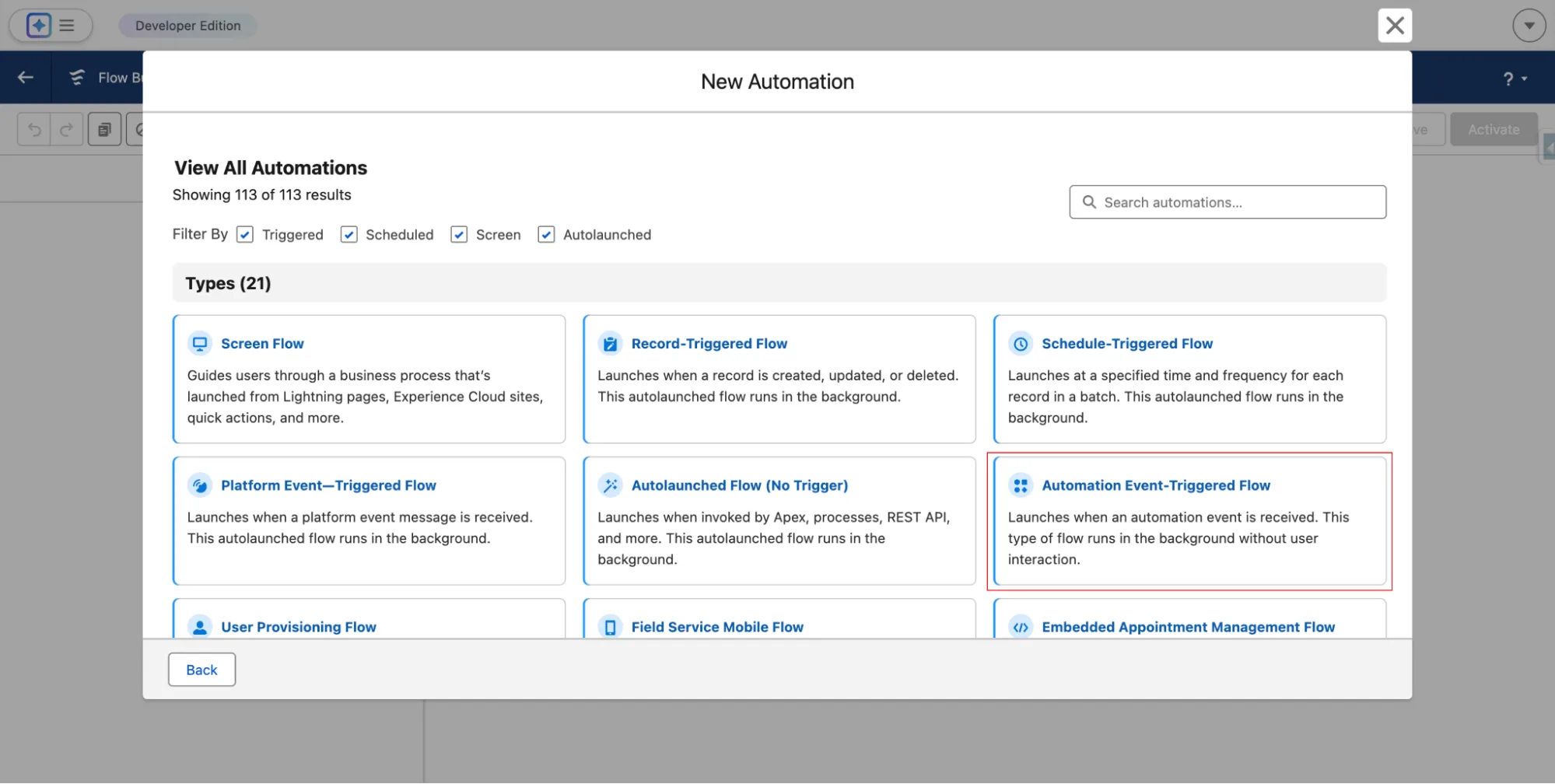
From a setup perspective, this starts when you create a new Flow and select Automation Event-Triggered Flow as the Flow type.
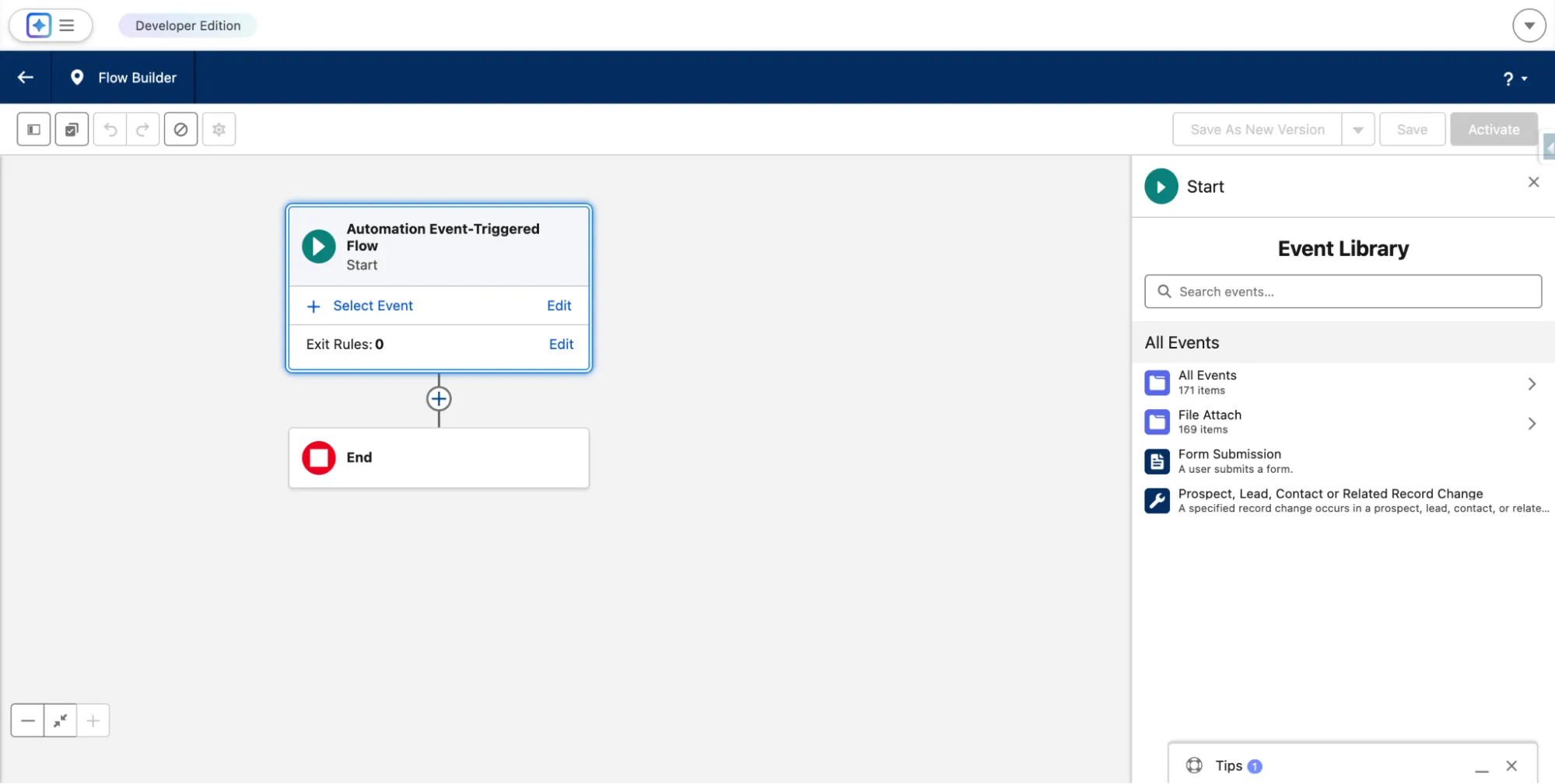
Once the Flow type is defined, you then choose the relevant Automation Event, such as a file upload event related to the Account object.
If needed, you can also decide which details should be included in the event payload, for example the file name, description, file type or extension, owner ID, created by ID, and any relevant timestamps.
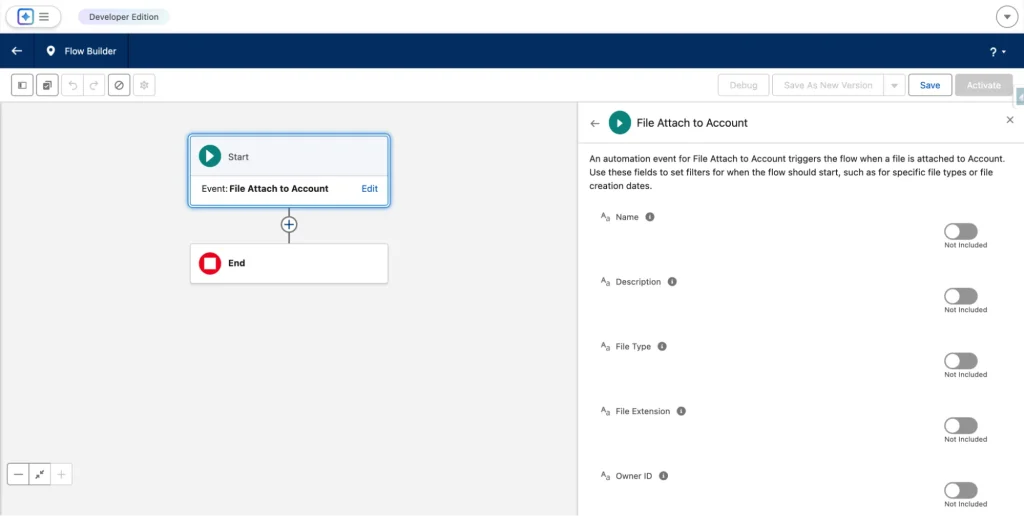
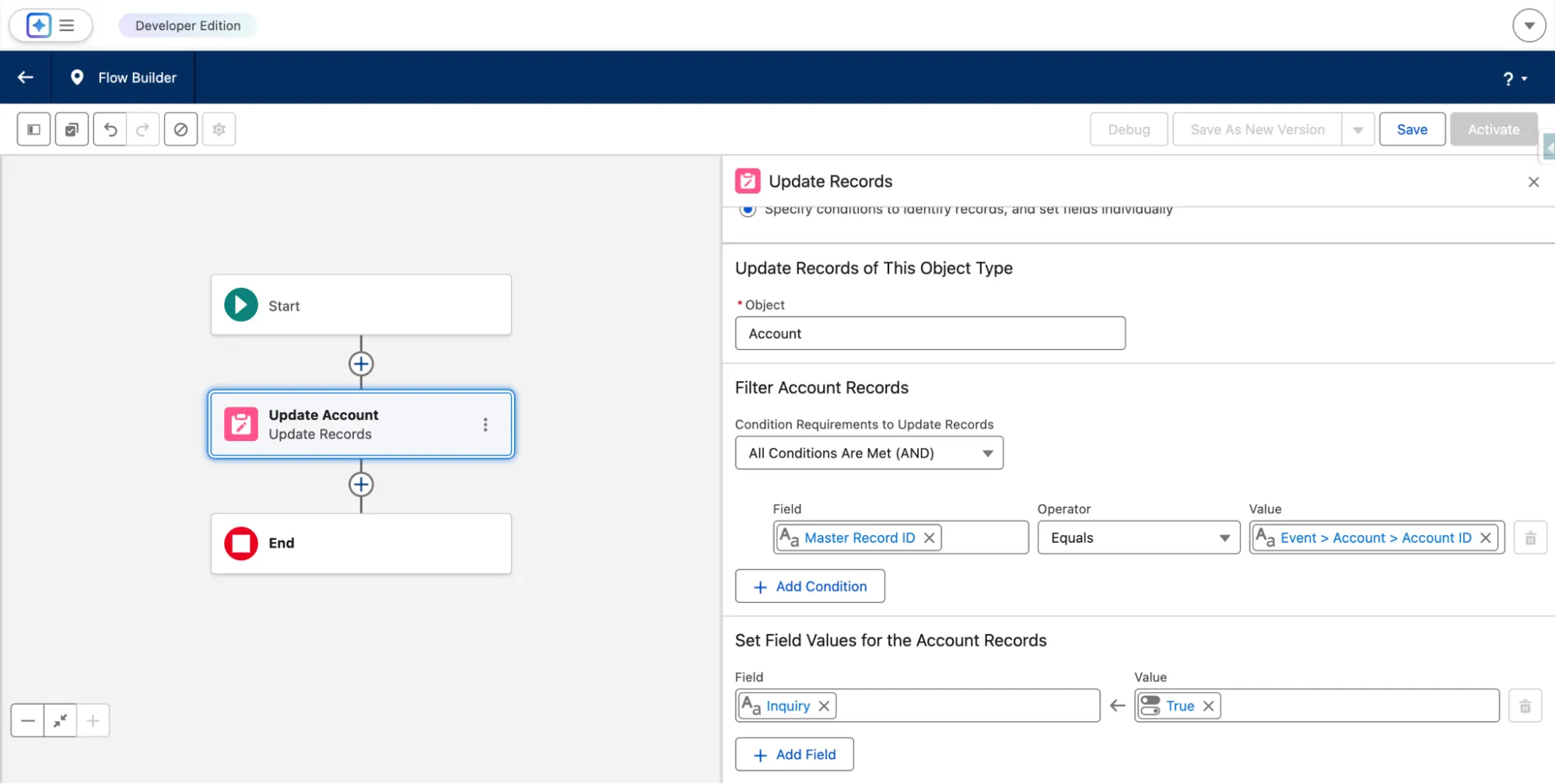
With that in place, the flow can use the Account ID provided in the event payload to locate the related record and apply your business logic. For example, the flow might update an Inquiry checkbox on the Account or set any other business-specific fields that should change when a file is uploaded.
Abandoned Cart
When a customer abandons a shopping cart, Salesforce publishes the Abandoned Cart Automation Event. An Automation Event-Triggered Flow can respond immediately by sending reminder communications, creating follow up tasks, or updating engagement status.
This allows the response to happen at the exact moment the business considers the cart abandoned, rather than waiting for a record update or scheduled job.
Email and Messaging Engagement
Events such as Email Open, Email Link Click, Email Subscription, SMS Response, SMS Subscription, and WhatsApp engagement events represent real customer interactions.
Flows triggered by these events can update consent, trigger campaigns, or notify teams at the moment engagement happens, without relying on indirect field updates.
Prospect, Lead, Contact, or Related Record Change
This Automation Event allows Flows to run when a prospect, lead, contact, or a related record meets defined conditions. It is designed for lifecycle-driven automation that spans related records without tightly coupling logic to a single object.
This is especially useful when automation needs to react to a business state rather than a specific field change on one record.
Real Time Data Graph Record Change
For organizations using Data 360, this event allows flows to react to real-time changes in data graph records. This enables automation across unified data models rather than individual Salesforce objects.
Delivery Failures for SMS and WhatsApp
Delivery failure events allow automation to react when messages cannot be delivered. A flow can flag records, create support cases, or switch communication channels automatically.
How They Fit Into an Automation Strategy
Automation Event-Triggered Flows are not a replacement for Record Triggered Flows. They complement them. Record Triggered Flows are ideal when automation should run because data has changed. Automation Event-Triggered Flows are ideal when automation should run because something has happened.
Apex still plays an important role for complex logic and edge cases. Using the right trigger type for the right scenario results in automation that is easier to reason about and more resilient over time.
Design Considerations
Automation Events are fire and forget. That makes monitoring and fault handling important. If a flow fails, you should have visibility into it. Be intentional about what data you include in the event payload. Include what the Flow needs, but avoid turning events into large data containers.
Events should represent meaningful business milestones, not technical noise. Treat them as moments in a process rather than micro triggers.
Common Pitfalls
One common mistake is trying to replace all record-triggered Flows with event-triggered ones. That usually adds complexity rather than removing it.
Another is publishing too many events. If everything becomes an event, it becomes harder to reason about what truly matters in your automation landscape. Use events where they simplify design and improve clarity, not simply because they are available.
Summary
Automation Event-Triggered Flows allow Salesforce automation to move closer to how real work actually happens. They let you design automation that starts with business moments rather than technical changes. Instead of building logic around which field needs to change, you can finally build logic around what actually happened in the process.
When you stop forcing automation into record updates and begin reacting to real events, your flows become cleaner, your data becomes healthier, and your automation starts to feel intentional instead of improvised. It is a meaningful shift in how we design automation. Over time, this approach reduces workarounds, simplifies troubleshooting, and makes your automation easier to explain to stakeholders.