

Since Dreamforce last year, a lot of people have been talking about Agentforce Vibes and whether it will replace developers or not. From my point of view, it’s here to support developers, not replace them. It helps us do more in less time, but it is definitely not taking anyone’s job. You still need your skills, experience, and brainpower to write strong prompts, review the output, and verify any generated code.
Before we jump into use cases, we need to understand something important: Agentforce Vibes gives you multiple ways to run a prompt, and choosing the wrong one can lead to poor results or even changes you didn’t mean to make. In this article, I’ll walk you through PlanMode, Act Mode, and the Deep Planning (/deep-planning) command, explain how each one works, and share when you should (and shouldn’t) use them based on real-world experience. Let’s break down each mode and see how they differ in practice.
Plan Mode
Plan Mode is basically the “think first, do later” option. When you type your prompt and hit enter, Agentforce Vibes will not modify your files yet. Instead, it will start analyzing your codebase and preparing a detailed plan of what it would implement.
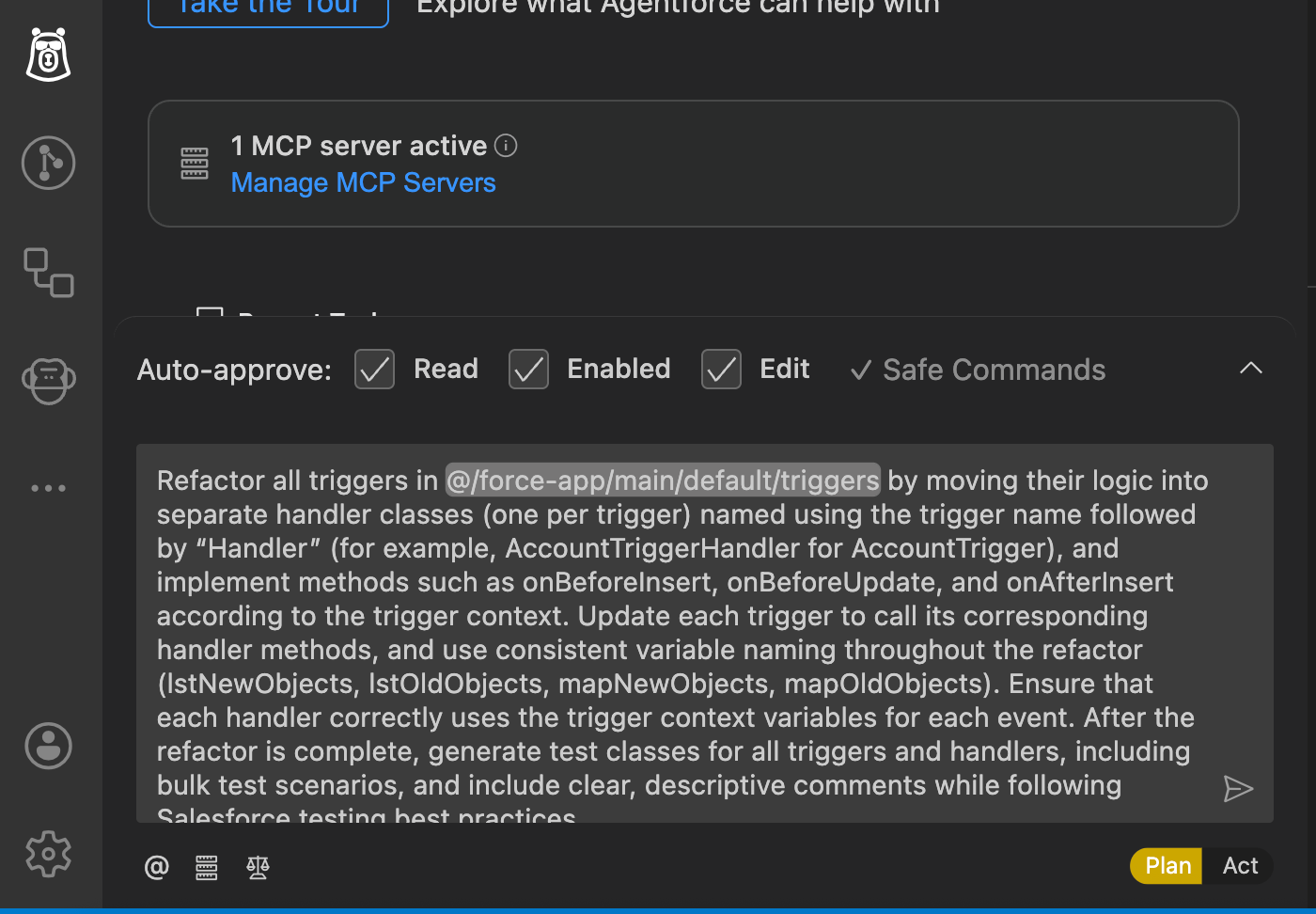
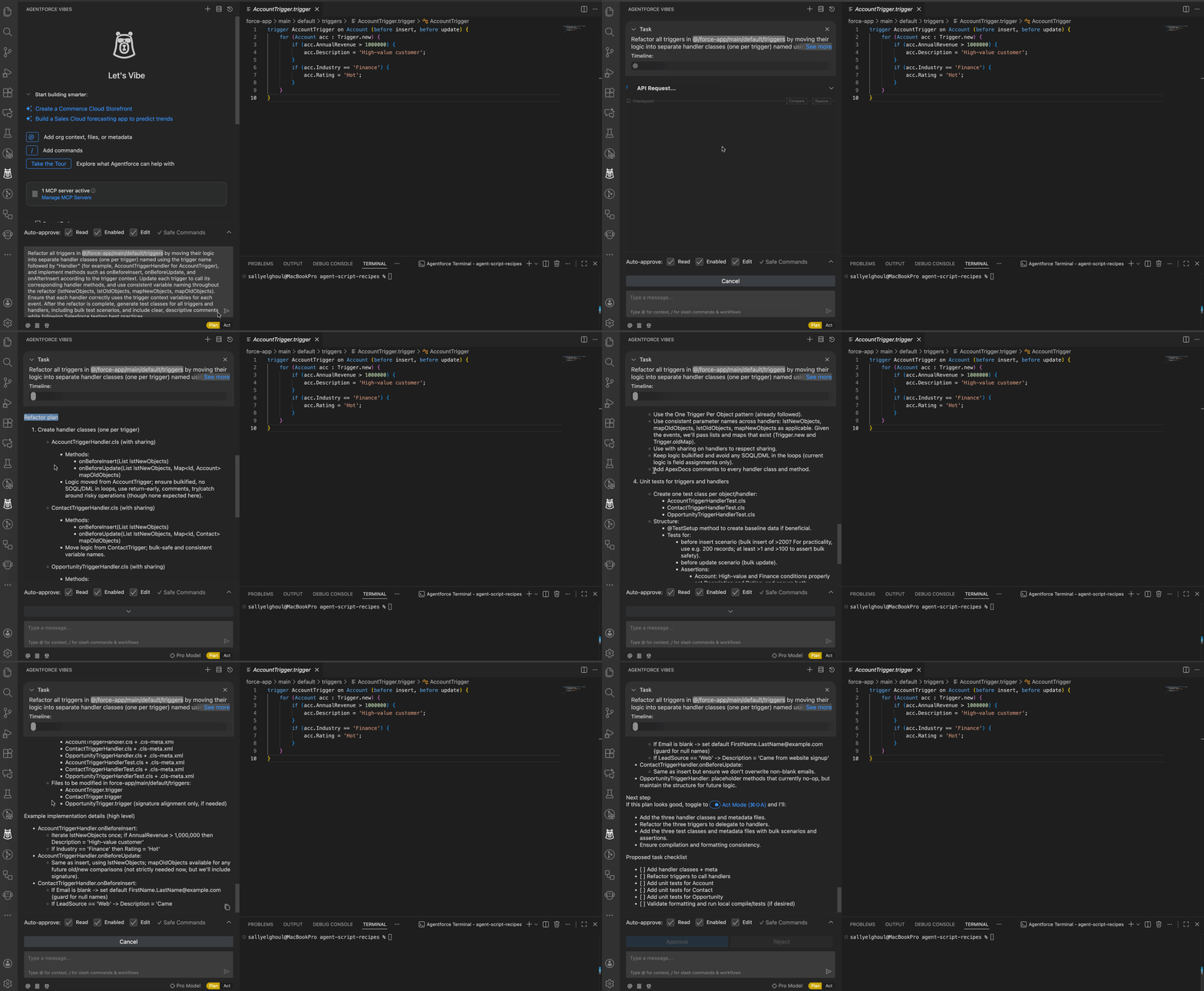
The Vibes side panel will show a detailed plan, including:
- Which files it will create.
- Which files it will modify.
- Why it’s making those changes.
- How your prompt was interpreted.
Your role here is important – you must review the plan line by line and check for misunderstandings, missing details, or any wrong assumptions.
If anything is off, just tell Agentforce Vibes what to fix, and it will update the plan before touching your code. You can go back and forth as much as you want. Nothing is executed in this phase. Once you’re fully happy with the plan, you can switch to Act Mode.
This mode is best for:
- Beginners.
- Bigger tasks for which you want full control.
- Any work involving existing code.
- Situations in which you need to double-check that your prompt was understood correctly.
Act Mode
When you already know exactly what you want and the task is small and low-risk, Act Mode is the fast path. It’s exactly what it sounds like – Agentforce Vibes moves straight to implementation instead of presenting a detailed plan first.
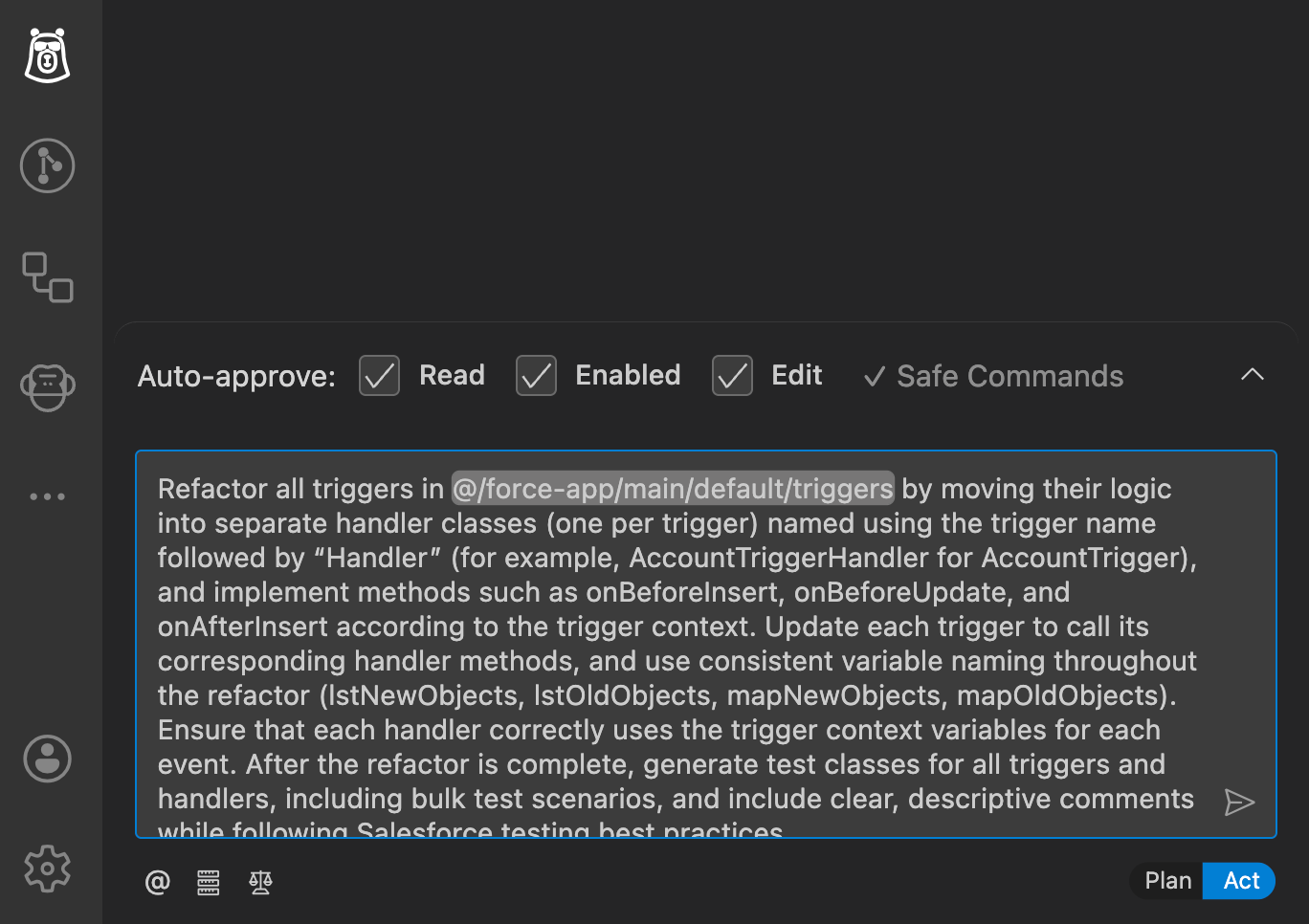
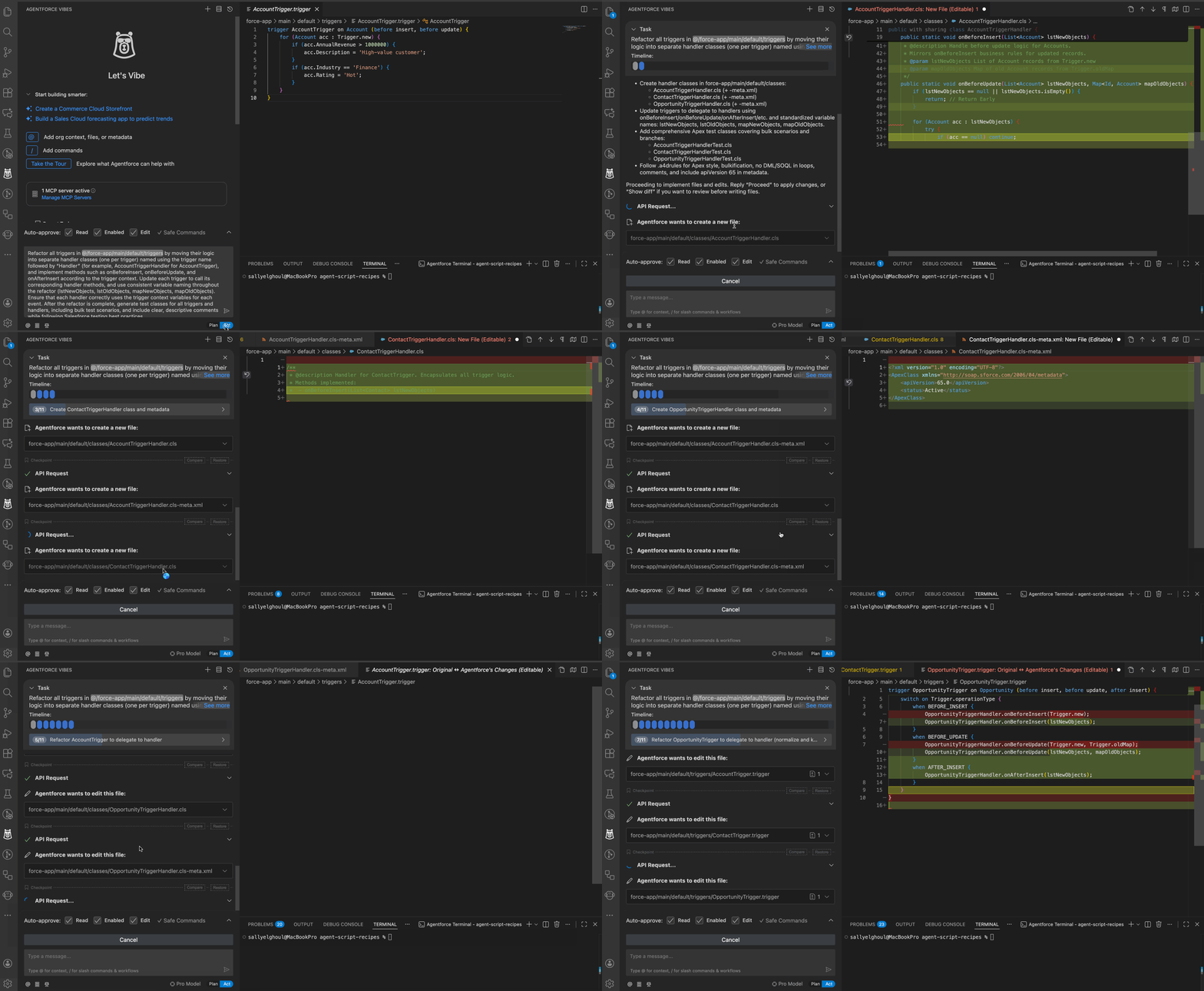
Once you enter your prompt and hit Enter, Agentforce Vibes will:
- Analyze your code.
- Interpret your prompt.
- Make decisions.
- Implement the changes immediately.
It creates an internal plan, but you don’t get to review it before it runs. You should only use this mode when you’re confident your prompt is clear, and you know exactly what outcome you expect.
This mode is best for:
- Quick or repetitive tasks.
- Simple file creation.
- Things unlikely to affect existing logic.
- When you just need the agent to “get it done”.
Deep Planning Mode
Deep Planning is like Plan Mode, but with far more depth. This is the mode you use when the task feels more like something an architect should design, not just a small code change.
To trigger it, Type / and choose deep-planning, then write your prompt.
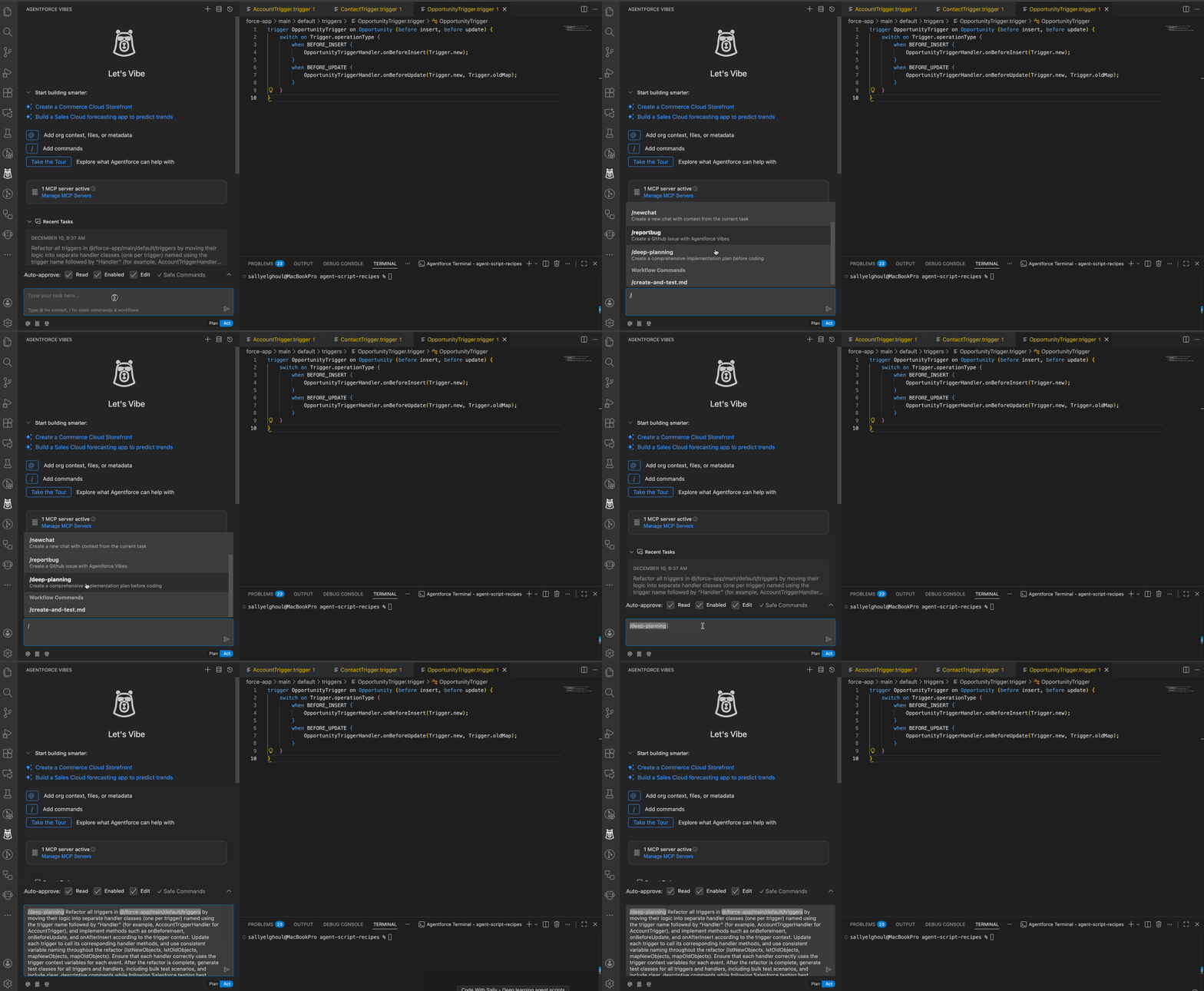
Deep Planning goes through four phases:

1. Silent Investigation
Agentforce analyzes your entire codebase in depth: structure, patterns, naming conventions, relationships, everything.
2. Question Phase
This part is amazing. The agent starts asking you questions if needed to clarify:
- Your intent.
- Your preferred patterns.
- Any assumptions it’s making.
- Edge cases or missing details.
The questions differ every time because they are based on your codebase and your prompt, not templates.

3. Plan Documentation Phase
Vibes generates a full Markdown plan file (.md) including:
- High-level architecture.
- Step-by-step implementation details.
- Which files will be created.
- What methods will be added.
- Why certain choices were made.
It’s incredibly detailed. You should review it as if it were a technical design document.
4. Task Creation
Vibes will ask whether you want to start a new task using the generated plan. You can:
- Say yes → start implementation.
- Say no → use the .md file to discuss with your team and reference it later.
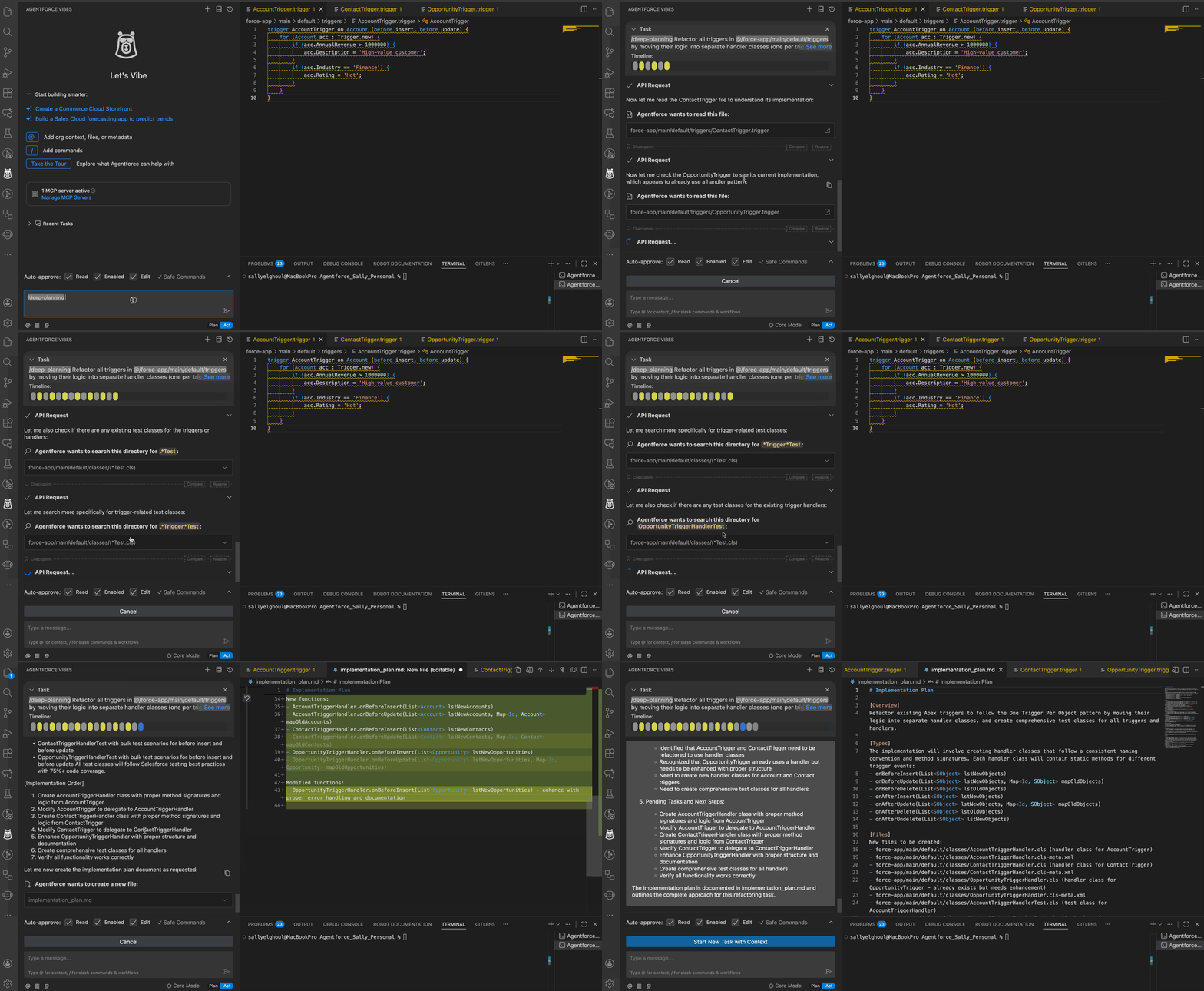
This mode is best for:
- Complex features.
- Refactoring legacy systems.
- Multi-file changes.
- Anything with architectural impact.
- Tasks where you need precision and zero risk.
When Should You Use Each Mode?
From my experience, choosing the right mode is less about the feature itself and more about the size and risk of the task you’re working on.
Beginners: Start with Plan Mode
Plan Mode helps you slow down, think clearly, and learn how to write better prompts. It gives you visibility into what Agentforce Vibes intends to do before anything actually changes in your code.
If you’re still building confidence with prompts (and honestly, we all are at the beginning), Plan Mode is a great starting point – even for small tasks – because you can review the plan, fix misunderstandings, and try again safely.
And even after you get comfortable, Plan is still the best choice anytime you’re touching existing code or multiple files.
When You’re Comfortable With Prompts: Use Act for Small, Low-Risk Work
Act Mode is best when the task is well understood and limited in scope. By limited scope, I mean changes like:
- Creating one or two new files from scratch.
- Updating a single existing file.
- Re-running a repeatable task using a prompt you’ve already used successfully.
In these situations, Act Mode can save a lot of time because Agentforce Vibes moves straight to implementation.
Advanced Users: Use Deep Planning for Complex Features and Architectural Work
Deep Planning is ideal for bigger, more complex tasks – the kind of work where you would normally want a Salesforce architect to step back and think things through carefully. This includes refactoring legacy code, introducing new patterns that require updating many files, or starting a large implementation where the file structure and overall approach need to be designed properly from the beginning.
In these scenarios, Deep Planning is the best choice. Agentforce Vibes takes the time to inspect and understand your codebase, asks the right follow-up questions to avoid assumptions, and creates a detailed implementation plan for you in a markdown (.md) file. This plan can be reviewed, shared with the team, discussed, and adjusted before any code is written, which makes Deep Planning ideal for high-risk or architectural changes.
Note: Here’s one rule that I personally always follow. If a task touches existing logic, modifies multiple files, or could impact critical behavior, I don’t jump straight to Act. I start with Plan Mode (or Deep Planning) first.
Final Thoughts
Vibe coding is becoming a very popular way of working today – not just in Salesforce, but across development in general. It’s clearly changing how developers approach their daily tasks and how we collaborate with AI tools.
Agentforce Vibes is a powerful tool, and like any powerful tool, how you use it really matters. Understanding how you run your prompt is just as important as what you ask for. Plan Mode, Act Mode, and Deep Planning each serve a different purpose, and choosing the wrong one can introduce risk. Before running any prompt, it’s worth pausing for a moment and asking yourself: Which mode makes the most sense for this task?
Once you’re comfortable with these modes, start exploring the different use cases where Agentforce Vibes can really help you. It’s not just about generating Apex classes or LWC components. There are many practical, everyday scenarios where it can help you learn faster, work smarter, and reduce repetitive effort. In the next article, I’ll walk you through real examples showing how you can use Agentforce Vibes in your daily development work.
For beginners, my advice stays the same: don’t skip the fundamentals. Learn how to code, understand why things work the way they do, and then use tools like Agentforce Vibes as support, not shortcuts. The better your foundation, the better your prompts and decisions will be.
And for experienced developers who feel hesitant about AI tools – don’t ignore them. The developers who will stand out in the future are the ones who combine strong technical skills with the ability to work effectively with AI.