

Agentforce Vibes is often introduced as a way to generate Apex classes or Lightning Web Components. But in practice, that’s only a small part of the story.
In my day-to-day work, I use Agentforce Vibes in many different ways: to understand unfamiliar code, generate documentation, refactor legacy logic, speed up repetitive tasks, and even improve collaboration through better commit messages. In this article, I’ll walk you through 8 real, practical use cases where Agentforce Vibes has helped me save time and work more effectively as a Salesforce Lead developer.
Note: If you’re not yet familiar with Plan Mode, Act Mode, or the Deep Planning command — or when to use each one — I recommend starting with my previous article: Agentforce Vibes Modes Explained: Plan vs. Act vs. Deep Planning. Understanding those modes will help you get the most value out of the use cases below.
Use Case 1: Ask Coding Questions Grounded in Your Codebase
One of the most helpful use cases for any developer – whether you’re learning a concept for the first time or revisiting something you haven’t used in a while – is asking Agentforce Vibes to explain it for you.
Yes, you can always ask standalone LLMs like ChatGPT or Gemini, but they don’t have access to your Salesforce project or your org’s metadata. Agentforce Vibes does, and that makes a huge difference!
With Agentforce Vibes, you can ask for an explanation of a concept using examples pulled directly from your codebase. This is extremely helpful when you want to understand not just the theory, but how your own project uses that concept today.
Here’s a simple example of a prompt you would use in ChatGPT or Gemini, and you will get a pretty decent explanation with generic examples: “Explain the difference between static and non-static methods for Salesforce Apex.”
With Agentforce Vibes, if you want to get examples from your codebase instead of those generic examples, you can use a prompt like this one instead: “Explain the difference between static and non-static methods for Salesforce Apex. Please include examples from this project.”
This is incredibly helpful when joining a new team, reviewing an unfamiliar codebase, or trying to understand patterns already being used in a project.
And even better – you don’t have to scroll through the Agentforce panel every time. You can ask Vibes to: “Explain the difference between static and non-static methods for Salesforce Apex? Please include examples from this project. Generate a markdown (.md) file with this explanation and those examples.”
Now that you have perfect documentation, you can save, share with teammates, or reuse it any time.I personally took this further by creating a reusable Agentforce Vibes workflow that automatically outputs a clean, well-structured .md file with the explanations, examples, and formatting I want. Anyone on the team can run it without typing a long prompt from scratch. You can find the workflow file here.
Use Case 2: Generate Documentation Across Multiple Classes
This is another use case I find helpful, because let’s be honest, developers don’t enjoy writing documentation (at all!). Even when we do write it, it’s usually very brief because we’re already excited to jump into the next task and keep coding.
So imagine having Agentforce Vibes right there to rescue us from documentation pain. With Agentforce Vibes, you can ask it to generate documentation for any Apex class or even multiple classes at once. Depending on your team’s needs, you can choose to generate: one Markdown file that documents all selected classes, or a separate Markdown file per class, all with consistent formatting every time.
Documentation can be tricky and time-consuming, which is why I personally prefer to use a repetitive prompt through workflow for this use case. In the workflow definition, your team can specify:
- The documentation format you want.
- The sections each document should contain.
- The style, level of detail, examples, summaries, etc.
- And the final output format (Markdown works beautifully for sharing).
Once the workflow is created, anyone on the team can run it. No need to type long prompts, and no need to reinvent the documentation style every time. You can find the workflow file I created for this use case here.
Use Case 3: Ask Questions About Your Codebase
This use case is very important, especially when you’re joining a new team or working with a codebase you’re not fully familiar with yet. Agentforce Vibes can help you understand your project much faster by answering targeted questions about the codebase itself.
You can use it in a couple of different ways…
1. Understand an Unfamiliar Piece Of Code
Sometimes you’ll open a class or a method and think: “Hmm… what exactly is this doing?”.
You can simply ask Agentforce Vibes to explain it to you and even request an example of how to call the method so you can get more comfortable with how it works.
2. Check if a Pattern or Utility Already Exists Before Writing New Code
Let’s say you have a new requirement that requires a common pattern, for example, calling Prompt Templates from Apex. Instead of searching through the entire project manually, you can ask: “Do we have any existing Apex logic in this project that calls Prompt Templates?”.
Agentforce Vibes will scan your codebase and tell you if the pattern already exists, and in which classes. This is good for:
- Reusability.
- Avoiding duplicate code.
- Learning existing architecture and conventions.
- Speeding up onboarding for new developers.
This is one of the features that saves the most time in real projects because it replaces hours of manual searching and makes the codebase feel more “alive” and discoverable.
Use Case 4: Refactor Legacy Code Using Deep Planning
This is a big one, and we have to treat it carefully. Every Salesforce project eventually builds up some technical debt, duplicate patterns, or areas that need refactoring. Sometimes you also need to apply a consistent change across multiple files. Doing this manually can take a lot of time: reviewing class by class, updating test classes, checking patterns, making sure nothing breaks; it adds up quickly.
For big changes like this, I strongly recommend using the Deep Planning command. If you’re not familiar with how Deep Planning works or when to use it, I cover it in detail in my previous article.
Deep Planning scans your codebase, asks smart clarification questions, and generates a detailed plan in a .md file before touching anything. This makes it much safer when working with legacy code.
Once the plan looks good, you can start the implementation step, and Agentforce Vibes will refactor the code for you based on that agreed plan.
Note: Always make sure your source control is clean and committed before running Deep Planning, especially with bigger refactors.
A Real Example from My Sessions
In one of my Code With Sally live sessions, we used the Deep Planning command to review all triggers in the project, identify bad patterns, and generate a detailed refactoring plan.
After carefully reviewing and confirming the plan, we moved forward with the implementation step, where Agentforce Vibes applied the changes and generated proper trigger handlers. The entire process was structured, safe, and fully guided by Deep Planning from start to finish.
Use Case 5: Add Inline Comments
We all know it’s a good practice to include inline comments in our code – not too many, not too few. The goal is to help the next developer (or our future selves!) quickly understand the intention behind a piece of logic without getting lost. Good comments act like a lightweight form of documentation inside the code itself.
But let’s be honest, many developers don’t enjoy writing comments. And some classes you inherit will have no comments, making the logic much harder to follow.
The good news is that Agentforce Vibes can help you add meaningful, clear inline comments to your code.
When writing your prompt, make sure to include any specific comment style or structure you want Agentforce Vibes to follow. For example, whether you prefer:
- Single-line comments above each method.
- Inline comments inside complex logic.
- Or a doc-block style for method descriptions.
A very simple prompt could be: “Add inline comments to this class: @/force-app/main/default/classes/MathUtility.cls’”.
In this prompt, I didn’t specify any style, so Agentforce Vibes chose its own approach. If you prefer a certain pattern, just add your instructions, and Agentforce Vibes will follow it.
You can add one class to the context or multiple classes if you want more files updated in the same request.
Use Case 6: Generate Visualforce Pages (PDF-Ready)
I tested this use case out of curiosity because I had tried something similar in the past using Agentforce for Developers, and it didn’t work back then. So I wanted to see if Agentforce Vibes could actually do it, and to my surprise, it worked really well!
Not many developers are actively building new Visualforce pages these days, but PDF generation is still a very common requirement in many Salesforce orgs. And if you haven’t written a Visualforce page in a while, or you’re not very comfortable with VF syntax, this use case can save you a lot of time.
Agentforce Vibes can help you generate a clean, functional PDF-ready Visualforce page with just a simple prompt. For example, you can test it yourself with something like: “Create a Visualforce page to render as PDF showing Account Name, Fax, Phone, Website, and Type using the standard controller. We will pass the Account Id through a query parameter. No need for an Apex controller. The Account object can be found here @/force-app/main/default/objects/Account’”.
The more details you include in your prompt – layout preferences, styling, sample PDF to mimic, field ordering, branding, etc. – the closer the output will match your expectations.
If you already have an existing PDF style or template, definitely add it as context so Agentforce Vibes can generate something similar.
Use Case 7: Convert JSON ⇆ Apex Wrapper Classes
If you work on integrations, this use case will probably become one of your favorites. Almost every integration project involves working with JSON, whether you’re receiving JSON responses that need to be deserialized or preparing JSON request bodies. In many cases, that means serializing a wrapper class into JSON.
Agentforce Vibes makes this so much easier. You can simply ask Agentforce Vibes to generate a wrapper class for any JSON structure you’re working with. For example:
“Create an Apex wrapper class that I can use to deserialize this JSON: JSON_TEXT”
Agentforce Vibes will read the JSON, understand its structure, and create the full Apex wrapper class for you, including nested classes and lists, all ready to use.
It also works the other way around! Another common situation in integration work is needing mock JSON samples for your test classes. Often, we need a fake JSON string that matches the structure of an existing wrapper class.
You can ask Agentforce Vibes to generate that for you as well: “Give me a sample JSON string I can use in a test class that represents this wrapper class: @WrapperClassName”.
This saves a lot of time, especially when the JSON structure is large or deeply nested.
Use Case 8: Generate Meaningful Git Commit Messages Automatically
This use case might sound small, but for me, it makes a big difference.
If you work with Git inside VS Code, you already know the pain. Developers hate writing commit messages! We’re usually tired, in a hurry, or jumping to the next task, so we type something like:
- “fix stuff”
- “updated file”
- “changes to Triggers”
- “final version really final”
And then later, we regret it.
Good commit messages matter for debugging, code reviews, audits, and helping your future self remember what you changed. Agentforce Vibes handles this beautifully!
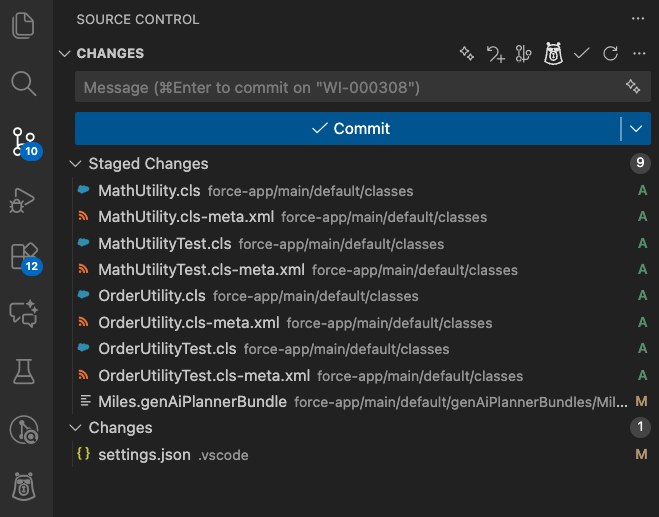
If you open the Source Control panel in VS Code, you’ll see the little Codey Bear icon next to your commit box. Click it, and Agentforce Vibes will automatically generate a clear, descriptive, professional commit message based on the actual changes in your files.
It reads your diffs, understands the purpose of the change, and writes something meaningful rather than something generic. For me, this is huge! It saves time, improves team communication, and raises the overall quality of your repository. I think this might be one of the most underrated use cases of Agentforce Vibes.
Here’s a screenshot of my own VS Code showing the staged changes. Normally, this is where I would stare at the screen, struggling to write a good commit description. Now I just let Agentforce Vibes handle it. You’ll thank yourself (and your team will thank you too) the next time you look back at your commit history and can actually understand what happened.

If you want to see all of these use cases visually, I demonstrated them in a deep-dive session on the Code With Sally YouTube channel – which you can watch below for additional context.
Final Thoughts
Agentforce Vibes is a powerful tool, and the more time you spend experimenting with it, the more value you’ll get out of it. As you’ve seen throughout this article, it’s not just about generating Apex classes or LWC components. It can also support you in understanding existing code, refactoring safely, improving documentation, speeding up repetitive work, and even improving team collaboration.
These eight use cases we discussed are definitely not the only ones. Once you start using Agentforce Vibes regularly, you’ll naturally discover your own workflows and patterns where it fits into your development process.
For developers who are just starting out, my advice is simple: don’t rush into relying on Agentforce Vibes. Learn how to code first. Understand the fundamentals. Build things yourself. That foundation is what allows you to write better prompts, review the output critically, and fix issues when something doesn’t look right. Without that, AI becomes risky instead of helpful.
For experienced developers who feel hesitant or resistant toward AI, I’d encourage you to reconsider. The future isn’t about AI replacing developers – it’s about strong developers who know how to use AI effectively. The developers who will stand out are the ones who combine solid technical skills with the ability to use tools like Agentforce Vibes to deliver faster and smarter.
Treat these use cases as a starting point. Experiment with them. Adapt them. Build on them. Stay curious. Keep experimenting. And most importantly, keep learning.
Related Articles
- What Is Vibe Coding? And What’s New in Agentforce Vibes for Developers?
- Agentforce Vibes Modes Explained: Plan vs Act vs Deep Planning