






This might come as a surprise from me – the man who won’t shut up about Salesforce Flow and Agentforce Vibes – but you should not be using Agentforce Vibes or similar AI coding tools to build Flows.
I’ve said it before – just because you can do something doesn’t mean you should. I strongly believe this is the case with vibe coding and Flow here, and this article will go into more detail as to why.
Reminder: Vibe Coding Does Not Replace Developers
First and foremost, I’m going to reiterate that Agentforce Vibes, or any other AI coding tool for that matter, does not replace a Salesforce Developer. The reality is that tools like Agentforce Vibes are just that – tools. Think about it: Flow doesn’t replace business users; it is a tool that is used to help them, to empower them to be more efficient with their time. That’s what AI coding tools are, too.
The other thing I want to reiterate is that just because Agentforce Vibes might be able to write code doesn’t mean you should be using it to do so if you yourself don’t understand code. If you are not a developer and use Agentforce Vibes to create code, then you are liable if something goes wrong with that code.
Think of it this way: imagine you’re someone who has lived in a built-up city your whole life, and you’ve never actually driven a car before. You haven’t had the need to! Suddenly, the world changes, and there are Teslas with full self-driving capabilities. Does this mean you would get into the driver’s seat of one of these cars? Absolutely not! If there were a crash, you would be at fault. The FSD feature is a tool, not a replacement, for an experienced driver.
Similarly, AI is just another tool that you should be using for the purposes it was designed for. We all know the personalities that are built into these tools are extremely obliging when it comes to helping with every little thing that we ask, but just because it tries doesn’t mean it will work. Just because it can doesn’t mean that it should, either. You wouldn’t use a chainsaw to cut a loaf of bread – it’s simply the wrong tool for the job. Plus, your toast would taste like chain bar oil.
Why AI Coding Drops the Ball in Metadata Generation
There are also a number of issues that you may run into when it comes to writing your Flows in code. I’ll first point out why it makes sense to write Apex in code, which may sound a little silly, but stick with me.
If you’ve ever written Apex before and you made a mistake while doing so, you’ll notice that the system alerts you and explains what the issue is. This has always been the case and is how Salesforce ensures that code is checked before it runs, reducing potential issues. If your syntax is good, the code will save and run – if not, you’ll be prompted to fix it before it can run.
This is what the process of writing Apex looks like: you write the code, save it, if there are any issues, the system will alert you. Then you run it, and it either does what it is supposed to or it doesn’t. Simple! Getting each word in the right order is what is known as “correct syntax,” and writing each line one by one correctly is part of coding. The same cannot be said for Flow. Given that you are using clicks, not code, to essentially put prebuilt elements of code in the right order and give them the correct parameters, much of the code that runs behind the scenes is written for you.
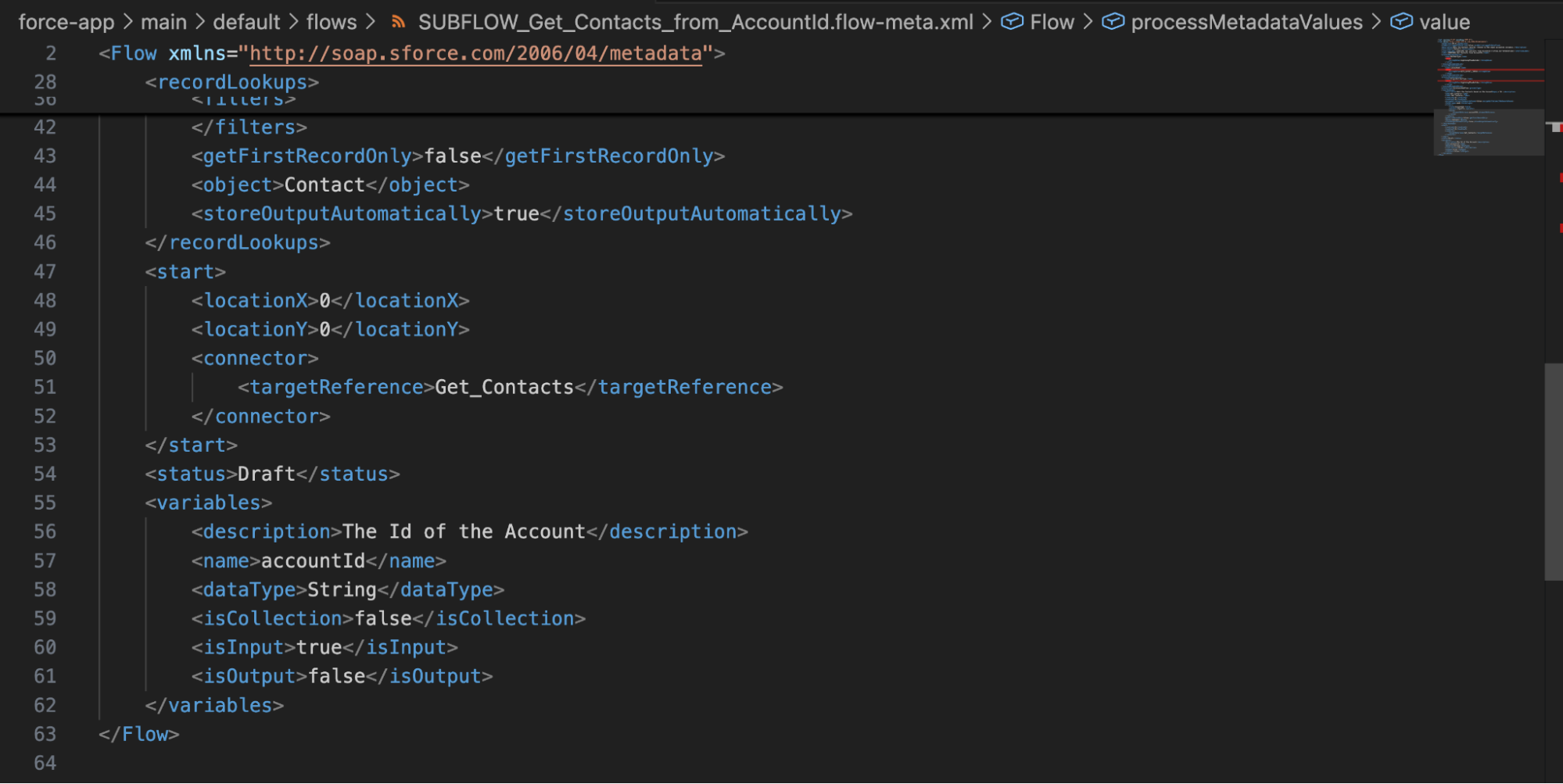
Look at these two screenshots. One shows a Flow with a single element on a canvas, and the other shows 64 lines of code in an XML file. They’re two ways to build the exact same Flow, but which one leaves more room for error?
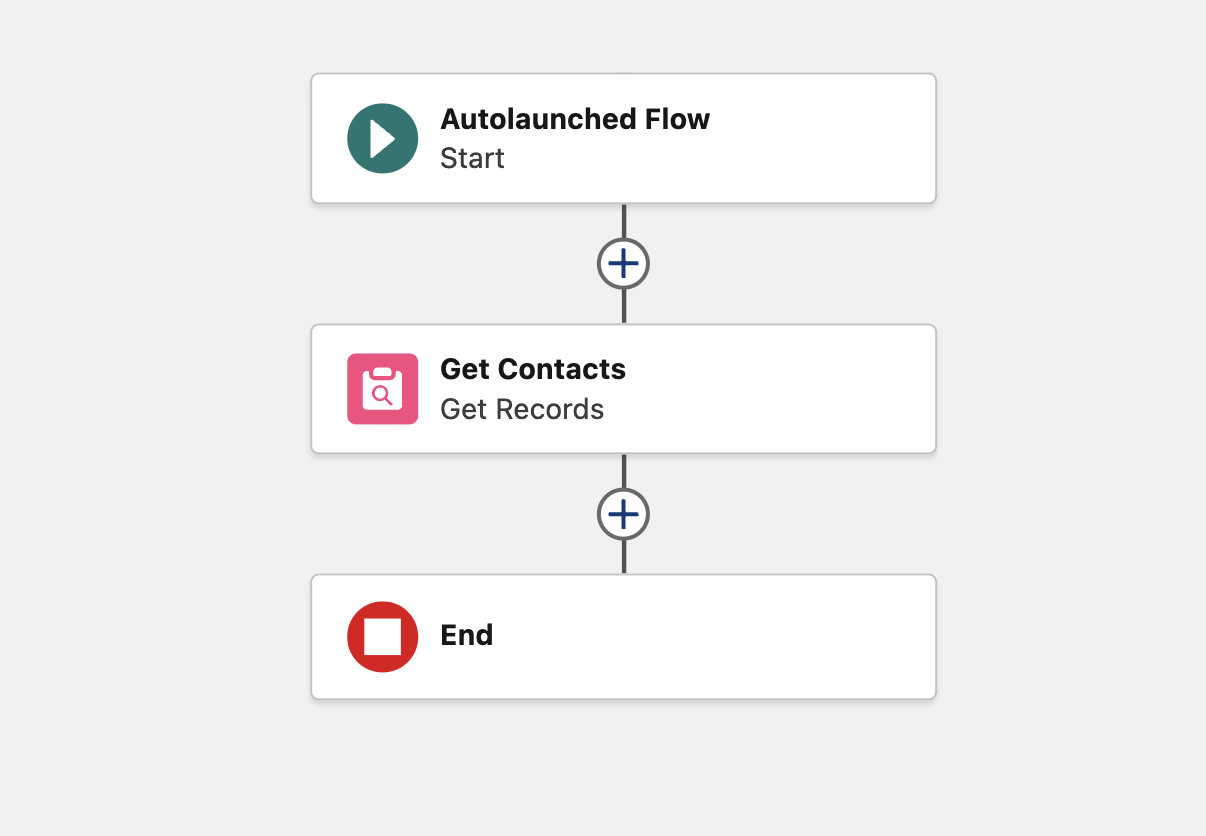
Why is this a problem? Well, because the code behind these building blocks is not properly documented (since you never actually need to write it yourself). Chances are, you’ve never had syntactical errors for these elements because they’re always pre-built by Flow Builder. This is why you may run into issues with AI-generated Flows: it’s doing things that were simply not necessary before and are not clearly documented.
This can be seen clearly in my attempt to build a Flow with Agentforce Vibes. While it was confident it could execute my prompt, it kept getting caught up in things that aren’t usually an issue when building a Flow – things like metadata tags or even the order in which they appear in the XML document. Think about it: when you build a Flow, you’re dragging building blocks onto a canvas and trusting Salesforce to do the rest. There’s also quite a bit of variability with a powerful tool like Salesforce Flow, which can confuse an AI tool like Agentforce Vibes.
There’s a reason that Flow works so well – it uses clicks, instead of code, to organize blocks of pre-built code on a visual canvas. This is how Flow was designed to work. Prior to the era of vibe coding, not one person had written a Flow’s XML from scratch. I’ll repeat what I said earlier in this article: just because it can do something doesn’t mean it should. Just as the chainsaw was the wrong tool to cut a piece of bread, so too is Agentforce Vibes the wrong tool to build a Flow – as is a keyboard, by the way. Flows were not designed to be written, but to be built in Flow Builder.
Where AI Coding Shines
Agentforce Vibes, and other AI coding tools like it, perform better when there is a written language and documentation to inform what it needs to do. It is better suited to assisting with written-language metadata like Apex or LWC than to trying to build Flows.
Writing Flows is one thing, but reading them is something else – and a good reason to write valuable description values. If you want to quickly understand what a Flow does without scanning through it entirely yourself, you can download the metadata file and ask Agentforce Vibes specific questions about it. You could ask what the Flow does, how it could solve a specific business problem, how it may be modified to meet a new requirement, or why it functions a certain way with specific data.
Apart from that, using Agentforce Vibes or similar AI coding tools to write code is a much better use of your time and will lead to greater success. However, the most important thing is to ensure you’re confidently aware of what it is doing. Whether you’re using it to assist with writing an Apex Trigger, expanding on some Apex Tests with additional scenarios, or polishing a Lightning Web Component, this still applies. At the end of the day, it is just a tool to assist you in what you are doing. It is not a replacement for a seasoned developer, nor is it a universal tool for everything you do in Salesforce.
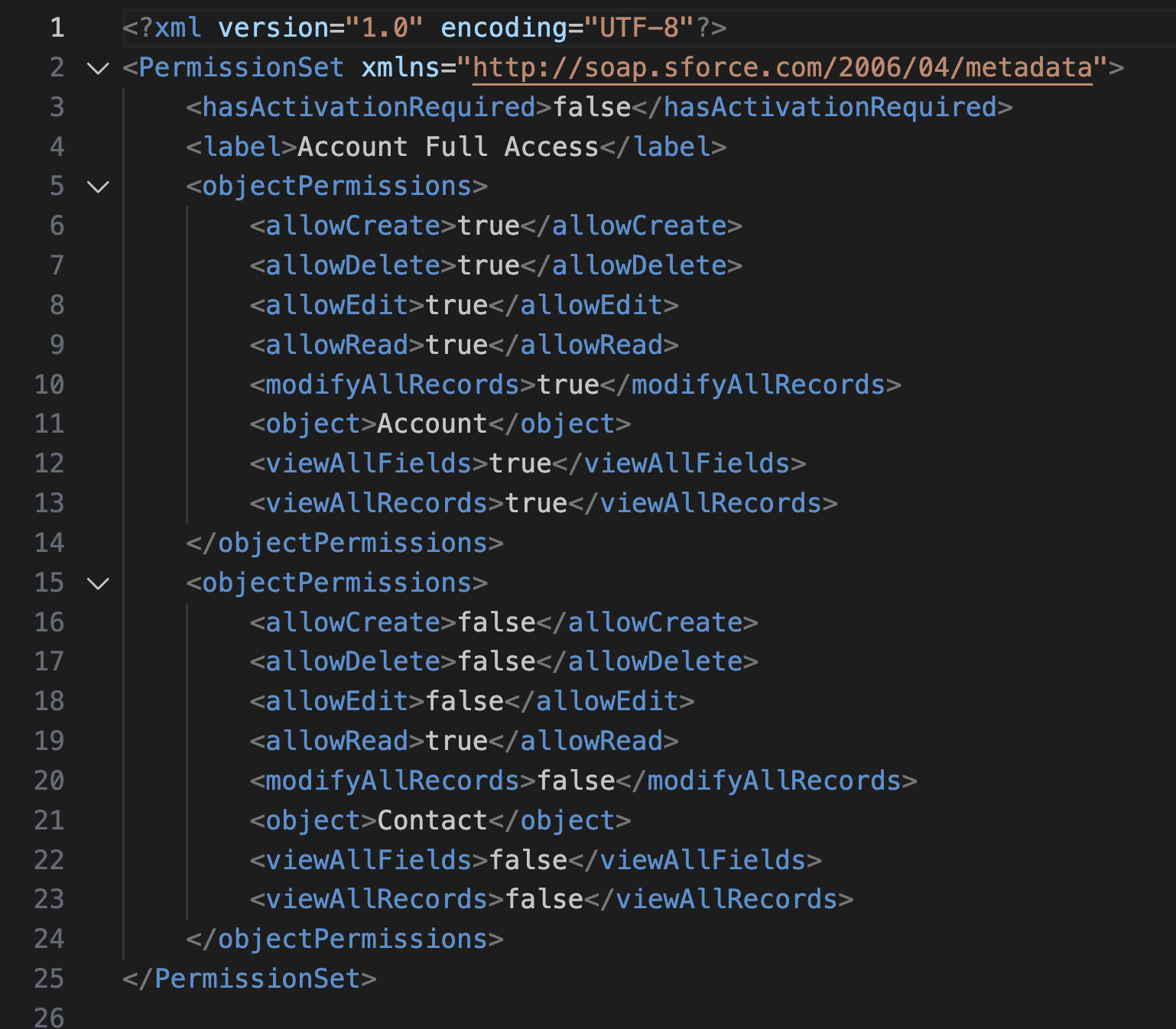
The exception to this is prebuilt code that has very little variation – think permissions as opposed to Flows. The permission is always the same; it’s just where it’s being assigned that varies. Although this is normally done through the UI, there’s very little that can go wrong when AI writes permissions metadata. This is one exception to the above rule that I believe you can take advantage of early in your vibe coding process.
Just Because You Can, Doesn’t Mean You Should
You could use Flow to fully replace your Page Layouts/Dynamic Forms… but would you? Not likely. The reason is because Dynamic Forms on Lightning Pages have their specific use, as does Flow, and only one of them is designed to surface key information about a record on a Lightning Page.
The reality is, you could use Agentforce Vibes to build Flows from the ground up, but… why would you? Developers write Apex code as plain text, so using Agentforce Vibes to assist with this makes sense. Admins build Permission Sets using tools with very little variability (basically: does this Permission Set have this permission or not). Flows are a different beast – they’re like Apex in that they allow for complex business automation, but they’re also not like Apex in that they’re designed to be built using clicks, not code. It’s extremely unnatural to build Flows with code rather than clicks.
As I mentioned earlier, it is totally possible for a Salesforce Admin to create their own Apex code or build Lightning Web Components, but it’s not that simple. A Salesforce Developer knows how to follow best practices, properly troubleshoot code, and plan ahead for future changes. An AI coding tool like Agentforce Vibes does not have the same insight or expertise that a Salesforce Developer has, which can lead to excessive technical debt if used incorrectly. This is why admins should focus on what they do best and leverage the incredibly valuable skills of a developer when code changes are required.
Summary
I love Flow, and I love Agentforce Vibes and similar AI coding tools. Similarly, I love pizza and I love chocolate. Some things are great – and better separate. You should find uses for AI coding apps where they make sense, and avoid trying to get them to do things that don’t. Flow is clicks, not code. Don’t try to make Flows a code thing.
Do you agree with me? If you do still use AI coding to write Flows, why? I’m genuinely curious to get some differing opinions and would love to learn more from someone who does things differently. Drop your thoughts in the comments below!





Comments: