

Nowadays, Agentforce has become a synonym for all things AI within Salesforce – from employee agents to always-on sales and service agents that interact with your prospects and customers, the sky is the limit to what companies can create to aid their human workforce. While all of these are great for users generally, what about Salesforce Admins who spend most of their day between the 1,200+ Setup pages?
You might have heard about Agent for Setup, which was announced at TDX back in 2025, but now you’re in for an even better treat! In this post, we’ll cover Setup with Agentforce, the new enhanced experience, and why this is a feature all admins should be excited about.
Getting Started
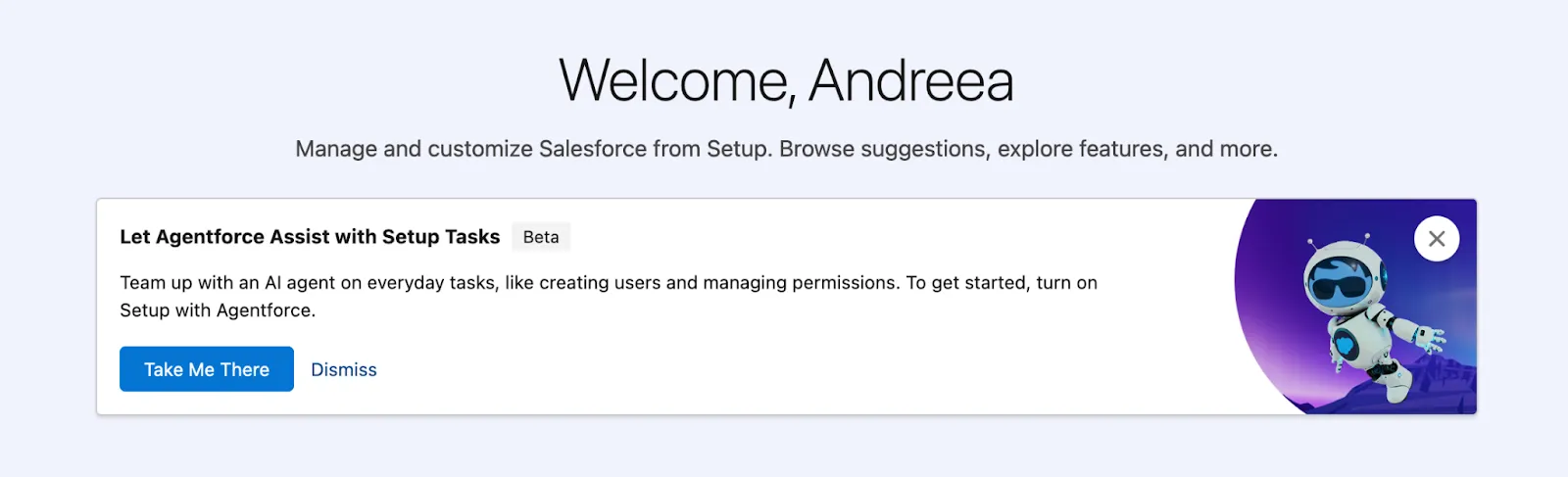
First things first, it’s all about getting the new experience up and running. Luckily, admins will be promoted to enable it right from Setup home – this makes sense since, as you will see below, this is where the agent will most often greet you. Following positive feedback from Salesforce professionals, Setup with Agentforce has just become generally available, but the setup steps remain the same as they were while in beta.
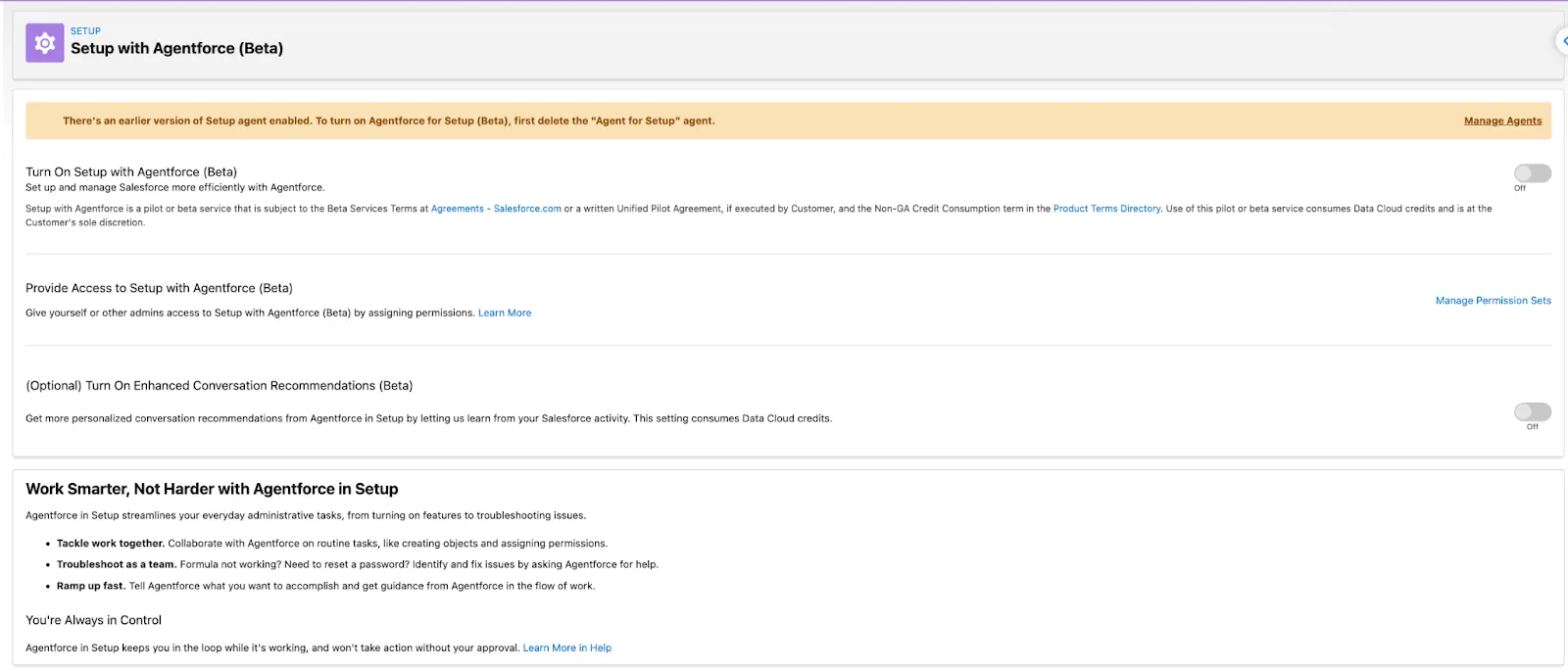
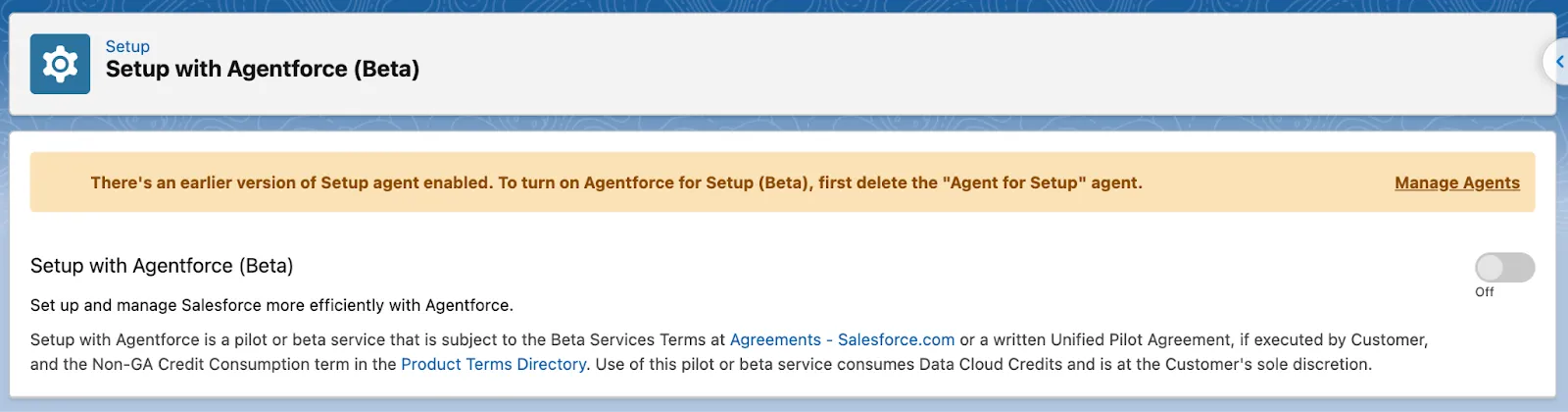
Setup with Agentforce has its own Setup page, where you will be prompted to follow the activation steps to enable it. Once done, there are a few more prerequisites to keep in mind:
- As you might have guessed, Data 360 needs to be enabled if it isn’t already
- The user enabling Setup with Agentforce should have Customize Application and Data Cloud user permissions, as well as access to the default data space
- Both Einstein Generative AI and Agentforce need to be enabled in your org as well
When all of the above is done, then it’s a matter of switching the toggle to turn on Setup with Agentforce and ensuring that proper permissions are in place for the entire team:
- Permission to complete all or part of the tasks the agent can help with (more on this below)
- Data Cloud user permission and access to the default data space
- Use Setup with Agentforce and Execute Prompt Template user permissions
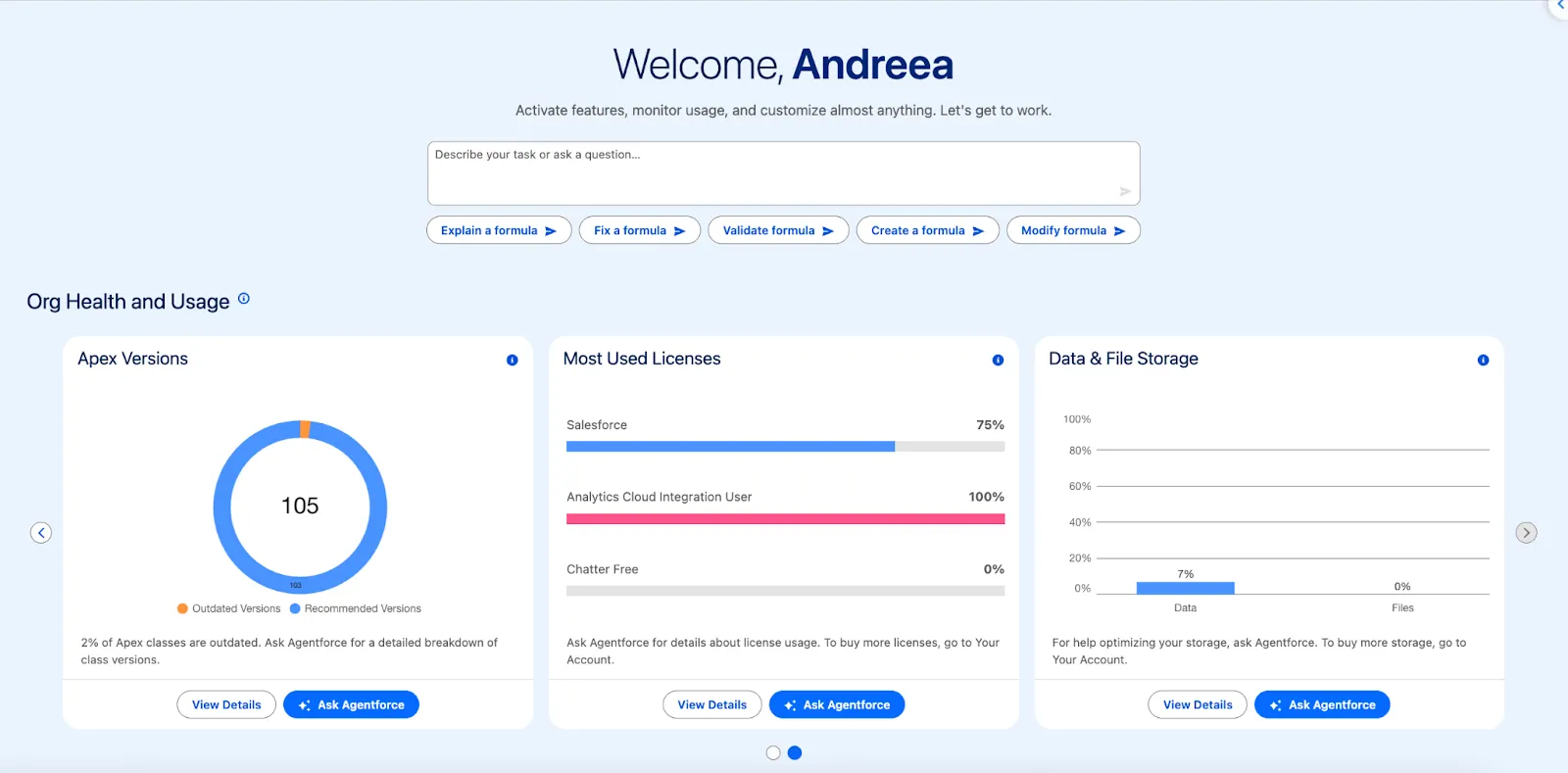
In addition to the capabilities themselves, note that Setup with Agentforce also comes with a brand new Setup home experience. The chat itself is embedded into Setup home alongside conversation recommendations to choose from, as well as specific tiles concerning your org’s health – more on that later on.
What Can Agentforce Actually Do in Setup?
If you haven’t already read through the documentation, you may be wondering what Setup with Agentforce can help you with – don’t worry, the agent itself has got you covered, all you have to do is ask.
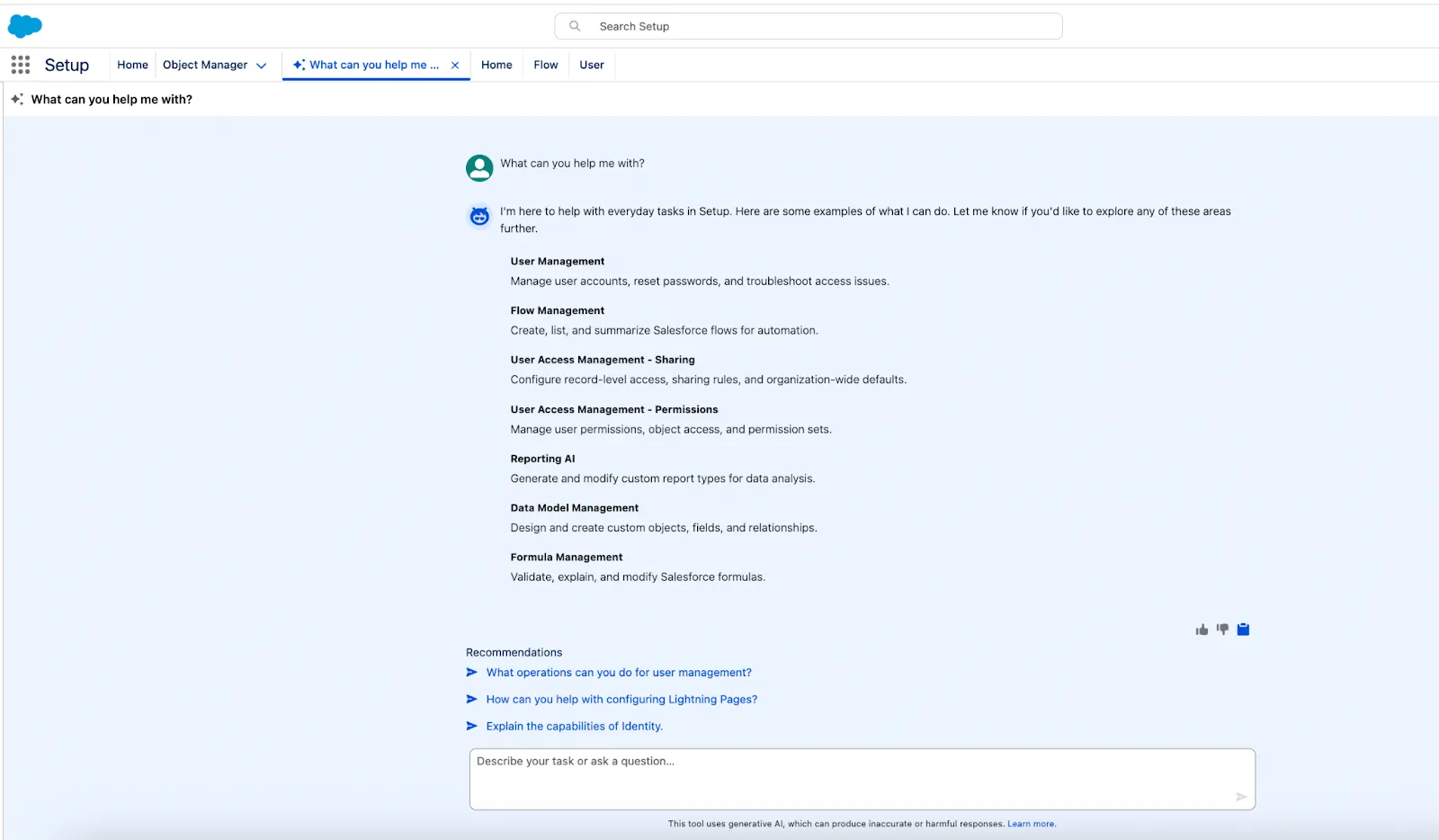
Compared to the previous version from almost a year ago, one thing’s for certain: Setup with Agentforce will continue to help with the initial items Setup Agent was able to, but also promises to expand the functionality in many more areas. Let’s see it in action with a few common use cases!
Take Over Time-Consuming Tasks
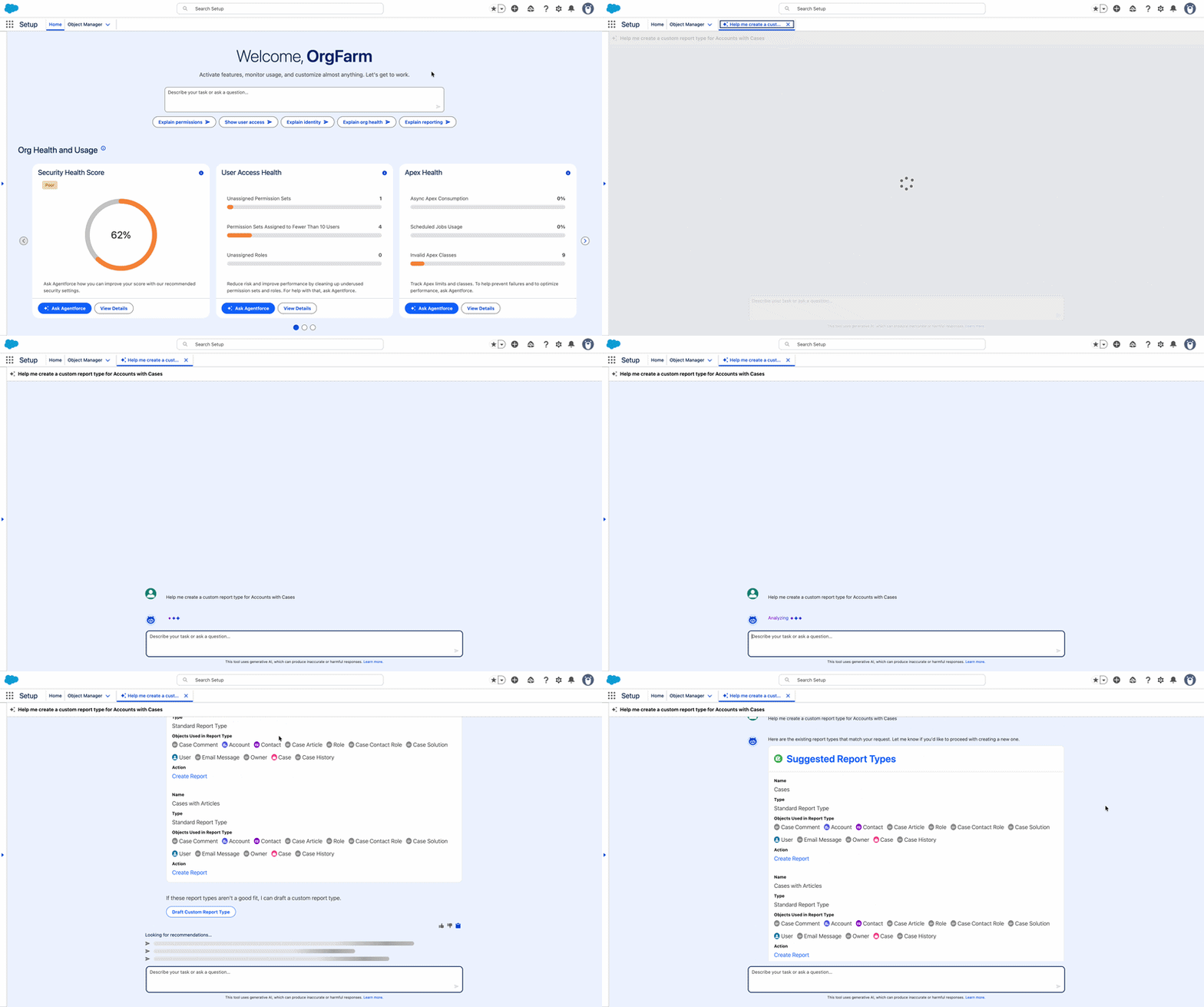
To start with, following my initial review of Agent for Setup in 2025, I noticed a gap: the option to create a custom report type using natural language instructions was no longer available at the time. Even if this may not be an everyday task, it does take a bit of time to set up, so when it was announced that Setup with Agentforce would do this right from the get-go in beta, it was the very first thing I checked out.
The agent not only lives up to the expectation in this regard, but it also recommends using existing report types if they match the requirement. Note that this action pertaining to report types is not currently available in Developer Editions, so you will have to try it out in a sandbox to begin with.
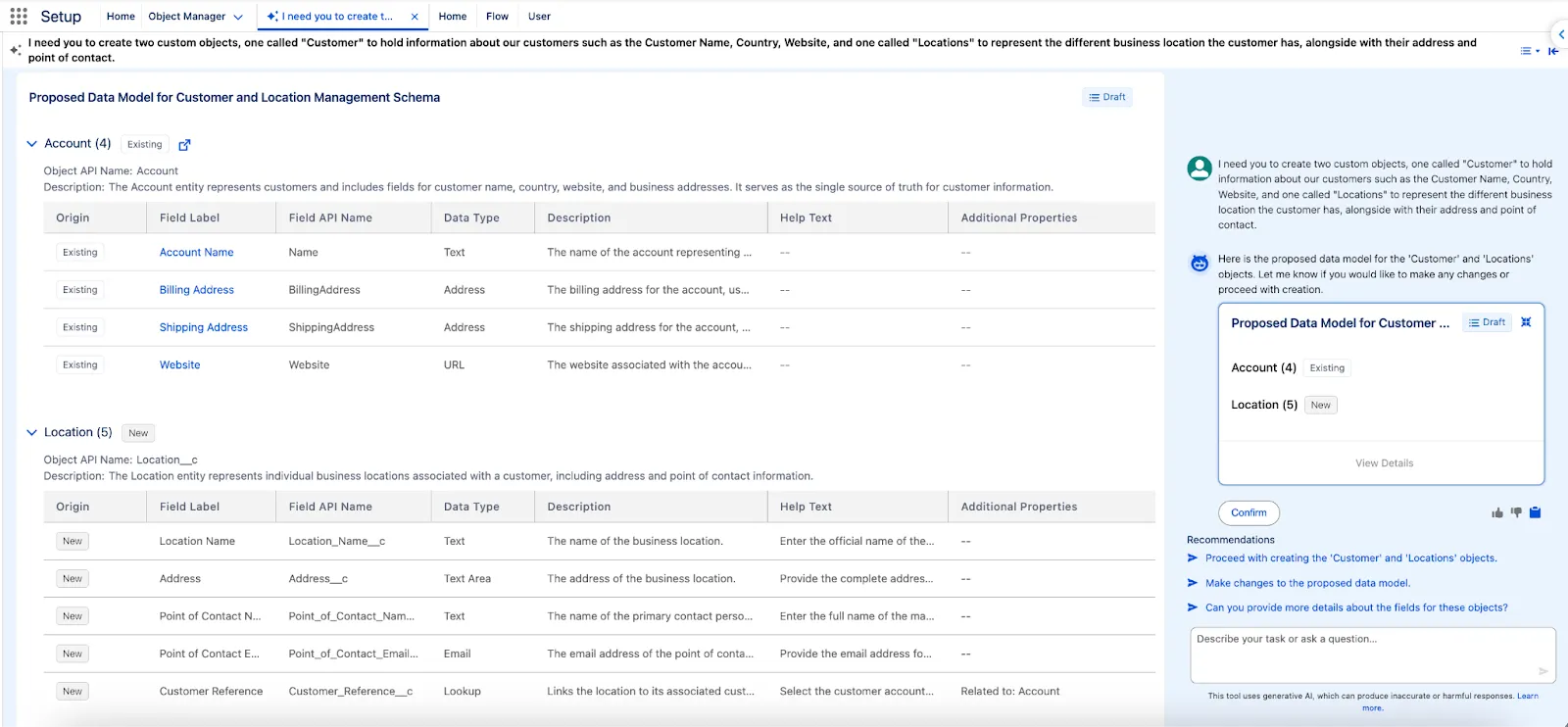
Speaking of time-consuming tasks, creating new custom objects and fields can easily fall into this category as well. As part of the data model management, the agent can design new objects, fields, and relationships while also following best practices.
In my example below, I did ask it to create a new Customer and Location object, but it correctly identified that the standard Account option can be used for the scenario at hand. Given the lack of details in the prompt, it also did quite a good job for the Location object; however, in a real-life scenario, not only should more detail be provided, but choices in terms of fields and field types have to meet the actual requirements.
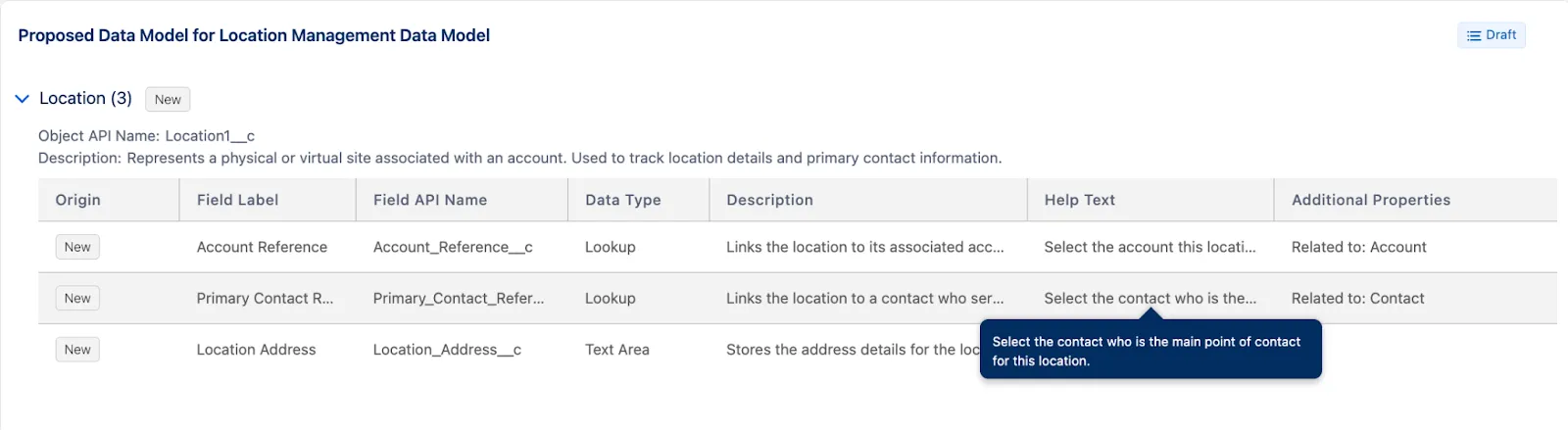
The good news is that even if the agent doesn’t propose what you were expecting, iterating is the key. You can ask it to make changes and provide a revised draft for you to take a look over before confirming the changes. In this instance, a Salesforce Admin should know that Location_Name__c is not needed as a custom field, given that there will be a Name field (unless the preference is auto-number or there is a need for more than 80 characters). Even more so, there should be one Point of Contact field instead of the proposed two, in order to facilitate reporting and data completion, and perhaps the address.
All in all, the more specific your prompt is – including object names, relationships, and field names – the better the result. Note that as of now, the custom Address field type is not supported at this time, which is why the agent recommended a Text Area for the address instead.
Formula Creation and Troubleshooting
One of the main use cases for generative AI in the Salesforce ecosystem is formula creation, especially when it comes to those long, nested ones that not only take time to write but are also prone to syntax errors.
As of now, Setup with Agentforce can help with all types of formulas you may need in Salesforce – be they formulas for formula fields or even validation rules. While it can’t yet create or modify formula fields, it can assist you in creating the formula you need, ready to be copied and pasted.
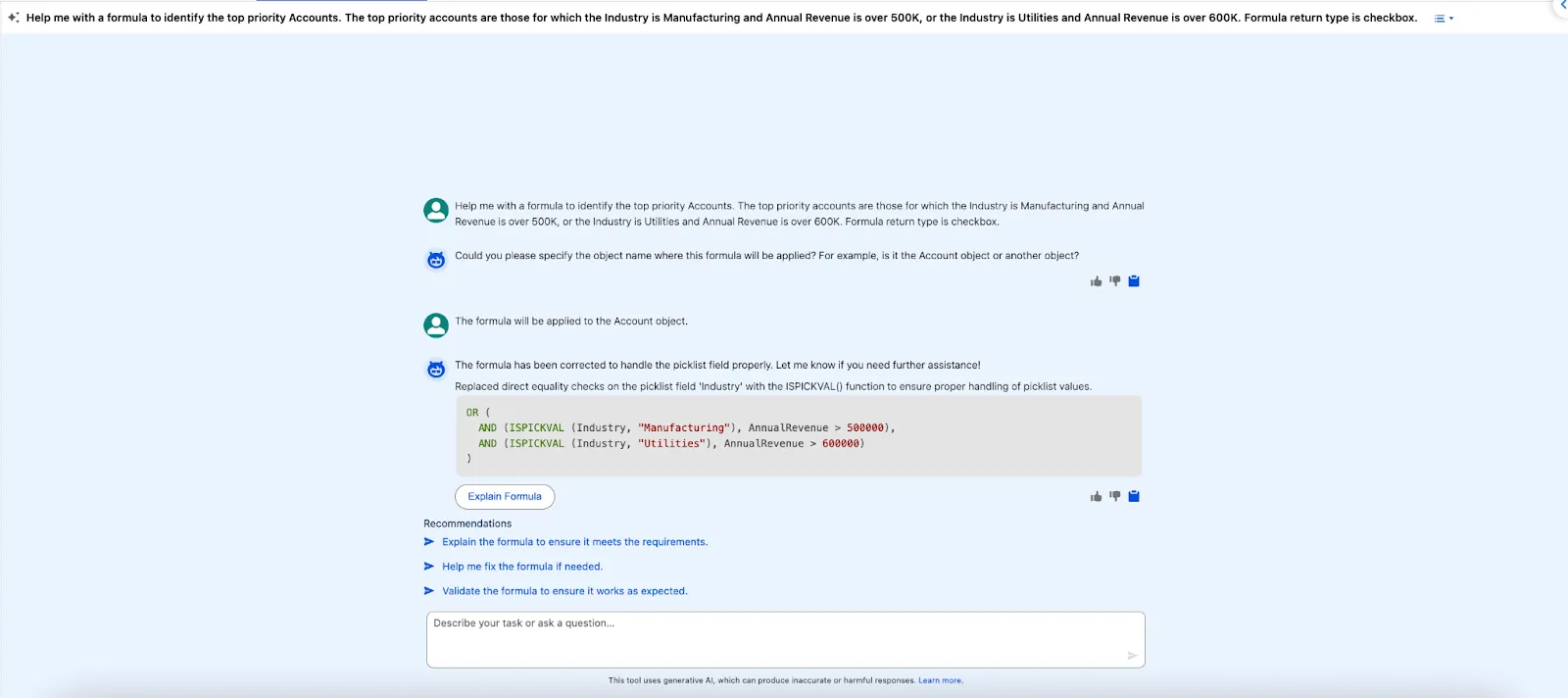
For any formula you chat with the agent about, you can also ask for an explanation – even if it’s generated by it or not.
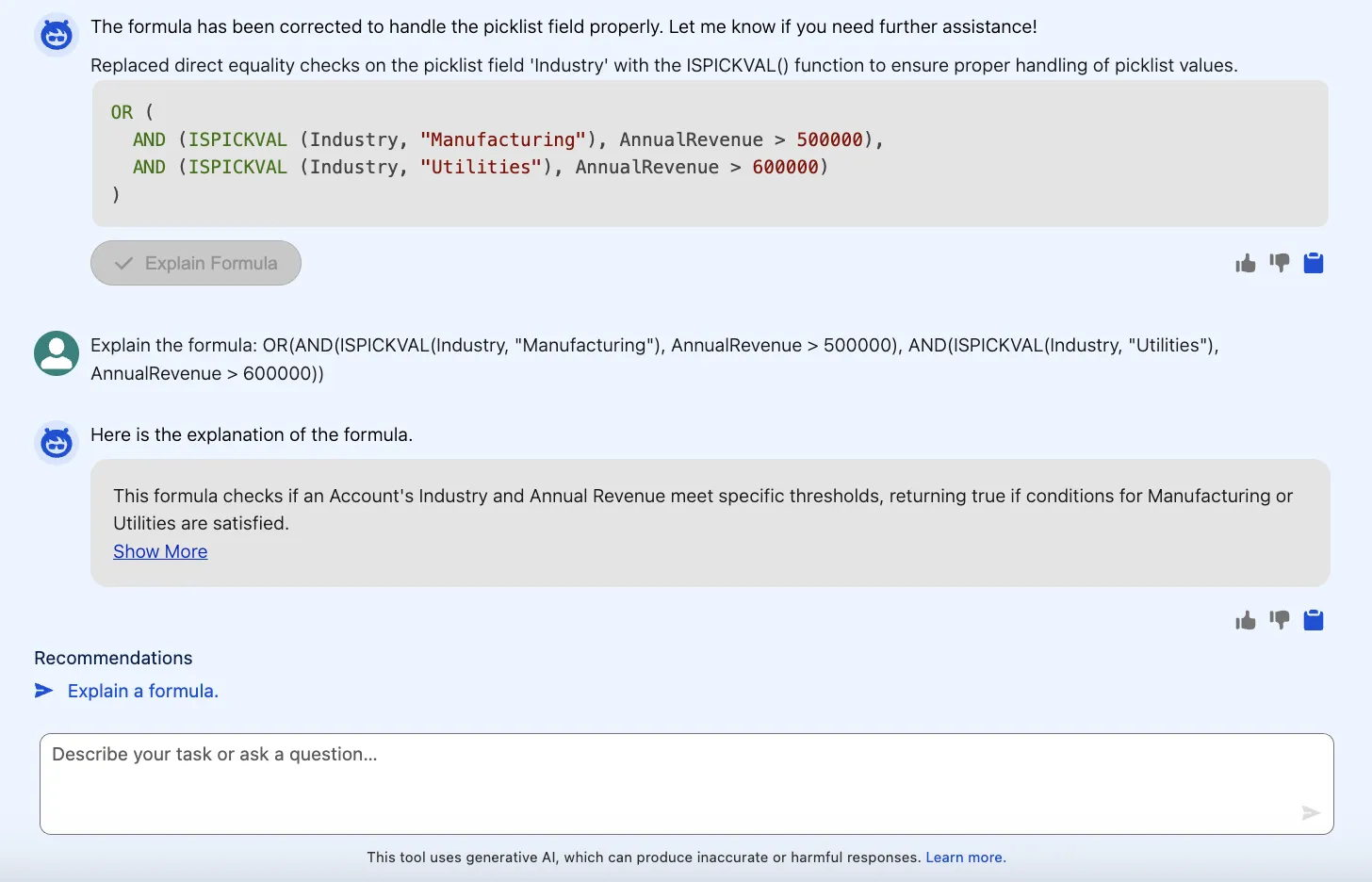
Alternatively, if you are already in the process of creating a formula field, you can always click the “Use Formula Assistant” button. This will surface Setup with Agentforce as well, and in this context, it can already suggest a formula, or correct one you wrote, and populate it in the editor if you accept the suggestion.
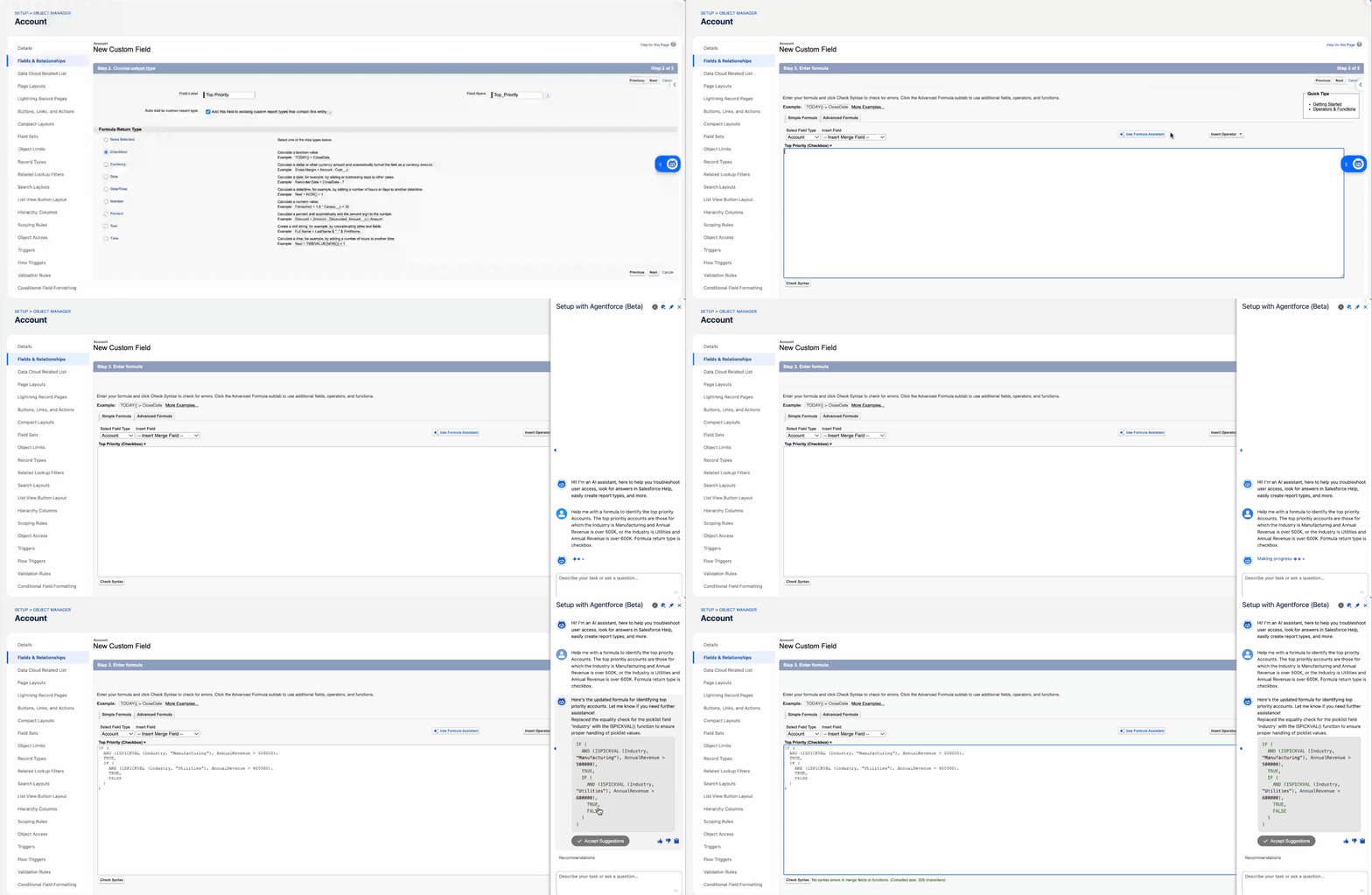
Keep in mind, though, that this is once again where the Salesforce Admin knowledge and experience come into play. The formulas generated are different, even if they do the same thing – the initial AND/OR logic approach is more user-friendly, cleaner, and easier to maintain, while the nested IF() one may be a bit more difficult to scale and read.
User Access Management Magic
While all other tasks we covered so far are time-consuming in their own way, permissions and access management are at a whole new level. The combination of the implications permissions have in Salesforce and the need for multiple clicks just to check if a user can access an object, field, or feature, makes this one the most useful area Setup with Agentforce can help in.
On top of this, chances are that while admins may not need to create new fields every single day, users asking for access or why they can’t access certain items across the platform happens daily. Sounds familiar, doesn’t it?
That’s exactly where Setup with Agentforce comes into play, and it can support a wide variety of requests when it comes to permissions. To begin with, you have probably run a query to find out who has Modify All Data, right? Well, the good news is that you don’t have to anymore. You can simply ask the agent – be it for this permission or any other system permissions, such as Customize Application.
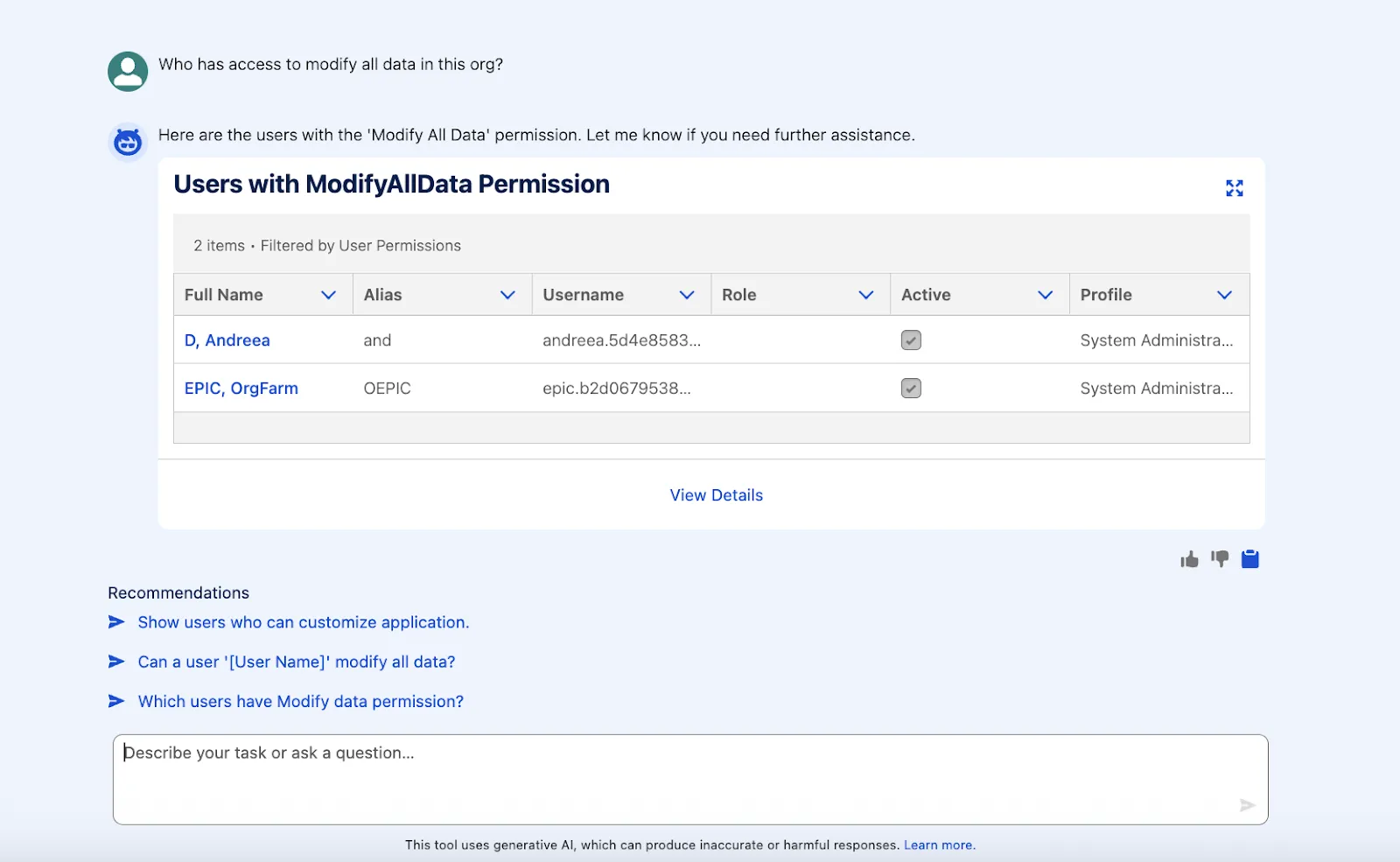
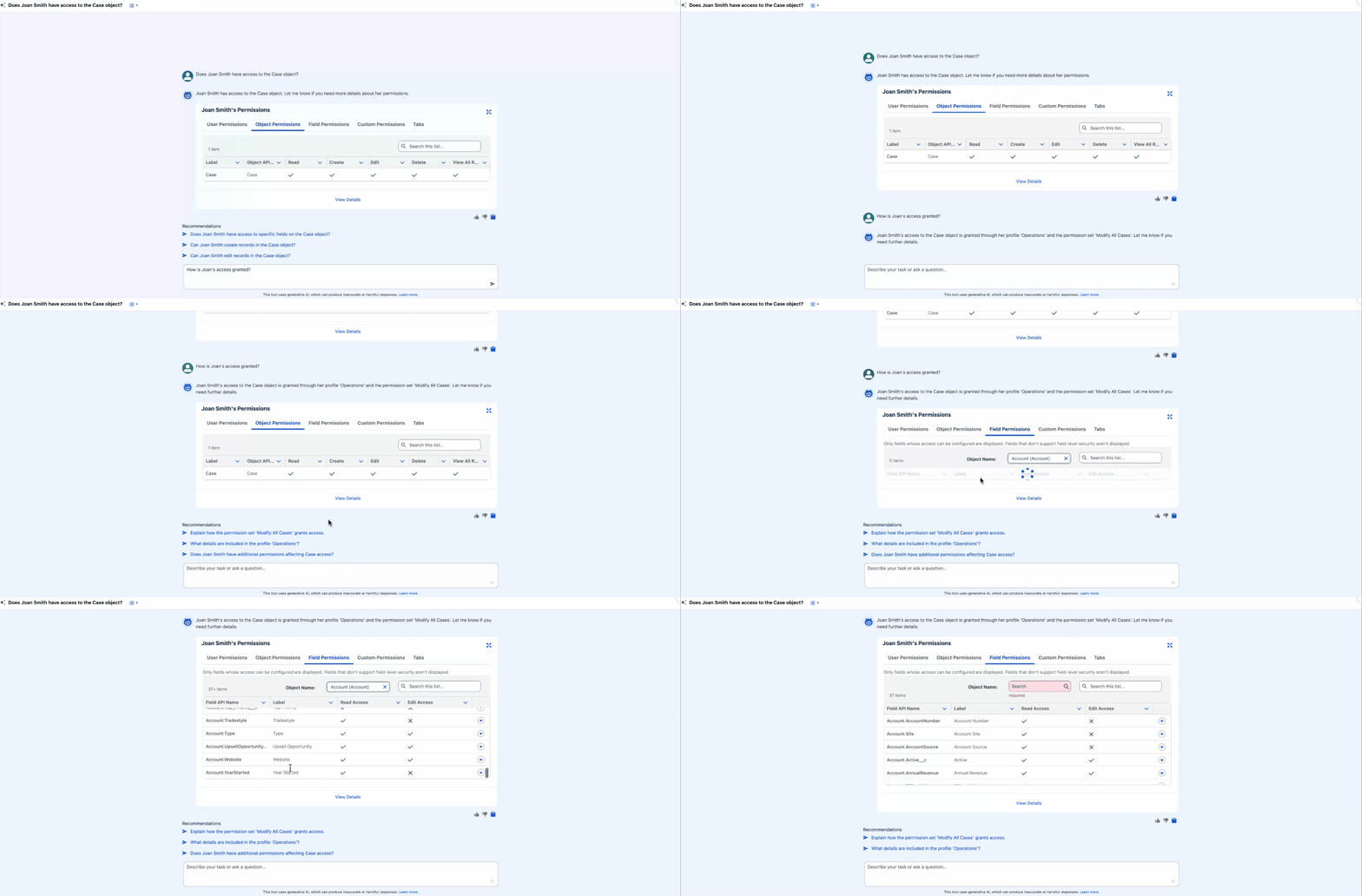
You may need information about critical system permissions during an audit or when exploring a new org, but in most cases, users will reach out about object and field permissions. As you can see below, we can once again ask the agent – no more navigating setup, or playing detective through profiles, permission sets, and permission set groups!
The agent can simply let you know if and how a certain user has access to an object, and you can further explore directly within the agent’s response. For permissions, the response is the same experience you’re already familiar with from the User Summary page. Even if we only asked about the Case in this instance, we can switch the filters to further explore any other object permissions this user has.
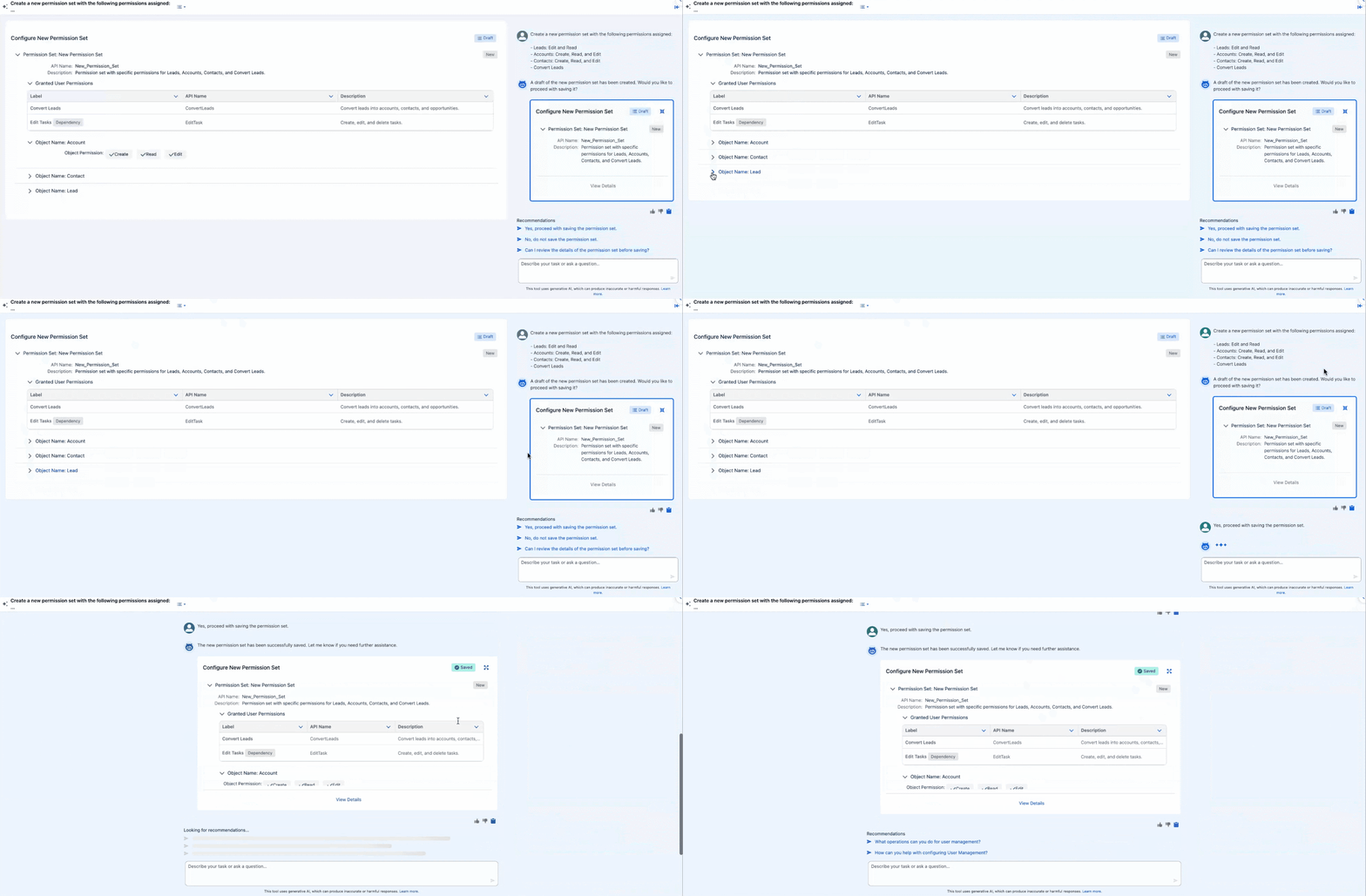
In addition to explaining what is already in your org, Setup with Agentforce can help with creating or editing existing permission sets or permission set groups as well. Practically, there is no need to navigate the setup again for these tasks. Of course, the more specific you are in your prompt, the better – in the example below, I wanted the agent to create a new permission set to include both the Convert Leads permission, as well as the additional required object permissions. What could have taken minutes is possible in a matter of seconds.
Check Org Health and License Consumption
As promised above, let’s go back to the new Setup home experience, which will most likely be the first place you will interact with Setup with Agentforce from. While you could start typing what you need directly or choose one of the suggested prompts, the Org Health tiles below the chat are what we’ll zoom in on.
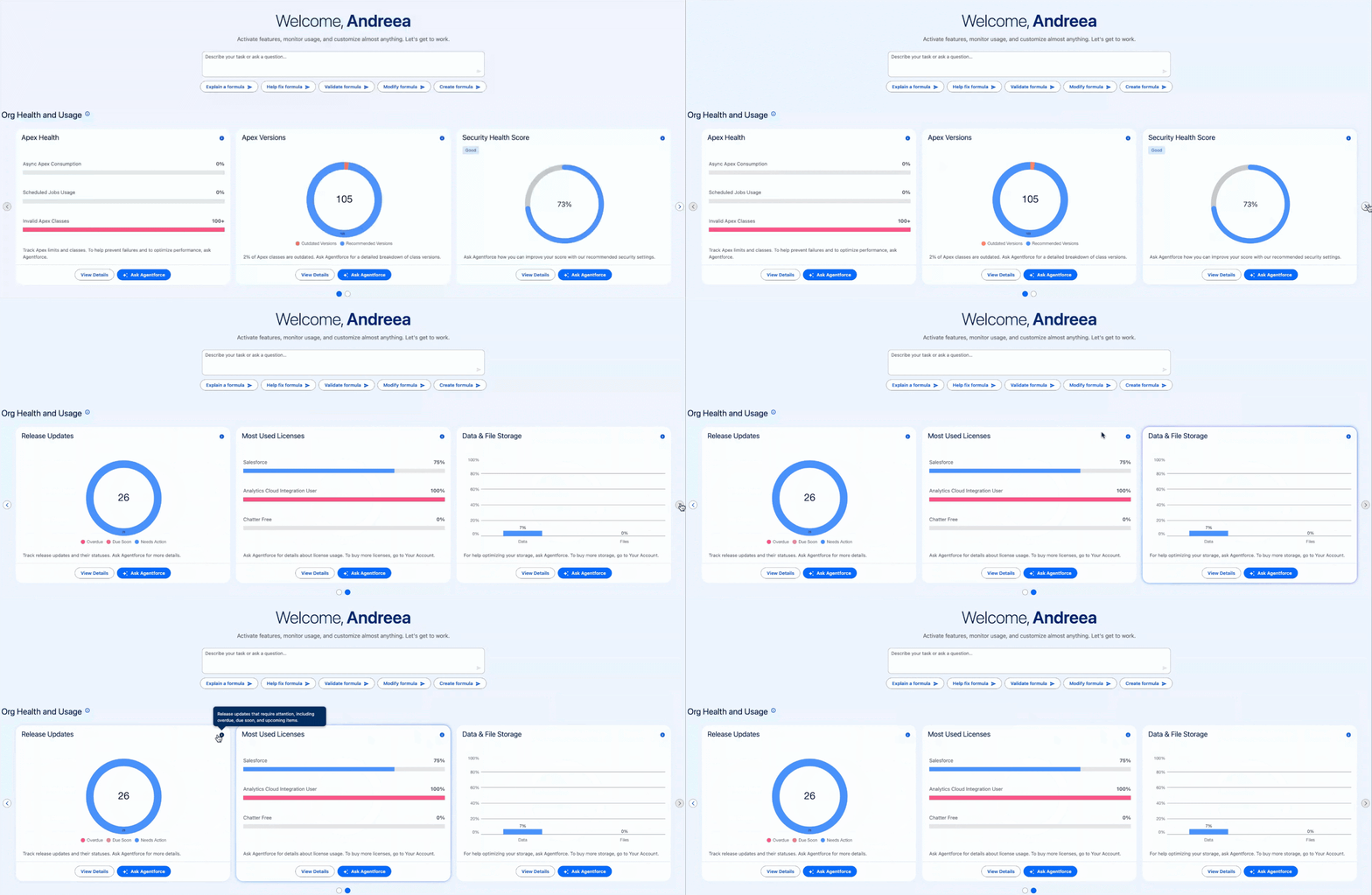
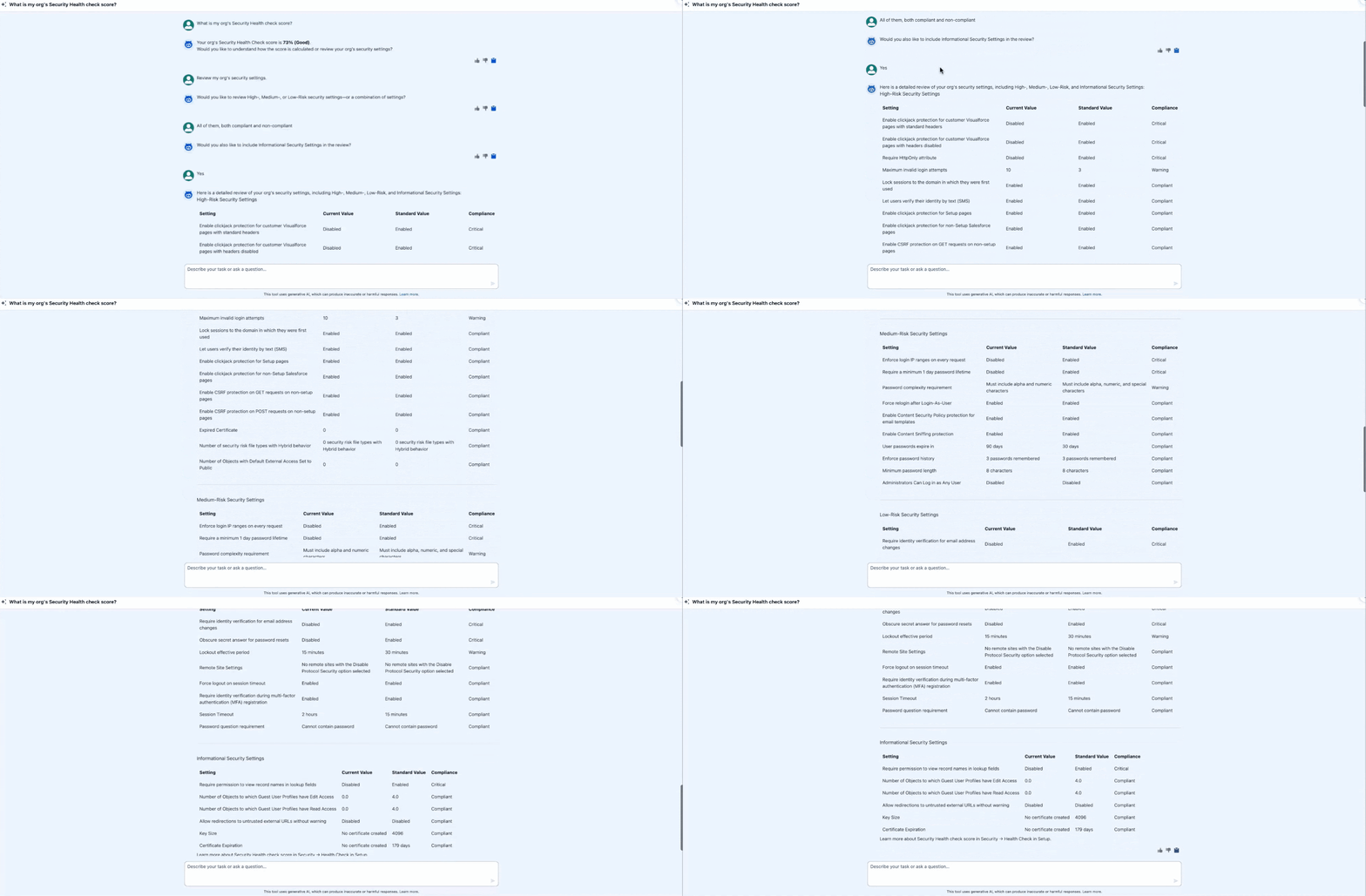
The goal of bringing this information front and center is to provide Salesforce Admins and Developers a way to proactively monitor their org. By removing the need to navigate multiple pages and sections, potential issues can be prevented rather than fixed afterwards. For example, when reviewing the org’s Security Health, the agent can surface all items you would find on the dedicated setup page, or only part of them if you’d like. You can continue the conversation to ask about any of them as well.
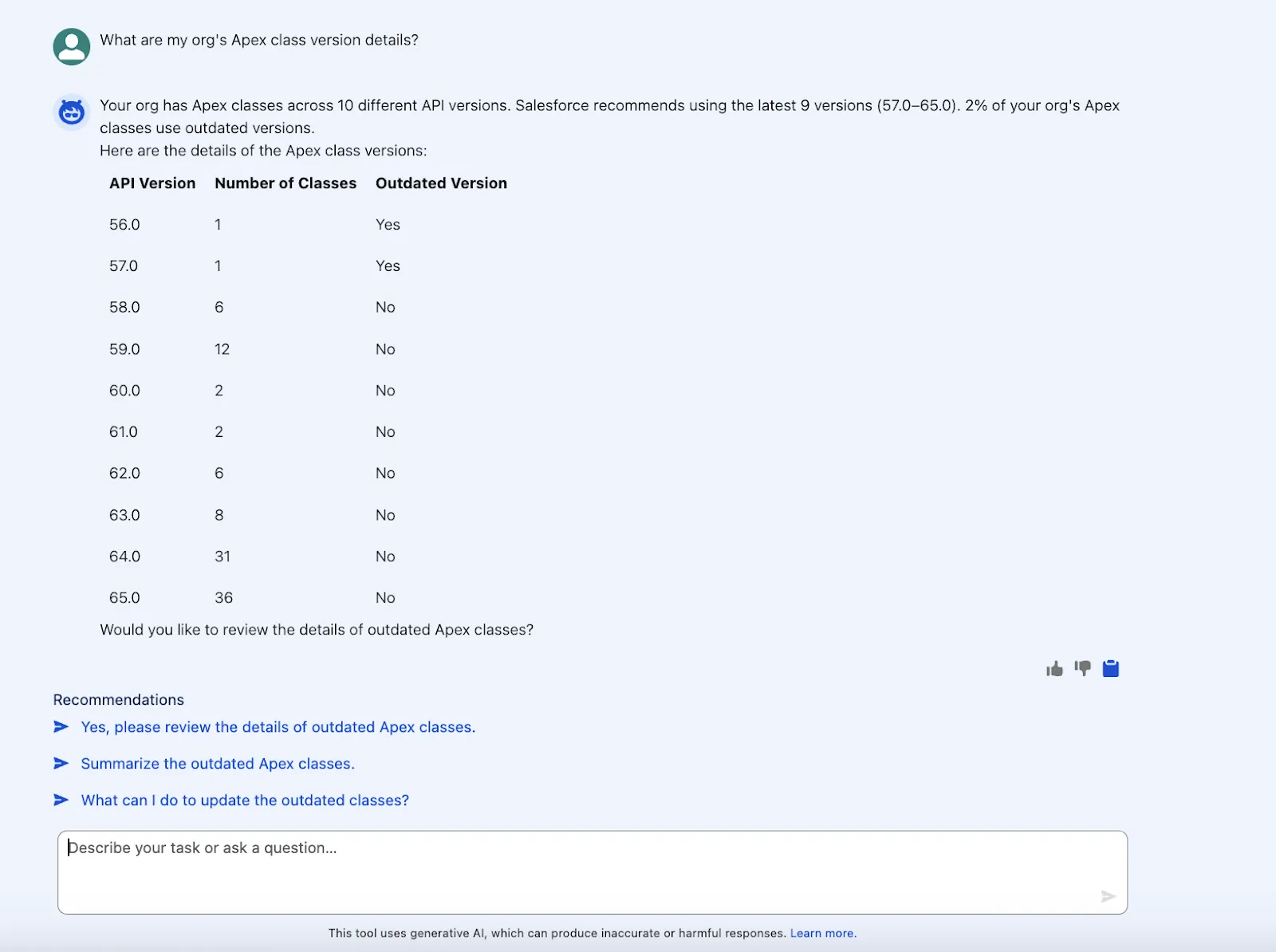
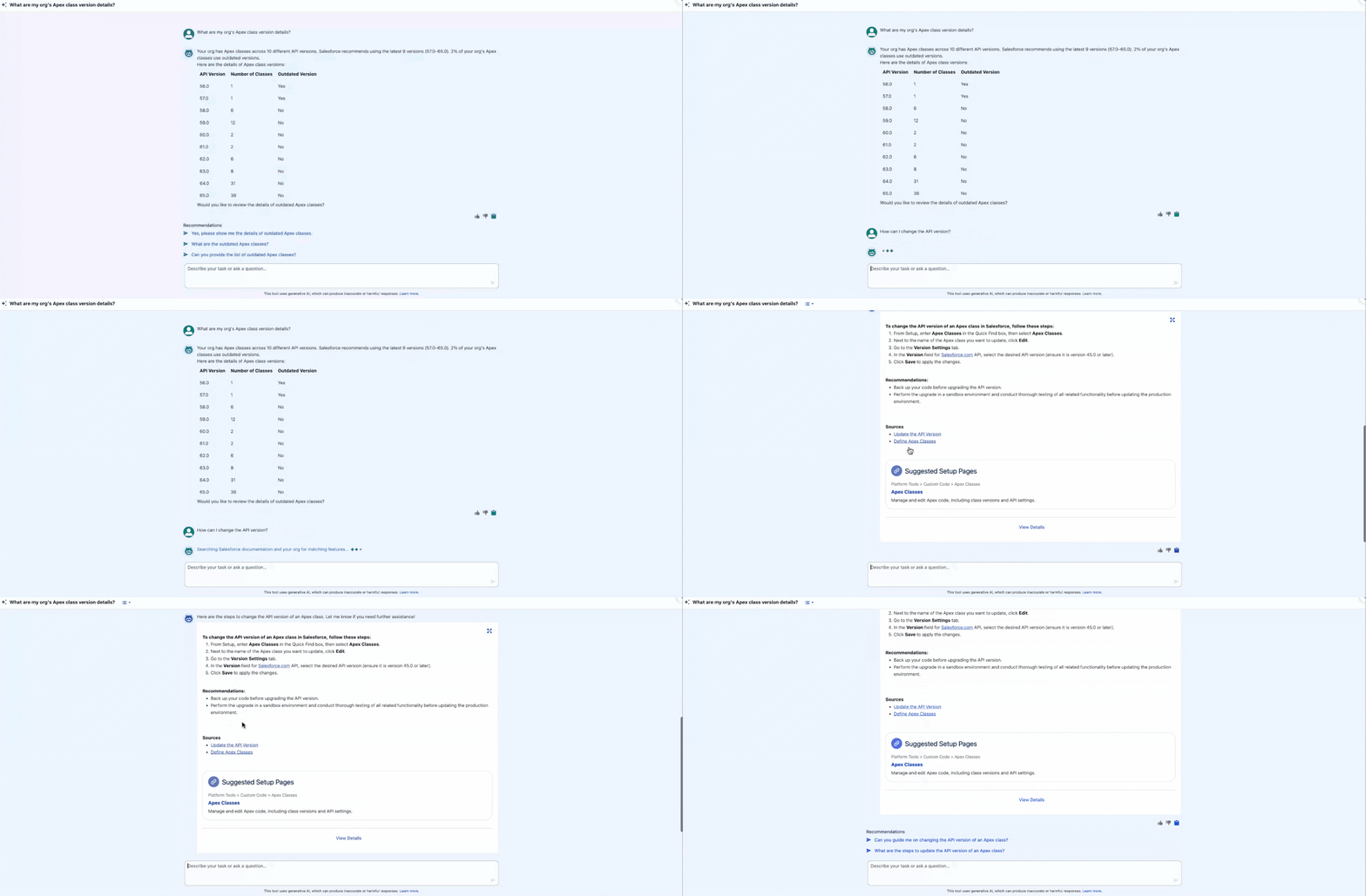
For Developers, keeping an eye on Apex Classes API versions has just become a breeze. Not only that, but the agent can provide details about the classes and even summarize them. While this example is in a developer edition, in a real org, the number of these classes may be quite high following an API version change, ultimately meaning more time back for the team members who don’t have to go through each class to find out more.
Provide Guidance in the Flow of Work
Before we proceed further, let’s also chat about scenarios Setup with Agentforce cannot help with directly – this still doesn’t mean it can’t help at all. For any given task that the agent is not yet equipped to handle, it will default to providing guidance directly from the Salesforce documentation.
Following up on the above example with the Apex Classes versions, let’s continue the conversation. The agent can’t help with the change, but we can ask how the change can be made. Just like that, the output will be a documentation excerpt from help.salesforce.com, but also one or more recommended Setup page(s) – so even if we have to manually go in and make the change, the agent makes it as easy as possible by providing the guidance, as well as the link to the dedicated page.
Create Flows
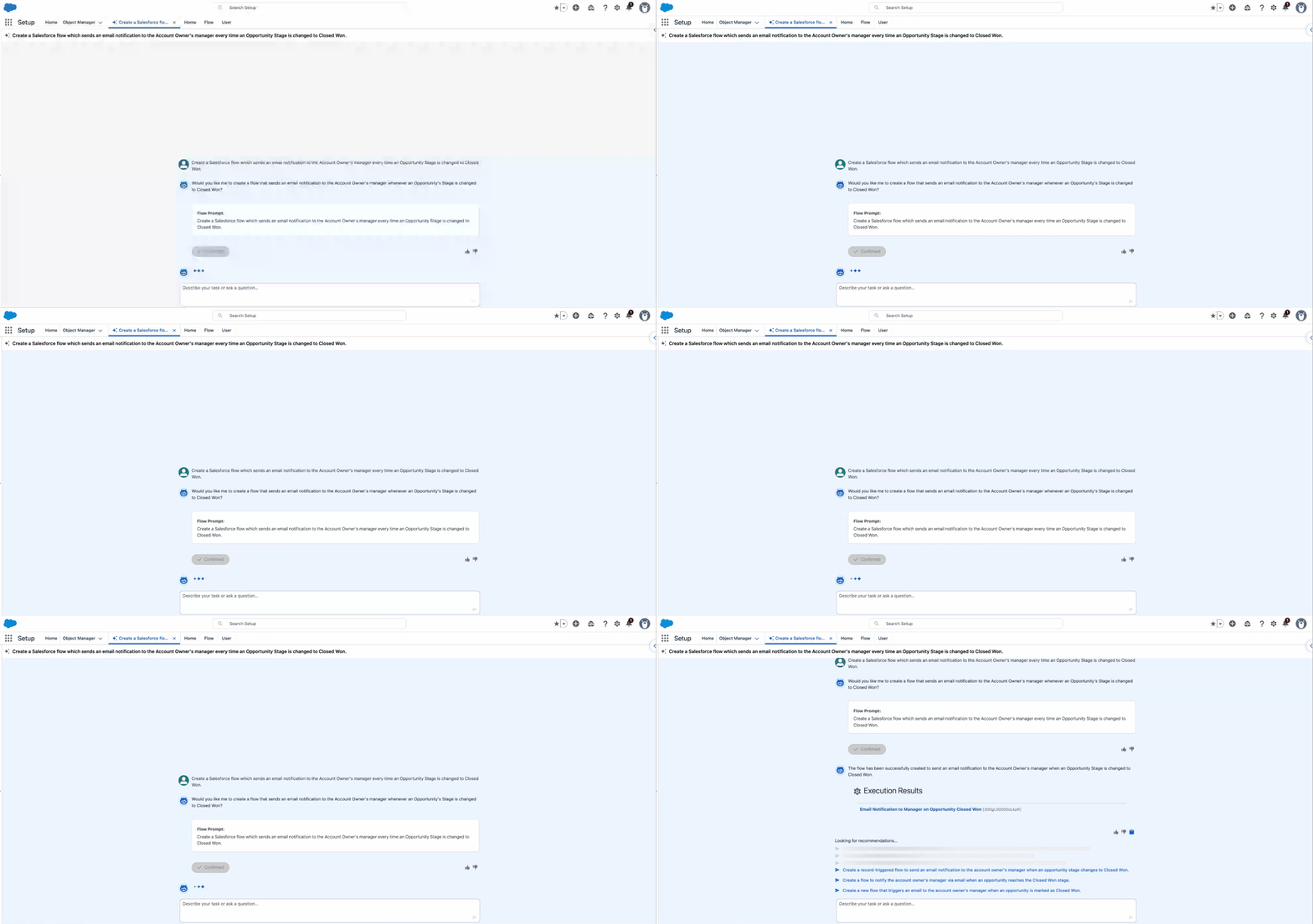
Salesforce Flows have been the go-to for declarative automations for a long time already, so it should come as no surprise that Setup with Agentforce aims to support Salesforce Admins in this regard as well. While you may have used Agentforce within Flow Builder already, this time around, you don’t have to navigate away from Setup Home at all – flows can be created directly from the chat, for you to review once the draft is ready.
Looking at a simple notification example, notice that the setup agent confirms the prompt and only afterwards does it get to building. In under 30 seconds, the output is a Draft Flow, which you can click into and review.
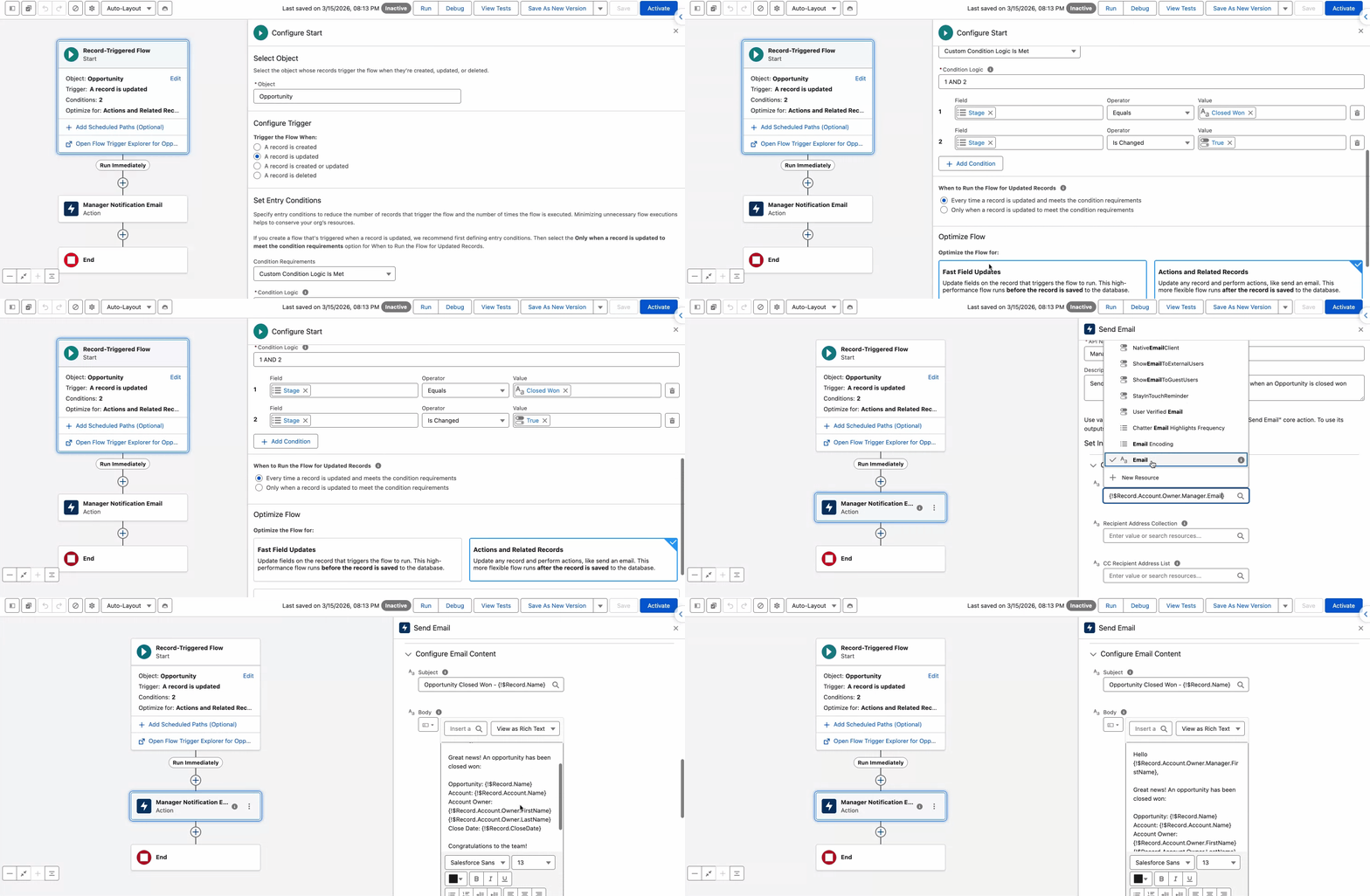
You will notice that the Draft Flow appears to have been created by you, the running user. If you haven’t specified a naming convention, the agent will select a suitable name and add a description as well. Zooming into the Flow itself, the agent did set up entry criteria, the correct recipient, as well as a detailed email body. Note that in this example, the agent chose to use the “Is Changed” operator within the entry conditions rather than the “Only when a record is updated to meet the condition requirements” option.
Either way, chances are that it did take the agent much less time than it would have taken a Salesforce Admin to build the same Flow – the Flow logic is not difficult at all, but Setup with Agentforce is a great sidekick when it comes to flows that include notifications with multiple references.
Forget About Downloading Setup Audit Trail
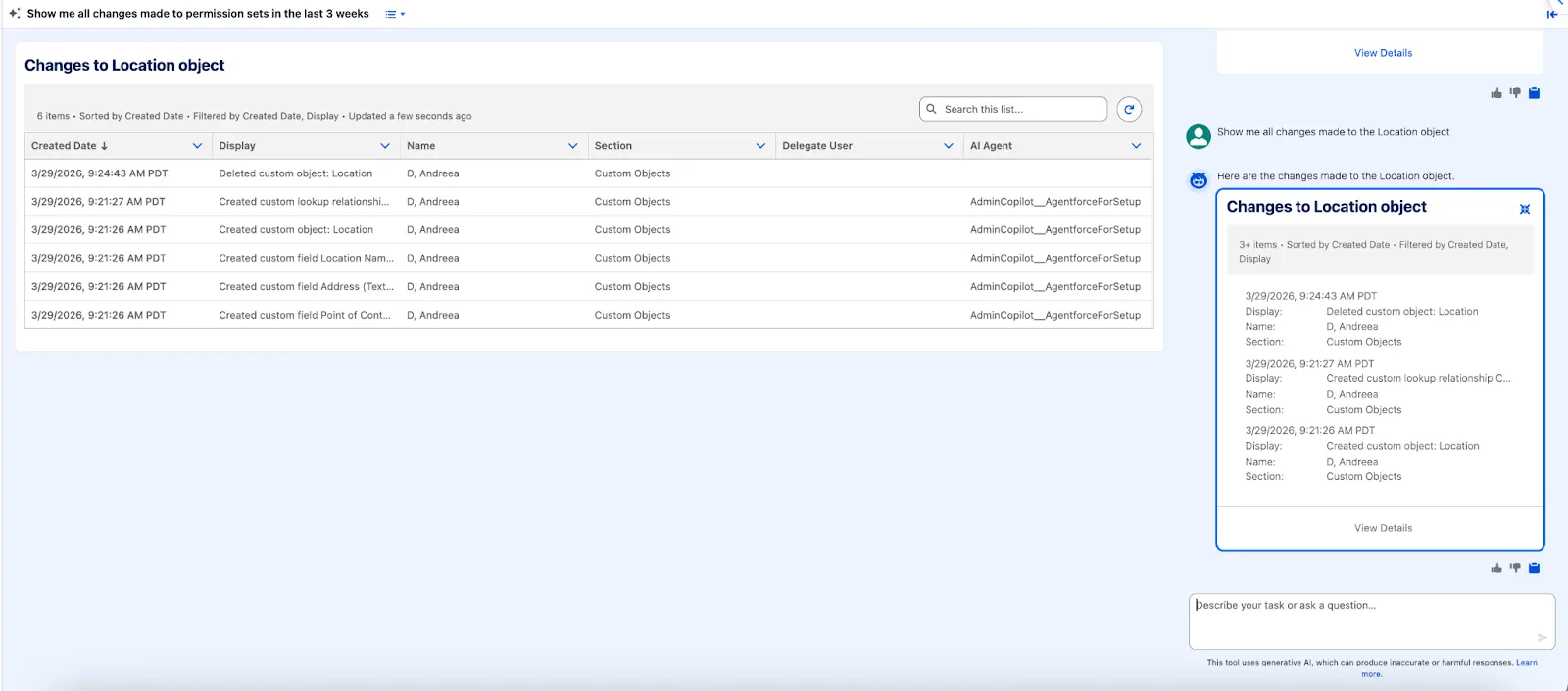
And finally, perhaps the most exciting addition for all Salesforce professionals – there’s no longer a need to download Setup Audit Trail to review changes when Setup with Agentforce is in use! If there are any changes you need to look into, you can simply ask the agent.
Your prompt can be as simple or as descriptive as needed, and the resulting list view can be sorted, searched, and further filtered. Note that in the permission set changes example, even changes made by the Automated Process are returned, so in case something was changed as a result of a release, you will have the information you need.
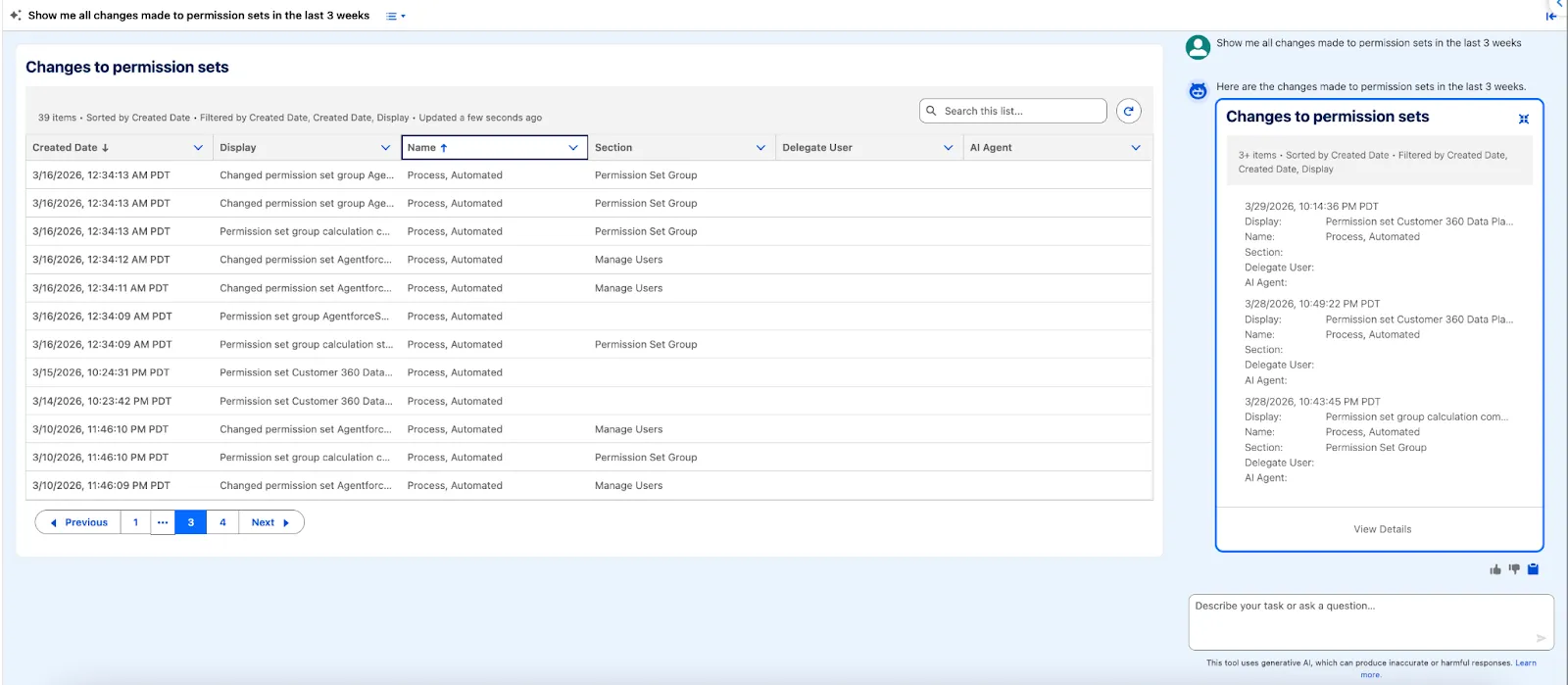
Additionally, even if the changes that the agent makes are made on the running user’s behalf, Setup Audit Trail has a new column to note this exact behavior. The “AI Agent” column will note the agent that was used to make the change – in this example, the creation of the Location object we asked for earlier. From this list, we can see that the agent created the object and fields, but that I manually deleted the object afterwards.
Considerations
As with any functionality, there are a few things to keep in mind as you start trying out Setup with Agentforce.
- From a consumption point of view, this agent doesn’t consume Agentforce credits, but it does consume Data 360 credits. Given the minimal consumption, Setup with Agentforce could be a use case to consider even if you’re using Salesforce Foundations.
- If you have been using the Agent for Setup in the past, you will have to delete it in order to enable Setup with Agentforce.
- The agent respects the running user’s permissions – so while users may have permissions to interact with Agentforce in setup, if they don’t have permissions to perform a certain action, the agent will let them know.
- All changes made by the agent are tracked within the Setup Audit Trail.
- Within Setup, the agent can be accessed from any page you need to work on. Also, the “Ask Setup Agent” button can be repositioned on the page to ensure that it doesn’t interfere with anything on the screen.
- Setup with Agentforce became generally available as of May 2026.
- As always, especially since Setup with Agentforce is still in beta, make sure to keep an eye on the official documentation for additional considerations.
Final Thoughts
Whether you’re an experienced Salesforce professional or a new admin, Setup with Agentforce can help you optimize your way of working right from the get-go. Even if the agent can help with formulas, create flows, amend permissions, create new objects and fields, and provide guidance, it’s all about the human in the loop – you will have to validate its output, and rely on your own experience to determine if what the agent has proposed makes sense.
What is the Setup with Agentforce feature you are most excited about? Have you tried it out already? Let us know in the comments section below!