

In the 2025 Salesforce Ben Developer Survey, we were curious to understand how developers do their work today. It’s obvious that for developers using Salesforce, there are two tools that will always have very high rates of adoption: VS Code (75.1%) and the Salesforce CLI (62.9%). But beyond that, what are the other tools developers use?
We asked several sets of questions to understand this. First, we inquired about which tools developers use to make deployments. We also asked which tools they use daily for their work as developers. And finally, we inquired about AI tool usage for AI-assisted coding and other development tasks. Here’s what we found.
Version Control
Of the three big version control providers available, 48.7% of those surveyed use GitHub – not too surprising given its standing among developers. The next most used is Bitbucket at 12.2%, followed by GitLab at 10.7%. Git itself comes in at 47.2%.
The retirement of long-time GitHub CEO Thomas Dohmke was greeted with some consternation at what would be in the cards next for the Microsoft subsidiary. It’ll be interesting to watch whether this impacts the use of version control providers in the coming years.
Workbench and Inspector
At 49.7%, Salesforce Inspector Reloaded is the most popular open-source Salesforce tool (not created by Salesforce). Thirty-one point five percent of our cohort still use Workbench – perhaps a bit surprising, as Salesforce has tried to discourage its use in recent years and move people toward Postman and the Salesforce Postman Collection. But these two tools provide UIs that fit certain tasks better. For instance, in Inspector, the query builder with auto-complete can be very useful for quickly looking up fields you want to use to compose SOQL queries. Workbench’s REST Explorer is still a very easy way to explore the REST API.
It goes to show that habit is a strong force to overcome when it comes to the tools we use. And while the Salesforce Postman Collection has recently been Postman’s top-rated collection, it’s clear that people are still drawn to these tools.
Other Salesforce Developer Tools
What of the other tools Salesforce has been building themselves to support developers? When asking specifically how work is deployed, a small number (8%) cited using Salesforce DevOps Center. This is less than half the number who still use Change Sets (19.4%). Salesforce Ben has an editorial guideline that discourages the use of emojis. Let’s just say that if it weren’t the case, this is where a facepalm emoji would have been inserted.
Salesforce Code Analyzer had 20.3% of our cohort reporting daily usage. Given how mature the ecosystem was before this tool appeared, this adoption rate seems good. Close to that, the Log Analyzer had 16.8% of respondents using it daily. And finally, Code Builder was 10.7%. It’s fair to say that, outside of the core tools of the VS Code and the Salesforce CLI, Salesforce has work to do to expand adoption of their home-grown offerings.

How Do You Do AI
So what about AI-assisted coding? We asked developers which tools and models they’re using. The runaway favorite was GitHub Copilot at 47.9% – remarkably close to those claiming daily GitHub usage. Agentforce for Developers was being used by 38.6% of respondents. Cursor (24.3%) and Claud Code (22.1%) rounded out the most popular tools. Everything else was 5% or fewer, including Windsurf, Lovable, and ChatGPT.
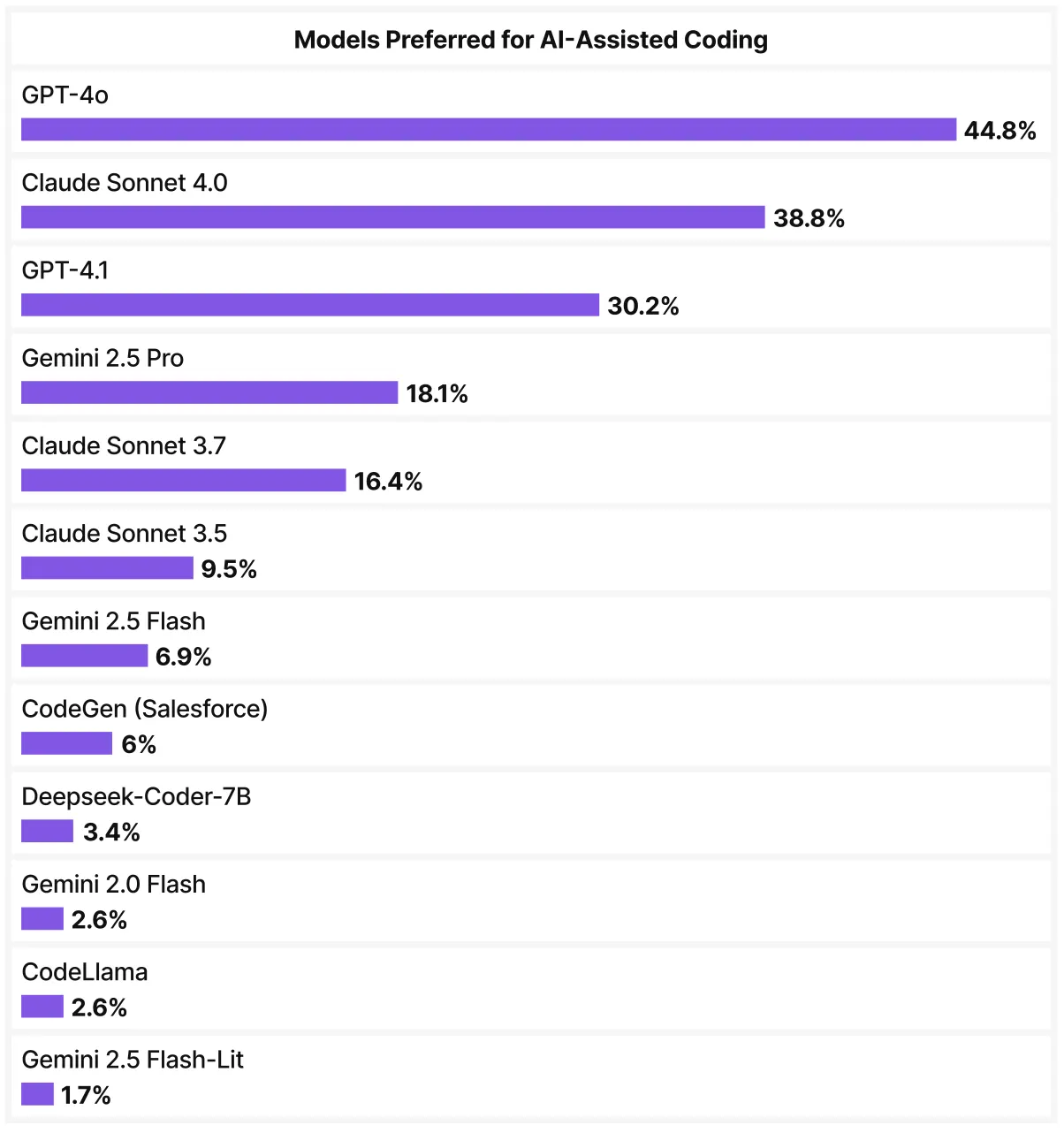
As far as models go, the top five consisted of two ChatGPT models, two Claude models, and one Gemini. With the rate of change in AI models, this information is already dated. But an interesting thing to note is that, at the time, anecdotally, Claude seemed to be the most popular model among developers at large.
Observability, Org Analysis, and More…
While we mentioned DevOps Center and Change Sets earlier, what about other deployment tools? Well, the most popular seems to be rolling your own pipeline using the Salesforce CLI, a version control system of choice, and some CI/CD tool – 37.3% opted for this option. After that, 30.8% used some form of Salesforce-specific DevOps vendor, such as Copado, Gearset, Autorabit, or Flosum. Finally, 6.1% specifically mentioned using SFDX Hardis as a tool they used daily.
Metadata and data quality tools have grown in their profile. They can greatly aid in understanding an org – especially one that lacks documentation and that you may not be familiar with. Twelve point seven percent of our cohort use such tools daily. Given the necessity of good data and well-documented org functionality, this low current rate of adoption suggests potential for these tools to grow in the coming years.
Illuminated Cloud is an IDE plugin for Salesforce, developed for the JetBrains/IntelliJ IDEA platform. It has a loyal and passionate following among developers, and 7.1% of our respondents use Illuminated Cloud.
And finally, another tool that stood out to me was Nebula Logger. This free and open observability and logging extension to Apex has grown in popularity and reach in the past few years. Thirteen point two percent of our respondents use Nebula Logger. Based on the attention I’ve seen it receive recently, I was surprised the number was not higher, but still a very good showing.
Final Thoughts
When asking about daily tool use, we allowed you to provide your own answers. There were some fun ones. So to wrap up, I want to give a shout-out to the lone developer out there who shared that they were using forceCLI (the open-source precursor to Salesforce CLI), PMD, Vim, and the Python simple_salesforce package for their development stack.
We live in times of great change. Learning what others are using can be a great help to see where our blind spots are. If you have a tool that you use regularly that we didn’t cover here, be sure to give it a shout-out in the comments below.
Want to learn more? Make sure to download our SF Ben Salesforce Developer Survey Results 2025.