

Web-to-Lead is one of the fastest ways to demonstrate Salesforce value: put a form on a website, capture interest, and get it into the right hands. For many teams, it’s the first visible win after implementing Salesforce.
But it’s also one of the easiest ways to unintentionally create a noisy database filled with duplicates, spam, misrouted submissions, and the familiar internal question:
“Where did that inquiry go?”
This playbook walks through how Salesforce Admins and Consultants can design a Web-to-Lead pipeline that’s secure, scalable, and reporting-ready. The goal isn’t just to capture more submissions, but to build an intake system that teams actually trust and can act on with confidence.
Design the Web-to-Lead Lifecycle (Start With Outcomes)
One of the most common mistakes with Web-to-Lead is starting with the form itself: what fields should we add? What should the page look like?
A more effective approach is to start at the end.
Before building anything, define what should happen after a submission:
- Who should see it first?
- How quickly should it be followed up?
- What qualifies as a “good” submission versus one that needs triage or enrichment?
- How will success be measured?
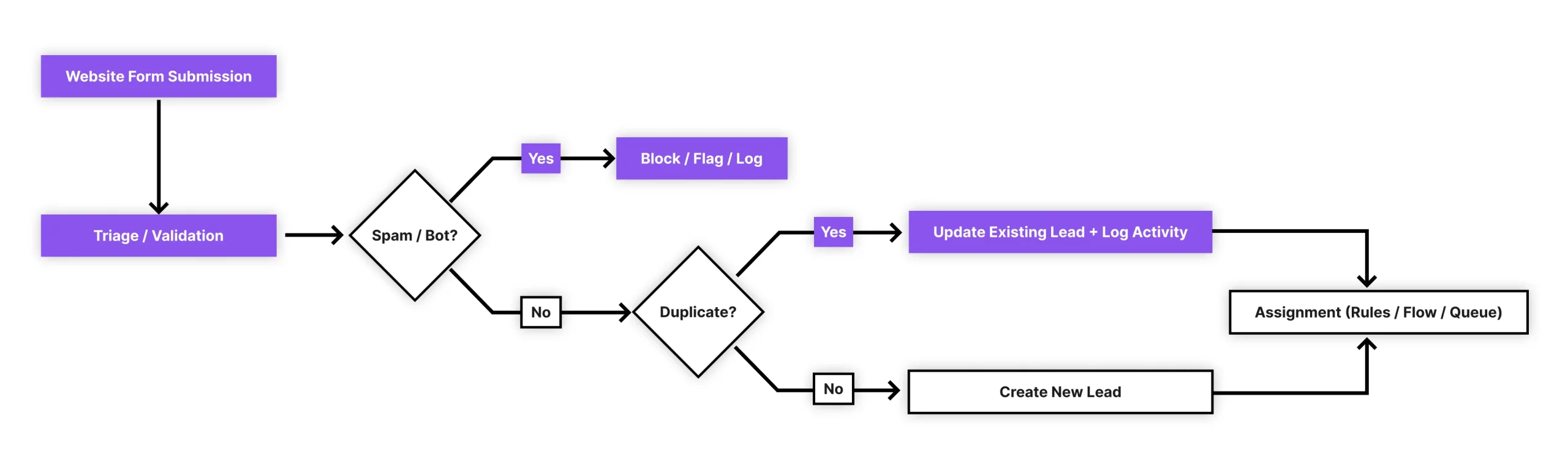
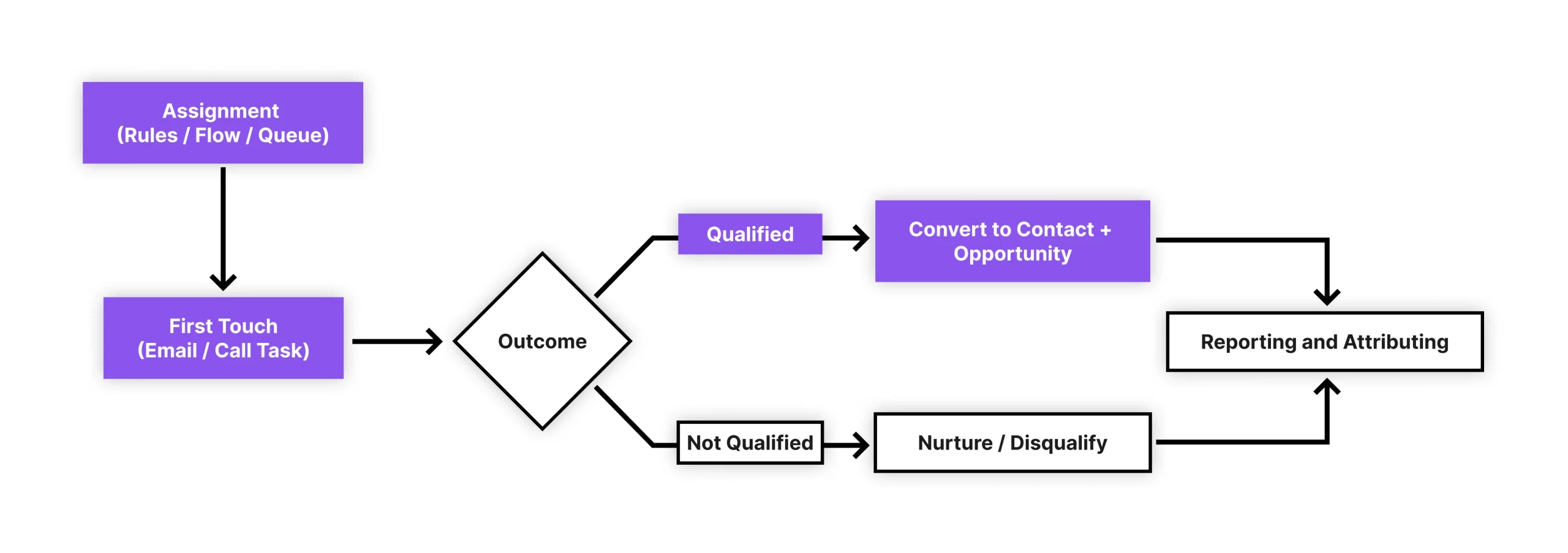
Many teams find it helpful to sketch a simple lifecycle:
Submission → Triage → Assignment → First Touch → Outcome → Reporting
This lifecycle becomes the foundation for your SLAs and success metrics, such as time-to-first-touch, conversion rate, and spam rate.
Define the “Minimum Viable Form”
Another recurring pain point is trying to collect too much information upfront. Long forms reduce completion rates and often introduce inconsistent data.
A practical rule of thumb is to start with a minimum viable form:
- Only collect what’s required to route and respond.
- Prefer clarity over completeness.
- Plan to enrich data later through follow-ups, automation, or internal processes.
Progressive profiling-collecting additional information over time instead of all at once-helps balance user experience with data needs.
Build for Data Quality (So Reporting Doesn’t Break Later)
Web-to-Lead issues rarely surface immediately. They usually show up weeks later, when someone tries to run a report or answer a leadership question.
Common data quality challenges include:
- Free-text fields that should have been picklists.
- Inconsistent country, state, or program values.
- Duplicate Leads created from repeat submissions.
- Missing attribution fields for campaigns or sources.
Simple guardrails make a big difference:
- Use picklists wherever possible.
- Add validation rules that guide users without blocking legitimate submissions.
- Capture attribution data through hidden fields rather than asking users directly.
Plan for Duplicate Behavior
Duplicate management is not a “later” problem-it’s a design decision.
Ask early:
- What happens if the same person submits twice?
- Should it update an existing Lead, create a new one, or trigger a task?
- How will users recognize repeat interest versus noise?
Being explicit about these scenarios prevents confusion and manual cleanup down the line.
Routing That’s Predictable and Maintainable
Routing logic often starts simple and quietly becomes fragile over time.
Teams typically use one (or a mix) of the following:
- Assignment Rules for straightforward routing
- Flow-based routing for more nuanced logic.
- Queue-based triage when volume or ambiguity is high.
The key is predictability. When routing breaks, trust breaks with it.
A lightweight best practice is to document routing as a decision table:
- Condition
- Assigned owner or queue
- Priority
- Expected SLA
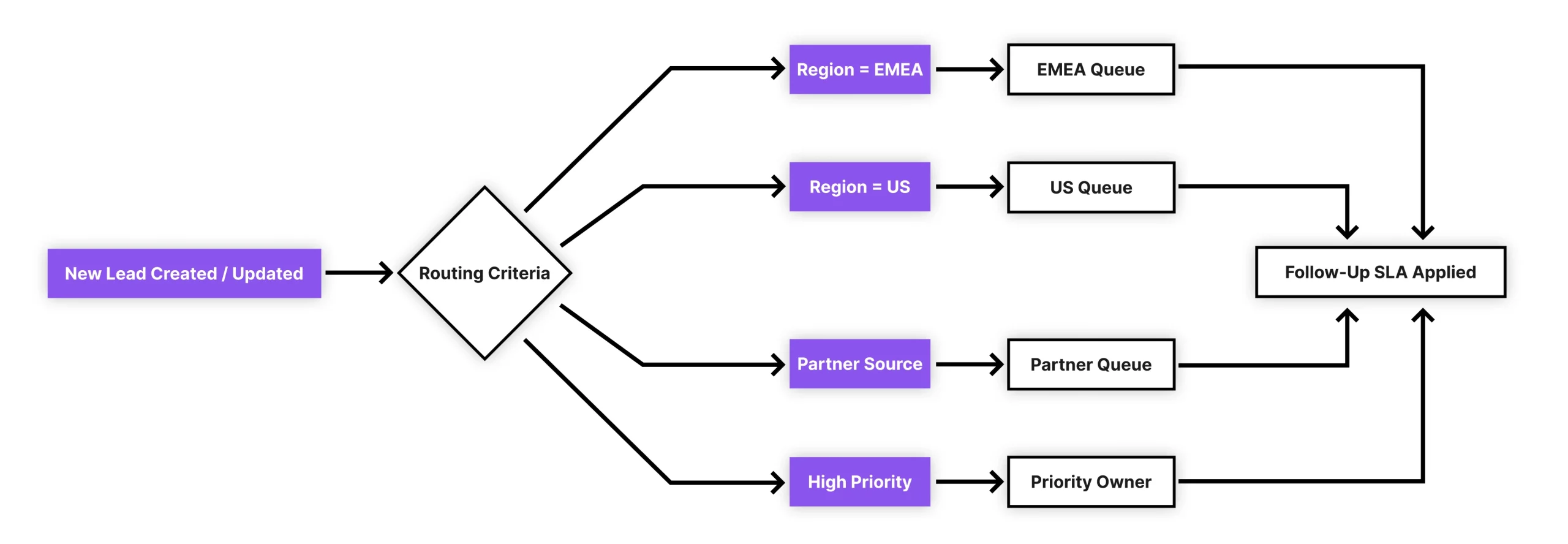
This documentation helps during onboarding, audits, and the inevitable “Why did this come to me?” moments.
Spam Prevention and Scaling Considerations
Public forms attract bots – it’s not a question of if, but when.
Admins often encounter spam after a marketing campaign, seasonal spike, or SEO improvement. Without safeguards, spam can overwhelm queues and distort reporting.
Common mitigation techniques include:
- CAPTCHA or honeypot fields.
- Monitoring submission spikes by time or source.
- Filtering obvious junk before assignment.
As volume grows, teams should also think about:
- Visibility into backlog and response times.
- Governance around who can modify forms and routing.
- Processes for handling failed or misrouted submissions.
When Basic Web-to-Lead Isn’t Enough
Not all external intake fits neatly into a Lead. In practice, teams often deal with scenarios like:
- Support or service requests are better handled via Case-to-Lead
- Applications or requests tied to custom objects.
- Multi-step submissions with conditional logic.
- File uploads, acknowledgements, signatures, or approvals.
These scenarios highlight a broader truth – external intake in Salesforce often spans multiple objects and lifecycle models.
At this stage, teams typically look for approaches that offer more flexibility while still respecting Salesforce’s native governance and data model.
A native Salesforce form and survey solution, such as BreezyBit Form and Survey Builder, can support these more complex scenarios without forcing everything through standard Web-to-Lead. The key is choosing tools that remain admin-friendly, quick to configure, and aligned with security and reporting requirements.
Final Thoughts
A clean, trusted Web-to-Lead pipeline is less about the HTML form and more about lifecycle design, routing logic, data quality, and measurable operations.
Start small. Define outcomes early. Build guardrails where mistakes are costly. And instrument the process so it can scale without losing stakeholder trust.
When teams treat Web-to-Lead as a system, not just a form, they unlock far more value from Salesforce.