

If your Salesforce org feels slower, messier, or harder to manage than it did a year ago, you’re not imagining things. Orgs naturally accumulate clutter – unused fields, outdated automations, and permission creep.
Just like your home, your Salesforce environment needs a regular spring cleaning. Here’s how admins can reset, simplify, and optimize their org in 2026.
1. Start With Security in Salesforce Health Check
Salesforce security issues aren’t going away anytime soon. Last year alone, we saw far too many security breaches that could have been prevented. Keeping your Salesforce org secure should always be top of mind, but let’s be honest, the day-to-day grind often pushes proactive security down the to-do list.
That’s where the Spring ’26 updates to Salesforce Health Check come in. Alongside improvements like MFA status tracking, SAML enablement, and session management controls, there’s a new feature that makes it easier to stay on top of your org’s security posture: automated email notifications when Health Check detects a change.
Toggle on Notify all System Admins to alert anyone with a System Administrator profile. Or, if you prefer, use the Recipients lookup to add individual users or even external email addresses.
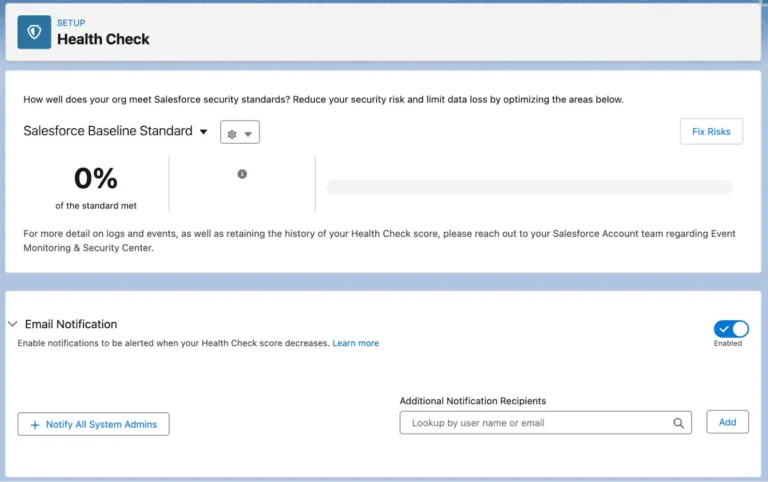
Now, you don’t have to wait to stumble on a security issue; your team will know right away.
2. Scale Up With Salesforce Scale Center (Now Free for Most Orgs)
Spring cleaning often starts with a feeling. The org seems slower and harder to use, but it is not always clear why. Salesforce Scale Center helps by giving you near-real-time performance insights without relying on support cases or delayed reports. Instead of guessing, you can quickly identify whether issues are related to data, automation, or system behavior and focus your efforts where they matter most. Scale Center is now available at no additional cost for most customers, making these insights accessible to a wider range of orgs.
On-demand insights make it easier to prioritize cleanup work. Whether it is a slow report or heavy database usage, you can investigate issues as they happen and take action with confidence. This shifts cleanup from reactive troubleshooting to targeted optimization.
It also helps improve user experience. By highlighting slow Lightning pages and components, Scale Center gives you clear direction on where to simplify and streamline. Spring cleaning becomes less about removing clutter and more about making the org faster and easier to use.
3. Review the New Salesforce Error Console
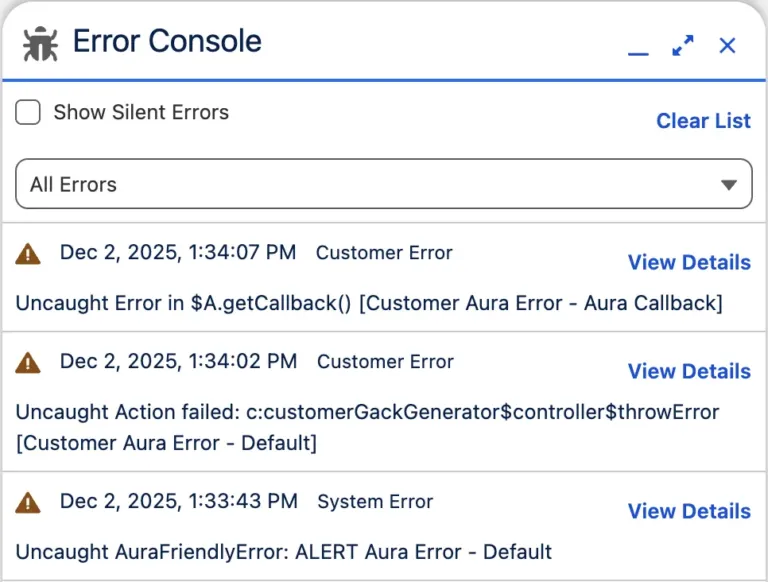
Errors happen. Some are loud and obvious; you can’t miss them. Others are quiet, sneaky, and easy to forget. Salesforce calls these non-fatal errors. They don’t stop a process, and users often keep working without noticing, but they can still cause problems behind the scenes.
Spring ’26 introduced the Error Console, a central place to see and manage page-level errors in Lightning Experience. No more hunting through scattered logs or ignoring silent issues. Now, all errors, both fatal and non-fatal, are surfaced in one place, making it easier to spot recurring problems, figure out where they’re happening, and fix them before your users start reporting broken pages or weird behavior.
4. Tackle Flow Sprawl
Flow is now the backbone of automation. It is also one of the biggest sources of technical debt.
Many orgs went through a rapid migration from Workflow Rules and Process Builder. The result is often a large number of flows with overlapping logic, inconsistent naming, and unclear ownership.
Start by auditing your flows:
- Identify inactive flows that can be removed
- Consolidate flows that trigger on the same object
- Standardize naming conventions
- Document what each Flow is responsible for
- Add descriptions to your flows
Don’t forget to use newer features, including the new Usage tab in the Automation Lightning App. The Usage tab brings visibility to Flow dependencies.
The goal is not to reduce the number of flows at all costs. It is to make your automation understandable and predictable. When admins hesitate to touch automation because it feels risky, that is a sign that cleanup is overdue.
5. Reduce Metadata Bloat
Unused fields and objects are easy targets, but deletion should be intentional.
Focus on:
- Fields with no recent usage
- Duplicate fields created for similar purposes
- Page layouts with excessive sections or components
- Record types that no longer serve a clear business process
Before removing anything, check dependencies. Look at reports, flows, validation rules, and integrations. Mature orgs often have hidden dependencies that are easy to overlook.
Cleaning metadata is less about minimalism and more about clarity. Every field that remains should have a clear purpose.
6. Rebalance Permissions and Access
Permission creep happens gradually. A user needs access; it gets granted quickly, and it is rarely reviewed again.
Over time, this leads to overly broad access and complicated permission structures.
Spring cleaning is the right time to:
- Review permission set assignments
- Remove redundant or overlapping permission sets
- Move away from profile-heavy models toward permission sets and permission set groups
- Validate least privilege access
This is not just governance. It directly affects user experience. Clean, well-structured permissions reduce confusion and make troubleshooting easier. As we move further into 2026, set an intention to follow the principles of least privilege and zero trust as a standard moving forward, not as an afterthought.
7. Clean Up Data
Data quality issues compound over time, and they matter even more in 2026 as AI becomes part of everyday workflows. Your AI agents are only as reliable as the data they rely on. Poor data quality does not just lead to inaccurate insights. It can result in agents contacting the wrong prospects, sending irrelevant messages, or creating frustrating experiences for existing customers.
Duplicate records, inconsistent picklist values, and incomplete fields all erode trust in the system. When users stop trusting the data, they build their own workarounds. That is where fragmentation begins.
Focus your efforts where data quality has the greatest impact:
- Deduplicate key objects such as Accounts and Contacts
- Standardize picklist values to remove ambiguity
- Archive stale records that no longer support reporting or operations
- Reassess required fields to ensure they are still meaningful
Use Salesforce’s duplicate management tools to find and merge duplicate records.
Data cleanup does not need to be a one-time project. Prioritize the areas that directly affect reporting, automation, and day-to-day user workflows, and improve those first.
8. Simplify the User Experience (Start With Where It Hurts)
In mature orgs, the problem is rarely a lack of functionality.
Users complain that pages take too long to load. Sales teams click through multiple layouts to do simple tasks. Support agents rely on workarounds because automation behaves unpredictably.
Before you do anything, identify where the friction is. Look at support tickets. Talk to power users. Review slow-performing pages. A successful cleanup focuses on what impacts users, not just what looks untidy in Setup.
- Audit existing page layouts to identify similar or redundant ones
- Combine layouts where possible, reducing the number of variations
- Leverage Dynamic Forms and conditional visibility to show fields only when relevant
- Test your page layout speed to ensure optimal performance
- Remove obsolete Apps and assign users only the apps they need
- Clean up list views, folders, reports, and dashboards
It’s not just about removing or reducing. Spring cleaning is also an opportunity to improve what users see and experience every day.
Take the new Message component for Screen Flows as an example. Its purpose is straightforward. It helps you communicate important information in a clear, visually distinct, and accessible way, right at the point where users need it.
It is a small enhancement, but it can make a meaningful difference. Well-placed messages can guide users, reduce confusion, and prevent errors as they move through a Flow. When reviewing your org, look for moments where users hesitate or make mistakes. Sometimes the best improvement is not removing something, but adding the right clarity in the right place.
9. Make Cleanup Ongoing, Not Seasonal
Spring cleaning is a useful reset, but mature orgs need continuous attention.
Build habits such as:
- Quarterly reviews of automation and permissions
- Regular monitoring of the Error Console
- Setting up proactive Health Check notifications
- Ongoing conversations with users about friction points
Small, consistent improvements prevent the need for large, disruptive cleanups later.
Summary
A Salesforce org does not become messy overnight. It gets there through growth, quick decisions, and changing business needs. That is not necessarily a bad thing. In many ways, it is a positive signal. It shows the org is being used, that it is evolving, and that the business is engaged. That level of adoption is a win, even if it means more work for you as an admin.
Sadly, we can’t Marie Kondo our Salesforce orgs…
Does this Flow bring me joy? No! Delete.
It’s rarely that straightforward.
But we can be intentional and deliberate in our clean-up. Understand why something exists before deciding what to do with it. Some components may look redundant, but still support critical processes behind the scenes.
A well-maintained org is not the one with the fewest components. It is the one where every component has a clear purpose and still makes sense to the people who rely on it.