

If you’re a Salesforce Admin, you already know that security is not something you configure once and forget. Profiles evolve. Permission sets multiply. Features get enabled. Integrations get added. Over time, your org’s security posture is constantly shifting, whether you intended it or not. Historically, keeping an eye on security settings required discipline. You had to remember to open Health Check, review your score, and investigate any unexpected changes. In reality, most admins are busy handling requests, building automations, and supporting users.
Health Check often became a reactive tool rather than an active safeguard. That dynamic changes with a new capability introduced in the Spring ’26 release: proactive Health Check notifications. This update transforms Health Check from a passive dashboard into something much closer to a monitoring system. Instead of periodically checking your score, you can now be alerted automatically whenever your security health score changes. For admins responsible for governance, compliance, or simply protecting their org, this is a meaningful shift.
Why This Matters for Salesforce Admins
Security issues rarely announce themselves with obvious errors. More often, risk creeps in quietly. A setting is relaxed to solve a short-term problem. A permission set grants broader access than intended. A policy adjustment lowers your overall security score. Without a clear signal, these changes are easy to miss.
The new Health Check notifications address this gap directly. Whenever your security health score changes, Salesforce can notify designated recipients. This gives admins immediate visibility into shifts in the org’s security posture and creates an opportunity to investigate before small issues turn into larger problems.
Given the steady stream of high-profile security incidents across the industry, this functionality feels especially timely. Proactive awareness is no longer a luxury. It is part of responsible org management.
How Health Check Notifications Work
Within Health Check, you receive a score out of 100 grading your org’s health when compared to Salesforce’s recommended settings. The more restrictive your settings, the higher the score.
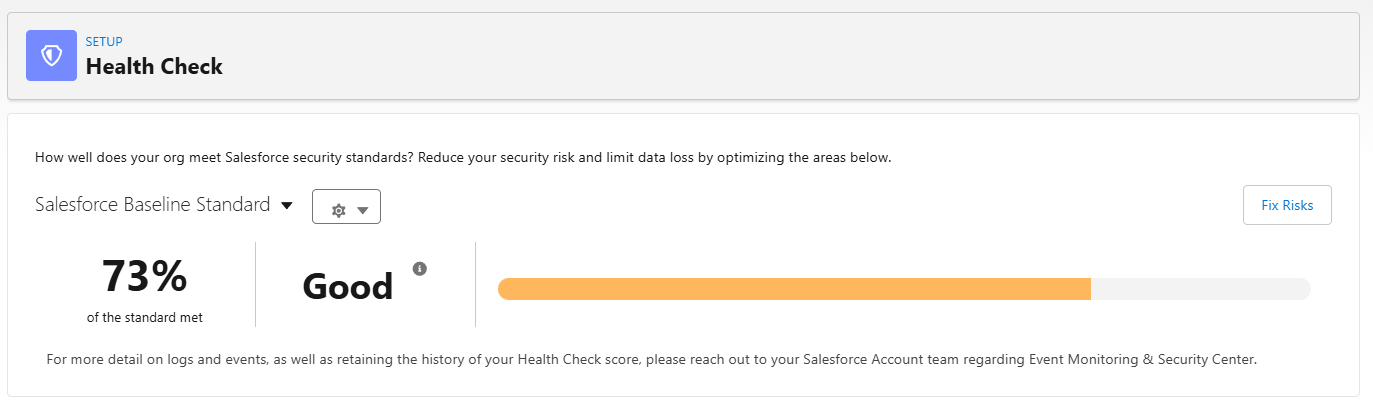
With the latest enhancement, admins can configure who receives notifications tied to changes in the Health Check score. The trigger is not a specific setting. It is the overall score movement. If something impacts your security baseline enough to change the score, the system can let you know.
Admins have several flexible options for recipients:
- Notify all System Administrators
- Select individual Salesforce users
- Add external email addresses
This last option is particularly useful for organizations with centralized security or audit teams. Not every stakeholder lives inside Salesforce. Now they don’t have to.
How to Enable Health Check Notifications
Configuration is refreshingly straightforward.
From Setup, enter Health Check in the Quick Find box, then select Health Check. In the Email Notifications section, toggle from Disabled to Enabled.
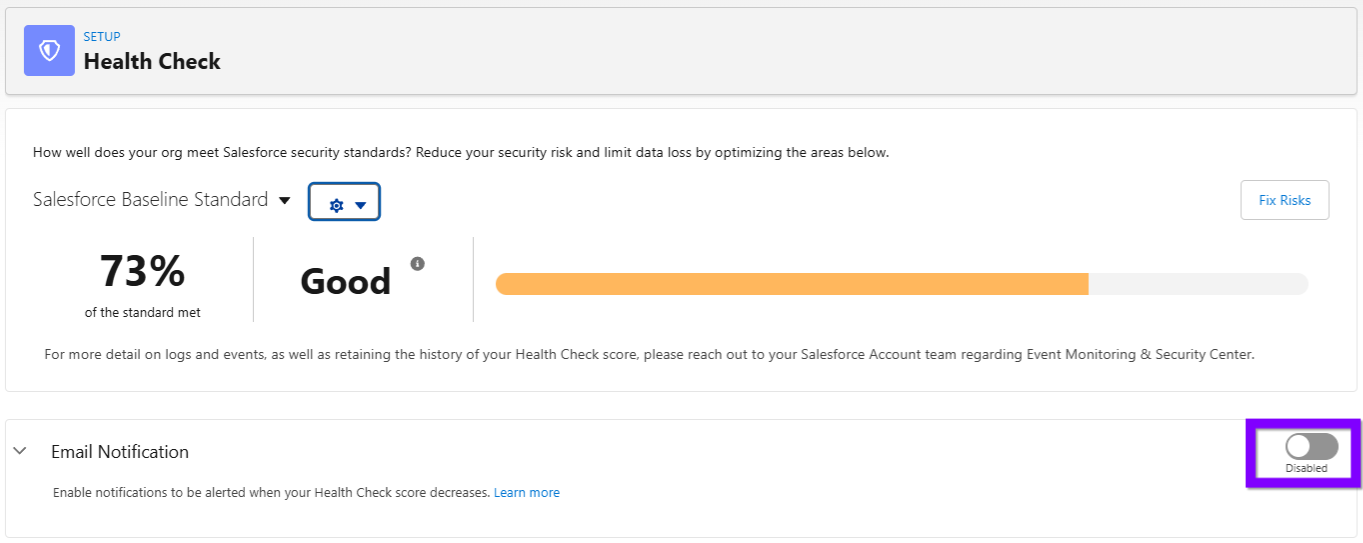
You will see new controls that allow you to define your notification behavior. If your goal is broad visibility among your admin team, enable the Notify all System Admins toggle. This sends notifications to anyone assigned the System Administrator profile.

If you prefer a more targeted approach, use the Recipients lookup field. Here you can select specific internal users or provide external email addresses. This makes it easy to include security leaders, compliance partners, or operational stakeholders who need awareness of security posture changes.

Once configured, notifications will be sent whenever the Health Check score changes.
Summary
Salesforce Admins sit at the center of configuration, access, and platform governance. That responsibility includes security, even when it is not the most visible part of the role.
The Spring ’26 Health Check notification enhancement is a practical, high-impact improvement. It supports a mindset that many admins already strive for: automation, awareness, and early intervention.
Security posture changes are inevitable in a living Salesforce org. Being surprised by them no longer has to be – now that is definitely something to celebrate.
For more Salesforce conversations and industry insights, check out the latest episode of the Picklist podcast below.