

Dreamforce 2025 offered a first look at one of the most anticipated updates to Agentforce: a completely redesigned builder experience. Rather than delivering surface-level enhancements, the new builder represents a fundamental shift in the platform’s direction.
Where Agentforce’s inner workings were once something of a black box, the updated builder introduces new ways to orchestrate agent reasoning – both declaratively and programmatically. As a result, both code‑savvy developers and low‑code admins can now access powerful new tools to control agent behaviour and logic.
I recently took the new builder for a spin to test its updated capabilities. In this article, we’ll walk through everything you need to know about the new builder and what it means for users.
Introducing Agent Script
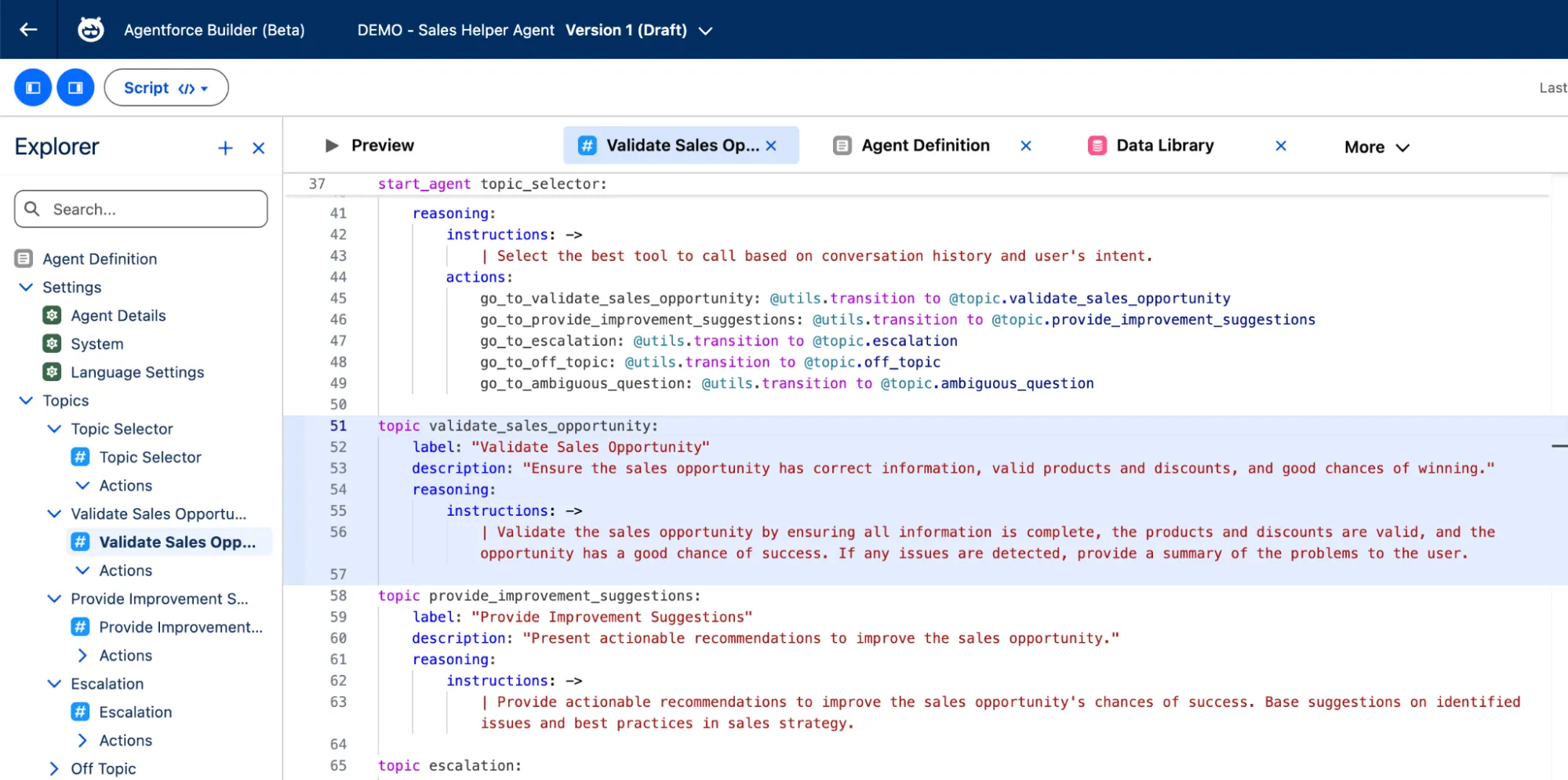
One of the most significant enhancements to Agentforce is the introduction of Agent Script – the platform’s own markup language. Agent Script enables developers to build and refine agent behaviour using programmatic logic. With it, you can use conditional if‑else statements, reference agent variables, and apply sequences to topics and actions.
This is an area where the legacy builder struggled. While you were able to control sequences with filters and instructions, it wasn’t entirely reliable, and chaining multiple actions together was difficult. Agent Script solves this by allowing you to embed deterministic logic directly into agent reasoning, dramatically reducing the unreliability and complexity of agent orchestration.
With Agent Script, you can clearly define where an agent can use its LLM-powered reasoning and when it should refer to deterministic, rule-based logic. Agent Script lets you set exact execution paths, using conditional expressions, variables, topic transitions, and action sequences. This ensures workflows behave predictably instead of relying on the model’s interpretation at runtime.
Build Agents Declaratively With Agent Canvas
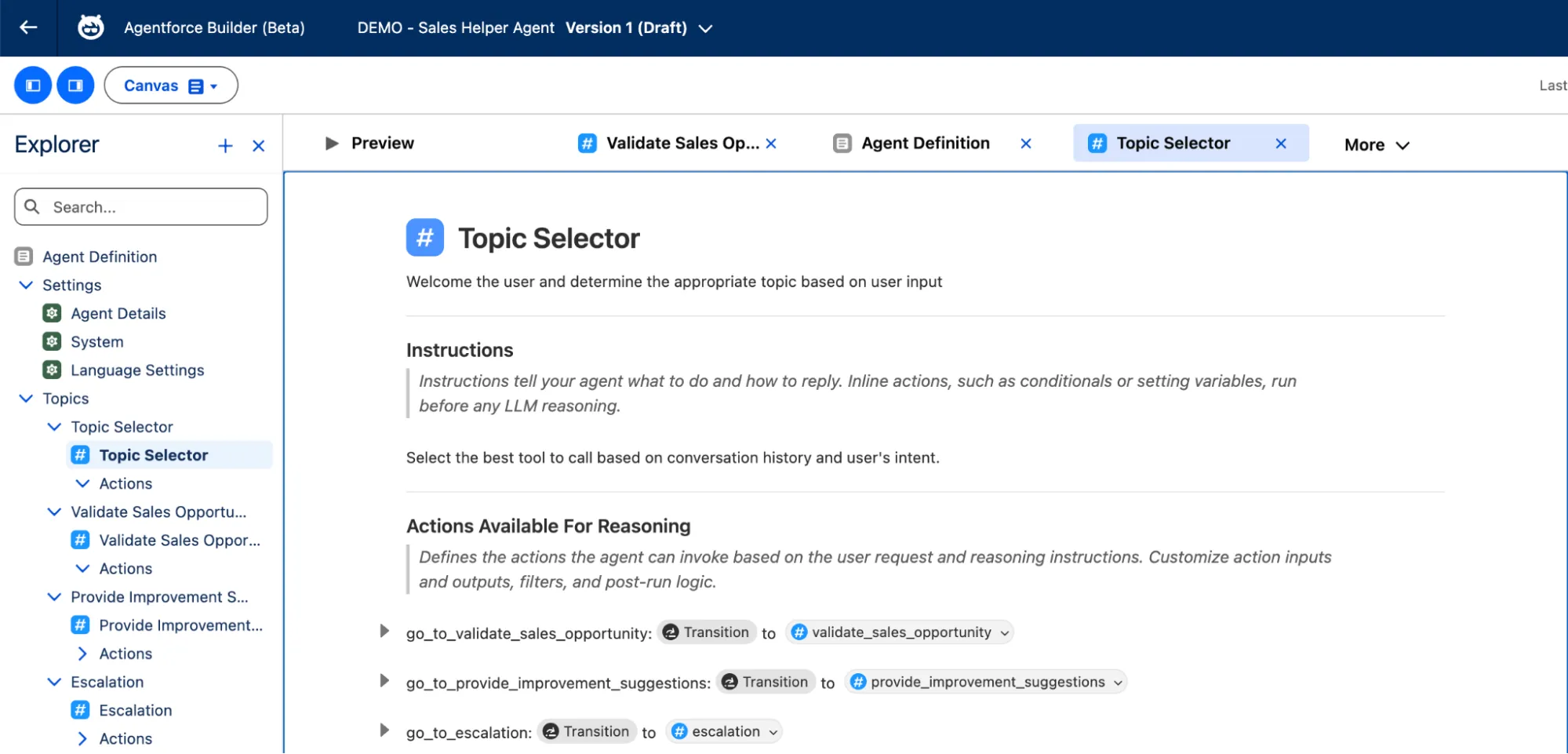
If you prefer working with a visual editor, you’ll be pleased to know that the new Agentforce Builder includes a completely redesigned no‑code editor. Agent Canvas presents your agent configuration as clear, structured blocks that summarise the underlying Agent Script in an easy‑to‑read format. It has shortcuts for inserting instructions, referencing resources, and navigating the agent configuration.
Agent Canvas gives you practical tools to add deterministic logic directly into your agent. Inline actions allow you to specify behaviour that must run before reasoning begins, helping you set variables, prepare context with data, or trigger required system actions before the LLM takes over.
Finally, the Agent Canvas gives you far greater control over how topics and actions work together during a conversation. Just like with Agent Script, you can use utilities, filters, variables, and follow‑up actions to manage transitions, escalations, handoffs, and next steps with predictable results. These tools allow the agent to stay grounded in structured logic while still using LLM reasoning where it is most effective.
What Else Has Changed?
As an active Agentforce user, the major updates like Agent Script and Agent Canvas can seem overwhelming at first. It is natural to wonder whether you need to relearn the entire agent-building process, but you do not. The core elements of an agent remain the same: topics, actions, instructions, channels, and guardrails. Most of what you already know is still there, simply reorganised to give you more visibility and control.
Cleaner UI
The updated Agentforce Builder introduces a clean, flat interface for configuring your agent. Previously, updating actions often required jumping back and forth between topic and action instructions, which created a disjointed experience. In the new builder, you work from a single interactive dropdown menu instead of navigating separate tabs and layered submenus. The result is a smoother, faster, and less error‑prone user experience.
Guided Agent Creation
Agentforce has always included built-in AI assistance, but the new builder takes this to another level. It now helps you iterate your agent directly in the interface by turning natural language requests into topics, actions, and Agent Script. You can ask it to generate new instructions, make existing ones more deterministic, or troubleshoot a specific line by using inline AI actions or the Ask AI command. For broader guidance, you can open the Agentforce panel and chat with it while you work.
Testing and Preview Enhancements
Testing is by far the most important, yet often the most difficult and time-consuming, part of agentic deployments. The updated builder introduces several improvements that make previewing and testing agent interactions much easier.
You can simulate an entire conversation and see a clear breakdown of how the agent reached each response, including which topics and actions it selected along the way. A revamped debugging panel provides step‑by‑step visibility into the interaction, letting you track exactly what the agent did at each moment and how long it spent on different parts of the reply.
How to Access the New Builder
The new Agentforce Builder is currently available in open beta, and you can access it directly from your Salesforce org through the App Launcher under Agentforce Studio. Salesforce confirms that the new builder is subject to the Beta Services Terms and available in Enterprise, Performance, Unlimited, and Developer Editions, with usage consuming standard Agentforce and Generative AI quotas.
Because the Builder is still in beta, you should expect occasional bugs, missing features, and changes to the user experience as Salesforce continues to refine the tool. Major updates may still be introduced, and organisations should use the new builder with these considerations in mind.
As for when the Builder will reach general availability (GA), Salesforce has not yet provided a confirmed GA date in any official documentation or announcements. Based on past experience, such an announcement may take place leading up to TDX 2026 in mid-April.
Final Thoughts
Agentforce Builder embodies Salesforce’s new “words, not code” philosophy, reducing time spent navigating the UI and allowing admins and developers to focus on refining agent behaviour. This matters because agents will always retain some level of unpredictability, and a lot of time and effort goes into balancing rule‑based execution and adaptive reasoning.
The next‑generation builder reflects Salesforce’s effort to make agentic AI truly enterprise‑ready. This is particularly relevant for a company that recently secured a $5.6B contract with the US Army and aims to embed AI into mission‑critical processes. In fields such as defence, health care, and infrastructure, there is no room for misclassification or hallucination, and the added determinism in the new builder moves Salesforce closer to meeting those requirements.