

Many know that it’s commonplace to often wait days for a pull request to be reviewed. Slow, irregular code reviews are a common problem for Salesforce development teams, particularly those in charge of intricate enterprise organizations. What should be a fast check becomes a backlog of PRs awaiting a senior engineer’s attention due to numerous sandboxes, managed packages, and custom integrations.
My own team had more open pull requests than finished ones at one point. Reviews became the silent bottleneck because everyone was busy. Human bandwidth was simply unable to keep up, despite strong LWC standards, well-written Apex, and excellent documentation. At that point, we began investigating AI-assisted code reviews as a means of scaling quality rather than as a substitute for human judgment.
The Current Status of Salesforce Teams’ Code Reviews
Code reviews are particularly difficult in Salesforce environments for these reasons:
- Organizational complexity: Apex, LWC, Flows, and metadata layers force context switching, slowing down reviews.
- Business-critical logic: Revenue recognition or data syncs may be impacted by a single incorrect modification to a trigger or flow.
- Long feedback loops: It’s neither enjoyable nor quick to review test classes, validation rules, and metadata that contain a lot of XML.
- Review fatigue: Time and effort are wasted on repetitive “style” or “best practice” remarks.
Conventional reviews in Azure DevOps or GitHub are solely dependent on human labor. The majority of the review time is spent identifying common errors, enforcing naming conventions, or reminding contributors to bulkify code, even with PR checklists and documentation. However, AI is here to change that…
Why Do We Need to Rethink Code Reviews With AI?
There is a lot of discussion around AI-assisted coding. But other parts of the software delivery process can benefit from AI, such as document generation and code reviews. Code reviews powered by AI add a level of intelligence and automation that is ideal for contemporary Salesforce delivery. What AI can already contribute is:
- Contextual feedback: AI models that have been trained on Apex and LWC patterns are able to identify security vulnerabilities or logical errors that static analyzers are unable to.
- Instant first pass: Before a human ever opens the PR, developers receive feedback in a matter of seconds.
- Consistency: There will be no more differences in review quality based on availability.
- Learning and mentoring: Every review becomes a mini-learning session because AI comments frequently contain explanations.
It isn’t perfect, of course. Sometimes, AI can over-flag compliant code or misunderstand logic specific to a business. However, it’s like having a helpful junior reviewer who never gets bored when used in addition to human review.
AI Code Review and Quality Tooling
AI-based code review tools come in many shapes and sizes, from traditional static analysis platforms to modern AI assistants. Tools like SonarQube offer thorough static analysis and quality checks, with a free community edition and paid enterprise options, making them a reliable choice for teams starting out or looking to add AI insights.
On the GitHub side, features like GitHub Copilot and AI-assisted review suggestions provide inline feedback and PR summaries, often with free tiers or low-cost subscriptions.
Newer AI-focused tools, including Codacy, DeepSource, CodeAnt AI, CodeRabbit, CodeScene and Qodo, bring automated feedback on pull requests, covering code quality, security, and even test generation; many are free for open-source projects but require per-user or team licenses for private repositories. With so many options available, teams can mix and match free and paid tools to fit their workflow, team size, and review needs, without feeling locked into a single solution.
Applying Qodo and CodeScene in Salesforce Code Reviews
Before I continue, I want to stress that I am not affiliated with, sponsored by, or receiving any benefit from the tools mentioned in this article. The perspectives shared here are based solely on my personal experience using them in real-world Salesforce implementations.
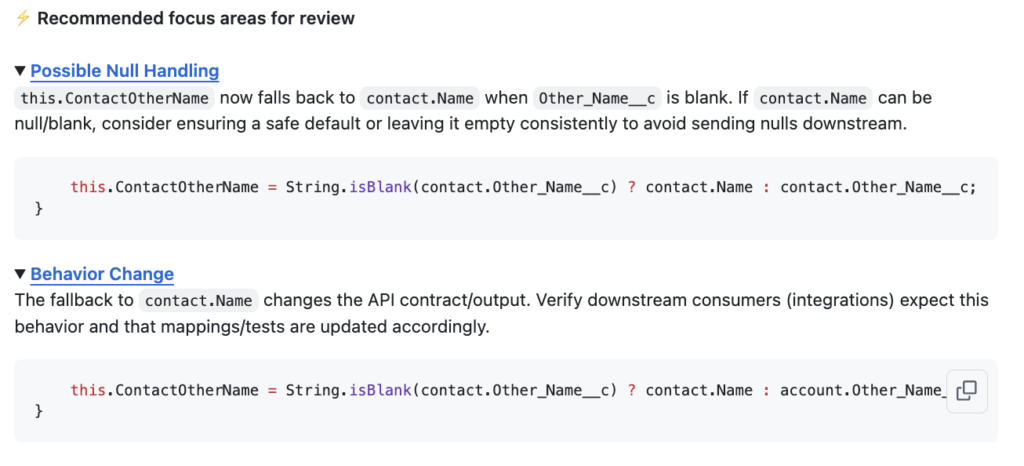
We found Qodo and CodeScene to be two particularly useful tools for Salesforce teams. GitHub workflows integrate easily with Qodo, enabling automated reviews for Apex, LWC, and SOQL.
Out of the box, it provides useful feedback on general code quality, readability, and common risk patterns. With some configuration and tuning, it can also surface Salesforce-specific concerns such as missing null checks. In practice, it behaves like an AI co-reviewer in pull requests, offering early guidance before a senior developer reviews the code, rather than replacing human judgment.
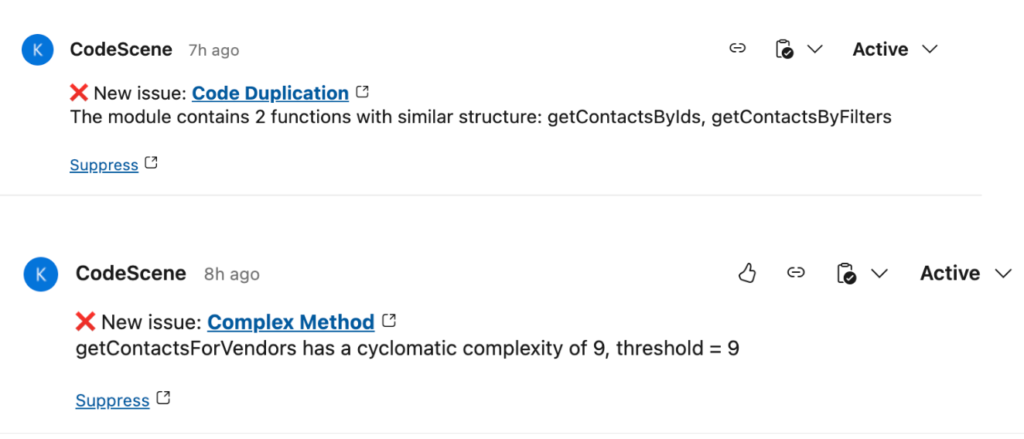
CodeScene is a natural fit for Azure DevOps environments. By examining code quality trends, hotspots, and team behaviors over time, it adopts a more comprehensive perspective. It helps you understand where tech debt is forming and why some modules slow down, not just one PR.
Setting Up Qodo for GitHub
Because it has a free tier, Qodo is a great option to test out AI code reviews. Before you begin, create an account – you’ll need to sign in to the Qodo portal and get a free account. After logging in, you can use the general outline below or the setup instructions there.
- Navigate to the Qodo Git plugin app page.
- Click the Configure button at the top right.
- Select the GitHub organization you wish to have Qodo enabled for. (Note it will work for individual accounts, too.)
- Choose which repositories you would like it to install on.
- Following installation, GitHub will display a confirmation banner and take you to your settings page.
- After it is finished, Qodo will start examining pull requests in the chosen repositories automatically.
How a Salesforce Development Workflow Uses This
An AI-enhanced review process might look like this:
- A developer creates a PR in GitHub after pushing changes to a new feature branch.
- AI review kicks in automatically (Qodo or CodeScene) to check for Apex/LWC best practices, performance issues, Bulkification and governor limit risks, SOQL/DML usage, Readability and complexity, test coverage patterns, etc.
- The AI feedback, which includes inline explanations and suggestions, is posted directly in the PR.
Pros and Cons of AI-Driven Reviews
| Pros | Cons |
|---|---|
| Quicker feedback loops | Occasional false positives |
| Higher consistency | Requires some configuration tuning |
| Decreased fatigue among reviewers | Business logic still requires human oversight |
| Actionable insights across projects |
A hybrid model is the most effective strategy. Humans for strategy, AI for structure.
Final Thoughts
AI-assisted reviews enhance engineers rather than replace them. In Salesforce projects, tools such as CodeScene and Qodo can significantly improve development efficiency by providing faster, more consistent feedback. A practical way to measure their impact is to start small by running AI reviews alongside manual reviews rather than replacing them outright.
Over time, teams typically see fewer recurring comments, quicker pull-request merges, and more capacity to focus on building meaningful, high-impact solutions.
Code reviews will continue to be important as Salesforce organizations grow, but they don’t have to be slow. We can finally get past manual PRs and concentrate on what really counts by creating solutions that have an impact and produce business results when AI enters the review process.