

In today’s fast-paced development environments, maintaining up-to-date documentation for Salesforce Apex classes often falls by the wayside.
This article explores an innovative GitHub Actions workflow that leverages AI to generate professional markdown documentation for your Apex classes. The pipeline combines Salesforce CLI, Ollama’s AI capabilities, and GitHub’s automation to transform code into comprehensive documentation with minimal manual effort.
The Documentation Challenge
Salesforce teams face significant documentation challenges, including time constraints that divert resources from feature development, inconsistent manual documentation, maintenance burdens as code evolves, and knowledge silos where critical implementation details remain undocumented. Our automated pipeline directly addresses these pain points by generating standardized documentation from source code, supporting key organizational needs:
- Accelerated Development Workflows: Automatically generate consistent documentation for new Apex classes within CI/CD pipelines.
- Legacy Code Modernization: Systematically document existing codebases without manual effort to improve maintainability.
- Enhanced Code Reviews: Generate documentation drafts during review processes to ensure comprehensive coverage.
- Effective Knowledge Transfer: Create standardized documentation for team onboarding and knowledge sharing.
Foundational Concepts
Before exploring our pipeline architecture, let us define key foundational concepts essential to understanding its design.
CI/CD
Continuous Integration and Continuous Delivery/Deployment (CI/CD) refers to an automated software development methodology. It enhances release reliability by standardizing deployment workflows, enabling faster delivery cycles with reduced production failures.
Ollama
An open-source platform designed to help users run, manage, and interact with large language models (LLMs) locally on their machines. It streamlines the process of downloading, installing, and using LLMs (like DeepSeek, Qwen, LLaMA, Mistral, etc.) without requiring extensive setup.
Here is a breakdown of its key applications:
- Privacy-focused AI: All data remains secure and local.
- Offline model interaction: No internet required.
- Development & prototyping: Integrates with apps via API.
- Experimentation with LLMs: Test and compare different AI models easily.
DeepSeek-Coder 6.7B
An open-source, 6.7-billion-parameter large language model (LLM) specialized in code generation, understanding, and assistance.
Here is a breakdown of its key capabilities:
- Excels at code completion, bug fixing, documentation, and code translation.
- Optimized for 87+ programming languages (Python, JavaScript, Java, Apex, etc.).
- Trained on 2 trillion tokens of high-quality code and natural language data.
- Free alternative to GitHub Copilot/OpenAI API.
The Pipeline Architecture
This pipeline follows a multi-stage architecture, each serving a critical function in the automated documentation process:
- Environment Initialization & Dependency Setup: Prepares the execution environment and installs required tooling (Salesforce CLI, Apex plugins).
- Local AI Infrastructure Provisioning: Deploys Ollama as an embedded LLM server within GitHub Actions runners, eliminating external API dependencies while maintaining full model control.
- Secure Salesforce Authentication & Metadata Extraction: Establishes authenticated sessions via SFDX URL credentials and retrieves targeted Apex class metadata using package.xml manifests.
- Intelligent Documentation Synthesis: Processes raw Apex code through DeepSeek-Coder 6.7B leveraging carefully crafted prompts designed to produce structured markdown documentation.
- Artifact Packaging & Distribution: Bundles output into versioned workflow artifacts for team accessibility and integration into documentation systems.
Prerequisites
Prior to the pipeline implementation, verify the availability of these foundational elements:
- Set Up a GitHub Repository: Sign in to GitHub and create a private repository for your Salesforce project as illustrated below.

- Generate Salesforce Authentication URL: With Salesforce CLI installed on your machine, authenticate to your Salesforce org and generate the target org authentication URL by running the following command in your terminal:
> sf force:auth:web:login --alias <OrgAlias> --instance-url <OrgURL> --set-default
Then, follow these steps:
- When the browser opens, log in to Salesforce.
- Close the tab after successful authentication.

- Execute this command in the terminal:
> sf org display --target-org <OrgAlias> --verbose
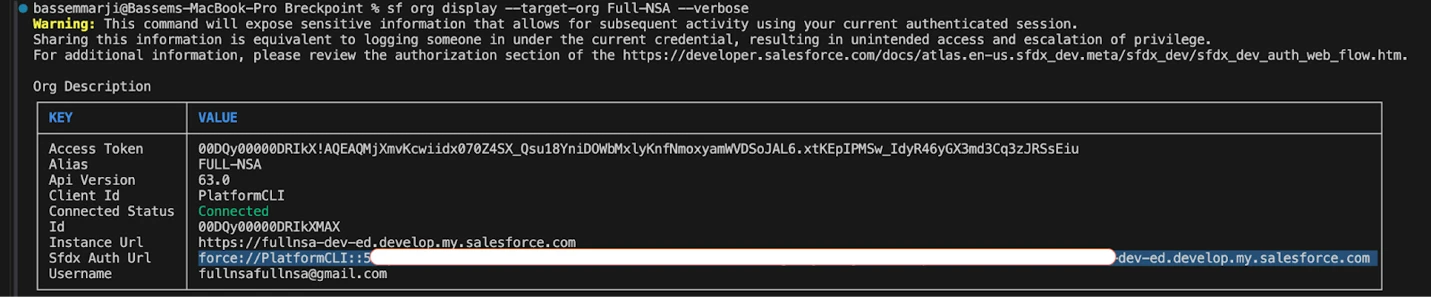
- Save the value shown after SFDX Auth Url for later use.
Disclaimer: Treat SFDX Auth URLs as highly sensitive credentials. If exposed, they grant full authenticated access to a Salesforce org matching the permissions of the associated user. Since most development environments use administrator-level profiles, a leaked URL can lead to complete org compromise. When connecting to orgs with sensitive data, always use service accounts with the principle of least privilege.
- Securely store the collected authentication URL in GitHub Secrets: Navigate to Repository Settings → Secrets and variables → Actions. Select New repository secret and add the following:
| Secret Name | Description |
|---|---|
| ORG_SFDX_URL | SFDX authentication URL for your Salesforce org |


- Configure Workflow Permissions: Ensure that permissions for actions and reusable workflows are granted by enabling the “Allow all actions and reusable workflows” setting.

- The Pipeline Implementation:
- Create a new file named
Generate_Documentation.ymlin your repository’s /.github/workflows/ folder. - Copy the supplied YAML code snippet into the new file.
- Save and commit your changes.
- Create a new file named
name: AI-Powered Apex Documentation Generator
on:
  workflow_dispatch:
    inputs:
      ORG_ALIAS:
        type: string
        description: "Salesforce org alias"
        required: true
        default: "dev"
      CLASS_NAME:
        type: string
        description: "Name of the Apex class to generate documentation for"
        required: true
        default: "GitHubActionTrigger"

env:
  ORG_ALIAS: ${{ github.event.inputs.ORG_ALIAS }}
  CLASS_NAME: ${{ github.event.inputs.CLASS_NAME }}

jobs:
  generate_docs:
    runs-on: ubuntu-latest
    timeout-minutes: 45

    steps:
      - name: 🏗️ Setup Environment
        uses: actions/checkout@v4
        with:
          fetch-depth: 0

      - name: ⚙️ Install Dependencies
        run: |
          # Install Salesforce CLI
          npm install --global @salesforce/cli@latest
          sf plugins:install @salesforce/plugin-apex@latest

      - name: 🦙 Install & Configure Ollama
        run: |
          # Install Ollama
          curl -fsSL https://ollama.com/install.sh | sh

          # Create systemd service file
          sudo tee /etc/systemd/system/ollama.service <<EOF
          [Unit]
          Description=Ollama Service
          After=network-online.target

          [Service]
          ExecStart=/usr/local/bin/ollama serve
          User=root
          Group=root
          Restart=always
          RestartSec=3
          Environment="OLLAMA_HOST=0.0.0.0"
          Environment="OLLAMA_MODELS=$HOME/.ollama/models"

          [Install]
          WantedBy=multi-user.target
          EOF

          # Start and enable the Ollama service
          sudo systemctl daemon-reload
          sudo systemctl enable --now ollama  # Combined enable and start

          # Wait for service initialization and check status
          sleep 10
          if ! systemctl is-active --quiet ollama; then
            echo "❌ Failed to start Ollama service"
            journalctl -u ollama -b --no-pager | tail -n 20
            exit 1
          fi

          # Pull model with retries
          for i in {1..3}; do
            if ollama pull deepseek-coder:6.7b; then
              break
            else
              echo "⚠️ Pull attempt $i failed, retrying..."
              sleep 10
            fi
          done

      - name: 🩺 Health Check Ollama
        run: |
          # Verify server responsiveness
          if ! curl -s http://localhost:11434 >/dev/null; then
            echo "❌ Ollama server not responding, restarting..."
            sudo systemctl restart ollama
            sleep 15  # Wait for restart
          fi

          # Final verification
          if ! ollama list >/dev/null; then
            echo "❌ Ollama still not responding after restart"
            exit 1
          fi

      - name: 🔐 Authenticate to Salesforce Org
        env:
          SFDX_URL: ${{ secrets.ORG_SFDX_URL }}
        run: |
          if [ -z "$SFDX_URL" ]; then
            echo "❌ Error: SFDX_URL environment variable is empty"
            exit 1
          fi

          echo "$SFDX_URL" | sf org login sfdx-url \
            --alias $ORG_ALIAS \
            --set-default \
            --sfdx-url-stdin

          sf org display

      - name: 📦 Retrieve Metadata
        run: |
          # Create full project structure
          sf project generate --name "org-metadata" --manifest
          cd ./org-metadata

          # Create package.xml
          mkdir -p manifest
          cat <<EOF > manifest/package.xml
          <?xml version="1.0" encoding="UTF-8"?>
          <Package xmlns="http://soap.sforce.com/2006/04/metadata">
            <types>
              <members>${{ env.CLASS_NAME }}</members>
              <name>ApexClass</name>
            </types>
            <version>59.0</version>
          </Package>
          EOF

          sf project retrieve start --target-org $ORG_ALIAS --manifest manifest/package.xml

      - name: 📝 Generate Markdown Docs
        run: |
          # Create output directory
          mkdir -p generated-docs

          # Verify class exists
          CLASS_FILE="org-metadata/force-app/main/default/classes/${{ env.CLASS_NAME }}.cls"
          if [ ! -f "$CLASS_FILE" ]; then
            echo "❌ Error: Class ${{ env.CLASS_NAME }} not found"
            exit 1
          fi

          # Process the specified class
          CLASS=${{ env.CLASS_NAME }}
          echo "📄 Processing $CLASS.cls"

          # Get sanitized content (4000 chars max)
          CONTENT=$(head -c 4000 "$CLASS_FILE" | sed '/\/\*/,/\*\//d' | sed 's/\/\/.*$//')

          # Generate with retries
          for ATTEMPT in {1..3}; do
            echo "Attempt $ATTEMPT/3: Generating docs for $CLASS"

            PROMPT="Generate professional markdown documentation for Salesforce Apex class $CLASS. Follow these rules STRICTLY:
            - Only show the final documentation content
            - Use ONLY Apex code examples (no Java/JavaScript)
            - Never include disclaimers or requirements in output
            - Maintain this exact format:
            # $CLASS
            ## Overview
            [1-2 sentence class purpose]
            ## Methods
            ### methodName()
            **Description:** [Functionality]
            **Parameters:**
            - param1 (Type): [Description]
            - param2 (Type): [Description]
            **Returns:** [Return type description]
            **Example:**
            \`\`\`apex
            // Proper Apex example
            [Relevant code]
            \`\`\`
            ## Usage Notes
            [Implementation details]
            Class content to document:
            $CONTENT"

            echo "$PROMPT" | ollama run deepseek-coder:6.7b > "generated-docs/${CLASS}.md"

            # Verify output
            if [ -s "generated-docs/${CLASS}.md" ] && grep -q "AI-Generated" "generated-docs/${CLASS}.md"; then
              echo "✅ Successfully generated $CLASS.md"
              break
            else
              echo "⚠️ Attempt $ATTEMPT failed"
              sleep 5
            fi
          done

          # Final failure check
          if [ ! -s "generated-docs/${CLASS}.md" ]; then
            echo "❌ Failed after 3 attempts - creating empty file"
            echo "# Failed to generate docs for $CLASS" > "generated-docs/${CLASS}.md"
          fi

      - name: 📤 Upload Documentation
        uses: actions/upload-artifact@v4
        with:
          name: apex-documentation
          path: "generated-docs/${{ env.CLASS_NAME }}.md"

      - name: 📊 Generate Summary
        run: |
          echo "## Documentation Generation Summary" >> $GITHUB_STEP_SUMMARY
          echo "Generated markdown for: \`$CLASS_NAME\`" >> $GITHUB_STEP_SUMMARY
          echo "- \`$CLASS_NAME\`" >> $GITHUB_STEP_SUMMARY
The Pipeline Execution and Monitoring
- Navigate to GitHub Actions: Go to your repository and click the “Actions” tab in the top navigation bar.
- Trigger the Workflow:
- From the left sidebar, locate your workflow “AI Powered Apex Documentation Generator”.
- Click the “Run workflow” dropdown, confirm any required inputs, and initiate execution.

- Monitor Real-Time Progress:
- After triggering, GitHub automatically redirects you to the live run page.
- Observe each step’s status (Success/Failure) as the workflow progresses.

- Review Results:
- After execution completes, review the results by selecting the corresponding workflow run instance from your Actions history.
- Download the generated artifact and check out the resulting documentation.

Resulting Markdown Output
GitHubActionTrigger: This Apex class provides methods for interacting with the GitHub API to trigger workflows. It allows retrieving default GitHub settings and triggers a specific workflow on a given branch of a repository based on provided parameters.
Methods
getDefaultGitHubSettings (String githubFlow)
Fetches default GitHub settings for the given flow. The settings include GitHub Owner, Repo, Workflow, and Branch.
- Parameters:
githubFlow(String) – The name of the GitHub flow to fetch settings for. - Returns: A Map containing keys ‘githubOwner’, ‘githubRepo’, ‘githubWorkflow’ and ‘githubBranch’.
- Example:
Map<String, String> defaultSettings =
GitHubActionTrigger.getDefaultGitHubSettings('Deployment');
System.debug(defaultSettings); // Map with keys 'githubOwner',
'githubRepo', etc.
triggerWorkflow(String githubOwner, String githubRepo, String githubWorkflow, String githubBranch, String githubPat, String orgAlias)
Triggers a GitHub workflow on the given branch of the repository with the provided PAT (Personal Access Token).
- Parameters:
githubOwner(String): The owner/organization name in GitHub.githubRepo(String): The name of the repository.githubWorkflow(String): The workflow file name to trigger.githubBranch(String): The branch on which to trigger the workflow.githubPat(String): The Personal Access Token for authentication with GitHub API.orgAlias(String): Organization alias to pass as an input to the GitHub action workflow.
- Returns: A String indicating the success or failure of the operation along with any additional details provided by the GitHub API response.
- Example:
String result = GitHubActionTrigger.triggerWorkflow('my-org', 'my-repo',
'.github/workflows/test.yml', 'main', 'your_pat_here', 'alias123');
System.debug(result); // Should indicate success or failure with
additional details if any
Summary
This AI-powered documentation pipeline represents a significant advancement in automated Salesforce development tooling. By combining local AI processing with robust Salesforce integration, it addresses common documentation challenges while maintaining security and reliability standards.
For organizations seeking to improve their Apex documentation processes, this pipeline provides a practical, implementable solution that scales with development team needs.