

Keep your Salesforce records clean with real-time and bulk phone number, email, and address validation built into your processes, automations, and Agentforce agents.
Highlights
- Ensure accurate phone numbers, emails, and addresses for any custom or standard Salesforce object.
- Choose between point of entry or bulk validation to prevent bad data for any new or existing data.
- Integrate verification into any existing processes with Flow Actions or APIs.
- Enhance your Agentforce agents with readily available verification actions.
Even before the era of Agentforce and AI agents, data quality within Salesforce was something that all technical professionals and users alike wanted to improve. Especially when it comes to contact or shipping information, having the right details can make the difference between a healthy pipeline, successful marketing campaigns, and, of course, product delivery and billing.
Regardless of the industry you operate in, wouldn’t you sleep better knowing this data is up to par and can be trusted by your entire team?
Verification runs in two of the four phases of the Plauti data quality lifecycle: Monitor, Clean, Prevent, and Act. Plauti Clean fixes what’s wrong by verifying your CRM data, finding and merging duplicates, and standardizing your fields. Plauti Prevent stops bad data at the door, so clean data stays clean.
Be it Lead and Contact emails, Account addresses, or even phone numbers, having these details correct and up to date in your CRM ensures that your team is ready to take action. Each data point can be validated against a global database for addresses, while emails and phone numbers can be checked for validity and formatting in no time.
This in-depth overview will showcase the main Plauti Verify features, ideal use cases, and setup effort, as well as how fast your users can start enjoying this new solution.
Features
As you will discover in the feature overview below, data validation is not only about knowing that data is right or wrong, but also correcting it as soon as possible before it becomes a problem. Plauti Verify offers three types of verification, across various data points:
- Email validation: Checks if email addresses are syntactically correct and deliverable. Returns email status codes (e.g., valid, risky, invalid, unknown).
- Phone number validation: Normalizes and standardizes phone numbers to a consistent format. Validates country codes and number structure. Can optionally enforce specific formats for reporting and dialing.
- Address validation: Parses, standardizes, and validates postal addresses. Supports over 240 countries and territories. Can add geocodes (latitude and longitude) to records where not present, and offers address auto-suggest for faster, more accurate manual entry.
Take Control of Key Information
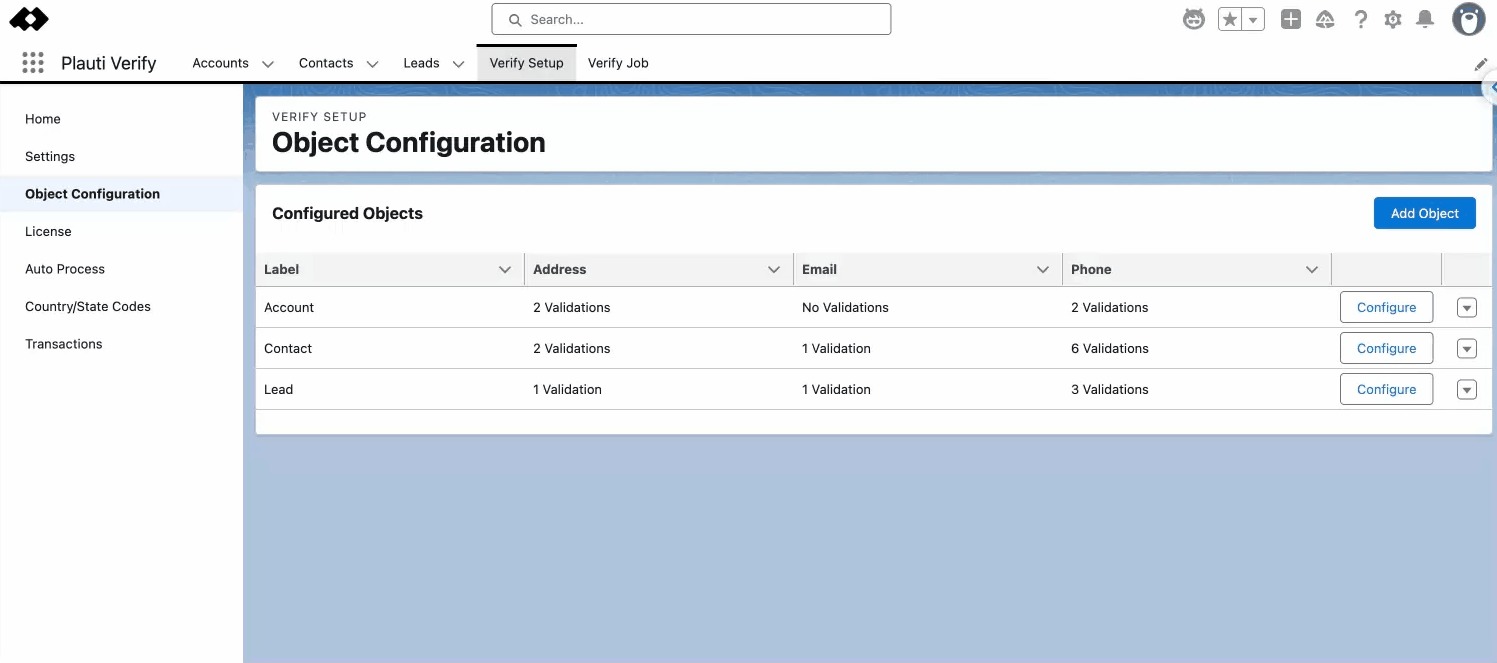
From a Salesforce Admin or Data Steward perspective, all the magic happens within the Plauti Verify app. The Verify Setup tab is the one-stop shop to get started by defining your objects, fields, and verification scenarios. Out of the box, Leads, Contacts, and Accounts are already in place, but you can continue configuring them according to your organization’s needs.
Note that all of the below settings are available for other standard as well as custom objects. When adding a new object, make sure to take a look at the detailed step-by-step guide, as after selecting it from the list and defining the settings, an Apex trigger, as well as the custom fields to store the output, needs to be created as well.
Direct Validation
While cleaning up data after the fact can bring peace of mind, what if invalid information doesn’t get into Salesforce in the first place?
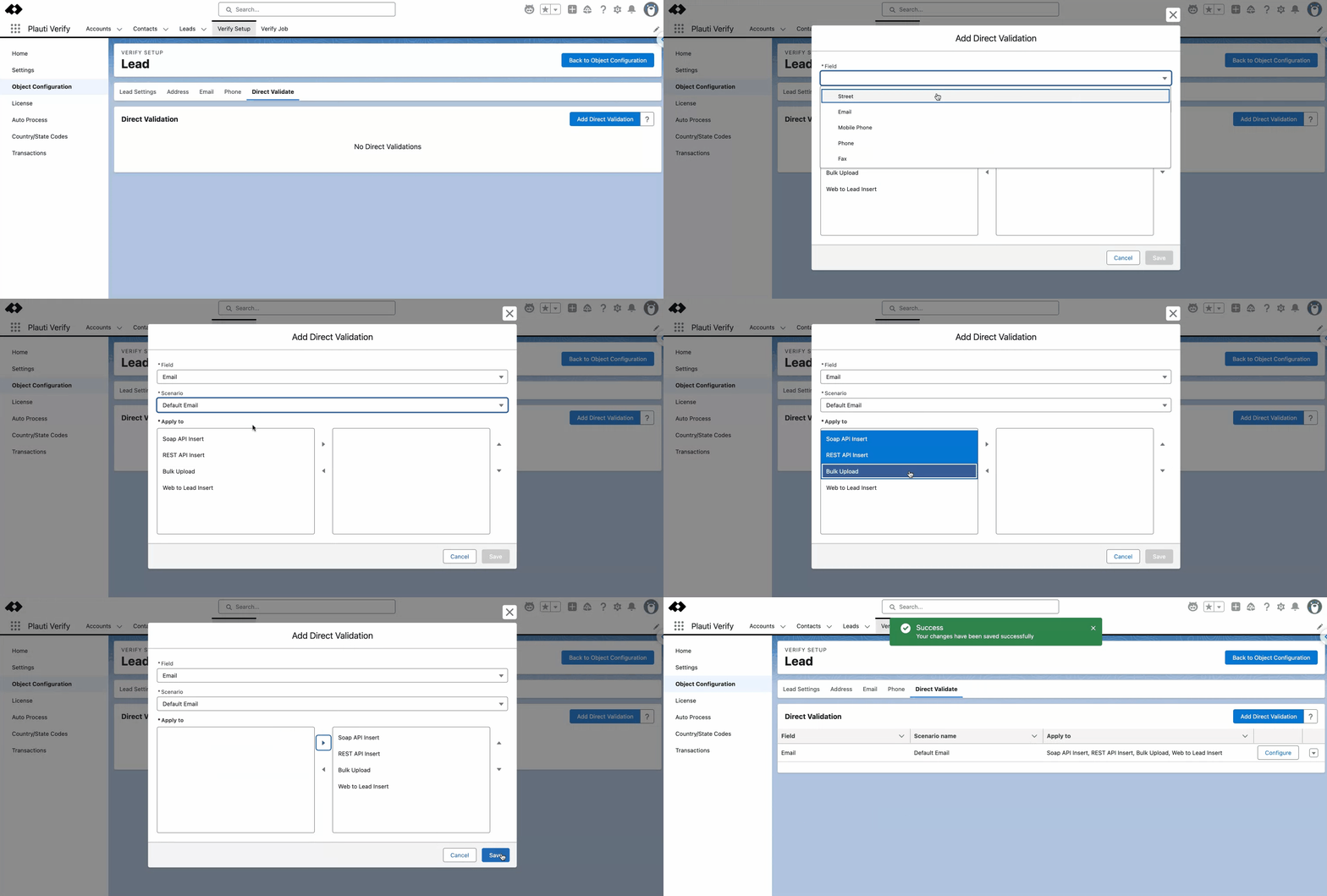
The Direct Validate tab is where you can pick and choose, for each field, which scenarios it will be validated in real-time for – this setting applies to external sources. If we zoom into the Lead example, notice that the validation scenario can be applied even to Web-to-Lead (alongside bulk imports or API), thus ensuring that no matter where the Lead comes from, the email will be valid!
The User Experience
For your users, the validation can either happen during record creation or directly on record pages. Continuing with the Lead example above, wouldn’t it be nice for Salesforce to tell business development reps that an email is invalid from the get-go?
That’s exactly what will happen, given the direct validation enabled above.
Record Creation Validation
Depending on the buttons you chose to override, when creating or editing a Plauti Verify-enabled object, the screen itself will be enhanced with a few new additions.
Continuing with the Lead example, whenever a new Lead is created, the configured fields will be instantly verified. In case of an invalid entry, the error message will be immediately displayed.
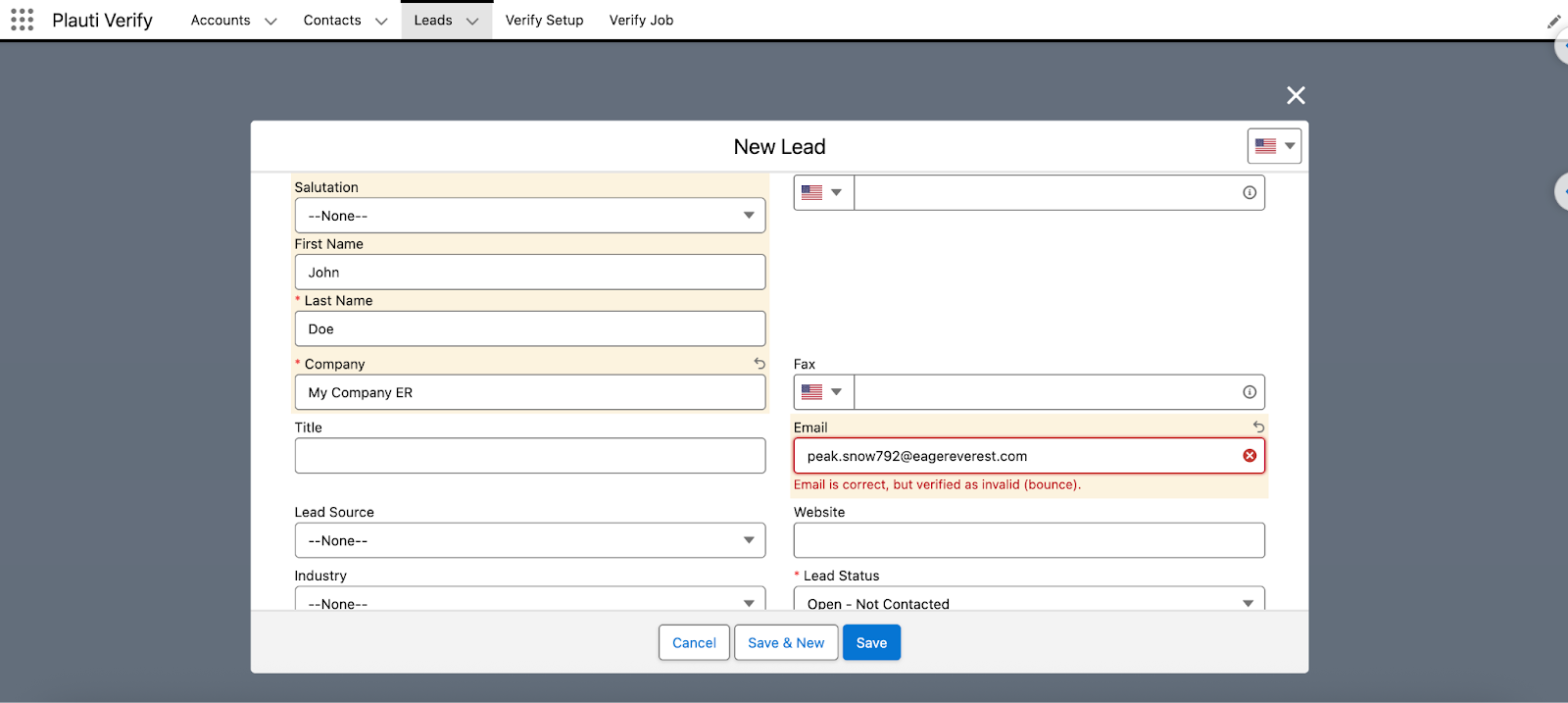
If the information is fixed, a green checkmark will appear next to the field – in this case, the Email. On top of the real-time verification, you can quickly select the country for which the data format will be validated. The country can either be chosen for the record at hand, or starred to become the default one.
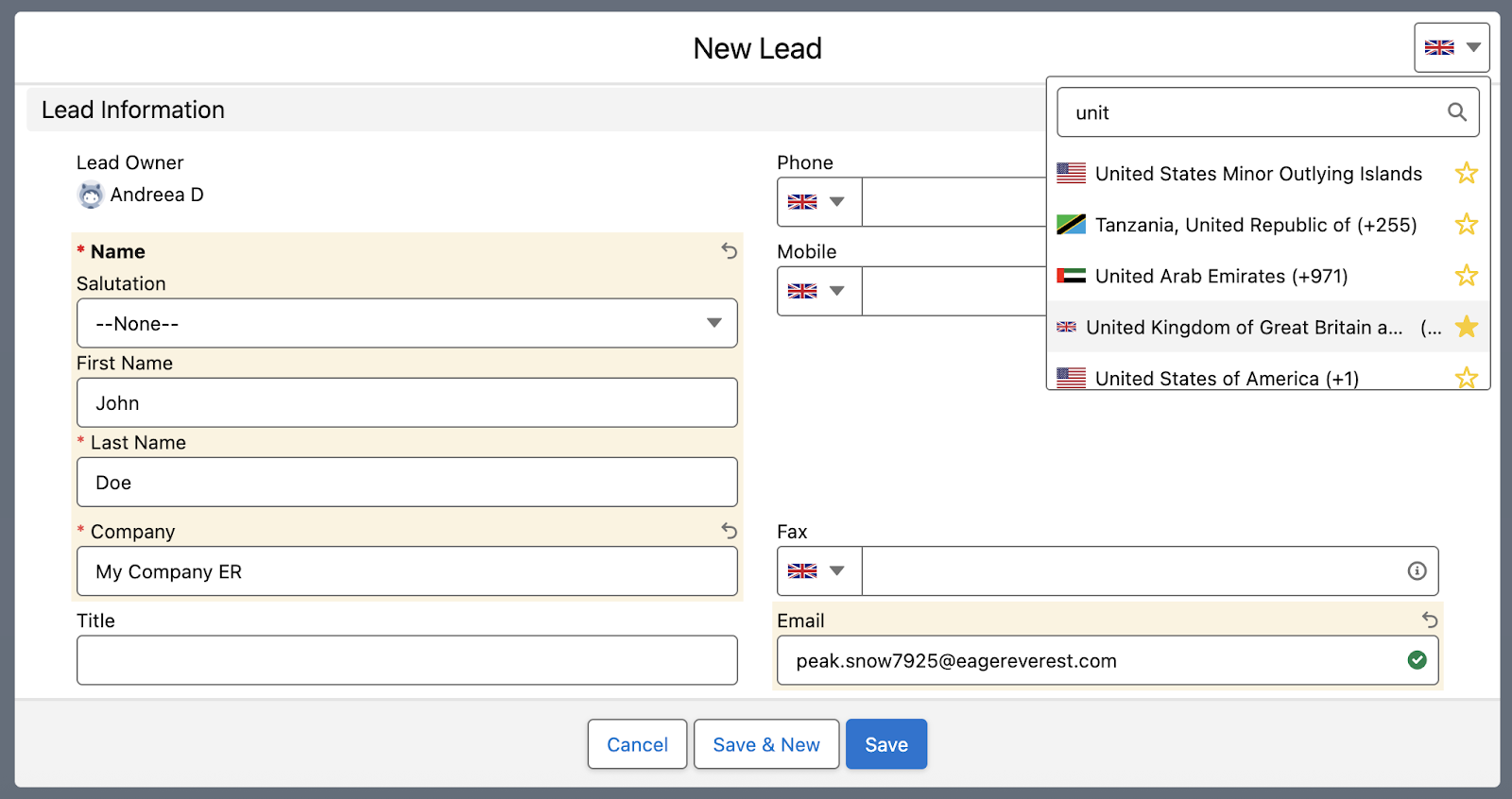
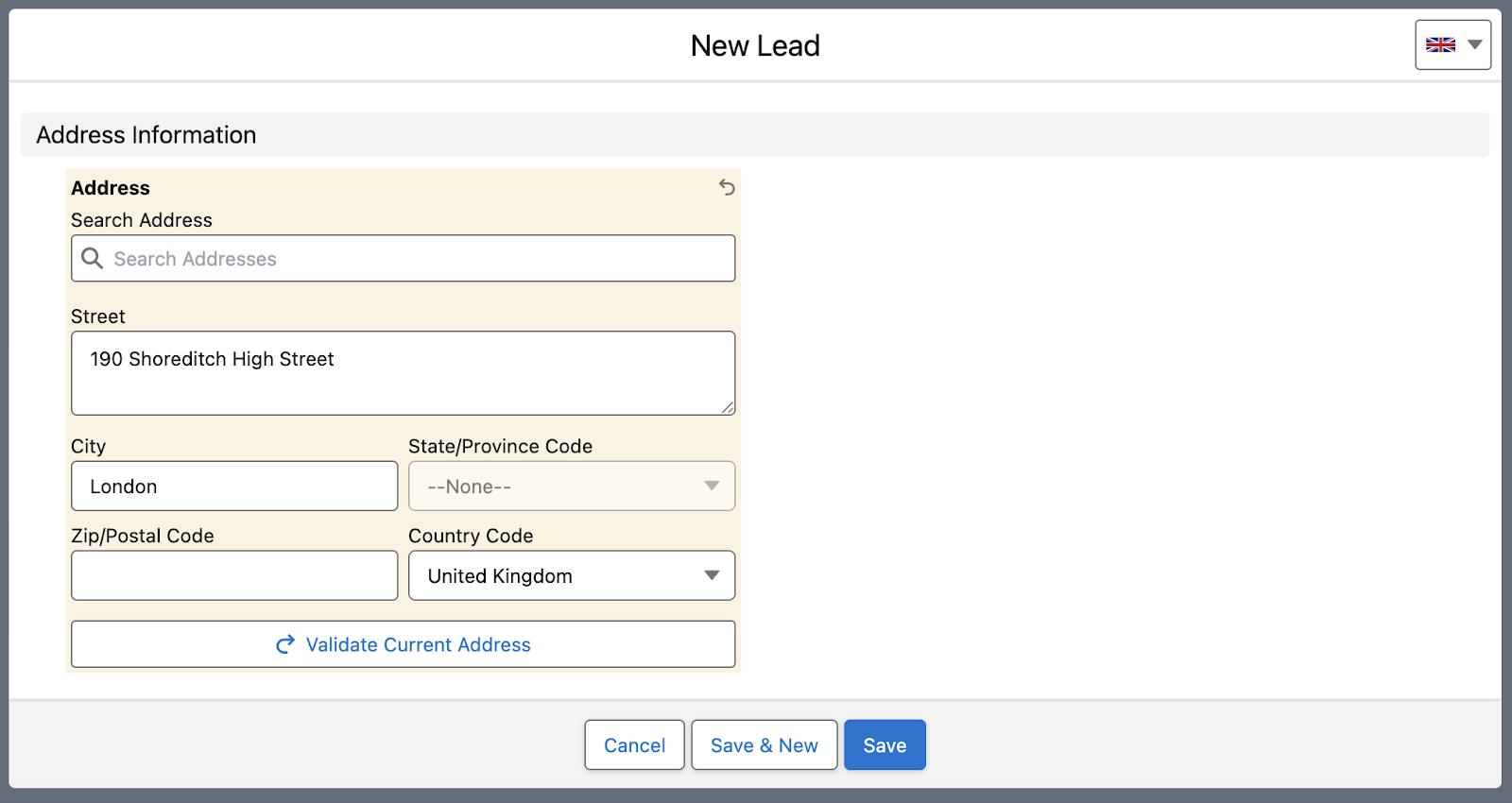
For addresses, on the other hand, you can choose to manually add an address and validate it, or you can start searching for the address and select one of the recommended ones. Keep in mind that you can also choose to add latitude and longitude to your records if needed.
Verify Live
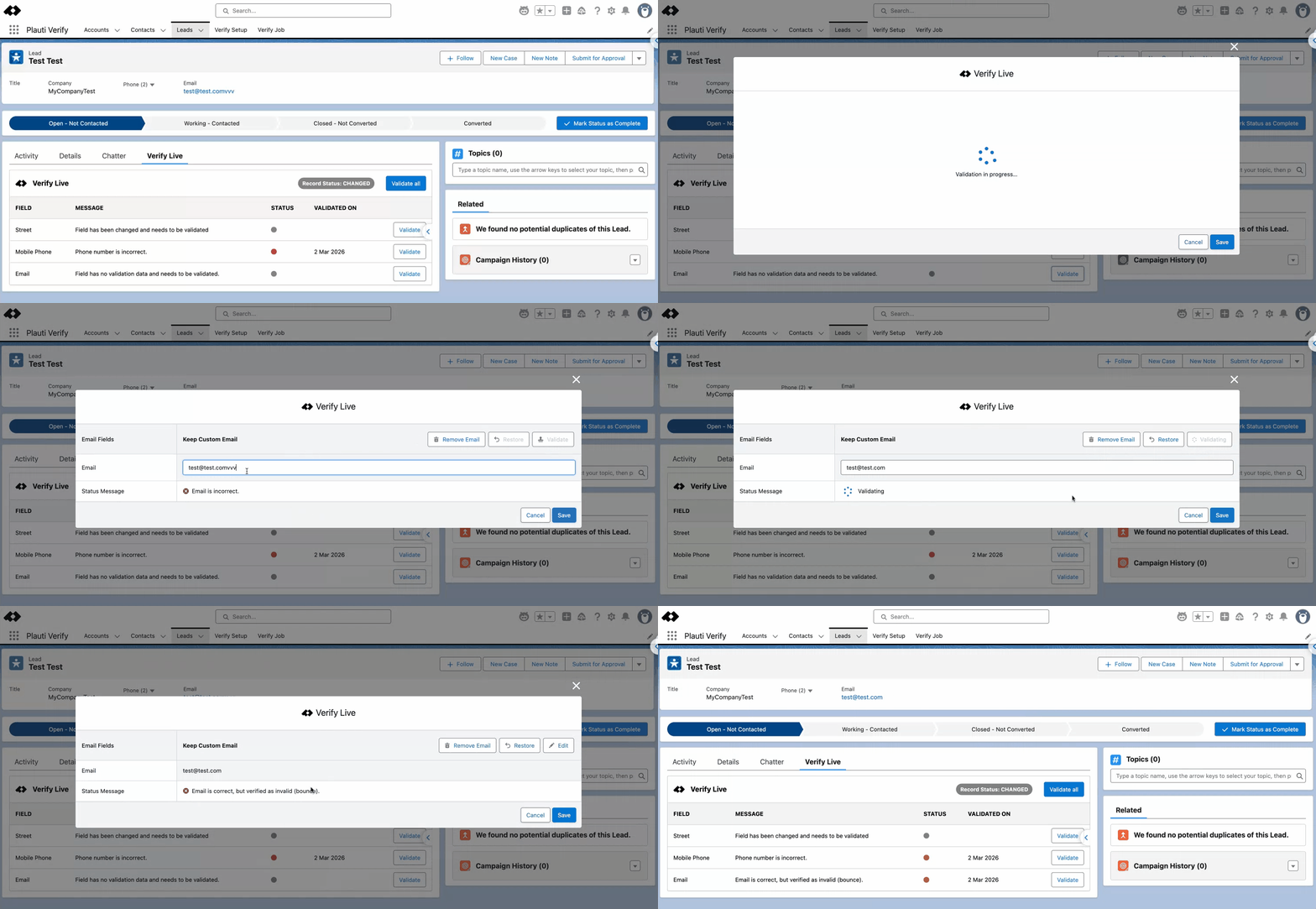
When users work directly on the Record Page, they don’t need to edit the record to complete field validations. Plauti has a dedicated Verify Live component available, which not only updates as the record is edited but also allows immediate verification.
Regardless if the field has been validated before but was changed in the meantime, or has never been validated before, a click of a button can make it happen. It may be that suggestions are not found, in which case users have to make a decision between keeping the data or removing it.
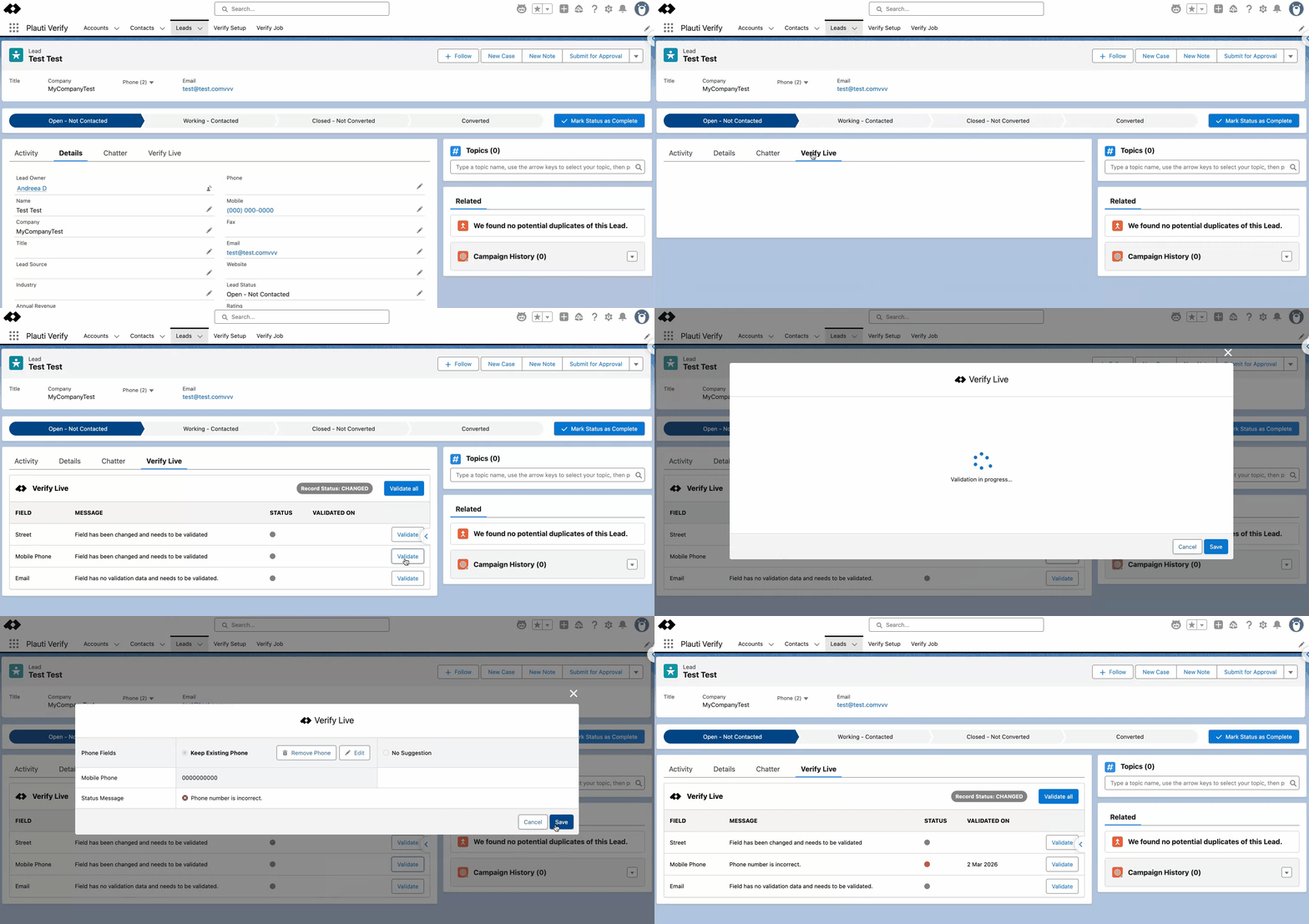
If the data determined as incorrect is fixed, the information can be re-validated without leaving the current screen. For emails in particular, as you can see below, they may seem correct but can immediately be flagged as hard bounces. This way, Sales and Marketing know to avoid them or evaluate enrichment options.
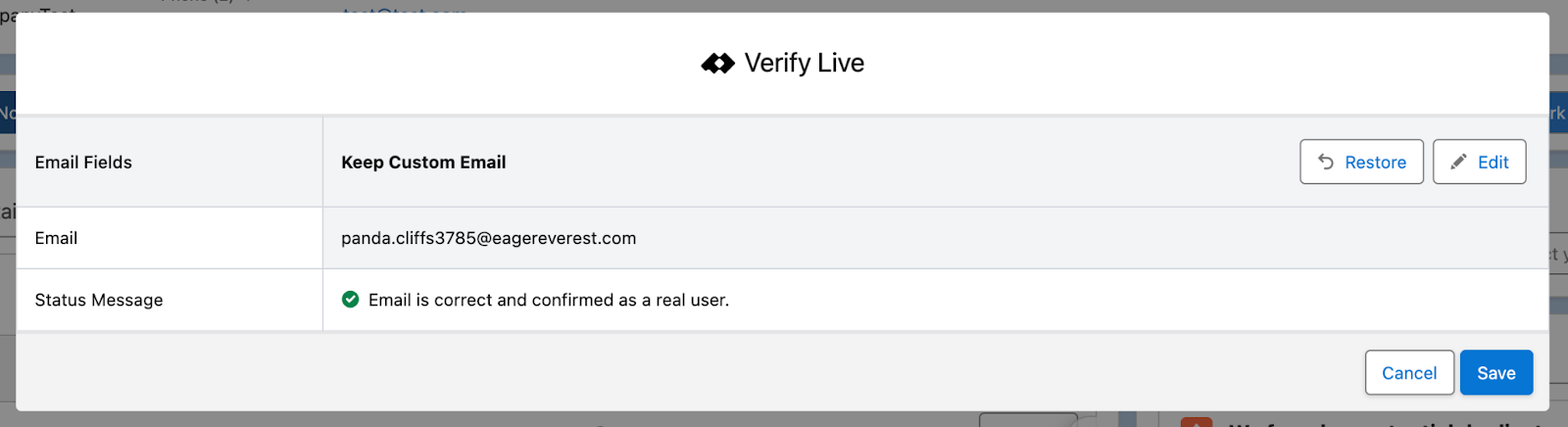
In the happy scenario in which the information is valid from the get-go, the Status Message will confirm it, and the user can move on with reaching out to the customer.
Automated Validation With Jobs
While having a manual option is great for quick validations, it’s not scalable in the long run. That’s why Plauti introduced Verify Jobs. This is a separate tab found within the same Plauti Verify app, which empowers anyone handling data quality checks in your organization to verify records in bulk – be it a few hundred, thousands, or even millions of records.
The jobs can be either broad or very specific thanks to the available filters, and will start running as soon as they’re saved. Each job will have a progress indicator, as well as a clear breakdown of successes, errors, and where manual input is needed.
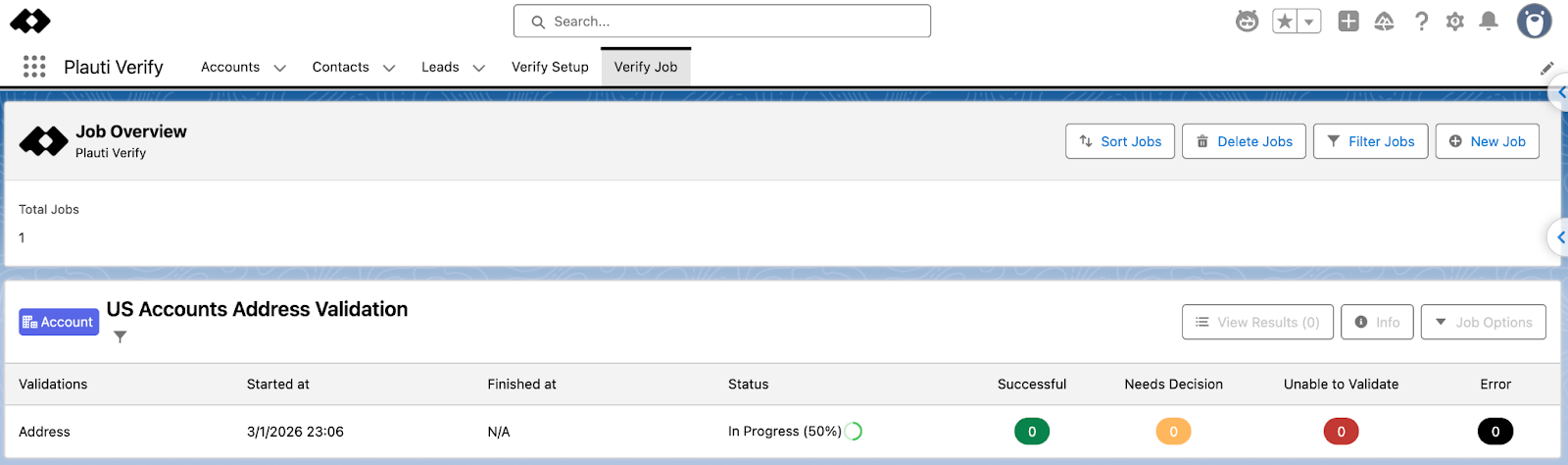
Since the data in this job was created in such a way as not to return successes, let’s deep dive into the job once ready!
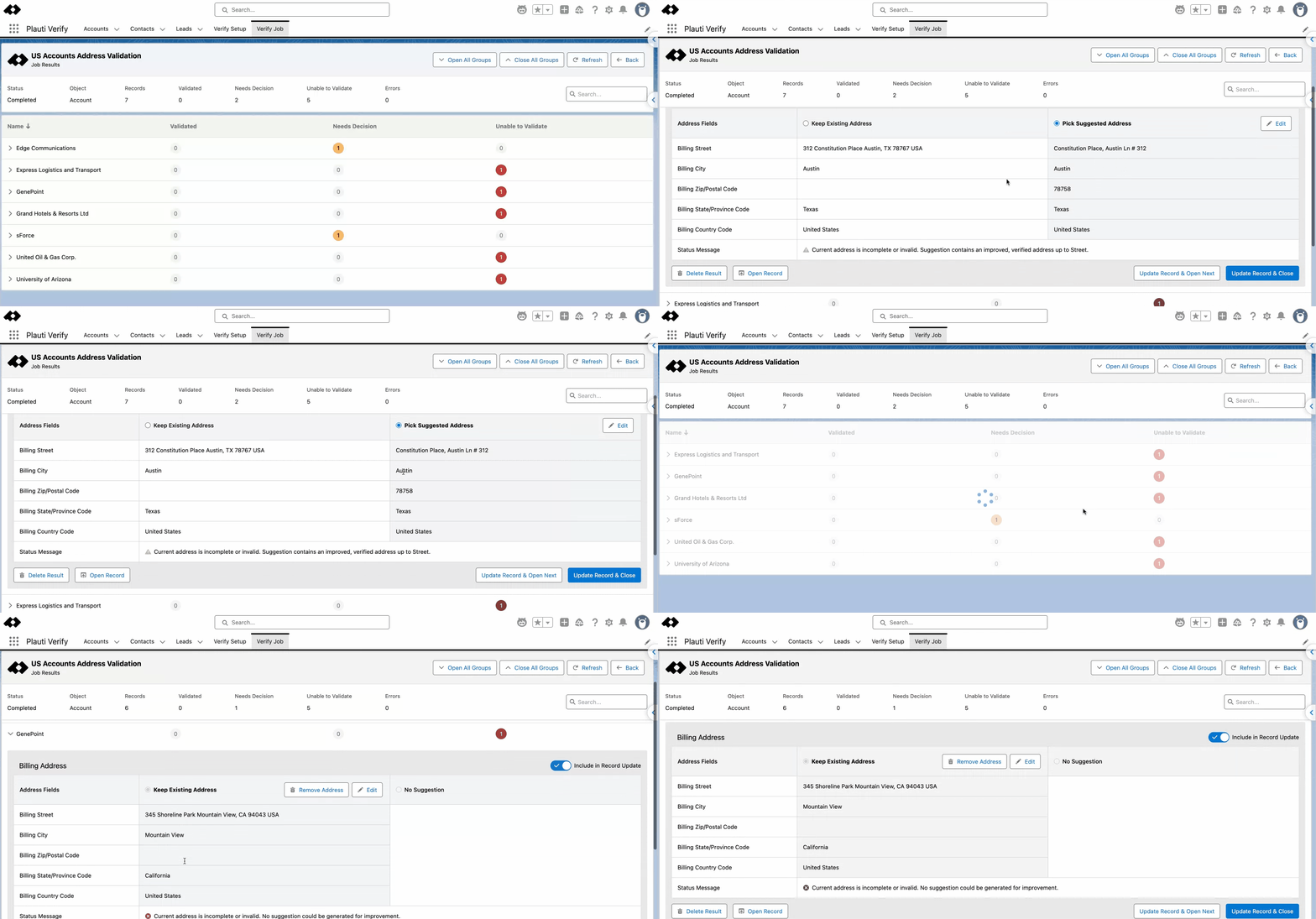
Each record flagged as “Needs Decision” will have to be manually reviewed for the suggestion to be accepted, declined, or edited. On the other hand, items flagged as “Unable to Validate” will not have any suggestion, and it will come down to a manual decision if the data is to be kept or removed.
All this information is available within the dedicated Job Results page, which will become accessible for each individual job once completed. Note that these results can also be processed via the “Auto Process” option, which can save your team a significant amount of time for larger jobs.
Additionally, when there are more records to go through, the buttons at the top of the page can be used to either extend or collapse each group so that the verification can be a breeze. In case you are looking for certain records, there is also a search bar available.
Tailor the Verification to What You Need
There are times when readily available options are not enough for your particular requirement. With Plauti Verify, that is not a problem!
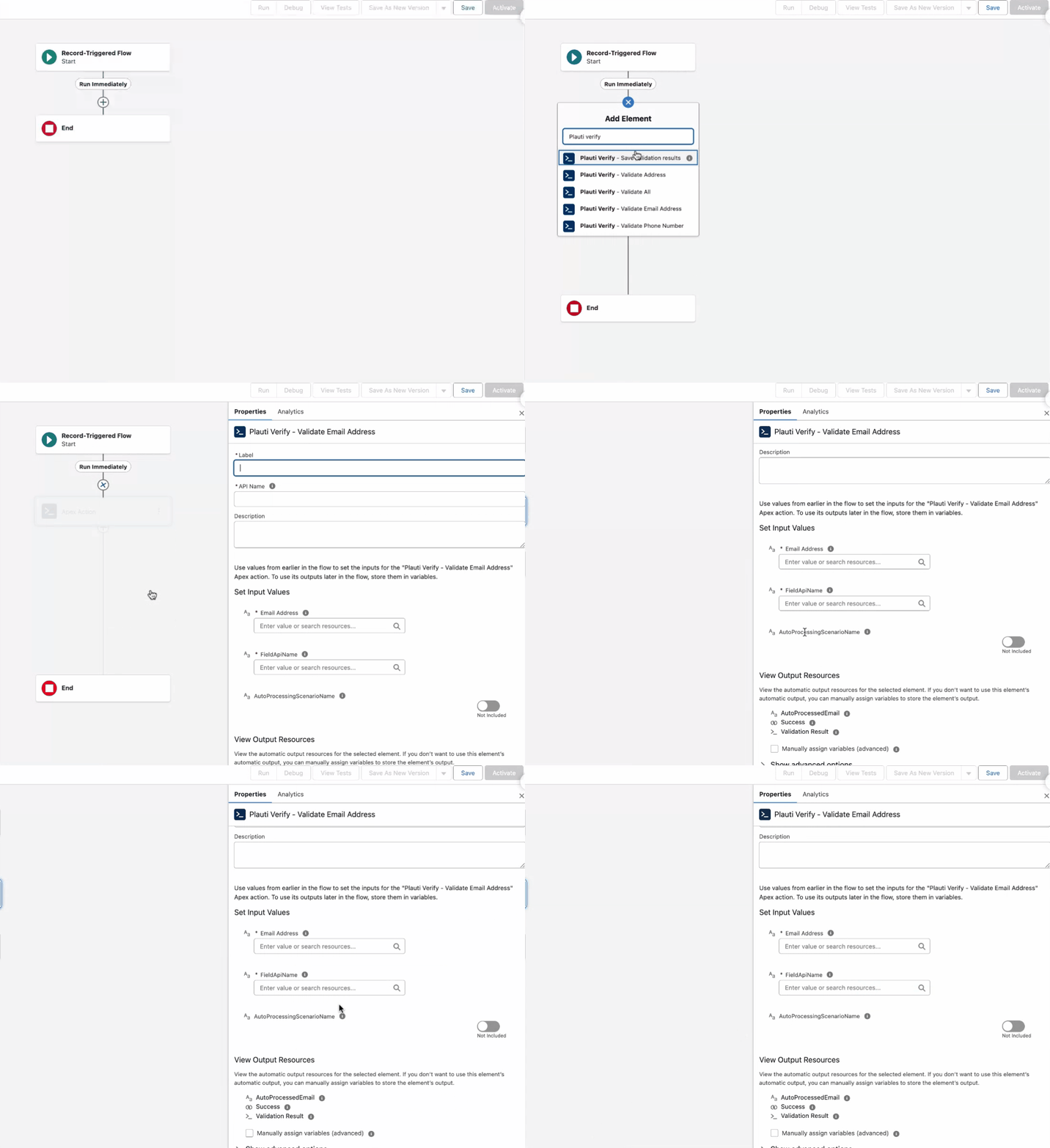
Within Salesforce Flow, you can find a variety of actions to choose from, including Address, Email, or Phone validation actions. On top of individual ones, there is a dedicated Validate All to aid in fully verifying the record information.
In case you already have existing Flows that either create records based on user input or allow users to modify information, Plauti Verify can easily be integrated into your existing processes.
Since there may be situations in which Salesforce Flow is not sufficient or doesn’t align with your current architecture, Plauti provides a fully fledged SDK (software development kit) for all its products. This means that no matter the requirement, there are multiple ways to access the Plauti Verify capabilities.
Analytics
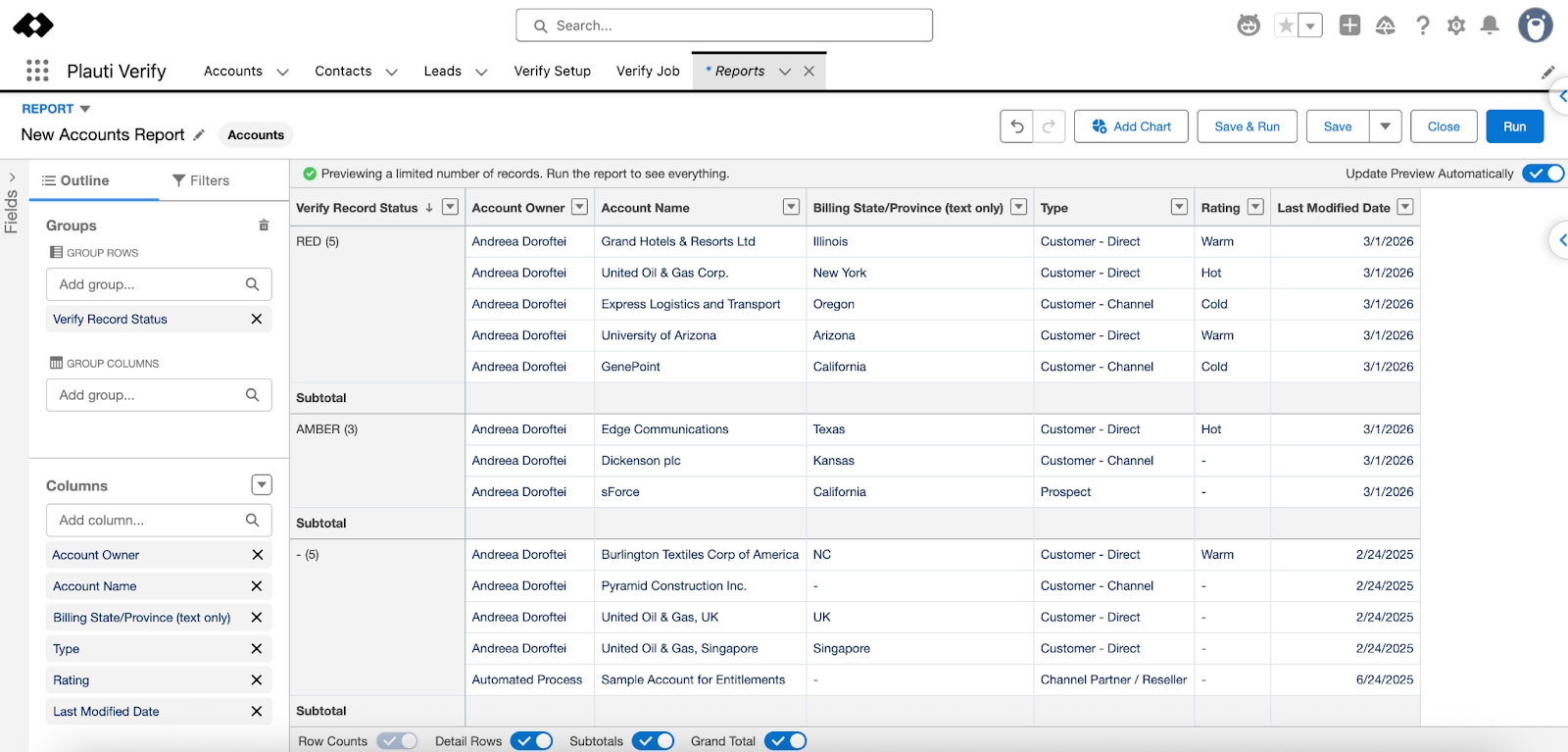
Since Plauti promoted keeping track of the verified records through custom fields, this means that you can easily report on the activity you and your users are conducting with the tool. Right after your first validation, you can already create a report using the readily available Verify Record Status field.
If, during the object configuration, you also chose to store the date and time for each of the fields in a dedicated custom field, then all of your reports can be much more granular.
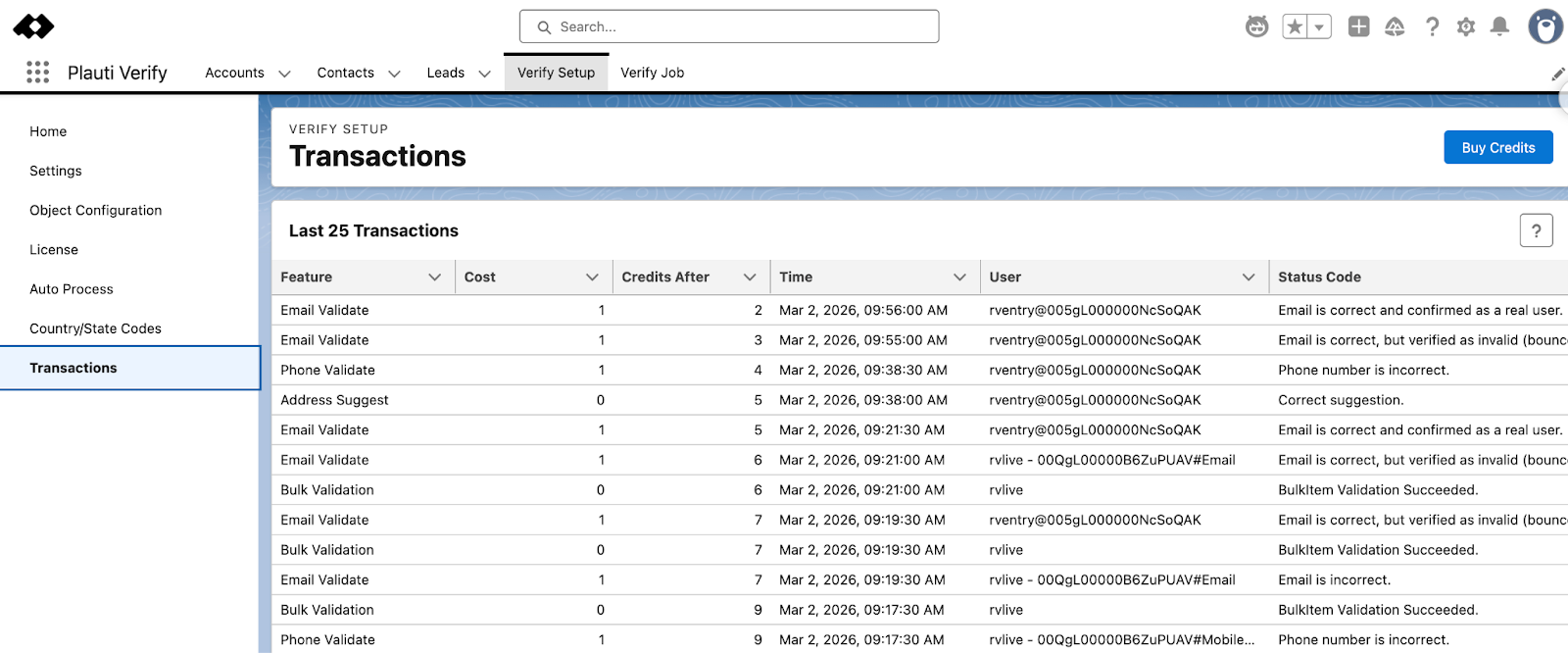
While not an actual Salesforce report, it’s worth noting that, within Verify Setup, you have access to a list view containing the last 25 transactions. This may come in handy when reviewing consumption per action, as well as the various status codes.
Roadmap
In addition to having an already robust offering to cater for all address, phone number, and email address validation needs, Plauti’s roadmap is packed with new features customers will soon be able to benefit from:
- For Plauti Verify, Residential vs Commercial address classification will be added so customers can better predict shipping costs and avoid unexpected surcharges from carriers. We’re also exploring enrichment capabilities.
- For Plauti Agentforce, built-in address verification and deduplication actions will be available to ensure tasks always run on accurate, clean data.
Next to having a roadmap with features like Plauti Agentforce address validation and Plauti Verify Residential vs Commercial classification and potential enrichment, customers can directly influence what the team will build next via Plauti’s Feedback Platform, since their roadmap reflects real-world needs.
Use Cases
Given how often email addresses, phone numbers, and physical addresses are used across the board, having valid ones at all times can aid virtually every team in your organization. Not only that, but when it comes to either physical product delivery or critical email communications, the right address or email can make the customer experience so much better. While we will cover a couple of use cases, make sure to explore Plauti’s demo hub as well to find out more.
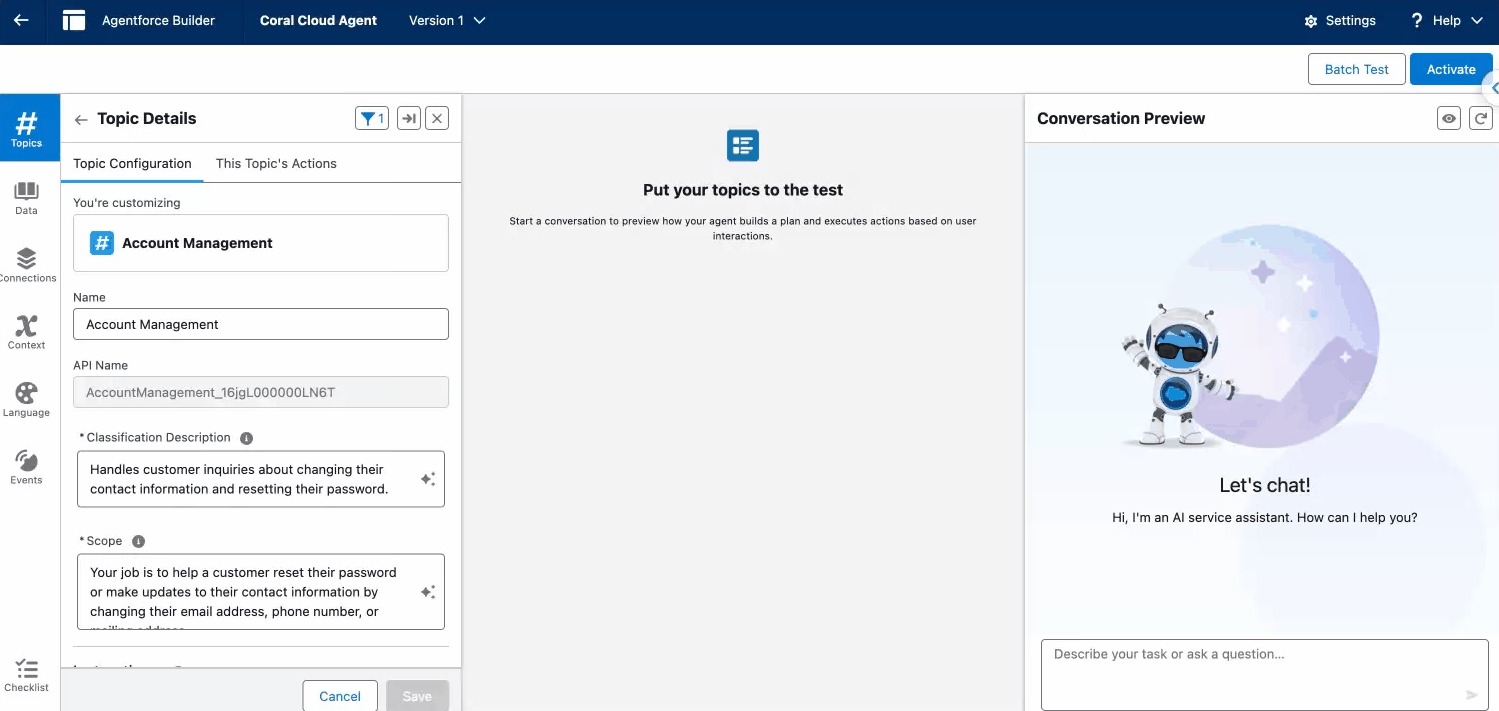
If you have already started your Agentforce journey with a customer-facing agent, Plauti has you covered! In just a few steps, you can make use of the readily available Plauti Agentforce actions for verifying the email address and phone number. Of course, these can easily be configured to your own data management needs.
Having these actions available to enhance your agent can prevent human error in case the customer is entering the wrong email address, for example, or even protect you against malicious intent in case of spam traps.
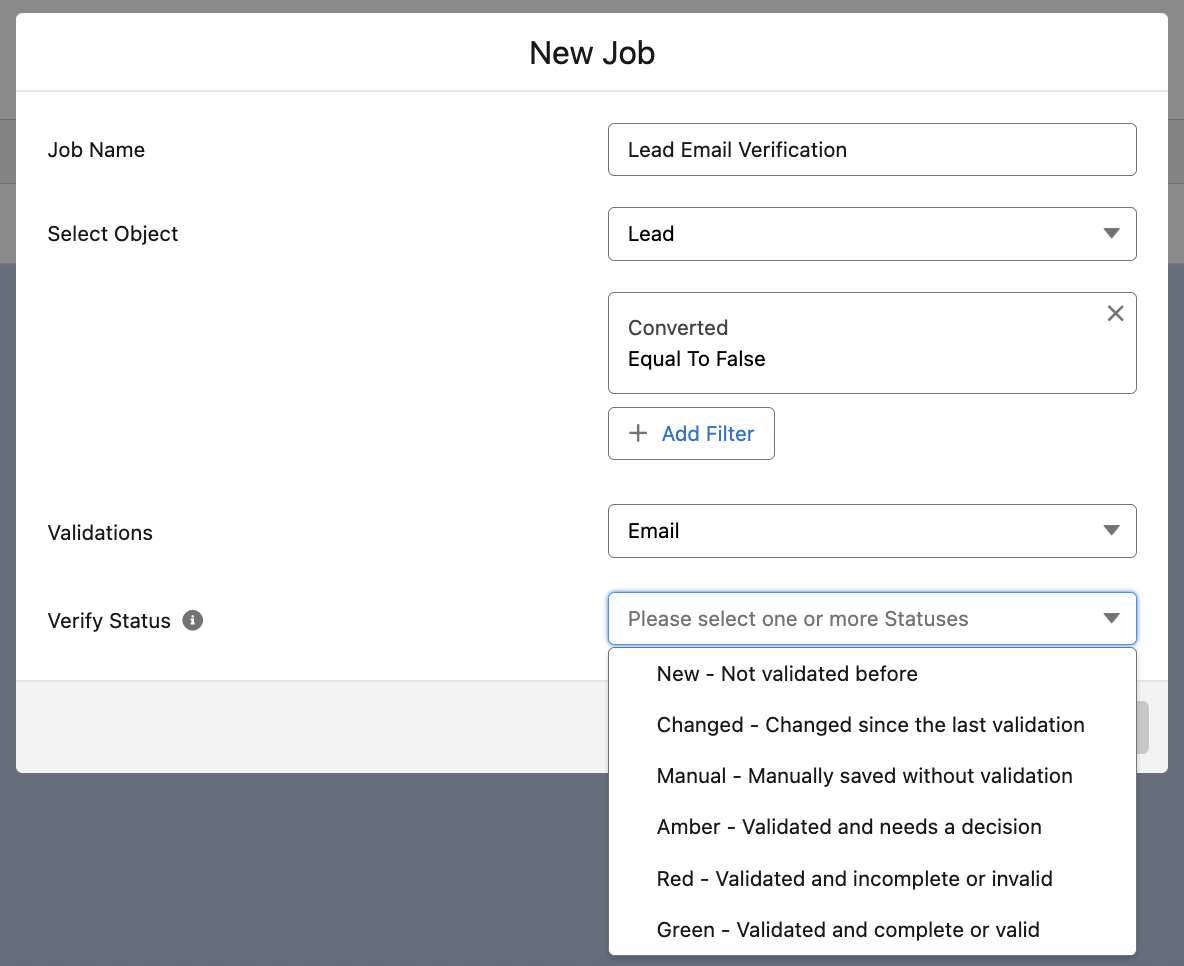
Speaking of existing implementations, whenever a new data-related tool is introduced, there’s always a question about historical data. Surely after hearing about the capabilities, your Sales and BDR teams would want to ensure their currently open Leads and customer Contacts have correct emails and phone numbers, right?
While this could have been a multi-hour manual effort with other approaches, within Plauti Verify, this is the perfect use case for Verify Jobs. With only a few clicks, a Job can be set up to target exactly the records that should be verified. Furthermore, the Lead Owners can be notified as soon as the verification is complete if needed, given that the Verify Status field is being updated.
Setup
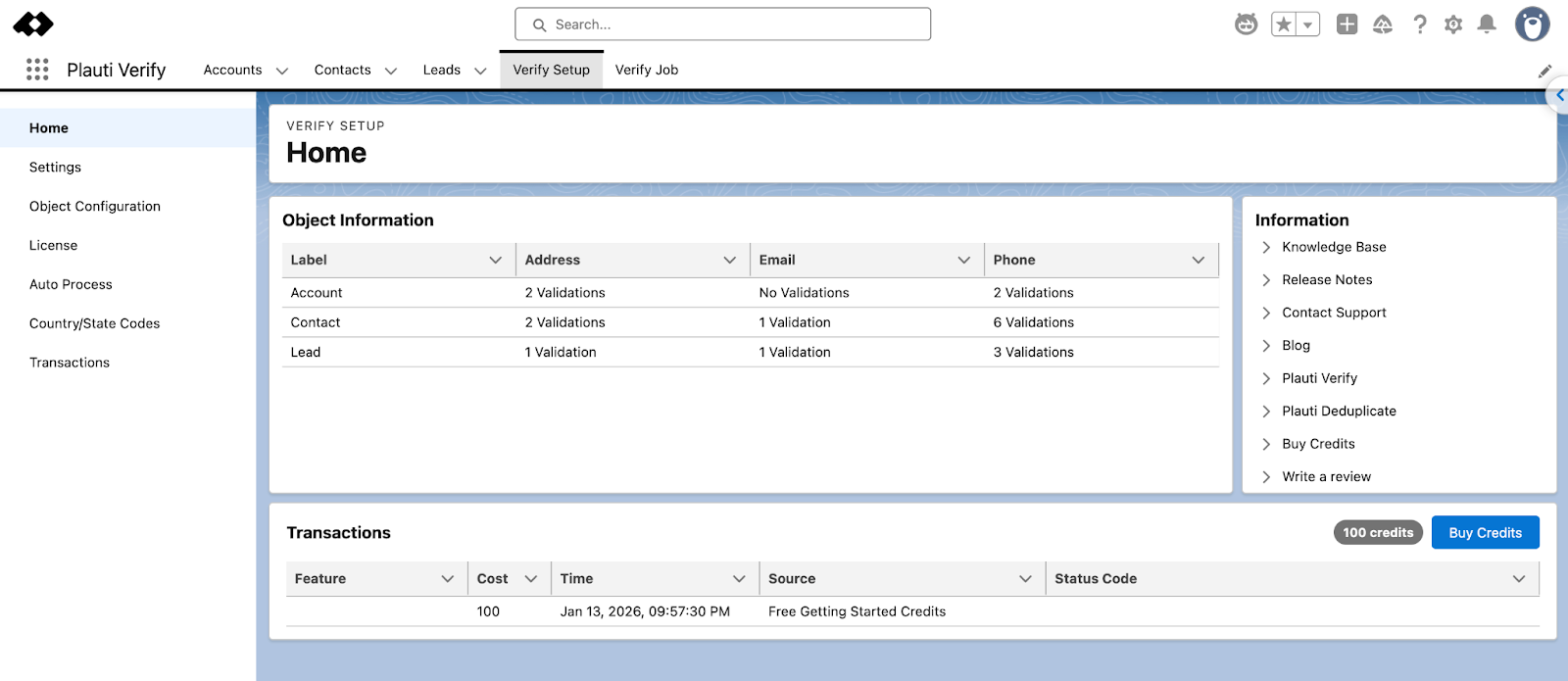
Similar to other products you may already be familiar with, Plauti Verify and Plauti Agentforce are two managed packages that have to be installed in your org(s). Getting started in a sandbox can take as little as five minutes – the setup time will just increase as you go into custom configurations and create your own jobs.
Support
Although unlikely given the comprehensive setup guide and extensive documentation embedded right within Salesforce, you can reach out to Plauti support by completing this form. The setup itself is intuitive, but in case support is needed for the more complex use cases and the use of Plauti’s SDK, the team is ready to help!
Pricing
In this article, we covered the main Plauti Verify product, which has consumption-based pricing, and Plauti Agentforce, which is a free add-on. When it comes to record verification, Plauti Verify starts with 100 free credits for you to test out the functionality before purchasing. Given the breakdown below, these should be plenty for a couple of simple use cases:
| Verified Data Point | Credit Consumption |
| Email validation | 1 credit |
| Phone number validation | 1 credit |
| Simple address validation | 10 credits |
| Address and Geo coordinate validation | 14 credits |
When you’re ready to enjoy the full capabilities across all of your verification use cases, make sure to reach out to the Plauti team to discuss your specific credit needs.
Summary
Having the correct address, email, and phone information on your Salesforce records doesn’t have to be a pain! Plauti Verify ensures that your key data points are correct, complete, and validated, regardless of the source: be it an Agentforce agent, a Web-to-Lead form, or even manual or bulk record creation. Worrying about incorrect contact information can be a thing of the past, as trusted data will become the new norm.
Looking forward to trying it out for yourself? Get started for free with both Plauti Verify and Plauti Agentforce in no time!