

For years, Salesforce data lived comfortably in tables: rows and columns neatly organized for reporting and automation. But the truth is, most of a company’s knowledge isn’t in those tables. It’s locked away in documents, emails, PDFs, and web pages.
In the past, these files were treated as mere byproducts, almost insignificant. Data 360’s (formerly Data Cloud) vector database changes that by transforming overlooked content into valuable sources of business intelligence. Where these files were once archived into oblivion, they now fuel a new wave of smart automation.
At the end of the day, unstructured data is still data, but it’s not the same as the structured records Salesforce has always relied on. Structured data powers automation seamlessly through flows, Apex triggers, APIs, and AI agents. Unstructured data, on the other hand, needs preparation before it can deliver value. Take a knowledge article, for example: it must be ingested, stored, and then undergo a process called vectorization. This step converts raw content into numerical representations, making it searchable and usable by AI and automation.
Turning a plain PDF into something searchable and actionable isn’t magic. It’s Salesforce’s vector database at work. In this article, we’ll break down how it all works in practice.
What Is a Vector Database – and How Does It Work?
A traditional database stores structured data like rows and columns. That works for CRM records, but not for PDFs, emails, or images. AI can’t work with raw text; you can’t simply dump unstructured content into a regular database and expect AI to work its magic. It needs a way to quickly scan vast bodies of text for the relevant information.
A vector database does exactly that. It stores content as vectors that capture context and relationships. These vectors allow AI to “understand” what a document is about, not just what words it contains.

So how does a PDF become searchable and actionable? It starts with chunking, which breaks large documents into smaller, manageable pieces. Next comes vectorization, where each chunk is converted into an embedding that places similar chunks closer to each other based on their meaning.
Finally, these vectors are stored and organized through indexing, which makes retrieval fast and efficient. Together, these turn raw, unstructured content into something AI and automation can actually use, turning a simple doc into a resource with value and meaning.
Vector database unlocks semantic search, which goes beyond simple keyword matching to find content based on meaning. For example, if you search “customer onboarding,” semantic search can surface a document about “new client setup” even if those exact words weren’t used.
Of course, semantic search isn’t an exact science. You sometimes get false positives: results that seem relevant but aren’t. This is why there is a third option called hybrid search. A hybrid search index blends semantic and keyword search, and you get the best of both worlds: precision and context.
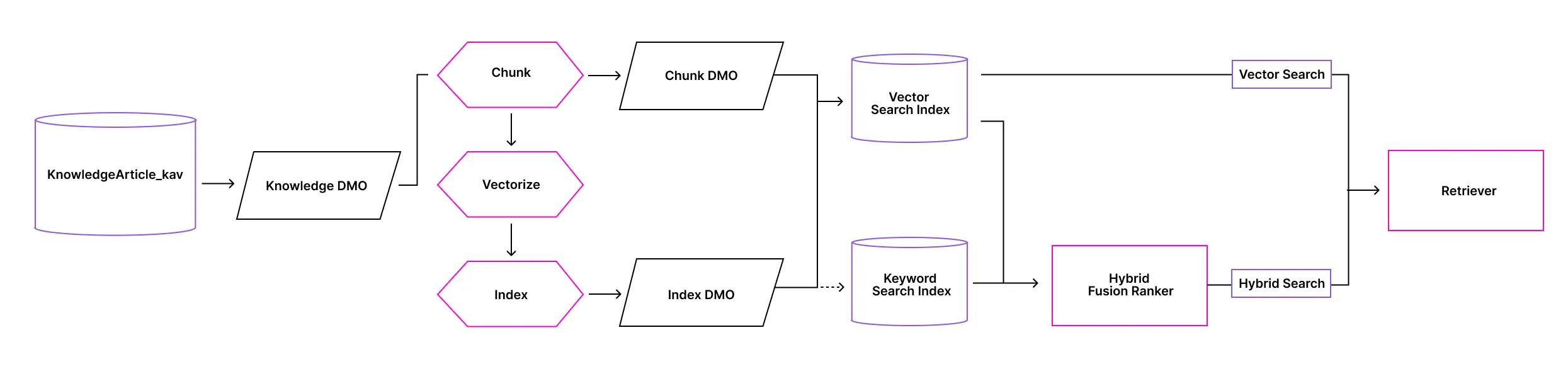
You’ll often hear the term RAG, short for Retrieval-Augmented Generation. It’s a technique where AI retrieves relevant information from a knowledge source to generate a response grounded in real data. To make this work, two components are key: search indexes and retrievers. Indexes organize vectors for fast lookup, while retrievers find the most relevant chunks based on your query. Together, they form the backbone of AI-powered workflows that are fast, accurate, and context-aware.
While the vector database is key to making unstructured data usable by AI, it’s just as powerful with structured data. Want to run a similarity search on cases or opportunities? Simply create a search index and a retriever for the object. Vectors add invisible connections between records through shared meaning and context. If you’re not vectorizing your Salesforce data, you’re only seeing half the picture.
How to Use the Vector Database in Data 360?
With Salesforce, you don’t actually interact with the vector database directly. Instead, it’s used whenever you run a vector search. Building a reliable vector search in Salesforce Data 360 isn’t like flipping a switch. It’s a process that involves careful preparation, configuration, and validation to ensure your AI delivers accurate, context-aware results.
Below is a practical checklist that will help you move from proof of concept to production with confidence.
Step 0: Prepare Your Source and Permissions
Ensure the data is available in data model objects (DMOs) or unstructured data model objects (UDMOs) and that Data 360 has the required connector permissions to the source data. Ensure that the dataset is accurate, timely, and complete. Trim off excess content or rows that aren’t needed for your use case. This can reduce processing costs and enhance retrieval accuracy. A clean, well-scoped dataset sets the foundation for successful indexing and retrieval.
Step 1: Ingest a Data Sample
Bring in a representative subset to a DMO or UDMO. You don’t want to do a full ingestion, especially in the case of large external datasets. Even with Salesforce data, where direct credit consumption is no longer a key consideration, follow the principle of just enough data to minimize risk and optimize performance. This approach helps you validate your configuration before scaling up.
Step 2: Create the Search Index Configuration
Choose vector or hybrid, set chunking strategy, select fields, and create the index. This creates CDMOs and IDMOs behind the scenes. While it may be tempting to go with hybrid search by default, this isn’t always the wisest option. Yes, you get the benefit of both semantic and keyword search, but this can backfire.
When users make ambiguous queries, the search index struggles to match keywords, leading to a mismatch with user intent. Also, hybrid search costs twice as many Data 360 credits as vector search. Make deliberate decisions based on your use case and data quality.
Step 3: Create the Retriever
Connect the retriever to your search index, set filters for search results, and choose the fields and number of chunks to return. These settings determine how well your system surfaces the most useful chunks. Remember that chunking and field selection during indexing directly impact retrieval quality. If they’re poorly configured, even the best retriever won’t fix it. Take time to tune these for accuracy and performance.
Step 4: Validate Retrieval
Before running prompts or agents, validate retrieval using the Query API if your team has developer capabilities. This step isolates retrieval quality from prompt design, making troubleshooting easier and faster. Once the API tests look good, move on to Prompt Builder and, if applicable, Agentforce agents for end-to-end testing. Early validation prevents wasted effort on prompt engineering when the real issue is indexing.
Step 5: Ingest the Full Dataset
After successful testing, ingest the remaining data into the same DMOs or UDMOs. Ensure consistency in schema and field mapping so your index remains valid. Large-scale ingestion should follow the same data hygiene principles as your sample. Avoid unnecessary content to keep performance optimal. This step prepares your system for production-level retrieval.
Step 6: Rebuild the Search Index
Rebuild the search index to include the fully ingested dataset. Do this also when you add new knowledge articles, files, or content to the data source. During the rebuild process, the existing index remains in use until the new index is ready, avoiding downtime.
Opportunities and Risks With Vector Search
Vector search unlocks powerful capabilities in Salesforce, from extracting insights in old documents to enabling autonomous AI. But like any technology, it comes with trade-offs. Data quality matters just as much for unstructured content as it does for Salesforce records. You can’t simply drop documents into a vector database and expect AI to sort them out.
Unstructured data needs the same level of governance as structured data. Understanding both the opportunities and the risks will help you design solutions that deliver value without adding unnecessary risk. Let’s explore what’s possible and what to watch out for.
Opportunities
Enhanced Knowledge Base
Vector search makes Salesforce Knowledge articles discoverable by meaning, not just keywords. This helps users find relevant content even when they don’t know the exact terminology, improving self-service and agent productivity.
Smarter Case Resolution
Support teams can surface similar past cases quickly, reducing resolution time and improving consistency. By retrieving contextually relevant cases, service reps can learn from previous solutions without manual searching.
Powering Agentic Knowledge
Vector database enables RAG to use insights that exist outside of Salesforce records. This ensures responses are grounded in real data from Data 360, reducing hallucinations and improving trust in AI-driven workflows.
Cross-Cloud Insights
Connect Sales, Service, and Commerce Cloud data for unified semantic search across customer touchpoints. This allows teams to deliver personalized experiences and insights that span multiple business functions.
Risks
Semantic Drift
Semantic drift occurs when poor-quality data or ambiguous queries make it difficult for the vector search to find chunks that align with the user’s intent. This can lead to irrelevant, generic, or misleading results.
Data Leakage
Poorly-scoped indexes can expose sensitive fields like personally identifiable information (PII) to AI agents. This makes least privilege access more difficult to enforce. Without strict governance, retrieval may surface confidential information in unintended contexts.
Compliance Gaps
Unstructured sources may contain outdated or non-compliant content. It’s important to establish governance on unstructured data, including classification and review practices. Failing to do so can result in information retrieval that violates regulations or internal policies.
Index Staleness
Forgetting to rebuild indexes after data changes results in incomplete or inaccurate retrieval. This can undermine trust in AI outputs and lead to operational inefficiencies.
Over-Retrieval
Returning too many chunks or fields can overwhelm AI agents and degrade response quality. Excessive context often introduces noise, making answers less accurate and harder to interpret.
Final Thoughts
Vector database extends Salesforce’s role as a hub for business intelligence by tapping into unstructured data that has long been sidelined. This shift brings both opportunity and risk: documents and knowledge articles can become rich sources of insight, but they may also expose sensitive information that bypasses traditional controls like field-level security and record sharing.
To mitigate this, data governance must evolve beyond structured records to include every file and document feeding these systems. The real question is whether companies are ready for this added responsibility, given that governance for structured data alone is often under-resourced. With the sheer volume of unstructured content, this challenge will be significant for most Salesforce customers.
That said, the potential here is enormous. Vector database opens doors to capabilities that were previously out of reach, and for those willing to invest in governance, the payoff could be transformative.