
In Salesforce Data Cloud (Data 360), what you calculate is only part of the story. When and how that calculation runs can dramatically affect data freshness, activation speed, and platform cost.
Two features sit at the center of this decision: Calculated Insights (CI) and Streaming Insights (SI). Though they may sound similar, they solve very different architectural problems. Choosing the wrong one can result in stale segments, missed real-time opportunities, or unnecessary credit burn.
This guide explains the differences, use cases, and architectural considerations to help you make the right choice.
1. The Core Philosophy: Timing and Visibility
The fundamental difference between CI and SI is when the computation runs and what data it can see.
Calculated Insights: Full Visibility, Scheduled Computation
Calculated Insights (CIs) operate across the entire Data Cloud estate. They join Unified Profiles, Data Model Objects (DMOs), Data Lake Objects (DLOs), and historical engagement data. CIs are designed for relational, multi-object aggregation over long time horizons, producing durable, business-critical metrics that define how the organization understands its customers.
Typical examples of Calculated Insights include:
- Engagement Consistency Score: A rolling measure of how consistently a customer interacts across channels over time, used for segmentation and journey prioritization.
- Cross-Channel Preference Index: Aggregating email, web, mobile, and service interactions to determine a customer’s dominant engagement channel.
- Service Burden Indicator: A metric combining case volume, escalations, and resolution time to identify customers requiring proactive service strategies.
- Purchase Cadence Profile: Measuring typical buying intervals to identify customers deviating from normal behavior patterns.
CIs are not real-time calculations. They are scheduled, often daily, because these attributes do not need to be updated minute by minute. They are intended to provide stable, reliable insights for business decisions.
CI Example: Customer Lifetime Value
This replicates a CI for Lifetime Value, Total Orders, and Last Purchase Date using Salesforce objects.
// Step 1: Aggregate data from child object (Order__dlm)
List<AggregateResult> orderAggregates = [
    SELECT ProfileId__c,
           SUM(TotalAmount__c) LifetimeValue,
           COUNT(Id) TotalOrders,
           MAX(OrderDate__c) LastPurchaseDate
    FROM Order__dlm
    GROUP BY ProfileId__c
];
// Step 2: Map aggregates by ProfileId
Map<Id, AggregateResult> aggregatesByProfile = new Map<Id, AggregateResult>();
for (AggregateResult ar : orderAggregates) {
    aggregatesByProfile.put((Id) ar.get('ProfileId__c'), ar);
} // Step 3: Query parent Unified Profiles
List<UnifiedProfile__dlm> profiles = [
    SELECT Id, Name
    FROM UnifiedProfile__dlm
    WHERE Id IN :aggregatesByProfile.keySet()
];

// Step 4: Combine and output results (example)
for (UnifiedProfile__dlm profile : profiles) {
    AggregateResult ar = aggregatesByProfile.get(profile.Id);
    System.debug('Profile: ' + profile.Name);
    System.debug('Lifetime Value: ' + ar.get('LifetimeValue'));
    System.debug('Total Orders: ' + ar.get('TotalOrders'));
    System.debug('Last Purchase Date: ' + ar.get('LastPurchaseDate'));
}
Notes:
Order__dlmis the child object withProfileId__clookup toUnifiedProfile__dlm.- Aggregates (
SUM,COUNT,MAX) emulate the CI metrics. - This can run daily or on a schedule (like a CI job) for durability.
Streaming Insights: Continuous Evaluation, Limited Scope
Streaming Insights (SIs) operate differently from Calculated Insights. They evaluate events as they arrive, computing metrics within rolling or tumbling windows. Unlike CIs, they do not scan your full historical data; their visibility is intentionally narrower, focused on current activity.
Streaming Insights typically operate on real-time engagement signals such as:
- Digital behavioral events captured from web sessions (page views, product interaction patterns, session abandonment signals).
- Mobile interaction streams, including in-app actions, location updates, or feature usage events that require immediate evaluation.
- Event streams ingested from external systems, such as commerce platforms, operational telemetry, or custom APIs delivering near-real-time business signals.
SI Example: Detect users who have viewed products three or more times in the last 15 minutes (tumbling window).
// Step 1: Define the time window (15 minutes tumbling window)
Datetime windowEnd = System.now();
Datetime windowStart = windowEnd.addMinutes(-15);
// Step 2: Query Web Engagement Events in the window
List<AggregateResult> recentEvents = [
    SELECT UserId,
           COUNT(Id) eventCount
    FROM WebEngagementEvent__e
    WHERE EventType__c = 'ProductView'
      AND CreatedDate >= :windowStart
      AND CreatedDate <= :windowEnd
    GROUP BY UserId
    HAVING COUNT(Id) >= 3
];
// Step 3: Process results
for (AggregateResult ar : recentEvents) {
    Id userId = (Id) ar.get('UserId');
    Integer views = (Integer) ar.get('eventCount');
    System.debug('User ' + userId + ' viewed products ' + views + ' times in the last 15 minutes.');
    // Optional: trigger real-time actions like sending notifications
}
Notes:
- Window Boundaries:
windowStart= 15 minutes agowindowEnd= now
- Aggregate Query: Counts events per user in the window (
COUNT(Id)+GROUP BYUserId) - Filter for Meaningful Activity: Counts events per user in the window (
COUNT(Id) + GROUP BY UserId)HAVING COUNT(Id) >= 3ensures only engaged users are captured
- Rolling vs. Tumbling:
- Tumbling: Call this logic every 15 minutes (fixed non-overlapping windows)
- Rolling: Call this logic more frequently (e.g. every minute) to emulate overlapping windows
2. Side-by-Side Comparison
| Feature | Calculated Insights (CI) | Streaming Insights (SI) |
| Data Scope | Full Data Cloud (Profiles, DMOs, DLOs, historical engagement) | Incoming engagement events only |
| Latency | Scheduled (often daily) | Seconds to minutes |
| Computation Style | Relational, multi-object, historical | Window-based, event-driven |
| Profile Joins | Supported | Not supported |
| Primary Usage | Segmentation, scoring, durable attributes | Real-time triggers, alerts |
| Cost Behavior | Predictable, scheduled | Scales with event velocity |
The Profile Joins row is often where architectural redesign begins. Streaming Insights cannot directly join Unified Profiles. If your real-time logic depends on attributes like loyalty tier or CLV, you must design around that constraint.
3. When to Choose Calculated Insights
Use Calculated Insights when you need stable, reusable metrics representing a customer’s long-term behavior or value.
- Customer Lifetime Value (CLV): Aggregating total purchases across multiple legacy systems over several years.
- Propensity or Risk Scoring: Churn predictions or likelihood to purchase based on historical behavior.
- Advanced Segmentation: Identifying high-value customers who haven’t logged in for a certain period, requiring joins between profile and engagement data.
If the insight defines who a customer is rather than what they are doing right now, CI is the right choice.
4. When to Choose Streaming Insights
Use Streaming Insights when timeliness is critical, and the value of the data diminishes quickly.
- Cart Abandonment: Detect users who browse multiple items and don’t check out within minutes to trigger immediate offers.
- Location-Based Engagement: Track geofence entries for mobile users and trigger relevant notifications while the event is still relevant.
- Operational Monitoring: Count error events in real time to trigger alerts to dev or operations teams.
If the question is “Should we act right now?”, Streaming Insights is your engine.
5. Architectural Considerations
Before committing to either engine, keep these constraints in mind:
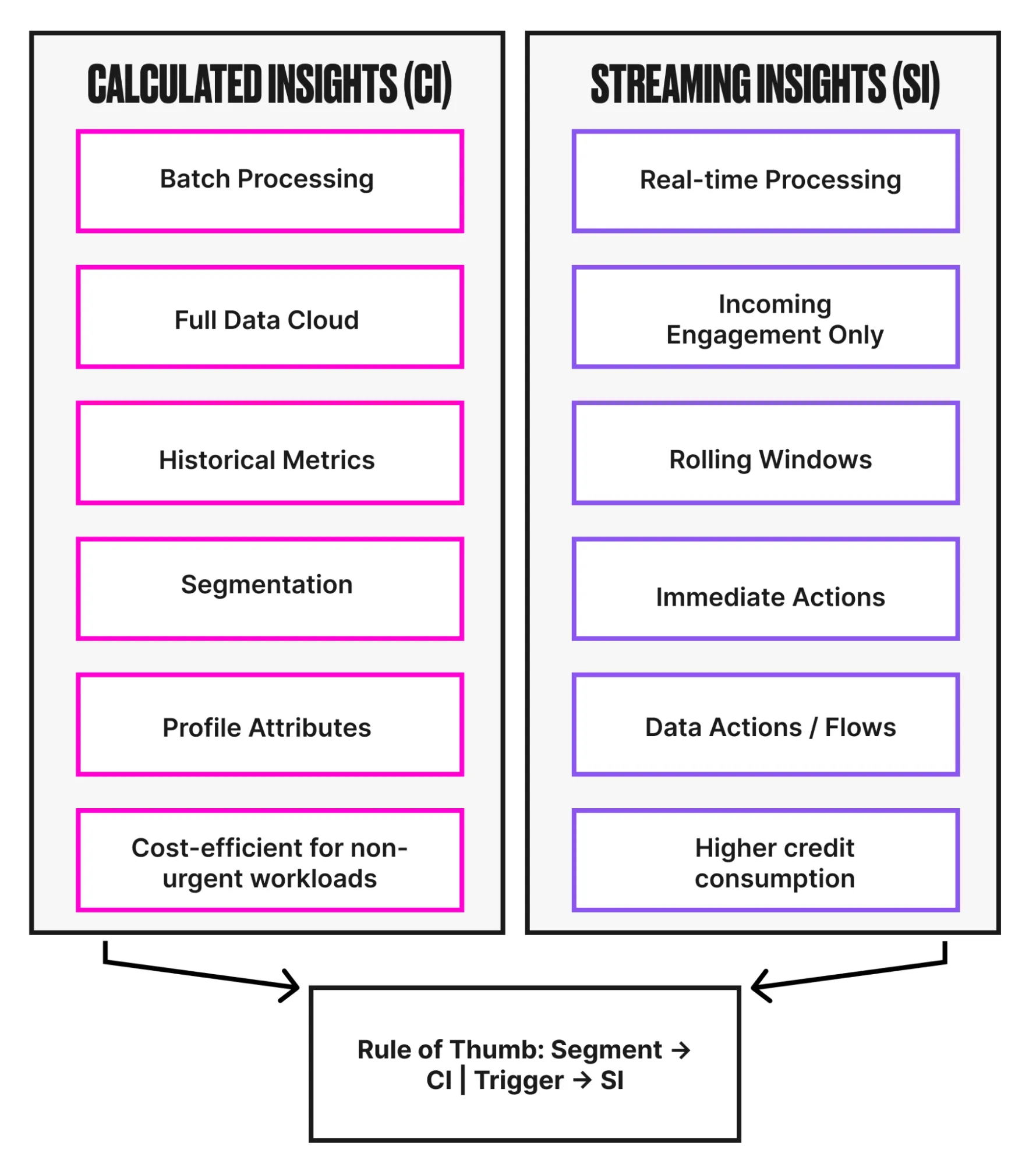
- Windowing Limits: SI always operates within a defined time window. Lifetime metrics are not possible.
- No Profile Joins in SI: Streaming Insights cannot join Unified Profiles. If real-time logic needs attributes like loyalty tier, additional architecture is required.
- Cost: SI consumes credits continuously, making CI more cost-efficient for non-urgent workloads.
Strong Data Cloud architectures assign each engine a clear responsibility rather than forcing one to solve every problem.
In practice, Calculated Insights compute durable customer attributes such as loyalty tier or lifetime value on a scheduled basis. Streaming Insights operate independently, detecting high-intent behavioral signals inside short time windows.
When a real-time condition is met, a Data Action or Flow acts as the decision layer, combining streaming signals with CI-derived profile context to determine the appropriate response.
This pattern avoids duplicating logic across engines and ensures that long-term customer understanding informs real-time engagement without introducing unnecessary complexity or cost.
6. Rule of Thumb: Segment vs. Trigger
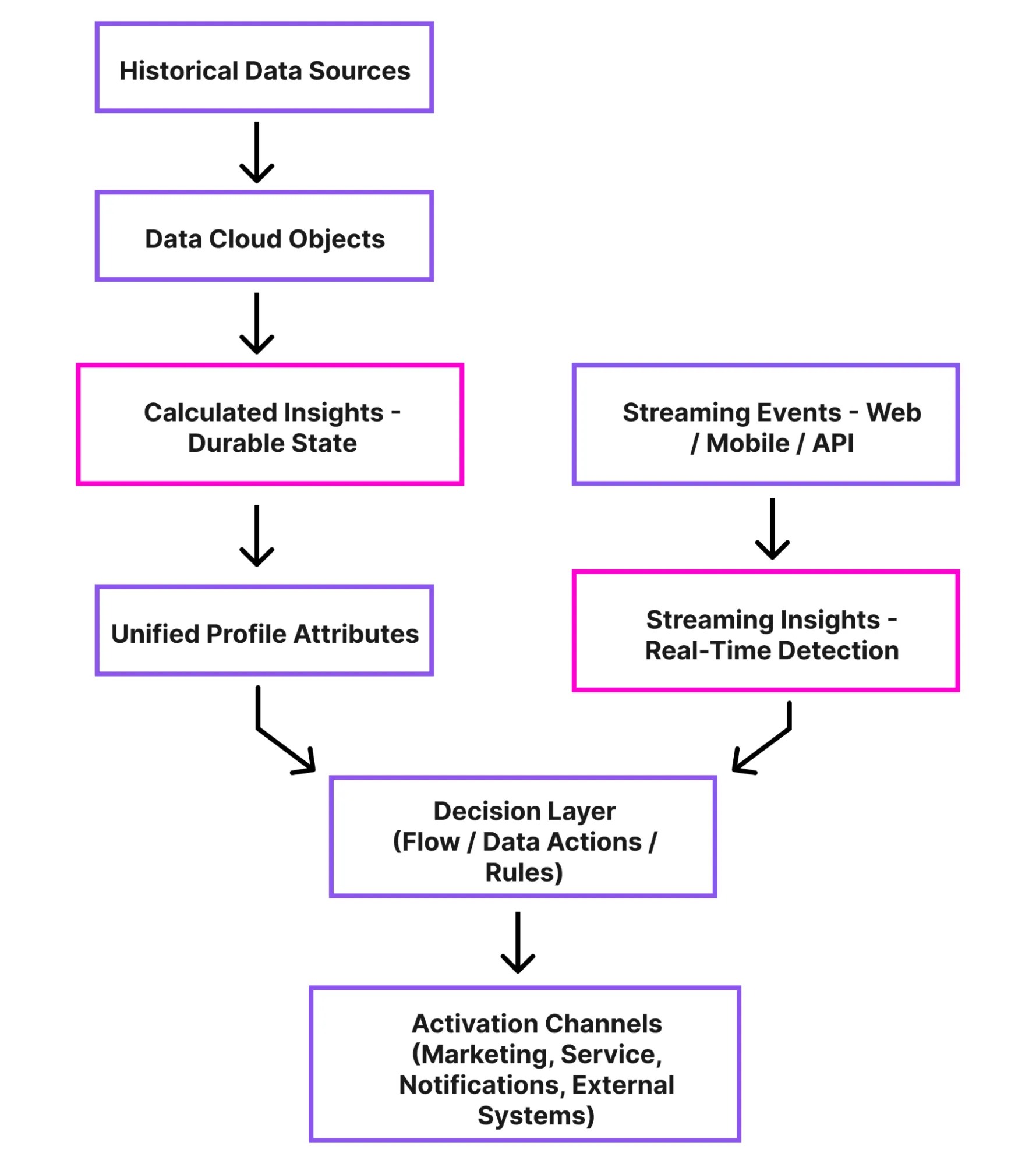
At a high level, choosing between Calculated Insights and Streaming Insights comes down to the purpose of your metric: Are you trying to understand and classify your customers, or act immediately on an event?
Segment It → Calculated Insights
If your goal is to define, analyze, or enrich customer data, CI is the right tool. Think of it as building the foundation of your customer understanding. Segmentation relies on stable, accurate metrics that reflect behavior over time.
- CI handles multi-object joins and aggregations, making it ideal for segments like “high-value customers who haven’t purchased in 90 days” or “frequent buyers with a low churn risk.”
- These metrics feed profile attributes, audiences, and long-term marketing strategies, rather than driving immediate actions.
- Because CI uses batch processing, it reduces credit usage for metrics that don’t need second-by-second updates.
Rule: If the metric will be referenced repeatedly across segments, reports, or scoring models, it belongs in Calculated Insights.
Trigger It → Streaming Insights
If your goal is to react in real time, SI is your engine. This includes event-driven actions, alerts, or time-sensitive campaigns where delay diminishes value.
- SI operates on rolling windows of incoming data, making it ideal for triggers like abandoned cart alerts, location-based notifications, or system error monitoring.
- These insights are ephemeral: if the action isn’t taken immediately, the opportunity is lost.
- Because SI consumes credits continuously, it should only be used when speed outweighs historical depth.
Rule: If your metric drives immediate engagement or automated decisioning, it belongs in Streaming Insights.
Putting It Together
Effective Data Cloud architectures don’t treat Calculated Insights and Streaming Insights as competing choices. They assign each engine a clear role and allow them to work together.
Calculated Insights establish the customer baseline – durable context such as loyalty tier, lifetime value, or risk score that represents accumulated understanding over time.
Streaming Insights operate in parallel, reacting to behavioral signals as they happen, such as cart abandonment, geofence entry, or sudden spikes in operational events.
When combined intentionally, this pattern allows real-time decisions to be informed by long-term customer context. The result is an architecture that reacts quickly without sacrificing consistency, governance, or cost efficiency.
Quick Memory Aid
- Segment → Calculated Insights: Use CI when the goal is to define or classify customers.
- Trigger → Streaming Insights: Use SI when the goal is to respond immediately to behavior in motion.
Keeping this distinction in mind helps architects make faster design decisions, avoid unnecessary credit consumption, and ensure insights are computed in the right place for the right purpose.
Summary
Calculated Insights and Streaming Insights are not competing features; they are complementary engines designed for different purposes.
Calculated Insights provides a complete, historical view, ideal for segmentation, scoring, and analytics that require depth and accuracy. Streaming Insights prioritizes immediate action, delivering near-real-time responses when timing is critical.
The key is to align the engine with the business need: use Calculated Insights to understand and define, and Streaming Insights to react and engage. By choosing the right engine for the right moment, architects can ensure timely decisions, reduce unnecessary costs, and fully leverage Data Cloud to deliver both insight and impact.
In short, choose the engine based on the lifespan of the insight: long-term understanding or immediate action.