






I had the opportunity to see Salesforce’s new Headless Data 360 capabilities demoed before release and later gained access to the developer preview on May 5.
This article is my frank first impression of what I believe may become one of the most important evolutions in the Salesforce Data 360 journey – not because it removes the UI, but because it removes many of the constraints that historically slowed implementations down. If you are a Salesforce consultant, Data 360 architect, or implementation lead, I strongly encourage you to pay attention to where this is heading.
Why This Matters
I have been working with Salesforce Customer 360 CDP → Genie → Data Cloud → now Data 360 for the past few years.
Like most architects who have spent meaningful time with the platform, I’ve had both favorite aspects and frustrations.
On the positive side, Data 360 consolidated capabilities that historically required multiple platforms and significant integration effort:
- Batch and streaming ingestion
- Data federation
- Data transforms
- Identity resolution without requiring a separate MDM platform
- Segmentation and activation
- Data Cloud Related Lists and downstream CRM activation
What made the platform compelling was not just the data layer itself, but how close it sat to value realization.
Historically, enterprise architectures often looked like:
- Data Lake
- Integration Layer
- MDM Platform
- Segmentation Engine
- Activation Tools
- CRM Integration
Data 360 simplified much of this into a single ecosystem. But “simpler” did not necessarily mean “simple.”
The Reality of Early Data 360 Implementations
Many early implementations struggled because the setup effort was often a huge challenge.
To configure Data 360 correctly, teams needed to:
- Understand the source schema
- Understand the source data itself
- Understand the target canonical model
- Decide what should map directly
- Decide where transformations were required
- Design identity resolution rules correctly
This was and often still is a meaningful lift. One of the highest hidden costs in early projects was mapping analysis, and the cost of incorrect mapping is wasted time and credits, i.e., real money.
Early Salesforce documentation and training often recommended maintaining offline spreadsheets to determine:
- Which source objects mapped to which DMOs
- Which fields should align
- What transformations were necessary
With hundreds of fields per object, this was, often still is, a time-consuming, error-prone task that is difficult to maintain. So many implementers naturally turned to Data Kits, hoping for certainty. But the problem is that these templates were constrained by the platform limitations and assumptions of the time. For example:
- Mapping multiple contact point fields still requires workarounds, and using the data kit may lead to misses or undo-redo of mapping operations.
- Standard mappings assumed naming conventions rather than actual data quality.
So “accelerated setup” still required weeks of iterative refinement.
The First Visible Shift: Setup Agents
Before Dreamforce ’25, I had the opportunity to preview the early Data Cloud Setup Agents and Simple Start capabilities.
The difference was immediately noticeable. The Mapper Agent did not make definitive assertions that its mapping recommendations were correct. (From what I can tell) It recommended likely mappings based on DLO object and field names, as well as knowledge of the entire DMO library metadata.
Furthermore, removing incorrect mappings was easy. This alone represented a significant operational improvement:
- Mitigating spreadsheet work
- Faster iterations
- Reduced implementation overhead
What previously took weeks could now be dramatically accelerated. However, there were still important gaps. The Data Cloud Mapper Agent understood metadata, but not the underlying data itself. Specifically, it still could not:
- Understand underlying data reliability issues that should lead the implementer to filter out or fix issues, based on impact.
- Determine when transforms were necessary, such as to enable normalization or avoid false positive match risks in identity resolution.
This matters enormously, because in any system of reference or system of context implementation – such as Data 360 – metadata tells you what could map, and knowledge of the underlying data tells you what should use, model, transform, and map.
TDX ’26: The Real Message Behind “Headless 360”
At TDX ’26, Salesforce introduced Headless Data 360. For me, the most important part of the announcement was not “You no longer need the UI”, but “You are no longer constrained by the UI”.
| Declarative UI | Headless Capabilities |
|---|---|
|
|
For experienced users, we can perform more and guide the process with insights and intelligence. For newer users, the guardrails can enable speed while reducing the likelihood of bad decisions due to missing insights. This is also a clear advantage of leveraging MCPs and an agentic experience vs. API’s that was always a strength of the Salesforce platform.
My “Day One” Data 360 MCP Developer Preview Experience
I accessed the developer preview on May 5th using Claude Code on a Mac, the date of the silent launch. For context:
- I am a data architect, not a full-time developer
- I do not live in the CLI
- I still prefer visual interfaces for many workflows
Even with this background, I was able to:
- Configure the environment
- Authenticate to my evaluation org
- Begin interacting with Data 360 programmatically
In under 20 minutes!
The setup leveraged Salesforce’s new MCP server architecture, which exposes Data 360 functionality through a simplified tool abstraction layer. Instead of exposing hundreds of individual operations directly to an LLM, the MCP implementation consolidates functionality behind three facade tools:
searchpayload_examplesexecute
Under the hood, these map to ~190 Data 360 operations across ingestion, identity resolution, transforms, mappings, segmentation, retrievers, semantic models, and more.
This abstraction is more important than it may initially appear, as it reduces tool overload while allowing agentic interfaces like Claude Code to interact with Data 360 more naturally and contextually.
Where Things Became Interesting
I initially started experimenting with relatively simple queries:
- Retrieve configuration metadata
- Validate existing structures
Immediately, small but annoying tasks disappeared. For example:
- Business labels were automatically correlated to API names
- Existing configuration structures became easier to inspect
- Metadata discovery became conversational instead of navigational
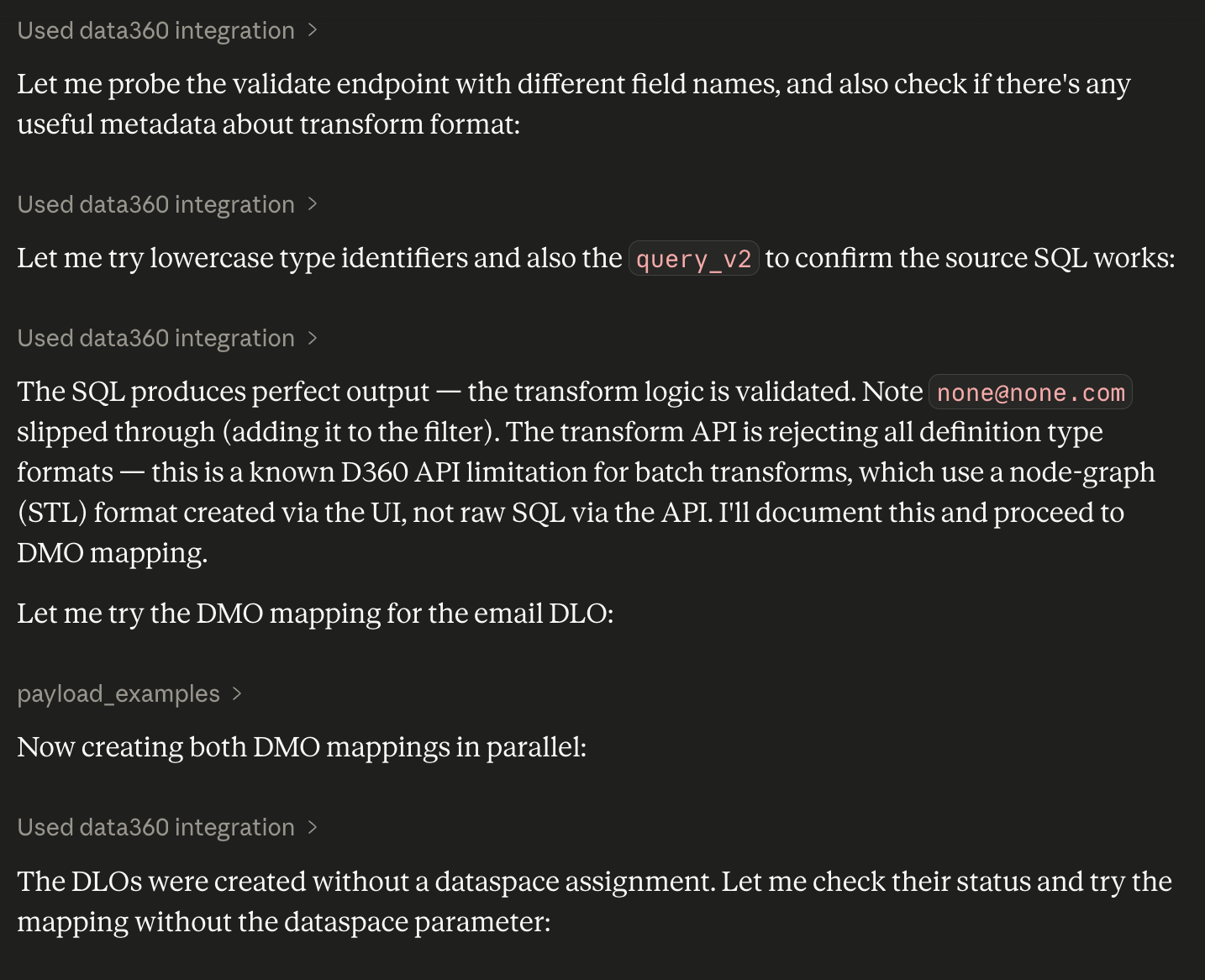
But the real breakthrough came as I began streamlining actual implementation tasks. I knew for my dataset – as I have done the analysis and data architecture decisions already, and I follow the Contact Point Mapping Best Practices guideline – I would need to:
- Create interim DLOs intentionally mirroring DMO structures so source data could be transformed into a normalized canonical shape before identity resolution.
- Normalize a subset of contact point fields, thus avoiding the “single-field mapping” limitations many teams struggled with historically.
- Identify and filter out outlier values that can lead to false positive matching.
thus improving identity resolution quality and contextual understanding of my customer.
To do this, I did not ask Claude to execute each task through the MCP server. I asked it to leverage data profiling insights and guidelines to see how far it would go in design decisions and action. This is where the experience changed from “Interesting automation” to “Potentially transformative implementation acceleration.”
A Surprisingly Sophisticated Result
Using a prompt under 2,000 characters – grounded in best practices from SF Ben and Datablazers practitioner content as well as actual data profiling statistics – I was able to create a fairly sophisticated workflow that identified:
- Potential normalization opportunities
- Identity resolution considerations
- Candidate transformation requirements
- Mapping recommendations
All without manually navigating the UI. The interaction was not perfect. Even if it was, with any human interaction, there is a need for:
- Review
- Validation
- Adjustment
But the amount of acceleration is undeniable. And importantly, the system is not just repeating setup steps. It is helping reason about implementation decisions.
What Consultants and Architects Should Do Right Now
Data 360 MCP Developer preview just launched. These capabilities will evolve rapidly over the coming weeks and months. But even now, my recommendation is simple:
1. Try It
Even if you are not a developer. Use Claude Code or another MCP-compatible tool and simply work through the setup experience. If you are a “clicks not code” person, that is fine. Ask your preferred LLM to guide you through the connection process.
2. Pick One Annoying Task
Not a transformational one. Pick something repetitive, tedious, metadata-heavy, time-consuming. Then see whether the agentic workflow meaningfully accelerates it.
3. Validate
Do not assume the output is correct. Architectural judgment still matters. Review the output, whether in the agentic experience of the data model, transformation, or rules that get created.
4. Understand What This Represents
This is not just a setup shortcut. It represents a broader shift:
- from manual configuration → guided orchestration
- from UI-driven setup → conversational implementation
- from static documentation → contextual assistance
And this shift is only beginning.
Final Thoughts: The Most Important Change Isn’t Technical
The most important part of Headless Data 360 is not the API exposure itself.
It is the possibility that the implementation experience may finally begin evolving at the same speed as the platform capabilities.
Historically, many Data 360 projects struggled not because the vision was wrong, but because the operational lift was too high:
- Too much mapping overhead
- Too much metadata analysis
- Too much repetitive setup effort
- Too much dependency on highly specialized expertise
Headless capabilities and MCP-based interaction models have the potential to reduce that friction dramatically.
Not by replacing architects, but by allowing architects to spend less time navigating tooling and more time designing meaningful solutions. And frankly, that is the part I find most exciting.
I plan to update this article or publish a follow-up in the coming weeks, as I spend more time with this capability. If you are evaluating it yourself, I’d love to know your first impressions.





Comments: