






As a Salesforce Admin, you’ve almost certainly built a validation rule at some point to enforce data quality. And as a Salesforce user, you’ve probably experienced one when trying to save a record only to be blocked by an error message because the data didn’t meet the required criteria.
Validation rules are often the go-to solution for maintaining data quality, but they can come at a cost. When overused or poorly implemented, they may frustrate users, negatively impact their perception of the system, and ultimately hinder user adoption. In this article, we’ll explore the hidden costs of validation rules and highlight alternative approaches that can deliver strong data quality while providing a more user-friendly experience.
What Is a Validation Rule?
Early in my career as a Salesforce Admin, I believed the best way to enforce data quality was through validation rules. In simple terms, a validation rule uses a formula that, when evaluated as true, triggers an error message and prevents the record from being saved.
Validation rules apply consistently across the platform, whether a record is updated in the Salesforce UI, through Salesforce Flow, or via the APIs.
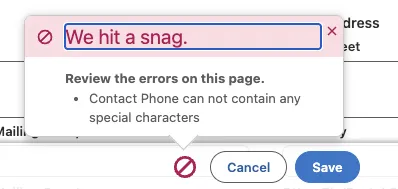
One day, Anne Dieu, a Salesforce Functional Consultant, pointed out a key flaw in my thinking. Validation rules block users from creating or updating records. While they protect data quality, they can also discourage users from keeping records up to date and, in the worst cases, from using the system at all.
You can introduce bypass logic to prevent disruptions to integrations or API-only users. However, this creates a conundrum: do you relax enforcement and risk compromising data quality, or enforce it strictly and potentially frustrate users?
Alternative 1: User Guidance / Training
Before implementing a new validation rule, consider whether better user training or guidance could achieve the same outcome. Helping users understand what information is required and at which stage can prevent issues before they occur.
This approach ensures users know what’s expected before they encounter a validation error, should you decide to introduce one as an additional safety net.
Salesforce provides several tools to support this. For example, Salesforce In-App Guidance allows you to create custom walkthroughs and prompts that guide users through processes directly within the platform. It’s offered on a freemium basis, with most customers receiving up to three walkthroughs and 500 prompts.
The Salesforce platform also enables you to add Rich Text components to Lightning Record Pages and Experience Site Pages. These can be configured to display conditionally, for example, when a specific field is blank or set to a certain value. While this doesn’t enforce a hard stop, it can proactively guide users towards resolving issues without becoming blocked.
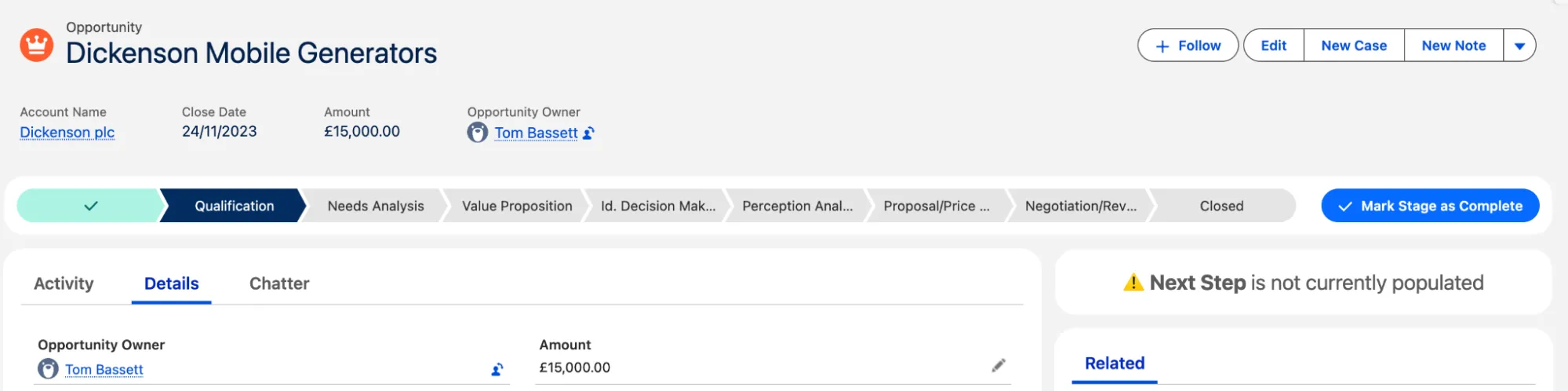
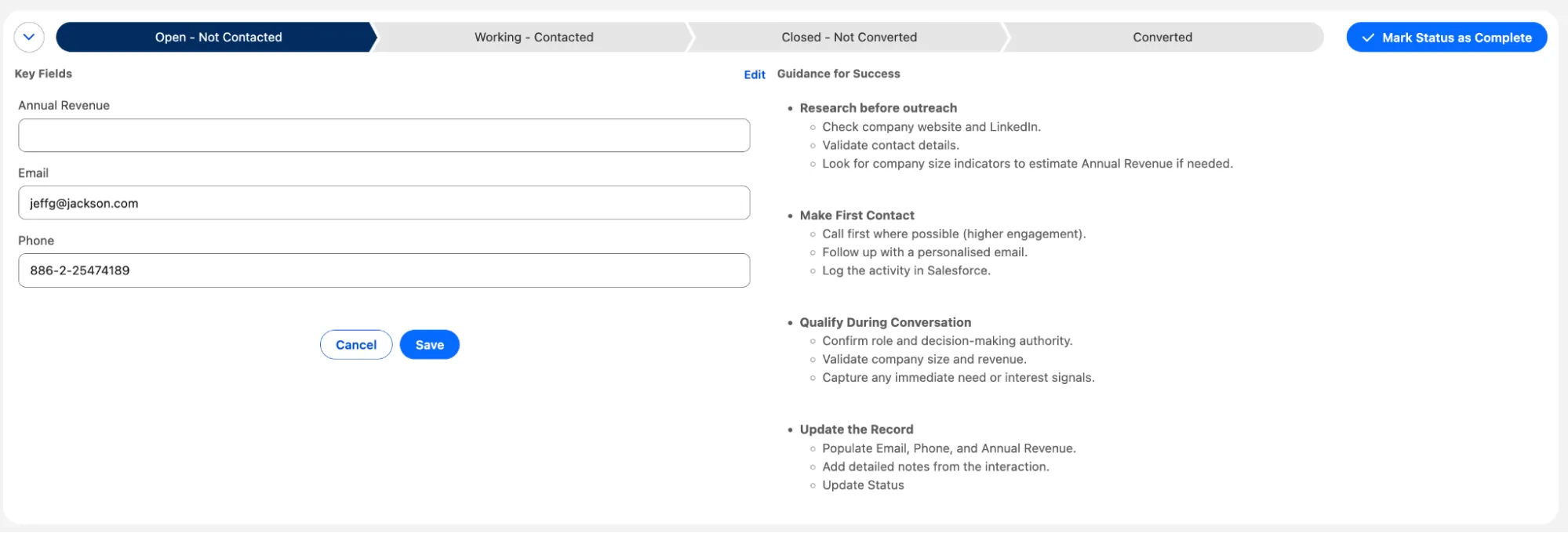
Finally, the Path component can be customized to highlight key fields and provide stage-specific guidance. Tailored to your business process, Path can support smoother record progression while reinforcing best practices, improving both data quality and user adoption.
Alternative 2: Dynamic Forms
If you’re familiar with the Lightning App Builder, you’ve likely come across Dynamic Forms. This feature allows you to move beyond traditional page layouts by placing fields directly onto Lightning Record Pages, positioning them across different tabs, and controlling visibility with rules.
At first glance, this seems like the perfect solution. However, Dynamic Forms are not supported for every object, do not work in Experience Cloud, and still lack full feature parity with traditional page layouts. It’s important to evaluate these limitations before opting for this solution.
Where Dynamic Forms are supported, they can be a powerful way to encourage better data quality without immediately resorting to validation rules.
For example, Dynamic Forms allow you to place the same field on a page more than once. This means you could technically have both a non-required and a required version of the same field. By applying visibility, you can show or hide a field based on criteria that are met. For example, you can use this to hide fields on record creation.
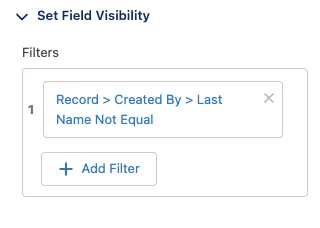
You could also apply visibility rules based on record status. For instance, hide the non-required version of a field and display the required version once a record moves to a specific stage. Used thoughtfully, this approach provides a visual cue * to users, reducing the likelihood that they attempt to save a record without completing essential information.
Alternative 3: Field Types
Salesforce provides a wide range of field types designed to suit different data needs. Choosing the correct field type can act as a form of “soft validation,” ensuring data is stored in the right format without requiring a separate validation rule.
For example, if you use a Text field, you can define a character limit or mark the field as unique. If a value exceeds the character limit or duplicates an existing record, the system will prevent the save automatically.
Similarly, an Email field only accepts values that match an email format. If a user enters something that doesn’t meet the expected pattern, Salesforce will reject the input because the field type itself enforces the structure.

By the same logic, Number and Currency fields will not accept text values. If a user attempts to enter non-numeric data, the system will throw an error.
By thoughtfully selecting the correct field type from the outset, you can enforce data quality without needing to build a validation rule at all.
Alternative 4: Picklist Fields
If you want data that is reliable and meaningful for reporting, consider using a picklist field.
By restricting a picklist, you ensure users can only select from approved options. This keeps data consistent, structured, and reportable.
Additionally, Field dependencies allow you to control which picklist values are available based on the value of another field. For example, if Stage = Closed Won, you can configure the system to display only relevant Closure Reasons. This prevents users from selecting a “Closed Lost” reason on a Closed Won Opportunity, helping data integrity and reporting.
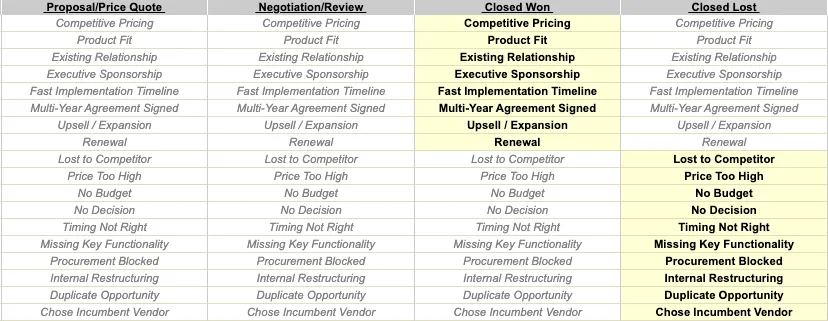
Used effectively, picklists and dependencies provide guardrails that guide users toward correct data entry without needing to resort to a validation rule.
Alternative 5: Review Business Process
If you layer Salesforce on top of a flawed business process, no amount of platform features or automation will fix the process; you’ll simply end up with a more efficient bad process.
Before introducing new functionality, take the time to review your current (“as-is”) processes and define the desired (“to-be”) future state. This creates an opportunity to challenge assumptions and identify data requirements that may no longer serve a meaningful purpose.
You may discover certain data points are being captured because it’s always been done that way, rather than because they drive value. Identifying and removing unnecessary requirements reduces friction before you even consider enforcing anything in the system.
The 5 Whys is a method to identify the root cause of a problem by asking “Why?” repeatedly (up to five times) until you reach the underlying issue. The idea is that the first answer often points to a symptom rather than the real cause.
Using the 5 Whys to Solve a Customer Onboarding Delay
Problem Statement: Customer onboarding is taking 10 days longer than the target timeline.
- WHY is the onboarding taking longer than expected?
- Because the account verification step is delayed.
- WHY is the account verification step delayed?
- Because the verification team is waiting for customer documents that are often incomplete.
- WHY are the customer documents incomplete?
- Because the instructions on the onboarding portal are unclear.
- WHY are the instructions unclear?
- Because the onboarding portal hasn’t been updated in over a year.
- WHY hasn’t the portal been updated?
- Because there is no dedicated resource managing the onboarding process.
Where data quality is critical for reports, compliance, or operations, consider whether there are less intrusive alternatives available. The goal should be to protect the business without discouraging users from engaging with the system altogether.
BONUS: Before-Save Record Triggered Flow
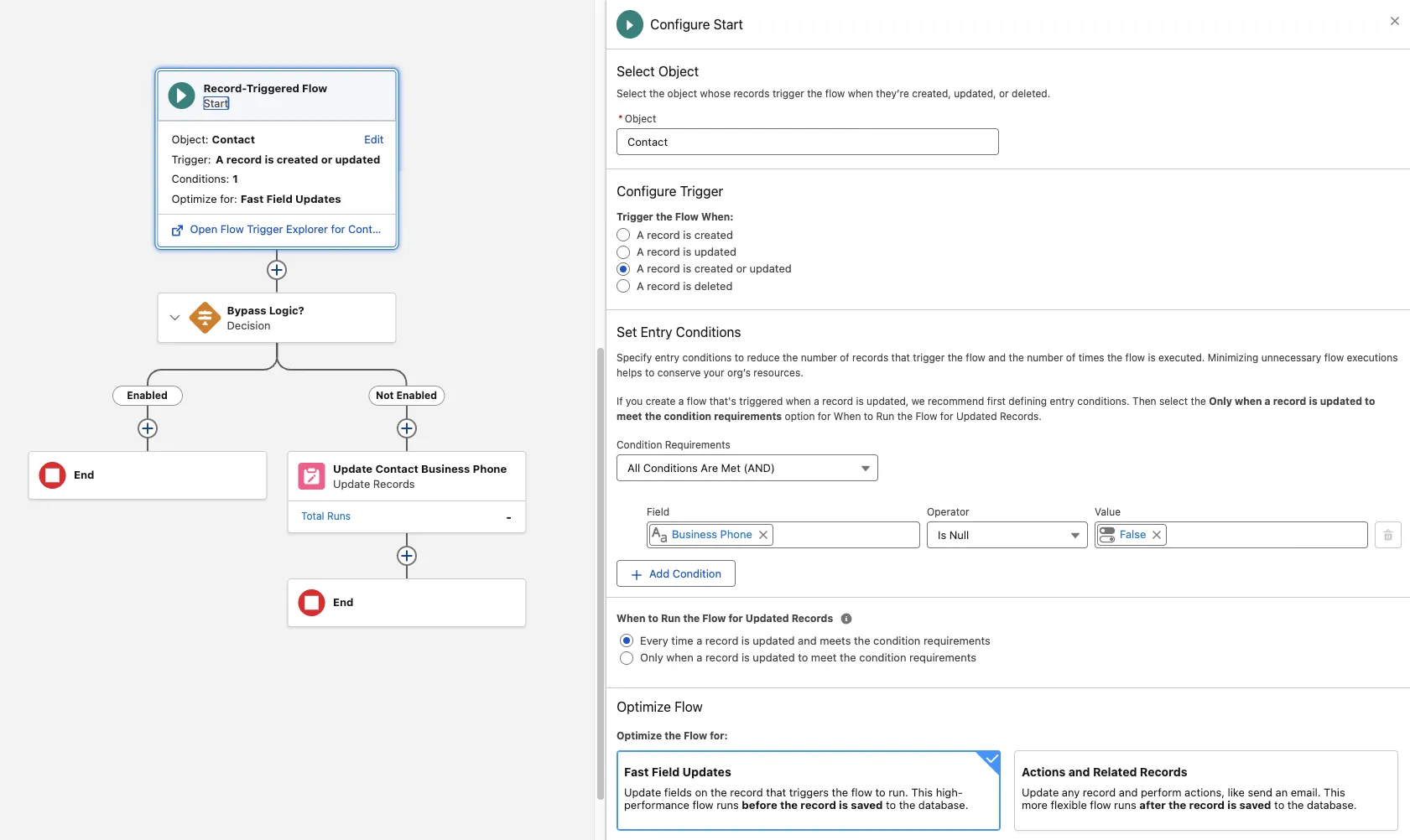
If you introduce a Before-Save Record-Triggered Flow, you can automatically clean or standardise data before it’s committed.
A Before-Save flow runs prior to the record being saved, making it both fast and efficient for field updates. Instead of blocking users with an error message, you can correct the data automatically behind the scenes.
For example, you could strip out unwanted characters from a Phone field or enforce a consistent naming convention for Opportunity Names. By applying this approach, user input is adjusted automatically without requiring manual intervention or displaying an error.
Used thoughtfully, Before-Save Flows can improve data consistency while preserving a smoother user experience.
Summary
Within Salesforce, you should carefully consider the impact before introducing a validation rule due to the “cost” to the user experience.
Validation rules are still appropriate when user-friendly alternatives have been ruled out. However, each additional rule adds friction. Over time, this can accumulate and lead to user frustration, reduced adoption, and, in cases, users reverting to managing information in spreadsheets where they have more freedom.
Striking the right balance between data quality and usability is key to maintaining compliance, reporting, and user engagement.
Other Resources
- Validation Rules (Salesforce Help)
- Formulas and Validations (Trailhead)
- Validation Rules (Trailhead)
- ValidationRule (Salesforce Developers)





Comments: