

Waterfall segmentation is a rule-based, sequential method in which entities are assigned to segments one step at a time in a predefined order. Each rule filters the remaining population, and once an entity meets a rule, it is placed into that segment and removed from further steps. This results in clear, mutually exclusive, and fully exhaustive segments.
In this article, we’ll explore the concept of Waterfall Segments, detailing how they function, their importance for targeted marketing, and the process for implementation across Salesforce Marketing Cloud Engagement (MCE) and Salesforce Data 360 (formerly Data Cloud).
Why Waterfall Segmentation Matters
Waterfall segmentation provides a layered approach to audience targeting, making it easier to:
- Tailor marketing efforts: Focus on specific customer behaviors and attributes to create messages that resonate with each segment.
- Personalize customer experiences: Deliver content and offers that reflect the unique needs and interests of each audience group.
- Optimize outreach strategies: Improve campaign efficiency by allocating resources to the most relevant and engaged customers.
- Minimize retention: Reduce message volume by delivering fewer but more targeted communications.
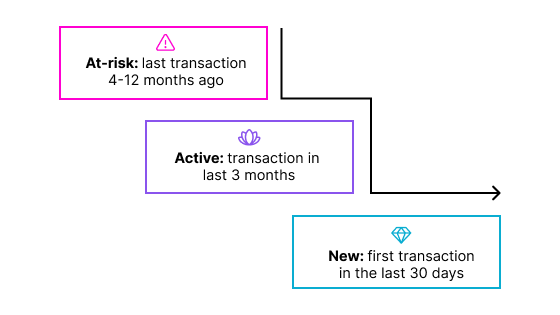
For example, a customer lifecycle waterfall might classify customers in a specific order based on recency, monetary value, or engagement.
Waterfall in MCE (Marketing Cloud Engagement)
Let’s start by stating that there is no built-in functionality for creating waterfall segments in Marketing Cloud Engagement. However, there are workarounds. More mature, tech-savvy marketing teams typically use waterfall segmentation, since implementing it in MCE requires SQL knowledge.
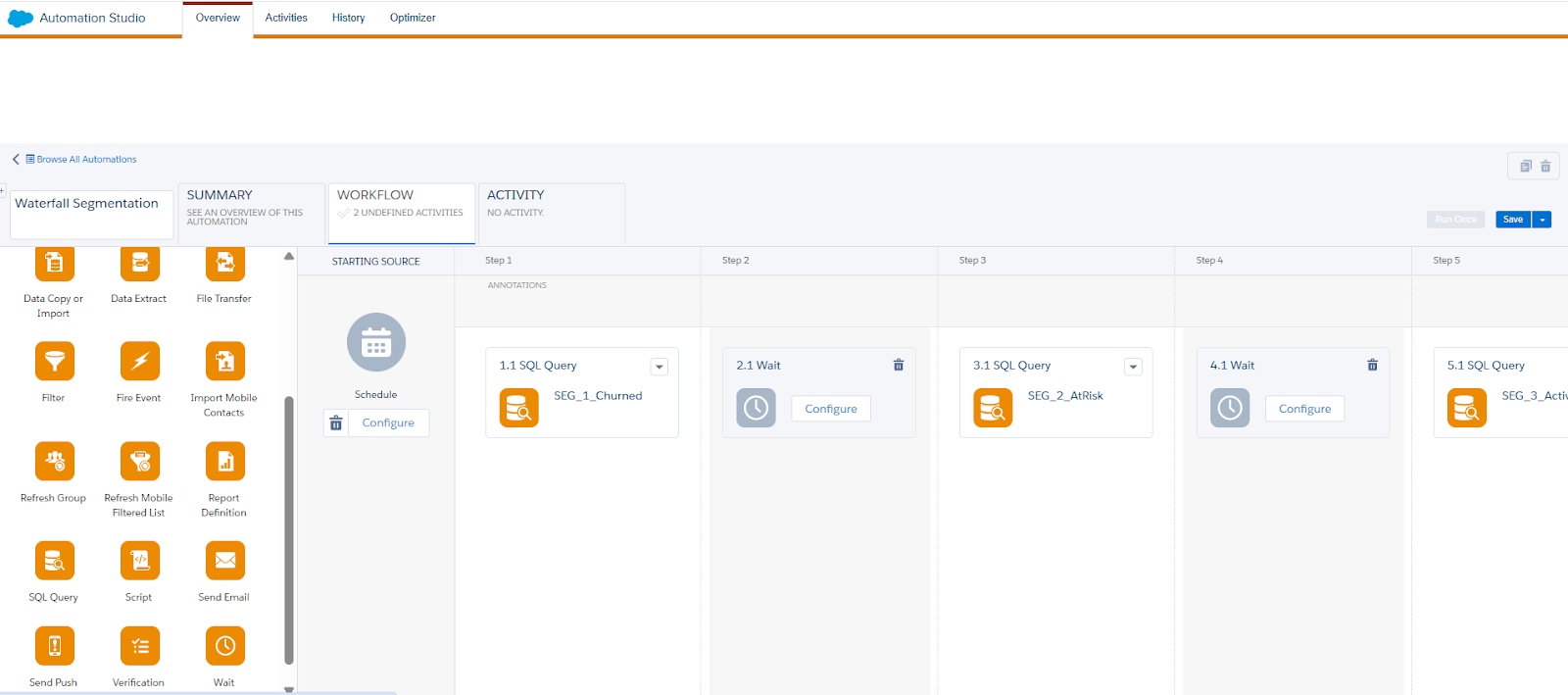
To create a waterfall campaign, begin by identifying your initial data extension (DE). This could be a prepared target, for example, one with geographic filters already applied. You then need to create multiple queries that reference this target DE as the source.
It’s best to run a test on a smaller DE to estimate processing time and validate targeting accuracy before applying it to your production segments.
To orchestrate the waterfall process, you can use Automation Studio, defining each step of the flow with appropriate wait times and error notifications.
Managing Query Performance and Timeouts
Because queries in MCE time out after 30 minutes, performance considerations are essential, especially with large datasets. The following practices can help mitigate timeouts:
- Primary keys: Use primary keys as unique identifiers for your datasets.
- Field length and data type: Limit field sizes and retrieve only the data types you need.
- Data quantity and retention: Reduce the volume of data queried and stored in DEs whenever possible.
- SARGable queries: Use searchable arguments (operators that leverage indexes) to improve performance.
- Concurrent activities: Avoid situations where multiple processes read or write to the same dataset simultaneously.
- Data staging: Break large, multi-join queries into smaller, staged queries for better performance.
- Properly segmented DEs: Ensure your initial DE is already filtered to reduce unnecessary processing.
How Does Waterfall Segmentation Work in Salesforce Data 360?
Salesforce Data 360’s waterfall segmentation helps eliminate common marketing inefficiencies by supporting more accurate audience targeting. Since each customer is placed into just one segment and receives a single offer, communications stay relevant, and customers aren’t overwhelmed.
This approach makes marketing spend more efficient and gives teams better control over message delivery, resulting in stronger overall campaign performance.
To get started with waterfall segmentation in Data 360, follow these steps:
- Select the Waterfall Segment type: When creating a new segment, choose Waterfall Segment to establish the cascading logic.
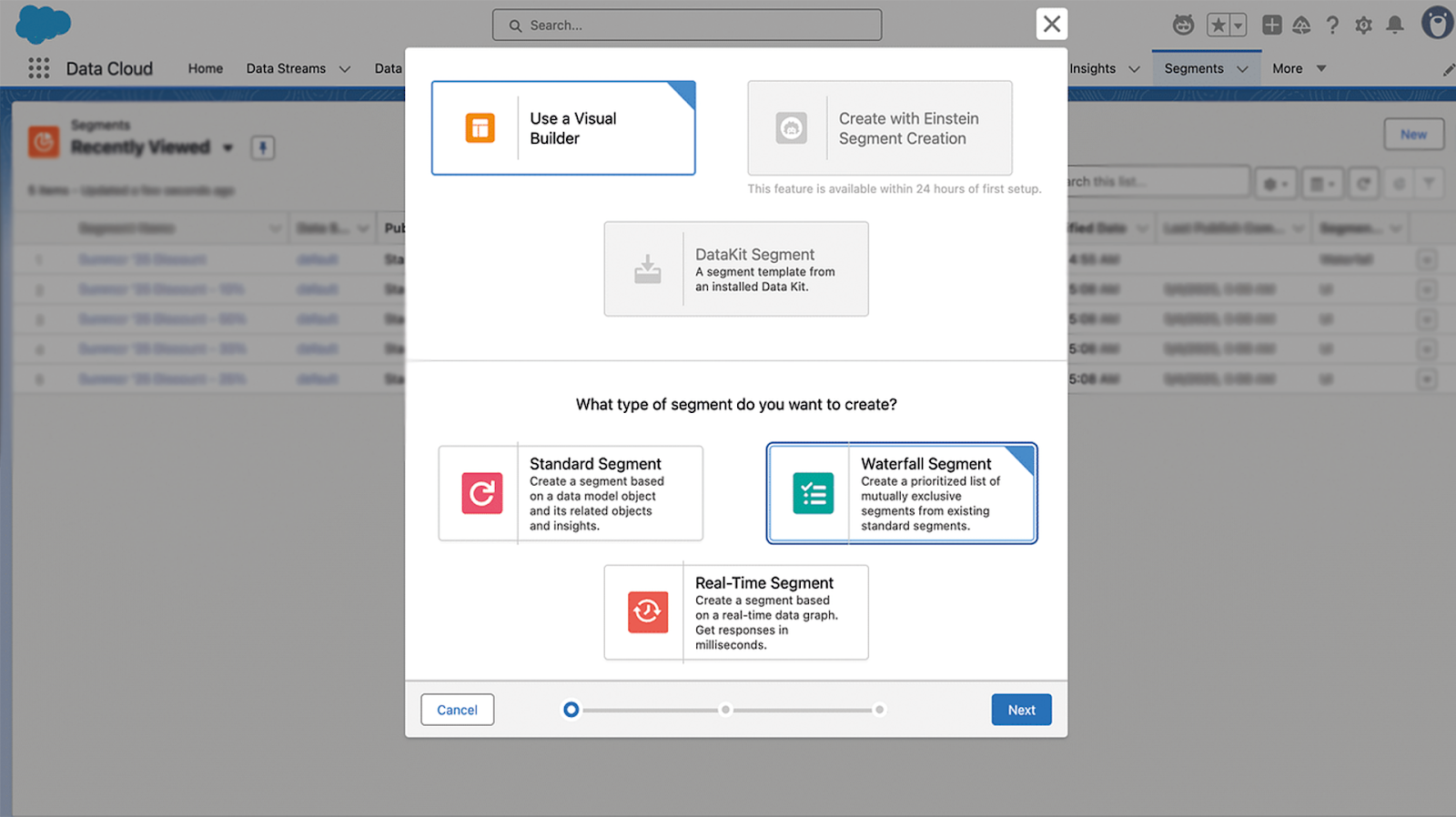
- Specify settings: Define the data space, name the segment, and select the entity from which it will be derived.
- Publish type and schedule: Set the publish type and activation schedule.
- Create and arrange segments: Select existing segments in Data 360, then drag and drop them onto the waterfall canvas in the desired sequence.
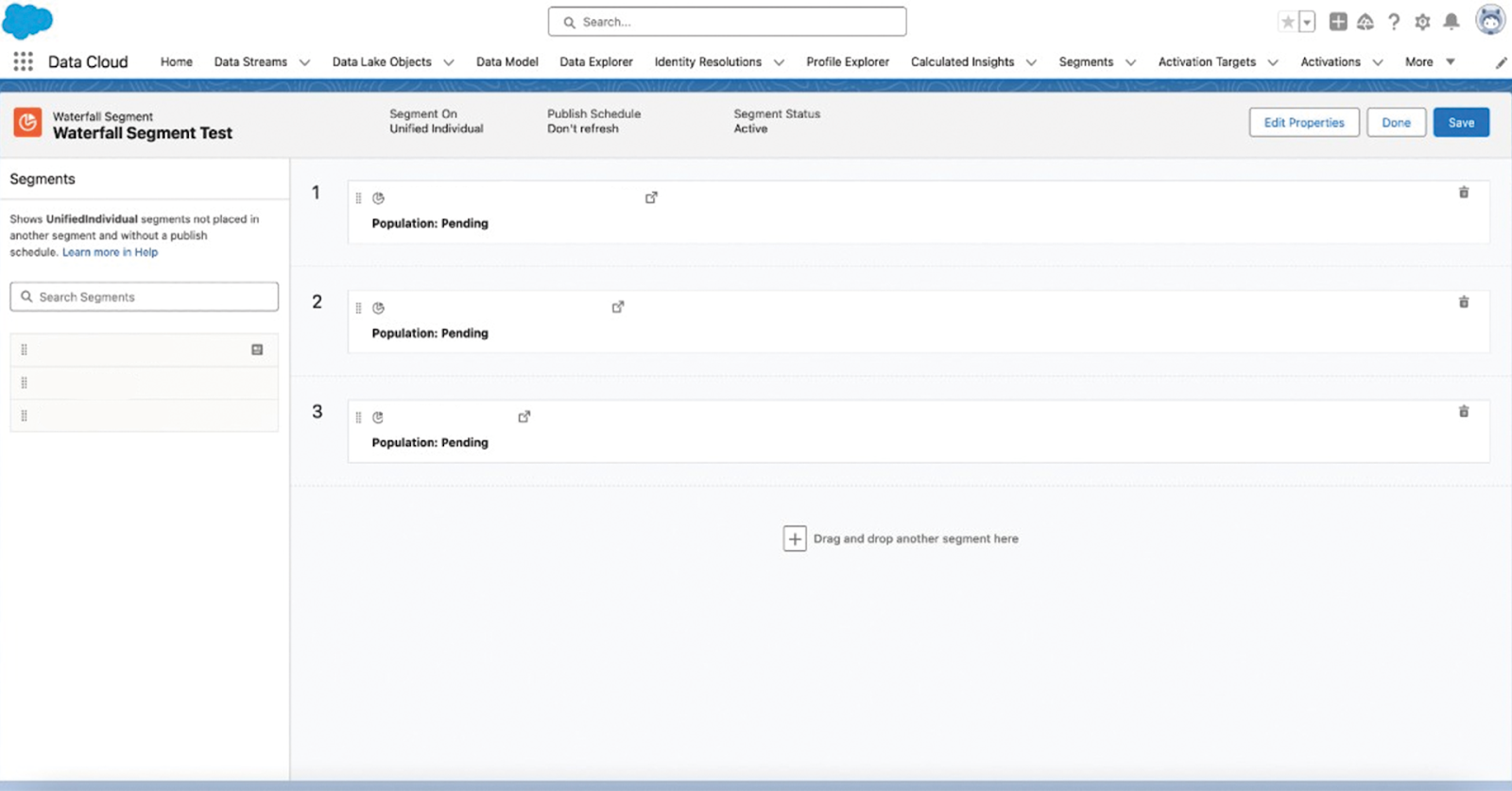
Consider this example, where three segments within Salesforce Data Cloud are arranged as follows:
- Segment 1: All unified individuals who made an online purchase of shoes for over 300 EUR in the past year.
- Segment 2: All unified individuals who made a purchase of shoes over 100 EUR (online or in-store) in the past year.
- Segment 3: All unified individuals who opened X emails in the past month.
In this hierarchy, Segment 2 excludes those already captured by Segment 1, and Segment 3 excludes individuals in Segments 1 and 2. This produces precise, highly relevant segments that enhance campaign performance.
Waterfall Segments Activated as a Single Data Extension
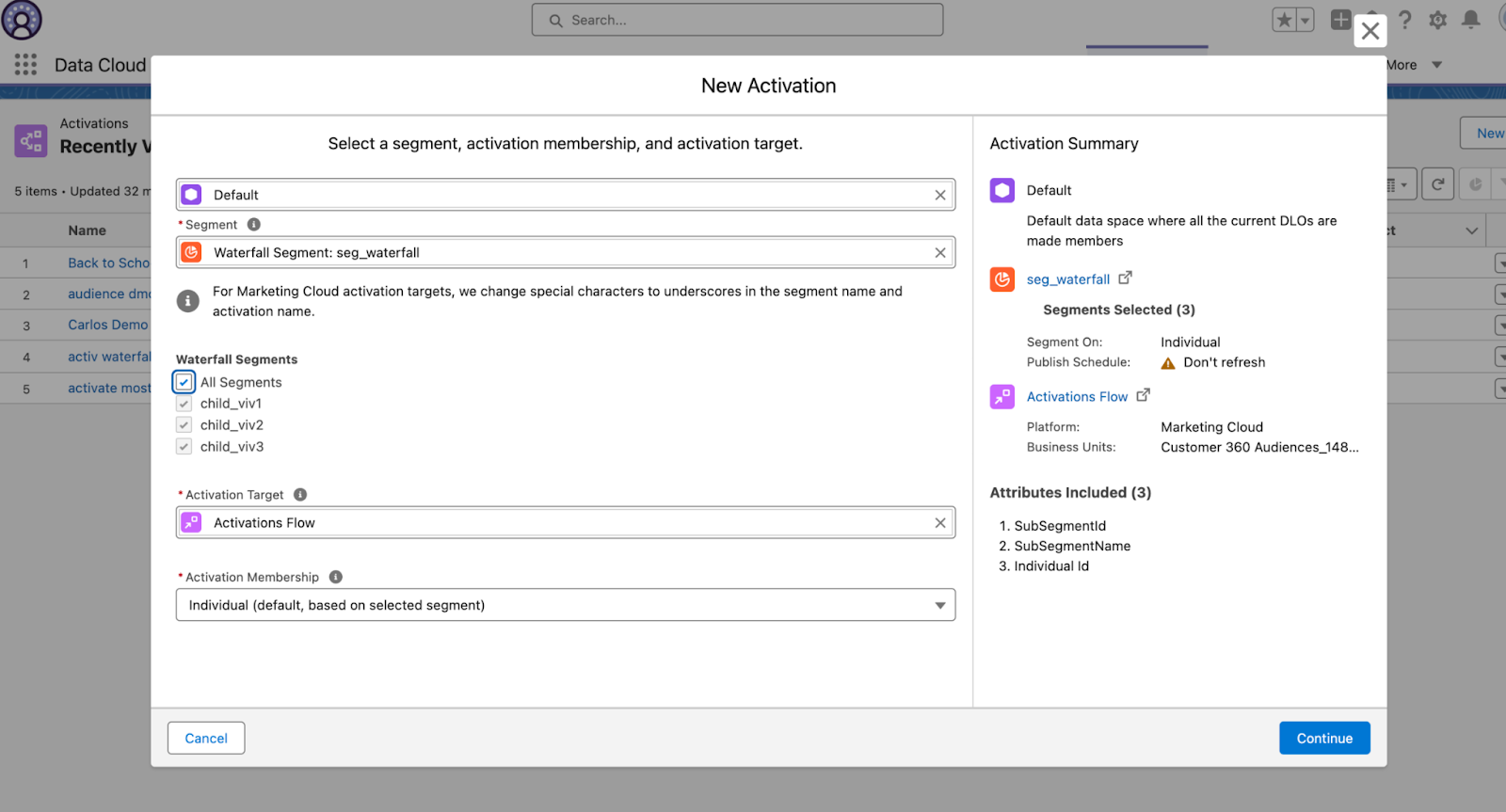
With Data Cloud, marketers can activate either individual subsegments within a waterfall segment or all subsegments at once. By activating the entire waterfall into a single data extension, teams can streamline their workflow, eliminating the need for multiple activations or post-activation stitching.
All users enter the same journey but are routed down different paths based on their assigned subsegment, enabling more precise targeting and improving both the effectiveness and efficiency of marketing campaigns.
The Waterfall Segments activated as a single data extension feature consolidates all subsegments into a single, unified destination for use in a single journey. Marketers can dynamically combine segments. For example, your waterfall segment contains subsegments: high-value customers, repeat customers, and window shoppers. You activate all three segments to the target by selecting all segments.
Later, when you add subsegments, active subscribers, and one-time purchases to the waterfall segment, they’re automatically included for activation in the next publish.
However, if you activate subsegments for high-value customers, repeat customers, and window shoppers individually, subsegments that you add later to the waterfall aren’t included automatically in the next publish. Instead, you must manually select these subsegments for activation.
Regardless of the selection method, destination, and membership settings remain consistent to ensure a stable and reliable activation process. After building the waterfall segment, it can be activated in Marketing Cloud Engagement.
Final Thoughts
Waterfall segmentation is a great technique to further advance communication with your customers without making it seem like you’re doing too much. It looks like this long-awaited functionality has become a reality with the help of Data Cloud, as it makes sense to do this on that platform and activate it later in Marketing Cloud Engagement.
However, if you’re an experienced marketer, you can also try to leverage it in MCE; it’s all in your hands. We hope that this article gave you inspiration to try out more advanced segmentation techniques that can be very helpful for your business.