


The Spring ‘26 release notes are fresh out of the oven. As always, Salesforce Ben is here to help you spot the updates that will make the biggest difference in marketers’ everyday work.
Compared to previous releases, the updates this time are more evenly spread across the products under the “Marketing Cloud Next” umbrella. So far, Salesforce seems to be living up to its promise of supporting users of older Marketing Cloud products (ExactTarget, Pardot, Evergage, and Datorama). Rather than abandoning them, Salesforce has introduced enhancements aimed at improving compatibility with the Core Platform.
The direction is clear: Salesforce wants a smooth transition. Instead of forcing customers into costly, high-risk migration projects, the goal is to enable an incremental switch to Marketing Cloud Growth or Advanced – one journey and campaign at a time.
Marketing Cloud Next
The Swedes have a saying: a dear child has many names. In true Salesforce fashion, Marketing Cloud Next picked up yet another moniker late last year – Agentforce Marketing. Beyond the name, though, agentic AI plays a lesser role in the Spring ‘26 marketing release.
Instead, what stands out is Salesforce tackling several key gaps compared to older Marketing Cloud products. Personally, I’m glad they listened to the community and chose this path. These updates make Marketing Cloud Next a stronger option for two-way communication and personalized engagement, while still aligning with the long-term vision of empowering the “agentic marketer.”
1. Agentforce Campaign Experience
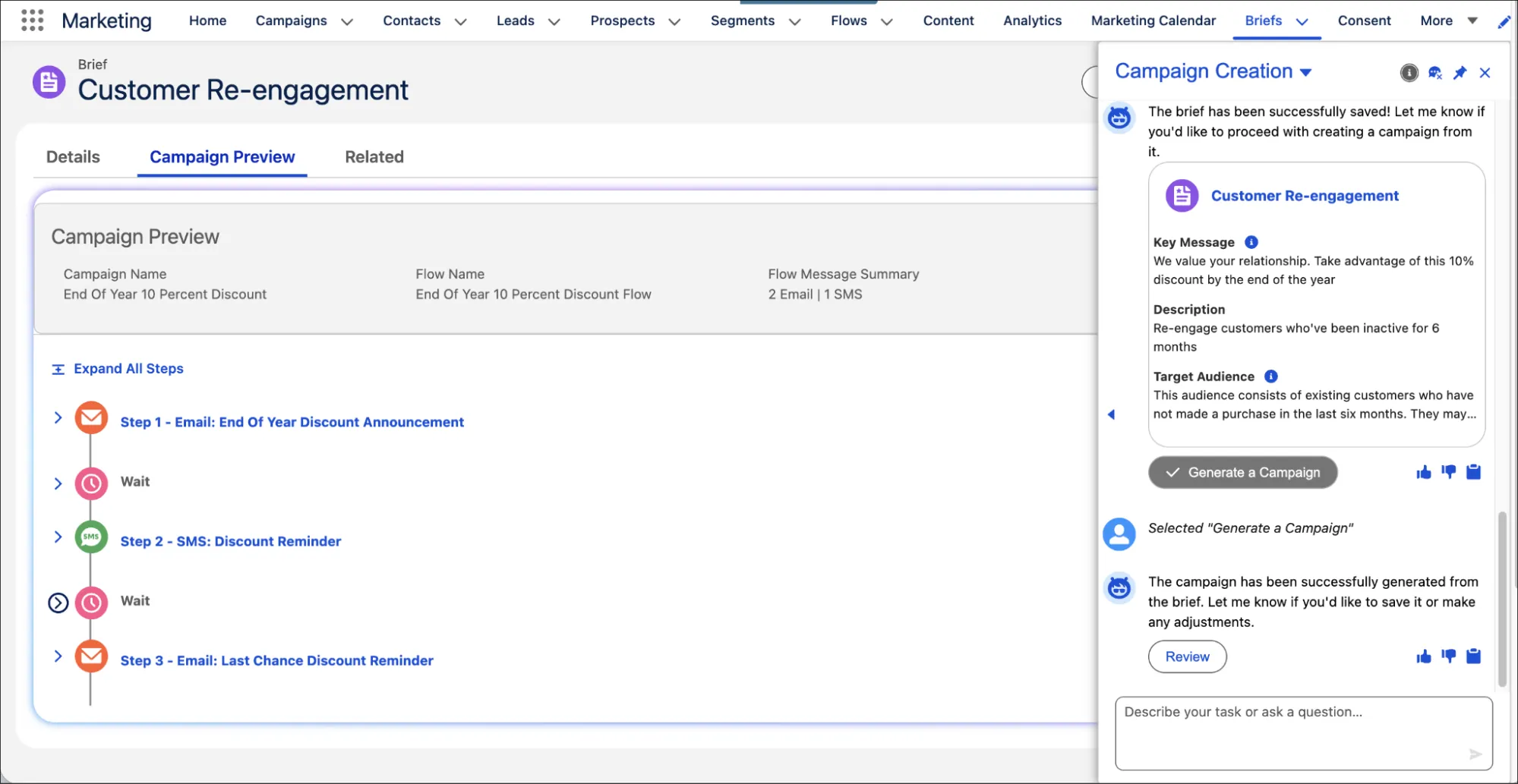
Agentforce Campaign Experience makes up the agentic AI part of this release. With the Spring ‘26 release, marketers can draft and preview campaign briefs directly in an Agentforce conversation. The brief sits alongside the campaign preview, allowing marketers to adjust it as they go. This makes the agentic campaign creation experience smoother and more iterative.
Beyond campaign creation, Spring ‘26 introduces two-way, conversational email and SMS. Campaigns can now engage customers in responsive, threaded conversations, capturing high-intent replies, resolving queries, and delivering personalized support within Salesforce. Flow Builder enhancements make it easy to convert existing one-way campaigns into interactive ones.
Finally, campaign briefs can now be grounded in strategic documents and brand identity. Upload PDFs or Word files to Salesforce Files and reference them in your prompt. The agent processes the content, generates a brief, and links back to the source. Add brand tone and key details, such as goals, KPIs, and guardrails, to ensure your campaigns stay aligned with business objectives.
2. Business Units
One of the most anticipated features in this release is the ability to partition data and marketing assets into several business units. Up until now, the lack of business units has been a blocker for many enterprise-level customers hoping to adopt Marketing Cloud Next. The new business unit feature takes a similar approach as Marketing Cloud Account Engagement (Pardot) does.
Each business unit in Marketing Cloud Next is connected to a corresponding data space and provides its own isolated view for campaigns, audiences, and reporting. Organizations can create up to 50 business units per org, assign users to one or more units, and scope channels like Email, SMS, WhatsApp, and Mobile App Messaging to a single or all units. Einstein features such as Send Time Optimization and Engagement Scoring are now business-unit aware, and Agentforce can operate within a defined unit for campaign creation.
3. Content Creation Enhancements
Most marketers spend the majority of their time creating content. This is now more efficient thanks to practical enhancements like extensions (not to be confused with data extensions), reusable content blocks, and preconfigured templates.
- Content Creation Enhancements: Speed up content development with tools like extensions, preconfigured templates, and reusable content blocks to reduce repetitive work and maintain consistency.
- Email Personalization and Template Control: Build richer, more dynamic emails using advanced editing, PDF attachments, and pro-code options like Handlebars scripting, while maintaining governance through template locking and sharing.
- Web Content Personalization: Deliver a tailored web experience by adding dynamic content to landing pages, simplifying forms with progressive profiling, and creating branded preference pages for consistent engagement.
4. Multi-Channel Support
Extend your marketing reach with improved messaging across mobile apps, SMS, email, and WhatsApp. Engage users with targeted in-app messages, track SMS performance using UTM links, and enable two-way email interactions with better deliverability. For WhatsApp, use interactive templates, optimize delivery, and offer payment options in supported regions.
5. Improved Reporting
- Mobile App Metrics
- Monitor in-app messaging and push notification performance with unified dashboards.
- Filter metrics by platform (iOS or Android) and track dismissals, delivery rates, and CTA clicks.
- Delivery Metrics
- Identify low-performing SMS, WhatsApp, and Mobile Push campaigns using the Low-Performing Campaign view.
- Apply delivery status filters to uncover reasons for unsuccessful deliveries.
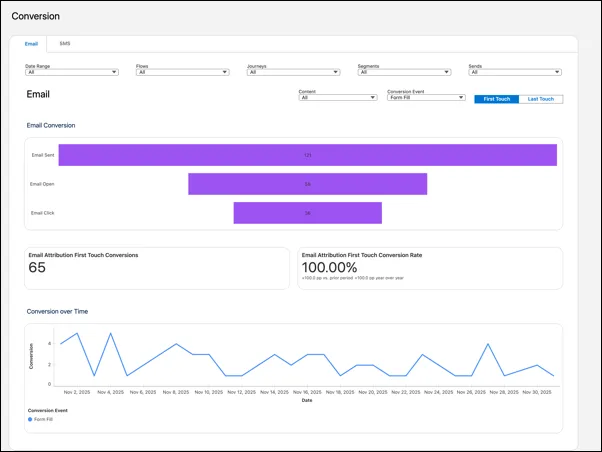
- Conversion Analytics Dashboard
- Measure campaign outcomes like orders or form fills over a 30-day conversion window.
- Use First Touch and Last Touch attribution models to identify which messages convert most effectively.
6. Email Testing in a Sandbox
If you need to test campaign logic without sending emails to real customers, enable the Blackhole feature in your full or partial sandbox. When active, Blackhole automatically discards all outbound emails, ensuring they never reach external recipients. You can also configure exceptions if certain domains need to receive test messages.
Marketing Cloud Engagement
In this release, Marketing Cloud Engagement has received several welcome performance and security enhancements. These updates not only strengthen data protection and reliability but also introduce new capabilities to improve campaign execution and reporting. In short, these updates help you improve reliability, strengthen security, and gain better insights.
7. Marketing Cloud Next for Engagement
- Email Template Control
- Create lockable email templates for use by platform users, ensuring consistency and governance.
- Enable Distributed Marketing and Alerts for non-marketing users after admin setup and component configuration.
- Improved Campaign Record
- Send Marketing Cloud Engagement emails directly from flows in the Marketing App.
- Access unified reporting on campaign records with Engagement email send details in the Next Steps section and a consolidated Performance tab.
- Data Compatibility Improvements
- Unify legacy Marketing Cloud Engagement data with Marketing Cloud Next for compatibility with newer features like Marketing Performance reports.
- Update data configurations to ensure smooth integration for accounts using older data models.
8. Advanced Multi-Channel Messaging
- Call-to-Action URLs: Add clear next steps in WhatsApp messages by defining button text and linking to specific URLs.
- WhatsApp Catalog Messages: Showcase products using single or multi-product catalog templates in WhatsApp, supporting up to 30 products organized in 10 sections.
- Marketing Messages Lite (MM Lite): Improve WhatsApp marketing template delivery rates by up to 5% with Meta-provided optimizations.
- VCF Support in Content Builder: Upload Virtual Contact File (VCF) cards in Content Builder and send them as MMS attachments via MobileConnect and Journey Builder.
- Bot-Click Detection in SMS: Get reliable SMS engagement metrics by filtering out bot clicks in SMS Link Clicks reports and Journey Builder activities.
- Einstein Metrics Guard: Identify non-human opens and clicks by scoring bot-driven engagement using Data 360, to get a clearer view of true campaign performance.
Marketing Cloud Account Engagement
The Spring ‘26 release brings Account Engagement closer to a true multi-channel experience while improving visibility into campaign performance. Marketers can now send approved email, SMS, and WhatsApp content through connected flows, ensuring consistent messaging across platforms. Tableau Next visualizations and Data 360 enhancements help teams align faster and maintain compliance.
9. Consent and Reporting Enhancements
- Consent Matching with Marketing Cloud Next
- Align overall email consent between Account Engagement prospects and Marketing Cloud Next records.
- Enable Consent Matching in Account Engagement settings to track changes across both platforms.
- Unified Engagement History Dashboards
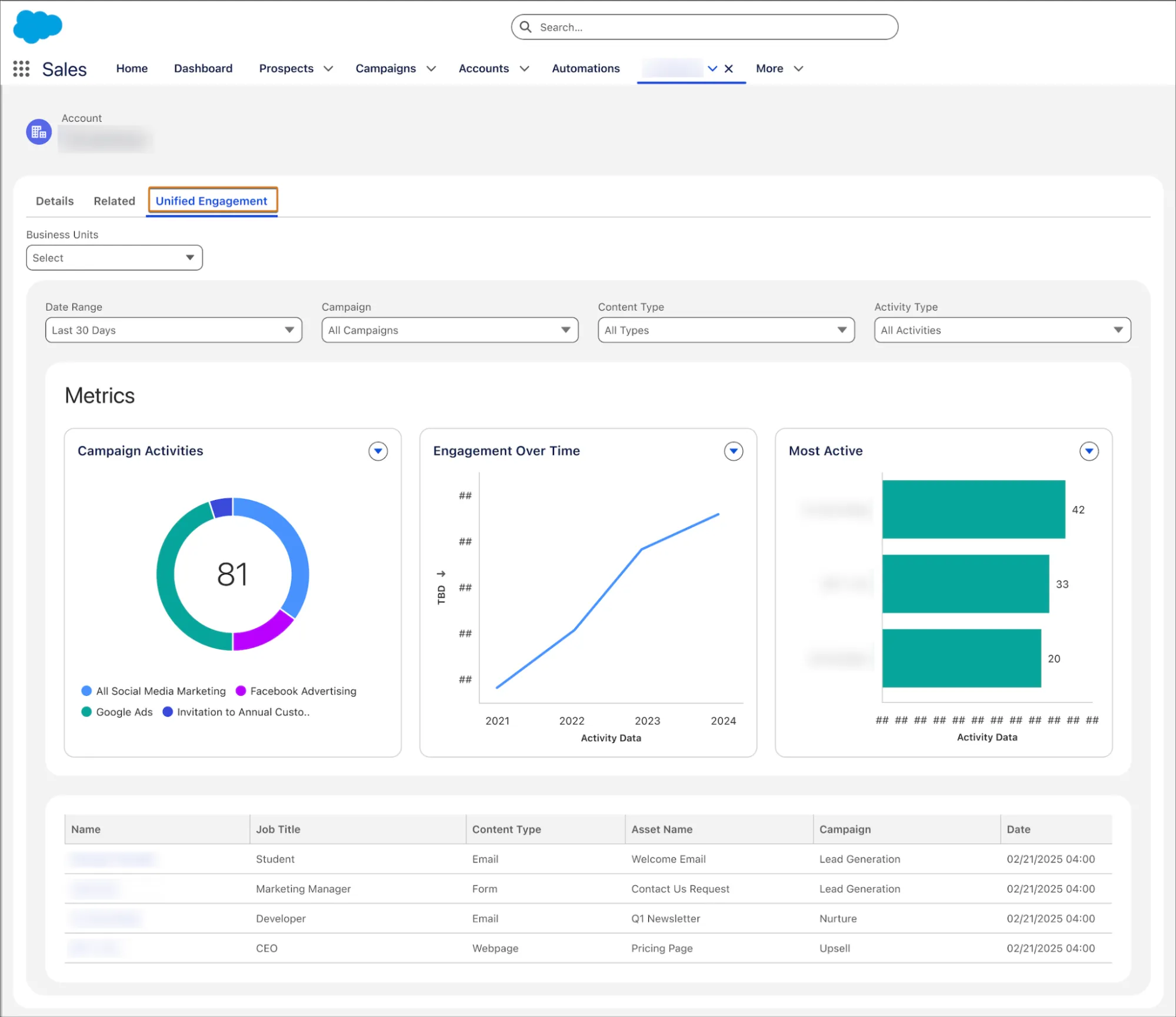
- Visualize interactions for leads, contacts, accounts, and person accounts using Unified Engagement History Dashboards.
- Access actionable insights by pulling engagement data directly from Tableau Next into Salesforce CRM.
Read More
- Match Overall Email Marketing Consent with Marketing Cloud Next
- Track Engagement History with Tableau Next
10. Distributed Marketing and Multi-Channel Support
- Email Templates for Non-Marketing Users
- Use Distributed Marketing and Alerts to provide Salesforce Platform users with approved email templates, similar to how Sales Emails and Alerts work.
- Enable the feature and add the required Lightning components to record pages for setup.
- SMS and WhatsApp Messages in Engagement Studio
- Add SMS and WhatsApp steps to Engagement Studio programs to reach prospects on their preferred channels.
- Trigger messages through On-Demand Flows built in Flow Builder using the Send to Flows action.
Note: SMS and WhatsApp send consume add-on credits.
Summary
As you can see, there’s plenty of goodies for Salesforce Marketers in this release: agentic campaign creation, multi-channel support, reporting improvements, performance enhancements, and so on.
As always, the devil is in the details. My advice is to read the release notes carefully for the technical and licensing requirements. Some of the features may require paid add-ons or even a contract upgrade to a “Plus” SKU (i.e. Marketing Cloud Engagement+ or Account Engagement+).
Which update are you most excited about? Let us know in the comments.
Read More
- Sales Cloud: Top 8 Salesforce Spring ’26 Features
- 9 Features for Salesforce Developers in the Spring ’26 Release
- 10 New Salesforce Flow Features in Spring ‘26
- Service Cloud: Top 10 Salesforce Spring ’26 Features
- Top 11 Salesforce Spring ’26 Features for Admins
