

Salesforce permissions are powerful, but that power can be dangerous when misconfigurations go unnoticed. Over the years, Salesforce has tightened controls, such as the Winter ’20 release, which required explicit sharing rules for guest users to access records. Yet some legacy objects (e.g., Document, Solution, Case, Pricebook2, and more) still don’t always follow modern security requirements and can be exposed without explicit sharing rules.
Guest users, portals, and public sites can accidentally expose records if sharing rules and object permissions aren’t aligned. Even with tools like the Guest User Access Report, admins may not be aware of every relationship between parent and child objects, which can result in “hidden” access paths to sensitive data being leaked to the public.
Example: A sharing rule on a parent object (Case) may expose related child records (Account), but these linked records don’t appear in the Guest User Access Report – making it difficult to spot leaks.
And permissions risks aren’t limited to guest users. Self-registration workflows in Salesforce sites sometimes map new sign-ups to internal roles or permission sets. If registration forms or flows are weakly protected, attackers can create accounts, escalate privileges, or pivot deeper into your org.
How Hackers Exploit Permission Misconfigurations
Misconfigured permissions don’t just make administration harder; they can also open the door for attackers. Once a public site or portal is enabled, anyone on the internet can probe its edges looking for gaps. Here are some of the most common ways attackers take advantage of weak configurations…
A typical attack begins with reconnaissance – a threat actor identifies a public site, Experience Cloud portal, or API endpoint linked to the target environment. Using automated scanners or intercept proxies, they enumerate pages, metadata, and legacy endpoints to see which objects and records might be accessible without authentication. From there, they test for overly permissive guest-user access, exposed self-registration flows, or API calls that return data linked through parent/child relationships. This mapping allows them to understand where sensitive information could be extracted or used as a foothold for further access.
Auditing Legacy Endpoints and Registration Flows
Older Salesforce features such as /s/CommunitiesSelfReg, “self-registration” forms, and classic login components often remain enabled long after a site has launched. If those flows are mapped to powerful roles or permission sets, a malicious user can create an account and gain more access than intended. A list of common legacy sites is listed below:
- /s/BandwidthExceeded
- /s/CommunitiesLanding
- /s/CommunitiesLogin
- /s/CommunitiesSelfReg
- /s/CommunitiesSelfRegConfirm
- /s/CommunitiesTemplate
- /s/Exception
- /s/FileNotFound
- /s/ForgotPassword
- /s/ForgotPasswordConfirm
- /s/InMaintenance
- /s/MicrobatchSelfReg
- /s/SiteLogin
- /s/SiteRegister
- /s/SiteRegisterConfirm
- /s/UnderConstruction
To reduce exposure, admins should:
- Audit and disable unused registration and login pages.
- Validate that Visualforce page access is strictly limited.
- Confirm that no legacy paths are mapped to high-privilege roles or permission sets.
Proactive clean-up of these features ensures attackers cannot exploit outdated entry points to gain unintended access.
Leveraging Platform APIs in Salesforce
Salesforce is designed with an API-first architecture, meaning data is accessible not only through the user interface but also via background service calls. This design enables powerful integrations, but it can also unintentionally expose sensitive data if misconfigurations exist.
Example: Aura Framework Data Exposure
Salesforce’s Aura framework provides a way to surface records on public-facing pages. When a public page calls a data provider, it can trigger service calls behind the scenes. For instance, consider this request:
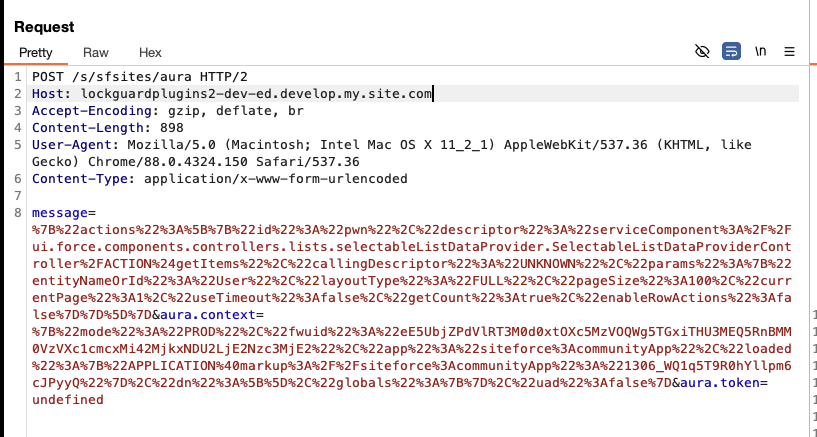
We are making a POST request to:

This endpoint (/s/sfsites/aura/) allows default and built-in Salesforce methods to be called directly. The request payload is URL encoded, but when decoded, it reveals the following structure:

- The payload is invoking the getItems action.
- It queries records from the User object using Salesforce’s internal data access methods.
An attacker could easily modify this request, replacing User with another object name.
Exploitation Through Object Substitution
When the object name was changed to Document, the server returned all available records from that object. This occurred because of a misconfigured access setting, highlighting how exposed APIs can leak sensitive data.
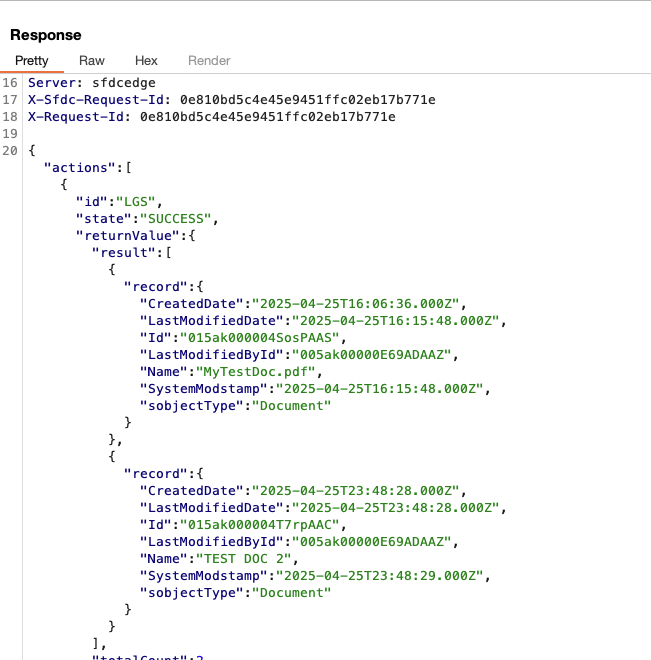
The server’s response confirmed that Document records were retrievable without proper restrictions, showing a serious gap in access control.
Discrepancies Between Reports and Reality
Salesforce’s built-in Guest User Sharing Rule Access Report is meant to help admins identify exposed objects. However, it does not always tell the full story. In our example, the report lists access to:
- User
- AccountBrand
- Case
- Solution
- Document
- Pricebook2
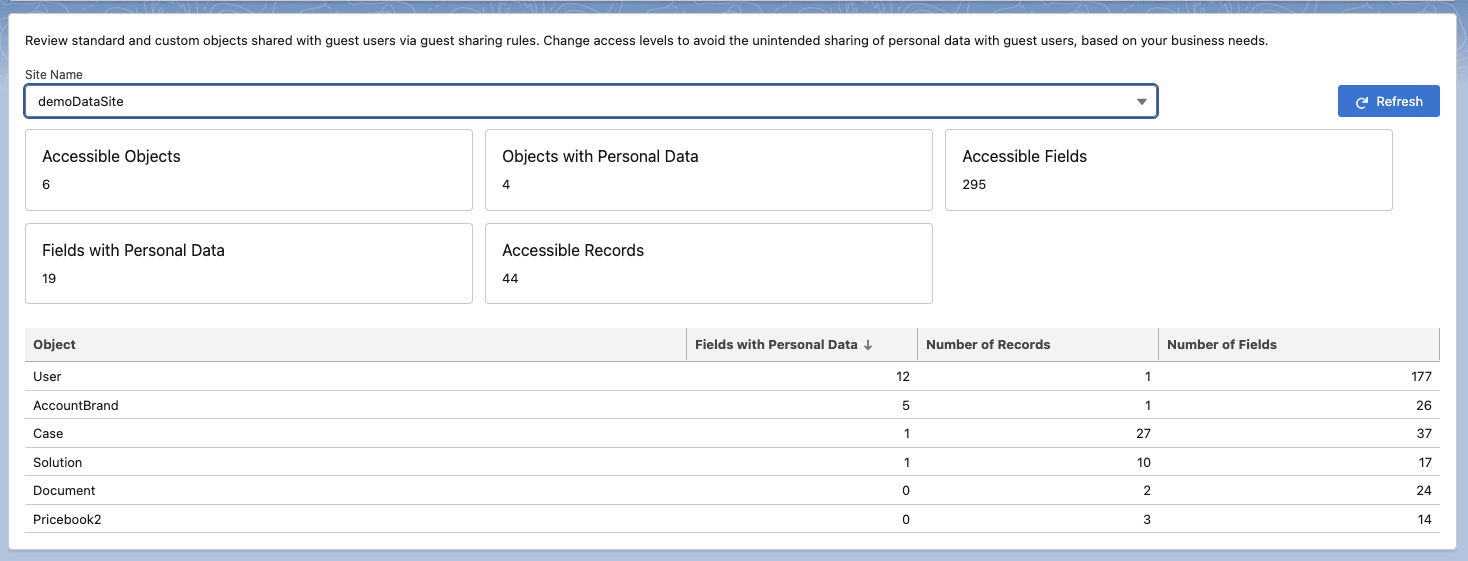
But, querying the Account object still returned data even though the report did not explicitly indicate that the Account object was exposed.
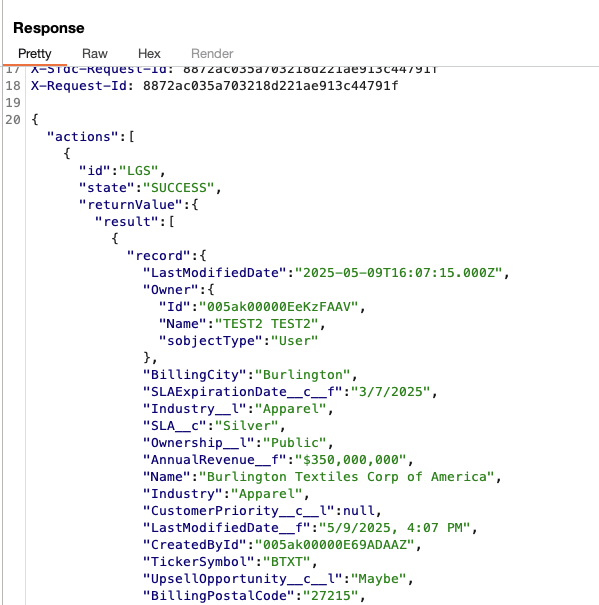
This gap reveals a dangerous blind spot: child relationships, implicit access, and legacy sharing configurations often slip through Salesforce’s default reporting. Child relationships and other sharing settings don’t come up sometimes, and they’re difficult to catch.
Why Admins Struggle to Catch These Risks
Even experienced Salesforce professionals can’t easily see every exposure path. Standard reports rarely surface data leaked through implicit sharing, inherited access, or legacy endpoints. Guest-user access, self-registration flows, and older objects add layers of complexity, while evolving business needs often create “permission creep.”
On top of that, permissions in Salesforce aren’t stored in one place. They’re distributed across profiles, permission sets, object- and field-level settings, org-wide defaults, and a patchwork of sharing rules. Parent/child relationships, lookup fields, and features like “grant access using hierarchies” can expand visibility in ways that aren’t obvious during configuration reviews.
Without tooling that consolidates these elements, admins are forced to manually cross-reference screens, exports, and reports to understand who can see which records. This process is slow, error-prone, and still leaves a risk of hidden gaps that may expose sensitive data.
From Risk to Resilience With Profile Guard
Modern Salesforce orgs are rich with data, relationships, and ever-changing access requirements, but that same complexity makes it difficult to understand where sensitive information may be slipping through the cracks. Profile Guard was designed to bridge this gap, giving admins and security teams a clear view of who can see what, and why.
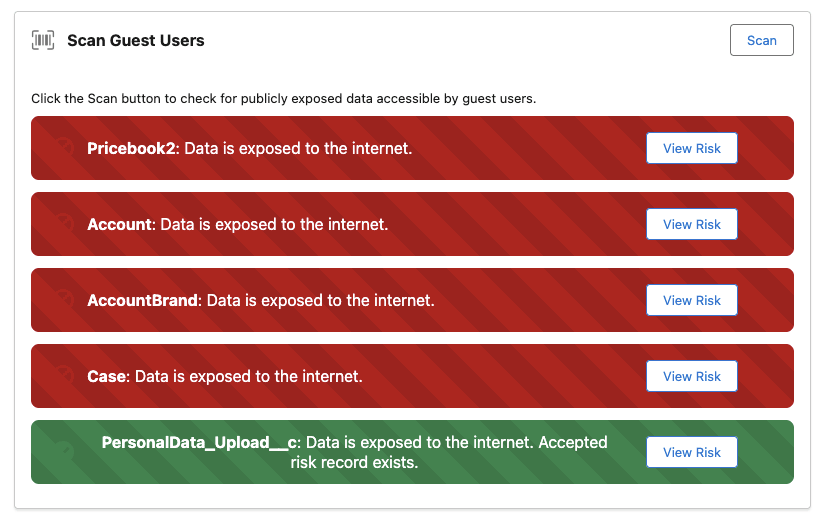
Its User Scanner automatically sweeps through your org’s configuration, analyzing sharing rules alongside object- and record-level security settings to uncover guest-user exposures and other hidden access paths. Not only does it identify vulnerable settings, but it also pinpoints the exact field, rule, or setting that is responsible, helping you remediate quickly and with confidence.
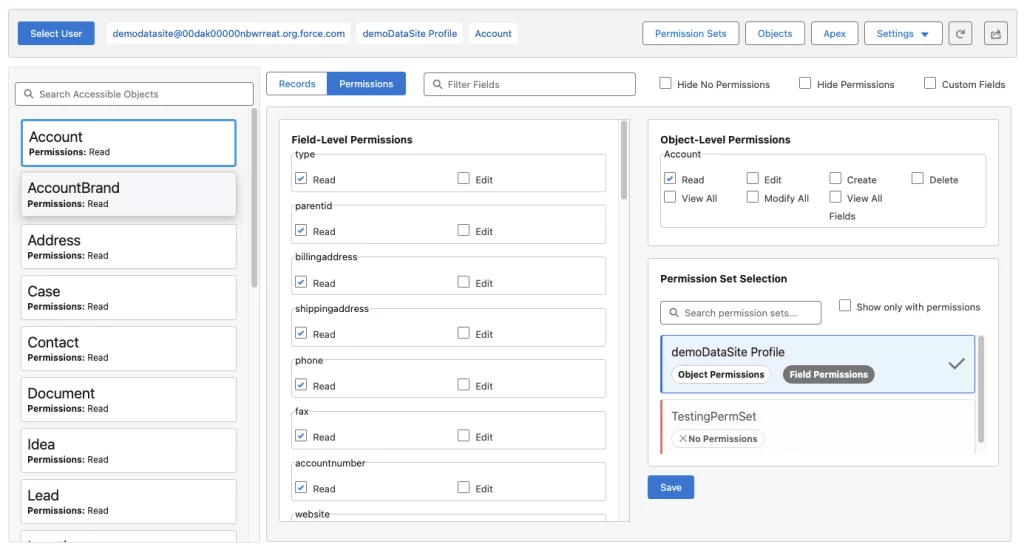
The Access Viewer provides a real-time window into any user’s experience, from standard employees to community guests, showing precisely which records and related objects are visible for that specific user, and tracing back to the profiles, permission sets, and sharing rules that allow it.

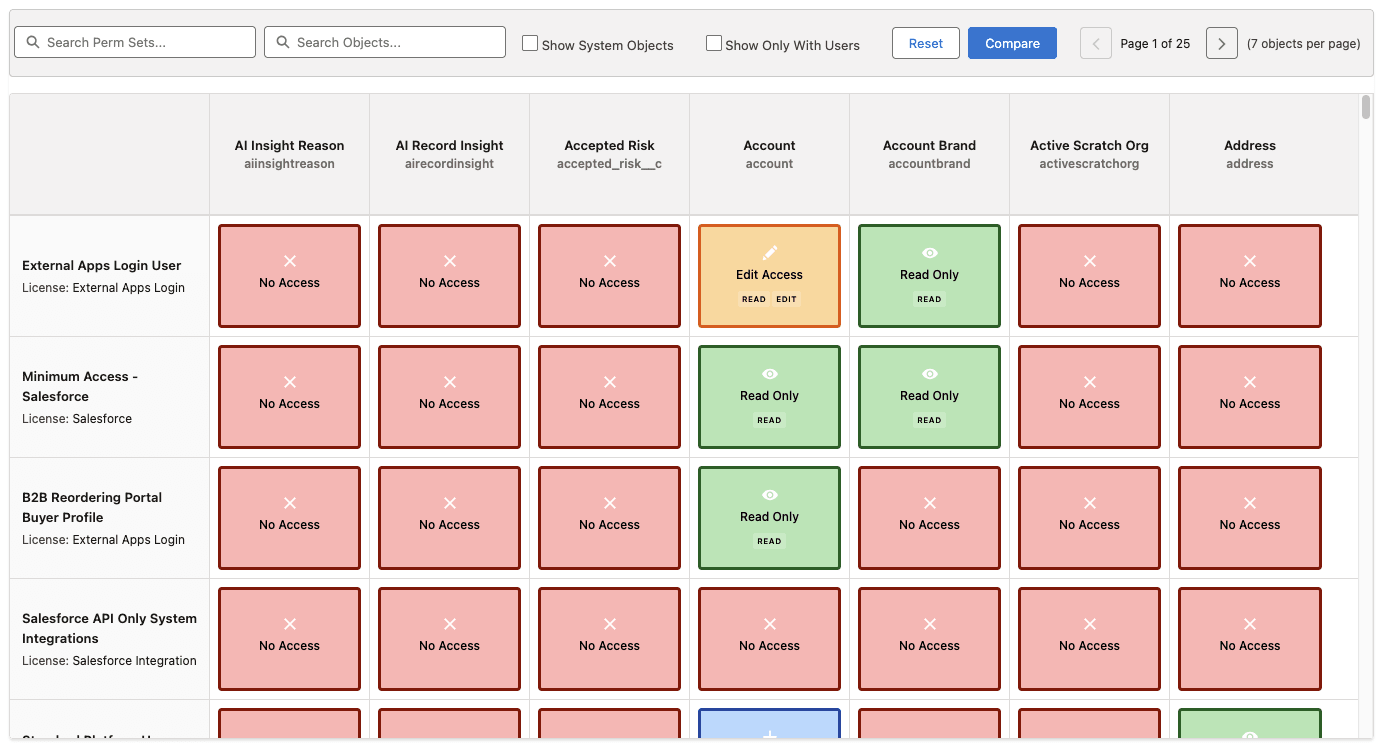
Finally, the Permissions Matrix brings order to the sprawl of permissions. By consolidating profiles, permission sets, object, and field access into a single, filterable dashboard, it gives admins a 360-degree picture of their environment. With one glance, you can isolate risky configurations, prioritize remediation, and compare permissions across multiple permission sets.
By transforming complex security settings into intuitive, actionable insights, Profile Guard enables organizations to move beyond slow, reactive audits and toward a proactive security posture. One that protects customer data, satisfies compliance requirements, and frees teams to focus on innovation rather than firefighting.
Final Thoughts
Salesforce’s flexibility comes with an equally complex security model. Guest-user access, self-registration flows, parent/child record relationships, and legacy objects can introduce exposure points that standard reports don’t always reveal. As organizations grow, layers of profiles, permission sets, and sharing rules accumulate, making it difficult to know exactly who can access which records.
A structured, automated approach is essential for maintaining a strong security posture. Profile Guard consolidates permission data from across your org, highlights misconfigurations, and traces access back to the rule or setting that allows it. By giving admins a clear, technical view of permissions and their impact, Profile Guard helps prevent data leaks and keeps your environment aligned with best practices and compliance standards.
Take the next step: Request a demo of Profile Guard or schedule a free security consultation today and see how we can help you secure your Salesforce org.