

If you’ve been around the Salesforce ecosystem for a while, you’ve likely felt the tension between how admins work and how DevOps has traditionally been implemented. You’ve probably also heard some version of “you should be doing DevOps by now,” often paired with tools or processes that didn’t quite feel built for you. This is where things start to shift in a meaningful way.
With the introduction of the Next-Generation DevOps Center, Salesforce DevOps Center is no longer just an add-on or a bridge. It’s becoming part of the platform itself. And that change is bigger than it might first appear. Let’s walk through why.
How We Got Here
To understand why this moment matters, it helps to look at the journey.
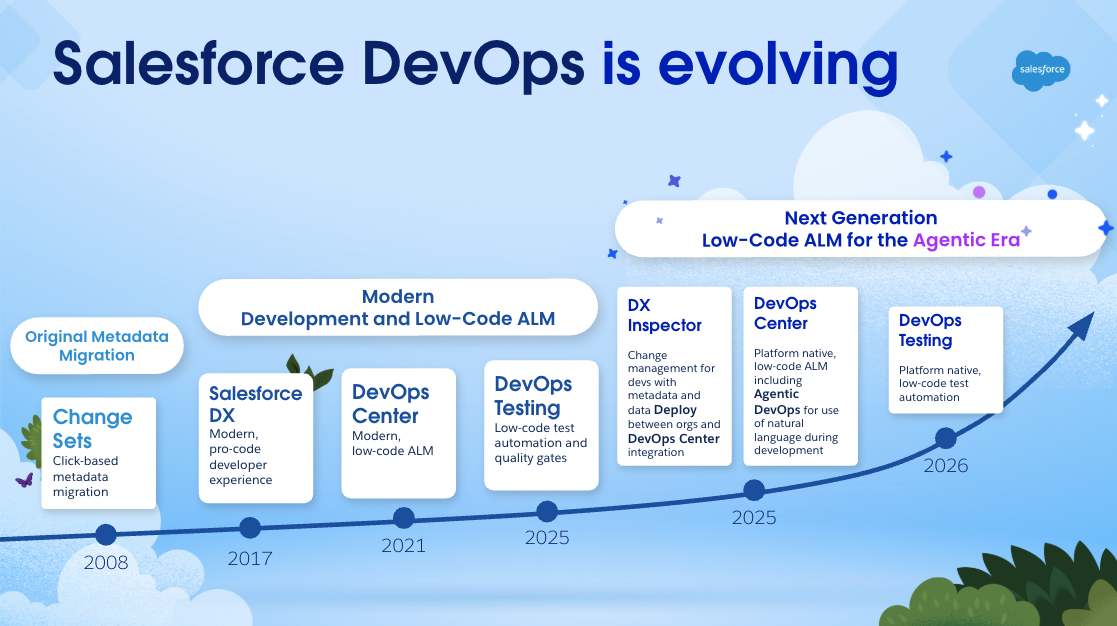
For years, Change Sets were the primary way admins moved changes between orgs. They were accessible and click-based, but over time, they struggled to keep up with the complexity and scale of modern Salesforce implementations.
Then came Salesforce DX, which brought powerful, modern development practices to pro-code teams. But it also introduced a divide. Developers moved forward with version control and automation, while admins were left with tools that didn’t quite connect to that new world.
DevOps Center was introduced to close that gap. It gave admins a way to participate in modern release management using a familiar interface, without needing to learn Git or the command line.
Now, the Next-Gen DevOps Center builds on that foundation and takes a significant step forward.
What’s Changed?
So, what exactly has changed, and why should you care? Let’s explore in more detail.
Managed Package to Native Capability
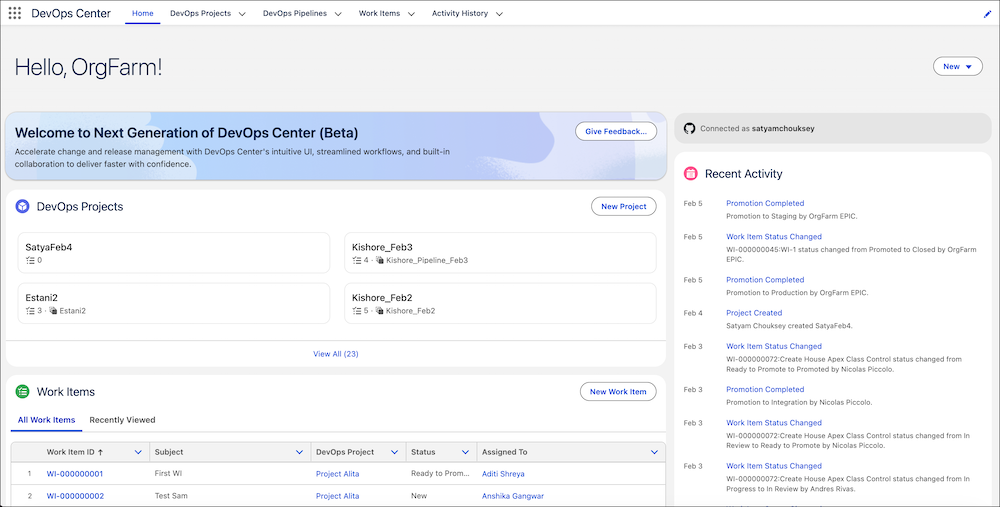
One of the most important changes is also one of the simplest to describe – DevOps Center is now native.
There’s no managed package to install. No version management. No separate configuration experience to maintain. You enable it in Setup, and you’re ready to begin.
That shift removes a surprising amount of friction. It also signals Salesforce’s long-term commitment to making DevOps a core part of the admin experience, not an optional add-on.
Just as importantly, it looks and feels like Salesforce. The interface is built on the Lightning Experience using Salesforce Lightning Design System 2, so everything feels familiar from the start.
You’re working with the same patterns you already know, and you can tailor the experience using your existing admin skills to match how your team operates. It doesn’t feel like adopting a new tool. It feels like extending the way you already work.
DevOps, Translated for Admins
One of the biggest barriers to DevOps adoption has always been language.
Pipelines, commits, version control, branching… These concepts are powerful, but they haven’t always been explained in a way that resonates with declarative builders. The Next-Gen DevOps Center doesn’t just include these concepts. It translates them.
Work items replace spreadsheets and disconnected notes. Instead of tracking “that Flow you updated last Tuesday,” you define a clear unit of work like “New Onboarding Flow,” and everything ties back to it.
Pipelines become visual and interactive. You can see exactly where each change sits, whether it’s in development, testing, or ready for production. Moving work forward becomes a deliberate action, not a guessing game.
And behind the scenes, version control is handled for you. Whether or not you’ve ever used Git, your changes are tracked, versioned, and safely stored as a single source of truth.
A Connected Way of Working
For many teams, one of the biggest challenges hasn’t been deploying changes. It’s been coordinating them. Admins and developers often operate in parallel, using different tools and processes, with limited visibility into each other’s work. That’s where issues creep in. The Next-Gen DevOps Center acts as a shared layer.
Admins can continue working declaratively. Developers can continue working in code. But both are now aligned through the same pipeline, the same work items, and the same lifecycle. Conflicts are no longer silent. If two people modify the same component, the system flags it early and provides a guided way to resolve it.
This is less about enforcing a process and more about creating clarity. Everyone can see what’s happening, where things are, and what’s ready to move forward.
Custom Promotions
One of the subtle but powerful shifts in the Next-Gen DevOps Center is how you move work through your pipeline.
Traditionally, promotions have been bundled. You move a group of changes forward together, even if only some of them are truly ready. That can slow teams down or introduce unnecessary risk, especially when one item needs more testing while others are good to go. Custom Promotions change that dynamic.
You can now “unbundle” specific work items and promote only what’s ready. If a feature has passed QA and is ready for the next stage, you don’t have to wait for everything else in the same batch to catch up. You simply select that work item and move it forward with a few clicks.
This gives you more precise control over your release flow. It supports a more incremental approach, where validated changes move ahead confidently, while in-progress work stays where it belongs.
For teams managing multiple streams of work, this is especially valuable. It reduces bottlenecks, keeps pipelines moving, and aligns your release process more closely with how work actually gets done. In practice, it means fewer compromises and more intentional releases. You’re no longer asking, “What can we safely move together?” but instead, “What’s truly ready?”
DX Inspector
Alongside DevOps Center, DX Inspector introduces a more intuitive way to track and manage changes directly inside your org.
Instead of manually remembering every component you touched, DX Inspector keeps track of your work as you go. It simplifies how changes are collected, reviewed, and prepared for deployment.
It also modernizes one of the most familiar admin workflows: org-to-org deployment.
Where Change Sets could be slow and fragile, DX Inspector helps ensure dependencies are included and deployments are more reliable. And for the first time, you can start thinking about deploying both metadata and data together as part of a single release. For admins who have felt the limits of Change Sets, this is a meaningful upgrade.
Agentic Capabilities
DevOps Center is evolving into a fully agentic experience. You’re no longer limited to the UI. With the introduction of the DX MCP server, you can operate DevOps Center through tools like Vibes or other agentic IDEs, interacting with your pipeline in a more flexible and conversational way. The release is just the starting point.
Salesforce is moving toward a model where intelligence is embedded directly into the lifecycle. In practical terms, that means the system tracks your work and actively helps move it forward.
You can imagine working with your pipeline the same way you would with a teammate. You describe what you need in natural language – whether that’s promoting a change, investigating a failure, or resolving a merge conflict – and the system helps carry it through. Routine steps like validations, checks, and promotions become lighter-weight, giving you more space to focus on decisions that actually require your judgment.
At the same time, this experience won’t exist in isolation. Deeper integrations with tools like Jira, GitLab, and Microsoft Azure DevOps are on the roadmap, along with built-in quality gates designed to ensure every release is production-ready before it moves forward.
Long-term, DevOps Center becomes less of a deployment tool and more of a command center. Execution becomes increasingly automated, but never opaque. You set the direction and define the guardrails, and the system works within that framework, with you always in control.
What If I’m Already Using DevOps Center (Managed Package)?
If you’ve already set up DevOps Center using the managed package, there’s no immediate need to change course. You can continue working as you are. According to this thread, Salesforce will be providing a migration path for the current managed package user post GA.
That said, this is a great moment to start exploring the Next-Generation DevOps Center. It builds on what you already know, while introducing a more streamlined, native experience along with AI-powered assistance that can simplify day-to-day work. Even a small pilot can help you see where it fits into your workflow and where it can make things easier.
Final Thoughts
It would be easy to see this as just another feature update, but it’s more than that. If you’ve ever struggled to feel confident with DevOps concepts or terminology, this release starts to meet you where you are. It makes those practices more approachable and, importantly, more usable in the context of how admins actually work day to day.
Bringing DevOps Center into the core platform signals a broader shift in how Salesforce is thinking about change management and who it’s for. This isn’t just designed around developer workflows anymore. It’s designed for the whole team.
For admins, consultants, and architects, that opens the door to practices that may have felt out of reach before, now delivered through tools that feel familiar and intuitive.
And perhaps most importantly, it helps you move from reacting to change to actively managing it, with more visibility, more control, and a stronger sense of confidence in the process.