






As Salesforce orgs grow more complex with Apex, Lightning Web Components, and extensive metadata footprints, expanding technical debt and security risks become harder to manage manually. Static code analysis (SCA) has emerged as a non-negotiable component of the modern DevOps lifecycle, shifting the burden of quality enforcement from manual peer review to automated, repeatable “quality gates”.
By integrating these Salesforce Code Analyzer, PMD, and ESLint checks into an Azure DevOps pipeline, teams can move beyond reactive reporting and implement a “shift-left” strategy. Using automation to generate pull request (PR) comments makes these checks more visible and actionable. This ensures that every line of code is validated against enterprise standards before it ever reaches a sandbox, fostering a culture of continuous improvement and developer accountability.
Understanding the Tooling Landscape
Effective static analysis requires a robust engine capable of parsing the nuances of the Salesforce language set. For years, PMD has served as the open-source backbone for Apex analysis, specializing in identifying anti-patterns such as SOQL queries inside loops, deep cyclomatic complexity, and unused variables.
However, the modern Salesforce stack is no longer limited to Apex. This necessitates the use of the Salesforce Code Analyzer, the official, Salesforce-supported orchestration tool that unifies multiple engines. It wraps the traditional PMD rules for Apex with ESLint for Lightning Web Components (LWCs) and Aura, providing a single, consistent interface for the entire project. Using the Code Analyzer is the recommended approach because it simplifies version management and ensures that the rulesets are aligned with Salesforce’s own evolving best practices.
Note: This article is written for developers familiar with Azure DevOps. If you are new to the platform, you can learn more about Azure DevOps Pipelines here.
Static code analysis is common across CI/CD platforms, but its true value lies in how feedback reaches developers. By injecting results directly into pull requests as line-level comments, teams eliminate the need to hunt through logs.
Combined with branch policies or equivalent quality gates, this approach ensures that only code meeting defined standards can merge into the main repository, fostering faster, safer, and more maintainable development.
Repository Structure
Not everyone may be familiar with Azure DevOps as a tool and how it integrates into your Salesforce project. The key artifact for its configuration is the azure-pipelines.yml file, which sits in your project root as below.
my-salesforce-project/
├── force-app/
│            └── main/
│            └── default/
│       	         ├── classes/
│       	         ├── triggers/
│       	         └── lwc/
├── azure-pipelines.yml
└── pmd-rules/ (optional)
	          └── apex-ruleset.xml
Azure DevOps Configuration
When configuring Azure DevOps, you’ll need to ensure you’ve set up the following configurations.
Enable System Access Token
- In the Azure DevOps tool, go to Pipeline Settings.
- Check Allow scripts to access the OAuth token.
- Save settings.
Set Branch Policies
- Navigate to Repos → Branches.
- Select main branch → Branch policies.
- Add Build validation requirement.
- Select your static analysis pipeline.
Agent Requirements
- Select an appropriate agent pool.
- Choose ubuntu-latest (Microsoft-hosted) for the build agent.
Ruleset Definition
- Create a custom ruleset XML file.
- Define the specific PMD rules required for your project analysis.
Violation Thresholds
- Define objective “Pass/Fail” criteria.
- Establish thresholds (e.g., fail the build on any critical security issue, but tolerate a limited number of minor warnings).
Artifact Storage Strategy
- Select the desired output format for scan reports (XML, JSON, or HTML).
- Configure the pipeline to publish these files as artifacts for auditing and review purposes.
Organizational Prerequisites
Before implementing the technical pipeline, the following technical and governance foundations must be established:
- Documented Coding Standards: Rulesets should not be arbitrary. Align your scanner configuration with a documented internal policy that defines the team’s standards for security and maintainability.
- Defined Violation Thresholds: Establish objective “pass/fail” criteria. For example, a single critical security violation should fail a build. A minor naming convention issue may only trigger a warning comment.
- Repository Access Control: The pipeline service identity requires Contribute to pull requests permissions within Azure Repos to allow for automated thread creation.
- Ruleset Definition: Maintain a version-controlled apex-ruleset.xml to ensure consistency between local developer environments and the CI/CD pipeline.
High-Level Pipeline Flow
The following section provides a high-level view of the pipeline execution order. It is intended for engineers implementing or maintaining the pipeline config artifacts. These nine steps provide the roadmap for the detailed breakdown below:
- PR Context Validation: Verifies the execution is happening within a Pull Request.
- Scanner Execution: Invokes the Salesforce Code Analyzer engine.
- Results Processing: Parses the JSON output to count total violations.
- API Configuration: Dynamically builds the connection to the Azure DevOps API.
- Path Normalization: Aligns file paths between the agent and the repository.
- Comment Generation: Builds actionable feedback strings for the developer.
- Guidance Logic: Provides rule-specific “Quick Fix” suggestions.
- API Request Construction: Packages the comments into the PR diff view.
- Error Handling: Manages API rate limits and connection retries.
Code Breakdown and Explanation
The following are highlights from the azure-pipelines.yml file to illustrate some of the features to consider when setting up your Azure DevOps pipeline. If you want to skip the detailed explanations, you can scroll down to the full file code below.
Step 1: PR Context Validation
To save on build minutes and prevent noise, we first verify that the pipeline is running within a Pull Request context.
If the SYSTEM_PULLREQUEST_PULLREQUESTID variable is missing, the script exits immediately, ensuring that direct commits to other branches don’t trigger unnecessary analysis.
if (!$env:SYSTEM_PULLREQUEST_PULLREQUESTID) {
  Write-Host "Not in PR context"
  exit 0
}
Step 2: PMD Scanner Execution
Executing the scan requires a robust command that works reliably across different hosted agents. We use a cmd /c wrapper to ensure the Salesforce CLI environment is properly invoked.
By targeting the force-app directory and outputting the results to a JSON file, we create a structured dataset that can be programmatically analyzed.
cmd /c "sfdx scanner:run --target force-app --engine pmd --format json --outfile $outputFile 2>&1" | Out-Null
Step 3: Results Processing and Validation
Once the scan is complete, the pipeline parses the JSON file to evaluate the findings. By using the -Raw parameter, we ensure the entire file is read as a single string, allowing for a clean conversion into a PowerShell object.
This stage is crucial for counting total violations and determining if the build should proceed.
$jsonContent = Get-Content $outputFile -Raw
$results = $jsonContent | ConvertFrom-Json

$totalViolations = 0
foreach ($file in $results) {
  if ($file.violations) {
	$totalViolations += $file.violations.Count
  }
}
Step 4: Azure DevOps API Configuration
To post comments back to the PR, the script builds a dynamic URL using Azure DevOps predefined variables. By combining the Organization URI, Project Name, and Repository ID, we establish a precise endpoint. We use TrimEnd(‘/’) to prevent double-slashes that could lead to authentication failures.
$org = $env:SYSTEM_TEAMFOUNDATIONCOLLECTIONURI.TrimEnd('/')
$project = $env:SYSTEM_TEAMPROJECT
$repoId = $env:BUILD_REPOSITORY_ID
$prId = $env:SYSTEM_PULLREQUEST_PULLREQUESTID

$baseUrl = "$org/$project/_apis/git/repositories/$repoId/pullRequests/$prId"
Step 5: File Path Normalization
Because build agents and local repositories often have different directory roots, we must normalize the paths. This logic ensures that the file paths in our comments match the structure expected by the Azure DevOps PR UI, allowing the comments to appear on the correct lines of code.
if ($filePath -match '.*\\(force-app\\.*)') {
  $filePath = $Matches[1] -replace '\\', '/'
} elseif ($filePath -match '.*(force-app\\.*)') {
  $filePath = $Matches[1] -replace '\\', '/'
} else {
  $workingDir = Get-Location
  $filePath = $filePath -replace [regex]::Escape($workingDir), '' -replace '^\\', '' -replace '\\', '/'
}
Step 6: Comprehensive Comment Generation
Creating actionable feedback requires more than just listing a rule violation; it requires precise location data and severity indicators.
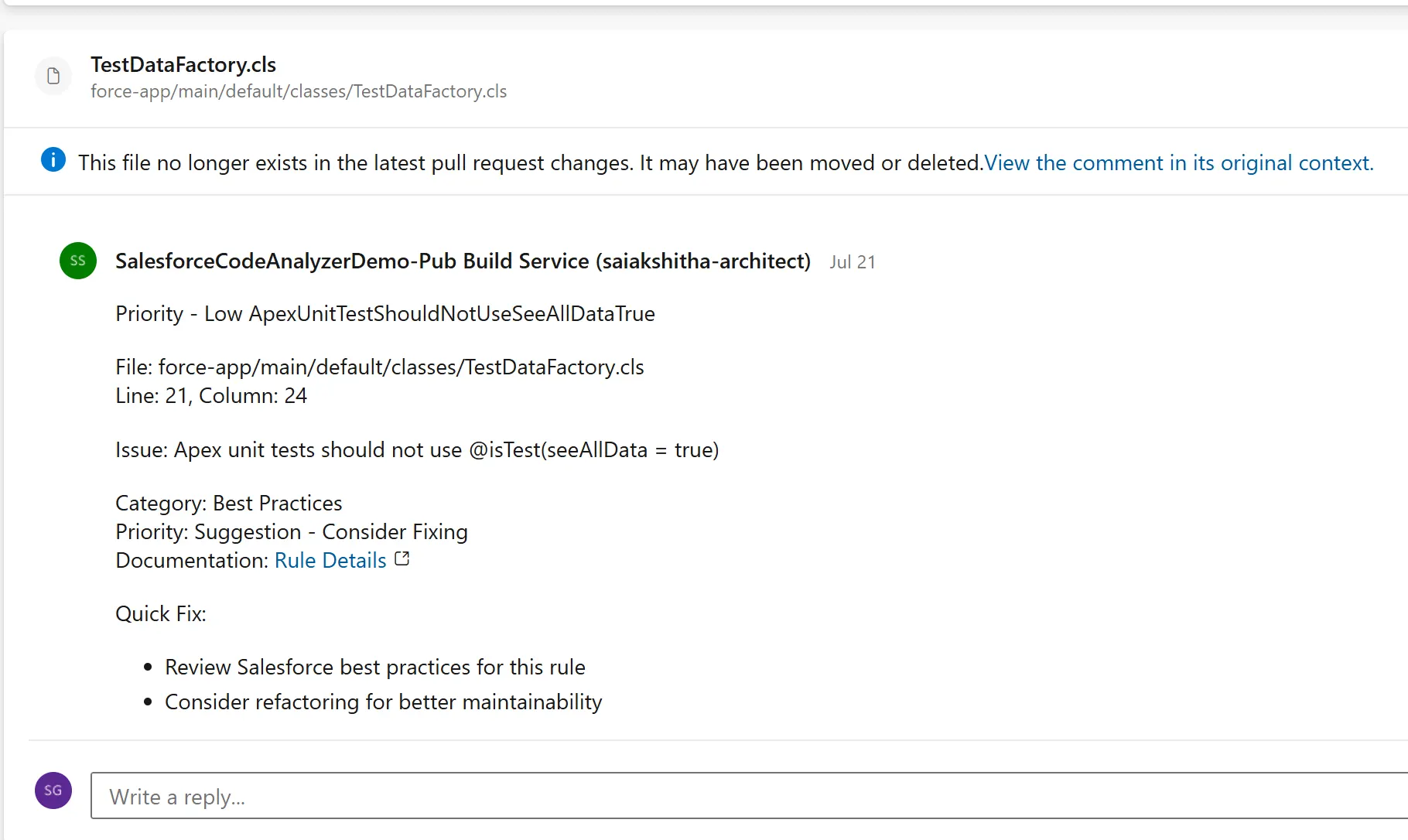
The comment generation logic creates detailed, actionable feedback for developers, ensuring that when they open a Pull Request, they see a clear, priority-ordered list of items requiring attention:
The comment generation logic creates detailed, actionable feedback for developers:
$comment = "$severityIcon $cleanRuleName`n`n"
$comment += "File: $filePath`n"
$comment += "Line: $($violation.line)"

if ($violation.column) {
  $comment += ", Column: $($violation.column)"
}
$comment += "`n`n"

$comment += "Issue: $($violation.message.Trim())`n`n"

if ($violation.category) {
  $comment += "Category: $($violation.category)`n"
}

$priorityText = switch ($violation.severity) {
  1 { "Critical - Fix Immediately" }
  2 { "Important - Should Fix" }
  3 { "Suggestion - Consider Fixing" }
  default { "Info" }
}
$comment += "Priority: $priorityText`n"
Step 7: Rule-Specific Fix Suggestions
Your fix suggestions should provide specific, actionable guidance based on the violation type, helping developers understand not just what’s wrong, but how to fix it.
switch -Wildcard ($cleanRuleName) {
  "*SOQL*" {
	$comment += "- Move SOQL queries outside of loops`n"
	$comment += "- Use bulk operations and collections`n"
	$comment += "- Consider using Map<Id, SObject> for efficient lookups"
  }
  "*Security*" {
	$comment += "- Validate user permissions before SOQL/DML operations`n"
	$comment += "- Use 'WITH SECURITY_ENFORCED' in SOQL queries`n"
	$comment += "- Escape user input to prevent injection attacks"
  }
  # Additional patterns...
}
Step 8: API Request Construction
It then creates properly formatted Azure DevOps API request body with thread context for precise line positioning in PR diff view.
$commentBody = @{
  comments = @(
	@{
      parentCommentId = 0
  	content = $comment
  	commentType = 1
	}
  )
  threadContext = @{
	filePath = $filePath
	rightFileStart = @{
  	line = $startLine
  	offset = 1
	}
	rightFileEnd = @{
  	line = $endLine
  	offset = 1
	}
  }
  status = 1
}
Step 9: Error Handling and Rate Limiting
When posting a large volume of comments, you may encounter API rate limiting (429 errors). To make the pipeline resilient, we wrap the REST call in a try-catch block and implement an adaptive delay. This ensures all feedback is successfully delivered even during periods of network throttling.
try {
  $response = Invoke-RestMethod -Uri $apiUrl -Method POST -Headers $headers -Body $bodyJson
  Write-Host "   Posted: $cleanRuleName (Line $startLine)"
  $posted++
  Start-Sleep -Milliseconds 50
} catch {
  $errorDetails = $_.Exception.Message
  if ($_.Exception.Response) {
	try {
  	$errorResponse = $_.Exception.Response.GetResponseStream()
  	$reader = New-Object System.IO.StreamReader($errorResponse)
  	$errorContent = $reader.ReadToEnd()
  	$errorDetails += " - Response: $errorContent"
	} catch {
  	# Ignore error reading response
	}
  }

  if ($errorDetails -match "rate limit|throttl|429") {
	Write-Host "   Rate limited, waiting 2 seconds..."
	Start-Sleep -Seconds 2
  }
}
Full Code of Pipeline Config Implementation
Now that you understand some of the key aspects of the pipeline config YAML file, here’s the full code so you can understand how it fits together as a whole.
# Azure DevOps PR Pipeline - Production Ready Static Analysis
trigger: none
pr:
  branches:
	include:
  	- main
  	- develop
  	- release/*
  	- feature/*
pool:
  name: 'Default'  # Use your agent pool
steps:
  - task: PowerShell@2
	displayName: 'Run PMD Scanner and Post ALL Comments'
	inputs:
  	targetType: 'inline'
  	script: |
    	# Check PR context
    	if (!$env:SYSTEM_PULLREQUEST_PULLREQUESTID) {
      	Write-Host "Not in PR context"
      	exit 0
    	}

    	Write-Host "Starting PMD Analysis for PR: $env:SYSTEM_PULLREQUEST_PULLREQUESTID"

    	# Run PMD scanner (using the working command from debug)
    	Write-Host "Running PMD Scanner..."
    	$outputFile = "scan-results.json"

    	# Use the command that worked in debug (without rulesets to get all violations)
    	cmd /c "sfdx scanner:run --target force-app --engine pmd --format json --outfile $outputFile 2>&1" | Out-Null

    	if (!(Test-Path $outputFile)) {
      	Write-Host "No results file created"
      	exit 0
    	}

    	# Parse results
    	$jsonContent = Get-Content $outputFile -Raw
    	$results = $jsonContent | ConvertFrom-Json

    	# Count total violations
    	$totalViolations = 0
    	foreach ($file in $results) {
      	if ($file.violations) {
        	$totalViolations += $file.violations.Count
      	}
    	}

    	Write-Host "Found $totalViolations violations across $($results.Count) files"

    	if ($totalViolations -eq 0) {
      	Write-Host "No violations found!"
      	exit 0
    	}

    	# Fixed API setup
    	$org = $env:SYSTEM_TEAMFOUNDATIONCOLLECTIONURI.TrimEnd('/')
    	$project = $env:SYSTEM_TEAMPROJECT
    	$repoId = $env:BUILD_REPOSITORY_ID
    	$prId = $env:SYSTEM_PULLREQUEST_PULLREQUESTID

    	# Construct the correct API URL
    	$baseUrl = "$org/$project/_apis/git/repositories/$repoId/pullRequests/$prId"

    	$headers = @{
      	'Authorization' = "Bearer $env:SYSTEM_ACCESSTOKEN"
      	'Content-Type' = 'application/json'
      	'Accept' = 'application/json'
    	}

    	Write-Host "API Base URL: $baseUrl"

    	# Process ALL violations without any limits
    	$posted = 0
    	$skipped = 0
    	$processedFiles = 0

    	foreach ($file in $results) {
      	if (!$file.violations) { continue }

      	$processedFiles++
      	$filePath = $file.fileName

      	# Clean up file path for PR comments
      	if ($filePath -match '.*\\(force-app\\.*)') {
        	$filePath = $Matches[1] -replace '\\', '/'
      	} elseif ($filePath -match '.*(force-app\\.*)') {
        	$filePath = $Matches[1] -replace '\\', '/'
      	} else {
        	# Extract relative path from full path
        	$workingDir = Get-Location
        	$filePath = $filePath -replace [regex]::Escape($workingDir), '' -replace '^\\', '' -replace '\\', '/'
      	}

      	Write-Host "Processing: $filePath ($($file.violations.Count) violations)"

      	# Process ALL violations in this file (no limits)
      	foreach ($violation in $file.violations) {
        	$cleanRuleName = $violation.ruleName -replace '\?\?', '' -replace '^\s+|\s+$', ''

        	# Create comprehensive comment
        	if ($cleanRuleName -eq "files-must-compile") {
          	$comment = "COMPILATION ERROR`n`n"
              $comment += "File: $filePath`n"
          	$comment += "Line: $($violation.line)`n"
          	$comment += "Issue: This file has syntax errors preventing compilation`n`n"
          	$comment += "Action Required: Fix the syntax errors before proceeding`n`n"
          	$comment += "Details: $($violation.message)"
        	} else {
          	# Determine severity icon
          	$severityIcon = switch ($violation.severity) {
            	1 { "Priority - High" }
            	2 { "Priority - Medium" }
            	3 { "Priority - Low" }
            	default { "" }
          	}

          	$comment = "$severityIcon $cleanRuleName`n`n"
          	$comment += "File: $filePath`n"
          	$comment += "Line: $($violation.line)"

          	if ($violation.column) {
            	$comment += ", Column: $($violation.column)"
          	}
          	$comment += "`n`n"

          	$comment += "Issue: $($violation.message.Trim())`n`n"

          	if ($violation.category) {
            	$comment += "Category: $($violation.category)`n"
          	}

          	# Add priority level
          	$priorityText = switch ($violation.severity) {
            	1 { "Critical - Fix Immediately" }
            	2 { "Important - Should Fix" }
            	3 { "Suggestion - Consider Fixing" }
            	default { "Info" }
          	}
          	$comment += "Priority: $priorityText`n"

          	if ($violation.url) {
            	$comment += "Documentation: [Rule Details]($($violation.url))`n"
          	}

          	# Add specific guidance for common rule types
          	$comment += "`n Quick Fix:`n"
          	switch -Wildcard ($cleanRuleName) {
            	"*SOQL*" {
              	$comment += "- Move SOQL queries outside of loops`n"
              	$comment += "- Use bulk operations and collections`n"
              	$comment += "- Consider using Map<Id, SObject> for efficient lookups"
            	}
            	"*Debug*" {
              	$comment += "- Remove System.debug() statements from production code`n"
              	$comment += "- Use proper logging frameworks instead"
            	}
            	"*Unused*" {
              	$comment += "- Remove unused variables to clean up code`n"
              	$comment += "- Or add @SuppressWarnings('PMD.UnusedLocalVariable') if intentional"
            	}
            	"*ApexDoc*" {
              	$comment += "- Add ApexDoc comments: /** @description Your description here */`n"
              	$comment += "- Document method parameters and return values"
            	}
            	"*Naming*" {
              	$comment += "- Follow Apex naming conventions (camelCase for variables/methods)`n"
              	$comment += "- Use descriptive names that explain purpose"
            	}
            	"*Security*" {
              	$comment += "- Validate user permissions before SOQL/DML operations`n"
              	$comment += "- Use 'WITH SECURITY_ENFORCED' in SOQL queries`n"
              	$comment += "- Escape user input to prevent injection attacks"
            	}
            	"*Global*" {
              	$comment += "- Avoid global modifier unless creating managed package APIs`n"
              	$comment += "- Use public or private modifiers instead"
            	}
            	"*Complexity*" {
              	$comment += "- Break down complex methods into smaller, focused methods`n"
              	$comment += "- Reduce nested if statements and loops"
            	}
            	"*Test*" {
              	$comment += "- Add System.assert() statements to verify test results`n"
              	$comment += "- Use @isTest instead of @isTest(seeAllData=true)"
            	}
            	default {
              	$comment += "- Review Salesforce best practices for this rule`n"
              	$comment += "- Consider refactoring for better maintainability"
            	}
          	}
        	}

        	# Determine line numbers for comment positioning
        	$startLine = if ($violation.line -and $violation.line -gt 0) { [int]$violation.line } else { 1 }
        	$endLine = if ($violation.endLine -and $violation.endLine -gt 0) { [int]$violation.endLine } else { $startLine }

        	# Create API request body
        	$commentBody = @{
          	comments = @(
            	@{
                  parentCommentId = 0
                  content = $comment
                  commentType = 1
            	}
          	)
          	threadContext = @{
            	filePath = $filePath
            	rightFileStart = @{
              	line = $startLine
              	offset = 1
            	}
            	rightFileEnd = @{
              	line = $endLine
              	offset = 1
            	}
          	}
          	status = 1
        	}

        	# Convert to JSON
        	$bodyJson = $commentBody | ConvertTo-Json -Depth 10 -Compress

        	# API endpoint for creating PR thread
        	$apiUrl = "$baseUrl/threads?api-version=7.1-preview.1"

        	try {
          	$response = Invoke-RestMethod -Uri $apiUrl -Method POST -Headers $headers -Body $bodyJson
          	Write-Host "   Posted: $cleanRuleName (Line $startLine)"
          	$posted++

          	# Small delay to prevent API throttling
          	Start-Sleep -Milliseconds 50

        	} catch {
          	$errorDetails = $_.Exception.Message
          	if ($_.Exception.Response) {
            	try {
              	$errorResponse = $_.Exception.Response.GetResponseStream()
              	$reader = New-Object System.IO.StreamReader($errorResponse)
              	$errorContent = $reader.ReadToEnd()
              	$errorDetails += " - Response: $errorContent"
            	} catch {
              	# Ignore error reading response
            	}
          	}

          	Write-Host "   Failed to post $cleanRuleName : $errorDetails"
          	$skipped++

          	# If rate limited, wait and continue
          	if ($errorDetails -match "rate limit|throttl|429") {
            	Write-Host "   Rate limited, waiting 2 seconds..."
            	Start-Sleep -Seconds 2
          	}
        	}
      	}
    	}

    	# Final summary
    	Write-Host "`n" + "="*60
    	Write-Host "PMD ANALYSIS COMPLETE"
    	Write-Host "="*60
    	Write-Host "Total violations found: $totalViolations"
    	Write-Host "Files processed: $processedFiles"
    	Write-Host "Comments posted successfully: $posted"
    	Write-Host "Comments failed to post: $skipped"
    	Write-Host "Success rate: $([math]::Round(($posted / $totalViolations) * 100, 1))%"

    	if ($posted -gt 0) {
      	Write-Host "`n Key Issues Found:"
      	Write-Host "- Check PR comments for detailed feedback"
      	Write-Host "- Focus on high priority issues first"
      	Write-Host "- Security and performance issues should be addressed immediately"
    	}

    	if ($skipped -gt 0) {
      	Write-Host "`n Some comments failed to post due to API limitations"
      	Write-Host "   This is normal for large numbers of violations"
    	}

    	# Clean up
    	Remove-Item $outputFile -Force -ErrorAction SilentlyContinue

	env:
  	SYSTEM_ACCESSTOKEN: $(System.AccessToken)
Advanced Configuration Options
The Strategy of Custom Rulesets
While the default Salesforce rules provide a strong baseline, true DevOps maturity comes from tailoring these checks to your team’s specific standards. Setting up a custom ruleset allows you to prioritize high-risk security and performance issues while muting lower-priority stylistic rules.
This prevents “analysis fatigue,” where developers begin to ignore all automated feedback because the system provides too much “noise” regarding minor formatting issues.
Custom PMD Ruleset
While the default Salesforce rules provide a strong baseline, true DevOps maturity comes from tailoring these checks to your team’s specific standards. Setting up a custom ruleset allows you to prioritize high-risk security and performance issues while muting lower-priority stylistic rules. This prevents ‘analysis fatigue,’ where developers begin to ignore all automated feedback because the system provides too much ‘noise’ regarding minor formatting issues.
When setting this up, start with the ‘Critical’ rulesets and only add ‘Best Practices’ once the team has cleared the initial technical debt.
xml
<?xml version="1.0" encoding="UTF-8"?>
<ruleset name="Custom Salesforce Rules"
     	xmlns="http://pmd.sourceforge.net/ruleset/2.0.0">

	<description>Custom PMD rules for Salesforce development</description>

	<!-- Critical Security Rules -->
	<rule ref="category/apex/security.xml/ApexSharingViolations" />
	<rule ref="category/apex/security.xml/ApexInsecureEndpoint" />
	<rule ref="category/apex/security.xml/ApexSOQLInjection" />

	<!-- Performance Rules -->
	<rule ref="category/apex/performance.xml/AvoidSoqlInLoops" />
	<rule ref="category/apex/performance.xml/AvoidDmlStatementsInLoops" />

	<!-- Best Practices -->
	<rule ref="category/apex/bestpractices.xml/ApexDoc">
    	<properties>
        	<property name="reportPrivate" value="false" />
    	</properties>
	</rule>
	<rule ref="category/apex/bestpractices.xml/UnusedLocalVariable" />

</ruleset>
Using Custom Ruleset
To implement a tailored strategy, you must first define an apex-ruleset.xml file. In your pipeline, you then modify the scanner command to point to this configuration file. This ensures that the automated feedback is always aligned with your organization’s specific definition of “quality.”
PowerShell
cmd /c "sfdx scanner:run --target force-app --engine pmd --pmdconfig pmd-rules/apex-ruleset.xml --format json --outfile $outputFile 2>&1" | Out-Null
Add Scanning for Frontend Code
Modern Salesforce development is multi-language. Beyond Apex, your Lightning Web Components and Aura components require their own set of quality checks.
By extending the pipeline to include the ESLint engine, you ensure that JavaScript and TypeScript files are held to the same rigorous standards as your backend code, providing a unified quality gate for the entire project.
cmd /c "sfdx scanner:run --target force-app --engine pmd,eslint --format json --outfile $outputFile 2>&1" | Out-Null
Troubleshooting Common Issues
Issue 1: System.AccessToken Not Found
- Root Cause: The pipeline script does not have permission to access the security token by default.
- Solution: Navigate to Pipeline Settings and check the box “Allow scripts to access the OAuth token.”
Issue 2: Comments Not Appearing in PR
- Root Cause: The Build Service identity lacks the “Contribute to pull requests” permission in the repository security settings.
- Solution: Go to Project Settings → Repositories → Security, find the Build Service user, and set “Contribute to pull requests” to Allow.
Issue 3: Scanner Command Fails
- Root Cause: The Salesforce CLI or the Scanner plugin is not installed on the build agent.
- Solution: Add a prior step in your YAML to install the
@salesforce/cliand thesfdx-scannerplugin using NPM.
- script: |
	npm install --global @salesforce/cli
	sf plugins install @salesforce/sfdx-scanner
  displayName: 'Install Dependencies'
Issue 4: Path Resolution Issues
- Root Cause: Differences in folder structures between the local developer machine and the Azure DevOps build agent.
- Solution: Verify your repository structure matches the expected
force-applayout and ensure the regex in the Path Normalization step correctly identifies the project root.
Issue 5: API Rate Limiting
- Root Cause: The Azure DevOps REST API limits the number of threads created in a short window.
- Solution: Use the adaptive delay logic (Start-Sleep) provided in the script or implement severity filtering to reduce the total number of comments posted.
Performance Optimization: The Strategy of Delta Scanning
For large or legacy codebases, running a full scan on every Pull Request can significantly delay the development cycle, sometimes taking 30 minutes or more. The professional standard for maintaining project velocity is Delta Scanning. This approach uses git diff to identify and target only the specific files modified within the current Pull Request.
Why and When to Use This: Delta scanning should be the default for all PR-based pipelines. It ensures that developers receive feedback in seconds and aren’t forced to remediate years of inherited technical debt in old files they didn’t touch.
Advantages:
- Speed: Dramatically reduces pipeline execution time.
- Focus: Keeps the conversation centered on the developer’s actual changes.
Disadvantages:
- Cross-file regressions: It may miss issues where a change in a new file affects a legacy file that wasn’t included in the scan. For this reason, it is best practice to run a “Full Scan” as part of a nightly release build to catch any interactions missed during the day.
# Get changed Apex files
$changedFiles = git diff --name-only HEAD~1 HEAD | Where-Object { $_ -match '\.(cls|trigger)$' }
if ($changedFiles) {
  $target = $changedFiles -join ','
  cmd /c "sfdx scanner:run --target $target --engine pmd --format json --outfile $outputFile 2>&1" | Out-Null
}
Severity Filtering
Introducing static analysis to an existing codebase often results in thousands of initial violations. To prevent overwhelming the team, you can implement severity filtering. By only processing violations with a severity of 1 (critical) or 2 (important), you ensure the pipeline acts as a ‘hard gate’ for security and stability risks.
This allows you to ignore minor stylistic suggestions or naming conventions until the codebase reaches a cleaner state, ensuring that the most impactful issues are addressed immediately without stopping project velocity for minor aesthetic findings.
# Only process severity 1 and 2 violations
if ($violation.severity -le 2) {
  # Process violation
}
Operational Best Practices
Do:
- Adopt a phased rollout of rulesets: Prioritize security vulnerabilities and performance anti-patterns to establish immediate architectural value before moving to stylistic rules.
- Provide remediable guidance: Ensure PR comments offer a “Quick Fix” or a link to internal documentation to turn a blocker into a coaching opportunity.
- Empower local validation: Provide developers with the same ruleset files used in the pipeline so they can scan code locally before committing.
- Differentiate gates by severity: Reserve pipeline failures for critical risks, while using soft gates (comments only) for maintainability suggestions.
Do not:
- Implement comprehensive rulesets prematurely: Overloading developers with hundreds of minor violations on day one is the fastest way to lose team buy-in.
- Pollute PR threads with aesthetic findings: Stylistic issues like bracket placement or spacing are better handled by local linting or IDE auto-formatting.
- Ignore API rate limits: For large legacy classes, ensure your script includes adaptive delays to avoid throttling by the Azure DevOps REST API.
Cultural Readiness
Implementing automated code checks is a significant cultural shift. To ensure adoption, teams must avoid analysis fatigue, where a high volume of low-priority feedback leads developers to disregard automated findings.
Success is found by focusing on the most impactful violations first and gradually tightening standards as the codebase improves.
Final Thoughts
Ultimately, the transition to automated static analysis represents an evolution from subjective code reviews toward an objective, measurable quality framework.
While implementation details vary across CI/CD platforms, the core principle remains universal: by codifying standards and surfacing violations within the developer’s existing workflow, teams eliminate the friction and inconsistency of manual oversight.
This automation is not a substitute for rigorous unit testing or human ingenuity – instead, it provides a foundational filter that ensures peer discussions remain focused on architectural strategy rather than remediable syntax violations.