

Highlights
- Agentforce Coworker is one of the three major pillars of AIforce, Salesforce’s new interface layer that was announced at Dreamforce ‘26. It brings Salesforce data and agents to where users already are – Salesforce comes to them, rather than them going to Salesforce.
- The two key solutions that Agentforce Coworker solves are swivel-chairing between applications and interfaces, and the challenge of knowing which agent to select for a specific task in a growing agentic workforce.
- There are three interaction modes in Agentforce Coworker: Find, Catch Up, and Plan and Act. Each has its own unique use cases.
- It leverages your existing Salesforce security model, ensuring that Agentforce Coworker doesn’t have access to any more than it needs to do its job.
- Setup is relatively simple with Salesforce Go, and requires Data 360 to be enabled in your org first. Administrators can then choose whether or not to enable different data sources as required.
Dreamforce ‘26 introduced AIforce, Salesforce’s new interface layer that sits on top of Agentforce, Customer 360, and Data 360. The goal of AIforce is to make the underlying layers accessible wherever users already work. This could be an AI tool like Claude, the Slack application, or within the tried-and-true Lightning Experience.
Agentforce Coworker forms one-third of the major components of the AIforce launch. It’s described as an AI teammate that lives in Lightning Experience and can be exposed wherever users already work – including Microsoft Teams!
In this article, you’ll get a deep technical understanding of how Agentforce Coworker works, how to set it up, where it can be used, and how it can create value for your organization.
What Agentforce Coworker Is
Agentforce Coworker targets a specific problem: swivel-chairing, also known as tab-switching or application-switching. Think about it – there are so many different applications, interfaces, and tools that your users will use on a daily basis as part of their work. Salesforce, Slack, Teams, Google Workspace, Microsoft Copilot, Claude, ChatGPT, and more. It can get overwhelming and difficult to find the right information when you need it. That, and switching between different interfaces, causes fatigue and distraction.
That’s why Agentforce Coworker exists: Salesforce’s AI teammate that lives where you work, can access the data that you need, and can help reduce the friction of switching between different interfaces for your users.
Agentforce Coworker also exists to solve another friction that was introduced by the rise of agentic AI: knowing which agent to use for what. With digital workforces increasing rapidly, users can find it difficult to keep track of which agent does what, and has access to what data. Coworker acts as a router agent; It’s the front door to the agentic workforce, and routes queries to the right agent at the right time.
There are three interaction modes for Agentforce Coworker: Find, Catch Up, and Plan and Act.
Find helps users to surface information and insights from multiple sources in a single interface. Think of it as the ‘ask anything’ mode where users can leverage natural language to ask questions instead of needing to navigate across multiple interfaces. It draws on CRM data, Slack conversations, files, knowledge bases, and other connected systems’ data.
According to Salesforce’s blog, users can “Ask anything in plain language and get back a rich, contextualized response drawn from your CRM, Slack conversations, files, knowledge bases, and 270+ connected enterprise sources.”
Catch Up helps users to stay across the latest changes across their scoped workspace without needing to search for them. It’s a proactive tool that surfaces what’s changed while you were in a meeting, or away on vacation. Once again, instead of needing to navigate across multiple systems to find what you’ve missed, you can use Agentforce Coworker to ensure you’re kept up to date without having to do anything.
Finally, Plan and Act is the orchestration feature that allows users to give it outcome-level instructions and have Agentforce Coworker do the heavy lifting in terms of routing to the correct agent. Agentic workforces are growing, and with each agent having its own unique set of abilities, it can be difficult to remember which agent to use in which scenario. Using Agentforce Coworker as the routing agent, you can rest assured knowing that your users will be able to leverage the powers of your agentic workforce without needing to manually route requests to the correct agent.
Under the Hood Architecture
There was a slide that was shown a lot during Dreamforce ‘26 that showed four key elements of the Salesforce offering, with AIforce (Agentforce Coworker is part of this) being at the top.
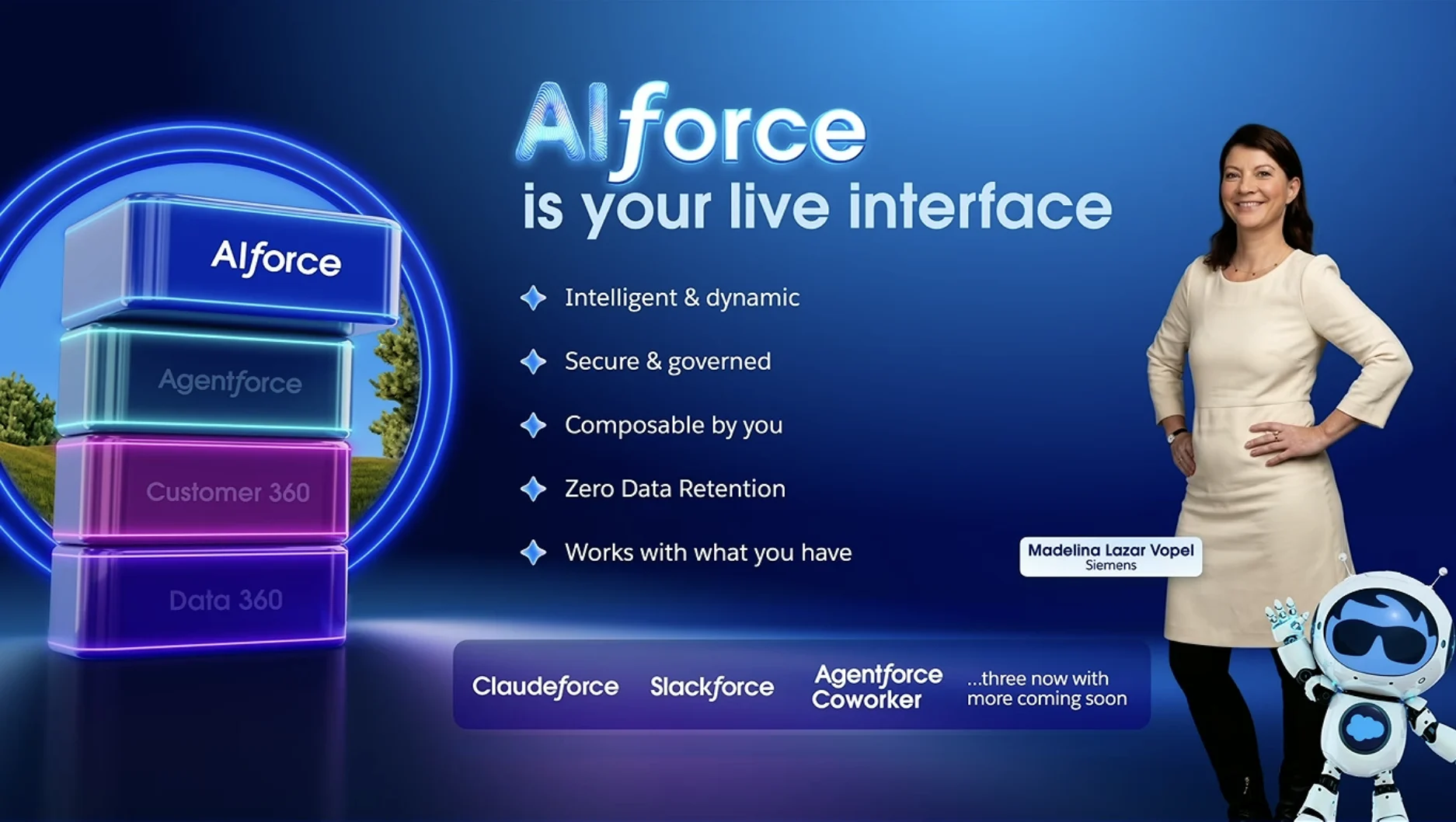
Agentforce Coworker is designed to be your Salesforce native digital teammate, and just like any other teammate, it requires access to the right data to do its job properly. This is why it’s set on top of Agentforce, Customer 360, and Data 360.
Each of the foundations that it’s built on is required to give it access to the right data. Data 360 is the grounding layer that connects all of your data from all of your sources together. Customer 360 ensures that your CRM data is the central unification point for your customer data. Finally, Agentforce is the digital workforce layer that Agentforce Coworker orchestrates.
Permissions and Trust Model
The Salesforce platform has been built as a metadata platform. What this means is that there has always been a clear separation between your data and how your data is built. When you add a field to Salesforce, you describe the type of data (i.e. the field type), what it’ll be used for, and where it gets stored in the Salesforce database. Then you define where it is exposed on a screen.
This is how Salesforce claims they are the perfect platform for the AI era. With everything having been built as metadata from the get-go, it’s a lot easier to give access to this data to your AI engine of choice. You can even leverage the workflow automation tools of the platform, and perhaps most importantly, you can leverage the security measures that Salesforce has built into the platform too.
This means that your data isn’t just granted to the AI engine in its entirety, but rather it conforms to the same security and governance measures that your users are. Profiles, permission sets, sharing rules, and more are all still there, and ensure that your agentic workforce adheres to the principle of least privilege.
Every investment you’ve made in your Salesforce org over the past two and a bit decades will be paying dividends now, as we enter the agentic era. If you’ve followed best practices and advice from Salesforce, you’ll be in a great position to take advantage of the new features that Salesforce is rolling out in AIforce, including Agentforce Coworker. If not, well, now’s a great time to catch up!
Agent Orchestration and Intelligent Routing
Agent orchestration is where Agentforce Coworker really shines. With rapidly growing numbers of AI agents in a given Salesforce org, it becomes increasingly difficult to keep track of which agent does what and should be used when. That’s where an intelligent routing engine becomes invaluable, as the one offered in Agentforce Coworker.
Agentforce Coworker’s goal is not to replace your Agentforce workforce, but rather to augment it and route your users’ requests to the correct agent for each job. When you built your agents, you were guided to create individual agents for specific tasks, not one agent that’s supposed to be able to do it all. While this ensures that the outputs of your agents are a lot more accurate, it also means that agent sprawl is a reality.
This is where Agentforce Coworker gets to show its superpowers. Rather than being yet another agent that you need to try to keep track of and differentiate from your other agents, Coworker has its own intelligent routing tool that can be used to route requests to your other agents. Think of it as a team leader whose job it is to triage your requests and assign them to the right person (or, in this case, agent) for the job.
Setting Up Agentforce Coworker
I will caution you before you continue any further: while it may seem relatively easy to set up Agentforce Coworker (and that’s because it is), you should not rush into this willy-nilly. If your org is not ready for your new digital teammate, you may end up with more problems than you started with. Always take some time to plan and make sure that your org has clean data, properly configured permissions, and you should have a better chance of success.
There was a fantastic hands-on session that I attended at Dreamforce ‘26, where I got to set up Agentforce Coworker for myself and try it out. The flow that we followed through that session has heavily inspired this guide.
Assuming you have the right licenses, you can set up Agentforce Coworker quite easily. The first step is to ensure you’ve got Data 360 connected, as this is both a prerequisite for Agentforce Coworker and a way of ensuring that the tool has the broad context it needs to be effective. Data 360 is the brain that powers Agentforce Coworker, as it indexes your Salesforce CRM data, makes it searchable by AI, and enforces governance.
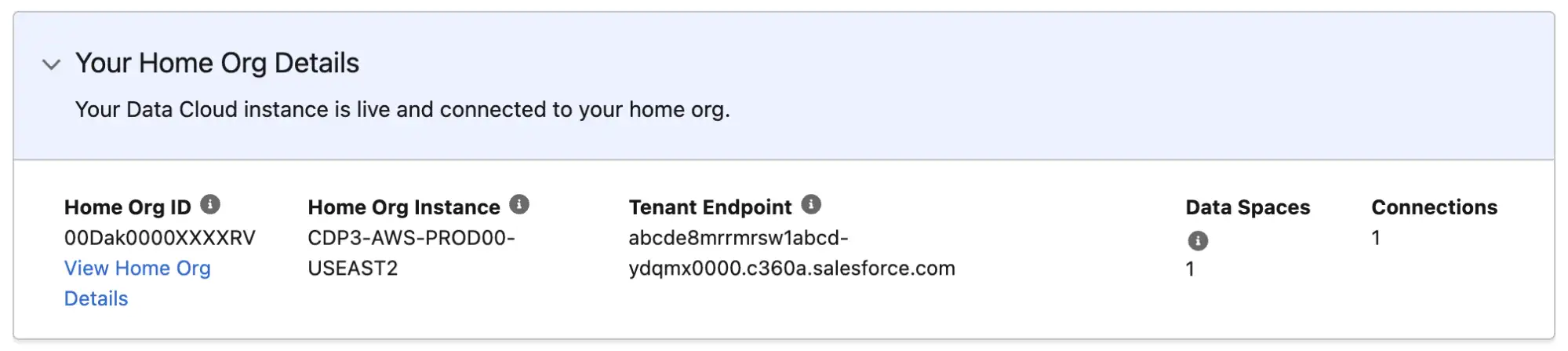
To do this, head to Setup and open the Data Cloud Setup Home page. From there, scroll down to the Your Home Org Details section. You should see your org’s Data 360 details if it is set up. If it is not, you’ll need to enable Data 360 before proceeding.
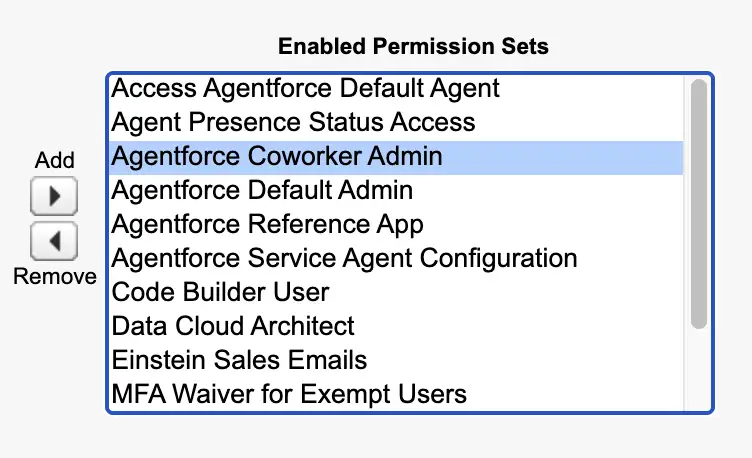
Next up, you’ll need to give yourself permission to administer Data 360, as well as anyone else who will need to do so. This is done by applying a permission set called Agentforce Coworker Admin to whichever users will need to administer the tool.
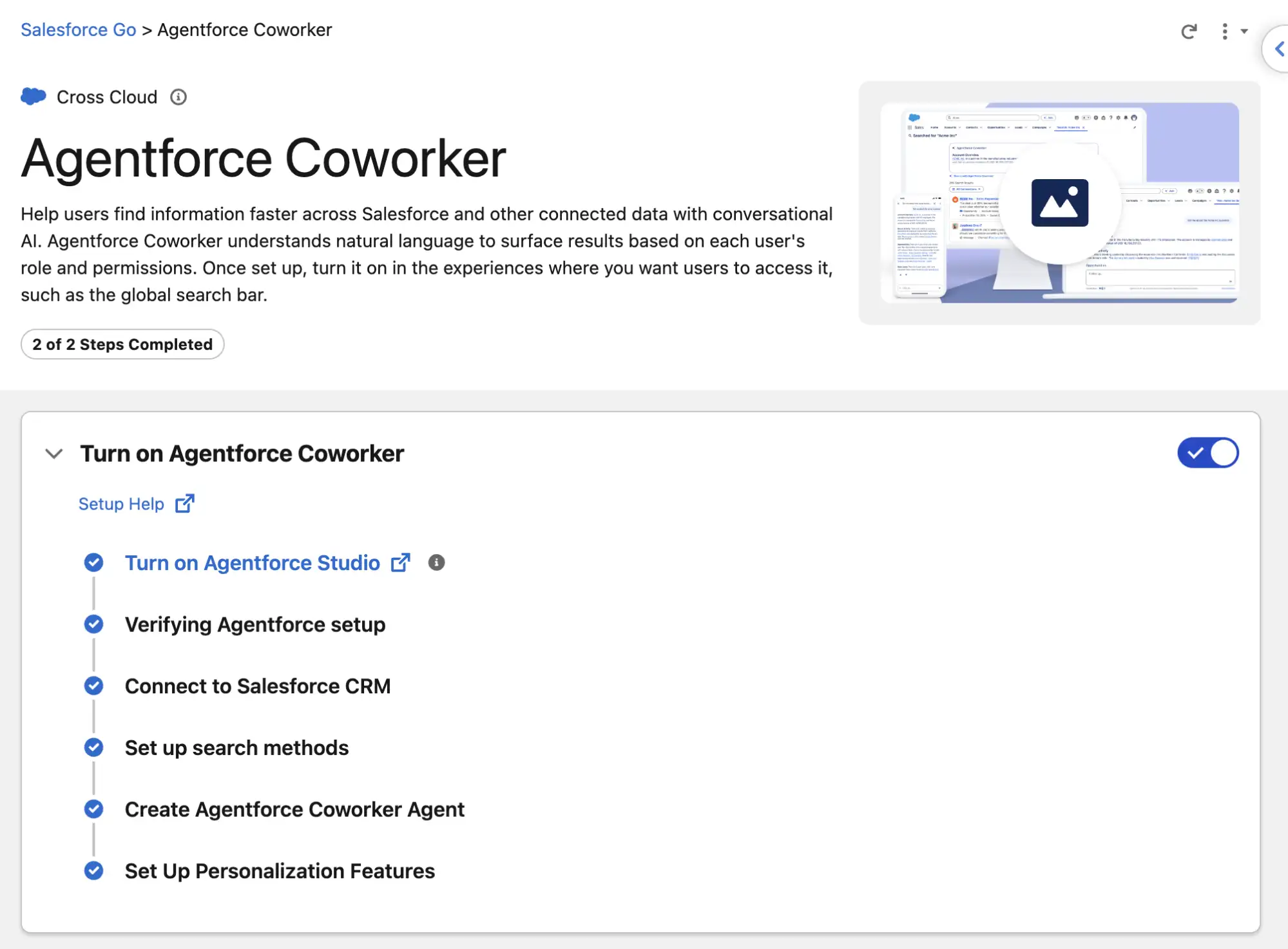
Finally, it’s time to enable Agentforce Coworker. The easiest way (and the Salesforce-recommended way) to do this is to use Salesforce Go in the Setup menu. Once there, search for Agentforce Coworker, and toggle the switch to enable the feature. It will automatically perform a series of steps on your behalf, and then let you know that Agentforce Coworker is ready to go!
For Agentforce Coworker to be able to work with data in your org, you’ll need to grant it access as a data source. Scroll down to the Manage Data section in the Agentforce Coworker page in Salesforce Go. By default, Agentforce Coworker will have access to your Salesforce CRM data, but if you want to give it access to other data sources, you can enable them here.
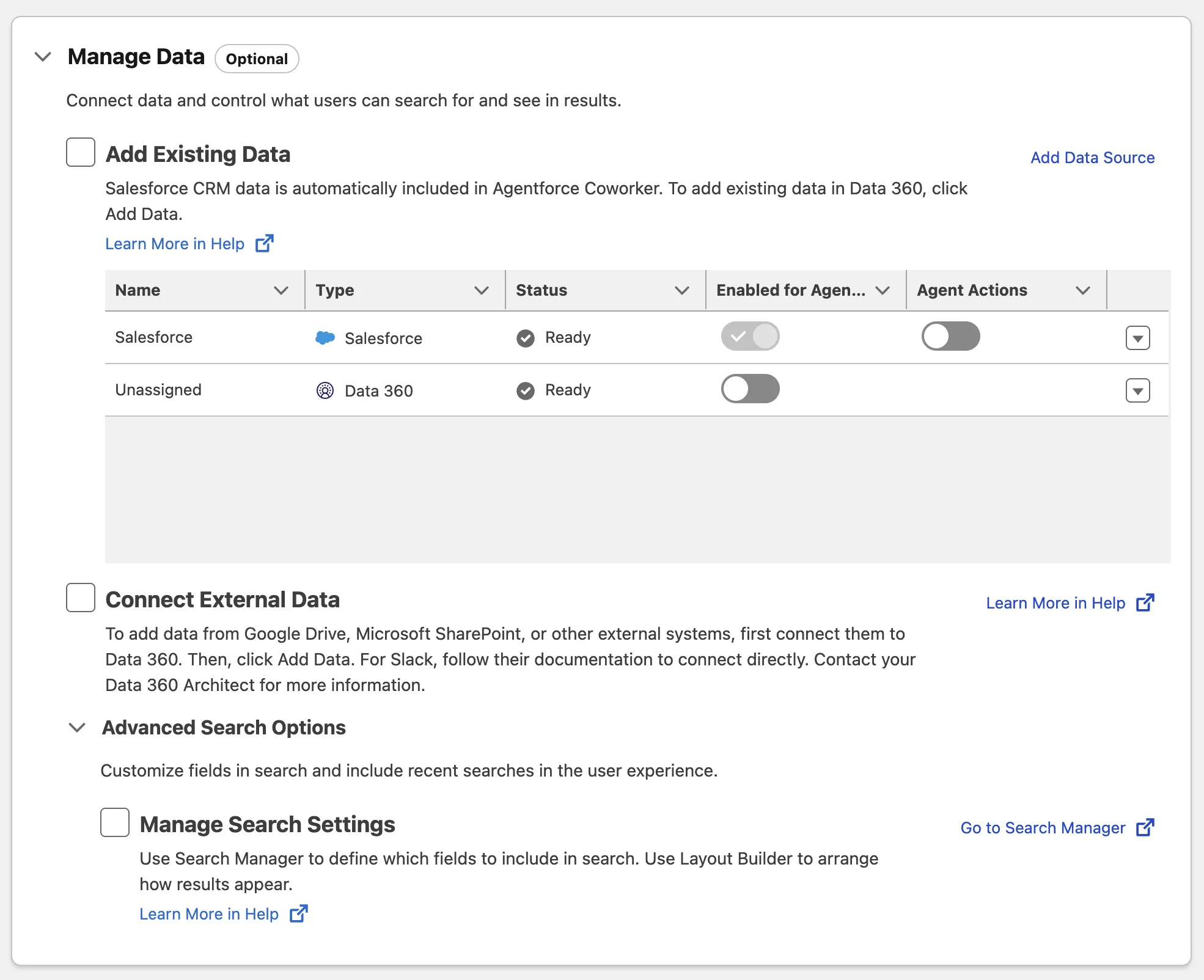
With Agentforce Coworker now enabled in your org, there’s one last thing you need to do. While you gave yourself the permission to set up and administer Coworker earlier, if you plan on actually using it, you’ll need to assign yourself the Agentforce Coworker User permission set as well.
There’s an easy way to do this in Salesforce Go. Simply scroll a bit further down to the Manage Users section, and click the Manage button in the Manage Access to Agentforce Coworker section. From here, you can add the users you wish to enable Agentforce Coworker for.
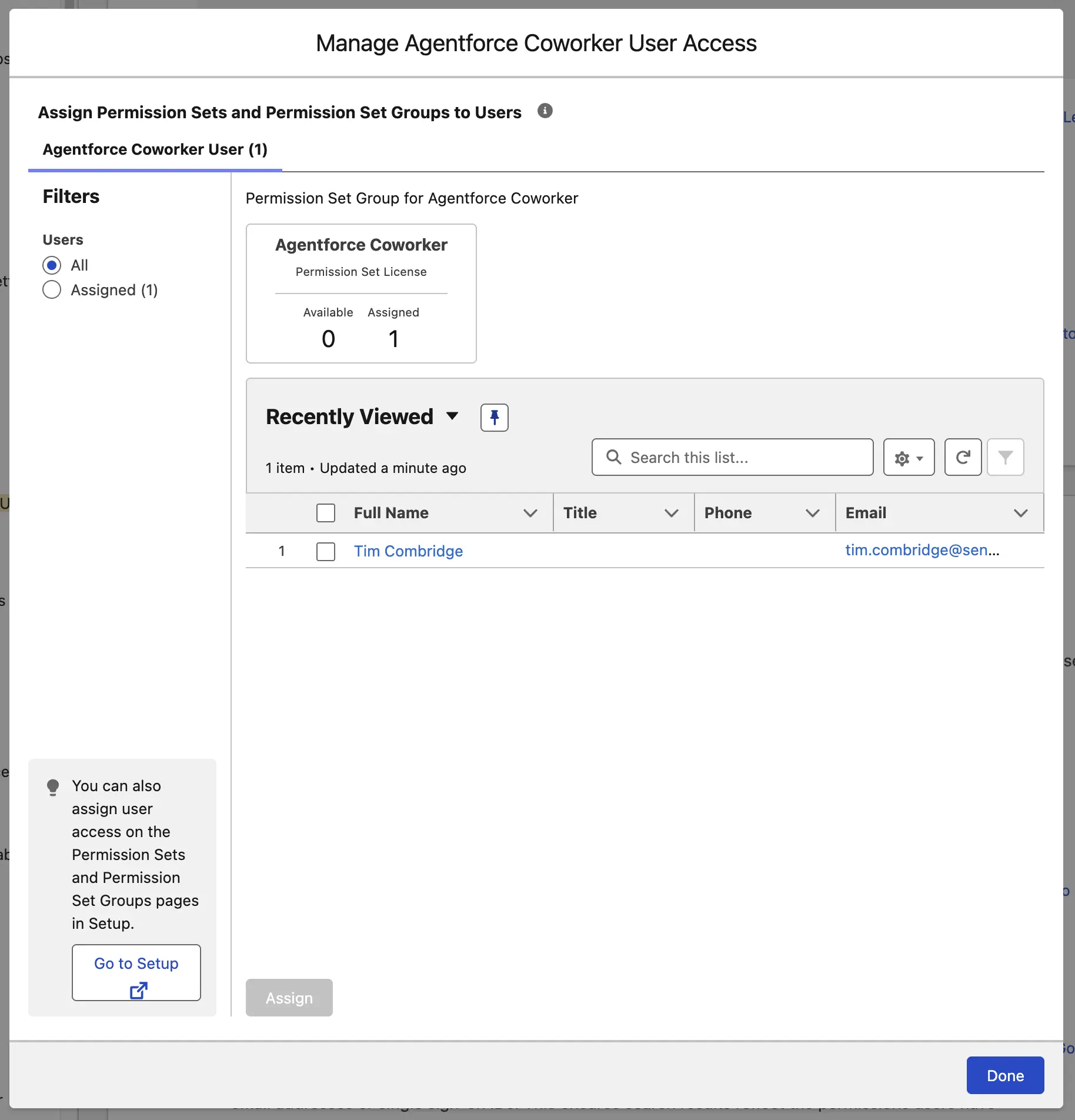
That’s it for now! You’ve granted yourself the admin permission to set up Agentforce Coworker, ensured Data 360 was enabled correctly, and turned Agentforce Coworker on. You’ve then ensured it has the right access to data, and enabled it for yourself to use. Now, to put it to work!
Agentforce Coworker In Action
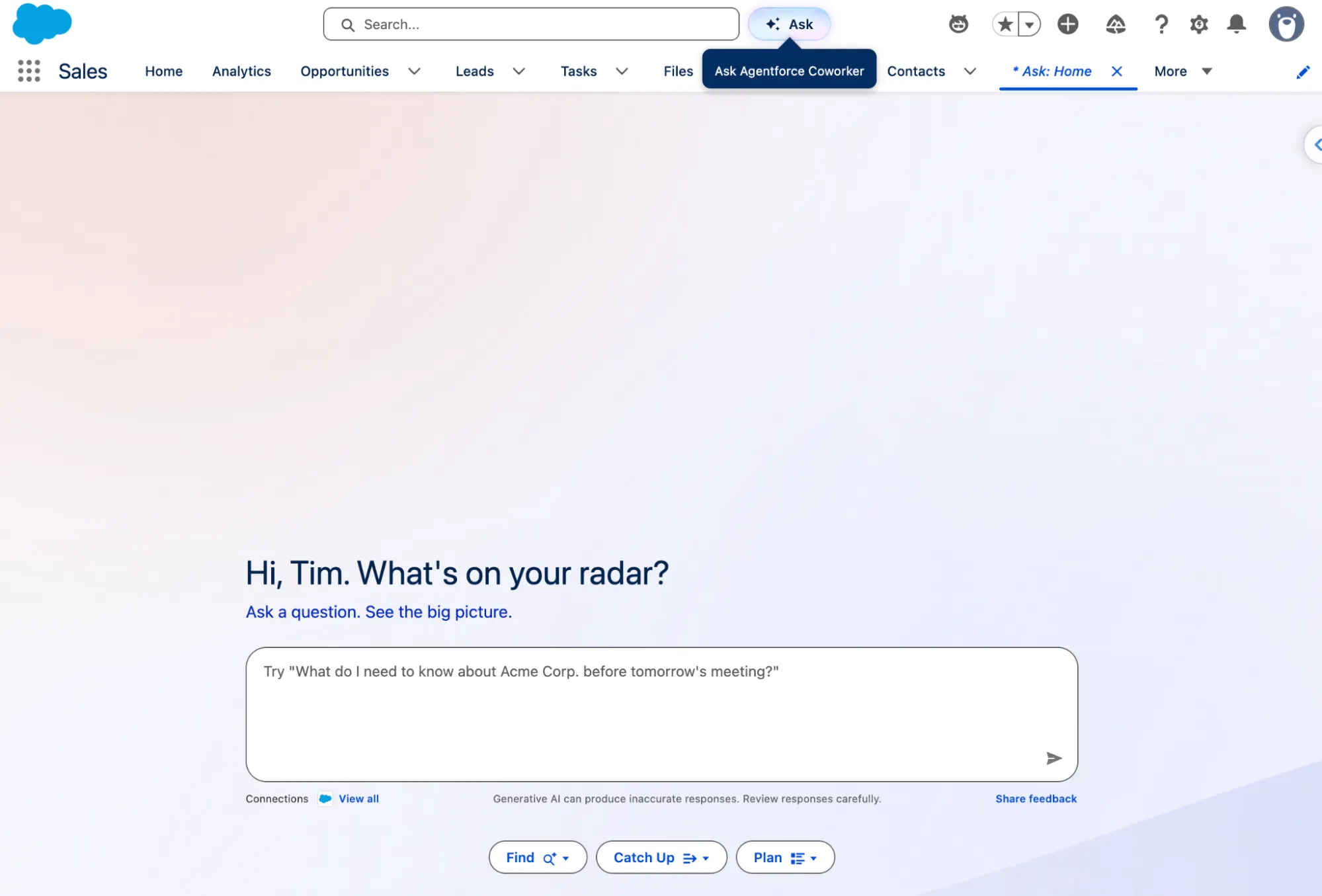
Head back to the main Salesforce application, and you’ll see a new Ask button to the right of the global search bar. Clicking this will open the Ask: Home tab, which introduces you to Agentforce Coworker.
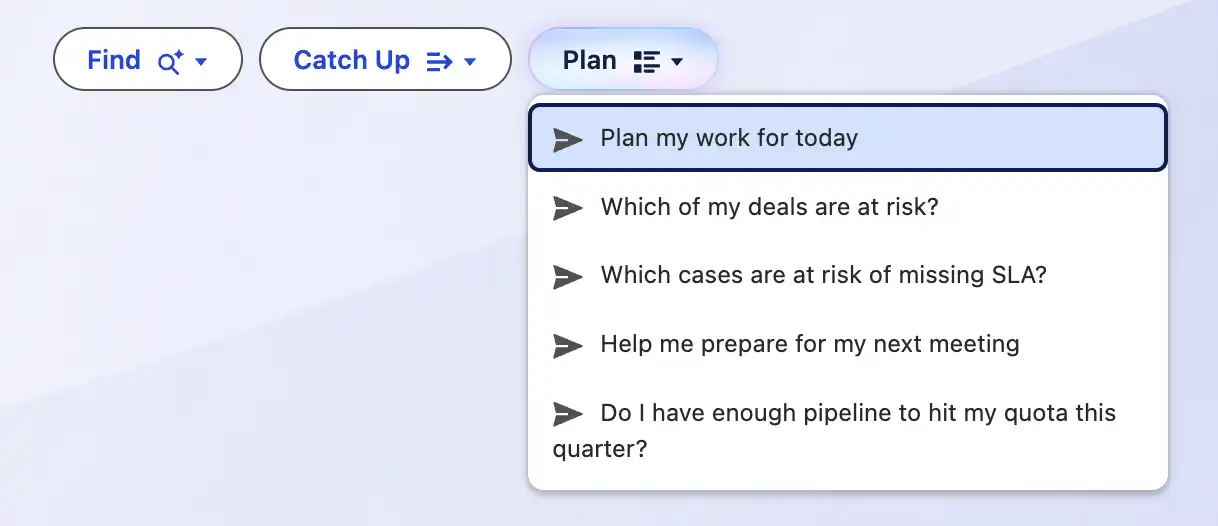
In this interface, you can also see the Find, Catch Up, and Plan buttons. These are here to give you an idea of some things you can get Agentforce Coworker to do for you. Click each one to see some of the suggested prompts.
Here, you can ask for information relating to your org. Keep in mind that in this setup, I’ve only given Agentforce Coworker access to my CRM data, so I will keep my examples relevant to that.
Firstly, I’m going to ask Agentforce Coworker to show me the top five accounts in my org. After a few seconds, Agentforce Coworker responds with information relating to those accounts.
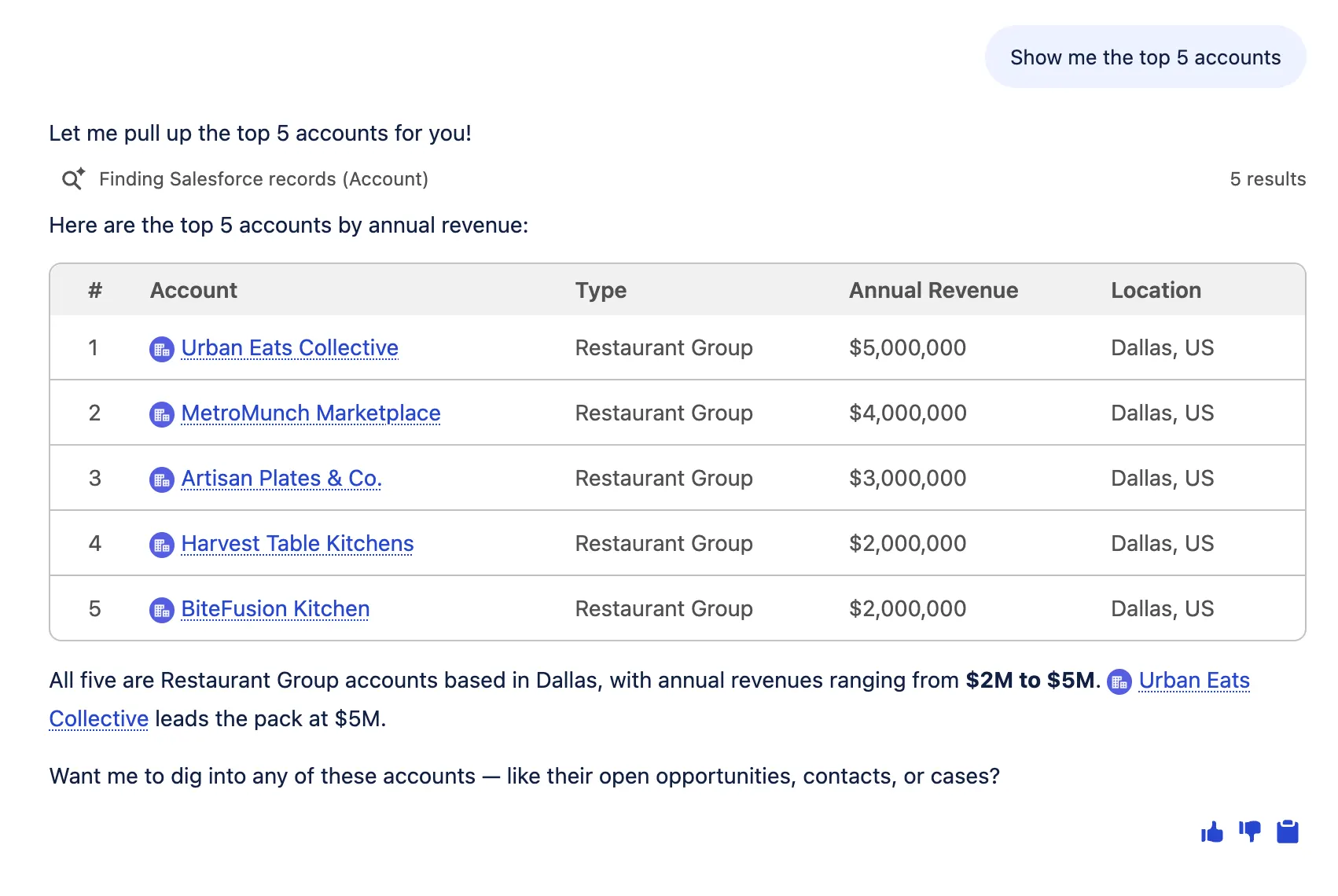
After I saw these results, I clicked the Ask button again to start a new session. The reason for this is that my next prompt is not directly related to the previous one, and I don’t want to carry over any unnecessary context. I highly recommend that you start a new session for each new prompt, unless one prompt is directly related to the last one. An example of this is up next.
For this next example, I’ll need to highlight a custom data model aspect that you’ll see in play. Business Accounts represent an organization, but under each Business Account there are one or more Storefronts.
In a new session, I asked Agentforce Coworker to show me the top five storefronts. It does this flawlessly. Then, in the same session (because it’s directly related), I asked it to show me the review summary for Green Fork, one of the storefronts that was returned in the previous response.
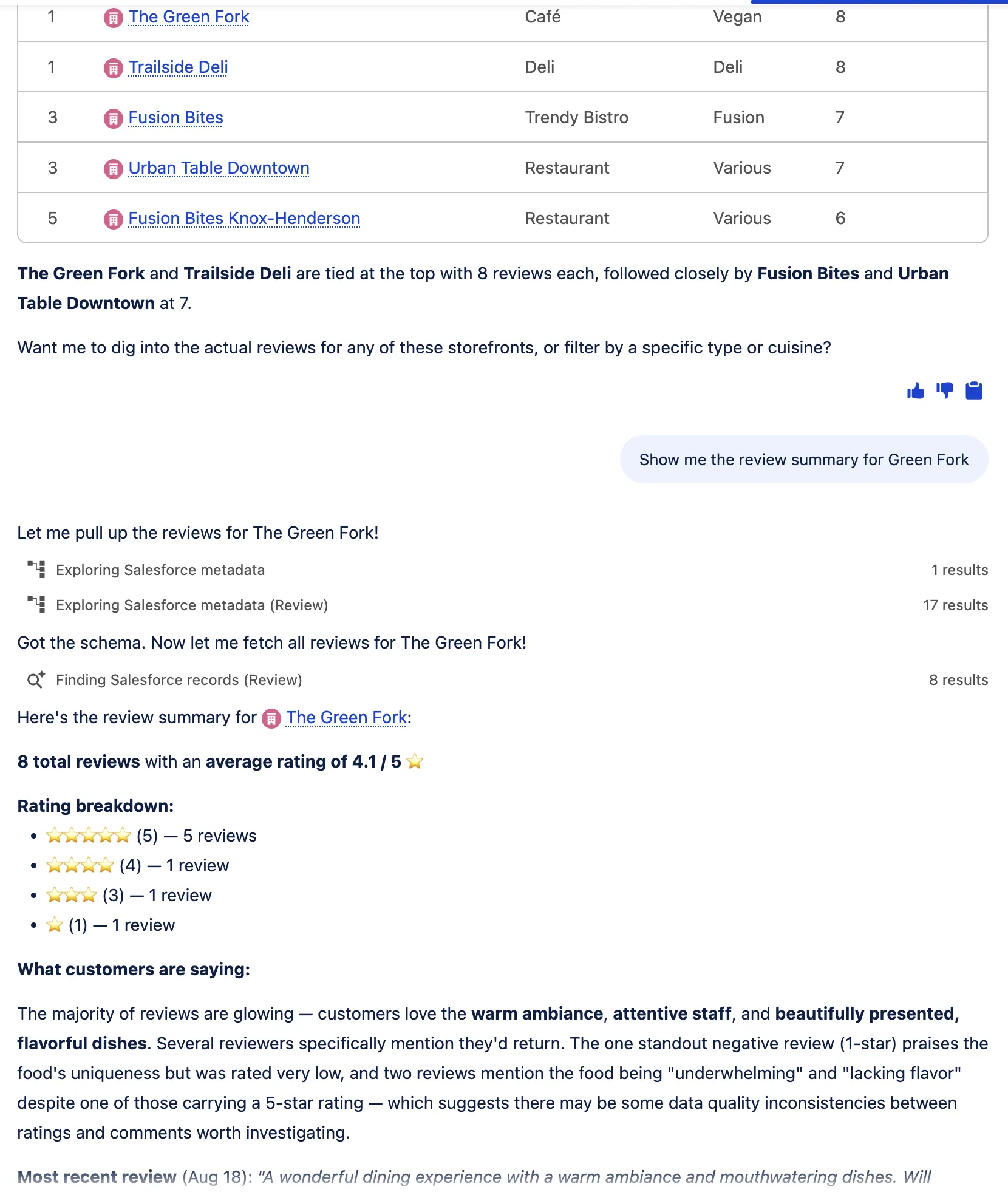
The reason that I didn’t clear the session between prompts this time around is that the second prompt is directly related to the first one, and to the response that was returned. I first queried the top five storefronts, and then, after those were returned, I then asked for further information about one of the storefronts in that response.
Considerations and Limitations
Data 360 underpins Agentforce Coworker. Without enabling it in your org, you simply cannot use Agentforce Coworker. Where Data 360 connects and unifies your data, Agentforce Coworker makes sense of it. This is why it is critical for Data 360 to be leveraged for the best Agentforce Coworker experience. Keep in mind that you don’t need to give Agentforce Coworker access to all of your Data 360 data sets, but it must be enabled before you begin.
Agentforce Coworker is included in Enterprise, Unlimited, and Agentforce 1 Editions of Salesforce. If you’re not on one of the supported editions, you’re out of luck.
Perhaps most importantly of all is the billing trap. There are two options: consumption-based or seat-based. Consumption-based means that you leverage Flex Credits to cover the cost of your usage as you use it, and seat-based means you’re paying on a per-user basis with usage caps. Costs can add up quickly, so it’s important to ensure you’re actually getting value from your investment. You can keep an eye on this by using tools like Agentforce Grid and Agentforce Observability.
The AIforce Umbrella
Agentforce Coworker is one of the three major pillars of the AIforce offering that Salesforce is investing heavily in. With AIforce being touted as a way of bringing Salesforce to whatever interface your users are using, Agentforce Coworker allows for the querying and interaction with Salesforce data from within Lightning Experience, or beyond (including Microsoft Teams).
Summary
Your new digital teammate awaits. Agentforce Coworker is designed to make sense of your data, surface it where you need it and in a way that makes sense, and empower your users to bring your business data to life. It connects all your different data sources to provide a holistic view of your customers.
Agentforce Coworker forms part of the AIforce umbrella, designed to bring Salesforce everywhere your users are – Salesforce coming to them, rather than the other way around.