

Personalization in your business is no longer a differentiator – it’s an expectation. Today’s marketers have access to powerful data, sophisticated tooling, and near-endless options for tailoring messages to individuals.
Yet despite all this capability, many personalization strategies fail to deliver meaningful impact. The reason isn’t a lack of technology, but a lack of focus.
Too often, we attempt to do too much too quickly – over-engineering personalization before the data, processes, and operating model are ready to support it. The result is brittle solutions, inconsistent experiences, and growing technical debt.
In this article, we’ll walk through five practical best practices for building personalization in Salesforce Marketing Cloud the right way – starting small, scaling intentionally, and ensuring your personalization efforts are reliable, maintainable, and measurable over time.
Examples in this article will be taken from the Marketing Cloud Engagement (MCE) platform and involve the personalization code AMPscript, which is proprietary to MCE.
1. Start Small
Personalization doesn’t need to be complex to be effective. One of the simplest and most impactful places to start is with the email greeting.
Personalizing an email with a recipient’s first name is low risk, easy to maintain, and immediately demonstrates value. It’s a foundational use case that helps teams validate their data, establish consistent patterns, and build confidence before introducing more advanced personalization logic.
Example: The Greeting
Using AMPscript, personalization can be as simple as wrapping a variable in the %% syntax and referencing the correct field from your sendable data extension. When configured correctly, this enables a personalized greeting with minimal effort and no added operational complexity.
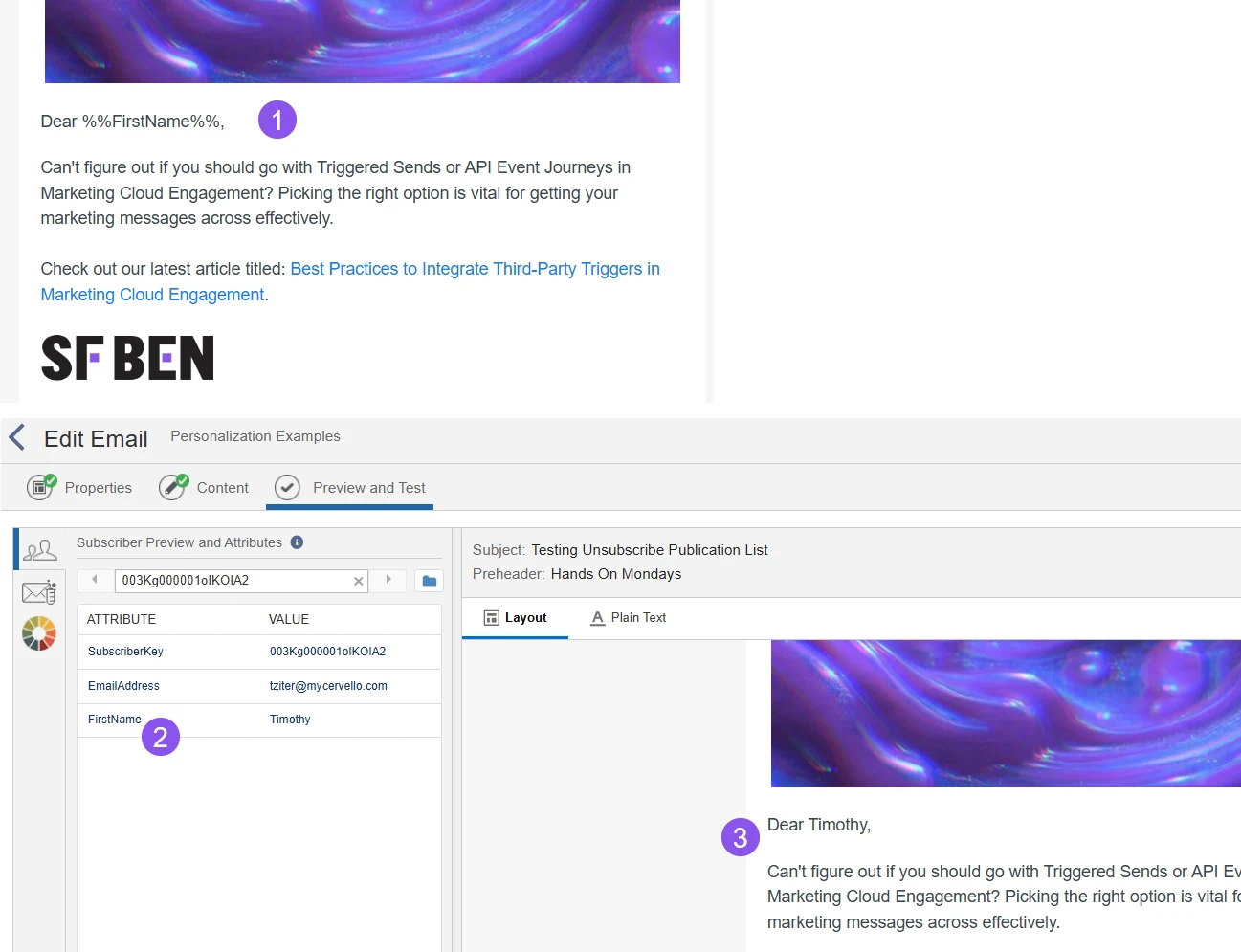
- With AMPscript, it’s as easy as wrapping your personalization variable in
%%syntax. - Use the appropriate syntax for the variable in your target data extension.
- And you have a personalized greeting.
Why This Matters
It may feel basic – and that’s the point. Before introducing advanced conditional logic or deeply personalized content blocks, ensure you are consistently personalizing the fundamentals. A standardized, reliable approach to simple personalization creates a strong foundation, allowing you to scale with confidence as complexity increases.
2. Variableize Your Personalization
Once you’ve validated a simple personalization use case, the next step is to make it scalable. The most effective way to do this in Marketing Cloud is by defining your key data points as variables.
Using the same greeting example, we can introduce a small amount of AMPscript coding that significantly improves consistency, reusability, and long-term maintainability – without adding unnecessary complexity.
By storing personalization logic in variables, you create a single source of truth that can be reused across the email, modified in one place, and safely extended over time.
Why Use Variables?
Variables sit between your data and your content, giving you a clean, consistent way to use personalization values. Rather than referencing raw attributes inline, you centralize logic and standardize how data is accessed and displayed.
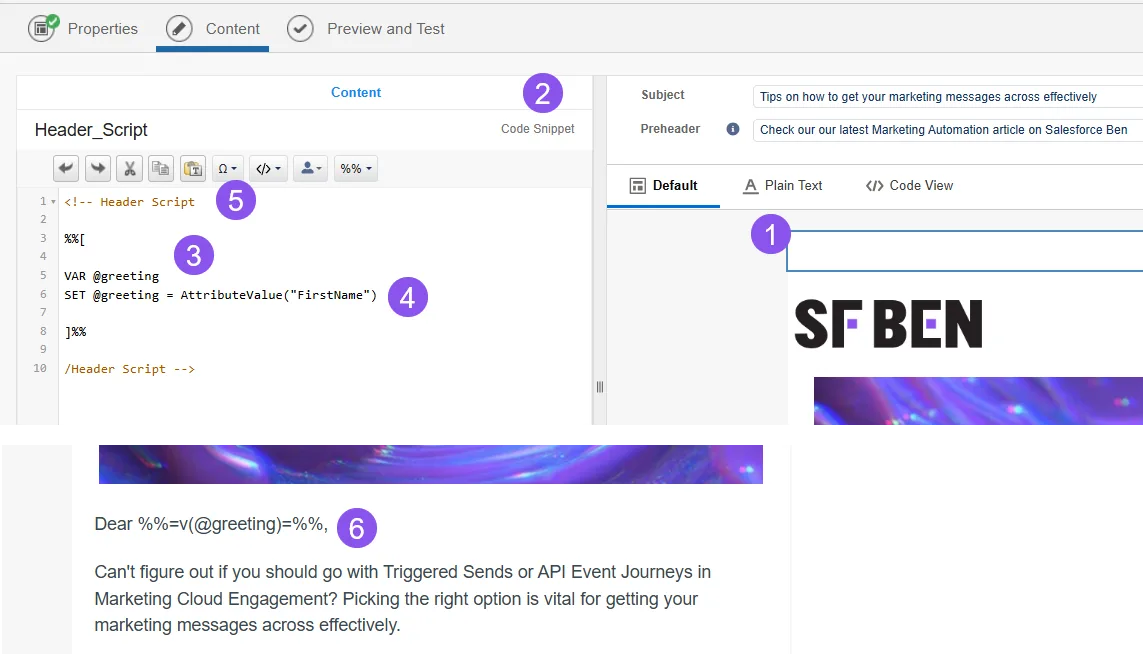
- Add a new content block to the top of your email to store your AMPscript variables and coding.
- Make sure you use a code snippet block as it’s the ideal type to store your AMPscript code.
- Declare your variable using the VAR function. Choose a name for your variable that is scalable. In this example, we are using
@greetingfor an email greeting. Make sure they are consistent across all users. - Use the SET function to ‘set’ the variable using the Attribute Value function. This function is essential when setting all variables in three ways:
- Prevents script errors when a field is missing: If the value is null, it returns an empty value and doesn’t crash the entire send.
- Prevents variable confusion: Your variable won’t conflict with other standardized Marketing Cloud variables.
- Consistency across different contexts: Works consistently across emails and cloud pages
- Add the following code to the top of your code snippet to prevent AMPscript from appearing in the body of your email when editing: “
<!--” and at the end of your AMPscript code “-->”. - To display the variable, add the “v” function to the in-line AMPscript code mentioned above:
%%=v(@greeting)=%%
Why This Matters
Variable-driven personalization requires slightly more effort upfront, but it pays dividends quickly:
- Reduced risk: Normalizing data with
AttributeValue()minimizes errors and improves send reliability. - Advanced flexibility: Variables make it easy to apply functions like
ProperCase,Substring, and conditional logic without rewriting content. - Consistency at scale: Standardized variables enable teams to reuse personalization logic across emails, journeys, and channels.
- Potential examples: With your data points as variables, you can look up other data in data extensions (via the AMPscript Lookup functions) to expand your personalization options.
This approach turns basic personalization into a scalable pattern – setting the stage for more advanced use cases while keeping your foundation clean, reliable, and easy to evolve.
3. Standardize Your Personalization
Once you’ve committed to using variables, the next step is to standardize how personalization is implemented across your emails and channels.
Standardization ensures that no matter the campaign, business unit, or developer, the same core data points behave consistently – driving efficiency, reliability, and long-term scalability.
Rather than treating personalization as one-off logic embedded in individual emails, standardization turns it into a reusable pattern your teams can rely on.
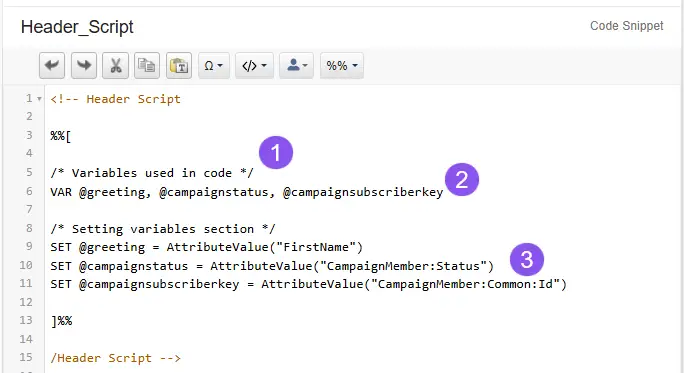
- Use standard comments to structure your code: Clearly label sections (e.g., variable declarations vs. variable assignments). This improves readability, speeds onboarding for new developers, and makes future maintenance far easier.
- Declare all variables at the top using VAR: Always declare variables before setting them. This not only follows AMPscript best practices, but also initializes variables to null, which can be useful in loops or conditional logic.
- Adopt consistent naming conventions: Use the same variable names for the same data points across all emails, CloudPages, and channels. Consistency allows content and code to be reused without modification.
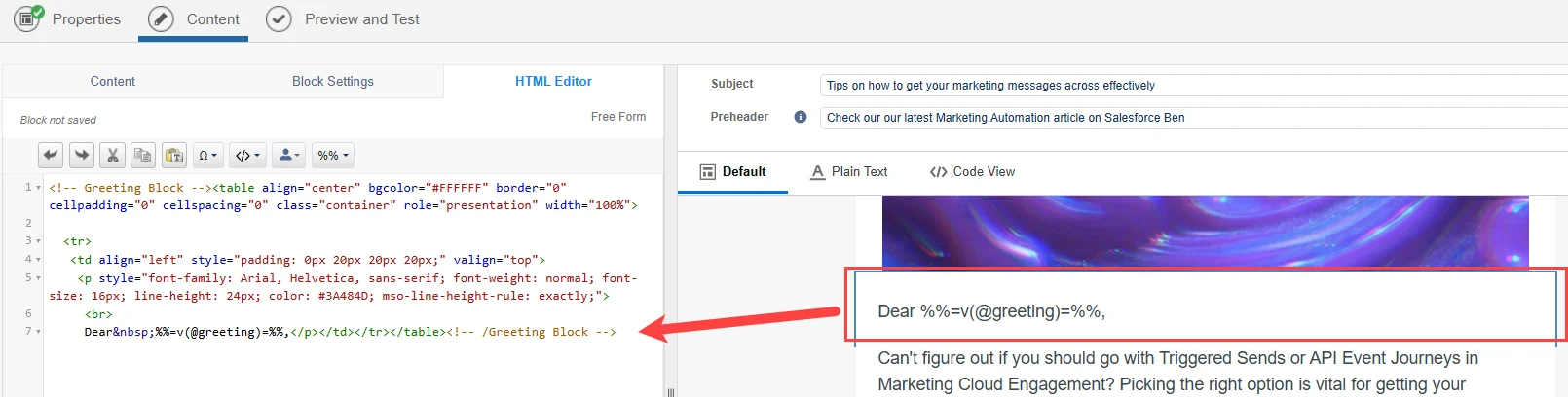
In this example, if you set the first name to the @greeting in your AMPscript code snippet block consistently, then simply drag and drop in this Greeting Block. This saves you from adding in-line AMPscript for every email.
Reusable Content Blocks Through Standardization
When variables are standardized, personalization becomes modular.
In this example, the greeting value is consistently set to @greeting in the AMPscript header. As a result, the greeting content block can simply be dragged and dropped into any email without rewriting inline AMPscript each time.
This approach:
- Reduces duplication of logic.
- Minimizes errors.
- Enables faster email creation across teams.
Be Intentional With SendLog Variables
One often overlooked aspect of standardization is how variables interact with the SendLog data extension.
When a variable set in AMPscript shares the same name as a field in SendLog, its value will be written to SendLog at send time. This can be powerful, but only if done intentionally.
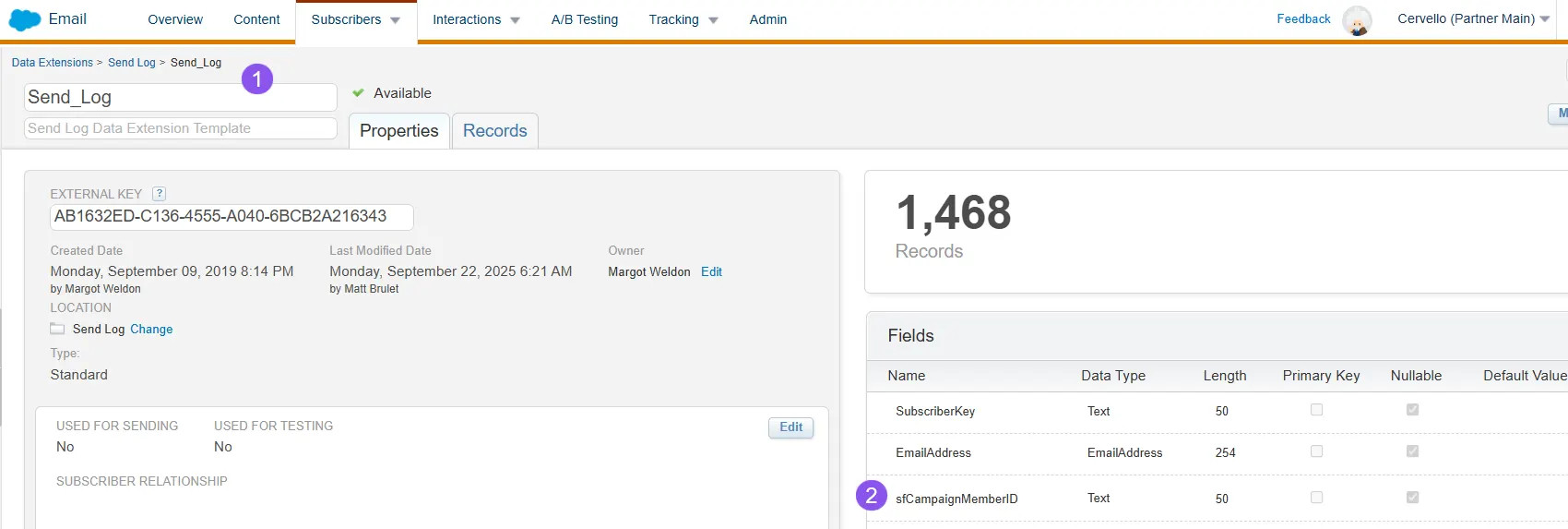
- Get to know your SendLog variables.
- If you use the same variable in your AMPscript code, it will overwrite the variable in the SendLog.
Why This Matters
Standardization transforms personalization from a tactical execution detail into an operational capability. It enables reuse, simplifies maintenance, and ensures your personalization strategy can scale as your Marketing Cloud footprint grows.
When every email follows the same personalization patterns, complexity becomes manageable, and advanced use cases become significantly easier to implement.
4. Know Your Data
Your data ultimately determines what you can and cannot personalize. Building an effective personalization strategy starts with understanding the quality, consistency, and structure of the data available to you.
A data point existing in your environment does not automatically mean it’s ready to be used for personalization. Inconsistent capitalization, unexpected formats, or multiple values stored in a single field can all degrade the customer experience if left unaddressed.
The good news: inconsistency doesn’t mean unusable. With the right approach, AMPscript allows you to normalize data at send time and deliver a consistent experience regardless of how the data is stored.
Data Reality: One Field, Many Variations
Even a simple attribute like First Name can vary widely across your data sources:
- Inconsistent capitalization (e.g., tim vs. TIMOTHY).
- Combined values (e.g., first and last name stored together).
Understanding these patterns is critical before relying on the field for personalization.
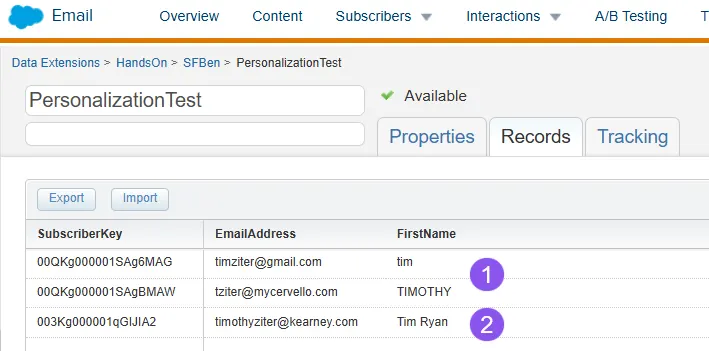
- The value could be inconsistently capitalized, like all lowercase or all uppercase.
- The value could include a middle or last name.
Normalize Data With AMPscript
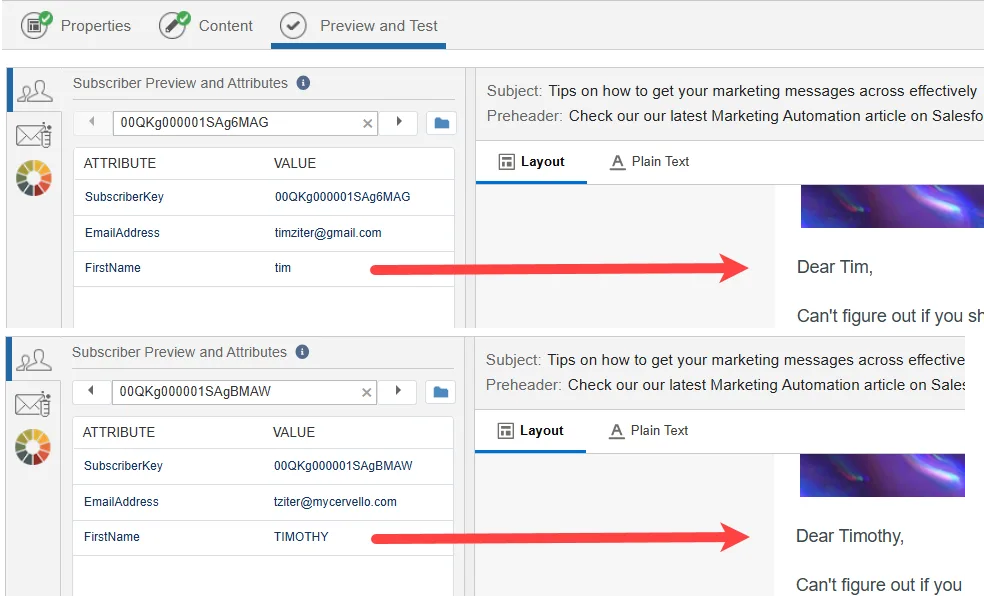
A simple solution is standardizing capitalization using the propercase function when setting your variable.
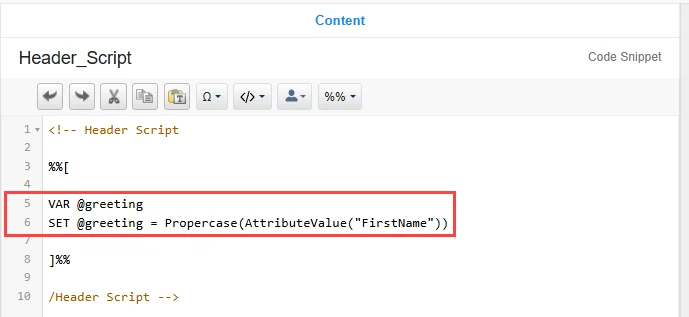
This ensures consistent formatting across all variations without modifying the underlying data.
Handling More Complex Data Scenarios
When a field contains multiple values, such as a first and last name, additional logic is required. In this case, you can use a combination of IndexOf, Substring, Subtract, and an IF/THEN statement to extract only the desired portion of the value.
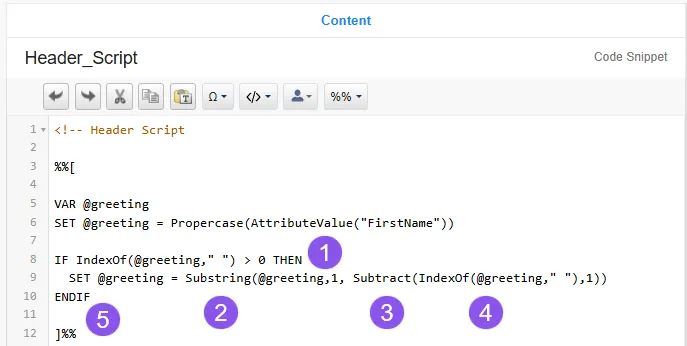
- Use an IF/THEN statement to check to see if the newly set variable meets certain criteria. If it does, modify the variable.
Use the IndexOf function to check if there is a space in the variable, which would signal either a middle or last name. IndexOf contains two variables (the variable you are checking, and the value it’s looking for, in this case, a space).
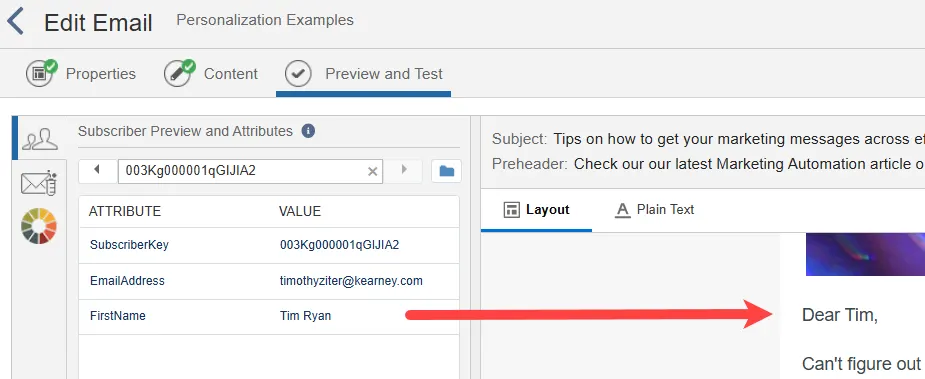
The IndexOf function will return the position in the variable string where this space occurs. In the “Tim Ryan” example, the IndexOf function would return a value of ‘4’. If no spaces are found, the returned value would be 0. So, in this example, since ‘4’ is greater than ‘0,’ the variable meets the IF criteria.
- If a space exists, we want to use the Substring function to remove the middle/last name. This function contains three variables (the variable, the position to start, and the position to end).
- In this case, the position to start is easy, as it’ll be the first character. When that first name will end is the tricky part, which is why we need to use the Substract function.
- Use IndexOf again to find the position of the space, in this case position 4, and subtract 1 space to end at the letter ‘m’.
- One thing to remember when creating an IF/THEN is to always end with an ENDIF.
With this code in place, let’s take a look at the final result when previewed.
Why This Matters
Knowing your data and designing personalization logic around its realities is what separates fragile personalization from scalable personalization.
By normalizing and validating data at send time, you protect the customer experience, reduce errors, and ensure your personalization performs reliably across audiences, campaigns, and channels.
Strong personalization doesn’t assume perfect data. It plans for imperfection and accounts for it by design.
5. Have a Backup Plan
No matter how well-designed your personalization logic is, data will eventually fail you. Fields will be empty, values will be missing, and assumptions will be broken.
One of the fastest ways to erode trust is a broken personalization experience – especially the dreaded “Dear ,” greeting. In many cases, this is worse than having no personalization at all.
For that reason, every personalization strategy should include a deliberate fallback plan.
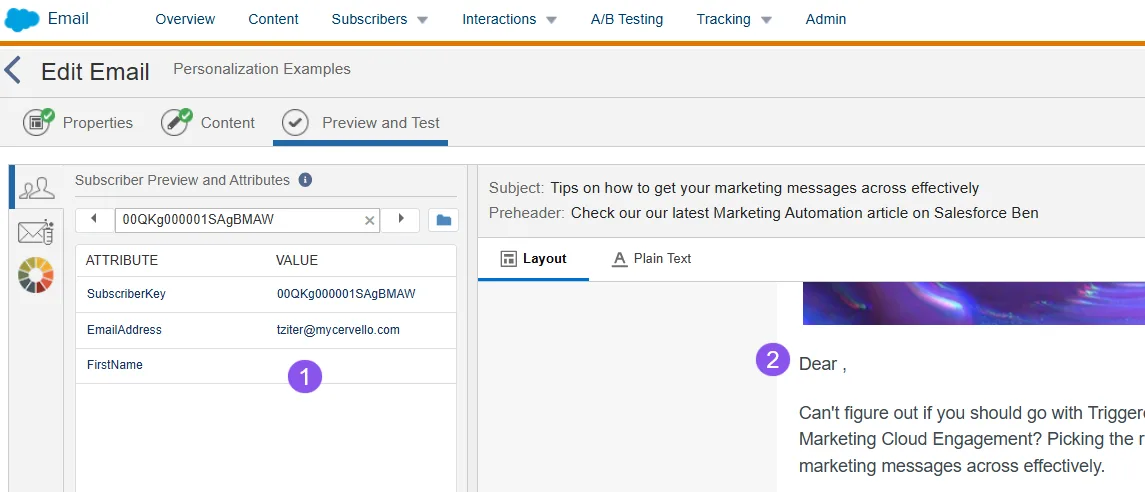
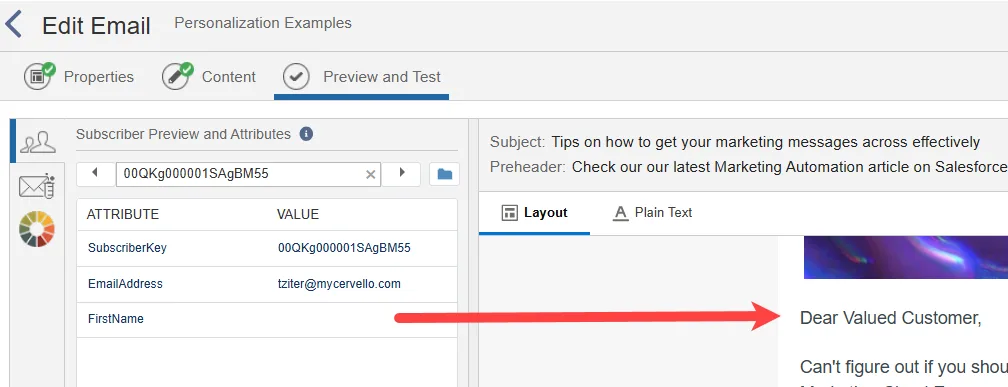
If that FirstName value is empty (1), and you get the dreaded Dear BLANK(2).
Design for Failure, Not Perfection
A simple and effective approach is to check whether a personalization value is empty and substitute a safe default when necessary.
Using AMPscript, this can be handled directly in your standardized header block:
- Use the
EMPTY()function to validate the variable. - If the value is missing, assign a neutral and acceptable default.
This ensures the email renders cleanly regardless of data quality, while preserving the personalization experience wherever possible.
As shown in the example, when a first name is unavailable, the greeting gracefully defaults to “Valued Customer” – protecting the experience without breaking the send.
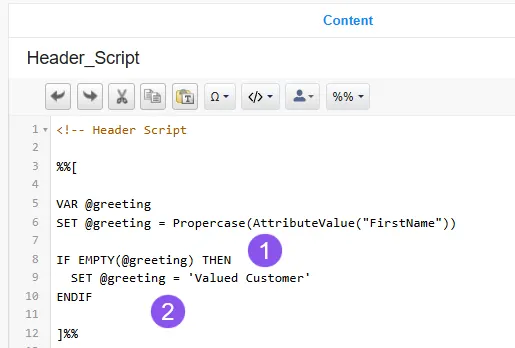
- One way is to use the Empty function to check to see if the personalization value is null.
- And if it is, then set the variable to an acceptable default value.
So, worst case scenario, you end up with…
Why This Matters
Fallback logic adds a small amount of upfront effort, but it prevents downstream issues:
- Broken or unprofessional customer experiences.
- Loss of credibility and trust.
- Last-minute QA surprises before a send.
In scalable personalization, defensive design is not optional – it’s foundational.
Final Thoughts
Effective personalization in Marketing Cloud is not about sophistication, but about discipline.
The strongest personalization strategies are built on simple, repeatable patterns that scale safely over time. By starting small, variableizing your data, standardizing your approach, understanding your data realities, and planning for failure, you create personalization that is reliable, maintainable, and resilient.
These principles allow you to:
- Move faster without increasing risk.
- Reuse personalization logic across emails, journeys, and channels.
- Confidently layer in more advanced use cases as your foundation matures.
Personalization is not a one-time implementation – it’s an ongoing capability. Data evolves, use cases expand, and teams change. Your personalization strategy should evolve with them.
Treat personalization as a living system. Test it and revisit it. Strengthen it regularly. When you do, you’ll avoid costly mistakes, protect the customer experience, and set your organization up for long-term success.
And most importantly, have fun with it. Marketing Cloud provides powerful tools to personalize at scale. With the right foundation in place, you can use them confidently, creatively, and consistently.