

I often connect with Fortune 500 CIOs who do not understand what “Salesforce native” really means. They trust a label, and they assume protection. But this past year changed everything.
2025 was a year of customer data breaches that rocked cybersecurity teams, the greater Salesforce ecosystem, and beyond. According to SF Ben’s breach roundup, the campaign spanned from social engineering attacks that began in May through the Salesloft Drift supply chain compromise in August to the Gainsight breach in November.
The Salesloft Drift breach alone exposed more than 700 Salesforce instances, through those trusted connections, in ten days, and the Gainsight breach compromised more than 200 companies three months later. Every one of those organizations had customer data, including survey responses, support interactions, and account records, exposed through apps that sat beside Salesforce, not inside it.
Maybe your org was spared. But if you cannot answer with certainty whether the tools collecting and storing your customer data are truly native or simply integrated, you have a problem worth understanding. This article breaks down what “Salesforce native” actually means, the questions you should ask vendors before your next purchase, and the real financial exposure organizations face when data lives outside the platform.
But if you stop reading here, remember this: trust what entirely lives and operates inside Salesforce. That architectural choice (not just a label) is the difference between true security and preventable exposure.
The 2025 Breaches That Proved the Point
The attackers did not breach Salesforce. In August, they compromised Salesloft’s Drift chatbot integration with OAuth tokens that granted access to customer data. Cloudflare, Palo Alto Networks, Google, Proofpoint, and other companies with world-class security all had data exposed. The stolen data included customer records, account information, and in some cases, personally identifiable information collected through integrated tools that stored data outside Salesforce’s trust boundary. Three months later, Gainsight’s integration suffered the same fate. Same pattern. Same vulnerability. Trusted connections to Salesforce that lived outside the platform.
Since then, the fallout has only escalated. More than 70 lawsuits have been filed against affected companies, including TransUnion, Allianz Life, Farmers Insurance, Workday, and Pandora. In January 2026, a federal judge consolidated 13 class actions in Northern California, as reported by the Daily Journal, Law360, and SF Ben. These cases are consolidating, gaining momentum, and setting precedent.
What makes 2025 even more striking is how many organizations saw the breaches coming and did nothing. Salesforce published a blog in March 2025 warning customers about social engineering threats and outlining specific measures to strengthen access controls. Google’s Threat Intelligence Group echoed that warning in June. Many organizations that were later breached had been given the playbook to prevent it, and chose not to act.
Why Integrations Are the Real Risk to Your Salesforce Data
Almost every third-party app on AppExchange now claims to be Salesforce native. But many of them mean something different: they integrate with Salesforce.
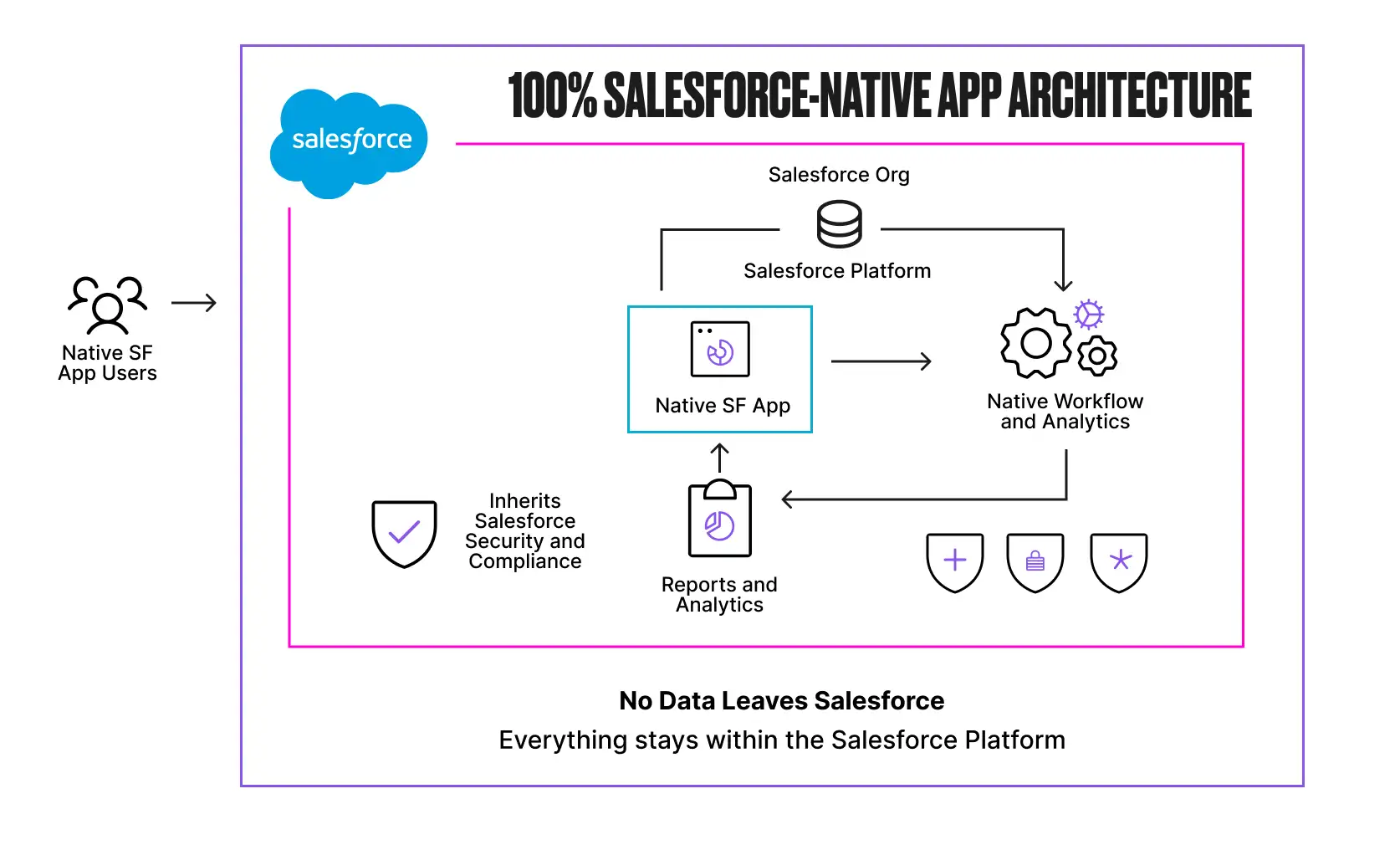
A 100% Salesforce native app is built entirely on the platform using Lightning components, Apex, and standard or custom objects. It runs inside Salesforce without integrations, connectors, syncs, or delays. Data is stored directly in Salesforce objects, and the app inherits Salesforce’s security model automatically, including profiles, permission sets, sharing rules, and compliance controls.
Admins configure everything using familiar tools like Flow without needing external development resources. When a customer submits data through a native app, that data goes straight into your Salesforce org and nowhere else.
An integrated app tells a different story. These apps are built on external infrastructure and connected via APIs, often embedded through an iframe that makes them appear seamless. But underneath, your data lives outside Salesforce in a separate database with separate access controls and separate compliance processes.
When a customer submits a survey response, fills out a form, or provides feedback through one of these tools, that data may touch an external server before it ever reaches your org. That is data outside your trust boundary and outside your control.
That architectural difference determines your exposure, and every integration you add is another door that attackers can walk through. The Grubhub breach in January 2026 proved the point: credentials stolen from the Salesloft Drift compromise were used to pivot into Grubhub’s Zendesk system, creating a cascading failure across multiple platforms from a single compromised integration.
When access tokens live too long or go unrotated, attackers do not need to break in again. They walk back through an open door, pivot into other connected systems, and monetize the data in waves.
For any organization running tools that collect customer data and connect to Salesforce through external integrations, Grubhub is a warning: your weakest integration defines your security posture.
Salesforce Is Already Restricting the Exploited Architecture
Salesforce has recognized the scale of this threat and is actively pushing organizations to migrate from Connected Apps to External Client Apps, a framework designed to be secure by default. In September 2025, Salesforce restricted uninstalled Connected Apps, eliminated the OAuth 2.0 Device Flow entirely, and required admin approval before users could authorize third-party applications.
In the Spring ’26 release, Salesforce went further by disabling the creation of new Connected Apps by default.
The old Connected Apps model operated on an open-by-default principle that allowed users to authorize third-party apps without admin oversight, which is exactly how attackers exploited the system. If your vendor’s app relies on the Connected Apps framework, particularly uninstalled apps that users self-authorized without admin governance, you are operating on the architecture that Salesforce itself is restricting.
A 100% native app does not depend on external connection mechanisms at all. There are no OAuth tokens to steal, no Connected Apps to exploit, and no external API surface for attackers to target.
Questions to Ask Before You Buy
Now that you understand what separates native from integrated, here is how to hold your vendors accountable. Before selecting any AppExchange solution, Salesforce teams need to ask these questions directly. If a vendor cannot answer clearly, treat that as a signal.
- Does data go directly into my Salesforce, or is it processed by an external site first? If a respondent’s data hits an external server before reaching your org, you are creating unnecessary data residency and security risk.
- Where does my data actually live? Inside Salesforce objects, or in an external database, or both? If the answer involves syncing, replication, or external storage, it is not native.
- Does the app respect Salesforce’s security model? Will my existing profiles, permission sets, sharing rules, and field-level security apply automatically? Or do I need to configure separate access controls?
- Can I automate actions using Salesforce Flow without custom APIs or connectors? If you need middleware or external webhooks, that is integration overhead.
- Is there any sync job involved? If data moves between systems on a schedule, you are dealing with an integrated app.
- Do my users need a separate login or admin console? Separate authentication means separate systems.
- What happens to my data if I stop using your product? With native apps, your data stays in Salesforce objects you control. With integrated apps, you may need to negotiate data exports or lose access entirely.
These questions matter, and I hope that more Salesforce teams start asking them before they bring a new vendor into their tech stack and expose their org data.
The Real Costs of Getting This Wrong
The financial consequences of data living outside Salesforce are now well documented, and they are compounding.
According to IBM’s 2025 Cost of a Data Breach Report, supply chain compromises cost organizations an average of $4.91M, taking the longest to resolve at 267 days. In the United States specifically, breach costs surged 9% to a record $10.22M, driven by higher regulatory fines, lost business averaging $1.38M per incident, and post-breach response costs that continue long after containment.
The Louis Vuitton lawsuit, filed in January 2026, alleges that the breach was “highly preventable” and that Louis Vuitton failed to implement five specific security measures Salesforce had recommended months earlier. TransUnion’s breach exposed 4.4M Social Security numbers. Allianz and Farmers each had more than 1M customer records compromised.
The regulatory landscape is tightening alongside these lawsuits. European regulators issued approximately €1.2B euros in GDPR fines throughout 2025, with breach notifications surging 22% year over year to 443 per day. Compliance fragments the moment customer data lives in multiple systems with different governance policies, and TikTok’s €530M fine for transferring European user data to servers in China is proof that regulators are enforcing data residency obligations with real consequences.
Any tool that processes customer data outside Salesforce before writing it back creates the same fundamental exposure.
When breaches do involve external integrations, incident response slows dramatically. You must coordinate across multiple vendors, review separate audit logs, and piece together what happened across disconnected systems. In the Gainsight incident, Salesforce revoked all active tokens linked to the compromised app, but that same action inadvertently removed the records customers needed to determine which users had granted OAuth access, making forensic investigations harder.
Contrast that with a 100% native architecture where every action and access event is captured within Salesforce’s own audit trail, with nothing external to reconcile and no separate vendor to contact at 2 AM.
Beyond regulatory fines and litigation, breaches erode the customer relationships that organizations spend years building. The Marks and Spencer breach in April 2025, caused by social engineering of a third-party IT provider, forced the retailer to shut down online operations for over six weeks. M&S reported £300M in lost operating profit and saw its market value drop by more than £700M, with statutory pre-tax profits falling from £391.9M to just £3.4M.
The ShinyHunters campaign has followed a similar pattern of compounding damage: extortion demands, dark web data listings, and months of negative press coverage for household names like Louis Vuitton, Google, Adidas, Chanel, Qantas, and Air France.
Final Thoughts: Getting Smarter Matters in 2026
The organizations that avoided exposure in 2025 understood the difference between apps that extend Salesforce and apps that merely connect to it. They audited their OAuth connections and chose tools that kept customer data within Salesforce’s trust boundary. Whether those tools collect survey responses, process support tickets, or capture feedback, the principle is the same: data that never leaves Salesforce cannot be compromised through an external integration.
2026 is the year to do the same. Audit your tech stack and ask vendors the hard questions. With more than 70 lawsuits filed, €1.2B in GDPR fines issued in a single year, and breach costs in the United States exceeding $10M on average, the cost of getting this wrong has never been higher.
I have spent more than 15 years building in the Salesforce ecosystem, and even longer as an engineering leader in Silicon Valley. The breaches of 2025 reinforced what I have believed from the beginning: trust is not a label you put on a product listing. It is an architectural decision that determines whether your customers’ data stays protected or becomes the next headline.