


Early 2025 made us feel like it was going to be the year of AI agents. Little did anyone suspect, however, that a broad swath of cybersecurity attacks and social engineering of Salesforce users across hundreds of customers in every country would also dominate our working lives with Salesforce.
If you had security set up in your Salesforce org in 2024, it is more likely than not insufficient for today’s environment. If you’ve not looked closely at your security settings this year, you may have technical debt. And it could be the worst kind – the kind that can leave you vulnerable to attack.
If your org is breached, it will allow much more of your data to be compromised, which means a much bigger blast radius. 2025 must mark the death of old attitudes toward security around Salesforce, and a new approach that creates more secure environments and more savvy users is now needed.
The Recap
In late May, Salesforce Ben became aware of the Google Threat Intelligence report that talked about a series of cybercrimes by a threat actor that shared a combination of two key factors:
- The victims were Salesforce customers who had suffered an incursion through the use of a malicious connected application.
- The malicious connected app was authorized to access orgs through social engineering attacks on Salesforce users.
The crimes included the securing and exfiltration of customer data, followed by the ransoming of that data. Some incursions into Salesforce ISVs’ own orgs included the exfiltration of org secrets of many customers, resulting in those ISVs being temporarily disabled from access to Salesforce orgs wholesale.
This implied (or even demonstrated) that there were a lot of orgs that were not optimally configured to guard against security threats. It also strongly pointed to a coordinated campaign on the part of threat actors to socially engineer Salesforce users (and likely admins).
Every Salesforce User is a Target
Let’s address the social engineering attacks first. If you are a Salesforce Admin, Developer, Consultant, etc., you are a target – and so is every user in your org.
While the impact so far has been vast, it is foolish to think that these threat actors are done. There is so much public information about us and our work these days. This creates fertile ground for those wishing to gain access to company data. The whole impact of the attack was so “successful” from the threat actors’ perspective, we should assume other copycat groups are investigating new ways to compromise orgs.
And cybercrime is an industry unto itself. According to a May report, the estimated impact of cybercrime is now larger than every economy in the world, bar the USA and China. There must be massive resources behind it for it to be that big. We must all keep in mind just how much time, people, and energy are being expended toward malicious activity. We can no longer afford to think of security as one-and-done.
Hardening Your Threat Stance
There are a number of things you need to do to help protect your business data from attackers. This spans from technical changes within Salesforce to general user empowerment and education. To make it easier to digest, we’ll break this section down into a number of key areas that will give you a practical guide on the steps to take.
This approach relies on the principles of the Shared Responsibility Model, which we’ll come back to in more detail in a moment.
Best Practices and Anti-Patterns
We’ve been working in the Salesforce space for quite some time and have noticed some common occurrences of bad practice within the system. There are things that many Salesforce customers do that increase either their risk of breach or the scope of data that is exposed if there is a breach.
Quite often, there is a misunderstanding around what should be done or changes to best practices following new features. This is why it’s important to pay attention to these best practices, regardless of whether you’re a newer Salesforce customer or a veteran that’s been around for a decade.
Below is a table of some of the more common issues we see, as well as the best practices that should be followed instead. If you see one or more of the anti-patterns in play in your org, you should build a plan to take action immediately.
| Anti-Pattern | Best Practice |
|---|---|
| Keep giving additional access to objects, features, and data to users to ensure they’re not missing anything that they might need for their role or a future role within the business. | Follow the Principle of Least Privilege. Design your security to cater stakeholders with the lowest access requirements, and build on top. Grant users only what they need, layer by layer. |
| Leverage the out-of-the-box Profiles where possible to ensure you’re giving a complete level of access for users. | Consider Standard Profiles to be templates, and use Custom Templates at all times. This ensures your users don’t have any abilities that they don’t need. This especially goes for System Administrators. |
| Keep a relatively lean number of Profiles, only adding in the Permissions that those groups of users will actually need. | While the anti-pattern is on the right track, the best practice messaging from Salesforce is to remove permissions from Profiles altogether and use Permission Sets and PS Groups instead. |
| Train your users to identify a phishing or malicious link, and trust that they will make the right decision. | It’s not a matter of trust, but putting in as many layers of protection as possible to help protect your business data. Configure Trusted URLs within your org to protect users who may accidentally miss one link and put your business in jeopardy. |
| Educate your users on what a safe app is and what is not. Empower them with knowledge and entrust them with these decisions. | Attackers are getting more and more crafty, and again, this is about leveraging tools to help give stakeholders an edge. Do not allow users to connect third-party apps to your org, and review your Connected Apps on a regular basis. |
| Your users work hard, and in fact may do so around the clock or even when they’re on vacation. Let them log into your org whenever and from wherever they need to, so as not to slow them down. | Attackers may log in and impersonate your users from a remote location or at a time when your user is not usually logged in. A combination of both IP restrictions and Login Hours protection will prevent remote attacks and even attacks from a trusted device that may have been compromised. |
| Your users know how important cybersecurity is, and they will do their own research to keep ahead of trends. | Help your users by offering education in-house. This ensures a baseline of education for all users and helps people to know aspects of cybersecurity that they otherwise may not have. |
Additional Features to Enable
Security is Salesforce’s game, and as the SaaS provider, they’ve created several offerings and tools that their customers can use to take security into their own hands.
Many may not be aware of the Salesforce Security Center. In the rapidly evolving world of AI, security threats are going to become more advanced and more common. Your organization must be prepared and ready to defend when, not if, an attack occurs. Security Center empowers you to do just that by offering visibility across all your orgs, behavior analysis to detect anomalies, policy governance to ensure your security is strong across the board, and insights for potential risk in your business.
Think about the way you commute to work every day. It may be that you jump on the nearest train station to your house, travel into the city center, walk from the station to your office block, and buy your regular coffee at the café around the corner from your office before starting work for the day. It may be that if you diverge from that process, then something is terribly wrong.
The same goes for how you work in Salesforce. You log in at a regular time and from a regular place. You access all the same objects. Likewise, you may access a number of reports to gain insights for your role; however, you never export them. If you were to suddenly log in at an extraordinary hour from an unusual location and begin exporting reports in bulk, then something has likely gone terribly wrong.
This is where Event Monitoring could save your bacon. Think of this as the black box for your Salesforce org – recording every little action that your users take, and using this data to detect anomalies. There is a free version included with your Salesforce subscription, but additional features are available within the Salesforce Shield offering.
Salesforce also offers the Security Health Check tool to help administrators understand where the org stands. It is an automated tool that checks across your Salesforce org for enabled features that should be reviewed, disabled features that are heavily encouraged, and configurations that may actually be misconfigured from a security standpoint.
Salesforce Features and Security Today
Salesforce has always prioritized security for their customers. The proactive stance they’ve taken to mitigate security threats is woven throughout the footprint of their products and services. But there is no finish line for “secure”. This episode prompted a response from Salesforce that focused on both technical updates and messaging around security.
An important move by Salesforce, which was taken out of the cycle of their standard major release cadence, was the change to OAuth device flow. Device flow has characteristics that help create secure connections between systems, where the user interface allows limited inputs. However, those very characteristics also mean it can be more easily abused by bad actors. And in the vast majority of cases with Salesforce, the user interface is not a concern.
More recently, Salesforce have announced the long-term end of support (EOS) for connected apps as a whole. Connected apps are the original server-side configuration for creating OAuth connections. However, identity and security evolved beyond their original structure; there were also packaging issues for ISVs.
This gave birth to the external client app (ECA). Starting in Winter ‘26, Salesforce forced new orgs to have to enable the creation of connected apps. EOS, coming in Spring ’26, will mean orgs will no longer be able to create a connected app, full stop.
There have been additional product improvements announced in the security keynote, such as improved Security Health Check and Security Center, which we’ve already highlighted earlier. There is also the Security Mesh feature, which allows the sharing of security information across cloud apps and service providers.
Salesforce and the Shared Responsibility Model
One of the most important innovations that has come about has been in Salesforce’s marketing and messaging around security. The Shared Responsibility Model has long been the stated principle behind security, meaning both Salesforce and its customers and partners share responsibility for the security of any single environment.
But how it was shared was not necessarily clear. Too many customers were lulled into a false sense of security that “Salesforce has it covered”. The reality was that they had not properly used the configurations Salesforce provided to keep up their end of the shared model. The new “Invisibles, Configurables, Enhanceables” model is an extremely effective way to understand the shared security model.
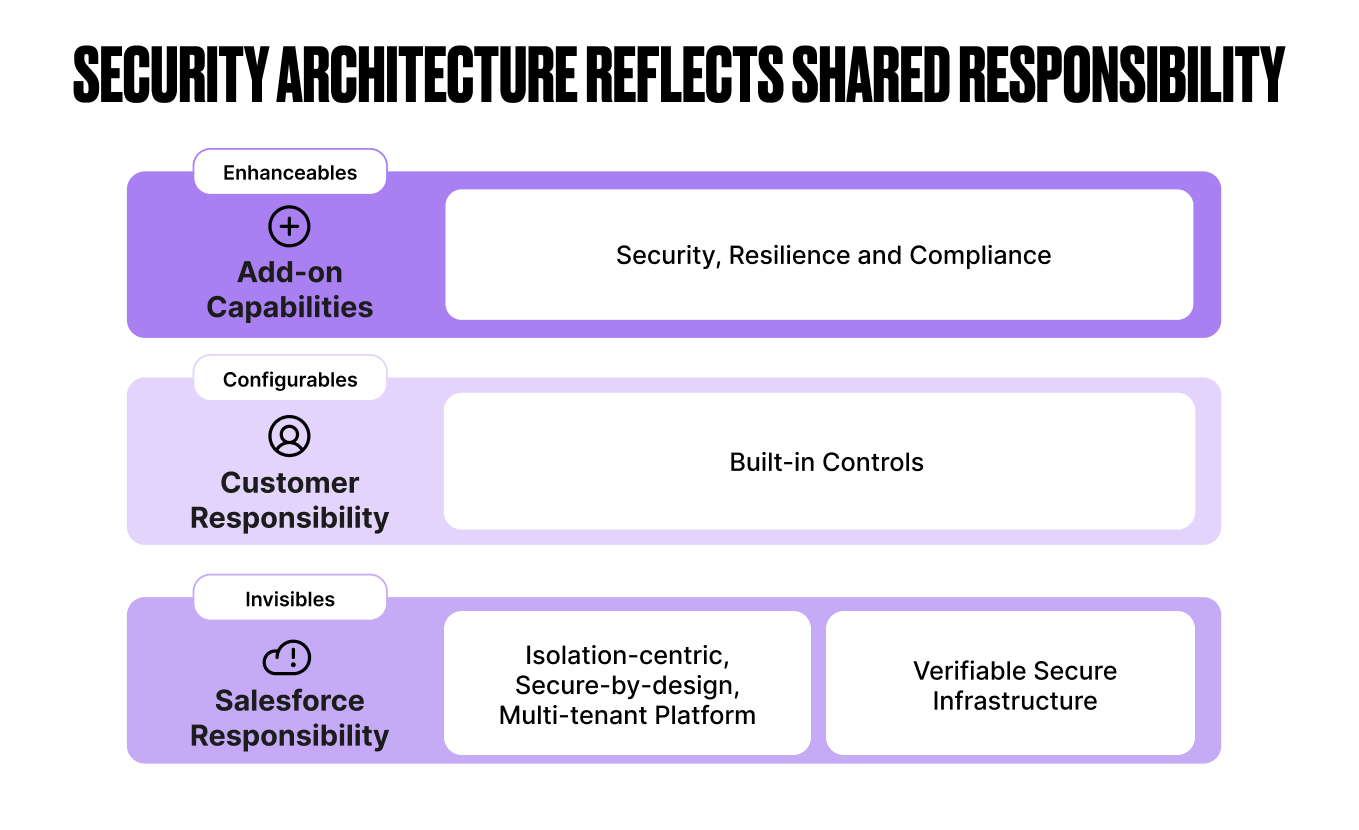
It’s quite simple.
- Invisibles are 100% Salesforce’s responsibility and should just work (thus “invisible”). These have to do with the broad platform-level security of their multi-tenant architecture, data centers, and administration of their public cloud infrastructure. Salesforce ensures these are secure, and they meet any compliance obligations Salesforce is certified for as a provider.
- Configurables are the features that every customer must own and put in place in a way that complies with their own situation. This should include the risk profile they take on as a business. It also includes any regulation or compliance required by the industry they operate. The customer is responsible for the configurables being configured correctly. Salesforce is responsible for ensuring the right configurables exist to meet their customers’ needs.
- Enhanceables are add-on features. This is primarily for customers who need to meet specific or advanced regulatory compliance where the Shield features, like encryption-at-rest, a more comprehensive data audit history, and notification and mitigation for suspicious actions taken in the org may take place.
With this messaging, it should be crystal clear to any customer just how much they can count on Salesforce to “just take care of”. The rest is up to you.
A New Security-First Mindset
Every business should look at their information systems with new eyes today. We are all cybersecurity professionals, whether we like it or not. With that, every Salesforce customer should now count themselves in the security business. So, when was the last time you looked hard at your security setup?
That’s right, if you’ve not looked closely at your security configurations in the last year, or even the last three months, it is almost certain that something you’ve configured may need adjusting. Whatever you did last to configure your security may even be technical debt that needs addressing.
There is a load of advice you can find on the internet about how to take on this new mindset, but let’s keep it really simple to start with. We recommend three important actions.
1. Run a Security-Focused Sprint or Project in the Next 90 Days
If the news this year has not already prompted you to do so, you need to do this now. Ask yourself, what would happen to your business if you lost access to Salesforce tomorrow? Or if some unknown bad actor exfiltrated all your customer data? Or if they deleted it? Research the current state of your org, and make plans to improve your security.
2. Institute a Practice of Regular Security Reviews
As we said, there’s no finish line for “secure”. Every business should make a regular practice of auditing, inspecting, and improving security. This can be different for different businesses. It could be quarterly, but certainly at the very least yearly.
Be sure to come up with a structure and automations around this. If you contract your Salesforce work, set up a plan with your partner to ensure this takes place. Larger businesses may choose to have dedicated security staff who are regularly looking for security improvements. And be sure to use the improvements in Salesforce’s offerings, such as the Security Health Check, to support you.
3. Everyone is a Cyber Security Professional
As we emphasized earlier, users are an integral part of your technology security systems. Businesses need to provide support and training to their IT staff and users to make them a more effective “component” in the security model. As impersonal as that may sound, it is a completely appropriate analogy.
Everyone should know what security is being used, and why. How they fit into the security picture is also important. And certainly, training for how not to fall victim to social engineering attacks is a must. Cybercriminals can and will use every bit of human psychology against their victim. Anyone can be sucked in.
But the better prepared everyone is, the less likely it will happen. And if you do experience a compromise, the worst thing you can do is to blame the victim, as this will only make other employees less likely to report suspicious activity.
Final Thoughts: Moving Forward
It is doubtful that these cybercrime attacks are over. If 2025 was the year that cybercriminals caught us all flat-footed, let’s make 2026 the year we build better systems and processes to combat this threat.
Let’s make it the year that security configuration went from an afterthought to a key part of every Salesforce implementation and project. And let’s make some projects 100% focused on our side of the Shared Responsibility Model. The threat actors will continue to evolve. So must we.
What is something you’ve learned from the events outlined in this article? Was there a security change you’ve made in your org that we haven’t mentioned that you believe is valuable as well? Let us know in the comments.