

Skip to content
SF Ben Con 26: Early Bird Sign-Up
Salesforce Ben
  • Events
  • Career
  • AppAssessor
  • Salesforce News
  • Articles by Role
    • Admins
    • DevOps
    • Developers
    • Marketers
    • Consultants
    • Architects
    • Business Analysts
  • Resources
  • Where to Start
  • Salesforce Certification List
  • How to Get Certified
  • Free Salesforce Practice Exams
    • Admin Practice Exam
    • Platform App Builder Practice Exam
    • Platform Developer 1 Practice Exam
  • How to Get a Job in Salesforce

Find us on:

Salesforce Ben
  • Events
  • Career
  • AppAssessor
  • Salesforce News
  • Articles by Role

      Articles by role:

    • Admins
    • DevOps
    • Developers
    • Marketers
    • Consultants
    • Architects
    • Business Analysts
    • Featured

      The Great Salesforce Job Market Reset

      By Sasha Semjonova

      December 09, 2024
      How to Avoid Bad Salesforce Partners: The Three-Question Test

      By Jon Cline

      January 08, 2025
  • Resources
Email
LinkedIn
Facebook
Twitter
  • Newsletter
SF Ben Con 26: Early Bird Sign-Up
  • Newsletter
  • Events
  • Career
  • AppAssessor
  • Salesforce News
  • Articles by Role

      Articles by role:

    • Admins
    • DevOps
    • Developers
    • Marketers
    • Consultants
    • Architects
    • Business Analysts
    • Featured

      The Great Salesforce Job Market Reset

      By Sasha Semjonova

      December 09, 2024
      How to Avoid Bad Salesforce Partners: The Three-Question Test

      By Jon Cline

      January 08, 2025
  • Resources

What's trending

Urgent Salesforce Security Update Will Break Your CI/CD Unless You Act Now
The Midlife Crisis of the Salesforce Professional
Salesforce Announces Agentforce Coworker: AI ‘In Every Search Bar’
Salesforce Security Roadmap 2026: What’s Changing and How to Prepare
How Salesforce CLI Can Save Admins Hours Every Week

UPCOMING EVENTS

More Output, Same Control: How Salesforce Leaders Embrace AI

28
May

Virtual

Webinar

Czech Dreamin’ 2026

29
May

Prague, Czechia

Community

Can You Trust AI With Your Salesforce Data? New Research and Best Practices

02
Jun

Virtual

SF Ben Webinar

Connections 2026

03
Jun

Chicago, IL

Salesforce Official

London’s Calling 2026

05
Jun

London, UK

Community
See more
Share
Email
LinkedIn
Facebook
Twitter
Marketers / Account Engagement (Pardot)

What to Do in Pardot When a User Leaves Your Company – Delete a User in 5 Steps.

By Lucy Mazalon

Published June 18, 2018
Updated November 29, 2024

Employee turnover is something every organisation deals with – some more often than others! Regardless, you should get clued up on this essential Pardot admin process to ensure you are keeping your account secure, decluttered, and to maintain marketing automation continuity.

Step 1: Align with your Salesforce Admin & Team

You don’t just go in there ‘all guns blazing’ and delete the user record – oh no, it’s key to get the context and align with your Salesforce admin.

Now with Salesforce User Sync, the rules change. If you have Salesforce User Sync enabled for your account, you will only need to deactivate the user in Salesforce. By unchecking the ‘Active’ checkbox in Salesforce, you will revoke their Pardot access too. Just be aware if the user is a Pardot only user, however; in those cases, you will need to continue following these instructions.

If the user has been deactivated in Salesforce, you will see this banner on the Pardot user record:

Step 2: Check Integration Users

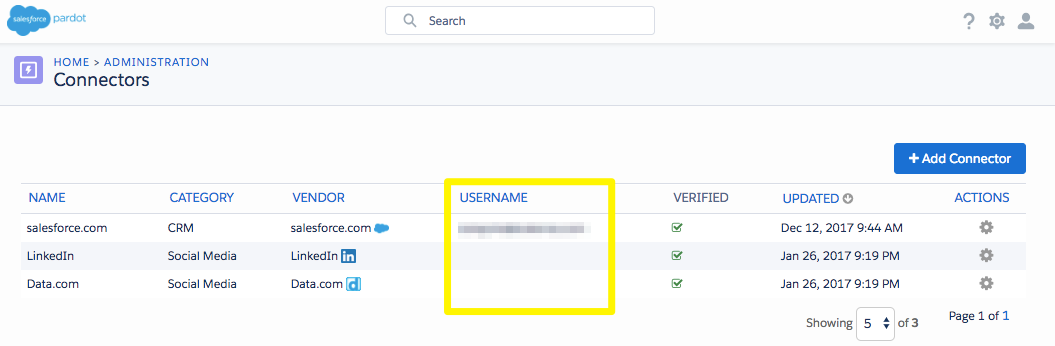
Some users may be in use as integration users. Check your “Connectors” section to see if the user is listed there in the ‘username’ column. You will need to switch the user out if that’s the case!
Step 3: Reassign Prospects

On a Pardot user’s record, you will be able to view tables of prospects, assets, and automations that this user is tied to. You have to disassociate the user with each before deleting, because these mass actions won’t be accessible to you once the user record is in the recycle bin!

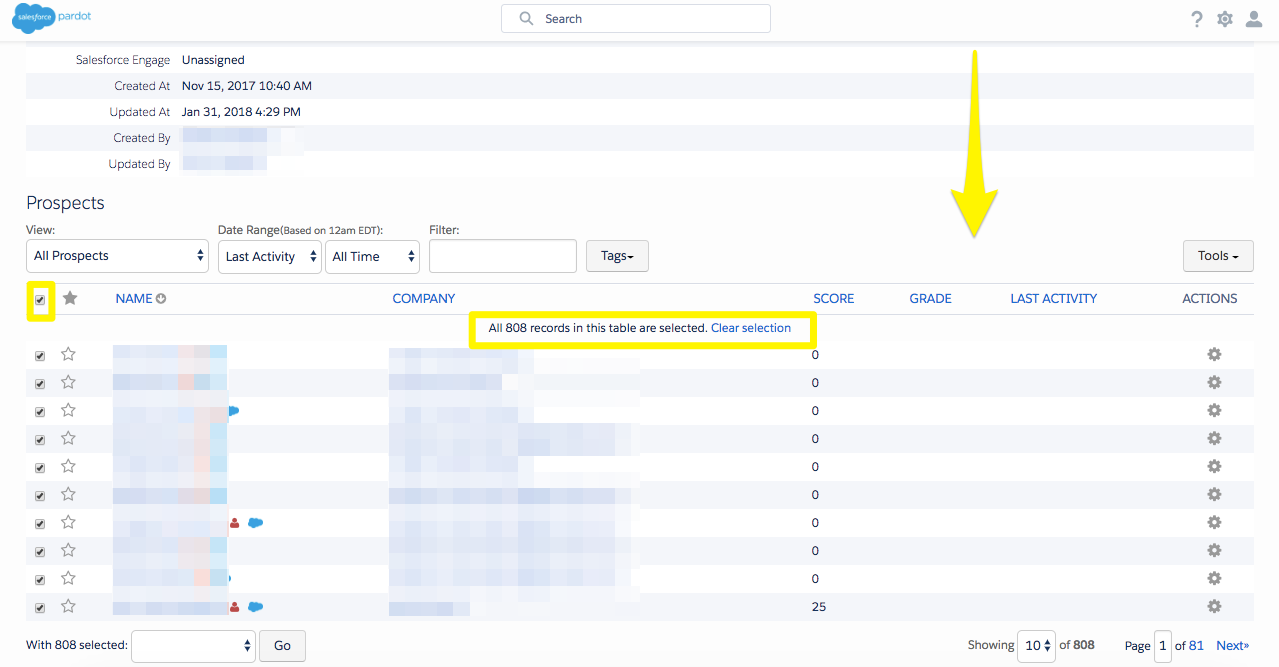
How long this takes depends on how complex/important lead assignment is to your organisation. Simply, you can reassign all prospects to a nominated user in the business (NB: they must have a verified CRM username!), or you can reassign prospects using an Active Salesforce Assignment Rule. You may need to jump out of the user record and use automation rules if you need to reassign based on criteria such as location or company size.

The simplistic method is shown below, by selecting all the prospects and using the dropdown menu at the bottom of the table to ‘Assign to user’.
Step 4: Modify Assets, Automations & Notifications

Let’s start with marketing assets. These remain untouched – so you don’t have to worry about the email templates, landing pages, and layout templates that the user created or modified.

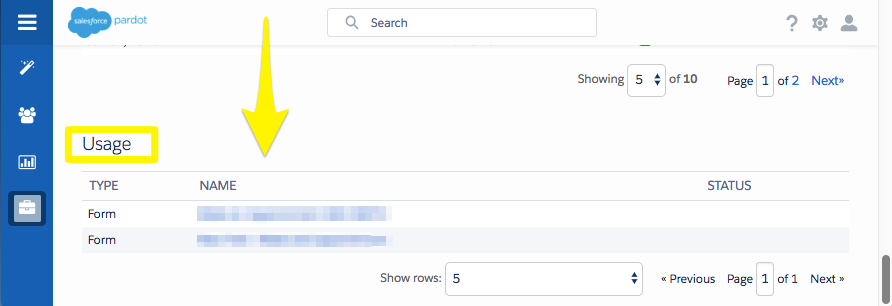
For automations and notfications, these will be listed in the ‘Usage’ table on the user record. Go through and amend these references one-by-one. It’s important for marketing continuity, to ensure that no prospect form submissions go missed – slow follow-up can result in lost business.
Also review your email templates to see if they are included as the specific user in the sender information. This is why it pays to keep your templates clean and organised! If they are referenced by name in the email body, change this text to user variable tags, eg: %%user_first_name%%, %%user_last_name%%. Going forward, these will pull in the ‘sender’s’ data, much less a headache to manage!

Be aware that automation rules, drip programs and dynamic lists will not show in this table!

Step 5: Delete User

Finally, you can delete the user by using the dropdown menu on the top right of the screen.

Breathe…don’t panic, you can always restore the user from the recycle bin. It will be like nothing happened. Good to know in case you deleted them before coming across this blog post!


The Author

Lucy Mazalon

Lucy is the Finance Director at Salesforce Ben. She is a 10x certified Marketing Champion and founder of The DRIP.

More like this:

Marketers

5 Best Practices for Effective Personalization in Salesforce Marketing Cloud Engagement

By Tim Ziter

May 22, 2026
Marketers

Complete Guide to Salesforce Connections 2026

By Lauren Metcalf

May 07, 2026
Marketers

How to Drive Your Marketing Cloud Engagement Use Case to Its Destination

By Alina Makarova

May 01, 2026

Leave a Reply Cancel reply

Newsletter:

By signing up you agree to our Terms of Use and Privacy Policy.

Find us on:

Salesforce Ben

Salesforce Ben
Unit G.01
189-190 Shoreditch High Street
London
United Kingdom
E1 6HU

  • Where to Start
  • Salesforce Certification List
  • How to Get Certified
  • Free Salesforce Practice Exams
    • Admin Practice Exam
    • Platform App Builder Practice Exam
    • Platform Developer 1 Practice Exam
  • How to Get a Job in Salesforce
  • Events
  • Career
  • AppAssessor
  • Salesforce News
  • Articles by Role
  • Resources
  • Admins
  • DevOps
  • Developers
  • Marketers
  • Consultants
  • Architects
  • Business Analysts
  • About Us
  • Contact Us
  • Write For Us
  • Influencer Program
  • Advertise With Us
  • Pledge 1%
  • Privacy Policy
  • Change Cookie Preferences

© 2014-2026 SalesforceBen.com