

Within Salesforce, a single powerful permission unlocks a wide range of administrative capabilities. It should therefore be granted sparingly, only to users who can be trusted to follow established governance and best practices.
In this article, we’ll take a deep dive into Customize Application to demystify what it controls and explore what the future may hold for this key permission. This permission is one of a handful that should never be assigned to users.
Data Structure and Object Schema
Customize Application allows you to shape and structure Salesforce to meet your organization’s needs. This includes creating, editing, or deleting custom fields, as well as adding record types.
With this permission, you can also adjust standard picklist values (eg, Industry) and map custom lead fields to custom fields on Accounts, Contacts, or Opportunities. Once mapped, these values automatically carry over if a lead is converted (which is usually the goal).
This permission also grants the ability to create, edit, and delete Custom Objects. These should be created sparingly, and so you wouldn’t want anyone but a system admin to be able to do this; otherwise, you could end up with an unclear data model that makes the system hard to use. You can also create Custom Tabs to navigate to Custom Objects and other parts of the system.
While Visualforce has largely replaced S-Controls, this permission still allows users to create, edit, and delete S-Controls.

User Experience (UX) and Layouts
A friendly user experience can make or break a system when it comes to adoption. Let’s take a look at what Customize Application grants in this area.
As an admin, you’ll often need to create, edit, and delete page layouts to control what information users see when viewing a record, along with available actions and related lists. If you’ve moved from traditional page layouts to Lightning record pages with Dynamic Forms, actions, and related lists, this permission provides equivalent access to edit and manage those configurations, too.
You can also manage custom links, rename tabs, and perform other interface adjustments, such as editing self-service page layouts or customizing the portal color theme.
This permission also allows you to manage Custom and Service Cloud Console Apps, including setting up and configuring the console itself.
Finally, it provides the ability to create communities for external users to collaborate on ideas and answers, as well as to set up the Salesforce Customer Portal.

Security and Reporting
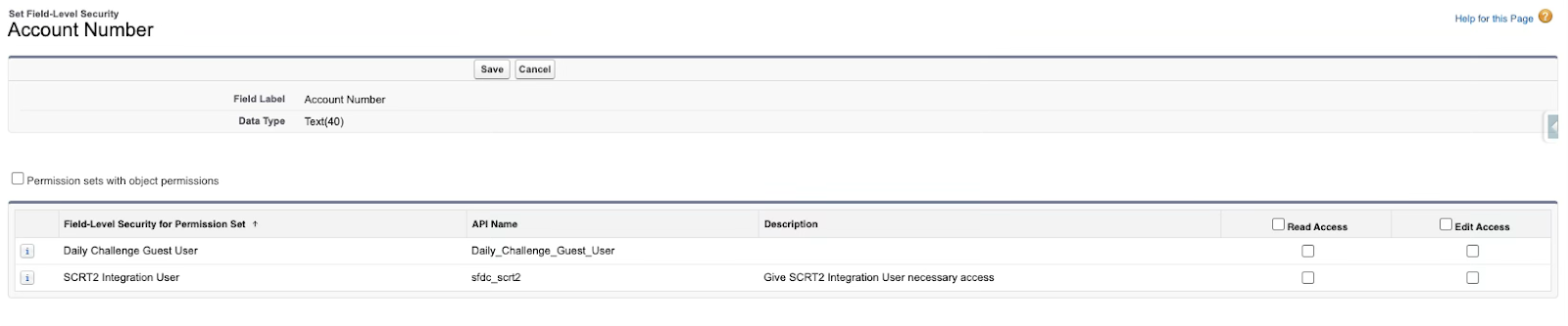
Customize Application empowers you to protect your data. You can assign field-level security to profiles or permission sets, ensuring users only see the information they need.
When it comes to reports, you can set up and schedule analytic snapshots to capture key data trends over time. For List Views, you can view and set API names during creation.
Process Automation
Workflow Rules may no longer be supported by Salesforce, but Customize Application provides management of these, as well as workflow tasks, field updates, outbound messages, and alerts.
This permission also allows you to manage Queues, which can be used in custom assignment and escalation rules.
For organizations using Service features, you can configure Web-to-Case, Email-to-Case, and email response rules to streamline how customer issues are managed.
Similarly, Web-to-Lead functionality is available with this permission, along with Auto Response Rules for the Lead object. You can also create Visualforce Email Templates with this permission.

Global System-Wide Settings
Teamwork makes the dream work. With Customize Application, you can enable Opportunity teams and configure big deal alerts to notify users when a deal reaches a certain threshold. You can also set up Account teams, as well as manage public calendars and resources.
This permission also allows you to configure business hours, implement advanced currency management, and make changes to currencies. Additionally, you can adjust lead settings and messages as well as set up multilingual features.

Other Permissions
On Salesforce Help, there’s an article that lists what this permission grants, but if you dig deeper, you’ll spot it mentioned in other places that don’t appear on this list.
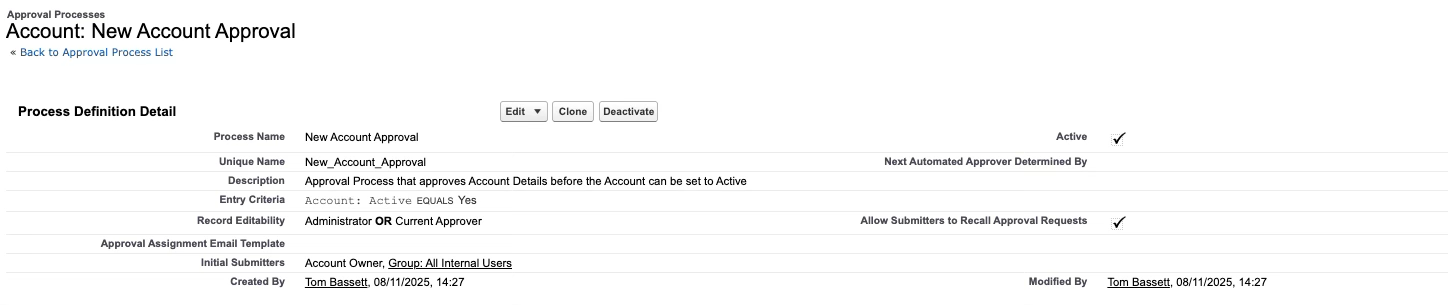
This permission lets you create classic approval processes and manage external client apps. You can create Flow categories, tweak process automation settings, and edit Chatter settings.
With Customize Application, you also get control over some features like enabling Contacts to multiple Accounts and managing global value sets.
I’d love to see Salesforce get granular about what this permission covers. Currently, it seems these are grouped as “Customize the Organization Using App Setup Menu Options” in the docs. If you agree, upvote this idea; Customize Application should be fully documented.
Sandbox vs. Production Development
Every admin should know that system changes should be made in a sandbox first and thoroughly tested before being deployed to other sandboxes and eventually to production.
While this is great in theory, there are not many technical blockers to changes being made directly in production, which could cause havoc.
It’s crucial that anyone with this permission develops changes initially in a sandbox and tests before they are deployed, which is covered by separate permissions.
You therefore have to have an element of trust in the users who have this permission to do things properly and in sandboxes first.
The Future of Customize Application
Salesforce faces an ongoing challenge in democratizing the “Customize Application” permission. Back in 2022, Salesforce Admins recognized just how complex this issue is, with one saying: “If we just broke up the super permissions, like Customize Application, it could create somewhere around 3,600 permissions! This would become a nightmare for you to manage – and we’re looking to make things easier for you, not harder.”
At the time, Salesforce shared some forward-looking statements about potential solutions, but so far, little visible progress has been made.
Ideas such as Split the Customize Application permission or introducing an interactive permissions dictionary show opportunities for Salesforce to deliver quick wins to ease the burden on admins and bring more transparency and control to permission management.
To compound this problem, if you only grant Customize Application to a Profile or Permission Set, Salesforce automatically grants the additional admin-only permissions:
- Manage Translation
- View Setup and Configuration
- Manage Custom Permissions
- View Roles and Role Hierarchy

Summary
In the era of Agentforce, security is more critical than ever. Ironically, while this article was being written, Salesforce added ‘Access Agentforce’ to the long list of capabilities granted by Customize Application… making democratizing this permission a little harder.
I’d love to see a future where this permission is clearly documented and split into distinct components, making the principle of least privilege far easier to achieve.
As members of the Trailblazer Community, we have the power to help make that future a reality by upvoting the following ideas:
- Customize Application should be fully documented
- Split the Customize Application permission
- Interactive permissions dictionary
If there are any ideas from the Trailblazer Community that I’ve missed, make sure to mention them in the comments below!