






If you’ve been putting off the move from Profiles to Permission Sets, you’re not alone. According to this year’s SF Ben Admin Survey, only 20.5% of organizations have fully transitioned away from Profiles and into a Permission Set-led security model. That means nearly 8 in 10 Salesforce orgs are still running (at least in part) on a model that Salesforce has been steering away from since they pushed back the hard deadline for going into Permission Sets.
But even if there is no longer an imminent date for retirement, migration from profiles to permission sets isn’t just a best practice or a “nice to have” cleanup task that might permanently stay on your backlog. With Salesforce tightening its belt around security requirements for this year, permissions in profiles should also be considered a security posture issue. In addition, it’s also a technical debt issue and, increasingly, a readiness issue for the AI-driven features being built on top of your org.
In this article, we’ll look at why most orgs are still stuck with profiles, what’s making the migration harder than it should be, and how to start moving forward without it consuming every spare hour you have.
The Community Is Mid-Transition
The survey data gives us a clearer view of the community’s current state, and it shows one that’s caught mid-transition:
- 20.5% have fully moved to Permission Sets (almost all permissions managed through Permission Sets or Permission Set Groups).
- 43.6% are mostly there, but Profiles still play a significant role.
- 22.7% have only partially adopted Permission Sets (only critical permissions have moved).
- 10.8% are still running primarily on Profiles.
- 2.3% are unsure.
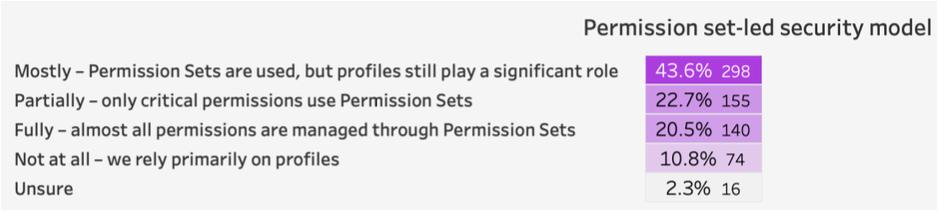
You’ll find that the majority of respondents (43.6%) aren’t at either extreme but in the messy middle, where they’re mostly partially migrated and carrying a mix of old Profiles and newer Permission Sets. And while we can say that this is still positive compared to not even having attempted to transition at all, this in-between state also comes with its own problems: the biggest one being inconsistent access control.
When some permissions live in Profiles and others in Permission Sets, where do you even start when you need to troubleshoot an access issue? It makes auditing harder than it needs to be, and over time this kind of scattered permissions becomes full-blown permission sprawl that further accumulates risk.
Enterprise organizations are the furthest along, with 26% having fully adopted a Permission Set-led approach. Smaller organizations, on the other hand, sit at 14%. This stat makes sense, as larger teams tend to have more formal governance and dedicated security functions. Smaller orgs are working with less of both, which means the migration often gets deprioritized. It’s not to say migration isn’t important for small businesses, but it’s because everything else is competing for the same limited time and headspace.
Migration Problem, or a Security Problem?
Profiles have existed for ages. It’s one of the first few things you learn when first getting into Salesforce. It was designed for a simpler time. The common way we’ve always known to do it is with that one profile per user; all permissions they need initially are bundled within. Permission sets are just there for additional permissions they might need as time goes by. This kind of thinking worked when Salesforce orgs were smaller and less complex. But as years went by, the platform grew, and so did the orgs along with it.
The problem is permission sprawl. When you need to give a user a slightly different combination of access, the path of least resistance is simply cloning a profile and making slight changes depending on what’s needed. Next time, who’s to say you won’t clone that tweaked profile again? And again, and again.
Back when I worked for Salesforce Support, I’ve seen orgs that had dozens of near-identical profiles (and some of them weren’t even named anything that made it obvious what they were actually for). Worst-case scenario was when nobody could tell you which one was which. The actual permissions picture became nearly impossible to audit cleanly, and troubleshooting access issues took way longer than it should have.
The admin survey found that only 20% of respondents are very effectively enforcing the Principle of Least Privilege (the idea that users should only have access to what they absolutely need to do their jobs). When you think about it, using a Permission Set-led model fixes this structurally.
Because instead of bundling everything into one monolithic profile per user, permission sets allow you to build modular, stackable sets of access. A minimal baseline profile is all you need per user, and then Permission Sets can be layered on top of that to reflect exactly what their job function requires. It’s easier to audit, easier to adjust, and significantly harder to accidentally over-permission.
What’s Blocking the Move?
The thing about migration is that it isn’t really difficult, technically and in concept. Even the “why” behind it is pretty straightforward. There are no fancy third-party tools needed to do it, so why haven’t most orgs finished the transition? The answer is a lot more practical.
- Profiles touch (almost) everything. Page layouts, login hours, IP ranges, app assignments, even Lightning page assignments. A lot of settings that aren’t formally listed as “permissions” are still tied to Profiles. If you’ve got profiles attached to integrations, org-wide email address access, Lightning page assignments…expect these to break and have problems surface if the transition isn’t planned properly. The tricky part is that user complaints will be the first thing you hear.
- Admins are already stretched thin. The survey found that 53.1% agree too much is expected of Salesforce Admins, while 56.3% say technical debt is their single biggest challenge. A migration project like this requires careful auditing, sandbox testing, and a methodical rollout, especially for larger or more complex orgs. This competes directly with the delivery pressure most admins are already under. The reality of everything else on an admin’s to-do list is what may be keeping migration in the backlog.
- The deadline kept moving. Salesforce originally announced a Spring ’26 hard date for retiring permissions on Profiles, then it was postponed. I believe this created a “we’ll get to it eventually” mindset that’s hard to shake. But remember, Salesforce has been clear about their investment in Profiles being over and done. All future development is going into Permission Sets and Permission Set Groups. So while the deadline is no longer there, it’s clear that Salesforce is still pushing us in the same direction.
How to Approach Migration
Migration isn’t just one big “bang”. If you find it difficult to even start, it would be smart to approach the goal in increments, slowly but surely moving your org toward a cleaner model without destabilizing everything else.
- Start with an audit. Before you move anything, understand what you currently have. Run a report on your users’ profiles and permissions to look for bloat such as duplicate Profiles, Permission Sets nobody is on, inherited configurations from past admins, etc. Salesforce has the User Access and Permissions Assistant on the AgentExchange to help with this.
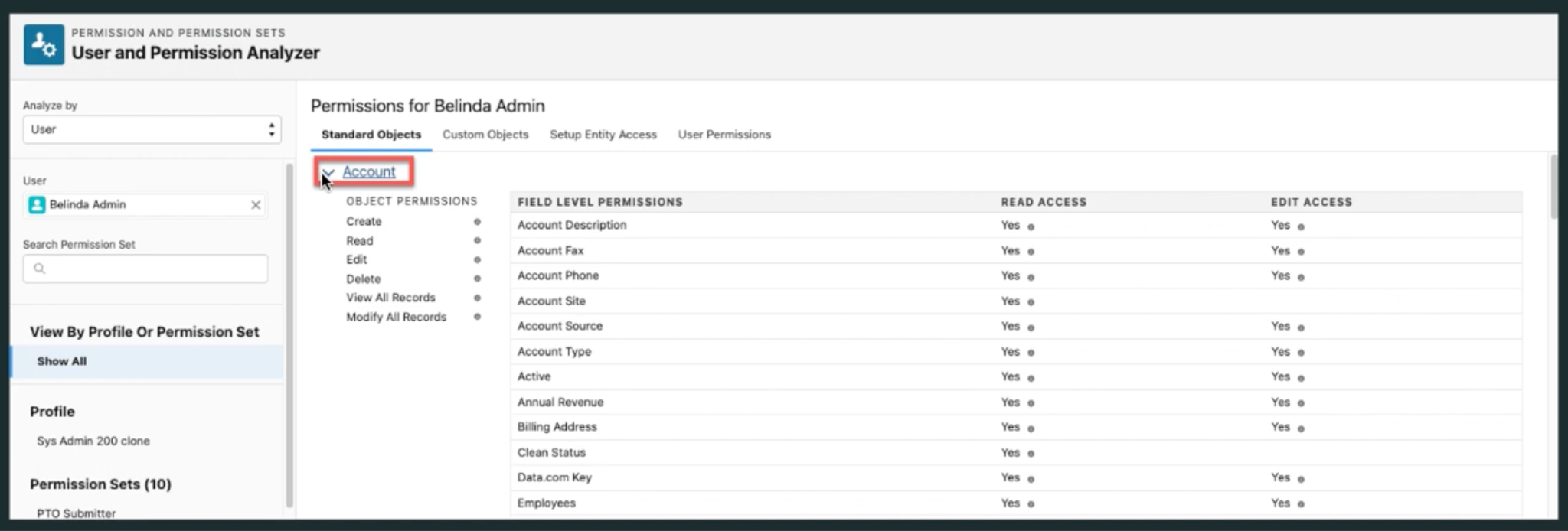
- Design your new model around job functions, and not the users themselves. The power of Permission Set Groups is that they let you think in terms of “what does a Sales Rep need?” rather than “what does Jane need?” Keep your Profiles the minimal baseline: only for login hours, IP restrictions, and basic defaults. Everything else should be layered on top with Permission Set Groups that reflect actual role requirements.
- Use User Access Policies to automate assignment. This went GA in Summer ’24, and I believe it’s genuinely underused (I even set up a Flow for the same purpose once, completely forgetting this feature existed). Instead of manually assigning Permission Sets when a new user is created or when someone changes roles, you can define criteria-based policies that trigger automatically. Maximizing this feature not only saves you time and manual work, but the automation also leaves less risk of someone being provisioned with the wrong access.
- Migrate in sandboxes and test with real users. The pitfalls in this migration don’t always surface in testing because they often depend on specific combinations of Profile, page, and record type. Get a representative sample of users from each role to test in a sandbox before you push to production.
- Make it a recurring project. If this is a one-time sprint, it can get overwhelming. When you think about it, permission sprawl is technical debt, and that tech debt didn’t accumulate all in one go. So why should it be resolved in one sprint? Build into your regular project cadence. Imagine, even one or two Profiles cleaned up per quarter moves you forward, eventually getting you to clean up all of your Profiles as time goes by.
Final Thoughts
The migration from Profiles to Permission Sets is so easy to think of as a one-time sprint, or a housekeeping exercise. But there’s a forward-looking reason to care about this, even beyond just tidying up org hygiene and technical debt.
In today’s world that’s becoming more and more accepting of AI embedded into everyday workflows, Agentforce will eventually become the new norm, and Agentforce runs within your security model. When an agent acts on behalf of a user or interacts with data in your org, it operates within the permissions that user has been granted.
If your access control model is messy, inconsistent, or over-permissioned, that same messiness just extends directly into what your agents can see and do. So think of migration not just as if you’re cleaning up Profiles of the past. Getting your Permission Sets in order now will be a big help in having a solid foundation for what’s being built on top of it, and future you (and your users) will thank you for it.





Comments: