








If you’ve seen 1999’s The Matrix, you’ll be familiar with the scene where Neo learns kung fu simply by having it downloaded into his brain. The concept is simple: instead of spending years practicing and developing the experience, he was able to skip that and learn it solely by having the skill installed into his brain, so to speak.
While it’s not quite the same in the real world, the concept is more or less the same (plus, it’s a cool analogy). You can teach Claude how to do a repeatable task by downloading the skill into its brain. Just how to create those skills is what we’re going to cover in this article, as well as rolling them out to your teams and some best practices to follow when creating them.
What Is a Claude Skill?
Let’s keep things as simple as possible: A skill is a reusable set of instructions that you can create or import into Claude so that it can perform a specific task on repeat. In terms of Salesforce, think of it like a subflow – something that you build once and can call on multiple times as needed. The difference is that skills are just text, and arguably simpler to build.
Think of a skill as a folder of instructions, scripts, and other resources that Claude loads in as required. It can then use these skills to perform specific tasks in a repeatable way.
Not all skills are loaded all the time, so you can load up your Claude with all the skills you’d like it to use in any and all scenarios. It will only load those that are relevant at the time of executing a task. This helps to minimize context overload in a Claude session.
Skills can be used across Free, Pro, Max, Team, and Enterprise Claude plans, and they require code execution to be enabled before they can be leveraged.
Anatomy of a Skill
The crux of a Claude skill is the Markdown (.md) file. Every single skill is a directory with at least the skill.md file. The Markdown file must begin with a YAML frontmatter to hold the name and description values. The name can be up to 64 characters, and the description can be up to 200. These should be used to clearly explain what the skill does and when it should be used. An example of what this looks like can be found below (note that the example below would need a script to function):
name: sfb-skill
description: This skill will retrieve article content from the Salesforce Ben website.
Use this skill when you need to get the highest quality Salesforce information in the ecosystem.
Then comes the important part of the skill – the markdown body itself. This is where your repeatable information and instructions go. An example of what this may look like, borrowed from Anthropic’s documentation, can be found below:
## Overview
This skill provides Acme Corp's official brand guidelines for creating consistent, professional materials.
When creating presentations, documents, or marketing materials, apply these standards to ensure all
outputs match Acme's visual identity. Claude should reference these guidelines whenever creating
external-facing materials or documents that represent Acme Corp.

## Brand Colors

Our official brand colors are:
- Primary: #FF6B35 (Coral)
- Secondary: #004E89 (Navy Blue)
- Accent: #F7B801 (Gold)
- Neutral: #2E2E2E (Charcoal)

## Typography

Headers: Montserrat Bold
Body text: Open Sans Regular
Size guidelines:
- H1: 32pt
- H2: 24pt
- Body: 11pt
Then, once you’ve got the main portion of your skill written, you can choose to add additional resources or scripts to the skill. Resources can be added as a REFERENCE.md file in your skill directory, and scripts may be included in a sub-directory called scripts. You can have a look at some of the example skills in Anthropic’s GitHub.
Once you’ve built your skill, you’ll need to package it into a ZIP file and load it into Claude.
Building Your First Custom Skill
Based on the above, you may think that building a custom skill is a very technical job, but the reality is that there are much easier ways to build a custom skill. In fact, you can use Claude to build a custom skill for you – this saves you a lot of the heavy lifting in terms of writing the markdown files.
Let’s work on a simple skill together. One that we all should have in our lives is a simple naming convention skill. We’ll keep it simple and build a skill that follows a standard naming convention for your flows. To further the simplicity, I’m going to limit the types of flows that are covered, and the types of resources that are covered too. Below is the prompt that I fed to Claude, which generated a positive response for me:
I need you to build me a Claude skill for Salesforce builders. It will be a naming convention skill for when
Claude Code is building flows.
Record-Triggered Flows should be named according to the object they're triggered on, and the action they perform
(e.g. Lead - Create Follow-up Task).
Autolaunched Flows should only contain the name of the task they perform (e.g. Get Lead from Record
Id).
Variables should have a simple name according to the data that they will contain, and be prefixed with var
(e.g. varLeadId).
Collections should be named according to the records they will contain, and be prefixed with col (e.g.
colLeads).
Formulas should be named according to the output of the formula, and be prefixed with fm (e.g.
fmLeadStatus).
Your output needs to be a zip file that contains the relevant skill.md file, as per Anthropic’s
documentation:
https://support.claude.com/en/articles/12512198-how-to-create-custom-skills#h_db275d1972
While this is not a comprehensive, end-to-end naming convention skill, it will be a good start for you to build your first custom skill. It’s also one that is beneficial in that it saves you time for setting up simple naming conventions when using Claude Code, so you’ve got a practical outcome from following this guide.
Once Claude spits out the skill, you need to give it a test. To do this in your own Claude Code, you need to head to the ~/.claude/skills/ folder on your computer if you want it to apply to all your Claude Code sessions. Alternatively, you can put it in the .claude/skills/ folder in a project if you only want to apply it to a specific project. You’ll also want to make sure that you extract the ZIP file, not just move it to the folder still compressed.
Once you’ve extracted it, open a new Claude Code session and ask it about the skill you just created.
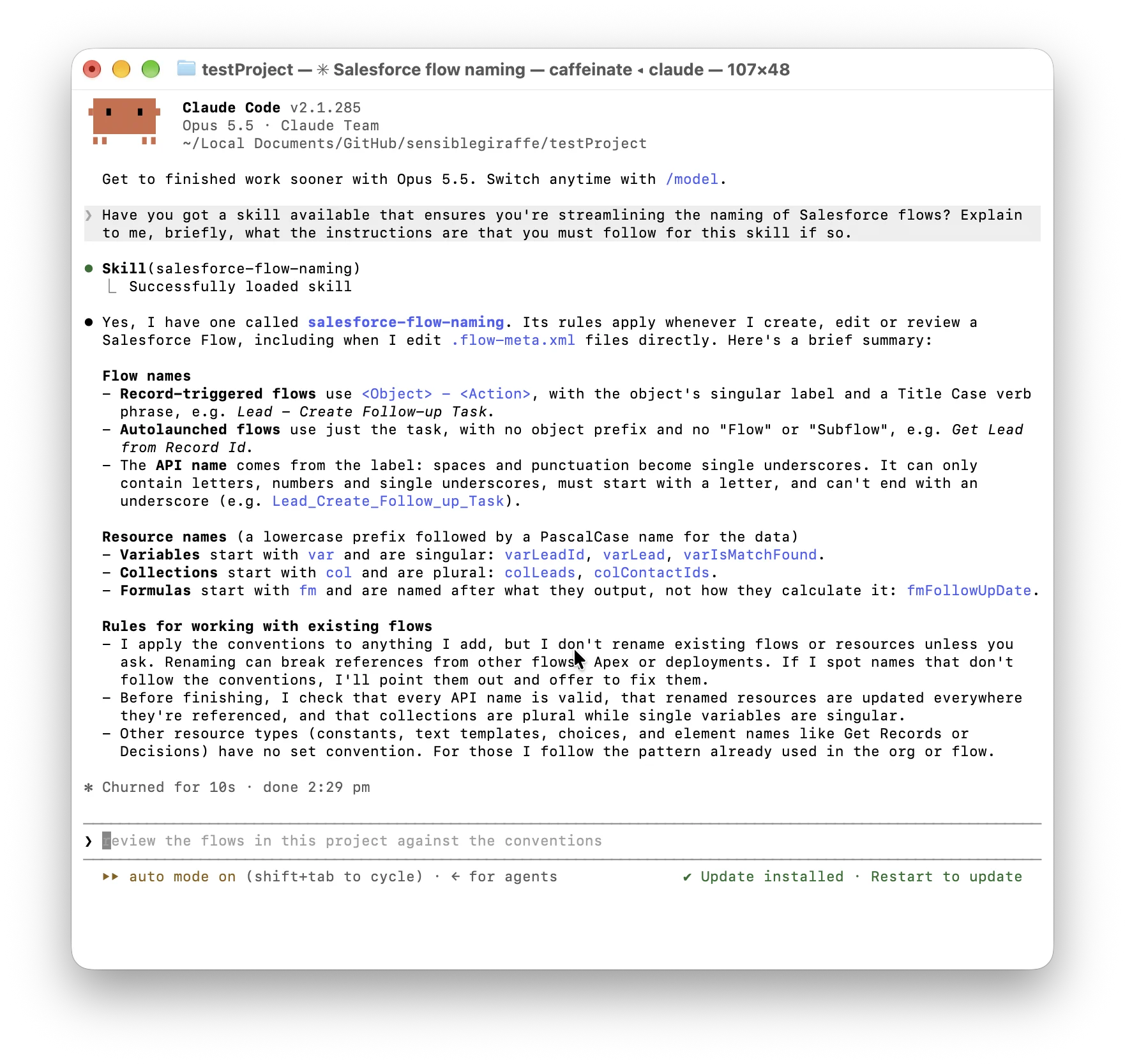
If all has worked as expected, you should see your skill being reflected to you and explained as you were expecting it to. You should then take it for a spin – get Claude to build you a flow, and ensure that it follows those naming conventions that you’ve set up in the skill.
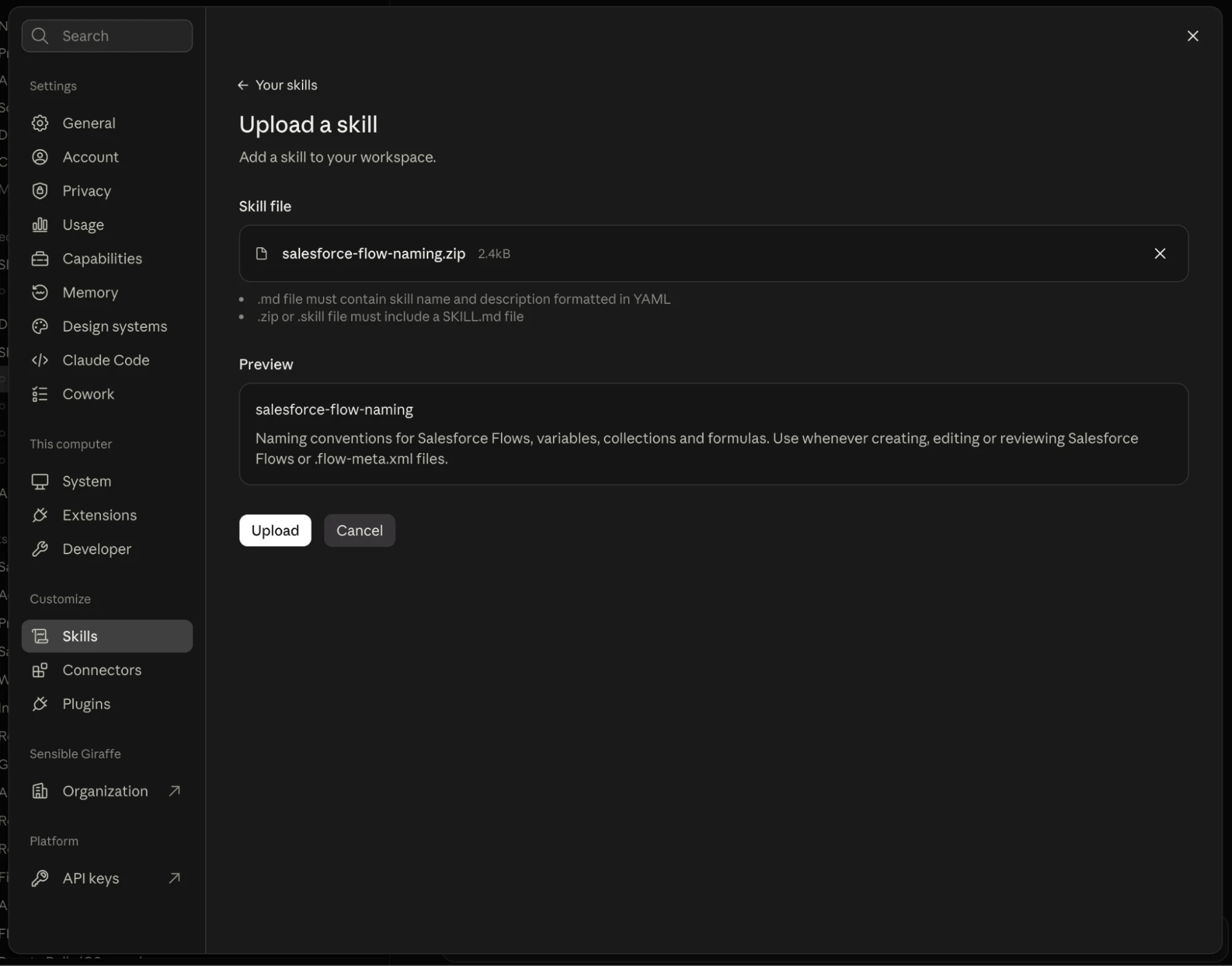
Alternatively, you can include your skill in the Claude app as well. Open Settings, go to the Skills section, and click the Add button to add a custom skill. Then, you’ll be able to upload your skill to the Claude app directly (this can be a compressed ZIP file).
Rolling Out Skills to Your Teams
This section is designed for those on a Teams or Enterprise Claude plan. However, before I get into that, other Claude users can share the skills that they’ve created. Because a skill is simply a directory with the skill.md file in it, you can share your skills simply by sharing the files with others. This isn’t the most user-friendly way, but it is possible and allows for shared skills.
For those who are on Teams and Enterprise Claude plans, there is a much better way to share skills. You can actually set up the ability to share a skill within a Claude org without having to shuffle files around.
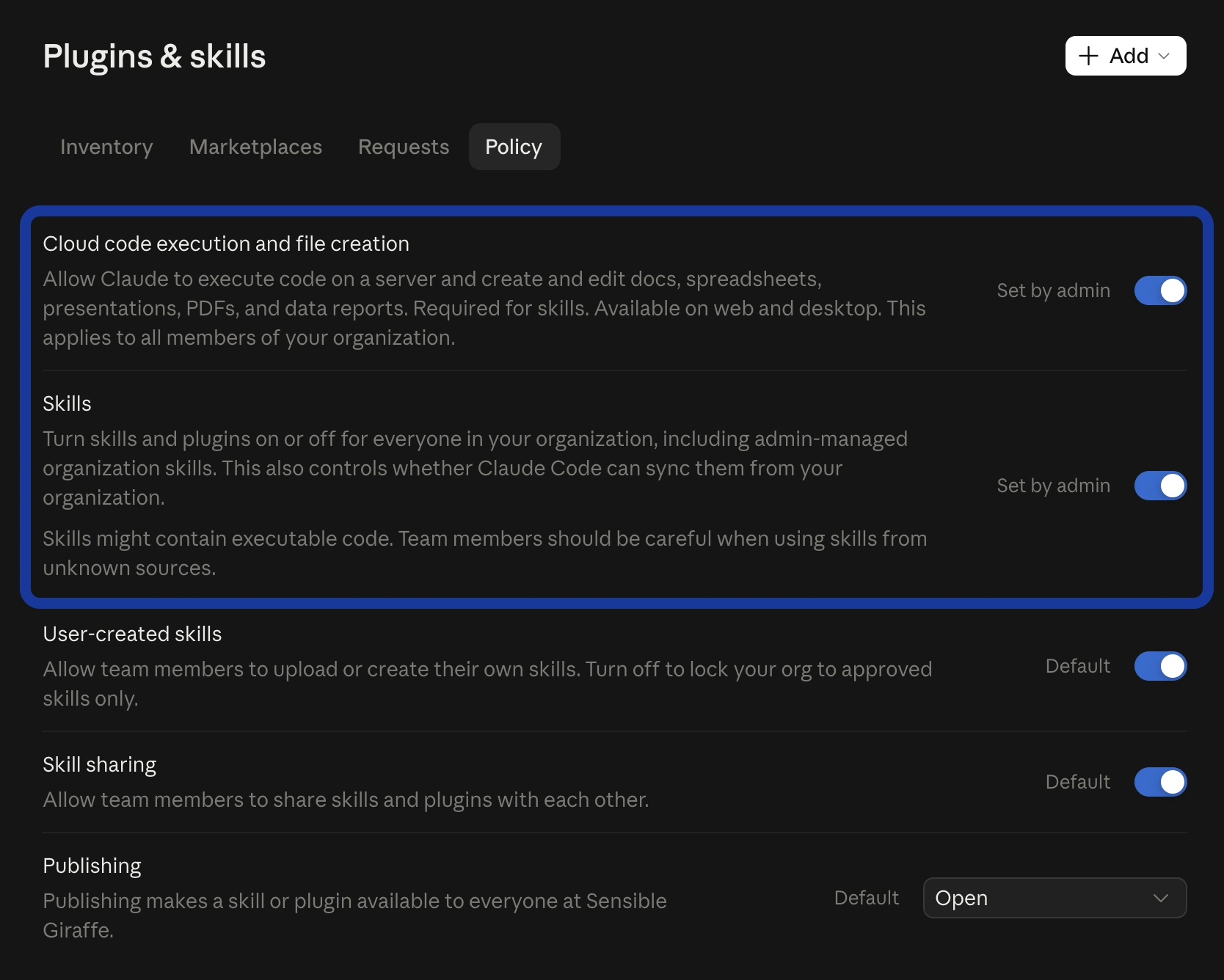
First, you’ll need to make sure that code execution and skills are enabled. Go to your org settings, head to the Plugins & skills section, and then to the Policy tab. Make sure you’ve got Cloud code execution and file creation, and Skills enabled.
Next, head back to the Inventory tab in the Plugins & skills section, and upload your custom skills as you did in the previous section (once again, this can be a compressed ZIP file). It’s that simple!
Skills that are uploaded to your org will be available throughout the org by default, with users able to switch individual skills on and off as they see fit. That being said, Enterprise subscribers can bundle multiple skills into plugins and deploy them to only some users. This can be done by creating the plugin and making the plugins available to groups of users as required.
Best Practices and Considerations
While working with Agentforce, you’ve likely heard the advice to not create one single, monolithic agent. Instead, you should create multiple agents, each of them with a specific purpose, and route to them based on the user’s intent. The same goes here when you’re building skills for Claude. Focus on a single workflow or task, and keep your skill as succinct as possible.
Remember, each skill requires a name and description specified at the beginning of your skill.md file. You should keep your name and descriptions short and to the point, as Claude will load and check these first when picking a skill to use. If you can include a simple example in your description, do so.
As always, never hardcode API keys, passwords, or other sensitive information into your skills. I cannot stress this enough. You should also make sure you test your skills thoroughly before you deploy them into your org, whether as an individual or as part of a Team/Enterprise org.
Summary
Anthropic’s Claude is an extremely powerful tool for Salesforce professionals, and it can be empowered even further with custom skills. You can use Claude to write the skill for you, and choose to distribute it to your entire org, or a subset of users (assuming you’ve got the right Claude plan).
What are some staple Claude custom skills that you think every Salesforce professional should have? Better yet – what are some custom skills that you’ve built for your org that you find invaluable?