
As a Salesforce Admin or power user, you’ve built something powerful. You’ve customized objects, automated workflows, set up validation rules, and created dashboards that surface real-time insights. But here’s the challenge: most of your team’s actual work – the conversations, decisions, and problem-solving – doesn’t happen inside Salesforce. It happens in chat, email, meetings, and other tools.
This creates a gap. Admins constantly chase sales reps to update their CRM records with activities. Service agents can’t quickly loop in experts when cases get complex. Engineering teams don’t see when data quality issues are impacting customer-facing teams.
The question isn’t whether your CRM holds valuable data. It’s whether that data reaches people where they’re already working – and whether they can act on it without constant context-switching.
The Hidden Cost of Managing Salesforce Through Email and Disconnected Apps
The average worker receives 117 emails a day, while the heaviest users of email (top 25%) spend almost nine hours per week managing their inbox, according to a report from Microsoft. Only 43% of the work week goes toward actual value creation. The rest disappears into communication overhead happening in fragmented tech silos.
Context switching between decisions made in email and records in your CRM adds friction to users, bogging down employees with cross-referencing systems instead of focusing on more valuable tasks. It makes it hard to get everyone on the same page, improve processes, and maintain data integrity when communication happens outside of Salesforce. Details sent via email might not make it into Salesforce, adding a preventable element of human error to your workflow. Today’s work runs on systems built for a different era. Email, meetings, and chat apps can’t carry context across them.
Why Bolting on AI Tools Makes It Worse
Now in the AI era, this fragmentation becomes a strategic liability. Many organizations respond by adding AI tools on top of their existing tech stack – a ChatGPT plugin here, a standalone analytics AI there, an AI assistant bolted onto Outlook. The promise is efficiency. The reality? More silos.
Instead of reducing context-switching, fragmented AI increases it. Now users are juggling Salesforce, email, chat tools, and multiple AI agents – each with its own interface, its own (incomplete) view of the customer, and its own suggestions that may conflict with what other systems recommend.
Here’s the problem: AI agents can’t operate effectively across fragmented tools. They need unified context to be useful. When your sales team uses one AI tool to draft emails, another to summarize deals, and a third to analyze pipeline – none of which connect to Salesforce or to each other – you’re not solving the collaboration gap. You’re multiplying it.
Consider what happens when an AI tool operates in isolation:
- A sales rep asks ChatGPT to “summarize the Acme deal” by copying and pasting opportunity details from Salesforce. The AI has no visibility into recent customer conversations in Slack, the support case history, or the product usage data. Its summary is incomplete – and the rep doesn’t even know what’s missing.
- A service agent uses an AI email assistant to draft a response to a frustrated customer. The AI suggests a generic reply because it can’t see the customer’s Salesforce case history, previous interactions with other team members, or the ongoing escalation thread. The response feels robotic, not helpful.
- An admin tries to use a standalone AI analytics tool to identify data quality issues in Salesforce. The tool flags inconsistencies but has no context about why they exist – the conversations where sales reps discussed edge cases, the Slack threads where workarounds were agreed upon, or the workflow changes made last quarter. Fixing the problem requires manual detective work across multiple systems.
Organizations must move past the “old way” of working. Legacy communication tools like email and traditional chat platforms fragment work, burying decisions in private inboxes. This fragmented “dual-loop” workflow – where teams talk in one place but make decisions in another – causes a constant loss of context. This forces both humans and AI to operate with dangerous blind spots.
A New, Conversational Approach to Salesforce
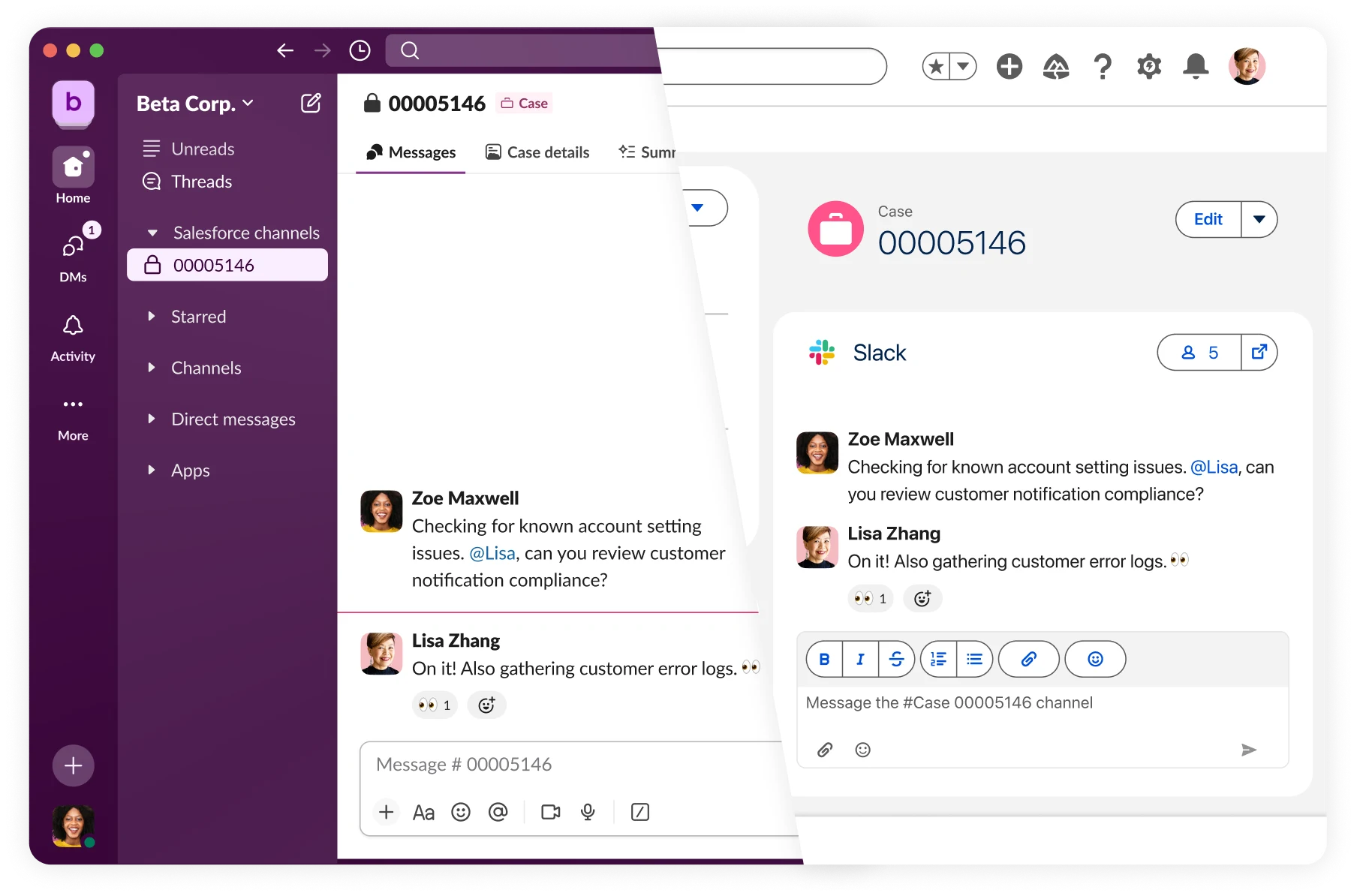
To lead in the AI era, the solution isn’t another integration – it’s fundamentally rethinking how teams interact with their CRM. Salesforce is natively built into Slack as a unified experience where customer data lives alongside the conversations about it.
For Salesforce Admins, this unlocks strategic advantages:
- Real-time collaboration replaces context-switching: When a deal stalls or a service case requires subject matter experts, the entire team can collaborate in a Salesforce Channel with live CRM data surfaced automatically. A service agent working in Salesforce won’t need to context switch to talk to a product expert working in Slack. Everyone can simply jump into a discussion right where they’re working, with the entire conversation tied to the record.
- Agentforce works best with complete context: AI agents grounded in both Salesforce data and Slack conversations can surface insights, answer questions, and take action with the full picture, not just what’s logged in fields, but the nuanced discussions, decisions, and institutional knowledge that lives in Slack.
At Salesforce, we use Agentforce within Slack every day. It has helped our sales reps save 203,000 hours per year, with our Sales Agent helping reps find information instantly. That’s less time digging through inboxes and more time closing deals.
- Governance becomes proactive: You can set up automated workflows when data quality issues occur, have AI agents answer repetitive admin questions, and route approvals through Slack, transforming change management from reactive cleanup to conversational collaboration.

Take, for example, Channel Expert, a pre-built agent in Slack powered by Agentforce, which is ready to deploy in seconds. It can be used in an admin help channel to answer routine Salesforce support questions, freeing your time up for more important problems to solve.
Final Thoughts
The most effective Salesforce implementations aren’t the ones where everyone spends the most time in Salesforce. They’re the ones where Salesforce data and actions are seamlessly woven into how and where teams actually work.
For admins and architects, this means rethinking the CRM not as the destination, but the layer that powers collaboration across your entire organization – whether that’s closing complex deals, resolving critical customer issues, or keeping systems running smoothly.
The organizations seeing the biggest impact are those that meet users where they are, reduce context-switching, and make it effortless to access and act on customer data without disrupting natural workflows.
Ready to start? Learn more about maximizing your Salesforce investment with Slack.